首页 文章 精选 留言 我的

精选列表

搜索[c 14],共10000篇文章
优秀的个人博客,低调大师

java版b2b2c社交电商spring cloud分布式微服务-服务提供与调用

上一篇文章我们介绍了eureka服务注册中心的搭建,这篇文章介绍一下如何使用eureka服务注册中心,搭建一个简单的服务端注册服务,客户端去调用服务使用的案例。 案例中有三个角色:服务注册中心、服务提供者、服务消费者,其中服务注册中心就是我们上一篇的eureka单机版启动既可,流程是首先启动注册中心,服务提供者生产服务并注册到服务中心中,消费者从服务中心中获取服务并执行。 服务提供 我们假设服务提供者有一个hello方法,可以根据传入的参数,提供输出“hello xxx,this is first messge”的服务 1、pom包配置 创建一个springboot项目,pom.xml中添加如下配置: <dependencies> <dependency> <groupId>org.springframework.cloud</groupId> <artifactId>spring-cloud-starter-eureka</artifactId> </dependency> <dependency> <groupId>org.springframework.boot</groupId> <artifactId>spring-boot-starter-test</artifactId> <scope>test</scope> </dependency> </dependencies> 2、配置文件 application.properties配置如下: spring.application.name=spring-cloud-producer server.port=9000 eureka.client.serviceUrl.defaultZone=http://localhost:8000/eureka/ 参数在上一篇都已经解释过,这里不多说。 3、启动类 启动类中添加@EnableDiscoveryClient注解 @SpringBootApplication @EnableDiscoveryClient public class ProducerApplication { public static void main(String[] args) { SpringApplication.run(ProducerApplication.class, args); } } 4、controller 提供hello服务 @RestController public class HelloController { @RequestMapping("/hello") public String index(@RequestParam String name) { return "hello "+name+",this is first messge"; } } 添加@EnableDiscoveryClient注解后,项目就具有了服务注册的功能。启动工程后,就可以在注册中心的页面看到SPRING-CLOUD-PRODUCER服务。 到此服务提供者配置就完成了。 服务调用 1、pom包配置 和服务提供者一致 <dependencies> <dependency> <groupId>org.springframework.cloud</groupId> <artifactId>spring-cloud-starter-eureka</artifactId> </dependency> <dependency> <groupId>org.springframework.boot</groupId> <artifactId>spring-boot-starter-test</artifactId> <scope>test</scope> </dependency> </dependencies> 2、配置文件 application.properties配置如下: spring.application.name=spring-cloud-consumer server.port=9001 eureka.client.serviceUrl.defaultZone=http://localhost:8000/eureka/ 3、启动类 启动类添加@EnableDiscoveryClient和@EnableFeignClients注解。 @SpringBootApplication @EnableDiscoveryClient @EnableFeignClients public class ConsumerApplication { public static void main(String[] args) { SpringApplication.run(ConsumerApplication.class, args); } } @EnableDiscoveryClient`:启用服务注册与发现 @EnableFeignClients`:启用feign进行远程调用 Feign是一个声明式Web Service客户端。使用Feign能让编写Web Service客户端更加简单, 它的使用方法是定义一个接口,然后在上面添加注解,同时也支持JAX-RS标准的注解。Feign也支持可拔插式的编码器和解码器。Spring Cloud对Feign进行了封装,使其支持了Spring MVC标准注解和HttpMessageConverters。Feign可以与Eureka和Ribbon组合使用以支持负载均衡。 4、feign调用实现 @FeignClient(name= "spring-cloud-producer") public interface HelloRemote { @RequestMapping(value = "/hello") public String hello(@RequestParam(value = "name") String name); } name:远程服务名,及spring.application.name配置的名称 此类中的方法和远程服务中contoller中的方法名和参数需保持一致。 5、web层调用远程服务 将HelloRemote注入到controller层,像普通方法一样去调用即可。 @RestController public class ConsumerController { @Autowired HelloRemote HelloRemote; @RequestMapping("/hello/{name}") public String index(@PathVariable("name") String name) { return HelloRemote.hello(name); } } 到此,最简单的一个服务注册与调用的例子就完成了。 测试 简单调用 依次启动spring-cloud-eureka、spring-cloud-producer、spring-cloud-consumer三个项目 先输入:http://localhost:9000/hello?name=neo检查spring-cloud-producer服务是否正常 返回:hello neo,this is first messge 说明spring-cloud-producer正常启动,提供的服务也正常。 浏览器中输入:http://localhost:9001/hello/neo 返回:hello neo,this is first messge 说明客户端已经成功的通过feign调用了远程服务hello,并且将结果返回到了浏览器。

优秀的个人博客,低调大师

java B2B2C电子商务平台分析之十六----Zuul的容错回退与高可用

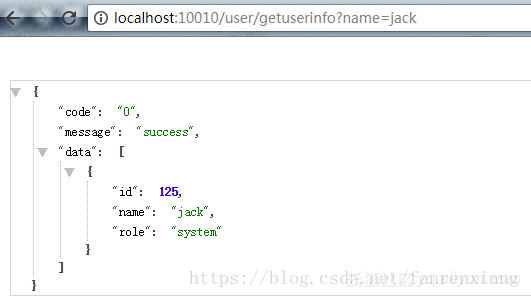
zuul的容错与回退之前说到过,使用Hystrix实现微服务的容错与回退,其实Zuul默认已经整合了Hystrix,使用起来也是比较简单: 在原有zuul-gateway 项目的基础上新增,实现ZuulFallbackProvider接口,并实现getRoute和fallbackResponse方法。愿意了解源码的朋友直接求求交流分享技术:二一四七七七五六三三 import com.google.gson.Gson; import com.simons.cn.util.CommonEnum; import com.simons.cn.util.CommonResult; import org.springframework.cloud.netflix.zuul.filters.route.ZuulFallbackProvider; import org.springframework.http.HttpHeaders; import org.springframework.http.HttpStatus; import org.springframework.http.MediaType; import org.springframework.http.client.ClientHttpResponse; import org.springframework.stereotype.Component; import java.io.ByteArrayInputStream; import java.io.IOException; import java.io.InputStream; import java.nio.charset.Charset; @Component public class UserProviderZuulFallBack implements ZuulFallbackProvider { private static final String USER_PROVIDER_SERVICE = "user-provider"; @Override public String getRoute() { return USER_PROVIDER_SERVICE; //返回你需要为哪个微服务提供回退 } @Override public ClientHttpResponse fallbackResponse() { return new ClientHttpResponse() { /** * 返回Http状态码标识 */ @Override public HttpStatus getStatusCode() throws IOException { return HttpStatus.OK; } /** * 返回Http状态码对应数字:200,详见HttpStatus */ @Override public int getRawStatusCode() throws IOException { return 200; } /** *返回Http状态码对应中译:OK,详见HttpStatus */ @Override public String getStatusText() throws IOException { return HttpStatus.OK.getReasonPhrase(); } @Override public void close() { } /** *body响应体 */ @Override public InputStream getBody() throws IOException { String message = new Gson().toJson(CommonResult.success(CommonEnum.SERVICE_NOT_AVAILABLE.getCode(), CommonEnum.SERVICE_NOT_AVAILABLE.getMessage())); return new ByteArrayInputStream(message.getBytes("UTF-8")); } /** * 设置HttpHeaders */ @Override public HttpHeaders getHeaders() { HttpHeaders headers = new HttpHeaders(); // MediaType mediaType = new MediaType("application/json;charset=utf-8"); //这是错误写法 MediaType mediaType = new MediaType("application", "json", Charset.forName("utf-8")); headers.setContentType(mediaType); return headers; } }; } } CommonEnum中的枚举(部分): SERVICE_NOT_AVAILABLE("5001","当前服务不可用,请稍后重试!"),测试: 启动zuul-gateway项目和user-provider-eureka、discovery-eureka三个项目,浏览器访问http://localhost:10010/user/getuserinfo?name=jack,效果如图: 关闭user-provider-eureka服务,再访问http://localhost:10010/user/getuserinfo?name=jack,效果如图: 可以看到,当用户微服务不可用时候,默认返回了自定义的json。 zuul的高可用策略一、如果Zuul也注册到了服务发现组件Eureka上,那么zuul就已经实现了高可用配置,这种情况和普通的服务消费者和提供者的高可用是一致的; 二、若zuul未注册到Eureka上,则可以通过Nginx/HAProxy等负载均衡器来将请求分配到zuul的其中一个节点;这点更多的还是负载均衡器的配置。例如nginx的: 整体代码结构如下: 资料和源码来源

资源下载

更多资源
优质分享App

优质分享App

近一个月的开发和优化,本站点的第一个app全新上线。该app采用极致压缩,本体才4.36MB。系统里面做了大量数据访问、缓存优化。方便用户在手机上查看文章。后续会推出HarmonyOS的适配版本。

Mario

Mario

马里奥是站在游戏界顶峰的超人气多面角色。马里奥靠吃蘑菇成长,特征是大鼻子、头戴帽子、身穿背带裤,还留着胡子。与他的双胞胎兄弟路易基一起,长年担任任天堂的招牌角色。

腾讯云软件源

腾讯云软件源

为解决软件依赖安装时官方源访问速度慢的问题,腾讯云为一些软件搭建了缓存服务。您可以通过使用腾讯云软件源站来提升依赖包的安装速度。为了方便用户自由搭建服务架构,目前腾讯云软件源站支持公网访问和内网访问。

Nacos

Nacos

Nacos /nɑ:kəʊs/ 是 Dynamic Naming and Configuration Service 的首字母简称,一个易于构建 AI Agent 应用的动态服务发现、配置管理和AI智能体管理平台。Nacos 致力于帮助您发现、配置和管理微服务及AI智能体应用。Nacos 提供了一组简单易用的特性集,帮助您快速实现动态服务发现、服务配置、服务元数据、流量管理。Nacos 帮助您更敏捷和容易地构建、交付和管理微服务平台。


用户登录
用户注册
修改密码
忘记密码