Centos6.5搭建smokeping服务
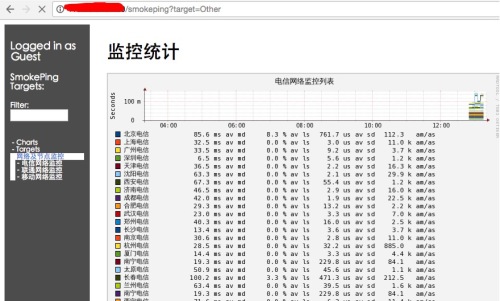
1.安装所需软件包。 yuminstall-yperlperl-Net-Telnetperl-Net-DNSperl-LDAPperl-libwww-perlperl-IO-Socket-SSLperl-Socket6perl-Time-HiResperl-ExtUtils-MakeMakerrrdtoolrrdtool-perlcurlhttpdhttpd-develgccmakewgetlibxml2-devellibpng-develglibpangopango-develfreetypefreetype-develfontconfigcairocairo-devellibart_lgpllibart_lgpl-develpoptpopt-devellibidnlibidn-devel 2.创建一个放置软件包的常用目录。 mkdir/smokeping/tools–p 3.下载fping软件包,并且解压,编译安装。 wgethttp://fping.org/dist/fping-3.10.tar.gz tar-zxvffping-3.10.tar.gz cdfping-3.10/ ./configure make&&makeinstall cd.. 4.下载echoping并且解压,编译安装。 wgethttp://fossies.org/linux/misc/old/echoping-6.0.2.tar.gz tar-zxvfechoping-6.0.2.tar.gz cdechoping-6.0.2/ ./configure make&&makeinstall 5.下载smokeping并且解压,编译安装。 wgethttp://oss.oetiker.ch/smokeping/pub/smokeping-2.6.9.tar.gz tar-zxvfsmokeping-2.6.9.tar.gz cdsmokeping-2.6.9/ ./setup/build-perl-modules.sh/usr/local/smokeping/thirdparty ./configure--prefix=/usr/local/smokeping gmakeinstall 6.创建三个文件目录和一个日志文件,并且设置属主和属组均为apache。 cd/usr/local/smokeping/ mkdir{cache,data,var} touch/var/log/smokeping.log chownapache.apache/var/log/smokeping.log chmod600/usr/local/smokeping/etc/smokeping_secrets.dist chown-Rapache.apachedata/ chown-Rapache.apachevar/ chown-Rapache.apachecache/ 7.修改相应的配置文件。 cd/usr/local/smokeping/htdocs/ mvsmokeping.fcgi.distsmokeping.fcgi cd/usr/local/smokeping/etc/ mvconfig.distconfig 8.配置apache配置文件和smokeping的配置文件。 在/etc/httpd/conf/httpd.con末尾添加以下加行: Alias/cache"/usr/local/smokeping/cache/" Alias/cropper"/usr/local/smokeping/htdocs/cropper/" Alias/smokeping"/usr/local/smokeping/htdocs/smokeping.fcgi" <Directory"/usr/local/smokeping"> AllowOverrideNone OptionsAll AddHandlercgi-script.fcgi.cgi Orderallow,deny Allowfromall DirectoryIndexsmokeping.fcgi </Directory> smokeping配置文件如下所示: cat/usr/local/smokeping/etc/config ***General*** owner=PeterRandom contact=some@address.nowhere mailhost=my.mail.host sendmail=/usr/sbin/sendmail #NOTE:donotputtheImageCachebelowcgi-bin #sinceallfilesundercgi-binwillbeexecuted...thisisnot #goodforp_w_picpaths. imgcache=/usr/local/smokeping/cache imgurl=cache datadir=/usr/local/smokeping/data piddir=/usr/local/smokeping/var cgiurl=http://10.104.96.155/smokeping.cgi smokemail=/usr/local/smokeping/etc/smokemail.dist tmail=/usr/local/smokeping/etc/tmail.dist #specifythistogetsysloglogging syslogfacility=local0 #eachprobeisnowruninitsownprocess #disablethistoreverttotheoldbehaviour #concurrentprobes=no ***Alerts*** to=alertee@address.somewhere from=smokealert@company.xy +someloss type=loss #inpercent pattern=>0%,*12*,>0%,*12*,>0% comment=loss3timesinarow ***Database*** step=300 pings=20 #consfnmrhbstepstotal AVERAGE0.511008 AVERAGE0.5124320 MIN0.5124320 MAX0.5124320 AVERAGE0.5144720 MAX0.5144720 MIN0.5144720 ***Presentation*** template=/usr/local/smokeping/etc/basepage.html.dist charset=utf-8 +charts menu=Charts title=Themostinterestingdestinations ++stddev sorter=StdDev(entries=>4) title=TopStandardDeviation menu=StdDeviation format=StandardDeviation%f ++max sorter=Max(entries=>5) title=TopMaxRoundtripTime menu=byMax format=MaxRoundtripTime%fseconds ++loss sorter=Loss(entries=>5) title=TopPacketLoss menu=Loss format=PacketsLost%f ++median sorter=Median(entries=>5) title=TopMedianRoundtripTime menu=byMedian format=MedianRTT%fseconds +overview width=600 height=50 range=10h +detail width=600 height=200 unison_tolerance=2 "Last3Hours"3h "Last30Hours"30h "Last10Days"10d "Last400Days"400d #+hierarchies #++owner #title=HostOwner #++location #title=Location ***Probes*** +FPing binary=/usr/local/sbin/fping ***Slaves*** secrets=/usr/local/smokeping/etc/smokeping_secrets.dist +boomer display_name=boomer color=0000ff +slave2 display_name=another color=00ff00 ***Targets*** probe=FPing menu=Top title=NetworkLatencyGrapher remark=WelcometotheSmokePingwebsiteofxxxCompany.\ Hereyouwilllearnallaboutthelatencyofournetwork. +Test menu=Targets #parents=owner:/Test/Jameslocation:/ ++James menu=James title=James alerts=someloss slaves=boomerslave2 host=james.address ++MultiHost menu=Multihost title=JamesandJamesasseenfromBoomer host=/Test/James/Test/James~boomer ++Localhost menu=Localhost title=Localhost alerts=someloss #slaves=boomerslave2 host=10.104.96.155 +Other menu=网络及节点监控 title=监控统计 ++dianxin menu=电信网络监控 title=电信网络监控列表 host=/Other/dianxin/dianxin-bj/Other/dianxin/dianxin-sh/Other/dianxin/dianxin-gz/Other/dianxin/dianxin-sz/Other/dianxin/dianxin-tj/Other/dianxin/dianxin-sy/Other/dianxin/dianxin-xa/Other/dianxin/dianxin-jn/Other/dianxin/dianxin-cd/Other/dianxin/dianxin-hf/Other/dianxin/dianxin-wh/Other/dianxin/dianxin-zz/Other/dianxin/dianxin-cs/Other/dianxin/dianxin-nj/Other/dianxin/dianxin-hz/Other/dianxin/dianxin-xm/Other/dianxin/dianxin-nn/Other/dianxin/dianxin-ty/Other/dianxin/dianxin-cc/Other/dianxin/dianxin-lz/Other/dianxin/dianxin-nn/Other/dianxin/dianxin-xn/Other/dianxin/dianxin-hk/Other/dianxin/dianxin-fz/Other/dianxin/dianxin-gy/Other/dianxin/dianxin-km/Other/dianxin/dianxin-xj/Other/dianxin/dianxin-xz/Other/dianxin/dianxin-heb/Other/dianxin/dianxin-hhht +++dianxin-bj menu=北京电信 title=北京电信 alerts=someloss host=106.37.232.114 +++dianxin-sh menu=上海电信 title=上海电信 alerts=someloss host=202.96.209.133 +++dianxin-gz menu=广州电信 title=广州电信 alerts=someloss host=219.137.229.134 +++dianxin-sz menu=深圳电信 title=深圳电信 alerts=someloss host=202.96.154.15 +++dianxin-tj menu=天津电信 title=天津电信 alerts=someloss host=219.150.32.132 +++dianxin-sy menu=沈阳电信 title=沈阳电信 alerts=someloss host=219.148.204.66 +++dianxin-xa menu=西安电信 title=西安电信 alerts=someloss host=117.35.68.4 +++dianxin-jn menu=济南电信 title=济南电信 alerts=someloss host=219.146.0.253 +++dianxin-cd menu=成都电信 title=成都电信 alerts=someloss host=61.139.2.69 +++dianxin-hf menu=合肥电信 title=合肥电信 alerts=someloss host=220.178.75.134 +++dianxin-wh menu=武汉电信 title=武汉电信 alerts=someloss host=221.232.129.35 +++dianxin-zz menu=郑州电信 title=郑州电信 alerts=someloss host=123.52.19.15 +++dianxin-cs menu=长沙电信 title=长沙电信 alerts=someloss host=202.103.96.253 +++dianxin-nj menu=南京电信 title=南京电信 alerts=someloss host=218.2.135.1 +++dianxin-hz menu=杭州电信 title=杭州电信 alerts=someloss host=202.96.96.68 +++dianxin-xm menu=厦门电信 title=厦门电信 alerts=someloss host=202.101.103.54 +++dianxin-nn menu=南宁电信 title=南宁电信 alerts=someloss host=202.103.225.254 +++dianxin-ty menu=太原电信 title=太原电信 alerts=someloss host=59.49.77.1 +++dianxin-cc menu=长春电信 title=长春电信 alerts=someloss host=219.149.194.55 +++dianxin-lz menu=兰州电信 title=兰州电信 alerts=someloss host=202.100.64.68 +++dianxin-nc menu=南昌电信 title=南昌电信 alerts=someloss host=202.101.224.68 +++dianxin-xn menu=西宁电信 title=西宁电信 alerts=someloss host=202.100.138.68 +++dianxin-hk menu=海口电信 title=海口电信 alerts=someloss host=202.100.192.1 +++dianxin-fz menu=福州电信 title=福州电信 alerts=someloss host=218.85.157.99 +++dianxin-gy menu=贵阳电信 title=贵阳电信 alerts=someloss host=202.98.198.167 +++dianxin-km menu=昆明电信 title=昆明电信 alerts=someloss host=222.172.200.68 +++dianxin-xj menu=新疆电信 title=新疆电信 alerts=someloss host=61.128.114.133 +++dianxin-xz menu=西藏电信 title=西藏电信 alerts=someloss host=202.98.224.2 +++dianxin-heb menu=哈尔滨电信 title=哈尔滨电信 alerts=someloss host=219.150.32.132 +++dianxin-hhht menu=呼和浩特电信 title=呼和浩特电信 alerts=someloss host=121.56.12.12 ++liantong menu=联通网络监控 title=联通网络监控列表 host=/Other/liantong/liantong-bj/Other/liantong/liantong-sh/Other/liantong/liantong-gz/Other/liantong/liantong-sz/Other/liantong/liantong-tj/Other/liantong/liantong-sy/Other/liantong/liantong-xa/Other/liantong/liantong-jn/Other/liantong/liantong-qd/Other/liantong/liantong-cd/Other/liantong/liantong-ah/Other/liantong/liantong-wh/Other/liantong/liantong-zz/Other/liantong/liantong-cs/Other/liantong/liantong-nj/Other/liantong/liantong-hz/Other/liantong/liantong-xm/Other/liantong/liantong-nn/Other/liantong/liantong-nc/Other/liantong/liantong-ty/Other/liantong/liantong-xn/Other/liantong/liantong-gz/Other/liantong/liantong-fz/Other/liantong/liantong-lz/Other/liantong/liantong-km/Other/liantong/liantong-xj/Other/liantong/liantong-xz/Other/liantong/liantong-heb/Other/liantong/liantong-hhht +++liantong-bj menu=北京联通 title=北京联通 alerts=someloss host=202.106.196.253 +++liantong-sh menu=上海联通 title=上海联通 alerts=someloss host=210.22.70.253 +++liantong-gz menu=广州联通 title=广州联通 alerts=someloss host=221.4.66.66 +++liantong-sz menu=深圳联通 title=深圳联通 alerts=someloss host=210.21.196.6 +++liantong-tj menu=天津联通 title=天津联通 alerts=someloss host=202.99.96.1 +++liantong-sy menu=沈阳联通 title=沈阳联通 alerts=someloss host=202.96.75.1 +++liantong-xa menu=西安联通 title=西安联通 alerts=someloss host=221.11.1.67 +++liantong-jn menu=济南联通 title=济南联通 alerts=someloss host=202.102.152.3 +++liantong-qd menu=青岛联通 title=青岛联通 alerts=someloss host=202.102.128.68 +++liantong-cd menu=成都联通 title=成都联通 alerts=someloss host=119.6.6.6 +++liantong-ah menu=安徽联通 title=安徽联通 alerts=someloss host=218.104.78.2 +++liantong-wh menu=武汉联通 title=武汉联通 alerts=someloss host=218.104.111.122 +++liantong-zz menu=郑州联通 title=郑州联通 alerts=someloss host=218.29.122.70 +++liantong-cs menu=长沙联通 title=长沙联通 alerts=someloss host=58.20.127.238 +++liantong-nj menu=南京联通 title=南京联通 alerts=someloss host=221.6.4.66 +++liantong-hz menu=杭州联通 title=杭州联通 alerts=someloss host=221.12.31.58 +++liantong-xm menu=厦门联通 title=厦门联通 alerts=someloss host=218.104.128.106 +++liantong-nn menu=南宁联通 title=南宁联通 alerts=someloss host=221.7.136.68 +++liantong-nc menu=南昌联通 title=南昌联通 alerts=someloss host=220.248.192.10 +++liantong-ty menu=太原联通 title=太原联通 alerts=someloss host=202.99.192.66 +++liantong-xn menu=西宁联通 title=西宁联通 alerts=someloss host=221.207.12.130 +++liantong-gy menu=贵阳联通 title=贵阳联通 alerts=someloss host=221.13.30.242 +++liantong-fz menu=福州联通 title=福州联通 alerts=someloss host=58.22.96.6 +++liantong-lz menu=兰州联通 title=兰州联通 alerts=someloss host=221.7.34.1 +++liantong-km menu=昆明联通 title=昆明联通 alerts=someloss host=221.3.131.11 +++liantong-xj menu=新疆联通 title=新疆联通 alerts=someloss host=60.13.184.49 +++liantong-xz menu=西藏联通 title=西藏联通 alerts=someloss host=221.13.65.38 +++liantong-heb menu=哈尔滨联通 title=哈尔滨联通 alerts=someloss host=202.97.224.1 +++liantong-hhht menu=呼和浩特联通 title=呼和浩特联通 alerts=someloss host=202.99.224.67 ++yidong menu=移动网络监控 title=移动网络监控列表 host=/Other/yidong/yidong-bj/Other/yidong/yidong-sh/Other/yidong/yidong-gz/Other/yidong/yidong-sz/Other/yidong/yidong-tj/Other/yidong/yidong-sy/Other/yidong/yidong-xa/Other/yidong/yidong-jn/Other/yidong/yidong-qd/Other/yidong/yidong-cd/Other/yidong/yidong-hf/Other/yidong/yidong-wh/Other/yidong/yidong-zz/Other/yidong/yidong-cs/Other/yidong/yidong-nj/Other/yidong/yidong-nc/Other/yidong/yidong-gy/Other/yidong/yidong-fz/Other/yidong/yidong-lz/Other/yidong/yidong-km/Other/yidong/yidong-hz/Other/yidong/yidong-nn/Other/yidong/yidong-wlmq/Other/yidong/yidong-ls +++yidong-bj menu=北京移动 title=北京移动 alerts=someloss host=211.136.17.107 +++yidong-sh menu=上海移动 title=上海移动 alerts=someloss host=211.136.150.25 +++yidong-gz menu=广州移动 title=广州移动 alerts=someloss host=221.179.38.7 +++yidong-sz menu=深圳移动 title=深圳移动 alerts=someloss host=120.196.165.7 +++yidong-tj menu=天津移动 title=天津移动 alerts=someloss host=211.137.160.5 +++yidong-sy menu=沈阳移动 title=沈阳移动 alerts=someloss host=211.137.32.178 +++yidong-xa menu=西安移动 title=西安移动 alerts=someloss host=218.200.48.238 +++yidong-jn menu=济南移动 title=济南移动 alerts=someloss host=211.137.191.26 +++yidong-qd menu=青岛移动 title=青岛移动 alerts=someloss host=211.137.186.224 +++yidong-cd menu=成都移动 title=成都移动 alerts=someloss host=211.137.96.205 +++yidong-hf menu=合肥移动 title=合肥移动 alerts=someloss host=211.138.180.2 +++yidong-wh menu=武汉移动 title=武汉移动 alerts=someloss host=211.137.59.2 +++yidong-zz menu=郑州移动 title=郑州移动 alerts=someloss host=211.138.30.66 +++yidong-cs menu=长沙移动 title=长沙移动 alerts=someloss host=111.8.55.1 +++yidong-nj menu=南京移动 title=南京移动 alerts=someloss host=221.130.48.1 +++yidong-hz menu=杭州移动 title=杭州移动 alerts=someloss host=120.199.7.10 +++yidong-nn menu=南宁移动 title=南宁移动 alerts=someloss host=211.138.245.180 +++yidong-nc menu=南昌移动 title=南昌移动 alerts=someloss host=211.141.90.68 +++yidong-gy menu=贵阳移动 title=贵阳移动 alerts=someloss host=211.139.5.1 +++yidong-fz menu=福州移动 title=福州移动 alerts=someloss host=211.138.151.1 +++yidong-lz menu=兰州移动 title=兰州移动 alerts=someloss host=218.203.160.1 +++yidong-km menu=昆明移动 title=昆明移动 alerts=someloss host=211.139.29.1 +++yidong-wlmq menu=乌鲁木齐移动 title=乌鲁木齐移动 alerts=someloss host=218.202.152.131 +++yidong-ls menu=拉萨移动 title=拉萨移动 alerts=someloss host=211.139.73.35 9.分别启动smokeping和httpd。 /usr/local/smokeping/bin/smokeping ps-ef|grepsmoke hadoop2184819908011:20pts/100:00:00grepsmoke root17713110Sep27?00:00:38/usr/local/smokeping/bin/smokeping[FPing] /etc/init.d/httpdstart -ef|grephttpd hadoop2224519908011:21pts/100:00:00grephttpd root17715210Sep27?00:00:00/usr/sbin/httpd apache1771541771520Sep27?00:00:00/usr/sbin/httpd apache1771551771520Sep27?00:00:00/usr/sbin/httpd apache1771561771520Sep27?00:00:00/usr/sbin/httpd apache1771571771520Sep27?00:00:00/usr/sbin/httpd apache1771581771520Sep27?00:00:00/usr/sbin/httpd apache1771591771520Sep27?00:00:00/usr/sbin/httpd apache1771601771520Sep27?00:00:00/usr/sbin/httpd apache1771611771520Sep27?00:00:00/usr/sbin/httpd apache1773731771520Sep27?00:00:00/usr/sbin/httpd apache1773781771520Sep27?00:00:00/usr/sbin/httpd apache1797261771520Sep27?00:00:00/usr/sbin/httpd 10.让smokeping界面支持中文 安装字体 yum-yinstallwqy-zenhei-fonts.noarch 编辑smokeping的配置文件vim/usr/local/smokeping/etc/config 第50行添加 charset=utf-8#添加此行 编辑Graphs.pm这个文件vim/usr/local/smokeping/lib/Smokeping/Graphs.pm#第147行下边插入下边一行 '--fontTITLE:20:"WenQuanYiZenHeiMono"', 11.访问地址,看下是否可以出现smokeping页面。