Spark RDD/Core 编程 API入门系列之动手实战和调试Spark文件操作、动手实战操作搜狗日志文件、搜狗日志文件深入实战(二)
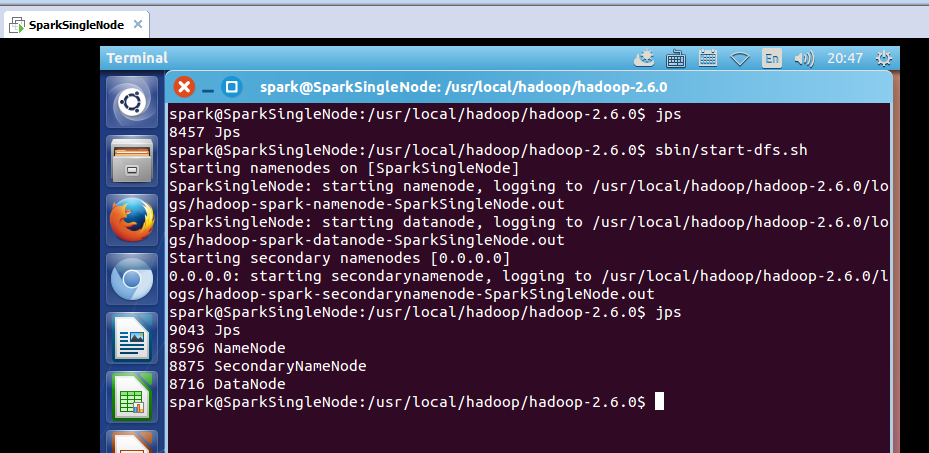
1、动手实战和调试Spark文件操作 这里,我以指定executor-memory参数的方式,启动spark-shell。 启动hadoop集群 spark@SparkSingleNode:/usr/local/hadoop/hadoop-2.6.0$ jps 8457 Jps spark@SparkSingleNode:/usr/local/hadoop/hadoop-2.6.0$sbin/start-dfs.sh 启动spark集群 spark@SparkSingleNode:/usr/local/spark/spark-1.5.2-bin-hadoop2.6$sbin/start-all.sh spark@SparkSingleNode:/usr/local/spark/spark-1.5.2-bin-hadoop2.6/bin$./spark-shell --master spark://SparkSingleNode:7077 --executor-memory 1g 在命令行中,我指定了spark-shell运行时暂时用的每个机器上executor的内存大小为1GB。 从HDFS上读取该文件 scala> val rdd1 = sc.textFile("/README.md") 或 scala> val rdd1 = sc.textFile("hdfs:SparkSingleNode:9000/README.md") 返回,MapPartitionsRDD 使用,toDebugString,可以查看其lineage的关系。 rdd1: org.apache.spark.rdd.RDD[String] = MapPartitionsRDD[1] at textFile at <console>:21 scala>rdd1.toDebugString 16/09/26 22:47:01 INFO mapred.FileInputFormat: Total input paths to process : 1 res0: String = (2)MapPartitionsRDD[1] at textFile at <console>:21 [] | /README.mdHadoopRDD[0] at textFile at <console>:21 [] scala> 可以看出,MapPartitionsRDD是HadoopRDD转换而来的。 hadoopFile,这个方法,产生HadoopRDD map,这个方法,产生MapPartitionsRDD 从源码分析过程 scala>val result = rdd1.flatMap(_.split(" ")).map((_,1)).reduceByKey(_+_).collect le>:23, took 15.095588 s result: Array[(String, Int)] = Array((package,1), (this,1), (Version"](http://spark.apache.org/docs/latest/building-spark.html#specifying-the-hadoop-version),1), (Because,1), (Python,2), (cluster.,1), (its,1), ([run,1), (general,2), (have,1), (pre-built,1), (locally.,1), (locally,2), (changed,1), (sc.parallelize(1,1), (only,1), (several,1), (This,2), (basic,1), (Configuration,1), (learning,,1), (documentation,3), (YARN,,1), (graph,1), (Hive,2), (first,1), (["Specifying,1), ("yarn-client",1), (page](http://spark.apache.org/documentation.html),1), ([params]`.,1), (application,1), ([project,2), (prefer,1), (SparkPi,2), (<http://spark.apache.org/>,1), (engine,1), (version,1), (file,1), (documentation,,1), (MASTER,1), (example,3), (distribution.,1), (are,1), (params,1), (scala>,1), (DataFram... scala> 不可这样使用toDebugString scala> result.toDebugString <console>:26: error: value toDebugString is not a member of Array[(String, Int)] result.toDebugString scala>val wordcount = rdd1.flatMap(_.split(" ")).map((_,1)).reduceByKey(_+_) wordcount: org.apache.spark.rdd.RDD[(String, Int)] = ShuffledRDD[10] at reduceByKey at <console>:23 scala>wordcount.toDebugString res3: String = (2) ShuffledRDD[10] at reduceByKey at <console>:23 [] +-(2) MapPartitionsRDD[9] at map at <console>:23 [] | MapPartitionsRDD[8] at flatMap at <console>:23 [] | MapPartitionsRDD[1] at textFile at <console>:21 [] | /README.md HadoopRDD[0] at textFile at <console>:21 [] scala> 或者 疑问:为什么没有MappedRDD?难道是版本问题?? 2、动手实战操作搜狗日志文件 本节中所用到的内容是来自搜狗实验室,网址为:http://www.sogou.com/labs/dl/q.html 我们使用的是迷你版本的tar.gz格式的文件,其大小为87K,下载后如下所示: 因为,考虑我的机器内存的自身情况。 或者 spark@SparkSingleNode:~$wget http://download.labs.sogou.com/dl/sogoulabdown/SogouQ/SogouQ2012.mini.tar.gz spark@SparkSingleNode:~$tar -zxvf SogouQ2012.mini.tar.gz 查看它的部分内容 spark@SparkSingleNode:~$head SogouQ.mini 该文件的格式如下所示:访问时间 \t 用户ID \t 查询词 \t 该URL在返回结果中的排名 \ t用户点击的顺序号 \t 用户点击的URL 开启hdfs和spark集群 把解压后的文件上传到hdfs的/目录下 spark@SparkSingleNode:/usr/local/hadoop/hadoop-2.6.0$bin/hadoop fs -copyFromLocal ~/SogouQ.mini / 开启spark-shell spark@SparkSingleNode:/usr/local/spark/spark-1.5.2-bin-hadoop2.6/bin$./spark-shell --master spark://SparkSingleNode:7077 接下来 我们使用Spark获得搜索结果排名第一同时点击结果排名也是第一的数据量,也就是第四列值为1同时第五列的值也为1的总共的记录的个数。 读取SogouQ.mini文件 scala>val soGouQRdd = sc.textFile("hdfs://SparkSingleNode:9000/SogouQ.mini") scala>soGouQRdd.count took 10.753423 s res0: Long = 2000 可以看出,count之后有2000条记录 首先过滤出有效的数据: scala>val mapSoGouQRdd = soGouQRdd.map((_.split("\t"))).filter(_.length == 6) mapSoGouQRdd: org.apache.spark.rdd.RDD[Array[String]] = MapPartitionsRDD[3] at filter at <console>:23 scala>mapSoGouQRdd.count took 2.175379 s res1: Long = 2000 可以发现该文件中的数据都是有效数据。 该文件的格式如下所示: 访问时间 \t 用户ID \t查询词\t该URL在返回结果中的排名\ t用户点击的顺序号 \t 用户点击的URL 下面使用spark获得搜索结果排名第一同时点击结果排名也是第一的数据量: scala>val filterSoGouQRdd = mapSoGouQRdd.filter(_(3).toInt == 1).filter(_(4).toInt == 1) filterSoGouQRdd: org.apache.spark.rdd.RDD[Array[String]] = MapPartitionsRDD[5] at filter at <console>:25 scala>filterSoGouQRdd.count 可以发现搜索结果排名第一同时点击结果排名也是第一的数据量为794条; 使用toDebugString查看一下其lineage: scala>filterSoGouQRdd.toDebugString res3: String = (2) MapPartitionsRDD[5] at filter at <console>:25 [] | MapPartitionsRDD[4] at filter at <console>:25 [] | MapPartitionsRDD[3] at filter at <console>:23 [] | MapPartitionsRDD[2] at map at <console>:23 [] | MapPartitionsRDD[1] at textFile at <console>:21 [] | hdfs://SparkSingleNode:9000/SogouQ.mini HadoopRDD[0] at textFile at <console>:21 [] scala> 为什么没有? HadoopRDD->MappedRDD->MappedRDD->FilteredRDD->FilteredRDD->FilteredRDD 3、搜狗日志文件深入实战 下面看,用户ID查询次数排行榜: 该文件的格式如下所示: 访问时间 \t用户ID\t查询词\t该URL在返回结果中的排名\ t用户点击的顺序号 \t 用户点击的URL scala>val sortedSoGouQRdd = mapSoGouQRdd.map(x => (x(1),1)).reduceByKey(_+_).map(x => (x._2,x._1)).sortByKey(false).map(x => (x._2,x._1)) 对sortedSogouQRdd进行collect操作:(不要乱collect 会出现OOM的) scala>sortedSoGouQRdd.collect res4: Array[(String, Int)] = Array((f6492a1da9875f20e01ff8b5804dcc35,14), (e7579c6b6b9c0ea40ecfa0f425fc765a,11), (d3034ac9911c30d7cf9312591ecf990e,11), (5c853e91940c5eade7455e4a289722d6,10), (ec0363079f36254b12a5e30bdc070125,10), (828f91e6717213a65c97b694e6279201,9), (2a36742c996300d664652d9092e8a554,9), (439fa809ba818cee624cc8b6e883913a,9), (45c304b5f2dd99182451a02685252312,8), (5ea391fd07dbb616e9857a7d95f460e0,8), (596444b8c02b7b30c11273d5bbb88741,8), (a06830724b809c0db56263124b2bd142,8), (6056710d9eafa569ddc800fe24643051,7), (bc8cc0577bb80fafd6fad1ed67d3698e,7), (8897bbb7bdff69e80f7fb2041d83b17d,7), (41389fb54f9b3bec766c5006d7bce6a2,7), (b89952902d7821db37e8999776b32427,6), (29ede0f2544d28b714810965400ab912,6), (74033165c877f4082e14c1e94d1efff4,6), (833f242ff430c83d293980ec10a42484,6... scala> 把结果保存在hdfs上: scala>sortedSoGouQRdd.saveAsTextFile("hdfs://SparkSingleNode:9000/soGouQSortedResult.txt") 把这些,输出信息,看懂,深入,是大牛必经之路。 scala> sortedSoGouQRdd.saveAsTextFile("hdfs://SparkSingleNode:9000/soGouQSortedResult.txt") 16/09/27 10:08:34 INFO Configuration.deprecation: mapred.tip.id is deprecated. Instead, use mapreduce.task.id 16/09/27 10:08:34 INFO Configuration.deprecation: mapred.task.id is deprecated. Instead, use mapreduce.task.attempt.id 16/09/27 10:08:34 INFO Configuration.deprecation: mapred.task.is.map is deprecated. Instead, use mapreduce.task.ismap 16/09/27 10:08:34 INFO Configuration.deprecation: mapred.task.partition is deprecated. Instead, use mapreduce.task.partition 16/09/27 10:08:34 INFO Configuration.deprecation: mapred.job.id is deprecated. Instead, use mapreduce.job.id 16/09/27 10:08:35 INFO spark.SparkContext: Starting job: saveAsTextFile at <console>:28 16/09/27 10:08:35 INFO spark.MapOutputTrackerMaster: Size of output statuses for shuffle 0 is 155 bytes 16/09/27 10:08:35 INFO scheduler.DAGScheduler: Got job 5 (saveAsTextFile at <console>:28) with 2 output partitions 16/09/27 10:08:35 INFO scheduler.DAGScheduler: Final stage: ResultStage 10(saveAsTextFile at <console>:28) 16/09/27 10:08:35 INFO scheduler.DAGScheduler: Parents of final stage: List(ShuffleMapStage 9) 16/09/27 10:08:35 INFO scheduler.DAGScheduler: Missing parents: List() 16/09/27 10:08:35 INFO scheduler.DAGScheduler: Submitting ResultStage 10 (MapPartitionsRDD[13] at saveAsTextFile at <console>:28), which has no missing parents 16/09/27 10:08:35 INFO storage.MemoryStore: ensureFreeSpace(128736) called with curMem=105283, maxMem=560497950 16/09/27 10:08:35 INFO storage.MemoryStore: Block broadcast_8 stored as values in memory (estimated size 125.7 KB, free 534.3 MB) 16/09/27 10:08:36 INFO storage.MemoryStore: ensureFreeSpace(43435) called with curMem=234019, maxMem=560497950 16/09/27 10:08:36 INFO storage.MemoryStore: Block broadcast_8_piece0 stored as bytes in memory (estimated size 42.4 KB, free 534.3 MB) 16/09/27 10:08:36 INFO storage.BlockManagerInfo: Added broadcast_8_piece0 in memory on 192.168.80.128:33999 (size: 42.4 KB, free: 534.5 MB) 16/09/27 10:08:36 INFO spark.SparkContext: Created broadcast 8 from broadcast at DAGScheduler.scala:861 16/09/27 10:08:36 INFO scheduler.DAGScheduler: Submitting 2 missing tasks from ResultStage 10 (MapPartitionsRDD[13] at saveAsTextFile at <console>:28) 16/09/27 10:08:36 INFO scheduler.TaskSchedulerImpl: Adding task set 10.0 with 2 tasks 16/09/27 10:08:36 INFO scheduler.TaskSetManager: Starting task 0.0 in stage 10.0 (TID 14, 192.168.80.128, PROCESS_LOCAL, 1901 bytes) 16/09/27 10:08:36 INFO storage.BlockManagerInfo: Added broadcast_8_piece0 in memory on 192.168.80.128:59936 (size: 42.4 KB, free: 534.5 MB) 16/09/27 10:08:41 INFO scheduler.TaskSetManager: Starting task 1.0 in stage 10.0 (TID 15, 192.168.80.128, PROCESS_LOCAL, 1901 bytes) 16/09/27 10:08:41 INFO scheduler.TaskSetManager: Finished task 0.0 in stage 10.0 (TID 14) in 5813 ms on 192.168.80.128 (1/2) 16/09/27 10:08:43 INFO scheduler.DAGScheduler: ResultStage 10 (saveAsTextFile at <console>:28) finished in 7.719 s 16/09/27 10:08:43 INFO scheduler.DAGScheduler: Job 5 finished: saveAsTextFile at <console>:28, took 8.348232 s 16/09/27 10:08:43 INFO scheduler.TaskSetManager: Finished task 1.0 in stage 10.0 (TID 15) in 2045 ms on 192.168.80.128 (2/2) 16/09/27 10:08:43 INFO scheduler.TaskSchedulerImpl: Removed TaskSet 10.0, whose tasks have all completed, from pool scala> hdfs命令行查询: part-0000: spark@SparkSingleNode:/usr/local/hadoop/hadoop-2.6.0$bin/hadoop fs -text /soGouQSortedResult.txt/part-00000 hdfs命令行查询: part-0000: spark@SparkSingleNode:/usr/local/hadoop/hadoop-2.6.0$bin/hadoop fs -text /soGouQSortedResult.txt/part-00001 我们通过hadoop命令把上述两个文件的内容合并起来: spark@SparkSingleNode:/usr/local/hadoop/hadoop-2.6.0$bin/hadoop fs -getmerge hdfs://SparkSingleNode:9000/soGouQSortedResult.txt combinedSortedResult.txt //注意,第二个参数,是本地文件的目录 spark@SparkSingleNode:/usr/local/hadoop/hadoop-2.6.0$ bin/hadoop fs -ls / Found 6 items -rw-r--r-- 1 spark supergroup 3593 2016-09-18 10:15 /README.md -rw-r--r-- 1 spark supergroup 216118 2016-09-27 09:17 /SogouQ.mini drwxr-xr-x - spark supergroup 0 2016-09-26 21:17 /result drwxr-xr-x - spark supergroup 0 2016-09-26 21:49 /resultDescSorted drwxr-xr-x - spark supergroup 0 2016-09-27 10:08 /soGouQSortedResult.txt drwx-wx-wx - spark supergroup 0 2016-09-09 16:28 /tmp spark@SparkSingleNode:/usr/local/hadoop/hadoop-2.6.0$ ls bin etc libexec NOTICE.txt share combinedSortedResult.txt include LICENSE.txt README.txt tmp dfs lib logs sbin spark@SparkSingleNode:/usr/local/hadoop/hadoop-2.6.0$ 或者 spark@SparkSingleNode:/usr/local/hadoop/hadoop-2.6.0$bin/hdfs dfs -getmerge hdfs://SparkSingleNode:9000/soGouQSortedResult.txt combinedSortedResult.txt //两者是等价的 spark@SparkSingleNode:/usr/local/hadoop/hadoop-2.6.0$ ls bin etc lib LICENSE.txt NOTICE.txt sbin tmp dfs include libexec logs README.txt share spark@SparkSingleNode:/usr/local/hadoop/hadoop-2.6.0$ cd bin spark@SparkSingleNode:/usr/local/hadoop/hadoop-2.6.0/bin$ ls container-executor hdfs mapred.cmd yarn hadoop hdfs.cmd rcc yarn.cmd hadoop.cmd mapred test-container-executor spark@SparkSingleNode:/usr/local/hadoop/hadoop-2.6.0/bin$ cd hdfs bash: cd: hdfs: Not a directory spark@SparkSingleNode:/usr/local/hadoop/hadoop-2.6.0/bin$ cd .. spark@SparkSingleNode:/usr/local/hadoop/hadoop-2.6.0$ bin/hdfs dfs -getmerge hdfs://SparkSingleNode:9000/soGouQSortedResult.txt combinedSortedResult.txt spark@SparkSingleNode:/usr/local/hadoop/hadoop-2.6.0$ ls bin etc libexec NOTICE.txt share combinedSortedResult.txt include LICENSE.txt README.txt tmp dfs lib logs sbin spark@SparkSingleNode:/usr/local/hadoop/hadoop-2.6.0$ 本文转自大数据躺过的坑博客园博客,原文链接:http://www.cnblogs.com/zlslch/p/5911131.html,如需转载请自行联系原作者