首页 文章 精选 留言 我的

精选列表

搜索[API集成],共10000篇文章
优秀的个人博客,低调大师

使用Java Stream API将List按自定义分组规则转换成Map的一个例子

本文完整测试代码见文末。 测试数据是List里的4个员工对象实例: 根据员工所在的城市进行分组: 结果分成了三组: 第一组的员工在上海: 第二组的员工在成都: 统计每组员工个数: 把员工进行分组,得分大于101分的在一组,小于等于101的在另一组: 分组结果: package java8; import java.util.ArrayList; import java.util.List; import java.util.Map; import java.util.Map.Entry; import java.util.function.Consumer; import java.util.stream.Collectors; class Employee { private String city; private String name; private int score; public Employee(String name, String city, int score){ this.city = city; this.name = name; this.score = score; } public String getCity(){ System.out.println("city: " + this.city); return this.city; } public String getName() { return this.name; } public int getScore() { return this.score; } @Override public String toString() { return String.format("Employee: " + this.name + " city: " + this.city); } } class Person { private String name; private int age; Person(String name, int age) { this.name = name; this.age = age; } @Override public String toString() { return String.format("Person{name='%s', age=%d}", name, age); } } // Jerry 2016-01-15 20:51PM ? 多用于extends generic的type,接受所有Object的sub class public class StreamTest { private static void printMap(Map<? extends Object, ? extends Object> map) { for(Entry<? extends Object, ? extends Object> entry:map.entrySet()) { System.out.println("key = " + entry.getKey() + " , Value = " + entry.getValue()); } } public static void main(String[] args) { ArrayList<Employee> employees = new ArrayList<Employee>(); employees.add(new Employee("A", "Shanghai",100)); employees.add(new Employee("B", "Chengdu",101)); employees.add(new Employee("C", "Shenzhen",102)); employees.add(new Employee("D", "Chengdu",104)); // group by City Map<String, List<Employee>> employeesByCity = employees.stream().collect( Collectors.groupingBy(Employee::getCity)); // default void forEach(Consumer<? super T> action) { for(Map.Entry<String, List<Employee>> entry:employeesByCity.entrySet()) { System.out.println("key= " + entry.getKey() + " , Value = " + entry.getValue()); entry.getValue().forEach(System.out::println); } // 2016-01-15 20:37PM Consumer<Employee> aa = a -> { System.out.println("Employee: " + a.getName() + " : " + a.getScore()); }; List<Employee> chengduEmployee = employeesByCity.get("Chengdu"); chengduEmployee.forEach(aa); // test for counting Map<String, Long> employeesByCity2 = employees.stream().collect( Collectors.groupingBy(Employee::getCity, Collectors.counting())); printMap(employeesByCity2); // calculate average score Map<String, Double> employeesByCity3 = employees.stream().collect( Collectors.groupingBy(Employee::getCity, Collectors.averagingInt(Employee::getScore))); printMap(employeesByCity3); /*Stream<Person> people = Stream.of(new Person("Paul", 24), new Person("Mark", 30), new Person("Will", 28)); Map<Integer, List<String>> peopleByAge = people.collect(groupingBy(p -> p.age, mapping((Person p) -> p.name, toList()))); System.out.println(peopleByAge);*/ /* * 分区是一种特殊的分组,结果 map 至少包含两个不同的分组——一个true,一个false。 * 例如,如果想找出最优秀的员工,你可以将所有雇员分为两组,一组销售量大于 N, * 另一组小于 N,使用 partitioningBy 收集器: */ System.out.println("partition result"); Map<Boolean, List<Employee>> partitioned = employees.stream().collect(Collectors.partitioningBy(e -> e.getScore() > 101)); printMap(partitioned); /* * 你也可以将 groupingBy 收集器传递给 partitioningBy 收集器来将联合使用分区和分组。例如,你可以统计每个分区中的每个城市的雇员人数: Map<Boolean, Map<String, Long>> result = employees.stream().collect(partitioningBy(e -> e.getNumSales() > 150, groupingBy(Employee::getCity, counting()))); 这样会生成一个二级 Map: {false={London=1}, true={New York=1, Hong Kong=1, London=1}} */ } } 本文来自云栖社区合作伙伴“汪子熙”,了解相关信息可以关注微信公众号"汪子熙"。

优秀的个人博客,低调大师

Spark RDD/Core 编程 API入门系列 之rdd实战(rdd基本操作实战及transformation和action流程图)(源...

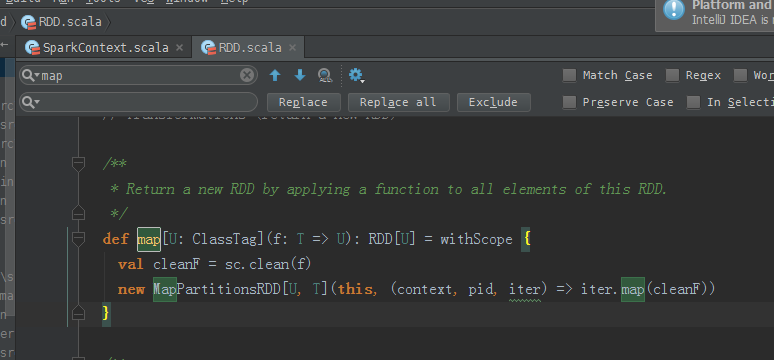
本博文的主要内容是: 1、rdd基本操作实战 2、transformation和action流程图 3、典型的transformation和action RDD有3种操作: 1、 Trandformation 对数据状态的转换,即所谓算子的转换 2、 Action 触发作业,即所谓得结果的 3、 Contoller 对性能、效率和容错方面的支持,如cache、persist、checkpoint Contoller包括cache、persist、checkpoint。 /** * Return a new RDD by applying a function to all elements of this RDD. */def map[U: ClassTag](f: T => U): RDD[U] = withScope { val cleanF = sc.clean(f) new MapPartitionsRDD[U, T](this, (context, pid, iter) => iter.map(cleanF))} 传入类型是T,返回类型是U。 元素之间,为什么reduce操作,要符合结合律和交换律?答:因为,交换律,不知,哪个数据先过来。所以,必须符合交换律。 在交换律基础上,想要reduce操作,必须要符合结合律。 /** * Reduces the elements of this RDD using the specified commutative and * associative binary operator. */def reduce(f: (T, T) => T): T = withScope { val cleanF = sc.clean(f) val reducePartition: Iterator[T] => Option[T] = iter => { if (iter.hasNext) { Some(iter.reduceLeft(cleanF)) } else { None } } var jobResult: Option[T] = None val mergeResult = (index: Int, taskResult: Option[T]) => { if (taskResult.isDefined) { jobResult = jobResult match { case Some(value) => Some(f(value, taskResult.get)) case None => taskResult } } } sc.runJob(this, reducePartition, mergeResult) // Get the final result out of our Option, or throw an exception if the RDD was empty jobResult.getOrElse(throw new UnsupportedOperationException("empty collection"))} RDD.scala(源码) 这里,新建包com.zhouls.spark.cores package com.zhouls.spark.cores /** * Created by Administrator on 2016/9/27. */ object TextLines { } 下面,开始编代码 本地模式 自动 ,会写好 源码来看, 所以,val lines = sc.textFile("C:\\Users\\Administrator\\Desktop\\textlines.txt") //通过HadoopRDD以及MapPartitionsRDD获取文件中每一行的内容本身 val lineCount = lines.map(line => (line,1)) //每一行变成行的内容与1构成的Tuple val textLines = lineCount.reduceByKey(_+_) textLines.collect.foreach(pair => println(pair._1 + ":" + pair._2)) 成功! 现在,将此行代码, textLines.collect.foreach(pair => println(pair._1 + ":" + pair._2)) 改一改 textLines.foreach(pair => println(pair._1 + ":" + pair._2)) 总结: 本地模式里, textLines.collect.foreach(pair => println(pair._1 + ":" + pair._2)) 改一改 textLines.foreach(pair => println(pair._1 + ":" + pair._2)) 运行正常,因为在本地模式下,是jvm,但这样书写,是不正规的。 集群模式里, textLines.collect.foreach(pair => println(pair._1 + ":" + pair._2)) 改一改 textLines.foreach(pair => println(pair._1 + ":" + pair._2)) 运行无法通过,因为结果是分布在各个节点上。 collect源码: /** * Return an array that contains all of the elements in this RDD. */ def collect(): Array[T] = withScope { val results = sc.runJob(this, (iter: Iterator[T]) => iter.toArray) Array.concat(results: _*) } 得出,collect后array中就是一个元素,只不过这个元素是一个Tuple。 Tuple是元组。通过concat合并! foreach源码: /** * Applies a function f to all elements of this RDD. */ def foreach(f: T => Unit): Unit = withScope { val cleanF = sc.clean(f) sc.runJob(this, (iter: Iterator[T]) => iter.foreach(cleanF)) } rdd实战(rdd基本操作实战)至此! rdd实战(transformation流程图) 拿wordcount为例! 启动hdfs集群 spark@SparkSingleNode:/usr/local/hadoop/hadoop-2.6.0$sbin/start-dfs.sh 启动spark集群 spark@SparkSingleNode:/usr/local/spark/spark-1.5.2-bin-hadoop2.6$sbin/start-all.sh 启动spark-shell spark@SparkSingleNode:/usr/local/spark/spark-1.5.2-bin-hadoop2.6/bin$./spark-shell --master spark://SparkSingleNode:7077 --executor-memory 1g scala>val partitionsReadmeRdd = sc.textFile("hdfs://SparkSingleNode:9000/README.md").flatMap(_.split(" ")).map(word =>(word,1)).reduceByKey(_+_,1).saveAsTextFile("~/partition1README.txt") 或者 scala>val readmeRdd = sc.textFile("hdfs://SparkSingleNode:9000/README.md") scala> val partitionsReadmeRdd = readmeRdd.flatMap(_.split(" ")).map(word => (word,1)).reduceByKey(_+_,1) .saveAsTextFile("~/partition1README.txt") 注意,~目录,不是这里。 为什么,我的,不是这样的显示呢? RDD的transformation和action执行的流程图 典型的transformation和action 本文转自大数据躺过的坑博客园博客,原文链接:http://www.cnblogs.com/zlslch/p/5913334.html,如需转载请自行联系原作者

优秀的个人博客,低调大师

Spark RDD/Core 编程 API入门系列之map、filter、textFile、cache、对Job输出结果进行升和降序、uni...

1、以本地模式实战map和filter 2、以集群模式实战textFile和cache 3、对Job输出结果进行升和降序 4、union 5、groupByKey 6、join 7、reduce 8、lookup 1、以本地模式实战map和filter 以local的方式,运行spark-shell。 spark@SparkSingleNode:~$ cd /usr/local/spark/spark-1.5.2-bin-hadoop2.6/bin spark@SparkSingleNode:/usr/local/spark/spark-1.5.2-bin-hadoop2.6/bin$ pwd /usr/local/spark/spark-1.5.2-bin-hadoop2.6/bin spark@SparkSingleNode:/usr/local/spark/spark-1.5.2-bin-hadoop2.6/bin$./spark-shell 从集合中创建RDD,spark中主要提供了两种函数:parallelize和makeRDD, scala>val rdd = sc.parallelize(List(1,2,3,4,5)) rdd: org.apache.spark.rdd.RDD[Int] = ParallelCollectionRDD[0] at parallelize at <console>:21 scala>val mappedRDD = rdd.map(2*_) mappedRDD: org.apache.spark.rdd.RDD[Int] = MapPartitionsRDD[1] at map at <console>:23 scala>mappedRDD.collect 得到 res0: Array[Int] = Array(2, 4, 6, 8, 10) scala> scala>val filteredRDD = mappedRDD.filter(_ > 4) 16/09/26 20:32:29 INFO storage.BlockManagerInfo: Removed broadcast_0_piece0 on localhost:40688 in memory (size: 1218.0 B, free: 534.5 MB) 16/09/26 20:32:30 INFO spark.ContextCleaner: Cleaned accumulator 1 filteredRDD: org.apache.spark.rdd.RDD[Int] = MapPartitionsRDD[2] at filter at <console>:25 scala>filteredRDD.collect 注意,一般,生产环境和正宗的写法是。 scala>val filteredRDDAgain = sc.parallelize(List(1,2,3,4,5)).map(2 * _).filter(_ > 4).collect 2、以集群模式实战textFile和cache 启动hadoop集群 spark@SparkSingleNode:/usr/local/hadoop/hadoop-2.6.0$ jps 8457 Jps spark@SparkSingleNode:/usr/local/hadoop/hadoop-2.6.0$sbin/start-dfs.sh 启动spark集群 spark@SparkSingleNode:/usr/local/spark/spark-1.5.2-bin-hadoop2.6$sbin/start-all.sh spark@SparkSingleNode:/usr/local/spark/spark-1.5.2-bin-hadoop2.6/bin$./spark-shell --master spark://SparkSingleNode:7077 读取该文件 scala>val rdd = sc.textFile("/README.md") 使用count统计一下该文件的行数 scala> rdd.count took 7.018386 s res0: Long = 98 花了时间7.018386 s 通过观察RDD.scala源代码即可知道cache和persist的区别: def persist(newLevel: StorageLevel): this.type = { if (storageLevel != StorageLevel.NONE && newLevel != storageLevel) { throw new UnsupportedOperationException( "Cannot change storage level of an RDD after it was already assigned a level") } sc.persistRDD(this) sc.cleaner.foreach(_.registerRDDForCleanup(this)) storageLevel = newLevel this } /** Persist this RDD with the default storage level (`MEMORY_ONLY`). */ def persist(): this.type = persist(StorageLevel.MEMORY_ONLY) /** Persist this RDD with the default storage level (`MEMORY_ONLY`). */ def cache(): this.type = persist() 可知: 1)RDD的cache()方法其实调用的就是persist方法,缓存策略均为MEMORY_ONLY; 2)可以通过persist方法手工设定StorageLevel来满足工程需要的存储级别; 3)cache或者persist并不是action; 附:cache和persist都可以用unpersist来取消 进行缓存 scala>rdd.cache res1: rdd.type = MapPartitionsRDD[1] at textFile at <console>:21 执行count,使得缓存生效 scala>rdd.count took 2.055063 s res2: Long = 98 花了时间2.055063 s 再执行,count took 0.583177 s res3: Long = 98 花了时间0.583177 s 总结,我们直接基于cache缓存后的数据,计算所消耗时间大大减少。 正在进行中的spark-shell 接着,对上面的RDD,进行wordcount操作 scala>val wordcount = rdd.flatMap(_.split(' ')).map((_,1)).reduceByKey(_+_) wordcount: org.apache.spark.rdd.RDD[(String, Int)] = ShuffledRDD[4] at reduceByKey at <console>:23 scala>wordcount.collect 通过saveAsTextFile把数据保存起来 res4: Array[(String, Int)] = Array((package,1), (this,1), (Version"](http://spark.apache.org/docs/latest/building-spark.html#specifying-the-hadoop-version),1), (Because,1), (Python,2), (cluster.,1), (its,1), ([run,1), (general,2), (have,1), (pre-built,1), (locally.,1), (locally,2), (changed,1), (sc.parallelize(1,1), (only,1), (several,1), (This,2), (basic,1), (Configuration,1), (learning,,1), (documentation,3), (YARN,,1), (graph,1), (Hive,2), (first,1), (["Specifying,1), ("yarn-client",1), (page](http://spark.apache.org/documentation.html),1), ([params]`.,1), (application,1), ([project,2), (prefer,1), (SparkPi,2), (<http://spark.apache.org/>,1), (engine,1), (version,1), (file,1), (documentation,,1), (MASTER,1), (example,3), (distribution.,1), (are,1), (params,1), (scala>,1), (DataFrames... scala>wordcount.saveAsTextFile("/result") 只是,仅仅对每行,做了wordcount而已。 3、对Job输出结果进行升和降序 升序 scala>val wordcount = rdd.flatMap(_.split(' ')).map((_,1)).reduceByKey(_+_).map(x => (x._2,x._1)).sortByKey(true).map(x => (x._2,x._1)).saveAsTextFile("/resultAscSorted") 同理,去下载,不多赘述。 变了 scala>val wordcount = rdd.flatMap(_.split(' ')).map((_,1)).reduceByKey(_+_).map(x => (x._2,x._1)).sortBy(true).map(x => (x._2,x._1)).saveAsTextFile("/resultAscSorted") <console>:23: error: type mismatch; found : Boolean(true) required: ((Int, String)) => ? val wordcount = rdd.flatMap(_.split(' ')).map((_,1)).reduceByKey(_+_).map(x => (x._2,x._1)).sortBy(true).map(x => (x._2,x._1)).saveAsTextFile("/resultAscSorted") ^ scala> 降序 scala>val wordcount = rdd.flatMap(_.split(' ')).map((_,1)).reduceByKey(_+_).map(x => (x._2,x._1)).sortByKey(false).map(x => (x._2,x._1)).saveAsTextFile("/resultDescSorted") 下载,同理 此刻,成功对Job输出结果进行了排序。 4、union union的使用 scala>val rdd1 = sc.parallelize(List(('a',1),('b',1))) rdd1: org.apache.spark.rdd.RDD[(Char, Int)] = ParallelCollectionRDD[26] at parallelize at <console>:21 scala>val rdd2 = sc.parallelize(List(('c',1),('d',1))) rdd2: org.apache.spark.rdd.RDD[(Char, Int)] = ParallelCollectionRDD[27] at parallelize at <console>:21 scala>rdd1 union rdd2 res6: org.apache.spark.rdd.RDD[(Char, Int)] = UnionRDD[28] at union at <console>:26 scala>val result = rdd1 union rdd2 result: org.apache.spark.rdd.RDD[(Char, Int)] = UnionRDD[29] at union at <console>:25 使用collect操作,查看一下执行结果 scala>result.collect res7: Array[(Char, Int)] = Array((a,1), (b,1), (c,1), (d,1)) 5、groupByKey scala>val wordcount = rdd.flatMap(_.split(' ')).map((_,1)).groupByKey wordcount: org.apache.spark.rdd.RDD[(String, Iterable[Int])] = ShuffledRDD[32] at groupByKey at <console>:23 scala>wordcount.collect res8: Array[(String, Iterable[Int])] = Array((package,CompactBuffer(1)), (this,CompactBuffer(1)), (Version"](http://spark.apache.org/docs/latest/building-spark.html#specifying-the-hadoop-version),CompactBuffer(1)), (Because,CompactBuffer(1)), (Python,CompactBuffer(1, 1)), (cluster.,CompactBuffer(1)), (its,CompactBuffer(1)), ([run,CompactBuffer(1)), (general,CompactBuffer(1, 1)), (YARN,,CompactBuffer(1)), (have,CompactBuffer(1)), (pre-built,CompactBuffer(1)), (locally.,CompactBuffer(1)), (locally,CompactBuffer(1, 1)), (changed,CompactBuffer(1)), (sc.parallelize(1,CompactBuffer(1)), (only,CompactBuffer(1)), (several,CompactBuffer(1)), (learning,,CompactBuffer(1)), (basic,CompactBuffer(1)), (first,CompactBuffer(1)), (This,CompactBuffer(1, 1)), (documentation,CompactBuffer(1, 1, 1)), (Confi... scala> 6、join 概念知识,参考 http://www.cnblogs.com/goforward/p/4748128.html scala>val rdd1 = sc.parallelize(List(('a',1),('a',2),('b',3),('b',4))) rdd1: org.apache.spark.rdd.RDD[(Char, Int)] = ParallelCollectionRDD[33] at parallelize at <console>:21 scala>val rdd2 = sc.parallelize(List(('a',5),('a',6),('b',7),('b',8))) rdd2: org.apache.spark.rdd.RDD[(Char, Int)] = ParallelCollectionRDD[34] at parallelize at <console>:21 scala>rdd1 join rdd2 res9: org.apache.spark.rdd.RDD[(Char, (Int, Int))] = MapPartitionsRDD[37] at join at <console>:26 scala>val result = rdd1 join rdd2 result: org.apache.spark.rdd.RDD[(Char, (Int, Int))] = MapPartitionsRDD[40] at join at <console>:25 scala>result.collect res10: Array[(Char, (Int, Int))] = Array((b,(3,7)), (b,(3,8)), (b,(4,7)), (b,(4,8)), (a,(1,5)), (a,(1,6)), (a,(2,5)), (a,(2,6))) scala> 可见,join操作,完全是一个笛卡尔积的操作。 7、reduce reduce本身啊,在RDD操作里,属于一个action类型的操作,会导致job作业的提交和执行。 scala>val rdd = sc.parallelize(List(1,2,3,4,5)) rdd: org.apache.spark.rdd.RDD[Int] = ParallelCollectionRDD[41] at parallelize at <console>:21 scala>rdd.reduce(_+_) res11: Int = 15 8、lookup scala>val rdd2 = sc.parallelize(List(('a',5),('a',6),('b',7),('b',8))) rdd2: org.apache.spark.rdd.RDD[(Char, Int)] = ParallelCollectionRDD[42] at parallelize at <console>:21 scala>rdd2.lookup('a') //返回一个seq, (5, 6) 是把a对应的所有元素的value提出来组成一个seq res12: Seq[Int] = WrappedArray(5, 6) 本文转自大数据躺过的坑博客园博客,原文链接:http://www.cnblogs.com/zlslch/p/5910869.html,如需转载请自行联系原作者

优秀的个人博客,低调大师

Hadoop MapReduce编程 API入门系列之自定义多种输入格式数据类型和排序多种输出格式(十一)

自定义输入格式,将明星微博数据排序后按粉丝数 关注数 微博数 分别输出到不同文件中。 代码 1 package zhouls.bigdata.myMapReduce.ScoreCount; 2 3 import java.io.DataInput; 4 import java.io.DataOutput; 5 import java.io.IOException; 6 import org.apache.hadoop.io.WritableComparable; 7 /** 8 * 学习成绩读写类 9 * 数据格式参考:19020090017 小讲 90 99 100 89 95 10 * @author Bertron 11 * 需要自定义一个 ScoreWritable 类实现 WritableComparable 接口,将学生各门成绩封装起来。 12 */ 13 public class ScoreWritable implements WritableComparable< Object > {//其实这里,跟TVPlayData一样的 14 // 注意: Hadoop通过Writable接口实现的序列化机制,不过没有提供比较功能,所以和java中的Comparable接口合并,提供一个接口WritableComparable。(自定义比较) 15 // Writable接口提供两个方法(write和readFields)。 16 17 18 private float Chinese; 19 private float Math; 20 private float English; 21 private float Physics; 22 private float Chemistry; 23 24 25 // 问:这里我们自己编程时,是一定要创建一个带有参的构造方法,为什么还要显式的写出来一个带无参的构造方法呢? 26 // 答:构造器其实就是构造对象实例的方法,无参数的构造方法是默认的,但是如果你创造了一个带有参数的构造方法,那么无参的构造方法必须显式的写出来,否则会编译失败。 27 28 public ScoreWritable(){}//java里的无参构造函数,是用来在创建对象时初始化对象 29 //在hadoop的每个自定义类型代码里,好比,现在的ScoreWritable,都必须要写无参构造函数。 30 31 32 //问:为什么我们在编程的时候,需要创建一个带有参的构造方法? 33 //答:就是能让赋值更灵活。构造一般就是初始化数值,你不想别人用你这个类的时候每次实例化都能用另一个构造动态初始化一些信息么(当然没有需要额外赋值就用默认的)。 34 35 public ScoreWritable(float Chinese,float Math,float English,float Physics,float Chemistry){//java里的有参构造函数,是用来在创建对象时初始化对象 36 this.Chinese = Chinese; 37 this.Math = Math; 38 this.English = English; 39 this.Physics = Physics; 40 this.Chemistry = Chemistry; 41 } 42 43 //问:其实set和get方法,这两个方法只是类中的setxxx和getxxx方法的总称, 44 // 那么,为什么在编程时,有set和set***两个,只有get***一个呢? 45 46 public void set(float Chinese,float Math,float English,float Physics,float Chemistry){ 47 this.Chinese = Chinese;//即float Chinese赋值给private float Chinese; 48 this.Math = Math; 49 this.English = English; 50 this.Physics = Physics; 51 this.Chemistry = Chemistry; 52 } 53 // public float get(float Chinese,float Math,float English,float Physics,float Chemistry){因为这是错误的,所以对于set可以分开,get只能是get*** 54 // return Chinese; 55 // return Math; 56 // return English; 57 // return Physics; 58 // return Chemistry; 59 // } 60 61 62 public float getChinese() {//拿值,得返回,所以需有返回类型float 63 return Chinese; 64 } 65 public void setChinese(float Chinese){//设值,不需,所以空返回类型 66 this.Chinese = Chinese; 67 } 68 public float getMath() {//拿值 69 return Math; 70 } 71 public void setMath(float Math){//设值 72 this.Math = Math; 73 } 74 public float getEnglish() {//拿值 75 return English; 76 } 77 public void setEnglish(float English){//设值 78 this.English = English; 79 } 80 public float getPhysics() {//拿值 81 return Physics; 82 } 83 public void setPhysics(float Physics){//设值 84 this.Physics = Physics; 85 } 86 public float getChemistry() {//拿值 87 return Chemistry; 88 } 89 public void setChemistry(float Chemistry) {//拿值 90 this.Chemistry = Chemistry; 91 } 92 93 // 实现WritableComparable的readFields()方法 94 // 对象不能传输的,需要转化成字节流! 95 // 将对象转换为字节流并写入到输出流out中是序列化,write 的过程(最好记!!!) 96 // 从输入流in中读取字节流反序列化为对象 是反序列化,readFields的过程(最好记!!!) 97 public void readFields(DataInput in) throws IOException {//拿代码来说的话,对象就是比如Chinese、Math。。。。 98 Chinese = in.readFloat();//因为,我们这里的对象是float类型,所以是readFloat() 99 Math = in.readFloat(); 100 English = in.readFloat();//注意:反序列化里,需要生成对象对吧,所以,是用到的是get那边对象 101 Physics = in.readFloat(); 102 Chemistry = in.readFloat(); 103 // in.readByte() 104 // in.readChar() 105 // in.readDouble() 106 // in.readLine() 107 // in.readFloat() 108 // in.readLong() 109 // in.readShort() 110 } 111 112 // 实现WritableComparable的write()方法,以便该数据能被序列化后完成网络传输或文件输出 113 // 将对象转换为字节流并写入到输出流out中是序列化,write 的过程(最好记!!!) 114 // 从输入流in中读取字节流反序列化为对象 是反序列化,readFields的过程(最好记!!!) 115 public void write(DataOutput out) throws IOException {//拿代码来说的话,对象就是比如Chinese、Math。。。。 116 out.writeFloat(Chinese);//因为,我们这里的对象是float类型,所以是writeFloat() 117 out.writeFloat(Math); 118 out.writeFloat(English);//注意:序列化里,需要对象对吧,所以,用到的是set那边的对象 119 out.writeFloat(Physics); 120 out.writeFloat(Chemistry); 121 // out.writeByte() 122 // out.writeChar() 123 // out.writeDouble() 124 // out.writeFloat() 125 // out.writeLong() 126 // out.writeShort() 127 // out.writeUTF() 128 } 129 130 public int compareTo(Object o) {//java里的比较,Java String.compareTo() 131 return 0; 132 } 133 134 135 // Hadoop中定义了两个序列化相关的接口:Writable 接口和 Comparable 接口,这两个接口可以合并成一个接口 WritableComparable。 136 // Writable 接口中定义了两个方法,分别为write(DataOutput out)和readFields(DataInput in) 137 // 所有实现了Comparable接口的对象都可以和自身相同类型的对象比较大小 138 139 140 // Hadoop中定义了两个序列化相关的接口:Writable 接口和 Comparable 接口,这两个接口可以合并成一个接口 WritableComparable。 141 // Writable 接口中定义了两个方法,分别为write(DataOutput out)和readFields(DataInput in) 142 // 所有实现了Comparable接口的对象都可以和自身相同类型的对象比较大小 143 144 145 // 源码是 146 // package java.lang; 147 // import java.util.*; 148 // public interface Comparable { 149 // /** 150 // * 将this对象和对象o进行比较,约定:返回负数为小于,零为大于,整数为大于 151 // */ 152 // public int compareTo(T o); 153 // } 154 155 } 1 package zhouls.bigdata.myMapReduce.WeiboCount; 2 3 import java.io.IOException; 4 5 import org.apache.hadoop.conf.Configuration; 6 import org.apache.hadoop.fs.FSDataInputStream; 7 import org.apache.hadoop.fs.FileSystem; 8 import org.apache.hadoop.fs.Path; 9 import org.apache.hadoop.io.Text; 10 import org.apache.hadoop.mapreduce.InputSplit; 11 import org.apache.hadoop.mapreduce.JobContext; 12 import org.apache.hadoop.mapreduce.RecordReader; 13 import org.apache.hadoop.mapreduce.TaskAttemptContext; 14 import org.apache.hadoop.mapreduce.lib.input.FileInputFormat; 15 import org.apache.hadoop.mapreduce.lib.input.FileSplit; 16 import org.apache.hadoop.util.LineReader; 17 19 20 21 //其实这个程序,就是在实现InputFormat接口,TVPlayInputFormat是InputFormat接口的实现类 22 //比如 WeiboInputFormat extends FileInputFormat implements InputFormat。 23 24 //问:自定义输入格式 WeiboInputFormat 类,首先继承 FileInputFormat,然后分别重写 isSplitable() 方法和 createRecordReader() 方法。 25 26 27 public class WeiboInputFormat extends FileInputFormat<Text,WeiBo>{ 28 29 // 线路是: boolean isSplitable() -> RecordReader<Text,WeiBo> createRecordReader() -> WeiboRecordReader extends RecordReader<Text, WeiBo > 30 31 32 @Override 33 protected boolean isSplitable(JobContext context, Path filename) {//这是InputFormat的isSplitable方法 34 //isSplitable方法就是是否要切分文件,这个方法显示如果是压缩文件就不切分,非压缩文件就切分。 35 // 如果不允许分割,则isSplitable==false,则将第一个block、文件目录、开始位置为0,长度为整个文件的长度封装到一个InputSplit,加入splits中 36 // 如果文件长度不为0且支持分割,则isSplitable==true,获取block大小,默认是64MB 37 return false; //整个文件封装到一个InputSplit 38 //要么就是return true; //切分64MB大小的一块一块,再封装到InputSplit 39 } 40 41 42 43 44 @Override 45 public RecordReader<Text, WeiBo> createRecordReader(InputSplit arg0,TaskAttemptContext arg1) throws IOException, InterruptedException{ 46 // RecordReader<k1, v1>是返回类型,返回的RecordReader对象的封装 47 // createRecordReader是方法,在这里是,WeiboInputFormat.createRecordReader。WeiboInputFormat是InputFormat类的实例 48 // InputSplit input和TaskAttemptContext context是传入参数 49 50 // isSplitable(),如果是压缩文件就不切分,整个文件封装到一个InputSplit 51 // isSplitable(),如果是非压缩文件就切,切分64MB大小的一块一块,再封装到InputSplit 52 53 //这里默认是系统实现的的RecordReader,按行读取,下面我们自定义这个类WeiboRecordReader。 54 //类似与Excel、WeiBo、TVPlayData代码写法 55 return new WeiboRecordReader();//新建一个ScoreRecordReader实例,所有才有了上面RecordReader<Text,ScoreWritable>,所以才如下ScoreRecordReader,写我们自己的 56 } 57 58 59 60 public class WeiboRecordReader extends RecordReader<Text, WeiBo>{ 61 //LineReader in是1,行号。 62 //Text line; 俞灏明 俞灏明 10591367 206 558,每行的相关记录 63 public LineReader in;//行读取器 64 public Text line;//每行数据类型 65 public Text lineKey;//自定义key类型,即k1 66 public WeiBo lineValue;//自定义value类型,即v1 67 68 69 @Override 70 public void close() throws IOException {//关闭输入流 71 if(in !=null){ 72 in.close(); 73 } 74 } 75 @Override 76 public Text getCurrentKey() throws IOException, InterruptedException {//获取当前的key,即CurrentKey 77 return lineKey;//返回类型是Text,即Text lineKey 78 } 79 @Override 80 public WeiBo getCurrentValue() throws IOException,InterruptedException {//获取当前的Value,即CurrentValue 81 return lineValue;//返回类型是WeiBo,即WeiBo lineValue 82 } 83 @Override 84 public float getProgress() throws IOException, InterruptedException {//获取进程,即Progress 85 return 0;//返回类型是float,即float 0 86 } 87 88 89 90 @Override 91 public void initialize(InputSplit input, TaskAttemptContext context)throws IOException, InterruptedException{//初始化,都是模板 92 FileSplit split=(FileSplit)input;//获取split 93 Configuration job=context.getConfiguration(); 94 Path file=split.getPath();//得到文件路径 95 FileSystem fs=file.getFileSystem(job); 96 97 FSDataInputStream filein=fs.open(file);//打开文件 98 in=new LineReader(filein,job); //输入流in 99 line=new Text();//每行数据类型 100 lineKey=new Text();//自定义key类型,即k1。//新建一个Text实例作为自定义格式输入的key 101 lineValue = new WeiBo();//自定义value类型,即v1。//新建一个TVPlayData实例作为自定义格式输入的value 102 } 103 104 105 //此方法读取每行数据,完成自定义的key和value 106 @Override 107 public boolean nextKeyValue() throws IOException, InterruptedException{//这里面,才是篡改的重点 108 int linesize=in.readLine(line); //line是每行数据,我们这里用到的是in.readLine(str)这个构造函数,默认读完读到文件末尾。其实这里有三种。 109 110 // 是SplitLineReader.readLine -> SplitLineReader extends LineReader -> org.apache.hadoop.util.LineReader 111 112 // in.readLine(str)//这个构造方法执行时,会首先将value原来的值清空。默认读完读到文件末尾 113 // in.readLine(str, maxLineLength)//只读到maxLineLength行 114 // in.readLine(str, maxLineLength, maxBytesToConsume)//这个构造方法来实现不清空,前面读取的行的值 115 116 117 if(linesize==0) return false; 118 119 //通过分隔符'\t',将每行的数据解析成数组 pieces 120 String[] pieces = line.toString().split("\t"); 121 //因为,我们这里是。默认读完读到文件末尾。line是Text类型。pieces是String[],即String数组。 122 123 if(pieces.length != 5){ 124 throw new IOException("Invalid record received"); 125 } 126 127 int a,b,c; 128 129 try{ 130 a = Integer.parseInt(pieces[2].trim());//粉丝,//将String类型,如pieces[2]转换成,float类型,给a 131 b = Integer.parseInt(pieces[3].trim());//关注 132 c = Integer.parseInt(pieces[4].trim());//微博数 133 }catch(NumberFormatException nfe) 134 { 135 throw new IOException("Error parsing floating poing value in record"); 136 } 137 138 139 //自定义key和value值 140 lineKey.set(pieces[0]); //完成自定义key数据 141 lineValue.set(b, a, c);//完成自定义value数据 142 // 或者写 143 // lineValue.set(Integer.parseInt(pieces[2].trim()),Integer.parseInt(pieces[3].trim()),Integer.parseInt(pieces[4].trim())); 144 145 146 // pieces[0] pieces[1] pieces[2] ... pieces[4] 147 // 俞灏明 俞灏明 10591367 206 558 148 // 李敏镐 李敏镐 22898071 11 268 149 // 大自然保护协会-马云 大自然保护协会-马云 15616866 0 39 150 // 林心如 林心如 57488649 214 5940 151 // 时尚小编Anne 时尚小编Anne 10064227 136 2103 152 // 黄晓明 黄晓明 22616497 506 2011 153 // 张靓颖 张靓颖 27878708 238 3846 154 // 张成龙2012 张成龙2012 9813621 199 744 155 // 吳君如大美女 吳君如大美女 18490338 190 412 156 // 李娜 李娜 23309493 81 631 157 // 徐小平 徐小平 11659926 1929 13795 158 // 唐嫣 唐嫣 24301532 200 2391 159 // 有斐君 有斐君 8779383 577 4251 160 161 162 return true; 163 } 164 165 166 167 } 168 } 1 package zhouls.bigdata.myMapReduce.WeiboCount; 2 3 import java.io.IOException; 4 import java.util.Arrays; 5 import java.util.Comparator; 6 import java.util.HashMap; 7 import java.util.Set; 8 import java.util.Map; 9 10 import org.apache.hadoop.conf.Configuration; 11 import org.apache.hadoop.conf.Configured; 12 import org.apache.hadoop.fs.FileSystem; 13 import org.apache.hadoop.fs.Path; 14 15 import org.apache.hadoop.io.IntWritable; 16 import org.apache.hadoop.io.Text; 17 import org.apache.hadoop.mapreduce.Job; 18 import org.apache.hadoop.mapreduce.Mapper; 19 import org.apache.hadoop.mapreduce.Reducer; 20 import org.apache.hadoop.mapreduce.lib.input.FileInputFormat; 21 import org.apache.hadoop.mapreduce.lib.output.FileOutputFormat; 22 import org.apache.hadoop.mapreduce.lib.output.MultipleOutputs; 23 import org.apache.hadoop.mapreduce.lib.output.TextOutputFormat; 24 import org.apache.hadoop.util.Tool; 25 import org.apache.hadoop.util.ToolRunner; 26 27 public class WeiboCount extends Configured implements Tool{ 28 public static class WeiBoMapper extends Mapper<Text, WeiBo, Text, Text>{ 29 @Override 30 protected void map(Text key, WeiBo value, Context context) throws IOException, InterruptedException{ 31 context.write(new Text("follower"),new Text(key.toString() + "\t" + value.getFollowers())); 32 context.write(new Text("friend"),new Text(key.toString() + "\t" + value.getFriends())); 33 context.write(new Text("statuses"),new Text(key.toString() + "\t" + value.getStatuses())); 34 } 35 } 36 37 public static class WeiBoReducer extends Reducer<Text, Text, Text, IntWritable> { 38 private MultipleOutputs<Text, IntWritable> mos; 39 40 protected void setup(Context context) throws IOException,InterruptedException{ 41 mos = new MultipleOutputs<Text, IntWritable>(context); 42 } 43 44 private Text text = new Text(); 45 46 protected void reduce(Text Key, Iterable<Text> Values,Context context) throws IOException, InterruptedException{ 47 int N = context.getConfiguration().getInt("reduceHasMaxLength", Integer.MAX_VALUE); 48 Map<String,Integer> m = new HashMap<String,Integer>(); 49 for(Text value:Values){//星型for循环,意思是把Values的值传给Text value 50 //value=名称+(粉丝数 或 关注数 或 微博数) 51 String[] records = value.toString().split("\t"); 52 m.put(records[0],Integer.parseInt(records[1].toString())); 53 } 54 55 //对Map内的数据进行排序 56 Map.Entry<String, Integer>[] entries = getSortedHashtableByValue(m); 57 for(int i = 0; i< N && i< entries.length;i++){ 58 if(Key.toString().equals("follower")){ 59 mos.write("follower",entries[i].getKey(), entries[i].getValue()); 60 }else if(Key.toString().equals("friend")){ 61 mos.write("friend", entries[i].getKey(), entries[i].getValue()); 62 }else if(Key.toString().equals("status")){ 63 mos.write("statuses", entries[i].getKey(), entries[i].getValue()); 64 } 65 } 66 } 67 68 protected void cleanup(Context context) throws IOException,InterruptedException { 69 mos.close(); 70 } 71 } 72 73 74 public int run(String[] args) throws Exception{ 75 Configuration conf = new Configuration();// 配置文件对象 76 Path mypath = new Path(args[1]); 77 FileSystem hdfs = mypath.getFileSystem(conf);// 创建输出路径 78 if (hdfs.isDirectory(mypath)){ 79 hdfs.delete(mypath, true); 80 } 81 82 Job job = new Job(conf, "weibo");// 构造任务 83 job.setJarByClass(WeiboCount.class);// 主类 84 85 job.setMapperClass(WeiBoMapper.class);// Mapper 86 job.setMapOutputKeyClass(Text.class);// Mapper key输出类型 87 job.setMapOutputValueClass(Text.class);// Mapper value输出类型 88 89 job.setReducerClass(WeiBoReducer.class);// Reducer 90 job.setOutputKeyClass(Text.class); 91 job.setOutputValueClass(IntWritable.class); 92 FileInputFormat.addInputPath(job, new Path(args[0]));// 输入路径 93 FileOutputFormat.setOutputPath(job, new Path(args[1]));// 输出路径 94 job.setInputFormatClass(WeiboInputFormat.class);// 自定义输入格式 95 //自定义文件输出类别 96 MultipleOutputs.addNamedOutput(job, "follower", TextOutputFormat.class,Text.class, IntWritable.class); 97 MultipleOutputs.addNamedOutput(job, "friend", TextOutputFormat.class,Text.class, IntWritable.class); 98 MultipleOutputs.addNamedOutput(job, "status", TextOutputFormat.class,Text.class, IntWritable.class); 99 job.waitForCompletion(true); 100 return 0; 101 } 102 103 104 //对Map内的数据进行排序(只适合小数据量) 105 public static Map.Entry[] getSortedHashtableByValue(Map h){ 106 Set set = h.entrySet(); 107 Map.Entry[] entries = (Map.Entry[]) set.toArray(new Map.Entry[set.size()]); 108 Arrays.sort(entries, new Comparator(){ 109 public int compare(Object arg0, Object arg1){ 110 Long key1 = Long.valueOf(((Map.Entry) arg0).getValue().toString()); 111 Long key2 = Long.valueOf(((Map.Entry) arg1).getValue().toString()); 112 return key2.compareTo(key1); 113 } }); 114 return entries; 115 } 116 117 public static void main(String[] args) throws Exception{ 118 // String[] args0 = { "hdfs://HadoopMaster:9000/weibo/weibo.txt", 119 // "hdfs://HadoopMaster:9000/out/weibo/" }; 120 121 String[] args0 = { "./data/weibo/weibo.txt", 122 "./out/weibo/" }; 123 124 int ec = ToolRunner.run(new Configuration(), new WeiboCount(), args0); 125 System.exit(ec); 126 } 127 } 128 本文转自大数据躺过的坑博客园博客,原文链接:http://www.cnblogs.com/zlslch/p/6164435.html,如需转载请自行联系原作者

资源下载

更多资源
Mario

Mario

马里奥是站在游戏界顶峰的超人气多面角色。马里奥靠吃蘑菇成长,特征是大鼻子、头戴帽子、身穿背带裤,还留着胡子。与他的双胞胎兄弟路易基一起,长年担任任天堂的招牌角色。

腾讯云软件源

腾讯云软件源

为解决软件依赖安装时官方源访问速度慢的问题,腾讯云为一些软件搭建了缓存服务。您可以通过使用腾讯云软件源站来提升依赖包的安装速度。为了方便用户自由搭建服务架构,目前腾讯云软件源站支持公网访问和内网访问。

Nacos

Nacos

Nacos /nɑ:kəʊs/ 是 Dynamic Naming and Configuration Service 的首字母简称,一个易于构建 AI Agent 应用的动态服务发现、配置管理和AI智能体管理平台。Nacos 致力于帮助您发现、配置和管理微服务及AI智能体应用。Nacos 提供了一组简单易用的特性集,帮助您快速实现动态服务发现、服务配置、服务元数据、流量管理。Nacos 帮助您更敏捷和容易地构建、交付和管理微服务平台。

Spring

Spring

Spring框架(Spring Framework)是由Rod Johnson于2002年提出的开源Java企业级应用框架,旨在通过使用JavaBean替代传统EJB实现方式降低企业级编程开发的复杂性。该框架基于简单性、可测试性和松耦合性设计理念,提供核心容器、应用上下文、数据访问集成等模块,支持整合Hibernate、Struts等第三方框架,其适用范围不仅限于服务器端开发,绝大多数Java应用均可从中受益。

用户登录
用户注册