首页 文章 精选 留言 我的

精选列表

搜索[Vue],共5356篇文章
优秀的个人博客,低调大师

Vue 3 高阶指南之 WeakMap

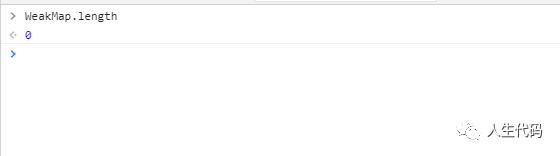
高阶指南之 WeakMap 「WeakMap」 对象是一组键/值对的集合,其中的键是弱引用的。其键必须是对象,而值可以是任意的。 在 JavaScript 里,map API 可以通过使其四个 API 方法共用两个数组(一个存放键,一个存放值)来实现。给这种 map 设置值时会同时将键和值添加到这两个数组的末尾。从而使得键和值的索引在两个数组中相对应。当从该 map 取值的时候,需要遍历所有的键,然后使用索引从存储值的数组中检索出相应的值。 但这样的实现会有两个很大的缺点,首先赋值和搜索操作都是 O(n) 的时间复杂度( n 是键值对的个数),因为这两个操作都需要遍历全部整个数组来进行匹配。另外一个缺点是可能会导致内存泄漏,因为数组会一直引用着每个键和值。这种引用使得垃圾回收算法不能回收处理他们,即使没有其他任何引用存在了。 相比之下,原生的 WeakMap 持有的是每个键对象的“弱引用”,这意味着在没有其他引用存在时垃圾回收能正确进行。原生 WeakMap 的结构是特殊且有效的,其用于映射的 key 只有在其没有被回收时才是有效的。 正由于这样的弱引用,WeakMap 的 key 是不可枚举的 (没有方法能给出所有的 key)。如果key 是可枚举的话,其列表将会受垃圾回收机制的影响,从而得到不确定的结果。因此,如果你想要这种类型对象的 key 值的列表,你应该使用 Map。 基本上,如果你要往对象上添加数据,又不想干扰垃圾回收机制,就可以使用 WeakMap。 属性 WeakMap.length length 属性的值为 0。 WeakMap.protorype WeakMap 构造器的原型。允许添加属性到所有的 WeakMap 对象。 方法 WeakMap.prototype.delete(key) 移除key的关联对象。执行后 WeakMap.prototype.has(key)返回``false。 WeakMap.prototype.get(key) 返回key关联对象, 或者 undefined(没有key关联对象时)。 WeakMap.prototype.has(key) 根据是否有key关联对象返回一个Boolean值。 WeakMap.prototype.set(key,value) 在WeakMap中设置一组key关联对象,返回这个 WeakMap对象。 使用 WeakMap constwm1=newWeakMap(),wm2=newWeakMap(),wm3=newWeakMap();consto1={},o2=function(){},o3=window; wm1.set(o1,37);wm1.set(o2,"azerty");wm2.set(o1,o2);//value可以是任意值,包括一个对象或一个函数wm2.set(o3,undefined);wm2.set(wm1,wm2);//键和值可以是任意对象,甚至另外一个WeakMap对象 wm1.get(o2);//"azerty"wm2.get(o2);//undefined,wm2中没有o2这个键wm2.get(o3);//undefined,值就是undefined wm1.has(o2);//truewm2.has(o2);//falsewm2.has(o3);//true(即使值是undefined) wm3.set(o1,37);wm3.get(o1);//37 wm1.has(o1);//truewm1.delete(o1);wm1.has(o1);//false 实现一 个带有 .clear() 方法的类 WeakMap 类 classClearableWeakMap{constructor(init){this._wm=newWeakMap(init)}clear(){this._wm=newWeakMap()}delete(key){returnthis._wm.delete(key)}get(key){returnthis._wm.get(key)}has(key){returnthis._wm.has(key)}set(key,value){this._wm.set(key,value)returnthis}} 本文分享自微信公众号 - 人生代码(lijinwen1996329ken)。如有侵权,请联系 support@oschina.cn 删除。本文参与“OSC源创计划”,欢迎正在阅读的你也加入,一起分享。

优秀的个人博客,低调大师

vue 打包报错 npm run build

npm run buildvue 打包报错 WebpackOptionsValidationError: Invalid configuration object. Webpack has been initialised using a configuration object that does not match the API schema. - configuration.output.filename: A relative path is expected. However the provided value "/static/js/[name].[chunkhash].js" is an absolute path! -> Specifies the name of each output file on disk. You must **not** specify an absolute path here! The `output.path` option determines the location on disk the files are written to, filename is used solely for naming the individual files. Please use output.path to specify absolute path and output.filename for the file name. at webpack (/Users/apple/Desktop/demo/dr-admin/node_modules/webpack/lib/webpack.js:19:9) at err (/Users/apple/Desktop/demo/dr-admin/build/build.js:19:3) at next (/Users/apple/Desktop/demo/dr-admin/node_modules/rimraf/rimraf.js:75:7) at CB (/Users/apple/Desktop/demo/dr-admin/node_modules/rimraf/rimraf.js:111:9) at /Users/apple/Desktop/demo/dr-admin/node_modules/rimraf/rimraf.js:137:14 at FSReqWrap.oncomplete (fs.js:153:21) -configuration.output.filename:应为相对路径。但是提供的值“/static/js/[name].[chunkhash].js”是绝对路径! 找到 config/index.js 里面的 assetsSubDirectory: '/static'是否绝对路径,除了 index.html 之外的静态资源要存放的路径,这里改为相对路径 build: { // Template for index.html index: path.resolve(__dirname, '../dist/index.html'), // Paths assetsRoot: path.resolve(__dirname, '../dist'), assetsSubDirectory: 'static', assetsPublicPath: '/sub/', /** * Source Maps */ productionSourceMap: false, // https://webpack.js.org/configuration/devtool/#production devtool: '#source-map', // Gzip off by default as many popular static hosts such as // Surge or Netlify already gzip all static assets for you. // Before setting to `true`, make sure to: // npm install --save-dev compression-webpack-plugin productionGzip: true, productionGzipExtensions: ['js', 'css'], // Run the build command with an extra argument to // View the bundle analyzer report after build finishes: // `npm run build --report` // Set to `true` or `false` to always turn it on or off bundleAnalyzerReport: process.env.npm_config_report }

资源下载

更多资源
腾讯云软件源

腾讯云软件源

为解决软件依赖安装时官方源访问速度慢的问题,腾讯云为一些软件搭建了缓存服务。您可以通过使用腾讯云软件源站来提升依赖包的安装速度。为了方便用户自由搭建服务架构,目前腾讯云软件源站支持公网访问和内网访问。

Rocky Linux

Rocky Linux

Rocky Linux(中文名:洛基)是由Gregory Kurtzer于2020年12月发起的企业级Linux发行版,作为CentOS稳定版停止维护后与RHEL(Red Hat Enterprise Linux)完全兼容的开源替代方案,由社区拥有并管理,支持x86_64、aarch64等架构。其通过重新编译RHEL源代码提供长期稳定性,采用模块化包装和SELinux安全架构,默认包含GNOME桌面环境及XFS文件系统,支持十年生命周期更新。

Sublime Text

Sublime Text

Sublime Text具有漂亮的用户界面和强大的功能,例如代码缩略图,Python的插件,代码段等。还可自定义键绑定,菜单和工具栏。Sublime Text 的主要功能包括:拼写检查,书签,完整的 Python API , Goto 功能,即时项目切换,多选择,多窗口等等。Sublime Text 是一个跨平台的编辑器,同时支持Windows、Linux、Mac OS X等操作系统。

WebStorm

WebStorm

WebStorm 是jetbrains公司旗下一款JavaScript 开发工具。目前已经被广大中国JS开发者誉为“Web前端开发神器”、“最强大的HTML5编辑器”、“最智能的JavaScript IDE”等。与IntelliJ IDEA同源,继承了IntelliJ IDEA强大的JS部分的功能。

用户登录
用户注册