首页 文章 精选 留言 我的

精选列表

搜索[SpringCloud],共1289篇文章
优秀的个人博客,低调大师

SpringCloud微服务(06):Config组件,实现配置统一管理

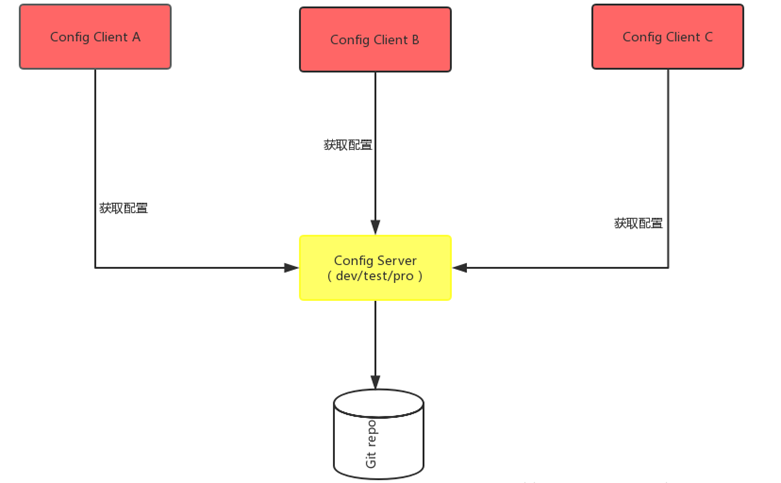
本文源码:GitHub·点这里 || GitEE·点这里 一、Config简介 在微服务系统中,服务较多,相同的配置:如数据库信息、缓存、参数等,会出现在不同的服务上,如果一个配置发生变化,需要修改很多的服务配置。spring cloud提供配置中心,来解决这个场景问题。 系统中的通用配置存储在相同的地址:GitHub,Gitee,本地配置服务等,然后配置中心读取配置以restful发布出来,其它服务可以调用接口获取配置信息。 二、配置服务端 1、项目结构 核心注解:@EnableConfigServer 2、核心依赖 <dependency> <groupId>org.springframework.cloud</groupId> <artifactId>spring-cloud-config-server</artifactId> </dependency> 3、核心配置文件 这里注意读取文件的配置 active :native,读取本地配置; active :git,读网络仓库配置; server: port: 9001 spring: application: name: config-server-9001 profiles: # 读取本地 # active: native # 读取Git active: git cloud: config: server: native: search-locations: classpath:/config git: # 读取的仓库地址 uri: https://gitee.com/cicadasmile/spring-cloud-config.git # 读取仓库指定文件夹下 search-paths: /cloudbaseconfig # 非公开需要的登录账号 username: password: label: master 4、读取配置内容 不同的环境读取的结果不同。 info: date: 20190814 author: cicada sign: develop version: V1.0 三、配置客户端 1、核心依赖 <dependency> <groupId>org.springframework.cloud</groupId> <artifactId>spring-cloud-starter-config</artifactId> </dependency> 2、核心配置文件 在上面的配置中心,配置读取Git资源,所以这里的配置也就是读取Git资源。 server: port: 8001 spring: application: name: config-client-8001 profiles: active: dev cloud: config: # 读取本地配置 --------------------------- #uri: http://localhost:9001 ## 读取策略:快速失败 #fail-fast: true ## 读取的文件名:无后缀 #name: client-8001 ## 读取的配置环境 #profile: dev # client-8001-dev.yml # ---------------------------------------- # github上的资源名称 ----------------------- name: client-8001 # 读取的配置环境 profile: dev label: master # 本微服务启动后,通过配置中心6001服务,获取GitHub的配置文件 uri: http://localhost:9001 # ---------------------------------------- 3、测试接口 @RestController public class ClientController { @Value("${info.date}") private String date ; @Value("${info.author}") private String author ; @Value("${info.sign}") private String sign ; @Value("${info.version}") private String version ; /** * 获取配置信息 */ @RequestMapping("/getConfigInfo") public String getConfigInfo (){ return date+"-"+author+"-"+sign+"-"+version ; } } 四、基于Eureka配置 上面的模式,通过服务中心,直接获取配置。下面把注册中心Eureka加进来。 1、项目结构 启动顺序也是如下: node06-eureka-7001 config-server-9001 config-client-8001 2、修改配置项 将config-server-9001添加到注册中心; 配置config-client-8001读取注册中心; 完成后Eureka注册中心效果图,启动顺序如下: 3、修改客户端配置 通过注册中心获取服务,避免使用URI地址。 经过测试后,正确无误。 提醒:国内如果读取git的配置,可能经常出去无法加载的问题,该案例使用的是Gitee的地址。 五、源代码地址 GitHub地址:知了一笑 https://github.com/cicadasmile/spring-cloud-base 码云地址:知了一笑 https://gitee.com/cicadasmile/spring-cloud-base

优秀的个人博客,低调大师

SpringCloud微服务(02):Ribbon和Feign组件,服务调用和负载均衡

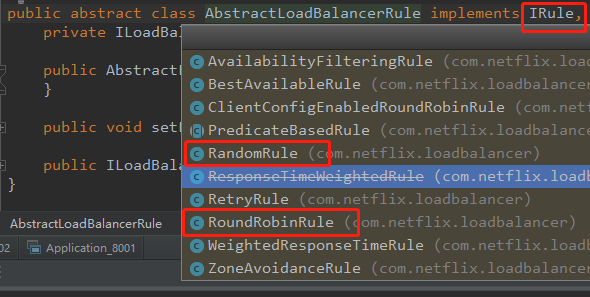
本文源码:GitHub·点这里 || GitEE·点这里 一、Ribbon简介 1、基本概念 Ribbon是一个客户端的负载均衡(Load Balancer,简称LB)器,它提供对大量的HTTP和TCP客户端的访问控制。 2、负载均衡简介 目前主流的负载均衡方案可分成两类: 1)集中式 即在服务的消费方和提供方之间使用独立的LB设施,可以是硬件,如F5,也可以是软件,如nginx,由该设施负责把访问请求通过某种策略转发至服务的提供方; 2)进程内 将LB逻辑集成到消费方,消费方从服务注册中心获取可用服务列表,然后根据指定负载均衡策略选择合适的服务器。Ribbon就属于该方式。 3、Ribbon负载策略 1) RoundRobinRule 轮询 轮询服务列表List<Server>的index,选择index对应位置的服务。 2) RandomRule 随机 随机服务列表List<Server>的index,选择index对应位置的服务。 3) RetryRule 重试 指定时间内,重试(请求)某个服务不成功达到指定次数,则不再请求该服务。 二、Feign简介 1、基本概念 Feign 是一个声明式的 Web Service 客户端。它的出现使开发 Web Service 客户端变得很简单。使用 Feign 只需要创建一个接口加上对应的注解,比如:@FeignClient 接口类注解。 2、执行流程 1) 主程序入口添加 @EnableFeignClients 注解开启对 FeignClient 接口扫描加载。接口使用@FeignClient注解。 2) 调用Feign 接口中的方法被时,通过JDK的代理的方式,生成具体的 RequestTemplate。 3) RequestTemplate 生成 Request请求,结合Ribbon实现服务调用负载均衡策略。 三、综合使用案例 1、项目结构图 1)、模块描述 Eureka注册中心 node02-eureka-7001 两个服务提供方 node02-provider-6001 node02-provider-6002 Ribbon服务调用 node02-consume-8001 Feign服务调用 node02-consume-8002 2)、依赖Eureka知识 上篇文章Eureka使用详解。 2、Ribbon服务调用 代码所属模块:node02-consume-8001 1)、核心依赖 <dependency> <groupId>org.springframework.cloud</groupId> <artifactId>spring-cloud-starter-ribbon</artifactId> </dependency> 2)、配置文件 @Configuration public class LoadConfig { @Bean @LoadBalanced public RestTemplate getRestTemplate (){ return new RestTemplate() ; } @Bean public IRule getIRule (){ // 默认轮询算法 // return new RoundRobinRule() ; // 重试算法:默认情况,访问某个服务连续三次失败,就不会再访问 // return new RetryRule() ; // 随机算法 return new RandomRule() ; } } 3)、调用方式 @RestController public class ConsumeController { @Autowired private RestTemplate restTemplate ; String server_name = "http://NODE02-PROVIDER" ; // http://localhost:8001/showInfo @RequestMapping("/showInfo") public String showInfo (){ return restTemplate.getForObject(server_name+"/getInfo",String.class) ; } } 这里的NODE02-PROVIDER就是服务提供方的配置文件。两个服务提供方的这块配置相同,Ribbon正基于此,实现多个服务调用的负载均衡。 spring: application: name: node02-provider 4)、提供方接口 @RequestMapping("/getInfo") public String getInfo (){ LOG.info("provider-6002"); return "success" ; } 3、Feign服务调用 代码所属模块:node02-consume-8002 1)、核心依赖 <dependency> <groupId>org.springframework.cloud</groupId> <artifactId>spring-cloud-starter-feign</artifactId> </dependency> 2)、配置文件 @FeignClient(value = "NODE02-PROVIDER") public interface GetAuthorService { @RequestMapping(value = "/getAuthorInfo/{authorId}",method = RequestMethod.GET) String getAuthorInfo (@PathVariable("authorId") String authorId) ; } 3)、调用方式 @RestController public class ConsumeController { @Resource private GetAuthorService getAuthorService ; @RequestMapping(value = "/getAuthorInfo") public String getAuthorInfo () { return getAuthorService.getAuthorInfo("1") ; } } 4)、启动类注解 // 因为包名路径不同,需要加basePackages属性 @EnableFeignClients(basePackages={"cloud.block.code.service"}) 5)、提供方接口 @RequestMapping(value = "/getAuthorInfo/{authorId}",method = RequestMethod.GET) public String getAuthorInfo (@PathVariable("authorId") String authorId) { LOG.info("provider-6002"); return "知了一笑"+authorId ; } 四、源代码地址 GitHub·地址 https://github.com/cicadasmile/spring-cloud-base GitEE·地址 https://gitee.com/cicadasmile/spring-cloud-base

优秀的个人博客,低调大师

SpringCloud系列----->SpringBoot项目中整合jooq和postgresql数据库

前言: 公司的BI项目采取的是SpringBoot + Jooq + postgresql 组织形势,现在将这个配置过程,详细记录下来。 Jooq和MyBatis和spring data jpa作用是一样的,都是用来链接操作数据库的。 Jooq的优点: (1)、DSL(Domain Specific Language )风格,代码够简单和清晰。遇到不会写的sql可以充分利用IDEA代码提示功能轻松完成。 (2)、保留了传统ORM 的优点,简单操作性,安全性,类型安全等。不需要复杂的配置,并且可以利用Java 8 Stream API 做更加复杂的数据转换。 (3)、支持主流的RDMS和更多的特性,如self-joins,union,存储过程,复杂的子查询等等。 (4)、丰富的Fluent API和完善文档。 (5)、runtime schema mapping 可以支持多个数据库schema访问。简单来说使用一个连接池可以访问N个DB schema,使用比较多的就是SaaS应用的多租户场景。 好了,不多啰嗦了,Jooq的详细文档还是请大家,看官方文档:https://www.jooq.org/ 公司的项目是采用gradle 组织的,gradle和maven是一样的,但是gradle的配置文件更清晰,maven的xml组织形式,啰嗦长,看着就晕,不简洁。有关gradle和maven的相关详细使用方法的请参考gradle和maven的官网。 闲话少劳聊,直接上build.gradle代码,在代码注释中详细说明每个配置的详细的作用: plugins { id 'org.springframework.boot' version '2.1.3.RELEASE' #springboot版本 id 'java' #标识是java项目 id 'nu.studer.jooq' version '3.0.3' #jooq的版本号 } apply plugin: 'io.spring.dependency-management' apply plugin: 'jacoco' #引入生成文档的jar包 group = 'com.jingdata.asset.manage.bi' #略 version = '0.0.1-SNAPSHOT' #略 sourceCompatibility = '1.8' #java版本 repositories { mavenLocal() mavenCentral() } dependencies { implementation 'org.springframework.boot:spring-boot-starter-data-redis' implementation 'org.springframework.boot:spring-boot-starter-jooq' #springboot对jooq直接支持,jooq的springboot的starter implementation 'org.springframework.boot:spring-boot-starter-web' implementation 'org.springframework.boot:spring-boot-starter-aop' implementation 'org.springframework.boot:spring-boot-starter-actuator' implementation 'org.aspectj:aspectjrt:1.6.11' implementation 'org.aspectj:aspectjweaver:1.6.11' implementation 'cglib:cglib:2.1' implementation 'org.springframework:spring-aop:4.3.9.RELEASE' implementation 'io.springfox:springfox-swagger2:2.8.0' implementation 'io.springfox:springfox-swagger-ui:2.8.0' compile group: 'org.apache.commons', name: 'commons-lang3', version: '3.1' compile("org.togglz:togglz-spring-boot-starter:2.6.1.Final") runtimeOnly 'org.postgresql:postgresql' #postgresql的链接支持 testImplementation 'org.springframework.boot:spring-boot-starter-test' compileOnly 'org.projectlombok:lombok:1.18.2' jooqRuntime 'postgresql:postgresql:9.1-901-1.jdbc4' #postgresql的链接支持 } test { include '**/*Test.class' #单元测试命令,执行gradle test命令只会执行测试文件中以Test结尾的文件中的所有的测试方法。 } task testInteg(type: Test) { include '**/*Integ.class' #单元测试命令,执行gradle testInteg命令只会执行测试文件中以Integ结尾的文件中的所有的测试方法。 #之所以需要gradle test , gradle testInteg两个命令,是因为有些我们这里需要区分涉及外部依赖(redis,mongodb,pg数据库,elasticsearch等)的单元测试,和不涉及外部依赖的单元测试(内存中执行就行),几十个组件的集成测试时,组件之间彼此需要依赖彼此产生的数据时,h2之类的内存数据库,就不能满足测试需要了,跑一次gradle testInteg 命令,把需要的数据保存在redis,mongodb,pg数据库,elasticsearch 等中。 #公司的项目要求,每次git push提交代码和jenkins部署项目的时候需要执行一下gradle test 命令,确认修改的代码没有破坏以前的功能。 #测试同事在整个系统集成的时候,需要执行gradle test , gradle testInteg两个命令,其中gradle test经常执行,gradle testInteg 在系统几十个模块集成的时候,会执行。 } #jooq配置,自动生成数据库表和字段的对应关系的一系列的java class文件 jooq { version = '3.11.9' edition = 'OSS' sample(sourceSets.main) { jdbc { driver = 'org.postgresql.Driver' #jooq链接数据库的驱动 url = 'jdbc:postgresql://127.0.0.1:5432/invest111' #数据库链接地址 user = 'inves111' #连接数据库的用户名 password = 'invest111' #连接数据库的密码 } generator { name = 'org.jooq.codegen.DefaultGenerator' strategy { name = 'org.jooq.codegen.DefaultGeneratorStrategy' // ... } database() { name = 'org.jooq.meta.postgres.PostgresDatabase' inputSchema = 'public' #只生成public schema中的表 includes='paas_bi_.*|paas_datarights_.*|paas_mt_.*|paas_auth_.*|paas_org_.*' #只需要paas_bi 、 paas_datarights、paas_mt、paas_auth、paas_org 开头的一系列的表。 } generate() {} target { packageName = 'com.jingdata.asset.manage.bi.assetmanagesystem.bidb' #生成文件夹的名字 directory = 'src/main/java' #生成文件所在的目录 } } } } settings.gradle文件的内容: pluginManagement { repositories { gradlePluginPortal() } } rootProject.name = 'asset-manage-system' 所有这些配置完成后,就会如图所示,执行这个命令,就会把数据库中的表自动生成出来: ![1564371259390](https://yqfile.alicdn.com/23bcb12200ad1136ea627ee340584ecdcae8e30d.jpeg) 我们执行gradle test命令结果如下: ![2222](https://yqfile.alicdn.com/0457c862e6b19e4203ba81d8e772391c194d0730.jpeg) 会在项目的目录下生成一个build文件夹,这个目录下会有本次执行单元测试生成的单元测试报告,单元测试报告打开后是这样一个效果: ![4444](https://yqfile.alicdn.com/4d75c24182206129c9e068eaf038c909b314981b.jpeg) gradle testInteg命令生成的单元测试也在这里,我这里就不赘述了。 这一部分是jooq自动生成的对应的数据库的表的java文件: ![6666](https://yqfile.alicdn.com/c209be982f43530097f82b35871a919929a8ea30.jpeg) 项目的src/main/resources下的application.properties文件中的配置内容: server.port=8006 spring.datasource.url = jdbc:postgresql://127.0.0.1:5432/invest111 spring.datasource.driver-class-nam = org.postgresql.Driver spring.datasource.username = invest111 spring.datasource.password = invest111 spring.datasource.minIdle = 5 spring.datasource.maxActive = 50 spring.datasource.maxWait = 60000 spring.datasource.timeBetweenEvictionRunsMillis = 60000 spring.datasource.minEvictableIdleTimeMillis = 300000 spring.datasource.validationQuery = SELECT 1 FROM DUAL spring.datasource.testWhileIdle = true spring.datasource.testOnBorrow = false spring.datasource.testOnReturn = false spring.datasource.poolPreparedStatements = true spring.datasource.maxPoolPreparedStatementPerConnectionSize = 20 spring.datasource.connectionProperties = druid.stat.mergeSql=true;druid.stat.slowSqlMillis=5000 spring.jooq.sql-dialect = postgres bi.http.port = 8006 bi.client.host = clientbi.2222.com #日志相关配置 logging.file= ./logs/jingdata-bi-pg logging.level.root= ERROR logging.level.com.jingdata= DEBUG logging.level.org.springframework.web= DEBUG logging.level.com.netflix.discovery.DiscoveryClien= OFF logging.level.com.netflix.discovery.InstanceInfoReplicator= OFF 基本是一看就行,也就不啰嗦了。 下面再给出,一些使用jooq在postgresql 数据中的表中做CURD操作的代码,不啰嗦,直接上,几乎是一看就懂: package com.jingdata.asset.manage.bi.assetmanagesystem.system.impl; import com.jingdata.asset.manage.bi.assetmanagesystem.system.function.IAnnouncementReferencesService; import com.jingdata.asset.manage.bi.assetmanagesystem.system.impl.base.BaseImpl; import com.jingdata.asset.manage.bi.assetmanagesystem.transform.ReferenceInfoVo; import com.jingdata.asset.manage.bi.assetmanagesystem.transform.ReferenceTransform; import org.jooq.Record; import org.jooq.Result; import org.jooq.impl.DSL; import org.slf4j.Logger; import org.slf4j.LoggerFactory; import org.springframework.stereotype.Service; import java.sql.Timestamp; import java.util.List; import static com.jingdata.asset.manage.bi.assetmanagesystem.bidb.Tables.PAAS_BI_ANNOUNCEMENT_REFERENCES; /** * @date 2019-02-28 * */ @Service public class AnnouncementReferencesImpl extends BaseImpl implements IAnnouncementReferencesService { private final Logger logger = LoggerFactory.getLogger(this.getClass()); private ReferenceTransform referenceTransform = new ReferenceTransform(); @Override public List<ReferenceInfoVo> getOneAnnouncementReferences(Integer announcementId) { Result<Record> records = getDSLContext().select().from(PAAS_BI_ANNOUNCEMENT_REFERENCES) .where(DSL.field(PAAS_BI_ANNOUNCEMENT_REFERENCES.USER_ID).eq("5bcfd9f06faa7b79fd28c304")) .and(DSL.field(PAAS_BI_ANNOUNCEMENT_REFERENCES.IS_DELETED).eq(0)) .and(DSL.field(PAAS_BI_ANNOUNCEMENT_REFERENCES.REFERENCE_ID).eq(announcementId)) .orderBy(DSL.field(PAAS_BI_ANNOUNCEMENT_REFERENCES.ID).desc()) .fetch(); return referenceTransform.transformReferenceRecord(records); } @Override public Integer addOneAnnouncementReferences(Integer announcementId, String reportList, String chartList) { return getDSLContext().insertInto(PAAS_BI_ANNOUNCEMENT_REFERENCES) .set(DSL.field(PAAS_BI_ANNOUNCEMENT_REFERENCES.APP_ID), "1111122222") .set(DSL.field(PAAS_BI_ANNOUNCEMENT_REFERENCES.USER_ID), "1111122222") .set(DSL.field(PAAS_BI_ANNOUNCEMENT_REFERENCES.TENANT_ID), "1111122222") .set(DSL.field(PAAS_BI_ANNOUNCEMENT_REFERENCES.CREATED_BY), "1111122222") .set(DSL.field(PAAS_BI_ANNOUNCEMENT_REFERENCES.UPDATED_BY), "1111122222") .set(DSL.field(PAAS_BI_ANNOUNCEMENT_REFERENCES.IS_DELETED), 0) .set(DSL.field(PAAS_BI_ANNOUNCEMENT_REFERENCES.UPDATED_AT), new Timestamp(System.currentTimeMillis())) .set(DSL.field(PAAS_BI_ANNOUNCEMENT_REFERENCES.CREATED_AT), new Timestamp(System.currentTimeMillis())) //1表示报表,2表示图表 .set(DSL.field(PAAS_BI_ANNOUNCEMENT_REFERENCES.REFERENCE_TYPE), 1) //1表示报表,2表示图表 .set(DSL.field(PAAS_BI_ANNOUNCEMENT_REFERENCES.REFERENCE_ID), Integer.parseInt("111")) //1表示报表,2表示图表 .set(DSL.field(PAAS_BI_ANNOUNCEMENT_REFERENCES.SOURCE_ID), announcementId) .execute(); } @Override public Integer deleteOneAnnouncementReferences(String referenceIds) { return getDSLContext().delete(PAAS_BI_ANNOUNCEMENT_REFERENCES) .where(DSL.field(PAAS_BI_ANNOUNCEMENT_REFERENCES.ID).eq(Integer.parseInt(referenceIds))).execute(); } @Override public void deleteByMasterChartId(Long masterId, Context context) { dslContext.update(PAAS_BI_DASHBOARD_LINKAGE) .set(PAAS_BI_DASHBOARD_LINKAGE.IS_DELETED, 1) .set(PAAS_BI_DASHBOARD_LINKAGE.UPDATE_BY, context.getUserId()) .set(PAAS_BI_DASHBOARD_LINKAGE.UPDATE_TIME, System.currentTimeMillis()) .where(PAAS_BI_DASHBOARD_LINKAGE.MASTER_CHART_ID.eq(masterId)) .and(PAAS_BI_DASHBOARD_LINKAGE.TENANT_ID.eq(context.getTenantId())) .and(PAAS_BI_DASHBOARD_LINKAGE.APP_ID.eq(context.getAppId())) .and(PAAS_BI_DASHBOARD_LINKAGE.IS_DELETED.eq(0)) .execute(); } } 基本上增、删、改、查都有了。 更高级的用法,jion 、union等相关写法,请参考jooq的官方文档。 本周会给出在码云上的git 源码的链接地址,如果有疑问的,请参考源码,代码胜千言!!!!!

优秀的个人博客,低调大师

SpringCloud SpringBoot mybatis分布式微服务云架构开发Web应用

静态资源访问在我们开发Web应用的时候,需要引用大量的js、css、图片等静态资源。 默认配置Spring Boot默认提供静态资源目录位置需置于classpath下,目录名需符合如下规则: /static/public/resources/META-INF/resources举例:我们可以在src/main/resources/目录下创建static,在该位置放置一个图片文件。启动程序后,尝试访问http://localhost:8080/D.jpg。如能显示图片,配置成功。 渲染Web页面在之前的示例中,我们都是通过@RestController来处理请求,所以返回的内容为json对象。那么如果需要渲染html页面的时候,要如何实现呢? 模板引擎在动态HTML实现上Spring Boot依然可以完美胜任,并且提供了多种模板引擎的默认配置支持,所以在推荐的模板引擎下,我们可以很快的上手开发动态网站。 Spring Boot提供了默认配置的模板引擎主要有以下几种: ThymeleafFreeMarkerVelocityGroovyMustacheSpring Boot建议使用这些模板引擎,避免使用JSP,若一定要使用JSP将无法实现Spring Boot的多种特性,具体可见后文:支持JSP的配置 当你使用上述模板引擎中的任何一个,它们默认的模板配置路径为:src/main/resources/templates。当然也可以修改这个路径,具体如何修改,可在后续各模板引擎的配置属性中查询并修改。 Thymeleaf Thymeleaf是一个XML/XHTML/HTML5模板引擎,可用于Web与非Web环境中的应用开发。它是一个开源的Java库,基于Apache License 2.0许可,由Daniel Fernández创建,该作者还是Java加密库Jasypt的作者。 Thymeleaf提供了一个用于整合Spring MVC的可选模块,在应用开发中,你可以使用Thymeleaf来完全代替JSP或其他模板引擎,如Velocity、FreeMarker等。Thymeleaf的主要目标在于提供一种可被浏览器正确显示的、格式良好的模板创建方式,因此也可以用作静态建模。你可以使用它创建经过验证的XML与HTML模板。相对于编写逻辑或代码,开发者只需将标签属性添加到模板中即可。接下来,这些标签属性就会在DOM(文档对象模型)上执行预先制定好的逻辑。 示例模板: <table> <thead> <tr> <th th:text="#{msgs.headers.name}">Name</td> <th th:text="#{msgs.headers.price}">Price</td> </tr> </thead> <tbody> <tr th:each="prod : ${allProducts}"> <td th:text="${prod.name}">Oranges</td> <td th:text="${#numbers.formatDecimal(prod.price,1,2)}">0.99</td> </tr> </tbody> </table> 可以看到Thymeleaf主要以属性的方式加入到html标签中,浏览器在解析html时,当检查到没有的属性时候会忽略,所以Thymeleaf的模板可以通过浏览器直接打开展现,这样非常有利于前后端的分离。 在Spring Boot中使用Thymeleaf,只需要引入下面依赖,并在默认的模板路径src/main/resources/templates下编写模板文件即可完成。 <dependency> <groupId>org.springframework.boot</groupId> <artifactId>spring-boot-starter-thymeleaf</artifactId> </dependency> 完整项目的源码来源 技术支持1791743380

优秀的个人博客,低调大师

业余草 SpringCloud教程 | 第五篇: 路由网关(zuul)(Finchley版本)

版权声明:本文为博主原创文章,未经博主允许不得转载。 https://blog.csdn.net/xmt1139057136/article/details/81412534 在微服务架构中,需要几个基础的服务治理组件,包括服务注册与发现、服务消费、负载均衡、断路器、智能路由、配置管理等,由这几个基础组件相互协作,共同组建了一个简单的微服务系统。一个简答的微服务系统如下图: 注意:A服务和B服务是可以相互调用的,作图的时候忘记了。并且配置服务也是注册到服务注册中心的。 在Spring Cloud微服务系统中,一种常见的负载均衡方式是,客户端的请求首先经过负载均衡(zuul、Ngnix),再到达服务网关(zuul集群),然后再到具体的服。,服务统一注册到高可用的服务注册中心集群,服务的所有的配置文件由配置服务管理(下一篇文章讲述),配置服务的配置文件放在git仓库,方便开发人员随时改配置。 一、Zuul简介 Zuul的主要功能是路由转发和过滤器。路由功能是微服务的一部分,比如/api/user转发到到user服务,/api/shop转发到到shop服务。zuul默认和Ribbon结合实现了负载均衡的功能。 zuul有以下功能: Authentication Insights Stress Testing Canary Testing Dynamic Routing Service Migration Load Shedding Security Static Response handling Active/Active traffic management 二、准备工作 继续使用上一节的工程。在原有的工程上,创建一个新的工程。 三、创建service-zuul工程 其pom.xml文件如下: <?xml version="1.0" encoding="UTF-8"?> <project xmlns="http://maven.apache.org/POM/4.0.0" xmlns:xsi="http://www.w3.org/2001/XMLSchema-instance" xsi:schemaLocation="http://maven.apache.org/POM/4.0.0 http://maven.apache.org/xsd/maven-4.0.0.xsd"> <modelVersion>4.0.0</modelVersion> <groupId>com.forezp</groupId> <artifactId>service-zuul</artifactId> <version>0.0.1-SNAPSHOT</version> <packaging>jar</packaging> <name>service-zuul</name> <description>Demo project for Spring Boot</description> <parent> <groupId>com.forezp</groupId> <artifactId>sc-f-chapter5</artifactId> <version>0.0.1-SNAPSHOT</version> </parent> <dependencies> <dependency> <groupId>org.springframework.cloud</groupId> <artifactId>spring-cloud-starter-netflix-eureka-client</artifactId> </dependency> <dependency> <groupId>org.springframework.boot</groupId> <artifactId>spring-boot-starter-web</artifactId> </dependency> <dependency> <groupId>org.springframework.cloud</groupId> <artifactId>spring-cloud-starter-netflix-zuul</artifactId> </dependency> </dependencies> </project> 在其入口applicaton类加上注解@EnableZuulProxy,开启zuul的功能: @SpringBootApplication @EnableZuulProxy @EnableEurekaClient @EnableDiscoveryClient public class ServiceZuulApplication { public static void main(String[] args) { SpringApplication.run( ServiceZuulApplication.class, args ); } } 加上配置文件application.yml加上以下的配置代码: eureka: client: serviceUrl: defaultZone: http://localhost:8761/eureka/ server: port: 8769 spring: application: name: service-zuul zuul: routes: api-a: path: /api-a/** serviceId: service-ribbon api-b: path: /api-b/** serviceId: service-feign 首先指定服务注册中心的地址为http://localhost:8761/eureka/,服务的端口为8769,服务名为service-zuul;以/api-a/ 开头的请求都转发给service-ribbon服务;以/api-b/开头的请求都转发给service-feign服务; 依次运行这五个工程;打开浏览器访问:http://localhost:8769/api-a/hi?name=forezp;浏览器显示: hi forezp,i am from port:8762 打开浏览器访问:http://localhost:8769/api-b/hi?name=forezp;浏览器显示: hi forezp,i am from port:8762 这说明zuul起到了路由的作用 四、服务过滤 zuul不仅只是路由,并且还能过滤,做一些安全验证。继续改造工程; @Component public class MyFilter extends ZuulFilter { private static Logger log = LoggerFactory.getLogger(MyFilter.class); @Override public String filterType() { return "pre"; } @Override public int filterOrder() { return 0; } @Override public boolean shouldFilter() { return true; } @Override public Object run() { RequestContext ctx = RequestContext.getCurrentContext(); HttpServletRequest request = ctx.getRequest(); log.info(String.format("%s >>> %s", request.getMethod(), request.getRequestURL().toString())); Object accessToken = request.getParameter("token"); if(accessToken == null) { log.warn("token is empty"); ctx.setSendZuulResponse(false); ctx.setResponseStatusCode(401); try { ctx.getResponse().getWriter().write("token is empty"); }catch (Exception e){} return null; } log.info("ok"); return null; } } filterType:返回一个字符串代表过滤器的类型,在zuul中定义了四种不同生命周期的过滤器类型,具体如下: pre:路由之前 routing:路由之时 post: 路由之后 error:发送错误调用 filterOrder:过滤的顺序 shouldFilter:这里可以写逻辑判断,是否要过滤,本文true,永远过滤。 run:过滤器的具体逻辑。可用很复杂,包括查sql,nosql去判断该请求到底有没有权限访问。 这时访问:http://localhost:8769/api-a/hi?name=forezp;网页显示: token is empty 访问http://localhost:8769/api-a/hi?name=forezp&token=22; 网页显示: hi forezp,i am from port:8762 本文源码下载:https://github.com/forezp/SpringCloudLearning/tree/master/sc-f-chapter5 五、参考资料: http://cloud.spring.io/spring-cloud-static/Finchley.RELEASE/single/spring-cloud.html 感谢您的关注!可加QQ1群:135430763,QQ2群:454796847,QQ3群:187424846。QQ群进群密码:xttblog,想加微信群的朋友,可以微信搜索:xmtxtt,备注:“xttblog”,添加助理微信拉你进群。备注错误不会同意好友申请。再次感谢您的关注!后续有精彩内容会第一时间发给您!原创文章投稿请发送至532009913@qq.com邮箱。商务合作可添加助理微信进行沟通!

优秀的个人博客,低调大师

SpringCloud Finchley 实战入门(基于springBoot 2.0.3)【八 config 微服务配置中心】

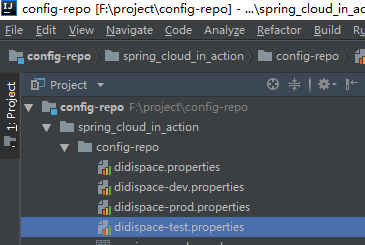
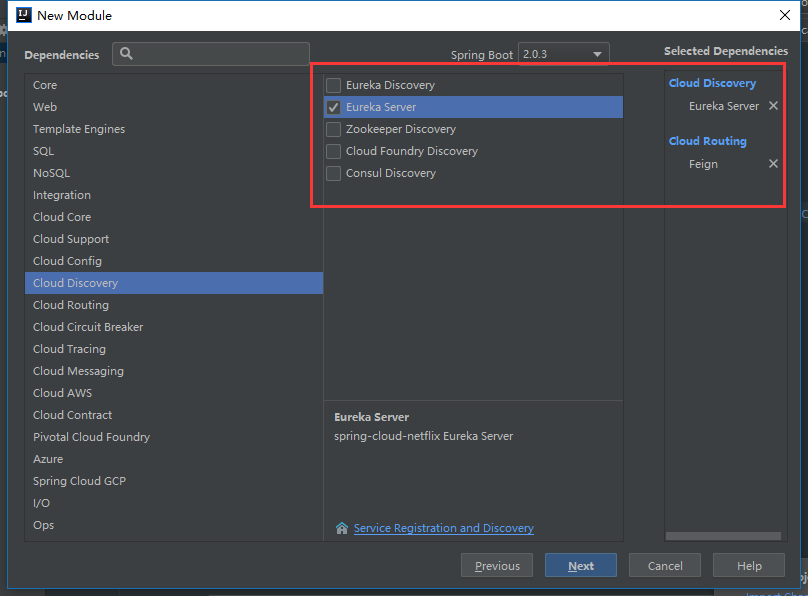
spring cloud config spring cloud config是spring cloud团队创建的一个全新的项目,用来为分布式系统中的基础设施和微服务应用提供集中化的配置支持。他分为服务端和客户端两部分。其中服务端也称为分布式式配置中心,它是一个独立的微服务应用,用来连接配置仓库的并为客户端提供获取配置信息,加密、解密等访问接口。而客户端则是微服务架构中的各个微服务应用和基础设施。 入门实例 这里我们会创建一个基于Git存储的分布式配置中心,并且在客户端演示如何通过配置指定的微服务应用所属的配置中心,以及让其能够通过配置中心获取配置信息并绑定到代码中。 说先我们在github上面先创建一个配置文件存储的仓库"config-repo",创建完成后新建spring_cloud_in_action/config-repo的目录。 在config-repo目录下面新建"didispace.properties"、 "didispace-dev.properties"、"didispace-prod.properties"、"didispace-test.properties"; 然后在这4个文件中均设置一个from属性,并且为每个配置文件设置不同的值: from=git-default-2.0 from=git-dev-2.0 from=git-prod-2.0 from=git-test-2.0 1532672579949.png 对应对应github上面的目录: 1532672654269.png 到这里,我们配置文件的仓库就已经配置好了。我们继续回到spring cloud的项目中; 建一个spring boot的module,并且命名为"";创建的过程中,我们选择eureka-server和config的组件依赖。 1532672208369.png pom.xml如下: <?xml version="1.0" encoding="UTF-8"?> <project xmlns="http://maven.apache.org/POM/4.0.0" xmlns:xsi="http://www.w3.org/2001/XMLSchema-instance" xsi:schemaLocation="http://maven.apache.org/POM/4.0.0 http://maven.apache.org/xsd/maven-4.0.0.xsd"> <modelVersion>4.0.0</modelVersion> <groupId>com.example</groupId> <artifactId>eureka-config-git</artifactId> <version>0.0.1-SNAPSHOT</version> <packaging>jar</packaging> <name>eureka-config-git</name> <description>Demo project for Spring Boot</description> <parent> <groupId>org.springframework.boot</groupId> <artifactId>spring-boot-starter-parent</artifactId> <version>2.0.3.RELEASE</version> <relativePath/> <!-- lookup parent from repository --> </parent> <properties> <project.build.sourceEncoding>UTF-8</project.build.sourceEncoding> <project.reporting.outputEncoding>UTF-8</project.reporting.outputEncoding> <java.version>1.8</java.version> <spring-cloud.version>Finchley.RELEASE</spring-cloud.version> </properties> <dependencies> <dependency> <groupId>org.springframework.cloud</groupId> <artifactId>spring-cloud-config-server</artifactId> </dependency> <dependency> <groupId>org.springframework.cloud</groupId> <artifactId>spring-cloud-starter-netflix-eureka-server</artifactId> </dependency> <dependency> <groupId>org.springframework.boot</groupId> <artifactId>spring-boot-starter-test</artifactId> <scope>test</scope> </dependency> </dependencies> <dependencyManagement> <dependencies> <dependency> <groupId>org.springframework.cloud</groupId> <artifactId>spring-cloud-dependencies</artifactId> <version>${spring-cloud.version}</version> <type>pom</type> <scope>import</scope> </dependency> </dependencies> </dependencyManagement> <build> <plugins> <plugin> <groupId>org.springframework.boot</groupId> <artifactId>spring-boot-maven-plugin</artifactId> </plugin> </plugins> </build> </project> application.yml配置: spring: application: name: config-server-git cloud: config: server: git: uri: https://github.com/ChinPangLung/config-repo #git仓库的地址;file://${user.name}/config-repo这是本地文件路径配置的方式,只限于用于开发使用 searchPaths: spring_cloud_in_action/config-repo username: XXXXXXX #这里对应仓库地址的账号密码 password: XXXXXXX discovery: enabled: true server: port: 7001 eureka: client: serviceUrl: defaultZone: http://peer1:8762/eureka/,http://peer2:8763/eureka/ spring.cloud.config.server.git.uri 表示我们上面再GitHub上创建的config-repo仓库地址 spring.cloud.config.server.git.searchPaths 表示配置文件存放查询的地址 spring.cloud.config.server.git.username 表示我们的github的账号 (大家修改成自己对应的账号密码就行了) spring.cloud.config.server.git.password 表示我们github的密码 项目的主类添加@EnableConfigServer注解 @SpringBootApplication @EnableConfigServer public class EurekaConfigGitApplication { public static void main(String[] args) { SpringApplication.run(EurekaConfigGitApplication.class, args); } } 到这里我们的配置服务中心就已经基本的搭建完成,在eureka注册中心,启动的情况下,我们运行该项目,如果没有报错,那就说明我们的配置是没有问题的。 完成了这些准备工作之后,我们就可以通过浏览器、POSTMAN或CURL等工具直接来访问到我们的配置内容了。访问配置信息的URL与配置文件的映射关系如下: /{application}/{profile}[/{label}] /{application}-{profile}.yml /{label}/{application}-{profile}.yml /{application}-{profile}.properties /{label}/{application}-{profile}.properties 上面的url会映射{application}-{profile}.properties对应的配置文件,其中{label}对应Git上不同的分支,默认为master。我们可以尝试构造不同的url来访问不同的配置内容,比如,要访问master分支,didisapce应用的dev环境,就可以访问这个url:http://localhost:7001/didispace/dev/master 可以得到以下的返回: 1532674051553.png 完成了上述的验证后,我们就可以创建一个客户端来映射服务配置中心的配置了。 创建一个spring boot的module,命名为"eureka-config-client" 1532674210897.png <?xml version="1.0" encoding="UTF-8"?> <project xmlns="http://maven.apache.org/POM/4.0.0" xmlns:xsi="http://www.w3.org/2001/XMLSchema-instance" xsi:schemaLocation="http://maven.apache.org/POM/4.0.0 http://maven.apache.org/xsd/maven-4.0.0.xsd"> <modelVersion>4.0.0</modelVersion> <groupId>com.example</groupId> <artifactId>eureka-config-client</artifactId> <version>0.0.1-SNAPSHOT</version> <packaging>jar</packaging> <name>eureka-config-client</name> <description>Demo project for Spring Boot</description> <parent> <groupId>org.springframework.boot</groupId> <artifactId>spring-boot-starter-parent</artifactId> <version>2.0.3.RELEASE</version> <relativePath/> <!-- lookup parent from repository --> </parent> <properties> <project.build.sourceEncoding>UTF-8</project.build.sourceEncoding> <project.reporting.outputEncoding>UTF-8</project.reporting.outputEncoding> <java.version>1.8</java.version> <spring-cloud.version>Finchley.RELEASE</spring-cloud.version> </properties> <dependencies> <dependency> <groupId>org.springframework.boot</groupId> <artifactId>spring-boot-starter-web</artifactId> </dependency> <dependency> <groupId>org.springframework.cloud</groupId> <artifactId>spring-cloud-starter-config</artifactId> </dependency> <dependency> <groupId>org.springframework.cloud</groupId> <artifactId>spring-cloud-starter-netflix-eureka-server</artifactId> </dependency> <dependency> <groupId>org.springframework.boot</groupId> <artifactId>spring-boot-starter-test</artifactId> <scope>test</scope> </dependency> </dependencies> <dependencyManagement> <dependencies> <dependency> <groupId>org.springframework.cloud</groupId> <artifactId>spring-cloud-dependencies</artifactId> <version>${spring-cloud.version}</version> <type>pom</type> <scope>import</scope> </dependency> </dependencies> </dependencyManagement> <build> <plugins> <plugin> <groupId>org.springframework.boot</groupId> <artifactId>spring-boot-maven-plugin</artifactId> </plugin> </plugins> </build> </project> application.yml配置: spring: application: name: config-client server: port: 7002 创建一个"bootstrap.yml"文件,配置如下: spring: cloud: config: profile: dev #dev开发环境配置文件,test测试环境配置文件,pro正式环境文件 label: master #git仓库对应的分支名称 config-label-test # uri: http://localhost:7001/ #config-server name: didispace discovery: serviceId: config-server-git #基于服务注册发现的方式查找 enabled: true eureka: client: serviceUrl: defaultZone: http://peer1:8762/eureka/,http://peer2:8763/eureka/ #注册中心eureka.client.service-url.defaultZone = 一定要放在boostrap文件中,不然启动会报错 在项目的中类中写一个from接口: @SpringBootApplication @RestController @RefreshScope public class EurekaConfigClientApplication { public static void main(String[] args) { SpringApplication.run(EurekaConfigClientApplication.class, args); } @Value("${from}") private String from; @RequestMapping(value = "from") public String getFrom() { return this.from; } } 启动项目,然后访问http://localhost:7002/from可以得到以下的返回: 1532674897020.png 这个数据就是config-client项目获取服务配置中心里对应指向的GitHub仓库配置文件的值。 而且我们观察"eureka-config-git"项目控制台的输出 1532675044524.png 我们可以知道,服务配置中心在获取GitHub上面的配置文件返回config-client时,同时会缓存一分数据在本地的。这样就算因为其他的问题导致配置服务中心获取不到GitHub仓库的数据时,config-client也能有缓存的数据返回。 这样我们就完成了分布式配置中心的搭建了。其实上面的config-client我们在实际的开发中,就是相当于一个具体的微服务实例应用了。 github 项目源码 下面一篇我们将搭建spring cloud bus 服务总线。

优秀的个人博客,低调大师

springCloud Finchley 实战入门(基于springBoot 2.0.3)【七 Fegin 声明式服务调用】

Fegin 介绍 spring cloud fegin ,他是基于Netflix Fegin实现得,整合了spring cloud Ribbon和spring cloud Hystrix,除了整合这两者得功能外,他还提供了了一种声明式得Web服务客户端定义方式。 快速入门 创建一个spring boot项目命名为"eureka-bussniss-service-user-client-fegin",选择server和fegin的依赖; 1532587428278.png application.yml相关配置: spring: application: name: service-user-client-fegin server: port: 9001 eureka: client: serviceUrl: defaultZone: http://peer1:8762/eureka/,http://peer2:8763/eureka/ feign: hystrix: enabled: true 项目主类EurekaBussnissServiceUserClientFeginApplication,添加@EnableEurekaClient和@EnableFeignClients注解 @SpringBootApplication @EnableEurekaClient @EnableFeignClients public class EurekaBussnissServiceUserClientFeginApplication { public static void main(String[] args) { SpringApplication.run(EurekaBussnissServiceUserClientFeginApplication.class, args); } } 我们以eureka-bussniss-service-user的服务例。在fegin项目中定义一个接口"UserFeignClient" /** * 标明feign调用的微服务名称 */ //通过@ FeignClient(“服务名”),来指定调用哪个服务。 // 比如在代码中调用了service-hi服务的“/hi”接口,还可以使用url参数指定一个URL // fallback 出现错误回调类 @FeignClient(name = "service-user",fallback = UserFallback.class) public interface UserFeignClient { /** * 对应service-user微服务中的URL * @return */ @GetMapping("/listUsers") String listUsers(); } 接着,创建一个Controller来实现对Fegin客户端的调用,使用@Autowired自动注入上面的“UserFeignClient ”实例。并且通过方法实现对service-user的服务发起调用。 @RestController public class UserFeignApi { /** * 将刚才定义的userFeignClient注入,并当成普通的接口调用即可 */ @Autowired private UserFeignClient userFeignClient; @GetMapping("/listUsersByFeign") public String ListUsers(){ String users = this.userFeignClient.listUsers(); return users; } } 方式测试fegin的负载均衡以及服务容错保护的功能,我们创建了一个UserFallback实现UserFeignClient。实现接口请求错误的反馈 @Component public class UserFallback implements UserFeignClient { @Override public String listUsers() { return "服务调用失败"; } } 包路径截图 1532588267196.png 到这里就已经基本完成了,依次启动service-user(8802,8803两个端口)、fegin。 1532588691914.png 访问fegin项目的地址http://localhost:9001/listUsersByFeign 1532588711363.png 1532588720488.png 重复请求,会发现接口数据是依次返回8802和8803的数据的。 现在把其中一个service-user服务停掉(8803),一开始当请求负载到8803这个服务实例时,因为当前的服务已经停掉了,所以接口响应显示了我们实现了UserFallback 类的返回。 1532588846177.png 再过几秒钟后,我们继续请求会发现,接口已经全部负载到了8802的服务实例了。 1532588992210.png 所以可以看到fegin已经实现了Ribbon和Hystrix的功能了。 github 项目源码 下一篇我们将实现spring cloud config分布式配置中心的组件。

优秀的个人博客,低调大师

阿里云Kubernetes SpringCloud 实践进行时(6): 熔断器聚合监控

简介 为了更好地支撑日益增长的庞大业务量,我们常常需要把服务进行整合、拆分,使我们的服务不仅能通过集群部署抵挡流量的冲击,又能根据业务在其上进行灵活的扩展。随着分布式的普及、服务的快速增长与云计算技术的进步,微服务架构也因其特有的优势而备受关注。微服务架构的本质,是把整体的业务拆分成很多有特定明确功能的服务,通过很多分散的小服务之间的配合,去解决更大,更复杂的问题。对被拆分后的服务进行分类和管理,彼此之间使用统一的接口来进行交互。 本系列讲述了在阿里云Kubernetes容器服务基础之上,如何快速搭建基于Spring Cloud的微服务架构中的基础设施: 第一篇:分布式服务注册与发现系统 第二篇:分布式配置管理系统 第三篇:API网关服务Zuul 系统 第四篇:分布式追踪系统 第五篇:分布式弹性服务与容错处理框架Hystrix及其监控仪表板 第六

优秀的个人博客,低调大师

SpringCloud技术专题】「Hystrix」(1)基本使用以及参数动态配置更新实现

### 概述 > 只介绍同步模式下简单的使用, 有助于快速接入, 会有一些官方文档中没有涉及的细节. ### 默认方式 ```java public class CommandHelloWorld extends HystrixCommand { private final String name; // 构造方法中传入需要用到的数据, run 方法处理逻辑. public CommandHelloWorld(String name) { // 构造 Setter 比较麻烦, 后面会进一步介绍 super(HystrixCommandGroupKey.Factory.asKey("ExampleGroup")); this.name = name; } @Override protected String run() { // a real example would do work like a network call here return "Hello " + name + "!"; } // fallback 方法可选, 如果没有, 默认抛异常. @Override protected String getFallback() { return "fallback"; } } ``` ### 构造Setter Hystrix 讲求的大而全, 设计的比较模式, 用起来不是很方便. 下面是一个构造 Setter 的实例: ```java Setter setter = Setter.withGroupKey(HystrixCommandGroupKey.Factory.asKey(site)) // groupKey 对command进行分组, 用于 reporting, alerting, dashboards, or team/library ownership, 也是 ThreadPool 的默认 key .andCommandKey(HystrixCommandKey.Factory.asKey(site)) // 可以根据 commandKey 具体的运行时参数 .andThreadPoolKey(HystrixThreadPoolKey.Factory.asKey(site)) // 指定 ThreadPool key, 这样就不会默认使用 GroupKey .andCommandPropertiesDefaults(HystrixCommandProperties.Setter() // 初始化 Command 相关属性 .withMetricsRollingStatisticalWindowInMilliseconds( 100 * 1000) // 设置统计窗口为100秒 .withCircuitBreakerSleepWindowInMilliseconds( 10 * 1000) // 设置熔断以后, 试探间隔为10秒 .withCircuitBreakerRequestVolumeThreshold( 10) // 设置判断熔断请求阈值为10 .withCircuitBreakerErrorThresholdPercentage( 80) // 设置判断熔断失败率为80% .withExecutionTimeoutInMilliseconds(3 * 1000)) // 设置每个请求超时时间为3秒 .andThreadPoolPropertiesDefaults( // 设置和threadPool相关 HystrixThreadPoolProperties.Setter().withCoreSize(20)); // 设置 threadPool 大小为20(最大20个并发) ``` - **另外threadPool还有个设置统计窗口的选项, 因为Hystrix统计维度会从主线程和线程池两个维度来统计.** - 还有好多配置信息可以配置, 这里只提供了几个重要的,其他配置参考:[hystrix-configuration](https://github.com/Netflix/Hystrix/wiki/Configuration) ### Spring cloud 注解方式 需要用到两个注解: **@EnableCircuitBreaker, @HystrixCommand(fallbackMethod = "reliable")** 启动类: ```java package hello; import org.springframework.boot.SpringApplication; import org.springframework.boot.autoconfigure.SpringBootApplication; import org.springframework.boot.web.client.RestTemplateBuilder; import org.springframework.context.annotation.Bean; import org.springframework.web.bind.annotation.RestController; import org.springframework.web.bind.annotation.RequestMapping; import org.springframework.beans.factory.annotation.Autowired; import org.springframework.cloud.client.circuitbreaker.EnableCircuitBreaker; import org.springframework.web.client.RestTemplate; @EnableCircuitBreaker @RestController @SpringBootApplication public class ReadingApplication { @Autowired private BookService bookService; @Bean public RestTemplate rest(RestTemplateBuilder builder) { return builder.build(); } @RequestMapping("/to-read") public String toRead() { return bookService.readingList(); } public static void main(String[] args) { SpringApplication.run(ReadingApplication.class, args); } } ``` 服务类: ```java package hello; import com.netflix.hystrix.contrib.javanica.annotation.HystrixCommand; import org.springframework.stereotype.Service; import org.springframework.web.client.RestTemplate; import java.net.URI; @Service public class BookService { private final RestTemplate restTemplate; public BookService(RestTemplate rest) { this.restTemplate = rest; } @HystrixCommand(fallbackMethod = "reliable") public String readingList() { URI uri = URI.create("http://localhost:8090/recommended"); return this.restTemplate.getForObject(uri, String.class); } public String reliable() { return "Cloud Native Java (O'Reilly)"; } } ``` ### 动态更新配置 Hystrix 使用 Archaius 来实现动态配置. 使用 Spring 配置方式: #### 创建配置获取源 > 实现接口 PolledConfigurationSource, 并返回一个 Map. 注意 Key 为 hystrix 配置key, 可以参考:[hystrix-configuration](https://github.com/Netflix/Hystrix/wiki/Configuration) ```java package com.rh.config.hystrix; import com.netflix.config.PollResult; import com.netflix.config.PolledConfigurationSource; import org.springframework.core.env.*; import org.springframework.core.io.ResourceLoader; import org.springframework.stereotype.Component; import javax.annotation.Resource; import java.util.*; /** * @Auther: wangyunfei * @Date: 2019/12/10 14:12 * @Description: */ @Component /** * @Author wangyunfei * @Description 定期读取配置文件中的hystrix配置 * @Date 2019/12/10 14:13 * @Param * @return **/ public class DegradeConfigSource implements PolledConfigurationSource { public final String HystrixPrefix = "hystrix"; //spring的Environment private ConfigurableEnvironment environment; private PropertySourcesPropertyResolver resolver; DegradeConfigSource(ConfigurableEnvironment environment) { this.environment = environment; this.resolver = new PropertySourcesPropertyResolver(this.environment.getPropertySources()); this.resolver.setIgnoreUnresolvableNestedPlaceholders(true); } @Override public PollResult poll(boolean initial, Object checkPoint) throws Exception { //Map complete = getHystrixConfig(); Map complete = getProperties(); return PollResult.createFull(complete); } @Resource private ResourceLoader resourceLoader; /** * @Author wangyunfei * @Description 获取配置文件中的指定hystrix前缀信息 * 缺点:1)不支持yml格式 只支持properties * 2)只能读取某一个配置文件中的信息 如果配置是写在不同配置文件则不支持 * @Date 2019/12/20 14:58 * @Param [] * @return java.util.HashMap **/ public HashMap getHystrixConfig() throws Exception { HashMap hystrixMap = new HashMap (); org.springframework.core.io.Resource resource = resourceLoader.getResource("classpath:application-mod.properties"); Properties props = new Properties(); props.load(resource.getInputStream()); Enumeration keys = props.propertyNames(); while (keys.hasMoreElements()) { String key = (String) keys.nextElement(); System.out.println(key + "=" + props.getProperty(key)); if(key.contains(HystrixPrefix)) { hystrixMap.put(key, props.getProperty(key)); } } return hystrixMap; } /** * @Author wangyunfei * @Description 获取所有配置信息 * @Date 2019/12/20 15:06 * @Param [] * @return java.util.Map **/ public Map getProperties() { Map properties = new LinkedHashMap<>(); //spring env 里面也是多个source组合的 for (Map.Entry > entry : getPropertySources().entrySet()) { PropertySource source = entry.getValue(); if (source instanceof EnumerablePropertySource) { EnumerablePropertySource enumerable = (EnumerablePropertySource) source; for (String name : enumerable.getPropertyNames()) { if (!properties.containsKey(name) && name.contains(HystrixPrefix)) { properties.put(name, resolver.getProperty(name)); } } } } return properties; } //PropertySource也可能是组合的,通过递归获取 private Map > getPropertySources() { Map > map = new LinkedHashMap >(); MutablePropertySources sources = null; if (environment != null) { sources = environment.getPropertySources(); } else { sources = new StandardEnvironment().getPropertySources(); } for (PropertySource source : sources) { extract("", map, source); } return map; } private void extract(String root, Map > map, PropertySource source) { if (source instanceof CompositePropertySource) { for (PropertySource nest : ((CompositePropertySource) source) .getPropertySources()) { extract(source.getName() + ":", map, nest); } } else { map.put(root + source.getName(), source); } } } ``` #### 配置并初始化自动配置 创建一个 DynamicConfiguration, 并注册一下就可以了. 注意, 我们使用了 FixedDelayPollingScheduler 来定期加载新的配置. 默认60秒加载一次. ```java @Configuration public class DegradeDynamicConfig { @Bean public DynamicConfiguration dynamicConfiguration(@Autowired DegradeConfigSource degradeConfigSource) { AbstractPollingScheduler scheduler = new FixedDelayPollingScheduler(30 * 1000, 60 * 1000, false); DynamicConfiguration configuration = new DynamicConfiguration(degradeConfigSource, scheduler); ConfigurationManager.install(configuration); // must install to enable configuration return configuration; } } ``` 其中从配置文件获取hystrix配置信息等参考如下代码 http://techblog.ppdai.com/2018/05/08/20180508/ ### 参考 https://github.com/Netflix/Hystrix/wiki/How-To-Use https://github.com/Netflix/Hystrix/wiki/Configuration https://github.com/Netflix/Hystrix/issues/1717 https://github.com/Netflix/archaius/wiki/Users-Guide https://spring.io/guides/gs/circuit-breaker/
优秀的个人博客,低调大师

(二十七) 跟我学习SpringCloud-使用Hystrix实现容错处理

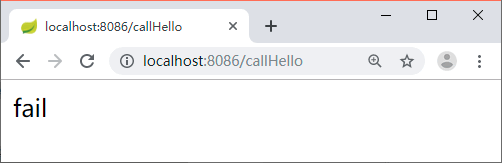
创建一个新的Maven项目 hystrix-feign-demo,增加 Hystrix 的依赖,代码如下所示。 <dependency> <groupId>org.springframework.cloud</groupId> <artifactId>spring-cloud-starter-netflix-hystrix</artifactId> </dependency> 在启动类上添加 @EnableHystrix 或者 @EnableCircuitBreaker。注意,@EnableHystrix 中包含了 @EnableCircuitBreaker。 然后编写一个调用接口的方法,在上面增加一个 @HystrixCommand 注解,用于指定依赖服务调用延迟或失败时调用的方法,代码如下所示。 @GetMapping("/callHello") @HystrixCommand(fallbackMethod = "defaultCallHello") public String callHello() { String result = restTemplate.getForObject("http://localhost:8088/house/hello", String.class); return result; } 当调用失败触发熔断时会用 defaultCallHello 方法来回退具体的内容,定义 default-CallHello 方法的代码如下所示。 public String defaultCallHello() { return "fail"; } 只要不启动 8088 端口所在的服务,调用 /callHello 接口,就可以看到返回的内容是“fail”,如图 1 所示。 将启动类上的 @EnableHystrix 去掉,重启服务,再次调用 /callHello 接口可以看到返回的是 500 错误信息,这个时候就没有用到回退功能了。 { code: 500, message: "I/O error on GET request for "http://localhost:8088/house/hello": Connection refused; nested exception is java.net.ConnectException: Connection refused ", data: null } 配置详解 HystrixCommand 中除了 fallbackMethod 还有很多的配置,下面我们来看看这些配置,如下表所示: HystrixCommand 配置详解 名称 说明 hystrix.command.default.execution.isolation .strategy 该配置用来指定隔离策略,具体策略有下面 2 种。 THREAD:线程隔离,在单独的线程上执行,并发请求受线程池大小的控制。 SEMAPHORE:信号量隔离,在调用线程上执行,并发请求受信号量计数器的限制。 hystrix.command.default.execution.isolation .thread.timeoutInMilliseconds 该配置用于 HystrixCommand 执行的超时时间设置,当 HystrixCommand 执行的时间超过了该配置所设置的数值后就会进入服务降级处理,单位是毫秒,默认值为 1000。 hystrix.command.default.execution .timeout.enabled 该配置用于确定是否启用 execution.isolation.thread.timeoutInMilliseconds 设置的超时时间,默认值为 true。设置为 false 后 execution.isolation.thread.timeoutInMilliseconds 配置也将失效。 hystrix.command.default.execution.isolation .thread.interruptOnTimeout 该配置用于确定 HystrixCommand 执行超时后是否需要中断它,默认值为 true。 hystrix.command.default.execution.isolation .thread.interruptOnCancel 该配置用于确定 HystrixCommand 执行被取消时是否需要中断它,默认值为 false。 hystrix.command.default.execution.isolation .semaphore.maxConcurrentRequests 该配置用于确定 Hystrix 使用信号量策略时最大的并发请求数。 hystrix.command.default.fallback.isolation .semaphore.maxConcurrentRequests 该配置用于如果并发数达到该设置值,请求会被拒绝和抛出异常并且 fallback 不会被调用,默认值为 10。 hystrix.command.default.fallback.enabled 该配置用于确定当执行失败或者请求被拒绝时,是否会尝试调用 hystrixCommand.getFallback(),默认值为 true。 hystrix.command.default.circuitBreaker.enabled 该配置用来跟踪 circuit 的健康性,如果未达标则让 request 短路,默认值为 true。 hystrix.command.default.circuitBreaker .requestVolumeThreshold 该配置用于设置一个 rolling window 内最小的请求数。如果设为 20,那么当一个 rolling window 的时间内(比如说 1 个 rolling window 是 10 秒)收到 19 个请求,即使 19 个请求都失败,也不会触发 circuit break,默认值为 20。 hystrix.command.default.circuitBreaker .sleepWindowInMilliseconds 该配置用于设置一个触发短路的时间值,当该值设为 5000 时,则当触发 circuit break 后的 5000 毫秒内都会拒绝 request,也就是 5000 毫秒后才会关闭 circuit。默认值为 5000。 hystrix.command.default.circuitBreaker .errorThresholdPercentage 该配置用于设置错误率阈值,当错误率超过此值时,所有请求都会触发 fallback,默认值为 50。 hystrix.command.default.circuitBreaker.forceOpen 如果配置为 true,将强制打开熔断器,在这个状态下将拒绝所有请求,默认值为 false。 hystrix.command.default.circuitBreaker.forceClosed 如果配置为 true,则将强制关闭熔断器,在这个状态下,不管错误率有多高,都允许请求,默认值为 false。 hystrix.command.default.metrics .rollingStats.timeInMilliseconds 设置统计的时间窗口值,单位为毫秒。circuit break 的打开会根据 1 个 rolling window 的统计来计算。若 rolling window 被设为 10 000 毫秒,则 rolling window 会被分成多个 buckets,每个 bucket 包含 success、failure、timeout、rejection 的次数的统计信息。默认值为 10 000 毫秒。 hystrix.command.default.metrics .rollingStats.numBuckets 设置一个 rolling window 被划分的数量,若 numBuckets=10、rolling window=10 000,那么一个 bucket 的时间即 1 秒。必须符合 rolling window%numberBuckets==0。默认值为 10。 hystrix.command.default.metrics .rollingPercentile.enabled 是否开启指标的计算和跟踪,默认值为 true。 hystrix.command.default.metrics .rollingPercentile.timeInMilliseconds 设置 rolling percentile window 的时间,默认值为 60 000 毫秒 hystrix.command.default.metrics .rollingPercentile.numBuckets 设置 rolling percentile window 的 numberBuckets,默认值为 6。 hystrix.command.default.metrics .rollingPercentile.bucketSize 如果 bucket size=100、window=10 秒,若这 10 秒里有 500 次执行,只有最后 100 次执行会被统计到 bucket 里去。增加该值会增加内存开销及排序的开销。默认值为 100。 hystrix.command.default.metrics .healthSnapshot.intervalInMilliseconds 用来计算影响断路器状态的健康快照的间隔等待时间,默认值为 500 毫秒。 hystrix.command.default.requestCache.enabled 是否开启请求缓存功能,默认值为 true。 hystrix.command.default.requestLog.enabled 记录日志到 HystrixRequestLog,默认值为 true。 hystrix.collapser.default.maxRequestsInBatch 单次批处理的最大请求数,达到该数量触发批处理,默认为 Integer.MAX_VALUE。 hystrix.collapser.default.timerDelayInMilliseconds 触发批处理的延迟,延迟也可以为创建批处理的时间与该值的和,默认值为 10 毫秒。 hystrix.collapser.default.requestCache.enabled 是否启用对 HystrixCollapser.execute() 和 HystrixCollapser.queue() 的请求缓存,默认值为 true。 hystrix.threadpool.default.coreSize 并发执行的最大线程数,默认值为 10。 hystrix.threadpool.default.maxQueueSize BlockingQueue 的最大队列数。当设为 -1 时,会使用 SynchronousQueue;值为正数时,会使用 LinkedBlcokingQueue。该设置只会在初始化时有效,之后不能修改 threadpool 的 queue size。默认值为 -1。 hystrix.threadpool.default.queueSizeRejectionThreshold 即使没有达到 maxQueueSize,但若达到 queueSizeRejectionThreshold 该值后,请求也会被拒绝。因为 maxQueueSize 不能被动态修改,而 queueSizeRejectionThreshold 参数将允许我们动态设置该值。if maxQueueSize==-1,该字段将不起作用。 hystrix.threadpool.default.keepAliveTimeMinutes 设置存活时间,单位为分钟。如果 coreSize 小于 maximumSize,那么该属性控制一个线程从实用完成到被释放的时间。默认值为 1 分钟。 hystrix.threadpool.default .allowMaximumSizeToDivergeFromCoreSize 该属性允许 maximumSize 的配置生效。那么该值可以等于或高于 coreSize。设置 coreSize 小于 maximumSize 会创建一个线程池,该线程池可以支持 maximumSize 并发,但在相对不活动期间将向系统返回线程。默认值为 false。 hystrix.threadpool.default.metrics .rollingStats.timeInMilliseconds 设置滚动时间窗的时间,单位为毫秒,默认值是 10 000。 hystrix.threadpool.default.metrics .rollingStats.numBuckets 设置滚动时间窗划分桶的数量,默认值为 10。 官方的配置信息文档请参考:https://github.com/Netflix/Hystrix/wiki/Configuration。 上面列出来的都是 Hystrix 的配置信息,那么在Spring Cloud中该如何使用呢?只需要在接口的方法上面使用 HystrixCommand 注解(如下代码所示),指定对应的属性即可。 @HystrixCommand(fallbackMethod = "defaultCallHello",commandProperties = { @HystrixProperty(name="execution.isolation.strategy", value = "THREAD") } ) @GetMapping("/callHello") public String callHello() { String result = restTemplate.getForObject("http://localhost:8088/house/hello", String.class); return result; } 给大家推荐分布式架构源码

优秀的个人博客,低调大师

SpringCloud 应用在 Kubernetes 上的最佳实践 — 线上发布(优雅上下线)

前言 上篇我们讲的是发布回滚过程,尤其是在 Kubernetes 的回滚过程中,原生有提供 Rollout 到上一个版本的能力,能保证我们在发布过程中遇到问题时快速回退的能力。然而在每一次上线的过程中,我们最难处理的就是正在运行中的流量,如何做到流量的无损上/下线,是一个系统能保证 SLA 的关键。 介绍 什么是优雅上线?就如下面这个房子一样,未建好的房子,人住进去会有危险,房子应该建好,装修好,人才能住进去。 那么如何做到优雅上线,我们先来看一个WEB应用的加载过程,就像上面造房子一样,是个漫长的过程: 应用的加载是漫长的,在加载过程,服务是不可预期的;如过早的打开Socket监听,则客户端可能感受到漫长的等待;如果数据库、消息队列、REDIS客户端未完成初始化,则服务可能因缺少关键的底层服务而异常。 所以在应用准备完成后,才接入服务,即做到优雅上线。当然应用上线后,也可能因如数据库断连等情况引起服务不可用;或是准备完成了,但在上线前又如发生数据库断连,导致服务异常。为了简化问题,后面两种情况作为一个应用自愈的问题来看待。 什么是优雅下线?与建房子相反就像下面的危房一样,人住在里面很危险,人应该先从房子出来,然后推掉房子。 那么如何做到优雅下线,我们先来看一个WEB应用的停止过程: 所以关闭服务接入(转移服务接入),完成正在处理的服务,清理自身占用的资源后退出即做到优雅下线。 如何实现优雅下线 从上面介绍看,似乎不难,但事实上,很少系统真正实现了优雅上下线。因为软件本身由无数各种各样相互依赖的结构组成,每个结构都使用一些资源,污染一些资源;通常在设计之初优雅上下线也不被作为优先考虑的需求,所以对于下线的过程,通常都没被充分考虑,在设计上通常要求: 结构(组件)应形成层次关系。 用户线程需能收到停止信号并响应退出;否则使用daemon线程。 结构应按依赖关系自下向上构建:就像建房子一样,自内向外构建而成。 结构应按依赖关系自上向下销毁:就像拆房子一样,自外向内拆解。 优雅下线实现路径 大致分为一个完整的过程,需要经历一下四个关键的节点,如下图; 接收信号:停止信号可能从进程内部触发(比如 Crash 场景),如果自退出的话基本上无法保证优雅下线;所以能保证优雅下线的前提就是需要正确处理来自进程外部的信号。 停止流量接收:由于在停止之前,我们会有一些正在处理的请求,贸然退出会对这些请求产生损耗。但是在这段时间之内我们绝不能再接收新的业务请求,如果这是一个后台任务型(消息消费型或任务调度型)的程序,也要停止接收新的消息和任务。对于一个普通的 WEB 场景,这一块不同的场景实现的方式也会不一样,下面的 Srping Cloud 应用的下线流程会详细讲解。 销毁资源:常见的是一些系统资源,也包括一些缓存、锁的清理、同时也包括线程池、关闭阻塞中的的IO操作,等到我们这些服务器资源销毁之后,就可以通知主线程退出。 Spring Cloud应用 一个Spring boot应用通常由应用本身加一系列的Starter组成,对于Spring boot体系,需要了解如下核心概念: Starter:提供一系列的模块,由Spring boot核心通过auto-configuration机制加载。 Bean:一切皆Bean,starter模块的加载产生各种Bean。 Context:Bean的容器,容器拥有生命周期,Bean需要感知生命周期事件。 LifeCycle:生命周期管理接口。 ApplicationEvent:模块之间,模块与容器之间,通过发送或监听事件来达到互相通讯的目的。 所以对于应用上下线这个主题,我们应尽可能利用其丰富的原生事件机制,Spring Cloud 中内置的 Starter 机制针对整个生命周期管理的过程有了很好的封装。 Spring Cloud应用的优雅上线 Spring Cloud 启动过程触发回调及事件如下,详细介绍见application-events-and-listeners,简单罗列如下: Spring自身及其组件大量基于这些事件构建,如响应WebServerInitializedEvent事件向服务注册中心注册服务,对于应用一般可利用: InitializingBean or @PostConstruct:在Bean装配完后,被回调,如完成数据源初始化连接。 ApplicationReadyEvent、ApplicationRunner、CommandLineRunner:如开始监听消息队列,处理消息;注册到SLB等;先通过配置禁用服务的自动注册,在这里做手动服务注册。 Spring Cloud应用的优雅下线 Spring Cloud 本身可以作为一个应用单独存在,也可以是依附在一个微服务集群中,同时还能作为反向代理架构中的一个网关。不同的场景,需要用到的方法也不一样,我们就常用的三种场景针对性的加以说明。 场景一:直接访问WEB服务 客户端直接访问WEB应用,在这个用例下,优雅下线需要做的事情有: 正在处理的请求完成处理 应用自身完成的安全下线并正常退出 客户端感知到连接异常 Spring-boot从2.3开始内置了WEB应用优雅下线的能力,需配置如下,具体介绍参见graceful-shutdown server.shutdown=graceful spring.lifecycle.timeout-per-shutdown-phase=20s 其实现方式: 首先关闭socket监听,等待正在处理的所有请求完成:具体可见WebServerGracefulShutdownLifecycle,通过getPhase返回最大值,达到早于WEB容器关闭执行的目的, 然后触发WEB容器关闭:具体可见WebServerStartStopLifecycle 但其实,对于未被WEB容器完全接收的请求,客户端仍会收到连接被重置的异常,只是这个时间窗口极小。该需求从提出到实现的时间跨度较长,感兴趣的可参见github上的讨论。 场景二:经由反向代理的服务优雅下线 因为实例前面还有反向代理,相比上个场景,需要新增“反向代理下线”这个处理流程。即若应用已经下线,但反向代理未摘除该应用实例时客户端将感知到失败。一般采取的策略有: 反向代理支持失败转移到其它应用实例 在关闭应用前,如将健康探测接口返回不健康以及等待足够的超时,让反向代理感知并摘除实例的路由信息。 对于仍在使用2.3以前版本的Spring Cloud应用,可参见一个方案,实现方式: 使用自身的shutdownHook替换Spring的shutdownHook 先改变health状态,等待一段时间,让反向代理感知并摘除实例的路由信息 场景三:在微服务集群中下线单个服务 在优雅关闭Spring Cloud应用自身之前,我们除了完成场景一之中的目标之外,还需要将自身节点从注册中心中下线。目前在Spring Cloud中针对注册中心下线的场景暂未提供开箱即用的方法,下面介绍两种可能的实现方案: 方案1:先通过脚本、或通过监听ContextClosedEvent反注册服务摘除流量;等待足够时间,如使用ribbon负载均衡器,需要长于配置的刷新时间;对于基于HTTP的服务,若Spring Cloud版本小于2.3,则时间需加上预期的请求处理时间。 方案2:客户端支持连接感知重试,如重试,实现方案可参考Spring-retry,针对连接异常RemoteConnectFailureException做重试。 针对 Eureka 中的场景,有一个很好的参考的例子,请参见:https://home1-oss.github.io/home1-oss-gitbook/release/docs/oss-eureka/GRACEFUL_SHUTDOWN.html Kubernetes 下的机制 Kubernetes 中针对应用的的管控提供了丰富的手段,正常的情况他提供了应用生命周期中的灵活的扩展点,同时也支持自己扩展他的 Operator 自定义上下线的流程。 抛开实现成本,以下线的情况来说,一个 Kubernetes 应用实例下线之前,管控程序会向 POD 发送一个 SIGTERM 的信号,应用响应时除了额外响应这一个信号之外,还能触发一段自定义的 PreStop 的挂在脚本,代码样例如下: yaml lifecycle: preStop: exec: command: - sh - -c - "sleep 5" 上面的例子一点特殊说明:因服务控制面刷新与POD收到SIGTERM同时发生,所以这里通过sleep 5让服务控制面先完成刷新,应用进程再响应SIGTERM信号。 Spring Cloud 与 Kubernetes 的结合 Kubernetes 会根据健康检查的情况来更新服务(Service)列表,其中如果 Liveness 失败,则会触发容器重建,这是一个相对很重的操作;若 Readiness 失败,则 Kubenetes 则默认不会将路由服务流量到相应的容器;基于这一基理,Spring Cloud 2.3开始,也做了原生的的支持,具体参见liveness-and-readiness-probes-with-Spring-boot,这些健康检查端点可对接kubnetes相应的probe: /actuator/health/liveness /actuator/health/readiness 同时,Spring Boot 内置了相应的 API、事件、Health Check 监控,部分代码/配置片段如下: java // Available as a component in the application context ApplicationAvailability availability; LivenessState livenessState = availabilityProvider.getLivenessState(); ReadinessState readinessState = availabilityProvider.getReadinessState(); .... // 对于应用,也可以通过API,发布相应的事件,来改变应用的状态 AvailabilityChangeEvent.publish(this.eventPublisher, ex, LivenessState.BROKEN); // 同时,应用监控也可影响这健康状态,将监控与健康关联,在K8S体系下,可以实现如离群摘除,应用自愈的能力 // application.properties management.endpoint.health.group.liveness.include=livenessProbe,cacheCheck 回到 Spring Cloud 应用在微服务集群中下线单个服务的章节中,我们的应用如果跑在 Kuberntes 中,如果我们使用了原生的 Kubernetes 机制去管理应用生命周期的话,只需要发布一个应用事件(LivenessState.BROKEN)即可实现优雅下线的能力。 后续 这一章节之后,和发布相关的内容都已经更新完毕,下一章节我们要开始高可用部分的能力,高可用也是系统保障 SLA 的关键部分,简单的理解是流量洪峰到来如何保证系统不会受到影响?当然我们还有一部分要达成的是洪峰退去之后资源是否存在浪费?敬请期待 ... 原文链接 本文为阿里云原创内容,未经允许不得转载。

资源下载

更多资源
优质分享App

优质分享App

近一个月的开发和优化,本站点的第一个app全新上线。该app采用极致压缩,本体才4.36MB。系统里面做了大量数据访问、缓存优化。方便用户在手机上查看文章。后续会推出HarmonyOS的适配版本。

腾讯云软件源

腾讯云软件源

为解决软件依赖安装时官方源访问速度慢的问题,腾讯云为一些软件搭建了缓存服务。您可以通过使用腾讯云软件源站来提升依赖包的安装速度。为了方便用户自由搭建服务架构,目前腾讯云软件源站支持公网访问和内网访问。

Spring

Spring

Spring框架(Spring Framework)是由Rod Johnson于2002年提出的开源Java企业级应用框架,旨在通过使用JavaBean替代传统EJB实现方式降低企业级编程开发的复杂性。该框架基于简单性、可测试性和松耦合性设计理念,提供核心容器、应用上下文、数据访问集成等模块,支持整合Hibernate、Struts等第三方框架,其适用范围不仅限于服务器端开发,绝大多数Java应用均可从中受益。

Sublime Text

Sublime Text

Sublime Text具有漂亮的用户界面和强大的功能,例如代码缩略图,Python的插件,代码段等。还可自定义键绑定,菜单和工具栏。Sublime Text 的主要功能包括:拼写检查,书签,完整的 Python API , Goto 功能,即时项目切换,多选择,多窗口等等。Sublime Text 是一个跨平台的编辑器,同时支持Windows、Linux、Mac OS X等操作系统。

用户登录
用户注册