首页 文章 精选 留言 我的

精选列表

搜索[环境],共10027篇文章
优秀的个人博客,低调大师

AppCode 2020.1.4 发布,集成开发环境

AppCode 2020.1.4 发布了,此版本修复了以下问题: Xcode 关于在具有 SPM 依赖项的项目上修改了 xcworkspace 的问题 XCTUnwrap 显示为未解决 在混合 Swift/OC 项目中更改 Objective-C 方法的签名时,IDE 冻结 类的构造方法/初始化方法问题 AppCode 2020.1 中的 Feature Trainer 插件问题 初始化程序中的字符串文字被高亮为错误 更新说明:https://blog.jetbrains.com/objc/2020/06/appcode-2020-1-4-is-here/

优秀的个人博客,低调大师

【Android电量】Battery Historian环境部署

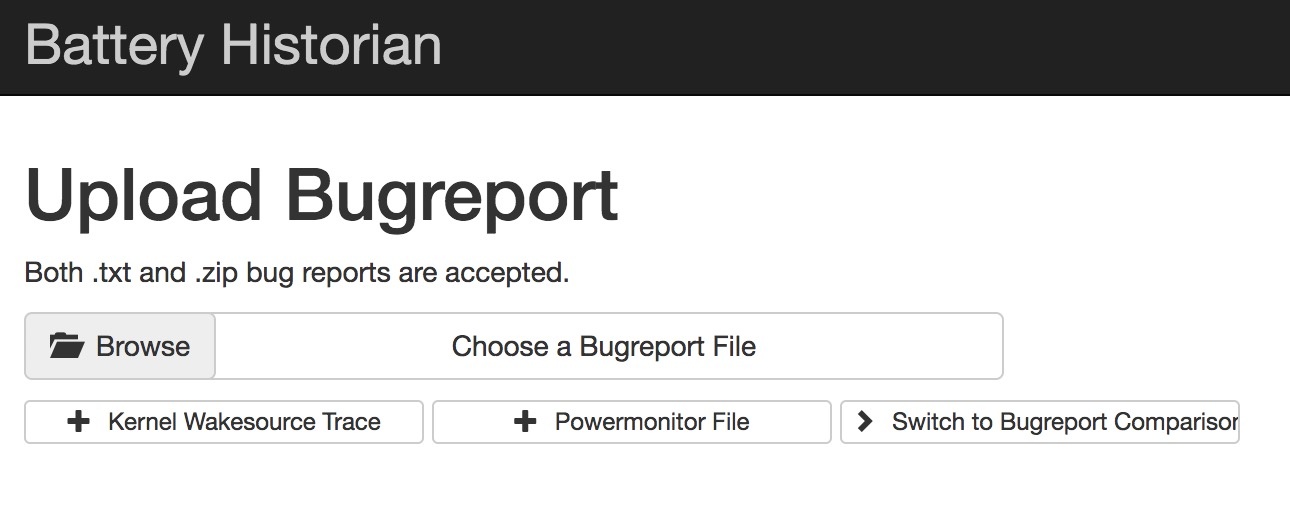
1、Install Docker Desktop for Mac (ps: Requires Apple Mac OS Sierra 10.12 or above.)手动下载安装 https://docs.docker.com/docker-for-mac/install/ 使用 Homebrew 安装 brew cask install docker(推荐) 2、Run the Battery Historian image. 使用命令 docker run -d -p 9999:9999 bhaavan/battery-historian 加载启动镜像 (有问题的镜像,不要用) docker run -p 9998:9998 gcr.io/android-battery-historian/stable:3.0 --port 9998 (亲测可用镜像) didi@localhost  ~  docker run -p 9998:9998 gcr.io/android-battery-historian/stable:3.0 --port 9998 Unable to find image 'gcr.io/android-battery-historian/stable:3.0' locally 3.0: Pulling from android-battery-historian/stable c62795f78da9: Pull complete d4fceeeb758e: Pull complete 5c9125a401ae: Pull complete 0062f774e994: Pull complete 6b33fd031fac: Pull complete a6bd6e1d0bdb: Pull complete 76cf9d0635af: Pull complete 856d20d533e0: Pull complete e63a73f6a528: Pull complete 1a75578c9353: Pull complete 24f3649604d9: Pull complete 10f637765748: Pull complete e06a9fa76cf2: Pull complete Digest: sha256:265a37707f8cf25f2f85afe3dff31c760d44bb922f64bbc455a4589889d3fe91 Status: Downloaded newer image for gcr.io/android-battery-historian/stable:3.0 2019/04/15 12:46:23 Listening on port: 9998 2019/04/15 12:48:19 Trace starting analysisServer processing for: GET 2019/04/15 12:48:19 Trace finished analysisServer processing for: GET 2019/04/15 12:48:20 Trace starting analysisServer processing for: GET 2019/04/15 12:48:20 Trace finished analysisServer processing for: GET 2019/04/15 12:48:27 Trace starting analysisServer processing for: POST 2019/04/15 12:48:27 Trace starting reading uploaded file. 2330165 bytes 2019/04/15 12:48:28 failed to extract battery info: could not find battery time info in bugreport 2019/04/15 12:48:28 failed to extract time information from bugreport dumpstate: open /usr/lib/go-1.6/lib/time/zoneinfo.zip: no such file or directory 2019/04/15 12:48:28 Trace started analyzing "bugreport-ALP-AL00-HUAWEIALP-AL00-2019-04-15-14-31-10.zip~bugreport-ALP-AL00-HUAWEIALP-AL00-2019-04-15-14-31-10/bugreport-ALP-AL00-HUAWEIALP-AL00-2019-04-15-14-31-10.txt" file. 2019/04/15 12:48:28 Trace finished processing checkin. 2019/04/15 12:48:28 Trace finished processing summary data. 2019/04/15 12:48:28 Trace finished generating Historian plot. 2019/04/15 12:48:28 Trace finished analyzing "bugreport-ALP-AL00-HUAWEIALP-AL00-2019-04-15-14-31-10.zip~bugreport-ALP-AL00-HUAWEIALP-AL00-2019-04-15-14-31-10/bugreport-ALP-AL00-HUAWEIALP-AL00-2019-04-15-14-31-10.txt" file. 2019/04/15 12:48:29 Trace ended analyzing file. 2019/04/15 12:48:29 Trace finished analysisServer processing for: POST didi@localhost  /usr/local/Cellar/go/1.12.4/src/github.com/google/battery-historian   master  docker ps -all CONTAINER ID IMAGE COMMAND CREATED STATUS PORTS NAMES c19bb05d9198 bhaavan/battery-historian "/bin/sh -c 'go run …" 19 minutes ago Up 19 minutes 0.0.0.0:9999->9999/tcp sad_shaw didi@localhost  /usr/local/Cellar/go/1.12.4/src/github.com/google/battery-historian   master  didi@localhost  /usr/local/Cellar/go/1.12.4/src/github.com/google/battery-historian   master  docker images REPOSITORY TAG IMAGE ID CREATED SIZE bhaavan/battery-historian latest 9a3a9fd0ca2f 2 years ago 922MB 3、Open BHRun historian and visit http://localhost:9999 4、Upload Report Both .txt and .zip bug reports are accepted. To take a bug report from your Android device, you will need to enable USB debugging under Settings > System > Developer Options To obtain a bug report from your development device running Android 7.0 and higher: $ adb bugreport bugreport.zip didi@localhost  ~  adb bugreport bugreport.zip /data/user_de/0/com.android.shell/files/bugreports/bugreport-ALP-AL00-HUAWEIALP-AL00-2019-04-15-11-08-01.zip: 1 file pulled. 23.2 MB/s (2295220 bytes in 0.094s) // 手机本地 didi@localhost  ~  adb pull /data/user_de/0/com.android.shell/files/bugreports/bugreport-ALP-AL00-HUAWEIALP-AL00-2019-04-15-12-08-32.zip /Users/didi/Documents/ # 导出到电脑 /data/user_de/0/com.android.shell/files/bugreports/bugreport-ALP-AL00-HUAWEIALP-AL00-2019-04-15-12-08-32.zip: 1 file pulled. 24.1 MB/s (2415380 bytes in 0.096s) For devices 6.0 and lower: $ adb bugreport > bugreport.txt 5、Start analyzing! Timeline: System stats: App stats:

优秀的个人博客,低调大师

vue开发环境搭建Mac版

1、安装brew 打开终端运行以下命令: /usr/bin/ruby -e "$(curl -fsSL https://raw.githubusercontent.com/Homebrew/install/master/install)" 2、安装成功后,查看一下brew的版本信息: brew -v 4、安装 淘宝镜像 (npm) npm install -g cnpm --registry=https://registry.npm.taobao.org 5、安装webpack cnpm install webpack -g 6、安装vue脚手架 npm install vue-cli -g 9、安装项目依赖 npm install 比较慢,需要有点耐心…… 10、安装 vue 路由模块vue-router和网络请求模块vue-resource cnpm install vue-router vue-resource --save 11、启动项目 npm run dev

资源下载

更多资源
优质分享App

优质分享App

近一个月的开发和优化,本站点的第一个app全新上线。该app采用极致压缩,本体才4.36MB。系统里面做了大量数据访问、缓存优化。方便用户在手机上查看文章。后续会推出HarmonyOS的适配版本。

Mario

Mario

马里奥是站在游戏界顶峰的超人气多面角色。马里奥靠吃蘑菇成长,特征是大鼻子、头戴帽子、身穿背带裤,还留着胡子。与他的双胞胎兄弟路易基一起,长年担任任天堂的招牌角色。

腾讯云软件源

腾讯云软件源

为解决软件依赖安装时官方源访问速度慢的问题,腾讯云为一些软件搭建了缓存服务。您可以通过使用腾讯云软件源站来提升依赖包的安装速度。为了方便用户自由搭建服务架构,目前腾讯云软件源站支持公网访问和内网访问。

Nacos

Nacos

Nacos /nɑ:kəʊs/ 是 Dynamic Naming and Configuration Service 的首字母简称,一个易于构建 AI Agent 应用的动态服务发现、配置管理和AI智能体管理平台。Nacos 致力于帮助您发现、配置和管理微服务及AI智能体应用。Nacos 提供了一组简单易用的特性集,帮助您快速实现动态服务发现、服务配置、服务元数据、流量管理。Nacos 帮助您更敏捷和容易地构建、交付和管理微服务平台。