首页 文章 精选 留言 我的

精选列表

搜索[unity3d],共120篇文章
优秀的个人博客,低调大师

[Unity3D]调用Android接口

简介 有一些手机功能,Unity没有提供相应的接口,例如震动,例如不锁屏,例如GPS,例如... 有太多的特殊功能Unity都没有提供接口,这时候,我们就需要通过使用Android原生的ADT编辑器去编写Java代码,然后打包jar导入到Unity工程,然后通过Unity提供的调用Android接口的函数去调用jar包中的函数即可。 这里我们就介绍一下使用Unity实现手机震动效果 实现内容简要说明: 1.Android提供jar文件,xml文件,res目录,libs目录 2.通过AndroidJavaClass去调用Android函数 另外,这些功能只能在真机上运行! 具体实现: Android部分 1.下载AndroidSDK(需要包含ADT编辑器的) 官方下载连接:http://developer.android.com/sdk/index.html 2创建Android项目 菜单位置:File ->New->Android Application Project 创建过程中,只有一下这个界面的内容需要更改,其他的使用默认的就行 生成后解决方案的目录如图 其中MainActivity就是我们需要编辑的java文件了 3.导入Unity相关jar Jar目录:unity的安装路径D:\Program Files\Unity\Editor\Data\PlaybackEngines\androidplayer\development\bin下的classes.jar 通过AddExternalArchives添加,如图: 4.导入jar后,就可以开始编辑相关的函数了,打开MainActivity 添加unityActivity,使MainActivity继承UnityPlayerActivity,并把SetContentView函数删掉(不然到手机上启动程序的时候就会只看到一句HelloWorld),这里用一个比较函数Max作为例子,有参数,有返回值 5.到这里,需要的函数已经写完,再修改一下xml文件 Xml文件在工程文件目录下,叫AndroidManifest.xml 6.接下来到处jar包 点击Export后选择Java目录下的Jar file,选择好路径之后按默认选项去到处jar文件即可 7.到这里Android部分结束了 Unity部分 1.设置PlayerSetting,要与Android的package对应上 2.在Assets目录下添加Plugins\Android目录,把Android的jar文件,res文件夹,libs文件夹,xml文件放入该目录 注意: A:libs目录下面不要有unity的安装路径D:\Program Files\Unity\Editor\Data\PlaybackEngines\androidplayer\development\bin下的classes.jar(要删除unity的classes.jar文件) B:如果build时报Failedtore-packageresources. 这个问题是因为Android后面SDK版本中使用了新的主题Theme,而我们在编译的SDK中可能包含,这里简单粗暴地方式是将values、values-11、values-14以及AndroidMenifest文件中有关主题Theme的定义和使用全都去掉,因为我们在这里创建的Android工程本身是与Unity层通信使用的,定义和使用Theme意义并不大,所以可以去掉;另外我们可以将其所以来的库引入或者使用最新的SDK去编译它。 C:如果build时报can't add script component because the script class cannot be found 3.调用相关函数 (注:初步了解这里的参数之所以填”com.unity3d.player.UnityPlayer”和”currentActivity”,是因为在生成jar文件的时候,已经指定了MainActivityclass继承UnityPlayerActivity,也在XML指定了MainActivity是Main class) 分类: android solve 本文转自wanqi博客园博客,原文链接:http://www.cnblogs.com/wanqieddy/p/4447594.html,如需转载请自行联系原作者

优秀的个人博客,低调大师

C# winform嵌入unity3D

最近做项目需要winform嵌入unity的功能,由于完全没接触过这类嵌入的于是在网上搜,有一种方法是UnityWebPlayer插件,也开始琢磨了一段时间,不过一会发现在5.4版本以后这个东西就被淘汰了,所以果断放弃。后来有探索新方法,看到另一种使用代码实现的方法,又开始鼓捣,结果鼓捣完发现也存在问题,但是没有解决方案,于是有了这篇文章。 问题:鼠标在winform中操作unity没有反应。 对比:两台机器,A:win7 像素1440*900的老古董,B:win10 1920*1080的新科技。 得出结论:在A机器上不好使,在B上好使。 原因:屏幕分辨率惹的祸,unity的程序是1920*1080,放在A上可能会覆盖掉unity的本身操作,从而导致无效果。 解决办法:unity程序默认启动设置为全屏(去掉框框那种)。 就这个问题看似很好弄,可是菜鸟的我整整鼓捣两天,哎...。最开始以为是系统,插件,引用等问题,后来被一一排除,竟然是分辨率...,接下来看主要实现的代码。 using System; using System.Collections.Generic; using System.Diagnostics; using System.Linq; using System.Runtime.InteropServices; using System.Text; using System.Threading; using System.Windows.Forms; namespace demo { public class exetowinform { EventHandler appIdleEvent = null; Control ParentCon = null; string strGUID = ""; public exetowinform(Control C, string Titlestr) { appIdleEvent = new EventHandler(Application_Idle); ParentCon = C; strGUID = Titlestr; } /// <summary> /// 将属性<code>AppFilename</code>指向的应用程序打开并嵌入此容器 /// </summary> public IntPtr Start(string FileNameStr) { if (m_AppProcess != null) { Stop(); } try { ProcessStartInfo info = new ProcessStartInfo(FileNameStr); info.UseShellExecute = true; info.WindowStyle = ProcessWindowStyle.Minimized; m_AppProcess = System.Diagnostics.Process.Start(info); m_AppProcess.WaitForInputIdle(); Application.Idle += appIdleEvent; } catch { if (m_AppProcess != null) { if (!m_AppProcess.HasExited) m_AppProcess.Kill(); m_AppProcess = null; } } return m_AppProcess.Handle; } /// <summary> /// 确保应用程序嵌入此容器 /// </summary> /// <param name="sender"></param> /// <param name="e"></param> void Application_Idle(object sender, EventArgs e) { if (this.m_AppProcess == null || this.m_AppProcess.HasExited) { this.m_AppProcess = null; Application.Idle -= appIdleEvent; return; } Thread.Sleep(300);//这里加阻塞 ,时间可以大些 Application.DoEvents(); if (m_AppProcess.MainWindowHandle == IntPtr.Zero) return; Application.Idle -= appIdleEvent; EmbedProcess(m_AppProcess, ParentCon); } /// <summary> /// 应用程序结束运行时要清除这里的标识 /// </summary> /// <param name="sender"></param> /// <param name="e"></param> void m_AppProcess_Exited(object sender, EventArgs e) { m_AppProcess = null; } /// <summary> /// 将属性<code>AppFilename</code>指向的应用程序关闭 /// </summary> public void Stop() { if (m_AppProcess != null)// && m_AppProcess.MainWindowHandle != IntPtr.Zero) { try { if (!m_AppProcess.HasExited) m_AppProcess.Kill(); } catch (Exception) { } m_AppProcess = null; } } #region 属性 /// <summary> /// application process /// </summary> Process m_AppProcess = null; /// <summary> /// 标识内嵌程序是否已经启动 /// </summary> public bool IsStarted { get { return (this.m_AppProcess != null); } } #endregion 属性 #region Win32 API [DllImport("user32.dll", EntryPoint = "GetWindowThreadProcessId", SetLastError = true, CharSet = CharSet.Unicode, ExactSpelling = true, CallingConvention = CallingConvention.StdCall)] private static extern long GetWindowThreadProcessId(long hWnd, long lpdwProcessId); [DllImport("user32.dll", SetLastError = true)] private static extern IntPtr FindWindow(string lpClassName, string lpWindowName); [DllImport("user32.dll", SetLastError = true)] private static extern long SetParent(IntPtr hWndChild, IntPtr hWndNewParent); [DllImport("user32.dll", EntryPoint = "GetWindowLongA", SetLastError = true)] private static extern long GetWindowLong(IntPtr hwnd, int nIndex); public static IntPtr SetWindowLong(HandleRef hWnd, int nIndex, int dwNewLong) { if (IntPtr.Size == 4) { return SetWindowLongPtr32(hWnd, nIndex, dwNewLong); } return SetWindowLongPtr64(hWnd, nIndex, dwNewLong); } [DllImport("user32.dll", EntryPoint = "SetWindowLong", CharSet = CharSet.Auto)] public static extern IntPtr SetWindowLongPtr32(HandleRef hWnd, int nIndex, int dwNewLong); [DllImport("user32.dll", EntryPoint = "SetWindowLongPtr", CharSet = CharSet.Auto)] public static extern IntPtr SetWindowLongPtr64(HandleRef hWnd, int nIndex, int dwNewLong); [DllImport("user32.dll", SetLastError = true)] private static extern long SetWindowPos(IntPtr hwnd, long hWndInsertAfter, long x, long y, long cx, long cy, long wFlags); [DllImport("user32.dll", SetLastError = true)] private static extern bool MoveWindow(IntPtr hwnd, int x, int y, int cx, int cy, bool repaint); [DllImport("user32.dll", EntryPoint = "PostMessageA", SetLastError = true)] private static extern bool PostMessage(IntPtr hwnd, uint Msg, uint wParam, uint lParam); [DllImport("user32.dll", SetLastError = true)] private static extern IntPtr GetParent(IntPtr hwnd); [DllImport("user32.dll", EntryPoint = "ShowWindow", SetLastError = true)] static extern bool ShowWindow(IntPtr hWnd, int nCmdShow); private const int SWP_NOOWNERZORDER = 0x200; private const int SWP_NOREDRAW = 0x8; private const int SWP_NOZORDER = 0x4; private const int SWP_SHOWWINDOW = 0x0040; private const int WS_EX_MDICHILD = 0x40; private const int SWP_FRAMECHANGED = 0x20; private const int SWP_NOACTIVATE = 0x10; private const int SWP_ASYNCWINDOWPOS = 0x4000; private const int SWP_NOMOVE = 0x2; private const int SWP_NOSIZE = 0x1; private const int GWL_STYLE = (-16); private const int WS_VISIBLE = 0x10000000; private const int WM_CLOSE = 0x10; private const int WS_CHILD = 0x40000000; private const int SW_HIDE = 0; //{隐藏, 并且任务栏也没有最小化图标} private const int SW_SHOWNORMAL = 1; //{用最近的大小和位置显示, 激活} private const int SW_NORMAL = 1; //{同 SW_SHOWNORMAL} private const int SW_SHOWMINIMIZED = 2; //{最小化, 激活} private const int SW_SHOWMAXIMIZED = 3; //{最大化, 激活} private const int SW_MAXIMIZE = 3; //{同 SW_SHOWMAXIMIZED} private const int SW_SHOWNOACTIVATE = 4; //{用最近的大小和位置显示, 不激活} private const int SW_SHOW = 5; //{同 SW_SHOWNORMAL} private const int SW_MINIMIZE = 6; //{最小化, 不激活} private const int SW_SHOWMINNOACTIVE = 7; //{同 SW_MINIMIZE} private const int SW_SHOWNA = 8; //{同 SW_SHOWNOACTIVATE} private const int SW_RESTORE = 9; //{同 SW_SHOWNORMAL} private const int SW_SHOWDEFAULT = 10; //{同 SW_SHOWNORMAL} private const int SW_MAX = 10; //{同 SW_SHOWNORMAL} #endregion Win32 API /// <summary> /// 将指定的程序嵌入指定的控件 /// </summary> private void EmbedProcess(Process app, Control control) { // Get the main handle if (app == null || app.MainWindowHandle == IntPtr.Zero || control == null) return; try { // Put it into this form SetParent(app.MainWindowHandle, control.Handle); } catch (Exception) { } try { // Remove border and whatnot SetWindowLong(new HandleRef(this, app.MainWindowHandle), GWL_STYLE, WS_VISIBLE); SendMessage(app.MainWindowHandle, WM_SETTEXT, IntPtr.Zero, strGUID); } catch (Exception) { } try { // Move the window to overlay it on this window MoveWindow(app.MainWindowHandle, 0, 0, control.Width, control.Height, true); } catch (Exception) { } } [DllImport("User32.dll", EntryPoint = "SendMessage")] private static extern int SendMessage(IntPtr hWnd, int Msg, IntPtr wParam, string lParam); const int WM_SETTEXT = 0x000C; } } 调用方法: //panel1是在窗体中的控件名 exetowinform fr = new exetowinform(panel1, ""); //打开unity生成的exe文件 fr.Start(@"E:\Text.exe");

优秀的个人博客,低调大师

[Unity3d for android]屏幕触摸事件

移动物体: [csharp] view plain copy usingUnityEngine; usingSystem.Collections; publicclassexample:MonoBehaviour{ publicfloatspeed=0.1F; voidUpdate(){ if(Input.touchCount>0&&Input.GetTouch(0).phase==TouchPhase.Moved){ Vector2touchDeltaPosition=Input.GetTouch(0).deltaPosition; transform.Translate(-touchDeltaPosition.x*speed,-touchDeltaPosition.y*speed,0); } } } 点击碰撞克隆 [csharp] view plain copy usingUnityEngine; usingSystem.Collections; publicclassexample:MonoBehaviour{ publicGameObjectprojectile; voidUpdate(){ inti=0; while(i<Input.touchCount){ if(Input.GetTouch(i).phase==TouchPhase.Began) clone=Instantiate(projectile,transform.position,transform.rotation)asGameObject; ++i; } } } =================== [csharp] view plain copy usingUnityEngine; usingSystem.Collections; publicclassexample:MonoBehaviour{ publicGameObjectparticle; voidUpdate(){ inti=0; while(i<Input.touchCount){ if(Input.GetTouch(i).phase==TouchPhase.Began){ Rayray=Camera.main.ScreenPointToRay(Input.GetTouch(i).position); if(Physics.Raycast(ray)) Instantiate(particle,transform.position,transform.rotation)asGameObject; } ++i; } } } TouchPhaseEnumeration Describes phase of a finger touch. Values Began A finger touched the screen. Moved A finger moved on the screen. Stationary A finger is touching the screen but hasn't moved. Ended A finger was lifted from the screen. This is the final phase of a touch. Canceled The system cancelled tracking for the touch, as when (for example) the user puts the device to her face or more than five touches happened simultaneously. This is the final phase of a touch. 本文转蓬莱仙羽51CTO博客,原文链接:http://blog.51cto.com/dingxiaowei/1366234,如需转载请自行联系原作者

优秀的个人博客,低调大师

[Unity3d]Player Settings导出设置

Player Settingsis where you define various parameters (platform specific) for the final game that you will build in Unity. Some of these values for example are used in theResolution Dialogthat launches when you open a standalone game, others are used by XCode when building your game for the iOS devices, so it's important to fill them out correctly. 播放器设置是将在Unity中编译最终游戏时定义的各种参数(特定平台)的地方。当打开独立版游戏,启动时例如使用在分辨率对话框的这些值,当编译iOS设备游戏时,使用于Xcode的一些值,因此,正确地填写它们是十分重要的。 To see the Player Settings chooseEdit->Project Settings->Playerfrom the menu bar. 从菜单栏查看播放器设置,选择Edit->Project Settings->Player Global Settings that apply to any project you create. 将应用于所有项目的全局设置 Cross-Platform Properties 跨平台特性 Company Name 公司名称 The name of your company. This is used to locate the preferences file. 您的公司名称, 这是用来设置参数文件。 Product Name 产品名称 The name that will appear on the menu bar when your game is running and is used to locate the preferences file also. 当游戏运行时,这个名字将出现在菜单栏。并且也被使用来设置参数文件。 Default Icon 默认图标 Default icon the application will have on every platform (You can override this later for platform specific needs). 将应用于每一个平台的默认图标(特定平台需要以后还可以覆盖这个)。 Per-Platform Settings 各平台设置 Desktop Web-Player Web播放器 Resolution And Presentation 分辨率和描述 Resolution 分辨率 Default Screen Width 默认屏幕宽度 Screen Width the player will be generated with. 播放器将生成的屏幕宽度。 Default Screen Height 默认屏幕高度 Screen Height the player will be generated with. 播放器将生成的屏幕高度。 Run in background 后台运行 Check this if you dont want to stop executing your game if the player looses focus. 如果不想在播放器失去焦点时停止运行游戏,请勾选此项。 WebPlayer Template 网络播放器模板 For more information you should check the "Using WebPlayer templates page", note that for each built-in and custom template there will be an icon in this section. 查看更多信息参阅"使用Web播放器模板页"。注意,对于每一个内置和自定义模板将会对应一个图标在此处显示。 Icon 图标 Icons don't have any meaning for most webplayer builds but they are needed for Native Client builds used as Chrome applications. You can set these icons here. 图标对于大多数Web播放器没有任何意义,但是在编译Chrome应用的本地客户端时需要使用,你可以在这里设置这些图标。 Other Settings 其他设置 Rendering 渲染 Rendering Path 渲染路径 This property is shared between Standalone and WebPlayer content. 此属性是在单机版和Web版两者共享的。 Vertex Lit 顶点光照 Lowest lighting fidelity, no shadows support. Best used on old machines or limited mobile platforms. 最低光照保真,不支持阴影,最好用于老机器或受限的手机平台。 Forward with Shaders 正向着色器 Good support for lighting features; limited support for shadows. 很好的支持光照特性,有限的支持阴影。 Deferred Lighting 延时光照 Best support for lighting and shadowing features, but requires certain level of hardware support. Best used if you have many realtime lights. Unity Pro only. 最好的支持光照和阴影特性,但需要一定程度的硬件支持。最好有许多实时光照时使用。Untiy专业版功能。 Color Space 色彩空间 The color space to be used for rendering 用于渲染的色彩空间 GammaSpace Rendering 伽马空间渲染 Rendering is gamma-corrected 伽马校正渲染 Linear Rendering 线性渲染 Rendering is done in linear space 在线性空间渲染 Hardware Sampling 硬件采样 Static Batching 静态批处理 Set this to use Static batching on your build (Inactive by default in webplayers). Unity Pro only. 编译时设置使用静态批处理(在Web播放器中默认无效)。 Unity 专业版功能 。 Dynamic Batching 动态批处理 Set this to use Dynamic Batching on your build (Activated by default). 编译时设置使用动态批处理(默认激活)。 Streaming 流处理 First Streamed Level 首先流处理的关卡 If you are publishing a Streamed Web Player, this is the index of the first level that will have access to all Resources.Load assets. 如果你想发布流媒体网络播放器, 这是第一个关卡的索引,它将访问所有Resources.Load加载的资源。 Standalone 单机 Resolution And Presentation 分辨率和描述 Resolution 分辨率 Default Screen Width 默认屏幕宽度 Screen Width the stand alone game will be using by default. 单机游戏默认的屏幕宽度。 Default Screen Height 默认屏幕高度 Screen Height the plater will be using by default. 单机游戏默认的屏幕高度。 Run in background 后台运行 Check this if you dont want to stop executing your game if it looses focus. 如果你不想在游戏失去焦点时停止游戏,请勾选此项。 Standalone Player Options 单机游戏播放器选项 Default is Full Screen 默认为全屏 Check this if you want to start your game by default in full screen mode. 如果你想开始游戏后默认全屏模式,勾选此项。 Capture Single Screen 捕获单屏 If enabled, standalone games in fullscreen mode will not darken the secondary monitor in multi-monitor setups. 如果开启,在全屏模式下单机游戏不会在多显示器设置的第二显示器变暗。 DisplayResolution Dialog 显示分辨率对话框 Disabled 禁用 No resolution dialog will appear when starting the game. 在游戏开始时,不显示分辨率对话框。 Enabled 启用 Resolution dialog will always appear when the game is launched. 在游戏开始时,显示分辨率对话框。 Hidden by default 默认隐藏 The resolution player is possible to be opened only if you have pressed the "alt" key when starting the game. 在游戏开始时按“alt”键才能打开分辨率对话框。 Use Player Log 使用播放器日志 Write a log file with debugging information. 写入带有调试信息的日志。 Mac App Store Validation Mac应用商店验证 Enable receipt validation for the Mac App Store. 开启Mac应用商店验证。 Supported Aspect Ratios 支持的长宽比 Aspect Ratios selectable in the Resolution Dialog will be monitor-supported resolutions of enabled items from this list. 可选长宽比,在分辨率对话框将提供显示器支持的分辨率。 Icon 图标 Override for Standalone 覆盖图标 Check if you want to assign a custom icon you would like to be used for your standalone game. Different sizes of the icon should fill in the squares below. 如果你想自定义单机游戏的图标,请勾选。对应不同大小的图标填入方框。 Splash Image 开机画面 Config Dialog Banner 配置对话框横幅 Add your custom splash image that will be displayed when the game is starting. 添加自定义开机画面,将在游戏开始时显示。 Other Settings 其他设置 Rendering 渲染 Rendering Path 渲染路径 This property is shared between Standalone and WebPlayer content. 此属性是在单机版和Web版两者共享的。 Vertex Lit 顶点光照 Lowest lighting fidelity, no shadows support. Best used on old machines or limited mobile platforms. 最低光照保真,不支持阴影,最好用于老机器或受限的手机平台。 Forward with Shaders 正向着色器 Good support for lighting features; limited support for shadows. 很好的支持光照特性,有限的支持阴影。 Deferred Lighting 延时光照 Best support for lighting and shadowing features, but requires certain level of hardware support. Best used if you have many realtime lights. Unity Pro only. 最好的支持光照和阴影特性,但需要一定程度的硬件支持。最好有许多实时光照时使用。Untiy专业版功能。 Color Space 色彩空间 The color space to be used for rendering 用于渲染的色彩空间 GammaSpace Rendering 伽马空间渲染 Rendering is gamma-corrected 伽马校正渲染 Linear Rendering 线性渲染 Rendering is done in linear space 在线性空间渲染 Hardware Sampling 硬件采样 Static Batching 静态批处理 Set this to use Static batching on your build (Inactive by default in webplayers). Unity Pro only. 编译时设置使用静态批处理(在Web播放器中默认无效)。 Unity 专业版功能 。 Dynamic Batching 动态批处理 Set this to use Dynamic Batching on your build (Activated by default). 编译时设置使用动态批处理(默认激活)。 API Compatibility Level API兼容性级别 .Net 2.0 .Net 2.0 libraries. Maximum .net compatibility, biggest file sizes .Net 2.0 库。 最大.net 兼容性, 最大文件大小。 .Net 2.0 Subset .Net 2.0 子集 Subset of full .net compatibility, smaller file sizes 完整的子集 .net 兼容性,较小的文件大小。 iOS Resolution And Presentation 分辨率和描述 Resolution 分辨率 Default Orientation 默认方向 (This setting is shared between iOS and Android devices) (此项在IOS和Android设备共享) Portrait 纵向 The device is in portrait mode, with the device held upright and the home button at the bottom. 设备为纵向模式,设备垂直手持并home键在底部。 Portrait Upside Down (iOS Only) 纵向倒置 (仅iOS) The device is in portrait mode but upside down, with the device held upright and the home button at the top. 设备为纵向倒置模式,设备垂直手持并home键在顶部。 Landscape Right (iOS Only) 右横向 (仅iOS) The device is in landscape mode, with the device held upright and the home button on the leftside. 设备为横向模式,设备垂直手持并且home键在左边。 Landscape Left 左横向 The device is in landscape mode, with the device held upright and the home button on the rightside. 设备为横向模式,设备垂直手持并且home键在右边。 Auto Rotation 自动旋转 The screen orientation is automatically set based on the physical device orientation. 基于设备物理设备方向,自动设置屏幕方向。 Auto Rotation settings 自动旋转设置 Use Animated Autorotation 使用带动画的自动旋转 When checked, orientation change is animated. This only applies when Default orientation is set to Auto Rotation. 当勾选,改变方向将带有动画效果。这仅适用于默认方向设置为自动旋转时。 Allowed Orientations for Auto Rotation 允许方向为自动旋转 Portrait 纵向 When checked, portrait orientation is allowed. This only applies when Default orientation is set to Auto Rotation. 当勾选,允许纵向,这仅适用于默认方向设置为自动旋转时。 Portrait Upside Down 纵向且上下颠倒 When checked, portrait upside down orientation is allowed. This only applies when Default orientation is set to Auto Rotation. 当勾选,允许纵向倒置,这仅适用于默认方向设置为自动旋转时。 Landscape Right 右横向 When checked, landscape right (home button on the leftside) orientation is allowed. This only applies when Default orientation is set to Auto Rotation. 当勾选,右允许横向(home 键左边)这仅适用于默认方向设置为自动旋转时。 Landscape Left 左横向 When checked, landscape left (home button is on the rightside) orientation is allowed. This only applies when Default orientation is set to Auto Rotation. 当勾选,允许左横向(home 键右边)这仅适用于默认方向设置为自动旋转时。 Status Bar 状态栏 Status Bar Hidden 隐藏状态栏 Specifies whether the status bar is initially hidden when the application launches. 当应用启动时,指定状态条是否最初隐藏。 Status Bar Style 状态栏样式 Specifies the style of the status bar as the application launches 当应用启动时,指定状态条的样式。 Default 默认 Black Translucent 黑色半透明 Black Opaque 黑色不透明 Use 32-bit Display Buffer 使用32位显示缓冲器 Specifies if Display Buffer should be created to hold 32-bit color values (16-bit by default). Use it if you see banding, or need alpha in your ImageEffects, as they will create RTs in same format as Display Buffer. 如果显示缓冲器被创建持有32位颜色值时指定(默认16位)。如果你看到条带或你的图像效果需要alpha时使用,将以相同的格式创建TRs作为显示缓冲器。在运行pre-Gingerbread操作系统的设备不支持(将强制为16位)。 Show Loading Indicator 显示加载条 Options for the loading indicator 加载条选项 Don't Show 不显示 No indicator 无加载条 White Large 白色大 Indicator shown large and in white 加载条较大,并且为白色 White 白色 Indicator shown at normal size in white 加载条为正常大小,并且为白色 Gray 灰色 Indicator shown at normal size in gray 加载条为正常大小,并且为灰色 Icon 图标 Override for iOS 覆盖图标 Check if you want to assign a custom icon you would like to be used for your iPhone/iPad game. Different sizes of the icon should fill in the squares below. 如果想为你的iPhone/iPad游戏只定义个图标,请选择。对应不同大小的图标填入方框中。 Prerendered icon 预渲染图标 If unchecked iOS applies sheen and bevel effects to the application icon. 如果不勾选,iOS应用光泽和斜角效果到应用程序的图标。 Splash Image 开机画面 Mobile Splash Screen 手机开机画面 (Pro-only feature) (专业版功能) Specifies texture which should be used for iOS Splash Screen. Standard Splash Screen size is 320x480.(This is shared between Android and iOS) 指定用于IOS开机画面纹理。 标准开机画面的尺寸为320x480。(此项与Android 和 iOS共享) High Res. iPhone (Pro-only feature) iphone高分辨率开机画面(专业版功能) Specifies texture which should be used for iOS 4th gen device Splash Screen. Splash Screen size is 640x960. 指定用于IOS第四代设备的开机画面纹理。 开机画面的尺寸为640x960。 iPad Portrait (Pro-only feature) iPad纵向(专业版功能) Specifies texture which should be used as iPad Portrait orientation Splash Screen. Standard Splash Screen size is 768x1024. 指定用于iPad纵向的开机画面纹理。 标准开机画面的尺寸为768x1024。 iPad Landscape (Pro-only feature) iPad横向(专业版功能) Specifies texture which should be used as iPad Landscape orientation Splash Screen. Standard Splash Screen size is 1024x768. 指定用于iPad横向的开机画面纹理。 标准开机画面的尺寸为1024x768。 Other Settings 其它设置 Rendering 渲染 Static Batching 静态批处理 Set this to use Static batching on your build (Activated by default). Pro-only feature. 设置使用Static batching编译(默认激活的)。仅专业版功能 Dynamic Batching 动态批处理 Set this to use Dynamic Batching on your build (Activated by default). 设置使用Dynamic batching编译(默认激活的)。 Identification 标识符 Bundle Identifier 包标识符 The string used in your provisioning certificate from your Apple Developer Network account(This is shared between iOS and Android) 从苹果开发者网络帐户在你的证书中使用的字符串。(此项与iOS 和 Android共享) Bundle Version 包版本 Specifies the build version number of the bundle, which identifies an iteration (released or unreleased) of the bundle. This is a monotonically increased string, comprised of one or more period-separated 指定该包的版本号,包的迭代版本号(发布或未发布的)。这是单一性的增加字符串,由一个或多个句点分割。 (此项与iOS 和 Android共享) Configuration 配置 Target Device 目标设备 Specifies application target device type. 指定应用程序目标设备类型。 iPhone Only Application is targeted for iPhone devices only. 应用程序目标设备仅为iPhone。 iPad Only Application is targeted for iPad devices only. 应用程序目标设备仅为iPad。 iPhone + iPad Application is targeted for both iPad and iPhone devices. 应用程序目标为iPad and iPhone设备。 Target Platform 目标平台 Specifies the target arquitecture you are going to build for.(This setting is shared between iOS and Android Platforms) 指定你将要编译的目标架构(此项与Android 和 iOS平台共享) armv6 (OpenGL ES1.1) Application is optimized for armv6 chipsets 对于armv6芯片组优化的应用程序 Universal armv6+armv7 (OpenGL ES1.1+2.0) Application supports both armv6 and armv7 chipsets. Note: increases application distribution size 应用程序支持armv6和armv7芯片组。 注意: 将会增加应用程序的大小 armv7 Application is optimized for armv7 chipsets. 1st-2nd gen. devices are not supported. There might be additional requirements for this build target imposed by Apple App Store. Defaults to OpenGL ES 2.0. 对于armv7芯片组优化的应用程序,不支持一代和二代设备。对于此编译目标苹果应用商店有可能额外强加要求,默认 OpenGL ES 2.0。 Target Resolution 目标分辨率 Resolution you want to use on your deployed device.(This setting will not have any effect on devices with maximum resolution of 480x320) 你要部署的设备上使用的分辨率。(此设置对设备的最大分辩率480x320不会有任何影响) Native(Default Device Resolution) 本地(默认设备分辨率) Will use the device native resolution. 将使用设备的本地分辨率。 Standard 标准(中低分辨率) (Medium or Low Resolution) Use the lowest resolution possible (480x320). 尽可能使用最低分辨率(480x320)。 HD 高清 (最高分辨率) (Highest available resolution) Use the maximum resolution allowed on the device (960x640). 使用设备允许最大的分辨率 (960x640)。 Accelerometer Frequency 加速计频率 How often the accelerometer is sampled 加速度计多长时间采样 Disabled 禁用 Accelerometer is not sampled 加速计不采样 15Hz 15 samples per second 每秒15次 30Hz 30 samples per second 每秒30次 60Hz 60 samples per second 每秒60次 100Hz 100 samples per second 每秒100次 Override iPod Music 覆盖iPod音乐 If selected application will silence user's iPod music. Otherwise user's iPod music will continue playing in the background. 如果选择,应用程序将用户的iPod音乐静音。否则,用户的iPod音乐将会继续在后台播放。 UI Requires Persistent WiFi 用户界面需要持久WiFi链接 Specifies whether the application requires a Wi-Fi connection. iOS maintains the active Wi-Fi connection open while the application is running. 指定应用程序是否需要Wi-Fi连接,当应用程序运行,iOS提供可用Wi-Fi连接。 Exit on Suspend 退出后挂起 Specifies whether the application should quit when suspended to background on iOS versions that support multitasking. 指定应用程序是否应退出后在后台挂起,需IOS版本支持多任务。 Optimization 优化 Api Compatibility Level API兼容性级别 Specifies active .NET API profile 指定可用的 .NET API 设定档 .Net 2.0 .Net 2.0 libraries. Maximum .net compatibility, biggest file sizes Net 2.0 库. 最大的.net 兼容性,最大文件大小 .Net 2.0 Subset .Net 2.0子集 Subset of full .net compatibility, smaller file sizes 完整的子集 .net 兼容性,较小的文件大小 AOT compilation options AOT编译器选项 Additional AOT compiler options. 额外的AOT编译器选项。 SDK Version SDK版本 Specifies iPhone OS SDK version to use for building in Xcode 指定在Xcode中编译时所用的iPhone系统的SDK版本 iOS 4.0 iOS SDK 4.0. iOS Simulator 4.0 iOS Simulator 4.0. Application built for this version of SDK will be able to run only on Simulator from the SDK 4. iOS 模拟器 4.0,对于这个SDK版本编译的应用程序,只能够从SDK4的模拟器上运行。 iOS 4.1 iOS 4.1. iOS Simulator 4.1 iOS Simulator 4.1. Application built for this version of SDK will be able to run only on Simulator from the SDK 4.x. iOS 模拟器 4.1,对于这个SDK版本编译的应用程序,只能够从SDK 4.x的模拟器上运行。 iOS 4.2 iOS 4.2. iOS Simulator 4.2 iOS Simulator 4.2. Application built for this version of SDK will be able to run only on Simulator from the SDK 4.x. iOS 模拟器 4.2,对于这个SDK版本编译的应用程序,只能够从SDK 4.x的模拟器上运行。 iOS 4.3 iOS 4.3. iOS Simulator 4.3 iOS Simulator 4.3. Application built for this version of SDK will be able to run only on Simulator from the SDK 4.x. iOS 模拟器 4.3,对于这个SDK版本编译的应用程序,只能够从SDK 4.x的模拟器上运行。 iOS 5.0 iOS 5.0 iOS Simulator 5.0 iOS Simulator 5.0. Application built for this version of SDK will be able to run only on Simulator from the SDK 5.x. iOS 模拟器 5.0,对于这个SDK版本编译的应用程序,只能够从SDK 5.x的模拟器上运行。 iOS latest 最新的iOS Latest available iOS SDK. Available since iOS SDK 4.2. (default value) 最新可用的iOS SDK, 自iOS SDK 4.2以后可用 (默认值) iOS Simulator latest 最新的iOS模拟器 Latest available iOS Simulator SDK. Available since iOS SDK 4.2. 最新可用的iOS模拟器 SDK,自iOS SDK 4.2以后可用。 Unknown 未知 iOS SDK version is not managed by Unity Editor. iOS SDK version 没有被Unity托管。 Target iOS Version 目标IOS版本 Specifies lowest iOS version where final application will able to run 指定最终应用程序将能运行的最低IOS版本。 3.0 iPhone OS 3.0. (default value) 3.1 iPhone OS 3.1. 3.1.2 iPhone OS 3.1.2. 3.1.3 iPhone OS 3.1.3. 3.2 iPhone OS 3.2. 4.0 iPhone OS 4.0. 4.1 iPhone OS 4.1. 4.2 iPhone OS 4.2. 4.3 iPhone OS 4.3. 5.0 iPhone OS 5.0 Unknown 未知 iPhone OS SDK version is not managed by Unity Editor. iPhone系统的SDK版本,未被Unity编辑器托管。 Stripping Level (Pro-only feature) 剥离级别(专业版功能) Options to strip out scripting features to reduce built player size(This setting is shared between iOS and Android Platforms) 可选剥离脚本功能,来减少构建播放器大小(此设置与iOS和Andriod平台共享) Disabled 禁用 No reduction is done. 不减少。 Strip Assemblies 剥离程序集 Level 1 size reduction. 1级大小减少。 Strip ByteCode 剥离字符集 Level 2 size reduction (includes reductions from Level 1). 2级大小减少。(包含1级大小减少。) Use micro mscorlib Level 3 size reduction (includes reductions from Levels 1 and 2). 3级大小减少。(包含1级和2级大小减少。) Script Call Optimization 脚本调用优化 Optionally disable exception handling for a speed boost at runtime 可选择禁用异常处理,用于运行时的速度提升。 Slow and Safe 缓慢而安全 Full exception handling will occur with some performance impact on the device 处理全部异常将发生一些对设备性能的影响。 Fast but no Exceptions 快但无异常处理 No data provided for exceptions on the device, but the game will run faster 对于设备异常不提供数据,但是游戏运行会更快。 Note:If you build for example for iPhone OS 3.2, and then select Simulator 3.2 in Xcode you will get a ton of errors. So youMUSTbe sure to select a proper Target SDK in Unity Editor. 注意:例如,如果编译目标为iPhone OS 3.2,那么在Xcode选择3.2模拟器,将得到很多错误。所以你必须确保在unity中选择一个恰当的目标 SDK。 Android Resolution And Presentation 分辨率和描述 Resolution and presentation为你的Android编译项目. Resolution 分辨率 Default Orientation 默认方向 (This setting is shared between iOS and Android devices) (此设置在IOS和Android设备中共享) Portrait 纵向 The device is in portrait mode, with the device held upright and the home button at the bottom. 设备为纵向模式,设备垂直手持并home键在底部。 Portrait Upside Down 纵向倒置 The device is in portrait mode but upside down, with the device held upright and the home button at the top (only available with Android OS 2.3 and later). 设备为纵向倒置模式,设备垂直手持并home键在顶部。 (仅Android OS 2.3和以后可用) Landscape Right 右横向 The device is in landscape mode, with the device held upright and the home button on the leftside (only available with Android OS 2.3 and later). 设备为横向模式,设备垂直手持并且home键在左边。(仅Android OS 2.3和以后可用) Landscape Left 左横向 The device is in landscape mode, with the device held upright and the home button on the rightside. 设备为横向模式,设备垂直手持并且home键在右边。 Use 32-bit Display Buffer 使用32位显示缓冲器 Specifies if Display Buffer should be created to hold 32-bit color values (16-bit by default). Use it if you see banding, or need alpha in your ImageEffects, as they will create RTs in same format as Display Buffer. Not supported on devices running pre-Gingerbread OS (will be forced to 16-bit). 如果显示缓冲器被创建持有32位颜色值时指定(默认16位)。如果你看到条带或你的图像效果需要alpha时使用,将以相同的格式创建TRs作为显示缓冲器。在运行pre-Gingerbread操作系统的设备不支持(将强制为16位)。 Use 24-bit Depth Buffer 使用24位深度缓冲器 If set Depth Buffer will be created to hold (at least) 24-bit depth values. Use it only if you see 'z-fighting' or other artifacts, as it may have performance implications. 如果深度缓冲器被创建持有24位深度值时设置。仅在你看到z-fighting或其他斑迹时使用,因为它可能影响性能。 Icon 图标 Different icons that your project will have when built 你的项目编译时的默认图标. Override for Android 覆盖图标 Check if you want to assign a custom icon you would like to be used for your Android game. Different sizes of the icon should fill in the squares below. 如果你想为你的Andriod游戏自定义一个图标,请勾选。对应不同尺寸的图片填入方框中。 SplashImage 开机画面 Splash image that is going to be displayed when your project is launched 你的项目运行时显示的开启画面. Mobile Splash Screen 手机开机画面 (Pro-only feature) Specifies texture which should be used by the iOS Splash Screen. Standard Splash Screen size is 320x480.(This is shared between Android and iOS) 指定用于iOS开机画面的纹理,标准开机画面的尺寸为320x480。(该项与Android 和 iOS共享) Splash Scaling 开机画面缩放 Specifies how will be the splash image scaling on the device. 指定开机画面将如何缩放。 Other Settings 其他设置 Rendering 渲染 Static Batching 静态批处理 Set this to use Static batching on your build (Activated by default). Pro-only feature. 设置使用Static batching编译(默认激活的)。仅专业版功能 Dynamic Batching 动态批处理 Set this to use Dynamic Batching on your build (Activated by default). 设置使用Dynamic batching编译(默认激活的)。 Identification 标识符 Bundle Identifier 包标识符 The string used in your provisioning certificate from your Apple Developer Network account(This is shared between iOS and Android) 从苹果开发者网络帐户在你的证书中使用的字符串。(这个与iOS 和 Android共享) Bundle Version 包版本 Specifies the build version number of the bundle, which identifies an iteration (released or unreleased) of the bundle. This is a monotonically increased string, comprised of one or more period-separated(This is shared between iOS and Android) 指定该包的版本号,包的迭代版本号(发布或未发布的)。这是单一性的增加字符串,由一个或多个句点分割。 (这个与iOS 和 Android共享) Bundle Version Code 包版本代码 An internal version number. This number is used only to determine whether one version is more recent than another, with higher numbers indicating more recent versions. This is not the version number shown to users; that number is set by the versionName attribute. The value must be set as an integer, such as "100". You can define it however you want, as long as each successive version has a higher number. For example, it could be a build number. Or you could translate a version number in "x.y" format to an integer by encoding the "x" and "y" separately in the lower and upper 16 bits. Or you could simply increase the number by one each time a new version is released. 内部版本号。这个数字仅用于确定一个版本比另外的版本是否最新,较高的数字表示是更新的版本。这不是显示给用户的版本号;此数字是由versionName属性设置。该值必须设置为一个整数,例如100。你可以自定义,只要每个后续版本有更大的数字。例如,它可以是内部版本号。或者你可以转换在"X.Y"格式的版本号为整数,通过编码的"X"和"Y"分别上下限为16位。或者在每次新版本发布时,简单的增加数值。 Configuration 配置 Device Filter 设备筛选器 Specifies the target architecture you are going to build for. 指定你要建立的目标架构。 ARMv7 only Application optimized for ARMv7 CPU architecture. It will also enable correct Android Market device filtering, thus recommended for publishing to the Android Market (only devices supporting Unity Android will list the application on the Android Market). 对于ARMv7 CPU 架构优化的应用程序。 这样将启用Android Market的设备过滤,因此,建议发布到Android Market(仅设备支持Unity Android 在Android Market列出的应用程序)。 ARMv6 with VFP Application optimized for ARMv6 CPU architecture (requires VFP support). Use runtime detection of hardware capabilities rather than relying on the Android Market filtering mechanism. It means the application when published to the Android Market will be visible also to devices not supporting Unity Android. Obviously this is not recommended, especially for paid applications (though can be combined with other means of filtering instead, like OpenGLES version). 对于ARMv6 CPU 架构优化的应用程序(需要VFP支持)。 使用硬件功能的运行检测而不是依靠Android电子市场的过滤机制。这意味着发布到Android电子市场的也将可见,但不支持Unity Andriod设备,显然这是不推荐的,特别是对于支付应用(但可以结合其他手段过滤,像OpenGLES版本)。 x86 Application compiled for the Intel x86 CPU architecture 对于Intel x86 CPU架构编译的应用程序。 Graphics Level 图形级别 Select either ES 1.1 ('fixed function') or ES 2.0 ('shader based') Open GL level. When using the AVD (emulator) only ES 1.x is supported. 选择ES 1.1 ('fixed function') 或 ES 2.0 ('shader based') Open GL级别。当使用AVD(模拟器)仅支持ES 1.x。 Install Location 安装位置 Specifies application install location on the device (for detailed information, please refer to http://developer.android.com/guide/appendix/install-location.html). 指定设备上的应用程序的安装位置更多信息参考这里。 Automatic 自动 Let OS decide. User will be able to move the app back and forth. 让操作系统决定。用户将能够来回移动应用程序。 Prefer External 偏好外部 Install app to external storage (SD-Card) if possible. OS does not guarantee that will be possible; if not, the app will be installed to internal memory. 如果可能,应用程序安装到外部储存(SD卡)。操作系统不保证可能,如果不,应用程序将被安装到内部储存器。 Force Internal 强制内部 Force app to be installed into internal memory. User will be unable to move the app to external storage. 强制应用程序安装到内部存储器。 用户将不能移动应用程序到外部储存器。 Internet Access 因特网访问 When set to Require, will enable networking permissions even if your scripts are not using this. Automatically enabled for development builds. 如果设置所需,将启用网络权限,即使你的脚本没有使用这个。开发版自动启用。 Write Access 写入访问 When set to External (SDCard), will enable write access to external storage such as the SD-Card. Automatically enabled for development builds. 当设置为外部(SD卡),将启用写入访问到外部储存器,如SD卡。开发版自动启用。 Optimization 优化 Api Compatibility Level Api 兼容级别 Specifies active .NET API profile 指定可用的.NE API 设定档 .Net 2.0 .Net 2.0 libraries. Maximum .net compatibility, biggest file sizes .NET 2.0库, 最大.net兼容性,最大的文件大小。 .Net 2.0 Subset 子集 Subset of full .net compatibility, smaller file sizes 完整的子集 .net 兼容性,较小的文件大小 Stripping Level (Pro-only feature) 剥离级别(仅专业版功能) Options to strip out scripting features to reduce built player size(This setting is shared between iOS and Android Platforms) 可选剥离脚本功能,来减少构建播放器大小(此设置与iOS和Andriod平台共享) Disabled 禁用 No reduction is done. 不减少 Strip Assemblies 剥离程序集 Level 1 size reduction. 1级大小减少。 Strip ByteCode (iOS only) 剥离字节码(iOS) Level 2 size reduction (includes reductions from Level 1). 2级大小减少。(包含1级大小减少。) Use micro mscorlib Level 3 size reduction (includes reductions from Levels 1 and 2). 3级大小减少。(包含1级和2级大小减少。) Enable "logcat" profiler 启用logcat分析器 Enable this if you want to get feedback from your device while testing your projects. So adb logcat prints logs from the device to the console (only available in development builds). 如果你想从设备获得反馈同时测试项目,启用此项。因此从设备adb logcat打印日志到控制台(仅在开发版可用)。 Publishing Settings 发布设置 Publishing settings for Android Market Andriod电子市场的发布设置 Keystore 密钥库 Use Existing Keystore 使用现有密钥库 Create New Keystore 创建新密钥库 Use this to choose whether to create a new Keystore or use an existing one. 选择是否创建新的密钥库或是使用现有的。 Browse Keystore 浏览密钥 Lets you select an existing Keystore. 选择已有的密钥库 Keystore password 密钥库密码 Password for the Keystore. 密钥库密码 Confirm password 确认密码 Password confirmation, only enabled if the Create New Keystore option is chosen. 确认密码,仅当Create New Keystore选项被选择时启用 Key 密钥 Alias 别名 Key alias 密钥别名 Password 密码 Password for key alias 密钥别名密码 Android Market Licensing (LVL) Android电子市场的授权 Public Key 公共密钥 The public key provided by the Android developer site. Android开发网站所提供的公共密钥。 Note that for security reasons, Unity will save neither the keystore password nor the key password. Also, note that the signing must be done from Unity's player settings - using jarsigner will not work. 注意:出于安全原因,Unity既不保存keystore密码也不保存key密码。此外也请注意,数字签名必须从PlayerSettings中来完成 - 使用Jarsigner将无法正常工作。 Flash Resolution And Presentation 分辨率和外观 Resolution 分辨率 Default Screen Width 默认屏幕宽度 Screen Width the player will be generated with. 播放器将生成的屏幕宽度 Default Screen Height 默认屏幕高度 Screen Height the plater will be generated with. 播放器将生成的屏幕高度 Other Settings 其他设置 Optimization 优化 Stripping 剥离 Bytecode can optionally be stripped during the build. 在编译期间可选字节码剥离。 Details Desktop The Player Settings window is where many technical preference defaults are set. See alsoQuality Settingswhere the different graphics quality levels can be set up. 播放器设置窗口其中有许多技术性首选项默认设置。参见质量设置那里可设置不同的图形质量等级。 Publishing a web player 发布网络播放器 Default Web Screen WidthandDefault Web Screen Heightdetermine the size used in the html file. You can modify the size in the html file later. 默认Web屏幕宽度和默认Web屏幕高度定义在html文件的大小。你也可以后在html文件中来修改这个大小。 Default Screen WidthandDefault Screen Heightare used by the Web Player when entering fullscreen mode through the context menu in the Web Player at runtime. 默认屏幕宽度和默认屏幕高度,当网络播放器运行是通过右键菜单进入全屏模式时使用。 Customizing your Resolution Dialog 自定义分辨率对话框 The Resolution Dialog, presented to end-users分辨率对话框,呈现给终端用户 You have the option of adding a custom banner image to the Screen Resolution Dialog in the Standalone Player. The maximum image size is 432 x 163 pixels. The image will not be scaled up to fit the screen selector. Instead it will be centered and cropped. 在独立版播放器有一个添加自定义横幅图像到分辨率对话框的选项。最大的图像尺寸是432 x 163像素。图像不能被缩放来适应容器。相反,它将会中心放置或裁剪。 Publishing to Mac App Store 发布到苹果应用商店 Use Player Logenables writing a log file with debugging information. This is useful to find out what happened if there are problems with your game. When publishing games for Apple's Mac App Store, it is recommended to turn this off, because Apple may reject your submission otherwise. Seethis manual pagefor further information about log files. 开启Use Player Log将写入一个带有调试信息的日志文件。如果游戏有问题,找出发生了什么事情,这是非常有用的。当发布游戏到苹果应用商店,建议关掉此选项,否则苹果公司可能会拒绝你的提交。参见日志文件页面来进一步了解日志文件。 Use Mac App Store Validationenables receipt validation for the Mac App Store. If this is enabled, your game will only run when it contains a valid receipt from the Mac App Store. Use this when submitting games to Apple for publishing on the App Store. This prevents people from running the game on any computer then the one it was purchased on. Note that this feature does not implement any strong copy protection. In particular, any potential crack against one Unity game would work against any other Unity content. For this reason, it is recommended that you implement your own receipt validation code on top of this using Unity's plugin feature. However, since Apple requires plugin validation to initially happen before showing the screen setup dialog, you should still enable this check, or Apple might reject your submission. 开启Use Mac App Store Validation接收苹果应用商店验证。如果启用,游戏仅在包含苹果应用商店的有效认证时运行。当提交游戏到苹果应用商店时使用此项。这可以防止从任何一台计算机上运行游戏然后购买人。请注意,此功能不执行任何强大的拷贝保护。尤其是,针对一个Unity游戏的任何可能的破解,可以运行针对任何Unity内容。出于这个原因,建议您使用Unity的插件功能来实现自己接收验证码。然而在显示屏幕设置对话框之前,由于苹果公司需要插件验证来初始发生。你还是应该启用此项检查,否则苹果可能会拒绝你的提交。 iOS Bundle Identifier 包标识符 TheBundle Identifierstring must match the provisioning profile of the game you are building. The basic structure of the identifier iscom.CompanyName.GameName. This structure may vary internationally based on where you live, so always default to the string provided to you by Apple for your Developer Account. Your GameName is set up in your provisioning certificates, that are manageable from the Apple iPhone Developer Center website. Please refer to theApple iPhone Developer Center websitefor more information on how this is performed. Bundle Identifier必须匹配构建游戏时的配置文件。标识符的基本结构是com.CompanyName.GameName。该结构不同的地方可能有所不同,所以总是默认字符串由苹果提供给您的开发者帐户。游戏名称在你的配置证书中设置,从苹果的iPhone开发人员中心网站的管理。请参考苹果的iPhone开发人员中心网站了解更新信息。 Stripping Level (Pro-only) 剥离级别(仅专业版) Most games don't use all necessary dlls. With this option, you can strip out unused parts to reduce the size of the built player on iOS devices. If your game is using classes that would normally be stripped out by the option you currently have selected, you'll be presented with a Debug message when you make a build. 大多数游戏并不使用dll的全部功能,有了这个选项,你可以去掉未使用的部分,以减少iOS设备上的内置播放器的大小。如果你的游戏使用通过当前选择的选项被剥离的类,当编译游戏时会看到一个调试信息。 Script Call Optimization 脚本调用优化 A good development practice on iOS is to never rely on exception handling (either internally or through the use of try/catch blocks). When using the defaultSlow and Safeoption, any exceptions that occur on the device will be caught and a stack trace will be provided. When using theFast but no Exceptionsoption, any exceptions that occur will crash the game, and no stack trace will be provided. However, the game will run faster since the processor is not diverting power to handle exceptions. When releasing your game to the world, it's best to publish with theFast but no Exceptionsoption. 在iOS一个良好的开发习惯是从不依赖异常处理(无论是内部或通过使用try/catch块)。当使用默认的Slow and Safe选项,设备上发生的任何异常将被捕获,将提供一个堆栈跟踪。当使用Fast but no Exceptions选项,发生的任何异常将导致游戏崩溃,不提供堆栈跟踪信息;然而游戏将运行的更快,因为处理器不分配运算来处理异常。当正式发布游戏时,最好带有Fast but no Exceptions选项。 Android Bundle Identifier 包标识符 TheBundle Identifierstring is the unique name of your application when published to the Android Market and installed on the device. The basic structure of the identifier iscom.CompanyName.GameName, and can be chosen arbitrarily. In Unity this field is shared with the iOS Player Settings for convenience. 当发布到Android Market和在设备上安装,包标识符字符串是应用程序唯一的名称。标识符的基本结构是com.CompanyName.GameName。在Unity为方便起见,该字段与iOS Player Settings共享。 Stripping Level (Pro-only) 剥离级别(仅专业版) Most games don't use all the functionality of the provided dlls. With this option, you can strip out unused parts to reduce the size of the built player on Android devices. 大多数游戏不使用所提供dll的所有功能。使用此选项,你可以去掉未使用的部分,以减少在Android设备上播放器的大小。 本文转蓬莱仙羽51CTO博客,原文链接:http://blog.51cto.com/dingxiaowei/1366173,如需转载请自行联系原作者

优秀的个人博客,低调大师

Unity3D实现模型体积拖拽变化

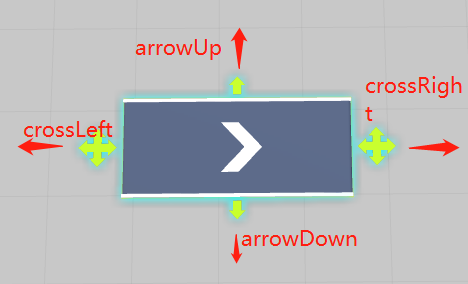
实现模型拖拽体积改变功能算法: publicTransformcrossLeft; publicTransformcro***ight; publicTransformarrowUp; publicTransformarrowDown; //模型结构子对象 publicTransformlegLeftUp; publicTransformlegRightUp; publicTransformlegLeftDown; publicTransformlegRightDown; publicTransformarrow; //////传动带模型MeshFilter ///publicMeshFilterconveyorMeshFilter; //////传送带边沿护栏模型MeshFilter ///publicMeshFilterguardBarMeshFilter; publicBoxColliderboxCollider; //Mesh保存 privateDictionaryconveyorMeshLeftVertices; privateDictionaryconveyorMeshRightVertices; privateDictionaryconveyorMeshUpVertices; privateDictionaryconveyorMeshDownVertices; privateDictionaryguardBarMeshLeftVertices; privateDictionaryguardBarMeshRightVertices; privateDictionaryguardBarMeshUpVertices; privateDictionaryguardBarMeshDownVertices; //交互所用变量 privatefloatfirstDistanceToOtherCross; privateVector3nowInputMousePosition; floatendDistance; privateTransformotherCross; privateVector3otherCrossScreenPostion; privateVector3lastInputMousePoistion; 核心方法: //初始化 voidInit() { conveyorMeshLeftVertices=FiltrateVertices(conveyorMeshFilter.mesh,VecticeDir.Left); conveyorMeshRightVertices=FiltrateVertices(conveyorMeshFilter.mesh,VecticeDir.Right); conveyorMeshUpVertices=FiltrateVertices(conveyorMeshFilter.mesh,VecticeDir.Up); conveyorMeshDownVertices=FiltrateVertices(conveyorMeshFilter.mesh,VecticeDir.Down); guardBarMeshLeftVertices=FiltrateVertices(guardBarMeshFilter.mesh,VecticeDir.Left); guardBarMeshRightVertices=FiltrateVertices(guardBarMeshFilter.mesh,VecticeDir.Right); guardBarMeshUpVertices=FiltrateVertices(guardBarMeshFilter.mesh,VecticeDir.Up); guardBarMeshDownVertices=FiltrateVertices(guardBarMeshFilter.mesh,VecticeDir.Down); //length=1; //heigth=1; boxCollider=gameObject.GetComponent(); if(name.Contains("left")) { otherCross=converyEntityMediator.converyEntityView.cro***ight; isLeft=true; } else { otherCross=converyEntityMediator.converyEntityView.crossLeft; isLeft=false; } } /// ///筛选顶点,分成左右两堆 /// ///顶点方向 DictionaryFiltrateVertices(Meshmesh,VecticeDirdir) { Dictionaryresult=newDictionary(); for(inti=0;i<mesh.vertices.Length;i++) { switch(dir) { caseVecticeDir.Left: if(mesh.vertices[i].z>0) { result.Add(i,mesh.vertices[i]); } break; caseVecticeDir.Up: if(mesh.vertices[i].x>0) { result.Add(i,mesh.vertices[i]); } break; caseVecticeDir.Right: if(mesh.vertices[i].z<0) { result.Add(i,mesh.vertices[i]); } break; caseVecticeDir.Down: if(mesh.vertices[i].x<0) { result.Add(i,mesh.vertices[i]); } break; } } returnresult; } //宽度 publicvoidChangeWidth(floatwidth,Vector3dir,boolisUp) { ListconveyorMeshVertices=newList(conveyorMeshFilter.mesh.vertices); ListguardBarMeshVertices=newList(guardBarMeshFilter.mesh.vertices); floathalfWidth=width/2; transform.position+=halfWidth*(transform.rotation*dir).normalized; //this.length+=length; //改变板和边栏的长度 foreach(KeyValuePairiteminconveyorMeshUpVertices) { conveyorMeshVertices[item.Key]+=Vector3.right*halfWidth; } foreach(KeyValuePairiteminconveyorMeshDownVertices) { conveyorMeshVertices[item.Key]-=Vector3.right*halfWidth; } foreach(KeyValuePairiteminguardBarMeshUpVertices) { guardBarMeshVertices[item.Key]+=Vector3.right*halfWidth; } foreach(KeyValuePairiteminguardBarMeshDownVertices) { guardBarMeshVertices[item.Key]-=Vector3.right*halfWidth; } if(isUp) { //设置子物体的位置 legLeftUp.localPosition+=halfWidth*dir; legRightUp.localPosition+=halfWidth*dir; legLeftDown.localPosition-=halfWidth*dir; legRightDown.localPosition-=halfWidth*dir; arrowUp.localPosition+=halfWidth*dir; arrowDown.localPosition-=halfWidth*dir; } else { //设置子物体的位置 legLeftUp.localPosition-=halfWidth*dir; legRightUp.localPosition-=halfWidth*dir; legLeftDown.localPosition+=halfWidth*dir; legRightDown.localPosition+=halfWidth*dir; arrowUp.localPosition-=halfWidth*dir; arrowDown.localPosition+=halfWidth*dir; } floatarrowScale=Mathf.Clamp(((ConveyorEntity)entity).conveyorProperty.Width*2f,0.2f,1); arrow.localScale=newVector3(arrowScale,1,arrowScale); conveyorMeshFilter.mesh.SetVertices(conveyorMeshVertices); guardBarMeshFilter.mesh.SetVertices(guardBarMeshVertices); //设置collider boxCollider.size+=Vector3.right*width; } ///改变传送带长度 /// ///传送带长度 ///是否选择的左边移动 publicvoidChangeLength(floatlength,Vector3dir,boolisChoiceLeft=false) { ListconveyorMeshVertices=newList(conveyorMeshFilter.mesh.vertices); ListguardBarMeshVertices=newList(guardBarMeshFilter.mesh.vertices); floathalfLength=length/2; transform.position+=halfLength*(transform.rotation*dir).normalized; //改变板和边栏的长度 foreach(KeyValuePairiteminconveyorMeshLeftVertices) { conveyorMeshVertices[item.Key]+=Vector3.forward*halfLength; } foreach(KeyValuePairiteminguardBarMeshLeftVertices) { guardBarMeshVertices[item.Key]+=Vector3.forward*halfLength; } foreach(KeyValuePairiteminconveyorMeshRightVertices) { conveyorMeshVertices[item.Key]-=Vector3.forward*halfLength; } foreach(KeyValuePairiteminguardBarMeshRightVertices) { guardBarMeshVertices[item.Key]-=Vector3.forward*halfLength; } if(isChoiceLeft) { //设置子物体的位置 legLeftUp.localPosition+=halfLength*dir; legRightUp.localPosition-=halfLength*dir; legLeftDown.localPosition+=halfLength*dir; legRightDown.localPosition-=halfLength*dir; crossLeft.localPosition+=halfLength*dir; cro***ight.localPosition-=halfLength*dir; } else { //设置子物体的位置 legLeftUp.localPosition-=halfLength*dir; legRightUp.localPosition+=halfLength*dir; legLeftDown.localPosition-=halfLength*dir; legRightDown.localPosition+=halfLength*dir; crossLeft.localPosition-=halfLength*dir; cro***ight.localPosition+=halfLength*dir; } //floatarrowScale=Mathf.Clamp(((ConveyorEntity)entity).conveyorProperty.Length*2f,0.2f,1); //arrow.localScale=newVector3(arrowScale,1,arrowScale); conveyorMeshFilter.mesh.SetVertices(conveyorMeshVertices); guardBarMeshFilter.mesh.SetVertices(guardBarMeshVertices); //设置collider boxCollider.size+=Vector3.forward*length; ChangeBounds(100);//拉伸mesh会导致原bound不在摄像机视角下,造成传送带不渲染(FrustumCulling) } privatevoidChangeBounds(floatboundLength) { Vector3bound=newVector3(boundLength,boundLength,boundLength); conveyorMeshFilter.mesh.bounds=newBounds(transform.position,bound); guardBarMeshFilter.mesh.bounds=newBounds(transform.position,bound); } 交互输入: privatevoidOnMouseDown() { endAddDistance=0; otherArrowScreenPostion=Camera.main.WorldToScreenPoint(otherArrow.position); lastInputMousePoistion=Input.mousePosition; lastDistanceToOtherCross=Vector2.Distance(otherArrowScreenPostion,lastInputMousePoistion); } privatevoidOnMouseDrag() { nowInputMousePosition=Input.mousePosition; floatdistance=Vector2.Distance(nowInputMousePosition,lastInputMousePoistion)*0.1f; floatotherDistaceToNowInputMousePosition=Vector2.Distance(otherArrowScreenPostion,nowInputMousePosition); //减少宽度 if(lastDistanceToOtherCross>otherDistaceToNowInputMousePosition) { endAddDistance-=distance; ChangeWidth(-distance,(transform.localPosition-otherArrow.localPosition).normalized,isUp); } //增加宽带 elseif(lastDistanceToOtherCross<otherDistaceToNowInputMousePosition) { endAddDistance+=distance; ChangeWidth(distance,(transform.localPosition-otherArrow.localPosition).normalized,isUp); } if(otherDistaceToNowInputMousePositionotherDistaceToNowInputMousePosition) { if(Vector3.Distance(transform.localPosition,otherCross.localPosition)Vector3.Distance(transform.localPosition,otherCross.localPosition)) { return; } endDistance-=distance; converyEntityMediator.ChangeLength(-distance,(transform.localPosition-otherCross.localPosition).normalized,isLeft); } //增加长度 elseif(firstDistanceToOtherCross<otherDistaceToNowInputMousePosition) { endDistance+=distance; converyEntityMediator.ChangeLength(distance,(transform.localPosition-otherCross.localPosition).normalized,isLeft); } lastInputMousePoistion=Input.mousePosition; lastDistanceToOtherCross=Vector2.Distance(otherArrowScreenPostion,lastInputMousePoistion); } privatevoidOnMouseUp() { if(endAddDistance!=0) { ChangeWidth(-endAddDistance,(transform.localPosition-otherArrow.localPosition).normalized,isUp); ChangeLength(-endDistance,(transform.localPosition-otherCross.localPosition).normalized,isLeft); } }

优秀的个人博客,低调大师

Unity3d dll 热更新 基础框架

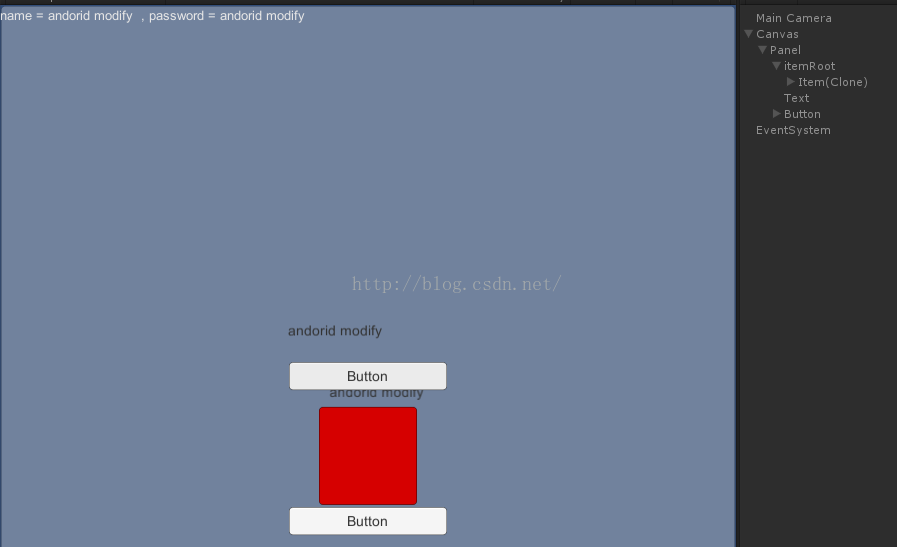
晚上有了dll 热更新的想法,今天做了一天的实验,也遇到些坑,这里总结下 工作环境: U3D5.3.2 + vs2010 +mono 下面要模拟的是一个登陆环境,点击按钮,就加载一个iGameObjec的Item, Item 上得到更新的文本内容。具体如下图 1> 程序集管理 2> Dll管理与加载 3> 逻辑代码和UI的实现 4> 打包dll+打包Assetbundle 限制1:在Android手机里动态加载dll不能使用Assembly.LoadFile(string path),只能使用Assembly.Load(byte[] rawAssembly)这个接口,所以要自己想办法先读出来。 限制2:动态加载的脚本不能在编辑器里挂在prefab上。 限制3:如果脚本在动态dll里,调用AddComponent()挂此脚本上prefab上时不能使用AddComponent(“SomeScript”)的方式调用,要用AddComponent(Type.GetType(“SomeScript”))。 限制4:在动态dll里使用[RequireComponent(typeof(SomeScript))]无效,所以不能使用。 本文转自jiahuafu博客园博客,原文链接:http://www.cnblogs.com/jiahuafu/p/8278893.html,如需转载请自行联系原作者

优秀的个人博客,低调大师

虚幻4和Unity3D应该学哪个?

虚幻4 (UE4) 和Unity是目前市场上最热门的游戏引擎,也各自拥有为数众多的开发者,虽然一些大型的游戏公司仍然运用自家开发的引擎来制作游戏,但是在巨大的市场需求下,独立开发者与游戏工作室依然需要一款优秀的引擎来支持项目的开发。 了解游戏的开发类型 首先需要了解的是,我们打算用游戏引擎来做什么,还有就是开发哪一类型的游戏,是2D还是3D形态? 是跑酷还是射击类?是准备将游戏做出来发布在浏览器还是手机? 对游戏如何获利是否已经有想法或是计划? 是通过哪种方式收费?广告置入还是道具购买? 明确以上的这些问题后才能让我们决定使用虚幻4还是Unity,而这两个引擎一定都可满足我们的需求,差别就在于哪一个引擎在我们开发过程中所带来的效益最高。 以国内目前的市场来看,采用Unity来开发手机游戏似乎是很理想的选择,不论是3D或是2D类型的游戏,Unity提供的功能已经能帮助开发者快速的制作出一款精美的手游。而虚幻4最近开始强化的2D图像与手机发布功能,似乎也让不少的开发者跃跃欲试。 如果我们想要创建的是一款3D游戏,那么使用Unity是不错的选择,在图像的呈现上面,Unity与虚幻4本来就不是同一个等级,如果在我们的游戏中并不需要表现出次时代画质的效果,那么Unity确实已经能符合我们的需求。 另外就是对于虚拟现实与导览项目的应用,现在国内外已经有不少的设计院采用游戏引擎来制作交互形态的展示,例如在iPad上面使用触控方式来表现建筑景观,或是在科博馆里面以互动效果来达到教育与各种视觉模拟。 价格部分 制作游戏的类型将决定了使用哪一款游戏引擎,另外就是发布平台的选择也是一个决定的因素,而准备投入的预算则是牵动了最终的决定。 如果你现在是很有理想,有抱负的一个开发者,手上并没有太多的预算,那么游戏引擎的授权费就是一个考虑的重点了,尤其是在游戏正式面向市场时,版权的费用一定是要列入计算的。 Unity 提供了免费版让我们使用,不过与Pro版本比较起来,免费版更适合刚接触游戏开发的用户,也就是我们所说的入门版本,如果要直接使用Unity Pro的版本,代价是1500美元,或是支付每个月75美元,即可获得完整的软件授权。 而虚幻4没有 Pro 或免费版的区分,只要月付19美元即可获得这个游戏引擎的所有东西, 这个价格看起来是比Unity Pro有更大的优势,但是有一个前提,就是虚化的开发商将在我们的获利中抽取5%的费用,不管这个游戏是用何种方式来跟用户收费,所以这个地方也是开发者需要特别注意的。 那么有人问到,如果停止支付19美元的后果是什么?这个就简单了,停止支付的结果就是无法升级到最新的版本,而我们也注意到了,从虚幻4.0发布以来,更新的脚本非常的快速,目前已经到了4.5的版本,而Unity从2012年底发布了4.0之后,目前还停留在4.5.x的版本。 虚幻4还有一个优势,在大学或是学术单位是可以免费使用虚幻4来做课业还是毕展,学生也可以用来制作与发布自己的游戏,当然了,开发商还是需要收取这5%的费用,相对之下,虚幻4似乎更容易在校园内推广。 编程部分 以现在资讯发达的程度来看,开发游戏已经不是什么惊天的技术或是啥秘密了,除了引擎价格与开发项目类型的考量,游戏引擎采用的编程方式也影响了我们的最终决定。 虚幻4采用C++的开发语言,而Unity使用C#与JavaScript,我们可以依照个人的能力与喜好来决定采用虚幻4或是Unity,虽然说有的人觉得C++已经过时了,但还是有不少的开发者偏好使用此一编程技术,如果我们擅长的语言是C#,那么投入Unity的怀抱是毋庸置疑的选择。 虚幻4现在提供一个可视化的脚本功能与Unity插件Playmaker、uScripts非常的相似,这种可视化工具的好处就是让美术人员可以在不用编写代码的情况下来完成游戏,只不过在国内市场对这类型的开发方式并不是有太高的认同度,大多数的情况下是将可视化工具用在虚拟现实的项目演示上面多些。 而虚幻4的可视化脚本有先天上的条件限制,如果是初学者来使用就很适合,或是用来做建筑导览,虚幻4的图像表现绝对是高于Unity,而实际上现在已经有许多高品质的室内外效果展示皆出自虚幻4。 资源商店 虚幻4与Unity都有专属的资源商店,我们可以在商店里面付费下载各种游戏开发用的资源,例如角色模型,场景,道具,GUI,特效与个类型的音效,而Unity提供的资源类型种类齐全,也是目前国内开发者经常去“淘资源”的地方,也有许多开发者制作插件与模型在商店进行销售,所以在资源提供的部分,Unity明显的要优于虚幻4。 图形能力 在图像的表现上面,虚幻4的确已经建立一个超高的标准,也符合大家对3A级游戏的定义,从复杂的粒子模拟效果与先进的动态照明技术,虚幻4带给开发者一个全新的开发平台,当然,对于即将发布的Unity 5.0版本,诸多开发者也是翘首以盼,希望Unity的新版本在某些效果的呈现上能与虚幻4并驾齐驱。 图像的能力虽然不能代表一切,毕竟以现在的游戏市场来说,有创意性的游戏往往更能吸引用户的关注,尤其是以手游市场的整体效益来看,小而精致的游戏确实比起一些游戏大作更受到玩家的喜爱。 哪一个更容易上手? 在一些论坛里面多数人讨论的一个话题是,到底是虚幻4好上手还是Unity更利于开发? 其实讨论这个主题的意义不大,Unity在国内的使用人口与学习资源皆高于虚幻引擎,市场上招聘的开发人员也多以Unity为主,所以我们认为讨论这个主题必须根据区域的情况来做为前提,例如有人学了虚幻后,发现市场的需求与机会不是很多,那是不是意味着必须放弃虚幻来学习Unity? 如果不考虑太多的前提,只是想知道哪一个引擎更适合自己的话,最简单的方法就是直接拿一个项目来做练习,分别将项目导入虚幻4与Unity,在实施过程中就会发现到许多的问题,这时就能根据自己的解决能力与手上的资源来判断哪一个引擎更适合自己。 更多unity2018的功能介绍请到paws3d爪爪学院查找。

优秀的个人博客,低调大师

基于Unity3d 引擎的Android游戏优化

更新不透明贴图的压缩格式为ETC 4bit,因为android市场的手机中的GPU有多种,每家的GPU支持不同的压缩格式,但他们都兼容ETC格式, 对于透明贴图,我们只能选择RGBA 16bit 或者RGBA 32bit。 减少FPS,在ProjectSetting-> Quality中的VSync Count 参数会影响你的FPS,EveryVBlank相当于FPS=60,EverySecondVBlank = 30;这两种情况都不符合游戏的FPS的话,我们需要手动调整FPS,首先关闭垂直同步这个功能,然后在代码的Awake方法里手动设置FPS(Application.targetFrameRate = 45;) 降低FPS的好处:1)省电,减少手机发热的情况;2)能都稳定游戏FPS,减少出现卡顿的情况。 当我们设置了FPS后,再调整下Fixed timestep这个参数,这个参数在ProjectSetting->Time中,目的是减少物理计算的次数,来提高游戏性能。 尽量少使用Update LateUpdate FixedUpdate,这样也可以提升性能和节省电量。多使用事件(不是SendMessage,使用自己写的,或者C#中的事件委托)。 待机时,调整游戏的FPS为1,节省电量。 遇到麻烦时要调用“垃圾回收器”(Garbage Collector,无用单元收集程序,以下简称GC)由于具有C/C++游戏编程背景,我们并不习惯无用单元收集程序的特定行为。确保自动清理你不用的内存,这种做法在刚开始时很好,但很快你就公发现自己的 分析器经常显示CPU负荷过大,原因是垃圾回收器正在收集垃圾内存。这对移动设备来说尤其是个大问题。要跟进内存分配,并尽量避免它们成为优先数 更多unity2018的功能介绍请到paws3d学习中心查找。

优秀的个人博客,低调大师

Unity3D使用经验总结 优点篇

一、可定制的IDE环境U3D这种ALL IN ONE的设计思路,我在一个叫神咒的代码中见到过。 集所有编辑器于一身。 虽然神咒的编辑器不能自由扩展,但由于是公司内部的引擎,所以,它的使用,也很方便。 比如,在场景中突然想要对一个模型的材质进行编辑,则选中此模型,右键,弹出材质编辑器即可。 U3D的组件式思路,将这种关系变得更加紧密。 你都感觉不到自己在使用一个材质编辑器。 你会觉得,你是在操作这个模型本身。 它的材质,它的碰撞器,它的对象结构等等。回想一开始进入游戏行业的时候,天天啃着代码。 当时觉得代码就是一切,各种认为很牛X的代码,都忍不住读上一番。 而随着时间的推移,特别是经过项目的洗礼后。 突然发现编辑器是多么的重要。 就我做的第一个页游来说,起手前两个星期,我们就做了动画编辑器,场景编辑器。而最终证明,因为这两个简陋的编辑器,使我们后面的工作变得更加容易。因此,一个好的引擎,必定得先有一个功能完备的编辑器。 二、基于Mono的开发脚本C/C++无疑是图形界的宠儿,也没有人想过用另一种语言来替代它。即使是U3D,亦是如此。 但是,早期使用C/C++编写的引擎,都理所当然地使用C/C++来作为上层逻辑的开发。 又有一些,采用了纯脚本的模式。比如Python,LUA。 脚本的好处在于更低的编码成本(经过仔细研究,我发现,这是由于写脚本语言的心态和写C++的心态导致的。 写C++的时候,总是想着代码的复用度,而在脚本的时候,很多时间会认为,这个脚本,就是为这个对象服务的,那我就按照策划需求来写就可以了。 我想,这也是许多时候,脚本语言存在的意义。特别是早期引擎中,使用脚本来处理一些关键的事件响应)。 而大家熟知的虚幻引擎以及有一个名不见经转的Torque,则自己整了一套开发语言。 我想,它们的目的,就是为了使大家能够以一种更安全的方式来编程, C++一不小心,则会带来内存和效率问题。 它的使用成本,人员成本其实是高于其它语言的。 Mono C# JS,BOO的出现,再一次让大家的眼睛一亮,原来,引擎可以这样整。Mono的桥接,使得高效的C++图形引擎与带GC的内存安全语言进行结合。不仅减少了安全隐患,也使得大家编写跨平台代码时更佳容易。 同时,这类语言的反射机制,更适合做编辑器。而比起先前的一些DIY语言和像LUA这样的小巧型语言,Mono使脚本编程可以进行DEBUG,而不单纯的靠PRINT输出。这里就顺带说一下三个语言的区别C# 这是我见过的大型项目中使用得最多的语言,也是我比较喜欢的语言。 因为它和C++很像,同时严格的类型和语法检查。JS 在帮一些朋友做小东西的时候,使用过这个语言,由于mono自带的提示功能,写起来还是挺顺手。 但总给我一种摸不着头脑的感觉。 并且U3D给的JS,不是严格的JS,有些语法不支持,而有些语法又很特别。BOO 完全没有使用过,貌似也很少有人使用。 更多unity2018的功能介绍请到paws3d学习中心查找。

优秀的个人博客,低调大师

unity3d配置Android环境,打包发布Apk流程详解

Unity配置Android环境,打包发布安卓流程 一:SDK与JDK下载地址:http://pan.baidu.com/s/1mhVaXHe 下载完成后,解压文件 SDK文件 **二、安装 JDK ** 运行安装程序jdk-7u67-windows-x64 Java-JDK 分别点击下一步进行安装。 安装中 在安装过程中先后会出现两次选择安装目录的界面,如果默认路径不是以下两个路径,全部改为以下路径,如果是,就不用管: jdk安装目录:C:\Program Files\Java\jdk1.6.0_22 jre安装目录:C:\Program Files\Java\jre6 安装好之后,配置环境变量 三、打开环境变量窗口方法 右键【我的电脑】--单击【属性】--单击【高级】--单击【环境变量】。 属性 高级系统设置 环境变量 添加变量 在上方的用户变量中依次新建如下变量,并分别填入如下路径: 一共新建3个环境变量,如下第一组 变量名:JAVA_HOME 变量值:C:\Java\jdk1.6.0_22第二组 变量名:PATH 变量值:%JAVA_HOME%/bin第三组 变量名:CLASSPATH 变量值: .;%JAVA_HOME%/lib/tools.jar;%JAVA_HOME%/lib/dt.jar 完成之后点击确定,完成环境变量的配置 应用-确定 四:复制android-sdk-windows文件夹到C盘或者D盘或者你可以找到的任意盘任意目录,注意:不能在中文目录下 SDK文件 五、复制完成之后,打开unity,新建一个项目,打开Edit-Preferences选项 Edit-Preferences SDK地址:点击Browse,找到刚刚复制的android-sdk-windows文件夹所在的路径 点击Browse 选择路径文件夹 JDK地址:C:\Program Files\Java\jdk1.7.0_67 JDK地址 JDK路径 完成之后,新建场景,保存场景,添加到build里面去切换平台为安卓Android平台 切换 点击Player settings修改Other Settings BundleIdentifiercom.Company.ProductName为自己的自定义的,例如:com.Test.test01,修改完成后,点击Build Player settings 修改完成后,点击Build Build 添加文件名,保存路径,保存** 保存 打包中…… 打包中 **打包完成 打包完成 好啦,现在安装Apk文件到手机就可以用了!

资源下载

更多资源
Nacos

Nacos

Nacos /nɑ:kəʊs/ 是 Dynamic Naming and Configuration Service 的首字母简称,一个易于构建 AI Agent 应用的动态服务发现、配置管理和AI智能体管理平台。Nacos 致力于帮助您发现、配置和管理微服务及AI智能体应用。Nacos 提供了一组简单易用的特性集,帮助您快速实现动态服务发现、服务配置、服务元数据、流量管理。Nacos 帮助您更敏捷和容易地构建、交付和管理微服务平台。

Spring

Spring

Spring框架(Spring Framework)是由Rod Johnson于2002年提出的开源Java企业级应用框架,旨在通过使用JavaBean替代传统EJB实现方式降低企业级编程开发的复杂性。该框架基于简单性、可测试性和松耦合性设计理念,提供核心容器、应用上下文、数据访问集成等模块,支持整合Hibernate、Struts等第三方框架,其适用范围不仅限于服务器端开发,绝大多数Java应用均可从中受益。

Rocky Linux

Rocky Linux

Rocky Linux(中文名:洛基)是由Gregory Kurtzer于2020年12月发起的企业级Linux发行版,作为CentOS稳定版停止维护后与RHEL(Red Hat Enterprise Linux)完全兼容的开源替代方案,由社区拥有并管理,支持x86_64、aarch64等架构。其通过重新编译RHEL源代码提供长期稳定性,采用模块化包装和SELinux安全架构,默认包含GNOME桌面环境及XFS文件系统,支持十年生命周期更新。

优质分享App

优质分享App

近一个月的开发和优化,本站点的第一个app全新上线。该app采用极致压缩,本体才4.36MB。系统里面做了大量数据访问、缓存优化。方便用户在手机上查看文章。后续会推出HarmonyOS的适配版本。

用户登录
用户注册