首页 文章 精选 留言 我的

精选列表

搜索[springboot2],共230篇文章
优秀的个人博客,低调大师

SpringBoot2整合Redis,开启缓存,提高访问速度

前言 什么是Redis Redis是一个开源(BSD许可),内存存储的数据结构服务器,可用作数据库,高速缓存和消息队列代理。它支持字符串、哈希表、列表、集合、有序集合,位图,hyperloglogs等数据类型。内置复制、Lua脚本、LRU收回、事务以及不同级别磁盘持久化功能,同时通过Redis Sentinel提供高可用,通过Redis Cluster提供自动分区。 参考文档:https://www.redis.net.cn 为什么选择Redis 这个问题一般人会拿Redis和Memcache来做比较,但是个人认为这两者对比并不合适,因为Memcache仅仅作为缓存,而Redis是一个NoSQL数据库,除了缓存还能做其他的很多事。所以拿来对比的同学应该就只是拿Redis来做缓存用了。但是Redis还有很多高级功能,包括持久化、复制、哨兵、集群等。因此Redis的用途更为广泛。 编码 1.添加Redis依赖 之前的文章中我们讲到数据库连接池的作用,有太多的有点了,所以今天在Redis这边我们也建立一个连接池来连接Redis。提高资源的利用率。在此采用的org.apache.commons.pool2来作为池,因此需要对添加一个池依赖。 打开pom.xml文件,添加 xml 复制代码 <dependency> <groupId>org.apache.commons</groupId> <artifactId>commons-pool2</artifactId> </dependency> <dependency> <groupId>org.springframework.boot</groupId> <artifactId>spring-boot-starter-data-redis</artifactId> </dependency> 2.配置SpringBoot的application.properties文件 因为SpringBoot2.x默认使用lettuce作为连接池,所以以下为lettuce的配置方式 sh 复制代码 # Redis配置 # spring.redis.database : Redis数据库索引(默认为0) # spring.redis.host : Redis服务器地址 # spring.redis.port : Redis服务器连接端口 # spring.redis.password : Redis服务器连接密码(默认为空) # spring.redis.timeout : 连接超时时间(毫秒) # spring.redis.lettuce.pool.max-active : 连接池最大连接数(使用负值表示没有限制) # spring.redis.lettuce.pool.max-idle : 连接池中的最大空闲连接 # spring.redis.lettuce.pool.max-wait : 连接池最大阻塞等待时间(使用负值表示没有限制) # spring.redis.lettuce.pool.min-idle : 连接池中的最小空闲连接 # spring.redis.lettuce.shutdown-timeout : 连接池中的关闭超时时间 spring.redis.database=1 spring.redis.host=127.0.0.1 spring.redis.port=6379 spring.redis.password= spring.redis.timeout=100000 spring.redis.lettuce.pool.max-active=50 spring.redis.lettuce.pool.max-idle=300 spring.redis.lettuce.pool.max-wait=-1 spring.redis.lettuce.pool.min-idle=10 spring.redis.lettuce.shutdown-timeout=100000 3.编写Controller测试Redis缓存数据 新增RedisController.java java 复制代码 package org.xujun.springboot.controller; import javax.annotation.Resource; import org.springframework.data.redis.core.StringRedisTemplate; import org.springframework.web.bind.annotation.GetMapping; import org.springframework.web.bind.annotation.RestController; @RestController public class RedisController { @Resource private StringRedisTemplate stringRedisTemplate; @GetMapping("redis") public String redis() { String key = "redis"; String data = "redis-data"; // 保存数据 stringRedisTemplate.opsForValue().set(key, data); // 获取数据 String getData = stringRedisTemplate.opsForValue().get(key); System.out.println(data.equals(getData)); // 删除数据 Boolean delete = stringRedisTemplate.delete(key); System.out.println(delete); return "suc"; } } 4.测试结果 运行项目,并且访问[http://127.0.0.1:8080/redis]。结果如下图所示 总结:本文章仅仅做了SpringBoot整合Redis,然后做了和Redis缓存测试。并未去探索Redis的高级功能。但是后期会陆续推出Redis的系列文章,在该系列中会详细讲解Redis

优秀的个人博客,低调大师

SpringBoot2整合Thymeleaf,官方推荐html解决方案

前言 什么是Thymeleaf Thymeleaf是适用于Web和独立环境的现代服务器端Java模板引擎。 Thymeleaf的主要目标是为您的开发工作流程带来优雅的自然模板 -HTML可以在浏览器中正确显示,也可以作为静态原型工作,从而可以在开发团队中加强协作。 Thymeleaf拥有适用于Spring Framework的模块,与您喜欢的工具的大量集成以及插入您自己的功能的能力,对于现代HTML5 JVM Web开发而言,Thymeleaf是理想的选择-尽管它还有很多工作要做。 Thymeleaf和Freemarker对比 Thymeleaf优点: 静态html嵌入标签属性,浏览器可以直接打开模板文件,便于前后端联调。springboot官方推荐方案。 Thymeleaf缺点: 模板必须符合xml规范,就这一点就可以判死刑!太不方便了!js脚本必须加入/<!\[CDATA\[/标识,否则一个&符号就会导致后台模板合成抛异常,而且错误信息巨不友好,害得我调试了好几个小时才明白是怎么回事。js里面还好办,这样是在html里面含有&等符号,还需要转义?忒麻烦了! 就上面一条就够了 Freemarker优点: 1、通用目标 能够生成各种文本:HTML、XML、RTF、Java源代码等等 易于嵌入到你的产品中:轻量级:不需要Serve环境 插件式模板载入器:可以从任何源载入模板,如本地文件、数据库等等 你可以按你所需生成文本:保存到本地文件;作为Ema发送;从Web应用程序发送它返回给Web浏览器 2、强大的模板语言 所有常用的指令:include、if/ elseif/else、循环结构 在模板中创建和改变变量 几乎在任何地方都可以使用复杂表达式来指定值 命名的宏,可以具有位置参数和嵌套内容 名字空间有助于建立和维护可重用的宏库,或者将一个大工程分成模块,而不必担心名字冲突 输岀转换块∶在嵌套模板片段生成输岀时,转换HM转义、压缩、语法高亮等等;你可以定义自己的转换 3、通用数据模型 FreeMarker不是直接反射到Java对象,Jva对象通过插件式对象封装,以变量方式在模板中显示 你可以使用抽象(接口)方式表示对象( Java bean、XM文档、sL查询结果集等等),告诉模板开发者使用方法,使其不受技术细节的打扰 4、为Web准备 在模板语言中内建处理典型Web相关任务(如HTML转义)的结构 能够集成到Mode2Web应用框架中作为JsP的 支持JSP标记库 为MVC模式设计:分离可视化设计和应用程序逻辑;分离页面设计员和程序员 5、智能的国际化和本地化 字符集智能化(内部使用UNICODE) 数字格式本地化敏感 日期和时间格式本地化敏感 非Us字符集可以用作标识(如变量名) 多种不同语言的相同模板 6、强大的XML处理能力 <#recurse> 和<#visit>指令(2.3版本)用于递归遍历XML树 Freemarker缺点: 暂时未发现 说明 好像通过上面的对比Thymeleaf好像没有占多大的便宜,但是也架不住老板说要用Thymeleaf,因此本文还是讲解下如何在程序中配置Thymeleaf模板解析引擎 编码 1.添加Thymeleaf的Jar包 编辑pom.xml添加 xml 复制代码 <dependency> <groupId>org.springframework.boot</groupId> <artifactId>spring-boot-starter-thymeleaf</artifactId> </dependency> 注:若之前有使用其他模板解析引擎请先删除下配置 2.配置SpringBoot的application.properties文件 添加 sh 复制代码 #Thymeleaf配置 # spring.thymeleaf.cache : 是否启用缓存 # spring.thymeleaf.check-template : 在展示前检查模板是否存在 # spring.thymeleaf.check-template-location : 检查模板位置是否存在 # spring.thymeleaf.encoding : 模板文件编码 # spring.thymeleaf.mode : 模板模式 # spring.thymeleaf.prefix : 模板文件路径前缀 # spring.thymeleaf.reactive.max-chunk-size : 模板可使用的最大缓冲区 # spring.thymeleaf.servlet.content-type : 模板内容类型 # spring.thymeleaf.suffix : 模板文件后缀 spring.thymeleaf.cache=false spring.thymeleaf.check-template=true spring.thymeleaf.check-template-location=true spring.thymeleaf.encoding=UTF-8 spring.thymeleaf.mode=HTML5 spring.thymeleaf.prefix=classpath:/static/views/ spring.thymeleaf.reactive.max-chunk-size=0 spring.thymeleaf.servlet.content-type=text/html spring.thymeleaf.suffix=.html 3.创建HTML模板 在resources/static/views编写一个Thymeleaf模板的html页面 新建一个thymeleaf.html html 复制代码 <!DOCTYPE html> <html lang="zh-cn"> <head> <title>index</title> </head> <body> hello Thymeleaf </body> </html> 4.编写Controller方法 新建一个ThymeleafController.java java 复制代码 package org.xujun.springboot.controller; import org.springframework.web.bind.annotation.GetMapping; import org.springframework.web.servlet.ModelAndView; @RestController public class ThymeleafController { @GetMapping("thymeleaf") public ModelAndView thymeleaf() { ModelAndView mv = new ModelAndView(); mv.setViewName("thymeleaf"); return mv; } } 注:其中mv.setViewName("thymeleaf");中thymeleaf为模板的名字,因为前缀后缀在配置文件中已经配置,所以在此配置模板名字即可 5.测试 运行项目,并且访问[http://127.0.0.1:8080/thymeleaf] 总结:个人对thymeleaf其实无感,用过一段时间,感觉非常难受。因此还是奔向Freemarker的怀抱。但是对于技术而言,它会改变。因此我们还是要掌握它。本文讲解了SpringBoot框架配置thymeleaf,并没有详细讲解thymeleaf模板的用法。因为这里主要讲解Springboot框架。后续的文章会对该模板语法做详细的讲解。

优秀的个人博客,低调大师

SpringBoot2 整合ElasticJob框架,定制化管理流程

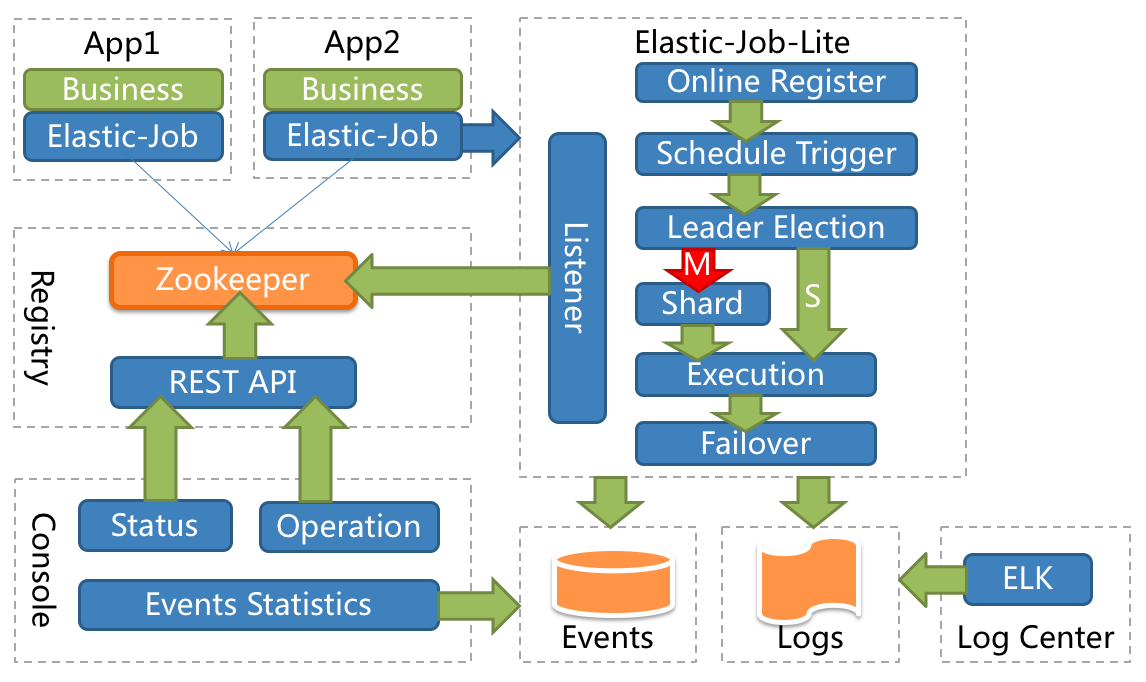
一、ElasticJob简介 1、定时任务 在前面的文章中,说过QuartJob这个定时任务,被广泛应用的定时任务标准。但Quartz核心点在于执行定时任务并不是在于关注的业务模式和场景,缺少高度自定义的功能。Quartz能够基于数据库实现任务的高可用,但是不具备分布式并行调度的功能。 2、ElasticJob说明 基础简介 Elastic-Job 是一个开源的分布式调度中间件,由两个相互独立的子项目 Elastic-Job-Lite 和 Elastic-Job-Cloud 组成。Elastic-Job-Lite 为轻量级无中心化解决方案,使用 jar 包提供分布式任务的调度和治理。 Elastic-Job-Cloud 是一个 Mesos Framework,依托于Mesos额外提供资源治理、应用分发以及进程隔离等服务。 功能特点 分布式调度协调 弹性扩容缩容 失效转移 错过执行作业重触发 作业分片一致性,保证同一分片在分布式环境中仅一个执行实例 补刀:人家官网这样描述的,这里赘述一下,充实一下文章。 基础框架结构 该图片来自ElasticJob官网。 由图可知如下内容: 需要Zookeeper组件支持,作为分布式的调度任务,有良好的监听机制,和控制台,下面的案例也就冲这个图解来。 3、分片管理 这个概念在ElasticJob中是最具有特点的,实用性极好。 分片概念 任务的分布式执行,需要将一个任务拆分为多个独立的任务项,然后由分布式的服务器分别执行某一个或几个分片项。 场景描述:假设有服务3台,分3片管理,要处理数据表100条,那就可以100%3,按照余数0,1,2分散到三台服务上执行,看到这里分库分表的基本逻辑涌上心头,这就是为何很多大牛讲说,编程思维很重要。 个性化参数 个性化参数即shardingItemParameter,可以和分片项匹配对应关系,用于将分片项的数字转换为更加可读的业务代码。 场景描述:这里猛一读好像很飘逸,其实就是这个意思,如果分3片,取名[0,1,2]不好看,或者不好标识,可以分别给个别名标识一下,[0=A,1=B,2=C]。 二、定时任务加载 1、核心依赖包 这里使用2.0+的版本。 <dependency> <groupId>com.dangdang</groupId> <artifactId>elastic-job-lite-core</artifactId> <version>2.1.5</version> </dependency> <dependency> <groupId>com.dangdang</groupId> <artifactId>elastic-job-lite-spring</artifactId> <version>2.1.5</version> </dependency> 2、核心配置文件 这里主要配置一下Zookeeper中间件,分片和分片参数。 zookeeper: server: 127.0.0.1:2181 namespace: es-job job-config: cron: 0/10 * * * * ? shardCount: 1 shardItem: 0=A,1=B,2=C,3=D 3、自定义注解 看了官方的案例,没看到好用的注解,这里只能自己编写一个,基于案例的加载过程和核心API作为参考。 核心配置类: com.dangdang.ddframe.job.lite.config.LiteJobConfiguration 根据自己想如何使用注解的思路,比如我只想注解定时任务名称和Cron表达式这两个功能,其他参数直接统一配置(这里可能是受QuartJob影响太深,可能根本就是想省事...) @Inherited @Target({ElementType.TYPE}) @Retention(RetentionPolicy.RUNTIME) public @interface TaskJobSign { @AliasFor("cron") String value() default ""; @AliasFor("value") String cron() default ""; String jobName() default ""; } 4、作业案例 这里打印一些基本参数,对照配置和注解,一目了然。 @Component @TaskJobSign(cron = "0/5 * * * * ?",jobName = "Hello-Job") public class HelloJob implements SimpleJob { private static final Logger LOG = LoggerFactory.getLogger(HelloJob.class.getName()) ; @Override public void execute(ShardingContext shardingContext) { LOG.info("当前线程: "+Thread.currentThread().getId()); LOG.info("任务分片:"+shardingContext.getShardingTotalCount()); LOG.info("当前分片:"+shardingContext.getShardingItem()); LOG.info("分片参数:"+shardingContext.getShardingParameter()); LOG.info("任务参数:"+shardingContext.getJobParameter()); } } 5、加载定时任务 既然自定义注解,那加载过程自然也要自定义一下,读取自定义的注解,配置化,加入容器,然后初始化,等着任务执行就好。 @Configuration public class ElasticJobConfig { @Resource private ApplicationContext applicationContext ; @Resource private ZookeeperRegistryCenter zookeeperRegistryCenter; @Value("${job-config.cron}") private String cron ; @Value("${job-config.shardCount}") private int shardCount ; @Value("${job-config.shardItem}") private String shardItem ; /** * 配置任务监听器 */ @Bean public ElasticJobListener elasticJobListener() { return new TaskJobListener(); } /** * 初始化配置任务 */ @PostConstruct public void initTaskJob() { Map<String, SimpleJob> jobMap = this.applicationContext.getBeansOfType(SimpleJob.class); Iterator iterator = jobMap.entrySet().iterator(); while (iterator.hasNext()) { // 自定义注解管理 Map.Entry<String, SimpleJob> entry = (Map.Entry)iterator.next(); SimpleJob simpleJob = entry.getValue(); TaskJobSign taskJobSign = simpleJob.getClass().getAnnotation(TaskJobSign.class); if (taskJobSign != null){ String cron = taskJobSign.cron() ; String jobName = taskJobSign.jobName() ; // 生成配置 SimpleJobConfiguration simpleJobConfiguration = new SimpleJobConfiguration( JobCoreConfiguration.newBuilder(jobName, cron, shardCount) .shardingItemParameters(shardItem).jobParameter(jobName).build(), simpleJob.getClass().getCanonicalName()); LiteJobConfiguration liteJobConfiguration = LiteJobConfiguration.newBuilder( simpleJobConfiguration).overwrite(true).build(); TaskJobListener taskJobListener = new TaskJobListener(); // 初始化任务 SpringJobScheduler jobScheduler = new SpringJobScheduler( simpleJob, zookeeperRegistryCenter, liteJobConfiguration, taskJobListener); jobScheduler.init(); } } } } 絮叨一句:不要疑问这些API是怎么知道,看下官方文档的案例,他们怎么使用这些核心API,这里就是照着写过来,就是多一步自定义注解类的加载过程。当然官方文档大致读一遍还是很有必要的。 补刀一句:如何快速学习一些组件的用法,首先找到官方文档,或者开源库Wiki,再不济ReadMe文档(如果都没有,酌情放弃,另寻其他),熟悉基本功能是否符合自己的需求,如果符合,就看下基本用法案例,熟悉API,最后就是研究自己需要的功能模块,个人经验来看,该过程是弯路最少,坑最少的。 6、任务监听 用法非常简单,实现ElasticJobListener接口。 @Component public class TaskJobListener implements ElasticJobListener { private static final Logger LOG = LoggerFactory.getLogger(TaskJobListener.class); private long beginTime = 0; @Override public void beforeJobExecuted(ShardingContexts shardingContexts) { beginTime = System.currentTimeMillis(); LOG.info(shardingContexts.getJobName()+"===>开始..."); } @Override public void afterJobExecuted(ShardingContexts shardingContexts) { long endTime = System.currentTimeMillis(); LOG.info(shardingContexts.getJobName()+ "===>结束...[耗时:"+(endTime - beginTime)+"]"); } } 絮叨一句:before和after执行前后,中间执行目标方法,标准的AOP切面思想,所以底层水平决定了对上层框架的理解速度,那本《Java编程思想》上的灰尘是不是该擦擦? 三、动态添加 1、作业任务 有部分场景需要动态添加和管理定时任务,基于上面的加载流程,在自定义一些步骤就可以。 @Component public class GetTimeJob implements SimpleJob { private static final Logger LOG = LoggerFactory.getLogger(GetTimeJob.class.getName()) ; private static final SimpleDateFormat format = new SimpleDateFormat("yyyy-MM-dd HH:mm:ss") ; @Override public void execute(ShardingContext shardingContext) { LOG.info("Job Name:"+shardingContext.getJobName()); LOG.info("Local Time:"+format.format(new Date())); } } 2、添加任务服务 这里就动态添加上面的任务。 @Service public class TaskJobService { @Resource private ZookeeperRegistryCenter zookeeperRegistryCenter; public void addTaskJob(final String jobName,final SimpleJob simpleJob, final String cron,final int shardCount,final String shardItem) { // 配置过程 JobCoreConfiguration jobCoreConfiguration = JobCoreConfiguration.newBuilder( jobName, cron, shardCount) .shardingItemParameters(shardItem).build(); JobTypeConfiguration jobTypeConfiguration = new SimpleJobConfiguration(jobCoreConfiguration, simpleJob.getClass().getCanonicalName()); LiteJobConfiguration liteJobConfiguration = LiteJobConfiguration.newBuilder( jobTypeConfiguration).overwrite(true).build(); TaskJobListener taskJobListener = new TaskJobListener(); // 加载执行 SpringJobScheduler jobScheduler = new SpringJobScheduler( simpleJob, zookeeperRegistryCenter, liteJobConfiguration, taskJobListener); jobScheduler.init(); } } 补刀一句:这里添加之后,任务就会定时执行,如何停止任务又是一个问题,可以在任务名上做一些配置,比如在数据库生成一条记录[1,job1,state],如果调度到state为停止状态的任务,直接截胡即可。 3、测试接口 @RestController public class TaskJobController { @Resource private TaskJobService taskJobService ; @RequestMapping("/addJob") public String addJob(@RequestParam("cron") String cron,@RequestParam("jobName") String jobName, @RequestParam("shardCount") Integer shardCount, @RequestParam("shardItem") String shardItem) { taskJobService.addTaskJob(jobName, new GetTimeJob(), cron, shardCount, shardItem); return "success"; } } 四、源代码地址 GitHub·地址 https://github.com/cicadasmile/middle-ware-parent GitEE·地址 https://gitee.com/cicadasmile/middle-ware-parent
优秀的个人博客,低调大师

SpringBoot2 整合 Redis集群 ,实现消息队列场景

一、Redis集群简介 1、RedisCluster概念 Redis的分布式解决方案,在3.0版本后推出的方案,有效地解决了Redis分布式的需求,当一个服务宕机可以快速的切换到另外一个服务。redis cluster主要是针对海量数据+高并发+高可用的场景。 二、与SpringBoot2.0整合 1、核心依赖 <dependency> <groupId>org.springframework.boot</groupId> <artifactId>spring-boot-starter-data-redis</artifactId> <version>${spring-boot.version}</version> </dependency> <dependency> <groupId>redis.clients</groupId> <artifactId>jedis</artifactId> <version>${redis-client.version}</version> </dependency> 2、核心配置 spring: # Redis 集群 redis: sentinel: # sentinel 配置 master: mymaster nodes: 192.168.0.127:26379 maxTotal: 60 minIdle: 10 maxWaitMillis: 10000 testWhileIdle: true testOnBorrow: true testOnReturn: false timeBetweenEvictionRunsMillis: 10000 3、参数渲染类 @ConfigurationProperties(prefix = "spring.redis.sentinel") public class RedisParam { private String nodes ; private String master ; private Integer maxTotal ; private Integer minIdle ; private Integer maxWaitMillis ; private Integer timeBetweenEvictionRunsMillis ; private boolean testWhileIdle ; private boolean testOnBorrow ; private boolean testOnReturn ; // 省略GET和SET方法 } 4、集群配置文件 @Configuration @EnableConfigurationProperties(RedisParam.class) public class RedisPool { @Resource private RedisParam redisParam ; @Bean("jedisSentinelPool") public JedisSentinelPool getRedisPool (){ Set<String> sentinels = new HashSet<>(); sentinels.addAll(Arrays.asList(redisParam.getNodes().split(","))); GenericObjectPoolConfig poolConfig = new GenericObjectPoolConfig(); poolConfig.setMaxTotal(redisParam.getMaxTotal()); poolConfig.setMinIdle(redisParam.getMinIdle()); poolConfig.setMaxWaitMillis(redisParam.getMaxWaitMillis()); poolConfig.setTestWhileIdle(redisParam.isTestWhileIdle()); poolConfig.setTestOnBorrow(redisParam.isTestOnBorrow()); poolConfig.setTestOnReturn(redisParam.isTestOnReturn()); poolConfig.setTimeBetweenEvictionRunsMillis(redisParam.getTimeBetweenEvictionRunsMillis()); JedisSentinelPool redisPool = new JedisSentinelPool(redisParam.getMaster(), sentinels, poolConfig); return redisPool; } @Bean SpringUtil springUtil() { return new SpringUtil(); } @Bean RedisListener redisListener() { return new RedisListener(); } } 5、配置Redis模板类 @Configuration public class RedisConfig { @Bean public StringRedisTemplate stringRedisTemplate(RedisConnectionFactory factory) { StringRedisTemplate stringRedisTemplate = new StringRedisTemplate(); stringRedisTemplate.setConnectionFactory(factory); return stringRedisTemplate; } } 三、模拟队列场景案例 生产者消费者模式:客户端监听消息队列,消息达到,消费者马上消费,如果消息队列里面没有消息,那么消费者就继续监听。基于Redis的LPUSH(BLPUSH)把消息入队,用 RPOP(BRPOP)获取消息的模式。 1、加锁解锁工具 @Component public class RedisLock { private static String keyPrefix = "RedisLock:"; @Resource private JedisSentinelPool jedisSentinelPool; public boolean addLock(String key, long expire) { Jedis jedis = null; try { jedis = jedisSentinelPool.getResource(); /* * nxxx的值只能取NX或者XX,如果取NX,则只有当key不存在是才进行set,如果取XX,则只有当key已经存在时才进行set * expx的值只能取EX或者PX,代表数据过期时间的单位,EX代表秒,PX代表毫秒。 */ String value = jedis.set(keyPrefix + key, "1", "nx", "ex", expire); return value != null; } catch (Exception e){ e.printStackTrace(); }finally { if (jedis != null) jedis.close(); } return false; } public void removeLock(String key) { Jedis jedis = null; try { jedis = jedisSentinelPool.getResource(); jedis.del(keyPrefix + key); } finally { if (jedis != null) jedis.close(); } } } 2、消息消费 1)封装接口 public interface RedisHandler { /** * 队列名称 */ String queueName(); /** * 队列消息内容 */ String consume (String msgBody); } 2)接口实现 @Component public class LogAListen implements RedisHandler { private static final Logger LOG = LoggerFactory.getLogger(LogAListen.class) ; @Resource private RedisLock redisLock; @Override public String queueName() { return "LogA-key"; } @Override public String consume(String msgBody) { // 加锁,防止消息重复投递 String lockKey = "lock-order-uuid-A"; boolean lock = false; try { lock = redisLock.addLock(lockKey, 60); if (!lock) { return "success"; } LOG.info("LogA-key == >>" + msgBody); } catch (Exception e){ e.printStackTrace(); } finally { if (lock) { redisLock.removeLock(lockKey); } } return "success"; } } 3、消息监听器 public class RedisListener implements InitializingBean { /** * Redis 集群 */ @Resource private JedisSentinelPool jedisSentinelPool; private List<RedisHandler> handlers = null; private ExecutorService product = null; private ExecutorService consumer = null; /** * 初始化配置 */ @Override public void afterPropertiesSet() { handlers = SpringUtil.getBeans(RedisHandler.class) ; product = new ThreadPoolExecutor(10,15,60 * 3, TimeUnit.SECONDS,new SynchronousQueue<>()); consumer = new ThreadPoolExecutor(10,15,60 * 3, TimeUnit.SECONDS,new SynchronousQueue<>()); for (RedisHandler redisHandler : handlers){ product.execute(() -> { redisTask(redisHandler); }); } } /** * 队列监听 */ public void redisTask (RedisHandler redisHandler){ Jedis jedis = null ; while (true){ try { jedis = jedisSentinelPool.getResource() ; List<String> msgBodyList = jedis.brpop(0, redisHandler.queueName()); if (msgBodyList != null && msgBodyList.size()>0){ consumer.execute(() -> { redisHandler.consume(msgBodyList.get(1)) ; }); } } catch (Exception e){ e.printStackTrace(); } finally { if (jedis != null) jedis.close(); } } } } 4、消息生产者 @Service public class RedisServiceImpl implements RedisService { @Resource private JedisSentinelPool jedisSentinelPool; @Override public void saveQueue(String queueKey, String msgBody) { Jedis jedis = null; try { jedis = jedisSentinelPool.getResource(); jedis.lpush(queueKey,msgBody) ; } catch (Exception e){ e.printStackTrace(); } finally { if (jedis != null) jedis.close(); } } } 5、场景测试接口 @RestController public class RedisController { @Resource private RedisService redisService ; /** * 队列推消息 */ @RequestMapping("/saveQueue") public String saveQueue (){ MsgBody msgBody = new MsgBody() ; msgBody.setName("LogAModel"); msgBody.setDesc("描述"); msgBody.setCreateTime(new Date()); redisService.saveQueue("LogA-key", JSONObject.toJSONString(msgBody)); return "success" ; } } 四、源代码地址 GitHub地址:知了一笑 https://github.com/cicadasmile/middle-ware-parent 码云地址:知了一笑 https://gitee.com/cicadasmile/middle-ware-parent

优秀的个人博客,低调大师

springboot2新版springcloud微服务全家桶实战

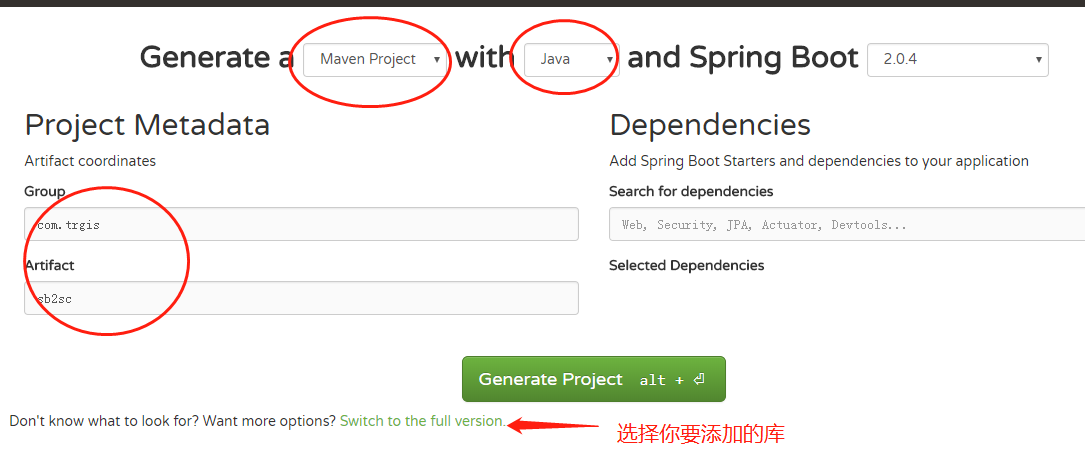
sb2.0新版springcloud微服务实战:Eureka+Zuul+Feign/Ribbon+Hystrix Turbine+SpringConfig+sleuth+zipkin springboot 版本是 2.0.3.RELEASE ,springcloud 版本是 Finchley.RELEASE 本篇文章是springboot2.x升级后的升级springcloud专贴,因为之前版本更新已经好久了,好多人评论可不可以出个新版本,大家一定要注意,这是springboot2.x版本的,springboot1.x的请参考 点击查看文章,基本组件都不变就是升级jar包版本,主要就是hystrix-dashboard使用有点变化。还有一点要注意的是sc默认使用的是eureka1.9.x版本,大家一定要主要,不要自己手动改为2.x版本,因为2.x版本还没有正式发布,而且停止开发了,官方还在积极的维护1.x版本(并不是网传的闭源)。 相信现在已经有很多小伙伴已经或者准备使用springcloud微服务了,接下来为大家搭建一个微服务框架,后期可以自己进行扩展。会提供一个小案例: 服务提供者和服务消费者 ,消费者会调用提供者的服务,新建的项目都是用springboot,附源码下载,推荐使用coding地址下载,因为可以切换分支,后期可以及时更新。 coding仓库地址(推荐下载): coding地址 远程配置仓库地址 远程配置仓库地址 如果有问题请在下边评论,或者200909980加群交流。或者关注文章结尾微信公众号,私信后台 Eureka/Consul/Zookeeper:服务发现 (根据情况选择一个,eureka已经宣布闭源) Hystrix:断路器 Zuul:智能路由 Ribbon/Feign:客户端负载均衡 (Feign用的更多) Turbine&hystrix-dashboard:集群监控 Springcloud-config:远程获取配置文件 接下来,我们开始搭建项目,首先我们到spring为我们提供的一个网站快速搭建springboot项目,点击访问,我这里用的是gradle,如果各位客官喜欢用maven,好吧你可以到http://mvnrepository.com/查看对应的依赖,点我访问。 1.png 一、搭建eureka-server服务sc-eureka-server 使用 spring-cloud-consul 作为服务发现 请参考 点击查看使用springcloud consul 作为服务发现 eureka-server作为服务发现的核心,第一个搭建,后面的服务都要注册到eureka-server上,意思是告诉eureka-server自己的服务地址是啥。当然还可以用zookeeper或者springconsul。 1.修改build.gradle文件 如果是maven项目请对应的修改pom.xml //加入阿里的私服仓库地址 maven { url "http://maven.aliyun.com/nexus/content/groups/public/" } //加入依赖 compile('org.springframework.cloud:spring-cloud-starter-netflix-eureka-server') //加入security,是因为访问eureka-server需要用户名和密码访问,为了安全 compile('org.springframework.boot:spring-boot-starter-security') 还有几点需要修改的,大家对应图片看看,就是springboot打包的时候会提示找不到主类。 2.png 2.修改 application.yml,建议用yml。 server: port: 8761 eureka: datacenter: trmap environment: product server: # 关闭自我保护 enable-self-preservation: false # 清理服务器 eviction-interval-timer-in-ms: 5000 client: healthcheck: enabled: true service-url: defaultZone: http://root:booszy@localhost:8761/eureka/ register-with-eureka: false fetch-registry: false spring: security: basic: enabled: true user: name: root password: booszy 3.修改程序的主类,建议修改类名,要加如eureka的 @EnableEurekaServer 注解,然后运行main方法。 @EnableEurekaServer @SpringBootApplication public class Sb2scEurekaApplication { public static void main(String[] args) { SpringApplication.run(Sb2scEurekaApplication.class, args); } } 4.png http://localhost:8761/ 这个是eureka-server的页面地址,密码在yml配置文件中,到这里,说明eureka-server搭建好了,简单吧,这一步一定要成功,否则后面的就不能继续进行下去了,后边基本类似。 二、搭建config-server服务sc-config-server springcloud-config-server是用来将远程git仓库的配置文件动态拉下来,这样配置文件就可以动态的维护了。当然也可以选择本地仓库。 新建一个springboot项目,修改maven私服地址,并加入一下依赖。 1.修改build.gradle文件 compile('org.springframework.cloud:spring-cloud-config-server') compile('org.springframework.cloud:spring-cloud-starter-netflix-eureka-client') //连接config-server也需要用户名和密码 compile('org.springframework.boot:spring-boot-starter-security') compile('org.springframework.boot:spring-boot-starter-actuator') 2.修改application.yml文件 server: port: 8800 spring: security: basic: enabled: true user: name: root password: booszy application: name: sc-config-server cloud: config: server: git: uri: https://git.coding.net/yirenyishi/springcloud-config-profile searchPaths: '{application}' eureka: client: service-url: defaultZone: http://root:booszy@localhost:8761/eureka/ instance: prefer-ip-address: true instance-id: ${spring.application.name}:${spring.application.instance_id:${server.port}} appname: sc-config-server 3.修改启动类 修改启动类,要加入这三个注解,因为要注册到eureka-server上,所以需要@EnableDiscoveryClient这个注解 @EnableConfigServer @EnableDiscoveryClient @SpringBootApplication public class Sb2scConfigApplication { public static void main(String[] args) { SpringApplication.run(Sb2scConfigApplication.class, args); } } 然后运行启动springboot项目,等启动成功后访问eureka的页面,会发现sc-config-server已经注册到上面了,如果启动报错,请检查错误信息。 3.png 三、搭建服务提供者服务sc-provider 编写一个服务提供者,为下边的消费者提供服务,用到了spring-webflux(spring新出的非阻塞式框架)不是springmvc,当然你们公司用什么你还是继续用什么。 注意 : 这里除了application.xml,还需要一个bootstrap.yml, 因为bootstrap.yml得加载顺序是在application.xml前边,服务注册和config配置必须放到bootstrap.yml。 修改build.gradle文件 compile('org.springframework.cloud:spring-cloud-starter-netflix-eureka-client') compile('org.springframework.cloud:spring-cloud-starter-config') compile('org.springframework.boot:spring-boot-starter-webflux') compile('org.springframework.boot:spring-boot-starter-actuator') 2.编写配置文件bootstrap.yml ** 注意 : 这里除了application.xml,还需要一个bootstrap.yml* application.xml我是放到远程仓库地址的,大家可以直接到我的远程仓库,根据项目名(sc-provider-config)查询。配置文件的仓库地址:点击访问。 eureka: client: service-url: defaultZone: http://root:booszy@localhost:8761/eureka/ instance: prefer-ip-address: true instance-id: ${spring.application.name}:${spring.application.instance_id:${server.port}} appname: sc-provider spring: application: name: sc-provider cloud: config: discovery: enabled: true service-id: sc-config-server fail-fast: true username: root password: booszy profile: csdn 3.编写代码 编写主类 @EnableDiscoveryClient @SpringBootApplication public class Sb2scProviderApplication { public static void main(String[] args) { SpringApplication.run(Sb2scProviderApplication.class, args); } } 新建IndexController进行测试,这里只是为了测试,案例代码使用的是webflux,如果想使用springmvc,修改jar包依赖即可。 @RestController @RequestMapping("test") public class IndexController { //返回一个实体 @GetMapping("{msg}") public Mono<String> sayHelloWorld(@PathVariable("msg") String msg) { System.out.println("come on " + msg); return Mono.just("sc-provider receive : " +msg); } //返回一个列表 @GetMapping("list") public Flux<Integer> list() { List<Integer> list = new ArrayList<>(); list.add(8); list.add(22); list.add(75); list.add(93); Flux<Integer> userFlux = Flux.fromIterable(list); return userFlux; } } 运行springboot项目,去eureka-server查看,有没有注册上。 5.png 我们的sc-provider已经注册到eureka上了,访问接口,成功。 6.png 四、搭建消费者服务sc-consumer 消费者要访问服务提供者的服务,这里用的是通过RestTemplate/feign请求resetful接口,使用ribbon做客户端负载均衡,hystrix做错误处理,feign和ribbon二选一,案例中ribbon和feign都有,也可以都用。 还是熟悉的配方,熟悉的味道,新建springboot项目,添加项目依赖。 1.修改build.gradle文件 compile('org.springframework.cloud:spring-cloud-starter-netflix-eureka-client') compile('org.springframework.cloud:spring-cloud-starter-config') compile('org.springframework.boot:spring-boot-starter-webflux') compile('org.springframework.boot:spring-boot-starter-actuator') compile('org.springframework.cloud:spring-cloud-starter-openfeign') compile('org.springframework.cloud:spring-cloud-starter-netflix-hystrix') 2.修改bootstrap.yml文件 application.yml 在git仓库,请前往git仓库查看。 eureka: client: service-url: defaultZone: http://root:booszy@localhost:8761/eureka/ instance: prefer-ip-address: true instance-id: ${spring.application.name}:${spring.application.instance_id:${server.port}} appname: sc-consumer spring: application: name: sc-consumer cloud: config: discovery: enabled: true service-id: sc-config-server fail-fast: true username: root password: booszy profile: csdn #新版配置,否则后面dashboard无法找到hystrix.stream management: endpoints: web: exposure: include: '*' 3.编写代码 启动类代码 @RibbonClient 指定服务使用的负载均衡类型,name不指定服务则为所有的服务打开负载均衡,也可以在用yml中进行配置。 @EnableHystrix 是支持hystrix打开断路器,在规定时间内失败参数超过一定参数,就会打开断路器,不会发起请求,而是直接进入到错误处理方法。 @EnableDiscoveryClient @EnableFeignClients @EnableCircuitBreaker @EnableHystrix @SpringBootApplication public class Sb2scConsumerApplication { // ribbon需要配置,负载均衡 @Autowired private RestTemplateBuilder builder; // ribbon需要配置,负载均衡 @Bean @LoadBalanced public RestTemplate restTemplate() { return builder.build(); } public static void main(String[] args) { SpringApplication.run(Sb2scConsumerApplication.class, args); } } 1.ribbon案例 ribbon不需要单独依赖,新建 RibbonController ribbon一个坑,不能接受List类型,要使用数组接收。 @HystrixCommand(fallbackMethod="fallbackMethod") 如果请求失败,会进入fallbackMethod这个方法,fallbackMethod这个方法要求参数和返回值与回调他的方法保持一致。 @RestController public class RibbonController { @Autowired private RestTemplate restTemplate; @Autowired private LoadBalancerClient loadBalancerClient; @GetMapping("/ribbon/{wd}") @HystrixCommand(fallbackMethod="fallbackMethod") public Mono<String> sayHelloWorld(@PathVariable("wd") String parm) { String res = this.restTemplate.getForObject("http://sc-provider/test/" + parm, String.class); return Mono.just(res); } public Mono<String> fallbackMethod(@PathVariable("wd") String parm) { return Mono.just("fallback"); } 运行springboot项目,先看有没有注册到eureka-server上。 7.png 注册成功后,访问接口,测试是否正确。 8.png ribbon使用就是这么简单,ribbon是springboot自带,所以不需要单独添加依赖。 2.feign案例 在实际开发中,feign使用的还是挺多的,feign底层还是使用了ribbon。废话不多说,直接上步骤,在服务消费者中使用feign访问服务提供者。 1配置文件 ribbon: ReadTimeout: 30000 ConnectTimeout: 15000 hystrix: command: default: execution: isolation: thread: timeoutInMilliseconds: 10000 feign的默认请求超时时间是1s,所以经常会出现超时的问题,这里我设置的是10s,因为我的数据库服务器在美国,所以有时候请求会比较慢。ribbon的请求时间也要设置,因为feign用的是ribbon。这里贴的是application.yml文件中的一小段 2 编码 1、主类注解 @EnableFeignClients @EnableCircuitBreaker @EnableHystrix 这三个都要,hystrix主要作用是断路器,会进如fein的fallback中。 主类代码在上面已经贴出来了 2、编写feign接口,MFeignClient.class name是指要请求的服务名称。这里请求的是服务提供者 fallback 是指请求失败,进入断路器的类,和使用ribbon是一样的。 configuration 是feign的一些配置,例如编码器等。 @FeignClient(name = "sc-provider",fallback = MFeignClientFallback.class, configuration = MFeignConfig.class) public interface MFeignClient { // 这是被请求微服务的地址,也就是provider的地址 @GetMapping(value = "/test/{msg}") String sayHelloWorld(@PathVariable("msg") String msg); @GetMapping(value = "/test/list") List<Integer> list(); @GetMapping(value = "/test/list") Integer[] array(); } 3 MFeignConfig.class feign的配置 这里配置了feign的打印日志等级 @Configuration public class MFeignConfig { @Bean Logger.Level feignLoggerLevel() { return Logger.Level.FULL; } } 4 MFeignClientFallback.class ,断路器回调方法 断路器要实现上边定义的MFeignClient接口,请求失败,进入断路器时,会回调这里的方法。 @Component public class MFeignClientFallback implements MFeignClient{ @Override public String sayHelloWorld(String msg) { return "fallback"; } @Override public List<Integer> list() { return new ArrayList<>(); } @Override public Integer[] array() { return new Integer[0]; } } 5 在controller中使用feign @RestController public class FeignController { @Autowired private MFeignClient feignClient; @GetMapping("/feign/{wd}") public Mono<String> sayHelloWorld(@PathVariable("wd") String parm) { String result = feignClient.sayHelloWorld(parm); return Mono.just(result); } @GetMapping("/feign/list") public Flux<Integer> list() { List<Integer> list = feignClient.list(); Flux<Integer> userFlux = Flux.fromIterable(list); return userFlux; } @GetMapping("/feign/array") public Flux<Integer> array() { Integer[] arrays = feignClient.array(); Flux<Integer> userFlux = Flux.fromArray(arrays); return userFlux; } } 9.png 五、用zuul做路由转发和负载均衡 这些微服务都是隐藏在后端的,用户是看不到,或者不是直接接触,可以用nginx或者zuul进行路由转发和负载均衡,zuul负载均衡默认用的是ribbon。 1.修改build.gradle文件 compile('org.springframework.cloud:spring-cloud-starter-netflix-eureka-client') compile('org.springframework.cloud:spring-cloud-starter-config') compile('org.springframework.cloud:spring-cloud-starter-netflix-zuul') compile('org.springframework.boot:spring-boot-starter-actuator') 2.修改bootstrap.yml 还是原来的配方,application.yml在git仓库 eureka: client: service-url: defaultZone: http://root:booszy@localhost:8761/eureka/ instance: prefer-ip-address: true instance-id: ${spring.application.name}:${spring.application.instance_id:${server.port}} appname: sc-zuul spring: application: name: sc-zuul cloud: config: discovery: enabled: true service-id: sc-config-server fail-fast: true username: root password: booszy profile: csdn 3.启动类 @RefreshScope这个注解是当application.yml配置文件发生变化的时候,不需要手动的进行重启,调用localhost:8400/refresh,就会加载新的配置文件,当然正在访问的客户并不影响还是使用旧的配置文件,因为不是重启,后来的用户会使用新的配置文件。注意这块的刷新要用post请求。 @EnableDiscoveryClient @SpringBootApplication @EnableZuulProxy @RefreshScope public class Sb2scZuulApplication { public static void main(String[] args) { SpringApplication.run(Sb2scZuulApplication.class, args); } } 启动springboot项目,访问eureka-server 10.png 这时候,我们就要通过zuul访问微服务了,而不是直接去访问微服务。 应该访问地址http://localhost:8400/sc-consumer/feign/list,这块你要换成你的zuul地址。 但是有些人就会说,这样以后用户请求会不会太长,比较反感,所以可以通过配置进行修改访问地址。 zuul: routes: springcloud-consumer-config: /consumer/** springcloud-provider-config: /provider/** 在application.yml中加入这样一段配置,其实就是nginx中的反向代理,使用一下简短的可以代理这个微服务。这个时候我们就可以这样去访问了http://localhost:8400/consumer/feign/list,是不是简短了很多 11.png 六、用hystrix-turbine-dashboard 做集群监控 项目在生产环境中,每个服务的访问量都不通,有些服务的访问量比较大,有时候有些服务挂了,不能继续服务,需要重启的时候,我们并不知道,所以这时候就需要使用hystrix-turbine-dashboard做一个监控,监控所有的微服务,可以看到这个接口实时访问量,和健康状况。 新建一个springboot项目,老套路,加入如下依赖 1 添加依赖 compile('org.springframework.cloud:spring-cloud-starter-netflix-eureka-client') compile('org.springframework.boot:spring-boot-starter-actuator') compile('org.springframework.cloud:spring-cloud-starter-netflix-hystrix') compile('org.springframework.cloud:spring-cloud-starter-netflix-hystrix-dashboard') compile('org.springframework.cloud:spring-cloud-starter-netflix-turbine') 2 修改application.yml配置文件 注意:是application.yml,这里不需要bootstrap.yml server: port: 8900 eureka: client: service-url: defaultZone: http://root:booszy@localhost:8761/eureka/ instance: prefer-ip-address: true instance-id: ${spring.application.name}:${spring.application.instance_id:${server.port}} appname: sc-dashboard turbine: aggregator: clusterConfig: default appConfig: sc-consumer clusterNameExpression: "'default'" spring: application: name: sc-dashboard #management: # endpoints: # web: # exposure: # include: '*' appConfig 后面是要检测的注册在eureka上的服务名,必须要有 3 修改主类 @EnableTurbine ,@EnableHystrixDashboard 一个都不能少 @EnableDiscoveryClient @SpringBootApplication @EnableTurbine @EnableHystrixDashboard public class Sb2scDashboardApplication { public static void main(String[] args) { SpringApplication.run(Sb2scDashboardApplication.class, args); } } 4 访问测试 这块的端口是8900,访问地址http://localhost:8900/hystrix,看到的是下面的页面。 13.png 然后在那个网址的输入框里输网址http://localhost:8900/turbine.stream,点击monitor stream。刚打开的时候可能是空的,什么也没有,这并不表示你已经错了。这时候你访问消费者服务的接口,例如访问http://localhost:8400/consumer/feign/list,多访问几次,然后看控制台有没有出现一个监控面板,没有就等会刷新一次,如果一直不出现,应该是配置有问题。 12.png 七、使用sleuth+zipkin 实现链路追踪服务 在使用微服务的时候,我们发现,有时候排错不好排查,所以就给大家整个这个链路追踪,很方便知道是哪一个服务调用哪一个服务出现了问题。因为有些项目可能服务比较多。 1 添加依赖 新建一个springboot项目 虽然其他服务调用zipkin不是从eureka上动态过去服务地址,而是硬编码,但是这块还是考虑吧zipkin注册到eureka上。 compile('org.springframework.cloud:spring-cloud-starter-netflix-eureka-client') compile group: 'io.zipkin.java', name: 'zipkin-server', version: '2.9.3' compile group: 'io.zipkin.java', name: 'zipkin-autoconfigure-ui', version: '2.9.3' compile('org.springframework.boot:spring-boot-starter-actuator') 如果提示log4j有冲突,要排除依赖 configurations { compile.exclude module: 'log4j' compile.exclude module: 'slf4j-log4j12' compile.exclude module: 'spring-boot-starter-logging' } 2 修改application配置文件 server: port: 9411 spring: application: name: sc-sc-zipkin profiles: active: csdn eureka: client: service-url: defaultZone: http://root:booszy@localhost:8761/eureka/ instance: prefer-ip-address: true instance-id: ${spring.application.name}:${spring.application.instance_id:${server.port}} appname: sc-zipkin management: metrics: web: server: auto-time-requests: false 3 主类注解添加 @EnableZipkinServer 主要是这个注解 启动服务后访问http://localhost:9411,就可以打开zipkin的控制台页面,这时候应该是什么都没有 @EnableDiscoveryClient @SpringBootApplication @EnableZipkinServer public class Sb2scZipkinApplication { public static void main(String[] args) { SpringApplication.run(Sb2scZipkinApplication.class, args); } } 4 其他服务中调用 这里我们在消费者服务和提供者服务里都加入如下依赖 .... compile group: 'org.springframework.cloud', name: 'spring-cloud-starter-sleuth', version: '1.3.1.RELEASE' compile group: 'org.springframework.cloud', name: 'spring-cloud-sleuth-zipkin', version: '1.3.1.RELEASE' ... 然后修改配置文件,bootstrap.yml、 这块zipkin的地址是硬编码的,目前还没发现怎么从服务注册中心eureka上动态获取,以后有解决方案,会更新帖子 sleuth这个是配置提取率,可以配置也可以不配置 spring: zipkin: base-url: http://localhost:9411 sleuth: sampler: percentage: 1.0 启动服务,然后访问消费者服务的接口,这时候访问zipkin的控制台http://localhost:9411 14.png 点击依赖分析,可以看到调用服务链,因为这块只涉及到两个服务,所以只有两个,在实际生产环境中,这块可能有很多,到时候看起来就特别直观了。 15.png 16.png 关注 如果有问题,请在下方评论,或者加群讨论 200909980 关注下方微信公众号,可以及时获取到各种技术的干货哦,如果你有想推荐的帖子,也可以联系我们的。

优秀的个人博客,低调大师

SpringBoot2 参数管理实践,入参出参与校验

# 一、参数管理 在编程系统中,为了能写出良好的代码,会根据是各种设计模式、原则、约束等去规范代码,从而提高代码的可读性、复用性、可修改,实际上个人觉得,如果写出的代码很好,即别人修改也无法破坏原作者的思路和封装,这应该是非常高水准。 但是在日常开发中,碍于很多客观因素,很少有时间去不断思考和优化代码,所以只能从实际情况的角度去思考如何构建系统代码,保证以后自己还能读懂自己的代码,在自己的几年编程中,实际会考虑如下几个方面:代码层级管理,命名和注释统一,合理的设计业务数据库,明确参数风格。 这里就来聊一下参数管理,围绕:入参、校验、返参三个方面内容。 如何理解代码规范这个概念:即大多数开发认同,愿意遵守的约束,例如Spring框架和Mvc模式对于工程的管理,《Java开发手册》中对于业务开发的规定,其根本目的都是想避免随着业务发展,代码演变到无法维护的境界。 # 二、接收参数 接收参数方式有很多种,List,Map,Object等等,但是为了明确参数的语义,通常都需要设计参数对象的结构并且遵守一定的规范,例如明确禁止Map接收参数: **Rest风格接收单个ID参数:** ```java @GetMapping("/param/single/{id}") public String paramSingle (@PathVariable Integer id){ return "Resp:"+id ; } ``` **接收多个指定的参数:** ```java @GetMapping("/param/multi") public String paramMulti (@RequestParam("key") String key, @RequestParam("var") String var){ return "Resp:"+key+var ; } ``` **基于Java包装对象入参:** ```java @PostMapping("/param/wrap") public ParamIn paramWrap (@RequestBody ParamIn paramIn){ return paramIn ; } -- 参数对象实体 public class ParamIn { private Integer id ; private String key ; private String var ; private String name ; } ``` 以上是在开发中常用的几种接参方式,这里通常会遵守下面几个习惯: - 参数语义:明确接收参数的作用; - 个数限制:参数超过三个使用包装对象; - 避免多个接口使用单个包装对象入参; - 避免包装对象主体过于复杂; 参数接收并没有很复杂的约束,整体上也比较容易遵守,通常的问题在于处理较大主体对象时,容易产生一个包装对象被多处复用,进而导致对象字段属性很多,这种情况在复杂业务中尤其容易出现,这种对象并不利于web层接口使用,或者很多时候都会在业务层和接口层混用对象; 在业务层封装复杂的BO对象来降低业务管理的复杂度,这是合理常见的操作,可以在web接口层面根据接口功能各自管理入参主体,在业务实现的过程中,再传入BO对象中。 避免复杂的业务包装对象在各个层乱飘,如果多个接口入参都是同一个复杂的对象,很容易让开发人员迷茫。 # 三、响应参数 与参数接收相对应的就是参数响应,参数响应通常具有明确的约束规范:响应主体数据,响应码,描述信息。通常来说就是这样三个核心要素。 **响应参数主体:** 这里泛型的使用通常用来做主体数据的接收。 ```java public class Resp { private int code ; private String msg ; private T data ; public static Resp ok (T data) { Resp result = new Resp<>(HttpStatus.OK); result.setData(data); return result ; } public Resp (HttpStatus httpStatus) { this.code = httpStatus.value(); this.msg = httpStatus.getReasonPhrase(); } public Resp(int code, String msg, T data) { this.code = code; this.msg = msg; this.data = data; } } ``` **Code状态码** 即接口状态,建议参照并遵守`HttpStatus`中状态码的描述,这是开发普遍遵守的规范,如果不满足业务需求,在适当自定义部分编码,可以完全自定义一套响应码,但是没太多必要。 **Msg描述** 描述接口的响应的Msg可能就是:成功或失败,更多的时候是需要处理业务异常的提示信息,例如单号不存在,账号冻结等等,通常需要从业务异常中捕获提示信息,并响应页面,或者入参校验不通过的描述。 **Data数据** 接口响应的主体数据,不同的业务响应的对象肯定不同,所以这里基于泛型机制接收即可,再以JSON格式响应页面。 **参考案例** 接口返参: ```java @PostMapping("/resp/wrap") public Resp respWrap (@RequestBody KeyValue keyValue){ return Resp.ok(keyValue) ; } ``` 响应格式: ```json { "code": 200, "msg": "OK", "data": { "key": "hello", "value": "world" } } ``` # 四、参数校验 参数接收和响应相对都不是复杂的,比较难处理的就是参数校验:入参约束校验,业务合法性校验,响应参数非空非null校验,等各种场景。 在系统运行过程中,任何参数都不是绝对可靠的,所以参数校验随处可见,不同场景下的参数校验,都有其必要性,但其根本目的都是为了给到请求端提示信息,快速打断流程,快速响应。 ## 1、借鉴参考 很多封装思想,设计模式,或者这里说的参数校验,都可以参考现有Java源码或者优秀的框架,这是一个应该具备的基础意识。 Java原生方法之`java.lang.Thread`线程: ```java public void interrupt() { if (this != Thread.currentThread()) checkAccess(); synchronized (blockerLock) { Interruptible b = blocker; if (b != null) { interrupt0(); b.interrupt(this); return; } } interrupt0(); } ``` 在Java源码中,大部分都是采用原生的if判断方式,对参数执行校验 **Spring框架**之`org.springframework.util.ClassUtils`工具类部分代码: ```java public static Class forName(String name, @Nullable ClassLoader classLoader) throws ClassNotFoundException, LinkageError { Assert.notNull(name, "Name must not be null"); Class clazz = resolvePrimitiveClassName(name); if (clazz == null) { clazz = commonClassCache.get(name); } if (clazz != null) { return clazz; } } ``` 在Spring框架中除了基础的if判断之外,还封装一个`org.springframework.util.Assert`断言工具类。 ## 2、常用校验方式 **If判断** ```java @GetMapping("/check/base") public String baseCheck (@RequestParam("var") String var){ if (var == null) { return var+" is null" ; } if ("".equals(var)){ return var+" is empty" ; } if ("hello".equals(var)){ return var+" sensitive word " ; } return var + " through " ; } ``` 这种判断在代码中很常见,只是一旦遇到校验的主体对象很大,并且在分布式的环境中,需要重复写if判断的话,容易出错是一个方面,对开发人员的耐心考验是另一个方面。 **Valid组件** 在早几年的时候,比较流行的常用校验组件`Hibernate-Validator`,后来兴起的`Validation-Api`,据说是参考前者实现,不过这并不重要,二者都简化了对JavaBean的校验机制。 基于注解的方式,标记Java对象的字段属性,并设定如果校验失败的提示信息。 ```java public class JavaValid { @NotNull(message="ID不能为空") private Integer id ; @Email(message="邮箱格式异常") private String email ; @NotEmpty(message = "字段不能为空") @Size(min = 2,max = 10,message = "字段长度不合理") private String data ; } ``` 校验结果打印: ```java public class JavaValidTest { private static Validator validator ; @BeforeClass public static void beforeBuild (){ validator = Validation.buildDefaultValidatorFactory().getValidator(); } @Test public void checkValid (){ JavaValid valid = new JavaValid(null,"email","data") ; Set > validateInfo = validator.validate(valid) ; // 打印校验结果 validateInfo.stream().forEach(validObj -> { System.out.println("validateInfo:"+validObj.getMessage()); }); } } ``` 接口使用: ```java @PostMapping("/java/valid") public JavaValid javaValid (@RequestBody @Valid JavaValid javaValid,BindingResult errorMsg){ if (errorMsg.hasErrors()){ List objectErrors = errorMsg.getAllErrors() ; objectErrors.stream().forEach(objectError -> { logger.info("CheckRes:{}",objectError.getDefaultMessage()); }); } return javaValid ; } ``` 这种校验机制基于注解方式,可以大幅度简化普通的入参校验,但是对业务参数的合法校验并不适应,例如常见的ID不存在,状态拦截等。 **Assert断言** 关于Assert断言方式,起初是在单元测试中常见,后来在各种优秀的框架中开始常见,例如Spring、Mybatis等,然后就开始出现在业务代码中: ```java public class AssertTest { private String varObject ; @Before public void before (){ varObject = RandomUtil.randomString(6) ; } @Test public void testEquals (){ Assert.assertEquals(varObject+"不匹配",varObject,RandomUtil.randomString(6)); } @Test public void testEmpty (){ Assert.assertTrue(StrUtil.isNotEmpty(varObject)); Assert.assertFalse(varObject+" not empty",StrUtil.isNotEmpty(varObject)); } @Test public void testArray (){ /* 数组元素不相等: arrays first differed at element [1]; Expected :u08 Actual :mwm */ String var = RandomUtil.randomString(5) ; String[] arrOne = new String[]{var,RandomUtil.randomString(3)} ; String[] arrTwo = new String[]{var,RandomUtil.randomString(3)} ; Assert.assertArrayEquals("数组元素不相等",arrOne,arrTwo); } } ``` Assert断言,可以替换传统的if判断,大量减少参数校验的代码行数,提高程序的可读性,这种风格是目前比较流行的方式。 # 五、源代码地址 ``` GitHub·地址 https://github.com/cicadasmile/middle-ware-parent GitEE·地址 https://gitee.com/cicadasmile/middle-ware-parent ``` ![](https://s4.51cto.com/images/blog/202008/11/7fd614ba86c567d35245a247b675bb35.png?x-oss-process=image/watermark,size_16,text_QDUxQ1RP5Y2a5a6i,color_FFFFFF,t_100,g_se,x_10,y_10,shadow_90,type_ZmFuZ3poZW5naGVpdGk=) **阅读标签** 【[Java基础](https://mp.weixin.qq.com/mp/appmsgalbum?__biz=MzU4Njg0MzYwNw==&action=getalbum&album_id=1342230680016683009#wechat_redirect)】【[设计模式](https://mp.weixin.qq.com/mp/appmsgalbum?__biz=MzU4Njg0MzYwNw==&action=getalbum&album_id=1709518416274833422#wechat_redirect)】【[结构与算法](https://mp.weixin.qq.com/mp/appmsgalbum?__biz=MzU4Njg0MzYwNw==&action=getalbum&album_id=1709518416274833422#wechat_redirect)】【[Linux系统](https://mp.weixin.qq.com/mp/appmsgalbum?__biz=MzU4Njg0MzYwNw==&action=getalbum&album_id=1334314473573744641#wechat_redirect)】【[数据库](https://mp.weixin.qq.com/mp/appmsgalbum?__biz=MzU4Njg0MzYwNw==&action=getalbum&album_id=1376212870744358913#wechat_redirect)】 【[分布式架构](https://mp.weixin.qq.com/mp/appmsgalbum?__biz=MzU4Njg0MzYwNw==&action=getalbum&album_id=1327025063014596608#wechat_redirect)】【[微服务](https://mp.weixin.qq.com/mp/appmsgalbum?__biz=MzU4Njg0MzYwNw==&action=getalbum&album_id=1460269376221200386#wechat_redirect)】【[大数据组件](https://mp.weixin.qq.com/mp/appmsgalbum?__biz=MzU4Njg0MzYwNw==&action=getalbum&album_id=1701021199339667459#wechat_redirect)】【[SpringBoot进阶](https://mp.weixin.qq.com/mp/appmsgalbum?__biz=MzU4Njg0MzYwNw==&action=getalbum&album_id=1425309486268661760#wechat_redirect)】【[Spring&Boot基础](https://mp.weixin.qq.com/mp/appmsgalbum?__biz=MzU4Njg0MzYwNw==&action=getalbum&album_id=1461797173297135618#wechat_redirect)】 【[数据分析](https://mp.weixin.qq.com/mp/appmsgalbum?__biz=MzU4Njg0MzYwNw==&action=getalbum&album_id=1695231212027428866#wechat_redirect)】【[技术导图](https://mp.weixin.qq.com/mp/appmsgalbum?__biz=MzU4Njg0MzYwNw==&action=getalbum&album_id=1506615482391511042#wechat_redirect)】【 [职场](https://mp.weixin.qq.com/mp/appmsgalbum?__biz=MzU4Njg0MzYwNw==&action=getalbum&album_id=1719834087936278530#wechat_redirect)】
优秀的个人博客,低调大师

SpringBoot2 集成测试组件,七种测试手段对比

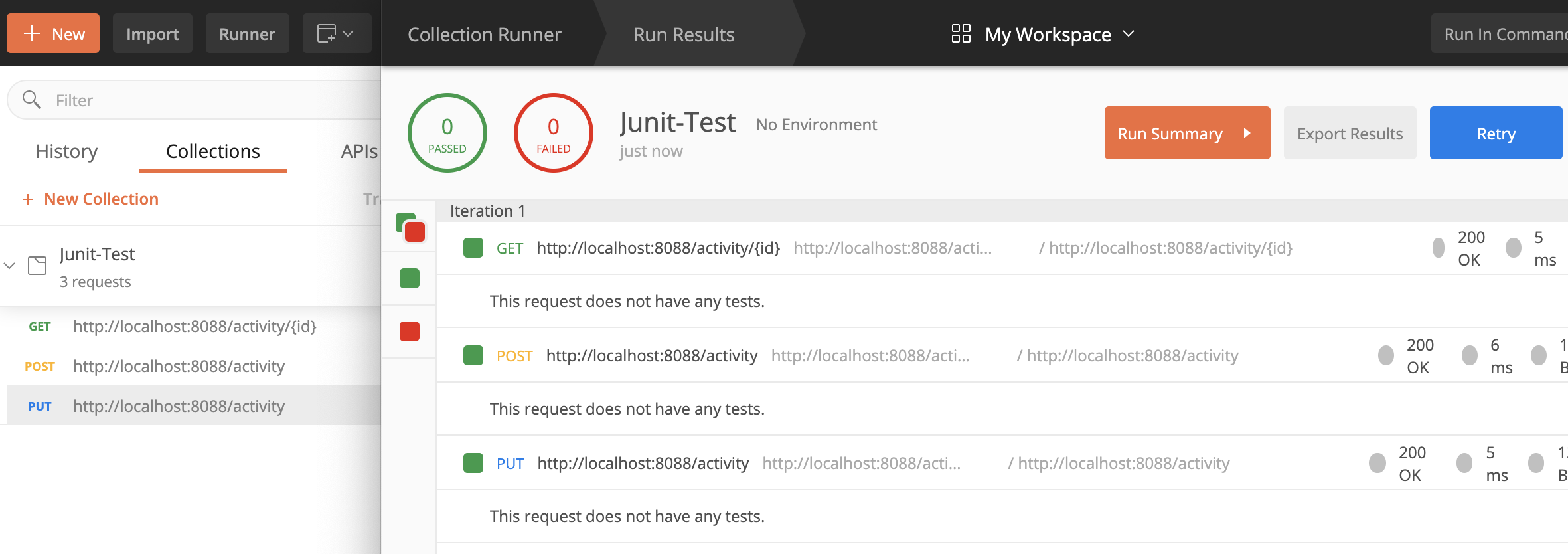
一、背景描述 在版本开发中,时间段大致的划分为:需求,开发,测试; 需求阶段:理解需求做好接口设计; 开发阶段:完成功能开发和对接; 测试上线:自测,提测,修复,上线; 实际上开发阶段两个核心的工作,开发和流程自测,自测的根本目的是为自己提前解决可能出现的问题;如果缺少自测和提测两个关键步骤,那么问题就会被传递给更多的用户,产生更多的资源消耗; 自测是于开发而言,提测是对专业的测试人员而言,如果尽可能在自测阶段就发现问题,并解决问题,那么一个问题就不会影响到团队协作上的更多人员,如果一个简单的问题上升到团队协作层面,很可能会导致问题本身被放大。 工欲善其事必先利其器,开发如果要做好自测流程,学会使用工具提高效率是十分关键的,自测的关键在于发现问题和解决问题,所以选择好用和高效的工具可以极大的降低自测的时间消耗。 下面围绕几个自己开发过程中常用的测试工具和手段,做简单的总结,不在于对比方式的好坏,存在即合理,在不同场景中对合理手段的选择,快速解决问题才是根本目的。 二、PostMan工具 PostMan很常用的接口测试工具,开发过程中快速测试接口,功能强大并且简单方便,不但可以单个接口测试,也可以对接口分块管理批量运行: 整体来说工具比较好用,适应于开发阶段的接口快速测试,或者在解决问题的过程中单个接口的测试,同时对测试参数有存储和记忆能力,这也是受欢迎的一大原因。 但是该工具不适应于复杂的流程化测试,例如需要根据上次接口的响应报文做分别处理,或者下次请求需要填充某个接口响应的数据。 三、Swagger文档 Swagger管理接口文档,是当下服务中很常用的组件,通过对接口和对象的简单注释,快速生成接口描述信息,并且可以对接口发送请求,协助调试,该文档在前后端联调中极大的提高效率。 接口文档的管理本身是一件麻烦事,接口通常会根据业务不断的调整,如果单独维护一份接口文档,需要付出很多时间成本,并且容易出问题,利用swagger就可以避免这个问题。 借助swagger注解标记对象 @TableName("jt_activity") @ApiModel(value="活动PO对象", description="活动信息表【jt_activity】") public class Activity { @ApiModelProperty(value = "主键ID") @TableId(type = IdType.AUTO) private Integer id; @ApiModelProperty(value = "活动主题") private String activityTitle; @ApiModelProperty(value = "联系号码") private String contactPhone; @ApiModelProperty(value = "1线上、2线下") private Integer isOnline; @ApiModelProperty(value = "举办地址") private String address; @ApiModelProperty(value = "主办单位") private String organizer; @ApiModelProperty(value = "创建时间") private Date createTime; } 借助swagger注解标记接口 @Api(tags = "活动主体接口") @RestController public class ActivityWeb { @Resource private ActivityService activityService ; @ApiOperation("新增活动") @PostMapping("/activity") public Integer save (@RequestBody Activity activity){ activityService.save(activity) ; return activity.getId() ; } @ApiOperation("主键查询") @GetMapping("/activity/{id}") public Activity getById (@PathVariable("id") Integer id){ return activityService.getById(id) ; } @ApiOperation("修改活动") @PutMapping("/activity") public Boolean updateById (@RequestBody Activity activity){ return activityService.updateById(activity) ; } } 通常来说,基于swagger注解标记接口类和方法上的入参和关键返参对象即可,这样可以避免再单独维护接口文档。 Swagger接口文档在开发的过程中更多是扮演文档的角色,真正使用swagger去调试的接口也常是一些增删改查的简单接口,这个工具也同样不适应于复杂流程的测试。 四、TestRestTemplate类 SpringBoot测试包中集成的测试API,需要依赖测试包,可以访问控制层接口,非常方便的完成交互过程: Jar包依赖 <dependency> <groupId>org.springframework.boot</groupId> <artifactId>spring-boot-starter-test</artifactId> <scope>test</scope> </dependency> 使用案例 @RunWith(SpringRunner.class) @SpringBootTest(webEnvironment = SpringBootTest.WebEnvironment.RANDOM_PORT) public class ActivityTest01 { protected static Logger logger = LoggerFactory.getLogger(ActivityTest01.class) ; @Resource private TestRestTemplate restTemplate; private Activity activity = null ; @Before public void before (){ activity = restTemplate.getForObject("/activity/{id}", Activity.class,1); logger.info("\n"+JSONUtil.toJsonPrettyStr(activity)); } @Test public void updateById (){ if (activity != null){ activity.setCreateTime(new Date()); activity.setOrganizer("One商家"); restTemplate.put("/activity",activity); } } @After public void after (){ activity = restTemplate.getForObject("/activity/{id}", Activity.class,1); logger.info("\n"+JSONUtil.toJsonPrettyStr(activity)); activity = null ; } } 在TestRestTemplate源码中可以发现,基于RestTemplate做封装,很多功能的实现都是调用RestTemplate方法。 用写代码的方式去实现接口测试,灵活度非常高,可以根据流程做定制开发,很适应于中等复杂的场景测试,这里为什么这样描述,下面对比Http请求再细说。 五、Http请求模式 通过模拟接口的Http请求实现的方式,目前来说个人感觉灵活的最高的方式,先看简单的案例: @RunWith(SpringRunner.class) @SpringBootTest(webEnvironment = SpringBootTest.WebEnvironment.DEFINED_PORT) public class ActivityTest03 { protected static Logger logger = LoggerFactory.getLogger(ActivityTest03.class) ; protected static String REQ_URL = "服务地址+端口"; @Test public void testHttp (){ // 查询 String getRes = HttpUtil.get(REQ_URL+"activity/1"); logger.info("\n {} ",JSONUtil.toJsonPrettyStr(getRes)); Activity activity = JSONUtil.toBean(getRes, Activity.class) ; // 新增 activity.setId(null); activity.setOrganizer("Http商家"); String saveRes = HttpUtil.post(REQ_URL+"/activity",JSONUtil.toJsonStr(activity)); logger.info("\n {} ",saveRes); // 更新 activity.setId(Integer.parseInt(saveRes)); activity.setOrganizer("Put商家"); String putRes = HttpRequest.put(REQ_URL+"/activity") .body(JSONUtil.toJsonStr(activity)).execute().body(); logger.info("\n {} ",putRes); } } 这种方式对于复杂的业务流程来说非常好用,当然这里不排除个人习惯,在测试复杂流程的时候,一个简单方案: 用户信息:模拟http中token数据; 业务流程:通过数据获取包装参数模型; 独立服务管理,模拟并发场景; 根据执行过程生成分析数据结果; 对于复杂业务流程的测试,每个节点的模拟都具有一定的难度,通常在完整的流程中涉及到的服务和库表都是多个,并且请求链路复杂,基于一个灵活的自动化流程,去测试完整的链路,可以对效率有极大的提升。 六、Service层测试 针对服务层的测试手段,其本意在于业务实现的逻辑测试: @RunWith(SpringRunner.class) @SpringBootTest(classes = Application.class) public class ActivityTest04 { protected static Logger logger = LoggerFactory.getLogger(ActivityTest04.class) ; @Autowired private ActivityService activityService ; @Test public void testService (){ // 查询 Activity activity = activityService.getById(1) ; // 新增 activity.setId(null); activityService.save(activity) ; // 修改 activity.setOrganizer("Ser商家"); activityService.updateById(activity) ; // 删除 activityService.removeById(activity.getId()) ; } } 该测试在实际的开发过程也并不常用,偶尔在于某个业务方法实现难度很大,用来针对性测试。 七、MockMvc方式 MockMvc同样是SpringBoot集成测试包提供的测试方式,通过对象的模拟,验证接口是否符合预期: @AutoConfigureMockMvc @RunWith(SpringRunner.class) @SpringBootTest(webEnvironment = SpringBootTest.WebEnvironment.MOCK) public class ActivityTest02 { protected static Logger logger = LoggerFactory.getLogger(ActivityTest02.class) ; @Resource private MockMvc mockMvc ; private Activity activity = null ; @Before public void before () throws Exception { ResultActions resultAction = mockMvc.perform(MockMvcRequestBuilders.get("/activity/{id}",1)) ; MvcResult mvcResult = resultAction.andReturn() ; String result = mvcResult.getResponse().getContentAsString(); activity = JSONUtil.toBean(result,Activity.class) ; } @Test public void updateById () throws Exception { activity.setId(null); activity.setCreateTime(new Date()); activity.setOrganizer("One商家"); ResultActions resultAction = mockMvc.perform(MockMvcRequestBuilders.post("/activity") .contentType(MediaType.APPLICATION_JSON) .content(JSONUtil.toJsonStr(activity))) ; MvcResult mvcResult = resultAction.andReturn() ; String result = mvcResult.getResponse().getContentAsString(); activity.setId(Integer.parseInt(result)); logger.info("result : {} ",result); } @After public void after () throws Exception { activity.setCreateTime(new Date()); activity.setOrganizer("Update商家"); ResultActions resultAction = mockMvc.perform(MockMvcRequestBuilders.put("/activity") .contentType(MediaType.APPLICATION_JSON) .content(JSONUtil.toJsonStr(activity))) ; MvcResult mvcResult = resultAction.andReturn() ; String result = mvcResult.getResponse().getContentAsString(); logger.info("result : {} ",result); } } 对于这种Mock类型的测试,非常专业,通常个人使用极少,暂时没有Get到其精髓思想。 八、Mockito测试 Mock属于非常专业和标准的测试手段,需要依赖powermock包: <dependency> <groupId>org.powermock</groupId> <artifactId>powermock-core</artifactId> <scope>test</scope> </dependency> <dependency> <groupId>org.powermock</groupId> <artifactId>powermock-api-mockito2</artifactId> <scope>test</scope> </dependency> <dependency> <groupId>org.powermock</groupId> <artifactId>powermock-module-junit4</artifactId> <scope>test</scope> </dependency> 简单使用案例: @RunWith(PowerMockRunner.class) @SpringBootTest public class ActivityTest05 { @Test public void testMock (){ Set mockSet = PowerMockito.mock(Set.class); PowerMockito.when(mockSet.size()).thenReturn(10); int actual = mockSet.size(); int expected = 15 ; Assert.assertEquals("返回值不符合预期",expected, actual); } @Test public void testTitle (){ String expectTitle = "Mock主题" ; Activity activity = PowerMockito.mock(Activity.class); PowerMockito.when(activity.getMockTitle()).thenReturn(expectTitle); String actualTitle = activity.getMockTitle(); Assert.assertNotEquals("主题相符", expectTitle, actualTitle); } } 可以通过Mock方式,快速模拟出复杂的对象结构,以便构建测试方法,由于使用很少,同样个人暂时没Get到点。 九、源代码地址 GitHub·地址 https://github.com/cicadasmile/middle-ware-parent GitEE·地址 https://gitee.com/cicadasmile/middle-ware-parent 阅读标签 【Java基础】【设计模式】【结构与算法】【Linux系统】【数据库】 【分布式架构】【微服务】【大数据组件】【SpringBoot进阶】【Spring&Boot基础】 【数据分析】【技术导图】【 职场】

优秀的个人博客,低调大师

🔥 无耳 Solon AI v3.1.2 发布(兼容 Java 8 ~ 24),支持 SpringBoot2,jFinal,Vert.X 等第三方框架

Solon AI Solon AI ,是一套大语言模型的 Java 通用开发工具包(是Solon的二级项目)。特点: 一套接口支持不同提供者、不同大模型调用(通过方言适配) 支持 Function Call 支持 RAG 支持 AI-Flow(与Solon Flow配合) 支持同步接口与流式接口 支持会话记忆 支持聊天生成模型(ChatModel) 、图片生成模型(ImageModel) 、多态模型等 支持嵌入模型(EmbeddingModel) 、排序模型(RankingModel) 支持 Java 8 到 Java 24 支持 Spring、jFinal、Vert.x 等 Solon 以外的框架 等......更多内容,参考官网介绍 通过 Hello world 了解下: 添加应用配置 solon.ai.chat: demo: apiUrl: "http://127.0.0.1:11434/api/chat" # 使用完整地址(而不是 api_base) provider: "ollama" # 使用 ollama 服务时,需要配置 provider model: "llama3.2" # 或 deepseek-r1:7b 效果测试 @Configuration public class DemoConfig { @Bean public ChatModel build(@Inject("${solon.ai.chat.demo}") ChatConfig config) { return ChatModel.of(config).build(); } @Bean public void test(ChatModel chatModel) throws IOException { //一次性返回 ChatResponse resp = chatModel.prompt("hello").call(); //打印消息 System.out.println(resp.getMessage()); } } 最近更新了什么? 新增 solon-ai-repo-chroma 插件 优化 solon-ai-repo-tcvectordb 插件相似度处理 优化 solon-ai-repo-elasticsearch 插件相似度处理 项目仓库地址? gitee:https://gitee.com/opensolon/solon-ai gitcode:https://gitcode.com/opensolon/solon-ai github:https://github.com/opensolon/solon-ai 官网? https://solon.noear.org/article/learn-solon-ai

资源下载

更多资源
Mario

Mario

马里奥是站在游戏界顶峰的超人气多面角色。马里奥靠吃蘑菇成长,特征是大鼻子、头戴帽子、身穿背带裤,还留着胡子。与他的双胞胎兄弟路易基一起,长年担任任天堂的招牌角色。

Nacos

Nacos

Nacos /nɑ:kəʊs/ 是 Dynamic Naming and Configuration Service 的首字母简称,一个易于构建 AI Agent 应用的动态服务发现、配置管理和AI智能体管理平台。Nacos 致力于帮助您发现、配置和管理微服务及AI智能体应用。Nacos 提供了一组简单易用的特性集,帮助您快速实现动态服务发现、服务配置、服务元数据、流量管理。Nacos 帮助您更敏捷和容易地构建、交付和管理微服务平台。

Sublime Text

Sublime Text

Sublime Text具有漂亮的用户界面和强大的功能,例如代码缩略图,Python的插件,代码段等。还可自定义键绑定,菜单和工具栏。Sublime Text 的主要功能包括:拼写检查,书签,完整的 Python API , Goto 功能,即时项目切换,多选择,多窗口等等。Sublime Text 是一个跨平台的编辑器,同时支持Windows、Linux、Mac OS X等操作系统。

WebStorm

WebStorm

WebStorm 是jetbrains公司旗下一款JavaScript 开发工具。目前已经被广大中国JS开发者誉为“Web前端开发神器”、“最强大的HTML5编辑器”、“最智能的JavaScript IDE”等。与IntelliJ IDEA同源,继承了IntelliJ IDEA强大的JS部分的功能。

用户登录
用户注册