$ minikube start
Starting local Kubernetes v1.9.0 cluster...
Starting VM...
Getting VM IP address...
Moving files into cluster...
Setting up certs...
Connecting to cluster...
Setting up kubeconfig...
Starting cluster components...
Kubectl is now configured to use the cluster.
Loading cached images from config file.
$ kubectl expose deployment/first-app --type="NodePort" --port=80
service "first-app" exposed
查看创建好的名为 first-app 的 service :
$ kubectl get svc first-app
NAME        TYPE       CLUSTER-IP    EXTERNAL-IP   PORT(S)        AGE
first-app   NodePort   10.102.0.12   <none>        80:30491/TCP   1m
在 PORT(S) 一栏中,除了 80 端口,后面还有一个 30491 端口。这是使用了“NodePort”类型创建 service 分配的端口,通过主机 ip 和这个端口,就可以访问到这个 service 了。可以使用 curl 工具进行访问:
$ curl 172.17.0.77:30491
<!DOCTYPE html>
<html>
<head>
<title>Welcome to nginx!</title>
<style>
    body {
        width: 35em;
        margin: 0 auto;
        font-family: Tahoma, Verdana, Arial, sans-serif;
    }
</style>
</head>
<body>
<h1>Welcome to nginx!</h1>
<p>If you see this page, the nginx web server is successfully installed and
working. Further configuration is required.</p>

<p>For online documentation and support please refer to
<a href="http://nginx.org/">nginx.org</a>.<br/>
Commercial support is available at
<a href="http://nginx.com/">nginx.com</a>.</p>

<p><em>Thank you for using nginx.</em></p>
</body>
</html>
$ kubectl get pod
NAME                        READY     STATUS    RESTARTS   AGE
first-app-6db44b474-6vlrj   1/1       Running   0          39s
first-app-6db44b474-dbbtp   1/1       Running   0          19m
first-app-6db44b474-gjzgg   1/1       Running   0          39s
如果觉得 3 个太浪费资源了,想减少 pod 的数量,那么可以使用同样的命令,把 replicas 参数的值改为需要的值就可以了。
Nacos /nɑ:kəʊs/ 是 Dynamic Naming and Configuration Service 的首字母简称,一个易于构建 AI Agent 应用的动态服务发现、配置管理和AI智能体管理平台。Nacos 致力于帮助您发现、配置和管理微服务及AI智能体应用。Nacos 提供了一组简单易用的特性集,帮助您快速实现动态服务发现、服务配置、服务元数据、流量管理。Nacos 帮助您更敏捷和容易地构建、交付和管理微服务平台。
Rocky Linux
Rocky Linux(中文名:洛基)是由Gregory Kurtzer于2020年12月发起的企业级Linux发行版,作为CentOS稳定版停止维护后与RHEL(Red Hat Enterprise Linux)完全兼容的开源替代方案,由社区拥有并管理,支持x86_64、aarch64等架构。其通过重新编译RHEL源代码提供长期稳定性,采用模块化包装和SELinux安全架构,默认包含GNOME桌面环境及XFS文件系统,支持十年生命周期更新。

 在k8s的网站上,描述是这样的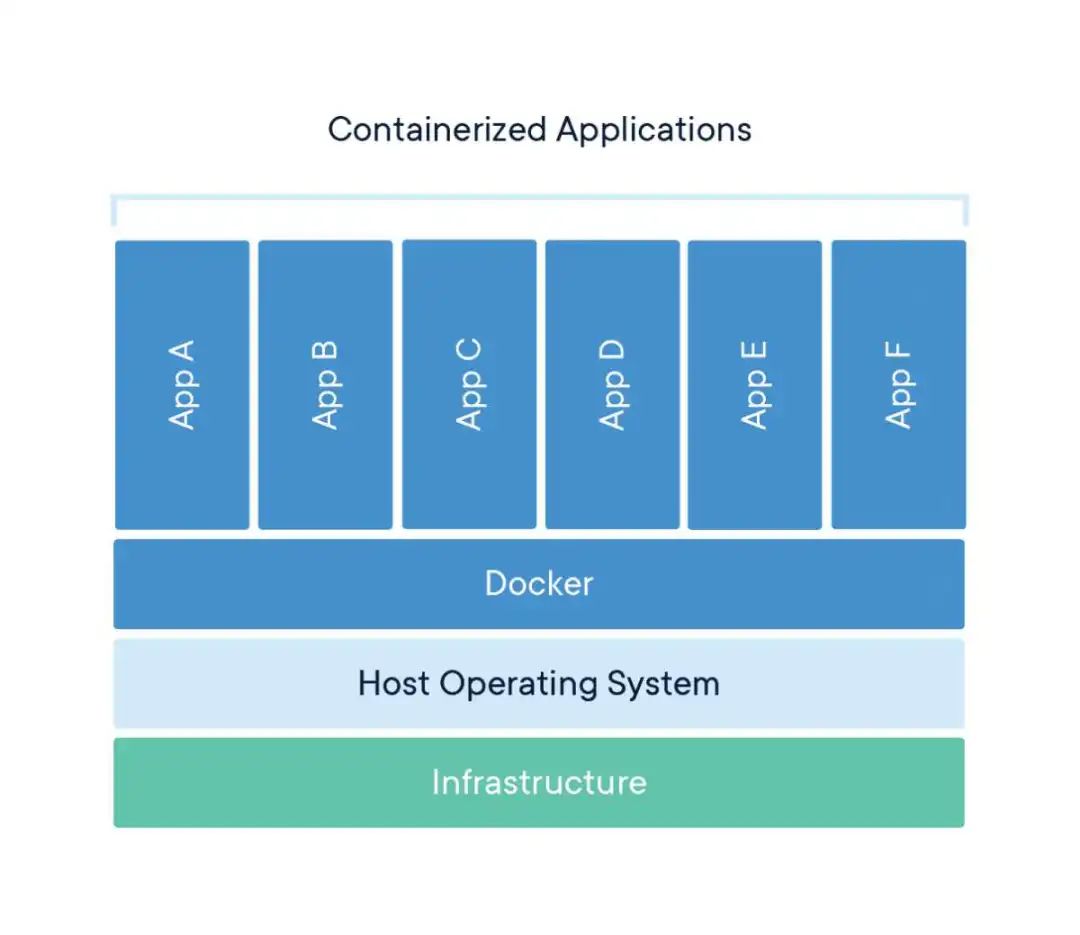

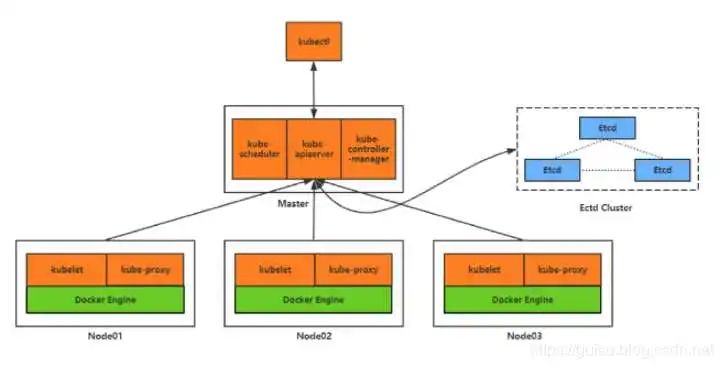
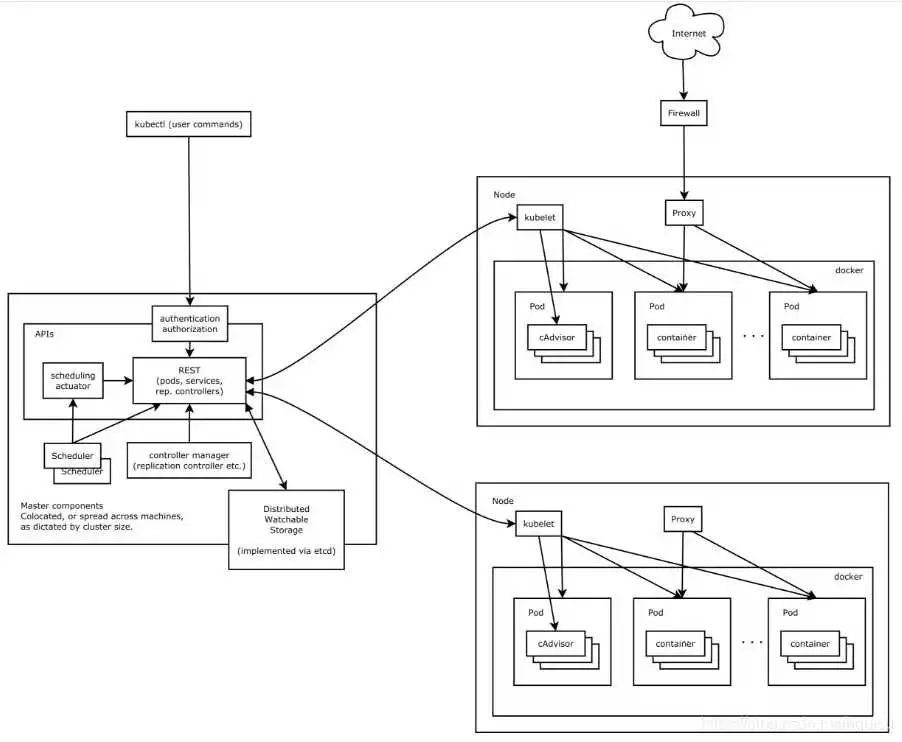
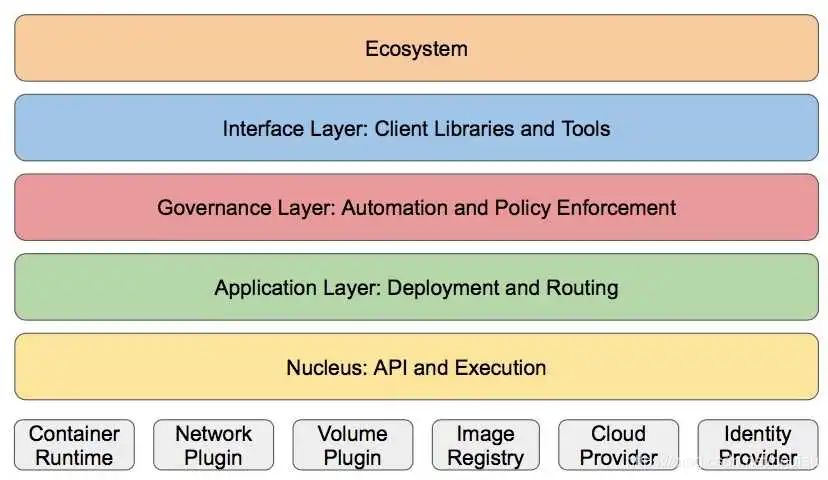 核心层:最核心的功能,对外提供api 应用层,部署无状态应用,等,和路由。管理层:系统度量,自动化,以及RBAC等 接口层:kubectl命令行工具,以及客户端sdk 生态系统:分为外部的日志,监控等,内部的镜像仓库等。