![]()
简介
前面刚说到Guava Cache,他的优点是封装了get,put操作;提供线程安全的缓存操作;提供过期策略;提供回收策略;缓存监控。当缓存的数据超过最大值时,使用LRU算法替换。这一篇我们将要谈到一个新的本地缓存框架:Caffeine Cache。它也是站在巨人的肩膀上-Guava Cache,借着他的思想优化了算法发展而来。
按 Caffeine Github 文档描述,Caffeine 是基于 JAVA 8 的高性能缓存库。并且在 spring5 (springboot 2.x) 后,spring 官方放弃了 Guava,而使用了性能更优秀的 Caffeine 作为默认缓存组件。
Caffine Cache
Caffeine Cache:https://github.com/ben-manes/caffeine
1. 缓存填充策略
Caffeine Cache提供了三种缓存填充策略:手动、同步加载和异步加载。
手动加载
在每次get key的时候指定一个同步的函数,如果key不存在就调用这个函数生成一个值。
/**
     * 手动加载
     * @param key
     * @return
     */
public Object manulOperator(String key) {
    Cache<String, Object> cache = Caffeine.newBuilder()
        .expireAfterWrite(1, TimeUnit.SECONDS)
        .expireAfterAccess(1, TimeUnit.SECONDS)
        .maximumSize(10)
        .build();
    //如果一个key不存在,那么会进入指定的函数生成value
    Object value = cache.get(key, t -> setValue(key).apply(key));
    cache.put("hello",value);

    //判断是否存在如果不存返回null
    Object ifPresent = cache.getIfPresent(key);
    //移除一个key
    cache.invalidate(key);
    return value;
}

public Function<String, Object> setValue(String key){
    return t -> key + "value";
}
同步加载
构造Cache时候,build方法传入一个CacheLoader实现类。实现load方法,通过key加载value。
/**
     * 同步加载
     * @param key
     * @return
     */
public Object syncOperator(String key){
    LoadingCache<String, Object> cache = Caffeine.newBuilder()
        .maximumSize(100)
        .expireAfterWrite(1, TimeUnit.MINUTES)
        .build(k -> setValue(key).apply(key));
    return cache.get(key);
}

public Function<String, Object> setValue(String key){
    return t -> key + "value";
}
异步加载
AsyncLoadingCache是继承自LoadingCache类的,异步加载使用Executor去调用方法并返回一个CompletableFuture。异步加载缓存使用了响应式编程模型。
如果要以同步方式调用时,应提供CacheLoader。要以异步表示时,应该提供一个AsyncCacheLoader,并返回一个CompletableFuture。
/**
 * 异步加载
 * @param key
 * @return
*/
public Object asyncOperator(String key){
    AsyncLoadingCache<String, Object> cache = Caffeine.newBuilder()
        .maximumSize(100)
        .expireAfterWrite(1, TimeUnit.MINUTES)
        .buildAsync(k -> setAsyncValue(key).get());

    return cache.get(key);
}

public CompletableFuture<Object> setAsyncValue(String key){
    return CompletableFuture.supplyAsync(() -> {
        return key + "value";
    });
}
2. 回收策略
Caffeine提供了3种回收策略:基于大小回收,基于时间回收,基于引用回收。
基于大小的过期方式
基于大小的回收策略有两种方式:一种是基于缓存大小,一种是基于权重。
// 根据缓存的计数进行驱逐
LoadingCache<String, Object> cache = Caffeine.newBuilder()
    .maximumSize(10000)
    .build(key -> function(key));


// 根据缓存的权重来进行驱逐(权重只是用于确定缓存大小,不会用于决定该缓存是否被驱逐)
LoadingCache<String, Object> cache1 = Caffeine.newBuilder()
    .maximumWeight(10000)
    .weigher(key -> function1(key))
    .build(key -> function(key));
maximumWeight与maximumSize不可以同时使用。
基于时间的过期方式
// 基于固定的到期策略进行退出
LoadingCache<String, Object> cache = Caffeine.newBuilder()
    .expireAfterAccess(5, TimeUnit.MINUTES)
    .build(key -> function(key));
LoadingCache<String, Object> cache1 = Caffeine.newBuilder()
    .expireAfterWrite(10, TimeUnit.MINUTES)
    .build(key -> function(key));

// 基于不同的到期策略进行退出
LoadingCache<String, Object> cache2 = Caffeine.newBuilder()
    .expireAfter(new Expiry<String, Object>() {
        @Override
        public long expireAfterCreate(String key, Object value, long currentTime) {
            return TimeUnit.SECONDS.toNanos(seconds);
        }

        @Override
        public long expireAfterUpdate(@Nonnull String s, @Nonnull Object o, long l, long l1) {
            return 0;
        }

        @Override
        public long expireAfterRead(@Nonnull String s, @Nonnull Object o, long l, long l1) {
            return 0;
        }
    }).build(key -> function(key));
Caffeine提供了三种定时驱逐策略:
- expireAfterAccess(long, TimeUnit):在最后一次访问或者写入后开始计时,在指定的时间后过期。假如一直有请求访问该key,那么这个缓存将一直不会过期。
- expireAfterWrite(long, TimeUnit):在最后一次写入缓存后开始计时,在指定的时间后过期。
- expireAfter(Expiry):自定义策略,过期时间由Expiry实现独自计算。
缓存的删除策略使用的是惰性删除和定时删除。这两个删除策略的时间复杂度都是O(1)。
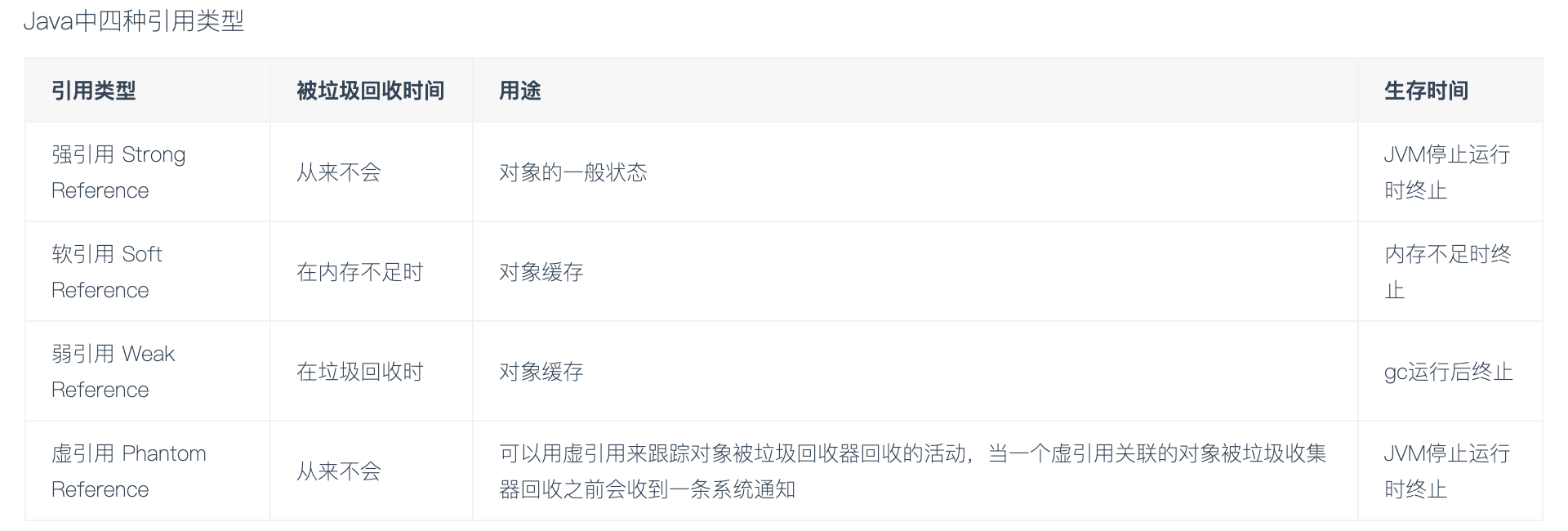
基于引用的过期方式
![]()
// 当key和value都没有引用时驱逐缓存
LoadingCache<String, Object> cache = Caffeine.newBuilder()
    .weakKeys()
    .weakValues()
    .build(key -> function(key));

// 当垃圾收集器需要释放内存时驱逐
LoadingCache<String, Object> cache1 = Caffeine.newBuilder()
    .softValues()
    .build(key -> function(key));

注意:AsyncLoadingCache不支持弱引用和软引用。
Caffeine.weakKeys(): 使用弱引用存储key。如果没有其他地方对该key有强引用,那么该缓存就会被垃圾回收器回收。由于垃圾回收器只依赖于身份(identity)相等,因此这会导致整个缓存使用身份 (==) 相等来比较 key,而不是使用 equals()。
Caffeine.weakValues() :使用弱引用存储value。如果没有其他地方对该value有强引用,那么该缓存就会被垃圾回收器回收。由于垃圾回收器只依赖于身份(identity)相等,因此这会导致整个缓存使用身份 (==) 相等来比较 key,而不是使用 equals()。
Caffeine.softValues() :使用软引用存储value。当内存满了过后,软引用的对象以将使用最近最少使用(least-recently-used ) 的方式进行垃圾回收。由于使用软引用是需要等到内存满了才进行回收,所以我们通常建议给缓存配置一个使用内存的最大值。 softValues() 将使用身份相等(identity) (==) 而不是equals() 来比较值。
Caffeine.weakValues()和Caffeine.softValues()不可以一起使用。
3. 移除事件监听
Cache<String, Object> cache = Caffeine.newBuilder()
    .removalListener((String key, Object value, RemovalCause cause) ->
                     System.out.printf("Key %s was removed (%s)%n", key, cause))
    .build();
4. 写入外部存储
CacheWriter 方法可以将缓存中所有的数据写入到第三方。

LoadingCache<String, Object> cache2 = Caffeine.newBuilder()
    .writer(new CacheWriter<String, Object>() {
        @Override public void write(String key, Object value) {
            // 写入到外部存储
        }
        @Override public void delete(String key, Object value, RemovalCause cause) {
            // 删除外部存储
        }
    })
    .build(key -> function(key));
如果你有多级缓存的情况下,这个方法还是很实用。

注意:CacheWriter不能与弱键或AsyncLoadingCache一起使用。
5. 统计
与Guava Cache的统计一样。

Cache<String, Object> cache = Caffeine.newBuilder()
    .maximumSize(10_000)
    .recordStats()
    .build();
通过使用Caffeine.recordStats(), 可以转化成一个统计的集合. 通过 Cache.stats() 返回一个CacheStats。CacheStats提供以下统计方法:

hitRate(): 返回缓存命中率

evictionCount(): 缓存回收数量

averageLoadPenalty(): 加载新值的平均时间
实例分享
SpringBoot 1.x版本中的默认本地cache是Guava Cache。在2.x(Spring Boot 2.0(spring 5) )版本中已经用Caffine Cache取代了Guava Cache。毕竟有了更优的缓存淘汰策略。
下面我们来说在SpringBoot2.x版本中如何使用cache。
Caffeine常用配置说明:
initialCapacity=[integer]: 初始的缓存空间大小
maximumSize=[long]: 缓存的最大条数
maximumWeight=[long]: 缓存的最大权重
expireAfterAccess=[duration]: 最后一次写入或访问后经过固定时间过期
expireAfterWrite=[duration]: 最后一次写入后经过固定时间过期
refreshAfterWrite=[duration]: 创建缓存或者最近一次更新缓存后经过固定的时间间隔,刷新缓存
weakKeys: 打开key的弱引用
weakValues:打开value的弱引用
softValues:打开value的软引用
recordStats:开发统计功能

注意:
expireAfterWrite和expireAfterAccess同时存在时,以expireAfterWrite为准。
maximumSize和maximumWeight不可以同时使用
weakValues和softValues不可以同时使用
需要说明的是,使用配置文件的方式来进行缓存项配置,一般情况能满足使用需求,但是灵活性不是很高,如果我们有很多缓存项的情况下写起来会导致配置文件很长。所以一般情况下你也可以选择使用bean的方式来初始化Cache实例。
SpringBoot 有俩种使用 Caffeine 作为缓存的方式:
- 直接引入 Caffeine 依赖,然后使用 Caffeine 方法实现缓存。
- 引入 Caffeine 和 Spring Cache 依赖,使用 SpringCache 注解方法实现缓存。
1. 直接引入 Caffeine 依赖
Pom
<!-- caffeine cache -->
<dependency>
	<groupId>com.github.ben-manes.caffeine</groupId>
	<artifactId>caffeine</artifactId>
	<version>2.5.5</version>
</dependency>
Conf
package com.spring.master.spring.caffeine.conf;
import com.github.benmanes.caffeine.cache.Cache;
import com.github.benmanes.caffeine.cache.Caffeine;
import org.springframework.context.annotation.Bean;
import org.springframework.context.annotation.Configuration;
import java.util.concurrent.TimeUnit;

/**
 * @author Huan Lee
 * @version 1.0
 * @date 2020-09-30 15:54
 * @describtion 业精于勤,荒于嬉;行成于思,毁于随。
 */
@Configuration
public class CaffeineCacheConfig {

    @Bean
    public Cache<String, Object> caffeineCache() {
        return Caffeine.newBuilder()
                // 设置最后一次写入或访问后经过固定时间过期
                .expireAfterWrite(60, TimeUnit.SECONDS)
                // 初始的缓存空间大小
                .initialCapacity(100)
                // 缓存的最大条数
                .maximumSize(1000)
                .build();
    }
}
Bean
package com.spring.master.spring.caffeine.bean;

import lombok.Data;
import lombok.ToString;

/**
 * @author Huan Lee
 * @version 1.0
 * @date 2020-09-30 15:56
 * @describtion 业精于勤,荒于嬉;行成于思,毁于随。
 */
@Data
@ToString
public class UserInfo {

    private Integer id;
    private String name;
}
Service
package com.spring.master.spring.caffeine.service;

import com.spring.master.spring.caffeine.bean.UserInfo;

/**
 * @author Huan Lee
 * @version 1.0
 * @date 2020-09-30 15:57
 * @describtion 业精于勤,荒于嬉;行成于思,毁于随。
 */
public interface UserInfoService {

    /**
     * 增加用户信息
     *
     * @param userInfo 用户信息
     */
    void addUserInfo(UserInfo userInfo);

    /**
     * 获取用户信息
     *
     * @param id 用户ID
     * @return 用户信息
     */
    UserInfo getByName(Integer id);

    /**
     * 删除用户信息
     *
     * @param id 用户ID
     */
    void deleteById(Integer id);
}
Impl
package com.spring.master.spring.caffeine.impl;

import com.github.benmanes.caffeine.cache.Cache;
import com.spring.master.spring.caffeine.bean.UserInfo;
import com.spring.master.spring.caffeine.service.UserInfoService;
import lombok.extern.slf4j.Slf4j;
import org.springframework.beans.factory.annotation.Autowired;
import org.springframework.stereotype.Service;

import java.util.HashMap;

/**
 * @author Huan Lee
 * @version 1.0
 * @date 2020-09-30 15:57
 * @describtion 业精于勤,荒于嬉;行成于思,毁于随。
 */
@Service
@Slf4j
public class UserInfoServiceImpl implements UserInfoService {

    /**
     * 模拟数据库存储数据
     */
    private HashMap<Integer, UserInfo> userInfoMap = new HashMap<>();

    @Autowired
    Cache<String, Object> caffeineCache;

    @Override
    public void addUserInfo(UserInfo userInfo) {
        userInfoMap.put(userInfo.getId(), userInfo);
        // 加入缓存
        caffeineCache.put(String.valueOf(userInfo.getId()),userInfo);
    }

    @Override
    public UserInfo getByName(Integer id) {
        // 先从缓存读取
        caffeineCache.getIfPresent(id);
        UserInfo userInfo = (UserInfo) caffeineCache.asMap().get(String.valueOf(id));
        if (userInfo != null){
            System.out.println("Hello, 我来自Caffeine Cache");
            return userInfo;
        }
        // 如果缓存中不存在,则从库中查找
        userInfo = userInfoMap.get(id);
        System.out.println("Hello, 我来自DataBase");

        // 如果用户信息不为空,则加入缓存
        if (userInfo != null){
            caffeineCache.put(String.valueOf(userInfo.getId()),userInfo);
        }
        return userInfo;
    }

    @Override
    public void deleteById(Integer id) {
        userInfoMap.remove(id);
        // 从缓存中删除
        caffeineCache.asMap().remove(String.valueOf(id));
    }
}
Controller
package com.spring.master.spring.caffeine.controller;

import com.spring.master.spring.caffeine.bean.UserInfo;
import com.spring.master.spring.caffeine.service.UserInfoService;
import org.springframework.beans.factory.annotation.Autowired;
import org.springframework.http.MediaType;
import org.springframework.web.bind.annotation.*;

/**
 * @author Huan Lee
 * @version 1.0
 * @date 2020-09-30 15:59
 * @describtion 业精于勤,荒于嬉;行成于思,毁于随。
 */
@RequestMapping(value = "/caffeine")
@RestController
public class CaffeineCacheController {

    @Autowired
    private UserInfoService userInfoService;

    @GetMapping("/userInfo/{id}")
    public Object getUserInfo(@PathVariable Integer id) {
        UserInfo userInfo = userInfoService.getByName(id);
        if (userInfo == null) {
            return "没有该用户";
        }
        return userInfo;
    }

    @RequestMapping(value = "/userInfo")
    public Object createUserInfo() {
        UserInfo userInfo = new UserInfo();
        userInfo.setId(1);
        userInfo.setName("HLee");
        userInfoService.addUserInfo(userInfo);
        return "SUCCESS";
    }

    @GetMapping(value = "/delete/{id}")
    public Object deleteUserInfo(@PathVariable Integer id) {
        userInfoService.deleteById(id);
        return "SUCCESS";
    }
}


启动服务:
localhost:2000/spring-master/caffeine/userInfo
localhost:2000/spring-master/caffeine/userInfo/1
localhost:2000/spring-master/caffeine/delete/1
2. 引入 Caffeine 和 Spring Cache 依赖
Pom
<dependency>
    <groupId>org.springframework.boot</groupId>
    <artifactId>spring-boot-starter-cache</artifactId>
</dependency>
<dependency>
    <groupId>com.github.ben-manes.caffeine</groupId>
    <artifactId>caffeine</artifactId>
</dependency>
Conf
@Configuration
public class CacheConfig {

    /**
     * 配置缓存管理器
     *
     * @return 缓存管理器
     */
    @Bean("caffeineCacheManager")
    public CacheManager cacheManager() {
        CaffeineCacheManager cacheManager = new CaffeineCacheManager();
        cacheManager.setCaffeine(Caffeine.newBuilder()
                // 设置最后一次写入或访问后经过固定时间过期
                .expireAfterAccess(60, TimeUnit.SECONDS)
                // 初始的缓存空间大小
                .initialCapacity(100)
                // 缓存的最大条数
                .maximumSize(1000));
        return cacheManager;
    }

}
Bean
package com.spring.master.spring.caffeine.bean;

import lombok.Data;
import lombok.ToString;

/**
 * @author Huan Lee
 * @version 1.0
 * @date 2020-09-30 15:56
 * @describtion 业精于勤,荒于嬉;行成于思,毁于随。
 */
@Data
@ToString
public class UserInfo {

    private Integer id;
    private String name;
}
Service
package com.spring.master.spring.caffeine.service;

import com.spring.master.spring.caffeine.bean.UserInfo;

/**
 * @author Huan Lee
 * @version 1.0
 * @date 2020-09-30 15:57
 * @describtion 业精于勤,荒于嬉;行成于思,毁于随。
 */
public interface UserInfoService {

    /**
     * 增加用户信息
     *
     * @param userInfo 用户信息
     */
    void addUserInfo(UserInfo userInfo);

    /**
     * 获取用户信息
     *
     * @param id 用户ID
     * @return 用户信息
     */
    UserInfo getByName(Integer id);

    /**
     * 删除用户信息
     *
     * @param id 用户ID
     */
    void deleteById(Integer id);
}
Impl
import lombok.extern.slf4j.Slf4j;
import mydlq.club.example.entity.UserInfo;
import mydlq.club.example.service.UserInfoService;
import org.springframework.cache.annotation.CacheConfig;
import org.springframework.cache.annotation.CacheEvict;
import org.springframework.cache.annotation.CachePut;
import org.springframework.cache.annotation.Cacheable;
import org.springframework.stereotype.Service;
import org.springframework.util.StringUtils;
import java.util.HashMap;

@Slf4j
@Service
@CacheConfig(cacheNames = "caffeineCacheManager")
public class UserInfoServiceImpl implements UserInfoService {

    /**
     * 模拟数据库存储数据
     */
    private HashMap<Integer, UserInfo> userInfoMap = new HashMap<>();

    @Override
    @CachePut(key = "#userInfo.id")
    public void addUserInfo(UserInfo userInfo) {
        userInfoMap.put(userInfo.getId(), userInfo);
    }

    @Override
    @Cacheable(key = "#id")
    public UserInfo getByName(Integer id) {
        return userInfoMap.get(id);
    }

    @Override
    @CachePut(key = "#userInfo.id")
    public UserInfo updateUserInfo(UserInfo userInfo) {
        if (!userInfoMap.containsKey(userInfo.getId())) {
            return null;
        }
        // 取旧的值
        UserInfo oldUserInfo = userInfoMap.get(userInfo.getId());
        // 替换内容
        if (!StringUtils.isEmpty(oldUserInfo.getAge())) {
            oldUserInfo.setAge(userInfo.getAge());
        }
        if (!StringUtils.isEmpty(oldUserInfo.getName())) {
            oldUserInfo.setName(userInfo.getName());
        }
        if (!StringUtils.isEmpty(oldUserInfo.getSex())) {
            oldUserInfo.setSex(userInfo.getSex());
        }
        // 将新的对象存储,更新旧对象信息
        userInfoMap.put(oldUserInfo.getId(), oldUserInfo);
        // 返回新对象信息
        return oldUserInfo;
    }

    @Override
    @CacheEvict(key = "#id")
    public void deleteById(Integer id) {
        userInfoMap.remove(id);
    }

}
Controller
@RestController
@RequestMapping
public class UserInfoController {

    @Autowired
    private UserInfoService userInfoService;

    @GetMapping("/userInfo/{id}")
    public Object getUserInfo(@PathVariable Integer id) {
        UserInfo userInfo = userInfoService.getByName(id);
        if (userInfo == null) {
            return "没有该用户";
        }
        return userInfo;
    }

    @PostMapping("/userInfo")
    public Object createUserInfo(@RequestBody UserInfo userInfo) {
        userInfoService.addUserInfo(userInfo);
        return "SUCCESS";
    }

    @PostMapping("/updateInfo")
    public Object updateUserInfo(@RequestBody UserInfo userInfo) {
        UserInfo newUserInfo = userInfoService.updateUserInfo(userInfo);
        if (newUserInfo == null){
            return "不存在该用户";
        }
        return newUserInfo;
    }

    @GetMapping("/delete/{id}")
    public Object deleteUserInfo(@PathVariable Integer id) {
        userInfoService.deleteById(id);
        return "SUCCESS";
    }

}