首页 文章 精选 留言 我的

精选列表

搜索[ios],共10000篇文章
优秀的个人博客,低调大师

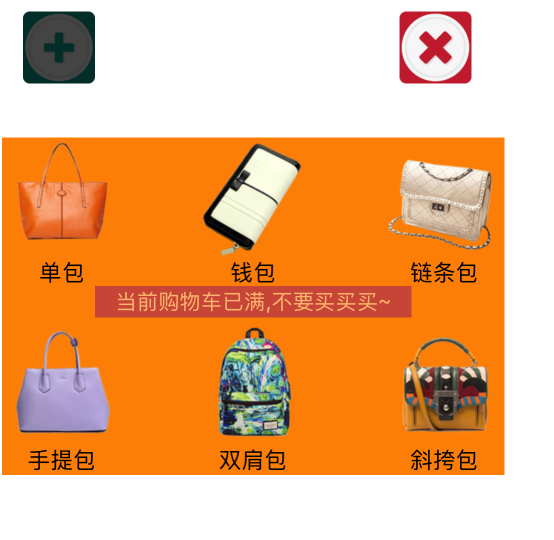
ios23--动画做弹出提示框toast

if (self.shopCarView.subviews.count == 0) { /* [UIView animateWithDuration:2.0 animations:^{ // 执行动画 self.showHUB.text = @"当前购物车已空,赶紧买买买~"; self.showHUB.alpha = 1.f; } completion:^(BOOL finished) { // 完成 [UIView animateWithDuration:1.0 delay:1.0 options:UIViewAnimationOptionCurveLinear animations:^{ self.showHUB.alpha = 0; } completion:nil]; }]; */ [self showWithInfo:@"当前购物车已空,赶紧买买买~"]; } } @property (weak, nonatomic) IBOutlet UILabel *showHUB; //提示文字,刚开始是隐藏的。连线连过去的。 - (void)showWithInfo: (NSString *)info{ [UIView animateWithDuration:2.0 animations:^{ // 执行动画 self.showHUB.text = info; self.showHUB.alpha = 1.f; } completion:^(BOOL finished) { // 完成 [UIView animateWithDuration:1.0 delay:1.0 options:UIViewAnimationOptionCurveLinear animations:^{ self.showHUB.alpha = 0; } completion:nil]; }]; } 本文转自农夫山泉别墅博客园博客,原文链接:http://www.cnblogs.com/yaowen/p/7469657.html,如需转载请自行联系原作者

优秀的个人博客,低调大师

iOS编程上获取本地时间以及星期几时间

本文回复一位网友关于获取时间的问题:http://blog.csdn.net/duxinfeng2010/article/details/8653411#reply - (void)viewDidLoad { [super viewDidLoad]; NSInteger year,month,day,hour,min,sec,week; NSString *weekStr=nil; NSCalendar *calendar = [[NSCalendar alloc] initWithCalendarIdentifier:NSGregorianCalendar]; NSDate *now = [NSDate date];; NSDateComponents *comps = [[NSDateComponents alloc] init]; NSInteger unitFlags = NSYearCalendarUnit | NSMonthCalendarUnit | NSDayCalendarUnit | NSWeekdayCalendarUnit | NSHourCalendarUnit | NSMinuteCalendarUnit | NSSecondCalendarUnit; comps = [calendar components:unitFlags fromDate:now]; year = [comps year]; week = [comps weekday]; month = [comps month]; day = [comps day]; hour = [comps hour]; min = [comps minute]; sec = [comps second]; if(week==1) { weekStr=@"星期天"; }else if(week==2){ weekStr=@"星期一"; }else if(week==3){ weekStr=@"星期二"; }else if(week==4){ weekStr=@"星期三"; }else if(week==5){ weekStr=@"星期四"; }else if(week==6){ weekStr=@"星期五"; }else if(week==7){ weekStr=@"星期六"; } else { NSLog(@"error!"); } NSLog(@"现在是:%d年%d月%d日 %d时%d分%d秒 %@",year,month,day,hour,min,sec,weekStr); NSInteger Monday = day - week+1+1; for (int i=1; i<=7; i++) { NSLog(@"本周 星期%d :%d年%d月%d日 ",i,year,month,Monday); Monday=Monday+1; } } 注:最后打印本周日期算是取得特殊值,还要考虑每个月份天数不同情况,以及某一周跨月情况处理; 运行结果: 本文转自新风作浪 51CTO博客,原文链接:http://blog.51cto.com/duxinfeng/1208676,如需转载请自行联系原作者

优秀的个人博客,低调大师

[IOS]九城问答系统客户端设计

前言: 最近要做一个九城问答系统手机客户端的应用,接手到项目当然知道最重要的就是要解决跟服务器通信获取数据的一个问题,首先还是从验证登陆解决起吧,小小尝试了一下终于成功完成了。下面就写一下做的登陆验证的一个过程,一起学习,共同提高! 主要技术点: 开源框架类ASIHttpRequest,toast弹出框,MD5加密算法 问答系统登陆验证API: appKey : F0D71CBA8E2D....470A1F33AD457 1,用户校验接口 接口url: http://uc.gongzuohou.cn/index.php/api/user/login 请求方式: POST 请求参数: 上行: uname string #用户名 upwd string #用户密码 md5(upwd) sign string #校验码 生成方式:md5(uname . upasswd . appKey) 下行: errno:状态码 0表示成功,>1 表示失败 error:返回内容 uid :用户ID ,仅在用户登录成功后后才返回 uname:用户名 ,仅在用户登录成功后后才返回 有了这些前期的准备就可以开始着手做了。 实现步骤: 1.导入framework框架 2.导入ASIHttpRequest开源类库 3.导入MD5和toast的类库 4.ViewController.h: #import <UIKit/UIKit.h> #import "ASIHttpHeaders.h" #import "tooles.h" @interface MainViewController : UIViewController<NSURLConnectionDataDelegate> { UITextField *username; UITextField *password; } @property (nonatomic,retain) UITextField *username; @property (nonatomic,retain) UITextField *password; @property (nonatomic,retain) NSString *md5pwd; @property (nonatomic,retain) NSString *md5str; @property(retain,nonatomic)NSData *data; @end 5.ViewController.m: #import "MainViewController.h" #define URL @"http://uc.gongzuohou.cn/index.php/api/user/login"; #import "MyMD5.h" #define appKey @"F0D71CBA8E2D.....470A1F33AD457"; @interface MainViewController () -(void) login:(id)sender; -(void) GetErr:(ASIHTTPRequest *)request; -(void) GetResult:(ASIHTTPRequest *)request; @end @implementation MainViewController @synthesize username,password; - (id)initWithNibName:(NSString *)nibNameOrNil bundle:(NSBundle *)nibBundleOrNil { self = [super initWithNibName:nibNameOrNil bundle:nibBundleOrNil]; if (self) { } return self; } -(void) login:(id)sender { //表单提交前的验证 if (username.text == nil||password.text==nil ) { [tooles MsgBox:@"用户名或密码不能为空!"]; return; } //隐藏键盘 [username resignFirstResponder]; [password resignFirstResponder]; [tooles showHUD:@"正在登陆...."]; NSString *urlstr = URL; NSURL *myurl = [NSURL URLWithString:urlstr]; ASIFormDataRequest *request = [ASIFormDataRequest requestWithURL:myurl]; NSString * name = username.text; _md5pwd = [MyMD5 md5:password.text]; NSString * appkey1 = appKey; NSString * s = [[NSString alloc] initWithFormat:@"%@%@%@",name,_md5pwd,appkey1]; _md5str = [MyMD5 md5:s]; NSLog(@"%@",_md5pwd); //设置表单提交项 [request setPostValue:username.text forKey:@"uname"]; [request setPostValue:_md5pwd forKey:@"upwd"]; [request setPostValue:_md5str forKey:@"sign"]; [request setDelegate:self]; [request setDidFinishSelector:@selector(GetResult:)]; [request setDidFailSelector:@selector(GetErr:)]; [request startAsynchronous]; } //获取请求结果 - (void)GetResult:(ASIHTTPRequest *)request{ [tooles removeHUD]; //接收字符串数据 NSString *str = [request responseString]; NSLog(@"-------\n%@",str); //接收二进制数据 _data = [request responseData]; NSDictionary *dic = [NSJSONSerialization JSONObjectWithData:_data options:NSJSONReadingMutableContainers error:nil]; NSLog(@"------\n%@",dic); //返回的用户名 NSString * sname = [dic objectForKey:@"username"]; NSLog(@"name:%@",sname); int flag = -1; flag = [[dic objectForKey:@"errno"] integerValue]; if (flag == 0) { [tooles MsgBox:@"登陆验证成功"]; } else if (flag == 1) { [tooles MsgBox:@"用户名或密码错误"]; } } //连接错误调用这个函数 - (void) GetErr:(ASIHTTPRequest *)request{ [tooles removeHUD]; [tooles MsgBox:@"网络错误,连接不到服务器"]; } - (void)viewDidLoad { [super viewDidLoad]; // Do any additional setup after loading the view, typically from a nib. UILabel *txt1 = [[UILabel alloc] initWithFrame:CGRectMake(30,90,70,30)]; [txt1 setText:@"用户名"]; [txt1 setBackgroundColor:[UIColor clearColor]]; [self.view addSubview:txt1]; UILabel *txt2 = [[UILabel alloc] initWithFrame:CGRectMake(30,140,70,30)]; [txt2 setText:@"密 码"]; [txt2 setBackgroundColor:[UIColor clearColor]]; [self.view addSubview:txt2]; username = [[UITextField alloc]initWithFrame:CGRectMake(120,90, 150, 30)]; [username setBorderStyle:UITextBorderStyleRoundedRect]; [self.view addSubview:username]; password = [[UITextField alloc]initWithFrame:CGRectMake(120,140, 150, 30)]; [password setBorderStyle:UITextBorderStyleRoundedRect]; [password setSecureTextEntry:YES]; [self.view addSubview:password]; UIButton *btn = [UIButton buttonWithType:UIButtonTypeRoundedRect]; [btn setTitle:@"提交" forState:UIControlStateNormal]; [btn addTarget:self action:@selector(login:) forControlEvents:UIControlEventTouchUpInside]; [btn setFrame:CGRectMake(90, 180, 150, 40)]; [self.view addSubview:btn]; } @end 运行效果图: 登陆验证失败: 登陆验证成功: 服务器端返回的值: 其他功能截图: 项目源码下载(猛戳) ==================== 迂者 丁小未 CSDN博客专栏================= MyBlog:http://blog.csdn.net/dingxiaowei2013 MyQQ:1213250243 Unity QQ群:858550 cocos2dx QQ群:280818155 ======================相互学习,共同进步=================== 转载请注明出处:http://blog.csdn.net/dingxiaowei2013/article/details/12617203 欢迎关注我的微博: http://weibo.com/u/2590571922 本文转蓬莱仙羽51CTO博客,原文链接:http://blog.51cto.com/dingxiaowei/1366373,如需转载请自行联系原作者


优秀的个人博客,低调大师

[IOS]用自定义的cell来创建UITableView

步骤: 1.创建自定义的CellView.xib,操作New File->User Interface->View->命名cellView 2.往上面拖放一个UITableViewCell,然后向其中拖放添加UILabel,UITextField,UIButton,如下图: 3.创建一个类Cell,操作New File->Cocoa Touch->Objective-C class->Class:Cell,Subclass of:UITableViewCell 4.将cellView.xib中的Cell的class设置为Cell类,然后可以将label关联到Cell.h中,也可以设置Label的Tag属性为1,后面有两种方法调用xib文件,一种是通过tag,其次就是通过cell。注意:xib文件中的File's Owner只能关联到viewController,这里自定义的cell.xib没有可以关联的contrller文件,所以不需要写,只需要把xib中的cell控件关联到cell类就可以了 5.ViewController.h: #import <UIKit/UIKit.h> @interface ViewController : UIViewController<UITableViewDataSource,UITableViewDataSource> @property (retain, nonatomic) IBOutlet UITableView *tableView; @property(retain,nonatomic)NSArray *arr; @end 6.ViewController.m: #import "ViewController.h" #import "Cell.h" static NSString *strIdentifier = @"strIdentifier"; @interface ViewController () @end @implementation ViewController - (id)initWithNibName:(NSString *)nibNameOrNil bundle:(NSBundle *)nibBundleOrNil { self = [super initWithNibName:nibNameOrNil bundle:nibBundleOrNil]; if (self) { // Custom initialization } return self; } - (void)viewDidLoad { [super viewDidLoad]; self.arr = [NSArray arrayWithObjects:@"1",@"2",@"3",@"4",@"5", nil]; //获得包含tableViewcell的nib文件 UINib *nib = [UINib nibWithNibName:@"cellView" bundle:nil]; //用这个nib文件注册成tableView中表示为strIdentifier的cell [self.tableView registerNib:nib forCellReuseIdentifier:strIdentifier]; } -(NSInteger)tableView:(UITableView *)tableView numberOfRowsInSection:(NSInteger)section { return [self.arr count]; } -(UITableViewCell *)tableView:(UITableView *)tableView cellForRowAtIndexPath:(NSIndexPath *)indexPath { //询问是否有未使用的,表示为strIdentifier的cell,如果没有,并且tableview注册过,系统会建一个新的cell UITableViewCell *cell = [tableView dequeueReusableCellWithIdentifier:strIdentifier]; //用这个自定义的cell可以用绑定的方式修改内容,要将自定义的cell.xib的class修改成Cell类 ((Cell *)cell).label.text = [self.arr objectAtIndex:[indexPath row]]; //也可以用tag的方式查找到需要修改的view //((UILabel *)[cell viewWithTag:1]).text = [self.arr objectAtIndex:[indexPath row]]; return cell; } - (void)didReceiveMemoryWarning { [super didReceiveMemoryWarning]; // Dispose of any resources that can be recreated. } - (void)dealloc { [_tableView release]; [self.arr release]; [super dealloc]; } @end 运行结果图: 本文转蓬莱仙羽51CTO博客,原文链接:http://blog.51cto.com/dingxiaowei/1366429,如需转载请自行联系原作者

资源下载

更多资源
Mario

Mario

马里奥是站在游戏界顶峰的超人气多面角色。马里奥靠吃蘑菇成长,特征是大鼻子、头戴帽子、身穿背带裤,还留着胡子。与他的双胞胎兄弟路易基一起,长年担任任天堂的招牌角色。

Nacos

Nacos

Nacos /nɑ:kəʊs/ 是 Dynamic Naming and Configuration Service 的首字母简称,一个易于构建 AI Agent 应用的动态服务发现、配置管理和AI智能体管理平台。Nacos 致力于帮助您发现、配置和管理微服务及AI智能体应用。Nacos 提供了一组简单易用的特性集,帮助您快速实现动态服务发现、服务配置、服务元数据、流量管理。Nacos 帮助您更敏捷和容易地构建、交付和管理微服务平台。

Rocky Linux

Rocky Linux

Rocky Linux(中文名:洛基)是由Gregory Kurtzer于2020年12月发起的企业级Linux发行版,作为CentOS稳定版停止维护后与RHEL(Red Hat Enterprise Linux)完全兼容的开源替代方案,由社区拥有并管理,支持x86_64、aarch64等架构。其通过重新编译RHEL源代码提供长期稳定性,采用模块化包装和SELinux安全架构,默认包含GNOME桌面环境及XFS文件系统,支持十年生命周期更新。

Sublime Text

Sublime Text

Sublime Text具有漂亮的用户界面和强大的功能,例如代码缩略图,Python的插件,代码段等。还可自定义键绑定,菜单和工具栏。Sublime Text 的主要功能包括:拼写检查,书签,完整的 Python API , Goto 功能,即时项目切换,多选择,多窗口等等。Sublime Text 是一个跨平台的编辑器,同时支持Windows、Linux、Mac OS X等操作系统。

用户登录
用户注册
修改密码
忘记密码