首页 文章 精选 留言 我的

精选列表

搜索[源码学习],共10010篇文章
优秀的个人博客,低调大师

android datepicker源码

/* * Copyright (C) 2007 The Android Open Source Project * * Licensed under the Apache License, Version 2.0 (the "License"); * you may not use this file except in compliance with the License. * You may obtain a copy of the License at * * http://www.apache.org/licenses/LICENSE-2.0 * * Unless required by applicable law or agreed to in writing, software * distributed under the License is distributed on an "AS IS" BASIS, * WITHOUT WARRANTIES OR CONDITIONS OF ANY KIND, either express or implied. * See the License for the specific language governing permissions and * limitations under the License. */ package android.widget; import android.annotation.Widget; import android.content.Context; import android.content.res.TypedArray; import android.os.Parcel; import android.os.Parcelable; import android.text.format.DateFormat; import android.text.format.DateUtils; import android.util.AttributeSet; import android.util.SparseArray; import android.view.LayoutInflater; import android.widget.NumberPicker; import android.widget.NumberPicker.OnChangedListener; import com.android.internal.R; import java.text.DateFormatSymbols; import java.text.SimpleDateFormat; import java.util.Calendar; import java.util.Locale; /** * A view for selecting a month / year / day based on a calendar like layout. * * <p>See the <a href="{@docRoot}resources/tutorials/views/hello-datepicker.html">Date Picker * tutorial</a>.</p> * * For a dialog using this view, see {@link android.app.DatePickerDialog}. */ @Widget public class DatePicker extends FrameLayout { private static final int DEFAULT_START_YEAR = 1900; private static final int DEFAULT_END_YEAR = 2100; // This ignores Undecimber, but we only support real Gregorian calendars. private static final int NUMBER_OF_MONTHS = 12; /* UI Components */ private final NumberPicker mDayPicker; private final NumberPicker mMonthPicker; private final NumberPicker mYearPicker; /** * How we notify users the date has changed. */ private OnDateChangedListener mOnDateChangedListener; private int mDay; private int mMonth; private int mYear; private Object mMonthUpdateLock = new Object(); private volatile Locale mMonthLocale; private String[] mShortMonths; /** * The callback used to indicate the user changes the date. */ public interface OnDateChangedListener { /** * @param view The view associated with this listener. * @param year The year that was set. * @param monthOfYear The month that was set (0-11) for compatibility * with {@link java.util.Calendar}. * @param dayOfMonth The day of the month that was set. */ void onDateChanged(DatePicker view, int year, int monthOfYear, int dayOfMonth); } public DatePicker(Context context) { this(context, null); } public DatePicker(Context context, AttributeSet attrs) { this(context, attrs, 0); } public DatePicker(Context context, AttributeSet attrs, int defStyle) { super(context, attrs, defStyle); LayoutInflater inflater = (LayoutInflater) context.getSystemService(Context.LAYOUT_INFLATER_SERVICE); inflater.inflate(R.layout.date_picker, this, true); mDayPicker = (NumberPicker) findViewById(R.id.day); mDayPicker.setFormatter(NumberPicker.TWO_DIGIT_FORMATTER); mDayPicker.setSpeed(100); mDayPicker.setOnChangeListener(new OnChangedListener() { public void onChanged(NumberPicker picker, int oldVal, int newVal) { mDay = newVal; notifyDateChanged(); } }); mMonthPicker = (NumberPicker) findViewById(R.id.month); mMonthPicker.setFormatter(NumberPicker.TWO_DIGIT_FORMATTER); final String[] months = getShortMonths(); /* * If the user is in a locale where the month names are numeric, * use just the number instead of the "month" character for * consistency with the other fields. */ if (months[0].startsWith("1")) { for (int i = 0; i < months.length; i++) { months[i] = String.valueOf(i + 1); } mMonthPicker.setRange(1, NUMBER_OF_MONTHS); } else { mMonthPicker.setRange(1, NUMBER_OF_MONTHS, months); } mMonthPicker.setSpeed(200); mMonthPicker.setOnChangeListener(new OnChangedListener() { public void onChanged(NumberPicker picker, int oldVal, int newVal) { /* We display the month 1-12 but store it 0-11 so always * subtract by one to ensure our internal state is always 0-11 */ mMonth = newVal - 1; // Adjust max day of the month adjustMaxDay(); notifyDateChanged(); updateDaySpinner(); } }); mYearPicker = (NumberPicker) findViewById(R.id.year); mYearPicker.setSpeed(100); mYearPicker.setOnChangeListener(new OnChangedListener() { public void onChanged(NumberPicker picker, int oldVal, int newVal) { mYear = newVal; // Adjust max day for leap years if needed adjustMaxDay(); notifyDateChanged(); updateDaySpinner(); } }); // attributes TypedArray a = context.obtainStyledAttributes(attrs, R.styleable.DatePicker); int mStartYear = a.getInt(R.styleable.DatePicker_startYear, DEFAULT_START_YEAR); int mEndYear = a.getInt(R.styleable.DatePicker_endYear, DEFAULT_END_YEAR); mYearPicker.setRange(mStartYear, mEndYear); a.recycle(); // initialize to current date Calendar cal = Calendar.getInstance(); init(cal.get(Calendar.YEAR), cal.get(Calendar.MONTH), cal.get(Calendar.DAY_OF_MONTH), null); // re-order the number pickers to match the current date format reorderPickers(months); if (!isEnabled()) { setEnabled(false); } } @Override public void setEnabled(boolean enabled) { super.setEnabled(enabled); mDayPicker.setEnabled(enabled); mMonthPicker.setEnabled(enabled); mYearPicker.setEnabled(enabled); } private void reorderPickers(String[] months) { java.text.DateFormat format; String order; /* * If the user is in a locale where the medium date format is * still numeric (Japanese and Czech, for example), respect * the date format order setting. Otherwise, use the order * that the locale says is appropriate for a spelled-out date. */ if (months[0].startsWith("1")) { format = DateFormat.getDateFormat(getContext()); } else { format = DateFormat.getMediumDateFormat(getContext()); } if (format instanceof SimpleDateFormat) { order = ((SimpleDateFormat) format).toPattern(); } else { // Shouldn't happen, but just in case. order = new String(DateFormat.getDateFormatOrder(getContext())); } /* Remove the 3 pickers from their parent and then add them back in the * required order. */ LinearLayout parent = (LinearLayout) findViewById(R.id.parent); parent.removeAllViews(); boolean quoted = false; boolean didDay = false, didMonth = false, didYear = false; for (int i = 0; i < order.length(); i++) { char c = order.charAt(i); if (c == '\'') { quoted = !quoted; } if (!quoted) { if (c == DateFormat.DATE && !didDay) { parent.addView(mDayPicker); didDay = true; } else if ((c == DateFormat.MONTH || c == 'L') && !didMonth) { parent.addView(mMonthPicker); didMonth = true; } else if (c == DateFormat.YEAR && !didYear) { parent.addView (mYearPicker); didYear = true; } } } // Shouldn't happen, but just in case. if (!didMonth) { parent.addView(mMonthPicker); } if (!didDay) { parent.addView(mDayPicker); } if (!didYear) { parent.addView(mYearPicker); } } public void updateDate(int year, int monthOfYear, int dayOfMonth) { if (mYear != year || mMonth != monthOfYear || mDay != dayOfMonth) { mYear = year; mMonth = monthOfYear; mDay = dayOfMonth; updateSpinners(); reorderPickers(getShortMonths()); notifyDateChanged(); } } private String[] getShortMonths() { final Locale currentLocale = Locale.getDefault(); if (currentLocale.equals(mMonthLocale) && mShortMonths != null) { return mShortMonths; } else { synchronized (mMonthUpdateLock) { if (!currentLocale.equals(mMonthLocale)) { mShortMonths = new String[NUMBER_OF_MONTHS]; for (int i = 0; i < NUMBER_OF_MONTHS; i++) { mShortMonths[i] = DateUtils.getMonthString(Calendar.JANUARY + i, DateUtils.LENGTH_MEDIUM); } mMonthLocale = currentLocale; } } return mShortMonths; } } private static class SavedState extends BaseSavedState { private final int mYear; private final int mMonth; private final int mDay; /** * Constructor called from {@link DatePicker#onSaveInstanceState()} */ private SavedState(Parcelable superState, int year, int month, int day) { super(superState); mYear = year; mMonth = month; mDay = day; } /** * Constructor called from {@link #CREATOR} */ private SavedState(Parcel in) { super(in); mYear = in.readInt(); mMonth = in.readInt(); mDay = in.readInt(); } public int getYear() { return mYear; } public int getMonth() { return mMonth; } public int getDay() { return mDay; } @Override public void writeToParcel(Parcel dest, int flags) { super.writeToParcel(dest, flags); dest.writeInt(mYear); dest.writeInt(mMonth); dest.writeInt(mDay); } public static final Parcelable.Creator<SavedState> CREATOR = new Creator<SavedState>() { public SavedState createFromParcel(Parcel in) { return new SavedState(in); } public SavedState[] newArray(int size) { return new SavedState[size]; } }; } /** * Override so we are in complete control of save / restore for this widget. */ @Override protected void dispatchRestoreInstanceState(SparseArray<Parcelable> container) { dispatchThawSelfOnly(container); } @Override protected Parcelable onSaveInstanceState() { Parcelable superState = super.onSaveInstanceState(); return new SavedState(superState, mYear, mMonth, mDay); } @Override protected void onRestoreInstanceState(Parcelable state) { SavedState ss = (SavedState) state; super.onRestoreInstanceState(ss.getSuperState()); mYear = ss.getYear(); mMonth = ss.getMonth(); mDay = ss.getDay(); updateSpinners(); } /** * Initialize the state. * @param year The initial year. * @param monthOfYear The initial month. * @param dayOfMonth The initial day of the month. * @param onDateChangedListener How user is notified date is changed by user, can be null. */ public void init(int year, int monthOfYear, int dayOfMonth, OnDateChangedListener onDateChangedListener) { mYear = year; mMonth = monthOfYear; mDay = dayOfMonth; mOnDateChangedListener = onDateChangedListener; updateSpinners(); } private void updateSpinners() { updateDaySpinner(); mYearPicker.setCurrent(mYear); /* The month display uses 1-12 but our internal state stores it * 0-11 so add one when setting the display. */ mMonthPicker.setCurrent(mMonth + 1); } private void updateDaySpinner() { Calendar cal = Calendar.getInstance(); cal.set(mYear, mMonth, mDay); int max = cal.getActualMaximum(Calendar.DAY_OF_MONTH); mDayPicker.setRange(1, max); mDayPicker.setCurrent(mDay); } public int getYear() { return mYear; } public int getMonth() { return mMonth; } public int getDayOfMonth() { return mDay; } private void adjustMaxDay(){ Calendar cal = Calendar.getInstance(); cal.set(Calendar.YEAR, mYear); cal.set(Calendar.MONTH, mMonth); int max = cal.getActualMaximum(Calendar.DAY_OF_MONTH); if (mDay > max) { mDay = max; } } private void notifyDateChanged() { if (mOnDateChangedListener != null) { mOnDateChangedListener.onDateChanged(DatePicker.this, mYear, mMonth, mDay); } } } <?xml version="1.0" encoding="utf-8"?> <!-- ** ** Copyright 2007, The Android Open Source Project ** ** Licensed under the Apache License, Version 2.0 (the "License"); ** you may not use this file except in compliance with the License. ** You may obtain a copy of the License at ** ** http://www.apache.org/licenses/LICENSE-2.0 ** ** Unless required by applicable law or agreed to in writing, software ** distributed under the License is distributed on an "AS IS" BASIS, ** WITHOUT WARRANTIES OR CONDITIONS OF ANY KIND, either express or implied. ** See the License for the specific language governing permissions and ** limitations under the License. */ --> <!-- Layout of date picker--> <!-- Warning: everything within the parent is removed and re-ordered depending on the date format selected by the user. --> <LinearLayout xmlns:android="http://schemas.android.com/apk/res/android" android:id="@+id/parent" android:orientation="horizontal" android:layout_gravity="center_horizontal" android:layout_width="wrap_content" android:layout_height="wrap_content"> <!-- Month --> <NumberPicker android:id="@+id/month" android:layout_width="80dip" android:layout_height="wrap_content" android:layout_marginLeft="1dip" android:layout_marginRight="1dip" android:focusable="true" android:focusableInTouchMode="true" /> <!-- Day --> <NumberPicker android:id="@+id/day" android:layout_width="80dip" android:layout_height="wrap_content" android:layout_marginLeft="1dip" android:layout_marginRight="1dip" android:focusable="true" android:focusableInTouchMode="true" /> <!-- Year --> <NumberPicker android:id="@+id/year" android:layout_width="95dip" android:layout_height="wrap_content" android:layout_marginLeft="1dip" android:layout_marginRight="1dip" android:focusable="true" android:focusableInTouchMode="true" /> </LinearLayout> 本文转自农夫山泉别墅博客园博客,原文链接:http://www.cnblogs.com/yaowen/p/4989988.html,如需转载请自行联系原作者

优秀的个人博客,低调大师

Elasticsearch安装-源码

安装Elasticsearch [root@test opt]#unzip elasticsearch-2.3.4.zip [root@test opt]# ll elasticsearch-2.3.4 总用量44 drwxr-xr-x. 2 root root 4096 6月 30 2016 bin drwxr-xr-x. 2 root root 4096 6月 30 2016 config drwxr-xr-x. 2 root root 4096 6月 30 2016 lib -rw-rw-r--. 1 root root 11358 6月 30 2016 LICENSE.txt drwxr-xr-x. 5 root root 4096 4月 18 22:44 modules -rw-rw-r--. 1 root root 150 6月 30 2016 NOTICE.txt -rw-rw-r--. 1 root root 8700 6月 30 2016 README.textile [root@test opt]# 创建Elasticsearch运行的普通账号 [root@test opt]# useradd elasticsearch 切换到elasticsearch普通账号 [root@test opt]# su - elasticsearch [elasticsearch@test ~]$ cd /opt/ 后台启动Elasticsearch [elasticsearch@test opt]$ ./elasticsearch-2.3.4/bin/elasticsearch -d 简单测试Elasticsearch [root@test ~]# curlhttp://127.0.0.1:9200 { "name" : "Interloper", "cluster_name" : "elasticsearch", "version" : { "number" : "2.3.4", "build_hash" : "e455fd0c13dceca8dbbdbb1665d068ae55dabe3f", "build_timestamp" : "2016-06-30T11:24:31Z", "build_snapshot" : false, "lucene_version" : "5.5.0" }, "tagline" : "You Know, for Search" } [root@test ~]# 成功! 本文转自 cexpert 51CTO博客,原文链接:http://blog.51cto.com/cexpert/1831980

优秀的个人博客,低调大师

Kibana安装-源码

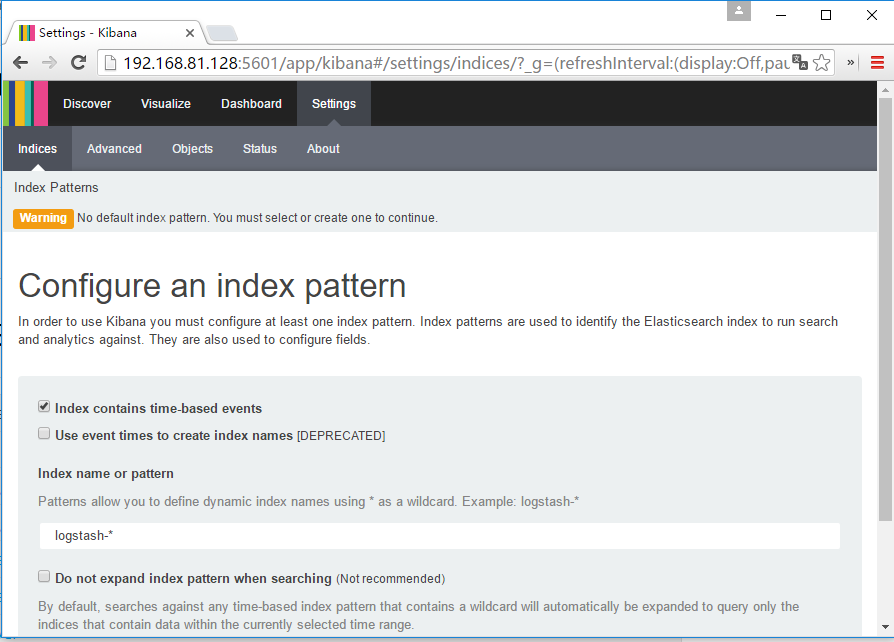
安装kibana [root@test opt]# ll kibana-4.5.2-linux-x64.tar.gz -rw-r--r--. 1 root root 33321872 7月 14 12:04 kibana-4.5.2-linux-x64.tar.gz [root@test opt]#tar -xf kibana-4.5.2-linux-x64.tar.gz [root@test opt]# 链接kibana到elasticsearch [root@test opt]# vim./kibana-4.5.2-linux-x64/config/kibana.yml elasticsearch.url: "http://192.168.81.128:9200" 启动kibana [root@test opt]# ./kibana-4.5.2-linux-x64/bin/kibana 注:kibana启动默认会连本地的elasticsearch,http://localhost:9200/ 简单访问测试 在elasticsearch存在索引的情况下 注: kibana初始化,需要elasticsearch存在初始化的索引,否则kibana无法进行初始化setting Over !! 本文转自 cexpert 51CTO博客,原文链接:http://blog.51cto.com/cexpert/1832268

优秀的个人博客,低调大师

Logstash安装-源码

Logstash下载有点麻烦,由于国内到elk官网速度很慢,下载过程中容易中断。 所以,可以通过有断点续传的工具(迅雷)进行下载好,再进行安装使用。 系统环境: [root@test ~]# cat /etc/issue CentOS release 6.7 (Final) Kernel \r on an \m [root@test ~]# 安装基础环境 # yum install epel-release -y #yum install java-1.8.0-openjdk.x86_64 -y #yum installunzip-y 将下载好的包传到测试机里 [root@test opt]# ll 总用量143200 -rw-r--r--. 1 root root 27552007 7月 14 2016 elasticsearch-2.3.4.zip -rw-r--r--. 1 root root 33321872 7月 14 2016 kibana-4.5.2-linux-x64.tar.gz -rw-r--r--. 1 root root 85757162 7月 14 2016 logstash-2.3.4.zip [root@test opt]# 安装Logstash [root@test opt]# unzip logstash-2.3.4.zip [root@test opt]# ll logstash-2.3.4 总用量156 drwxr-xr-x. 2 root root 4096 4月 18 22:29 bin -rw-rw-r--. 1 root root 104936 7月 7 2016 CHANGELOG.md -rw-rw-r--. 1 root root 2249 7月 7 2016 CONTRIBUTORS -rw-rw-r--. 1 root root 3885 7月 7 2016 Gemfile -rw-rw-r--. 1 root root 21773 7月 7 2016 Gemfile.jruby-1.9.lock drwxr-xr-x. 4 root root 4096 4月 18 22:29 lib -rw-rw-r--. 1 root root 589 7月 7 2016 LICENSE -rw-rw-r--. 1 root root 149 7月 7 2016 NOTICE.TXT drwxr-xr-x. 4 root root 4096 4月 18 22:30 vendor [root@test opt]# 简单验证Logstash [root@test opt]#./logstash-2.3.4/bin/logstash -e 'input { stdin { } } output { stdout {} }' Settings: Default pipeline workers: 1 Pipeline main started Hello World! 2016-04-18T14:33:16.570Z 0.0.0.0 Hello World! ^CSIGINT received. Shutting down the agent. {:level=>:warn} stopping pipeline {:id=>"main"} Received shutdown signal, but pipeline is still waiting for in-flight events to be processed. Sending another ^C will force quit Logstash, but this may cause data loss. {:level=>:warn} Pipeline main has been shutdown [root@test opt]# 本文转自 cexpert 51CTO博客,原文链接:http://blog.51cto.com/cexpert/1831973

优秀的个人博客,低调大师

SparkContext源码阅读

SparkContext是spark的入口,通过它来连接集群、创建RDD、广播变量等等。 class SparkContext(config: SparkConf) extends Logging with ExecutorAllocationClient { private val creationSite: CallSite = Utils.getCallSite() //如果生命了2个sparkContext,则会使用warn来取代exception.防止退出 private val allowMultipleContexts: Boolean = config.getBoolean("spark.driver.allowMultipleContexts", false) ..防止两个sparkcontext同时运行 SparkContext.markPartiallyConstructed(this, allowMultipleContexts) private[spark] var preferredNodeLocationData: Map[String, Set[SplitInfo]] = Map() val startTime = System.currentTimeMillis() //当提交任务执行spark-submit时,加载系统环境变量 def this() = this(new SparkConf()) def this(master: String, appName: String, conf: SparkConf) = this(SparkContext.updatedConf(conf, master, appName)) //preferredNodeLocationData 用于启动查找nodes,启动相应的container def this( master: String, appName: String, sparkHome: String = null, jars: Seq[String] = Nil, environment: Map[String, String] = Map(), preferredNodeLocationData: Map[String, Set[SplitInfo]] = Map()) = { this(SparkContext.updatedConf(new SparkConf(), master, appName, sparkHome, jars, environment)) if (preferredNodeLocationData.nonEmpty) { logWarning("Passing in preferred locations has no effect at all, see SPARK-8949") } this.preferredNodeLocationData = preferredNodeLocationData //构造函数 private[spark] def this(master: String, appName: String) = this(master, appName, null, Nil, Map(), Map()) private[spark] def this(master: String, appName: String, sparkHome: String) = this(master, appName, sparkHome, Nil, Map(), Map()) private[spark] def this(master: String, appName: String, sparkHome: String, jars: Seq[String]) = this(master, appName, sparkHome, jars, Map(), Map()) private[spark] def conf: SparkConf = _conf //clone Conf,那么在运行时就不能被修改 def getConf: SparkConf = conf.clone() def jars: Seq[String] = _jars def files: Seq[String] = _files def master: String = _conf.get("spark.master") def appName: String = _conf.get("spark.app.name") private[spark] def isEventLogEnabled: Boolean = _conf.getBoolean("spark.eventLog.enabled", false) private[spark] def eventLogDir: Option[URI] = _eventLogDir private[spark] def eventLogCodec: Option[String] = _eventLogCodec //创建schedular val (sched, ts) = SparkContext.createTaskScheduler(this, master) _schedulerBackend = sched _taskScheduler = ts _dagScheduler = new DAGScheduler(this) _heartbeatReceiver.ask[Boolean](TaskSchedulerIsSet) //启动taskschedular _taskScheduler.start() applicationId = _taskScheduler.applicationId() _applicationAttemptId = taskScheduler.applicationAttemptId() _conf.set("spark.app.id", _applicationId) _env.blockManager.initialize(_applicationId) //创建一个新的RDD,通过step来增加元素 def range( start: Long, end: Long, step: Long = 1, numSlices: Int = defaultParallelism): RDD[Long] = withScope { assertNotStopped() // when step is 0, range will run infinitely require(step != 0, "step cannot be 0") val numElements: BigInt = { val safeStart = BigInt(start) val safeEnd = BigInt(end) if ((safeEnd - safeStart) % step == 0 || safeEnd > safeStart ^ step > 0) { (safeEnd - safeStart) / step } else { (safeEnd - safeStart) / step + 1 } } parallelize(0 until numSlices, numSlices).mapPartitionsWithIndex((i, _) => { val partitionStart = (i * numElements) / numSlices * step + start val partitionEnd = (((i + 1) * numElements) / numSlices) * step + start def getSafeMargin(bi: BigInt): Long = if (bi.isValidLong) { bi.toLong } else if (bi > 0) { Long.MaxValue } else { Long.MinValue } val safePartitionStart = getSafeMargin(partitionStart) val safePartitionEnd = getSafeMargin(partitionEnd) new Iterator[Long] { private[this] var number: Long = safePartitionStart private[this] var overflow: Boolean = false override def hasNext = if (!overflow) { if (step > 0) { number < safePartitionEnd } else { number > safePartitionEnd } } else false override def next() = { val ret = number number += step if (number < ret ^ step < 0) { overflow = true } ret } } }) } //创建一个RDD def makeRDD[T: ClassTag]( seq: Seq[T], numSlices: Int = defaultParallelism): RDD[T] = withScope { parallelize(seq, numSlices) } //读取本地、HDFS的文件,返回一个String的字符串 def textFile( path: String, minPartitions: Int = defaultMinPartitions): RDD[String] = withScope { assertNotStopped() hadoopFile(path, classOf[TextInputFormat], classOf[LongWritable], classOf[Text], minPartitions).map(pair => pair._2.toString) } //加载一个二进制文件, @Experimental def binaryRecords( path: String, recordLength: Int, conf: Configuration = hadoopConfiguration): RDD[Array[Byte]] = withScope { assertNotStopped() conf.setInt(FixedLengthBinaryInputFormat.RECORD_LENGTH_PROPERTY, recordLength) val br = newAPIHadoopFile[LongWritable, BytesWritable, FixedLengthBinaryInputFormat](path, classOf[FixedLengthBinaryInputFormat], classOf[LongWritable], classOf[BytesWritable], conf = conf) val data = br.map { case (k, v) => val bytes = v.getBytes assert(bytes.length == recordLength, "Byte array does not have correct length") bytes } data } //获得一个为HADOOP sequenceFile给定键值对类型的RDD def sequenceFile[K, V](path: String, keyClass: Class[K], valueClass: Class[V], minPartitions: Int ): RDD[(K, V)] = withScope { assertNotStopped() val inputFormatClass = classOf[SequenceFileInputFormat[K, V]] hadoopFile(path, inputFormatClass, keyClass, valueClass, minPartitions) } //1300发送一个广播变量到集群的每个节点 def broadcast[T: ClassTag](value: T): Broadcast[T] = { assertNotStopped() if (classOf[RDD[_]].isAssignableFrom(classTag[T].runtimeClass)) { logWarning("Can not directly broadcast RDDs; instead, call collect() and " + "broadcast the result (see SPARK-5063)") } val bc = env.broadcastManager.newBroadcast[T](value, isLocal) val callSite = getCallSite logInfo("Created broadcast " + bc.id + " from " + callSite.shortForm) cleaner.foreach(_.registerBroadcastForCleanup(bc)) bc }


优秀的个人博客,低调大师

openstack 源码分析

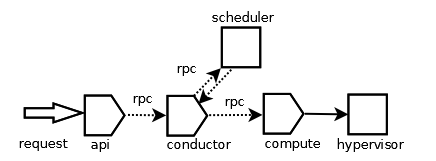
Nova对于底层Hypervisor(如KVM/QEMU等)的调用与管理主要通过LibvirtDriver类,nova/virt/libvirt/driver.py Libvirt对Hypervisor的连接有两种方式:一种是只读式,用于管理;另一种是认证式,用于操作; 创建实例过程:/nova/api/ec2/cloud.py/L1193, run_instances(),获取创建数目,kernal_id,ramdisk_id,镜像uuid等通过self.compute_api.create() 发送实例的信息和要运行实例的请求消息到远程调度器scheduler. 从用户发送请求(创建新实例)的工作流程: 上图是一个全局的流程图,图中每个服务是一个单独的进程实例,他们之间通过rpc调用(广播或者调用)另一个服务。 nova-api服务是一个wsgi服务实例,创建新instance的入口代码是在nova /api/openstack/compute/servers.py,处理函数为create(self, req, body); 参数验证之后,调用compute api的create 函数(代码在nova/compute/api.py中): http://www.infoq.com/cn/articles/openstack-access-request-calling-process eclipse快捷键: 注释:ctrl+/ 跳转函数定义:F3 显示outline:ctrl+o 自己用c++实现c++反射机制;类比java反射机制

资源下载

更多资源
Mario

Mario

马里奥是站在游戏界顶峰的超人气多面角色。马里奥靠吃蘑菇成长,特征是大鼻子、头戴帽子、身穿背带裤,还留着胡子。与他的双胞胎兄弟路易基一起,长年担任任天堂的招牌角色。

腾讯云软件源

腾讯云软件源

为解决软件依赖安装时官方源访问速度慢的问题,腾讯云为一些软件搭建了缓存服务。您可以通过使用腾讯云软件源站来提升依赖包的安装速度。为了方便用户自由搭建服务架构,目前腾讯云软件源站支持公网访问和内网访问。

Spring

Spring

Spring框架(Spring Framework)是由Rod Johnson于2002年提出的开源Java企业级应用框架,旨在通过使用JavaBean替代传统EJB实现方式降低企业级编程开发的复杂性。该框架基于简单性、可测试性和松耦合性设计理念,提供核心容器、应用上下文、数据访问集成等模块,支持整合Hibernate、Struts等第三方框架,其适用范围不仅限于服务器端开发,绝大多数Java应用均可从中受益。

WebStorm

WebStorm

WebStorm 是jetbrains公司旗下一款JavaScript 开发工具。目前已经被广大中国JS开发者誉为“Web前端开发神器”、“最强大的HTML5编辑器”、“最智能的JavaScript IDE”等。与IntelliJ IDEA同源,继承了IntelliJ IDEA强大的JS部分的功能。

用户登录
用户注册