首页 文章 精选 留言 我的

精选列表

搜索[API集成],共10000篇文章
优秀的个人博客,低调大师

Hadoop MapReduce编程 API入门系列之wordcount版本4(八)

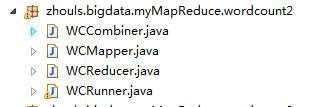
是将map、combiner、shuffle、reduce等分开放一个.java里。则需要实现Tool。 代码 1 package zhouls.bigdata.myMapReduce.wordcount2; 2 3 import java.io.IOException; 4 5 import org.apache.commons.lang.StringUtils; 6 import org.apache.hadoop.io.LongWritable; 7 import org.apache.hadoop.io.Text; 8 import org.apache.hadoop.mapreduce.Mapper; 9 10 //4个泛型中,前两个是指定mapper输入数据的类型,KEYIN是输入的key的类型,VALUEIN是输入的value的类型 11 //map 和 reduce 的数据输入输出都是以 key-value对的形式封装的 12 //默认情况下,框架传递给我们的mapper的输入数据中,key是要处理的文本中一行的起始偏移量,这一行的内容作为value 13 public class WCMapper extends Mapper<LongWritable, Text, Text, LongWritable>{ 14 15 //mapreduce框架每读一行数据就调用一次该方法 16 @Override 17 protected void map(LongWritable key, Text value,Context context)throws IOException, InterruptedException{ 18 //具体业务逻辑就写在这个方法体中,而且我们业务要处理的数据已经被框架传递进来,在方法的参数中 key-value 19 //key 是这一行数据的起始偏移量 value 是这一行的文本内容 20 21 //将这一行的内容转换成string类型 22 String line = value.toString(); 23 24 //对这一行的文本按特定分隔符切分 25 //hadoop helloworld 26 String[] words = StringUtils.split(line, " "); 27 28 //遍历这个单词数组输出为kv形式 k:单词 v : 1 29 for(String word : words){//word是k2 30 context.write(new Text(word), new LongWritable(1));//写入word是k2,1是v2 31 // context.write(word,1);等价 32 33 } 34 35 36 } 37 38 39 40 } 1 package zhouls.bigdata.myMapReduce.wordcount2; 2 3 import java.io.IOException; 4 5 import org.apache.hadoop.io.LongWritable; 6 import org.apache.hadoop.io.Text; 7 import org.apache.hadoop.mapreduce.Reducer; 8 9 public class WCReducer extends Reducer<Text, LongWritable, Text, LongWritable>{ 10 11 12 13 //框架在map处理完成之后,将所有kv对缓存起来,进行分组,然后传递一个组<key,valus{}>,调用一次reduce方法 14 //<hello,{1,1,1,1,1,1.....}> 15 @Override 16 protected void reduce(Text key, Iterable<LongWritable> values,Context context)throws IOException, InterruptedException { 17 long count = 0; 18 //遍历value的list,进行累加求和 19 for(LongWritable value:values){//value是v2 20 count += value.get(); 21 } 22 23 //输出这一个单词的统计结果 24 25 context.write(key,new LongWritable(count));//key是k3,count是v3 26 // context.write(key,count); 27 } 28 29 30 31 } 1 package zhouls.bigdata.myMapReduce.wordcount2; 2 3 import org.apache.hadoop.io.LongWritable; 4 import org.apache.hadoop.io.Text; 5 import org.apache.hadoop.mapreduce.Reducer; 6 7 8 /** 9 * combiner必须遵循reducer的规范 10 * 可以把它看成一种在map任务本地运行的reducer 11 * 使用combiner的时候要注意两点 12 * 1、combiner的输入输出数据泛型类型要能跟mapper和reducer匹配 13 * 2、combiner加入之后不能影响最终的业务逻辑运算结果 14 * 15 * 16 */ 17 public class WCCombiner extends Reducer<Text, LongWritable, Text, LongWritable>{ 18 19 } 1 package zhouls.bigdata.myMapReduce.wordcount2; 2 3 import java.io.IOException; 4 5 import org.apache.hadoop.conf.Configuration; 6 import org.apache.hadoop.fs.Path; 7 import org.apache.hadoop.io.LongWritable; 8 import org.apache.hadoop.io.Text; 9 import org.apache.hadoop.mapreduce.Job; 10 import org.apache.hadoop.mapreduce.lib.input.FileInputFormat; 11 import org.apache.hadoop.mapreduce.lib.output.FileOutputFormat; 12 13 /** 14 * 用来描述一个特定的作业 15 * 比如,该作业使用哪个类作为逻辑处理中的map,哪个作为reduce 16 * 还可以指定该作业要处理的数据所在的路径 17 * 还可以指定改作业输出的结果放到哪个路径 18 * .... 19 * @author duanhaitao@itcast.cn 20 * 21 */ 22 public class WCRunner { 23 24 public static void main(String[] args) throws Exception { 25 26 Configuration conf = new Configuration(); 27 28 Job wcjob = Job.getInstance(conf); 29 30 //设置整个job所用的那些类在哪个jar包 31 wcjob.setJarByClass(WCRunner.class); 32 33 34 //本job使用的mapper和reducer的类 35 wcjob.setMapperClass(WCMapper.class); 36 wcjob.setReducerClass(WCReducer.class); 37 38 39 //指定本job使用combiner组件,组件所用的类为 40 wcjob.setCombinerClass(WCReducer.class); 41 42 43 //指定reduce的输出数据kv类型 44 wcjob.setOutputKeyClass(Text.class); 45 wcjob.setOutputValueClass(LongWritable.class); 46 47 //指定mapper的输出数据kv类型 48 wcjob.setMapOutputKeyClass(Text.class); 49 wcjob.setMapOutputValueClass(LongWritable.class); 50 51 52 // //指定要处理的输入数据存放路径 53 // FileInputFormat.setInputPaths(wcjob, new Path("hdfs://HadoopMaster:9000/wordcount/wc.txt/")); 54 // 55 // //指定处理结果的输出数据存放路径 56 // FileOutputFormat.setOutputPath(wcjob, new Path("hdfs://HadoopMaster:9000/out/wordcount/wc/")); 57 58 //指定要处理的输入数据存放路径 59 FileInputFormat.setInputPaths(wcjob, new Path("./data/wordcount/wc.txt")); 60 61 //指定处理结果的输出数据存放路径 62 FileOutputFormat.setOutputPath(wcjob, new Path("./out/wordcount/wc/")); 63 64 65 //将job提交给集群运行 66 wcjob.waitForCompletion(true); 67 68 69 } 70 71 72 73 74 } 本文转自大数据躺过的坑博客园博客,原文链接:http://www.cnblogs.com/zlslch/p/6163687.html,如需转载请自行联系原作者

优秀的个人博客,低调大师

Android 3.0 r1 API中文文档(107) —— AsyncPlayer

正文 一、结构 public classAsyncPlayer extendsObject java.lang.Object android.media.AsyncPlayer 二、概述 播放一个连续 ( 多个 ) 的音频 URLs ,但那些任务较重的工作在另外的线程中完成,所以任何预处理或加载的延迟都不阻碍线程调用。 三、构造函数 publicAsyncPlayer(String tag) 构造一个AsyncPlayer对象。 参数 tag用于调试的字符串 四、公共方法 public voidplay(Context context, Uri uri, boolean looping, int stream) 开始播放声音。可在某个点上开始播放。这里不保证可能有延迟。在另一个音频文件播放时调用这个方法将导致当前音频停止播放并开始播放新的音频。 参数 context 应用程序上下文 uri 播放的URI (参见setDataSource(Context, Uri)) looping是否无限循环播放声音。(参见setLooping(boolean)) stream音频流(AudioStream)类型(参见setAudioStreamType(int))(译者注:例如AudioManager.STREAM_MUSIC) public voidstop() 停止之前播放的声音。不能在某点上暂停然后接着播放。多次调用没有不良影响。 本文转自over140 51CTO博客,原文链接:http://blog.51cto.com/over140/582378,如需转载请自行联系原作者

优秀的个人博客,低调大师

Hadoop HDFS编程 API入门系列之HdfsUtil版本2(七)

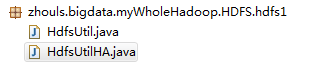
代码 1 import org.junit.Before; 2 import org.junit.Test; 3 4 package zhouls.bigdata.myWholeHadoop.HDFS.hdfs1; 5 6 import java.io.FileInputStream; 7 import java.io.FileNotFoundException; 8 import java.io.FileOutputStream; 9 import java.io.IOException; 10 import java.net.URI; 11 12 import org.apache.commons.io.IOUtils; 13 import org.apache.hadoop.conf.Configuration; 14 import org.apache.hadoop.fs.FSDataInputStream; 15 import org.apache.hadoop.fs.FSDataOutputStream; 16 import org.apache.hadoop.fs.FileStatus; 17 import org.apache.hadoop.fs.FileSystem; 18 import org.apache.hadoop.fs.LocatedFileStatus; 19 import org.apache.hadoop.fs.Path; 20 import org.apache.hadoop.fs.RemoteIterator; 21 import org.junit.Before; 22 import org.junit.Test; 23 24 public class HdfsUtil { 25 26 FileSystem fs = null; 27 28 29 @Before//@Before是在所拦截单元测试方法执行之前执行一段逻辑,读艾特Before 30 public void init() throws Exception{ 31 32 //读取classpath下的xxx-site.xml 配置文件,并解析其内容,封装到conf对象中 33 Configuration conf = new Configuration(); 34 35 //也可以在代码中对conf中的配置信息进行手动设置,会覆盖掉配置文件中的读取的值 36 conf.set("fs.defaultFS", "hdfs://HadoopMaster:9000/"); 37 38 //根据配置信息,去获取一个具体文件系统的客户端操作实例对象 39 fs = FileSystem.get(new URI("hdfs://HadoopMaster:9000/"),conf,"hadoop"); 40 41 42 } 43 44 45 46 /** 47 * 上传文件,比较底层的写法 48 * 49 * @throws Exception 50 */ 51 @Test//@Test是测试方法提示符,一般与@Before组合使用 52 public void upload() throws Exception { 53 54 Configuration conf = new Configuration(); 55 conf.set("fs.defaultFS", "hdfs://HadoopMaster:9000/"); 56 57 FileSystem fs = FileSystem.get(conf); 58 59 Path dst = new Path("hdfs://HadoopMaster:9000/aa/qingshu.txt"); 60 61 FSDataOutputStream os = fs.create(dst); 62 63 FileInputStream is = new FileInputStream("c:/qingshu.txt"); 64 65 IOUtils.copy(is, os); 66 67 68 } 69 70 /** 71 * 上传文件,封装好的写法 72 * @throws Exception 73 * @throws IOException 74 */ 75 @Test//@Test是测试方法提示符,一般与@Before组合使用 76 public void upload2() throws Exception, IOException{ 77 78 fs.copyFromLocalFile(new Path("c:/qingshu.txt"), new Path("hdfs://HadoopMaster:9000/aaa/bbb/ccc/qingshu2.txt")); 79 80 } 81 82 83 /** 84 * 下载文件 85 * @throws Exception 86 * @throws IllegalArgumentException 87 */ 88 @Test//@Test是测试方法提示符,一般与@Before组合使用 89 public void download() throws Exception { 90 91 fs.copyToLocalFile(new Path("hdfs://HadoopMaster:9000/aa/qingshu2.txt"), new Path("c:/qingshu2.txt")); 92 93 } 94 95 /** 96 * 查看文件信息 97 * @throws IOException 98 * @throws IllegalArgumentException 99 * @throws FileNotFoundException 100 * 101 */ 102 @Test//@Test是测试方法提示符,一般与@Before组合使用 103 public void listFiles() throws FileNotFoundException, IllegalArgumentException, IOException { 104 105 // listFiles列出的是文件信息,而且提供递归遍历 106 RemoteIterator<LocatedFileStatus> files = fs.listFiles(new Path("/"), true); 107 108 while(files.hasNext()){ 109 110 LocatedFileStatus file = files.next(); 111 Path filePath = file.getPath(); 112 String fileName = filePath.getName(); 113 System.out.println(fileName); 114 115 } 116 117 System.out.println("---------------------------------"); 118 119 //listStatus 可以列出文件和文件夹的信息,但是不提供自带的递归遍历 120 FileStatus[] listStatus = fs.listStatus(new Path("/")); 121 for(FileStatus status: listStatus){ 122 123 String name = status.getPath().getName(); 124 System.out.println(name + (status.isDirectory()?" is dir":" is file")); 125 126 } 127 128 } 129 130 /** 131 * 创建文件夹 132 * @throws Exception 133 * @throws IllegalArgumentException 134 */ 135 @Test//@Test是测试方法提示符,一般与@Before组合使用 136 public void mkdir() throws IllegalArgumentException, Exception { 137 138 fs.mkdirs(new Path("/aaa/bbb/ccc")); 139 140 141 } 142 143 /** 144 * 删除文件或文件夹 145 * @throws IOException 146 * @throws IllegalArgumentException 147 */ 148 @Test//@Test是测试方法提示符,一般与@Before组合使用 149 public void rm() throws IllegalArgumentException, IOException { 150 151 fs.delete(new Path("/aa"), true); 152 153 } 154 155 156 public static void main(String[] args) throws Exception { 157 158 Configuration conf = new Configuration(); 159 conf.set("fs.defaultFS", "hdfs://HadoopMaster:9000/"); 160 161 FileSystem fs = FileSystem.get(conf); 162 163 FSDataInputStream is = fs.open(new Path("/jdk-7u65-linux-i586.tar.gz")); 164 165 FileOutputStream os = new FileOutputStream("c:/jdk7.tgz"); 166 167 IOUtils.copy(is, os); 168 } 169 170 171 172 } 1 package zhouls.bigdata.myWholeHadoop.HDFS.hdfs1; 2 3 import java.io.IOException; 4 import java.net.URI; 5 6 7 import org.apache.hadoop.conf.Configuration; 8 import org.apache.hadoop.fs.FileSystem; 9 import org.apache.hadoop.fs.Path; 10 11 public class HdfsUtilHA { 12 public static void main(String[] args) throws Exception{ 13 Configuration conf = new Configuration(); 14 FileSystem fs = FileSystem.get(new URI("hdfs://HadoopMaster/9000"), conf, "hadoop"); 15 fs.copyFromLocalFile(new Path("C:/test.txt"), new Path("hdfs://HadoopMaster/9000")); 16 } 17 } 本文转自大数据躺过的坑博客园博客,原文链接:http://www.cnblogs.com/zlslch/p/6175628.html,如需转载请自行联系原作者

优秀的个人博客,低调大师

Hadoop MapReduce编程 API入门系列之wordcount版本2(六)

代码 1 package zhouls.bigdata.myMapReduce.wordcount4; 2 3 import java.io.IOException; 4 5 import org.apache.hadoop.io.IntWritable; 6 import org.apache.hadoop.io.LongWritable; 7 import org.apache.hadoop.io.Text; 8 import org.apache.hadoop.mapreduce.Mapper; 9 import org.apache.hadoop.util.StringUtils; 10 11 public class WordCountMapper extends Mapper<LongWritable, Text, Text, IntWritable>{ 12 13 //该方法循环调用,从文件的split中读取每行调用一次,把该行所在的下标为key,该行的内容为value 14 protected void map(LongWritable key, Text value, 15 Context context) 16 throws IOException, InterruptedException { 17 String[] words = StringUtils.split(value.toString(), ' '); 18 for(String w :words){ 19 context.write(new Text(w), new IntWritable(1)); 20 } 21 } 22 } 1 package zhouls.bigdata.myMapReduce.wordcount4; 2 3 import java.io.IOException; 4 5 import org.apache.hadoop.io.IntWritable; 6 import org.apache.hadoop.io.Text; 7 import org.apache.hadoop.mapreduce.Reducer; 8 9 public class WordCountReducer extends Reducer<Text, IntWritable, Text, IntWritable>{ 10 11 //每组调用一次,这一组数据特点:key相同,value可能有多个。 12 protected void reduce(Text arg0, Iterable<IntWritable> arg1, 13 Context arg2) 14 throws IOException, InterruptedException { 15 int sum =0; 16 for(IntWritable i: arg1){ 17 sum=sum+i.get(); 18 } 19 arg2.write(arg0, new IntWritable(sum)); 20 } 21 } //System.setProperty("HADOOP_USER_NAME", "root"); // //1、MR执行环境有两种:本地测试环境,服务器环境 // //本地测试环境(windows):(便于调试) // 在windows的hadoop目录bin目录有一个winutils.exe // 1、在windows下配置hadoop的环境变量 // 2、拷贝debug工具(winutils.exe)到HADOOP_HOME/bin // 3、修改hadoop的源码 ,注意:确保项目的lib需要真实安装的jdk的lib // // 4、MR调用的代码需要改变: // a、src不能有服务器的hadoop配置文件(因为,本地是调试,去服务器环境集群那边的) // b、再调用是使用: // Configuration config = new Configuration(); // config.set("fs.defaultFS", "hdfs://HadoopMaster:9000"); // config.set("yarn.resourcemanager.hostname", "HadoopMaster"); //服务器环境:(不便于调试),有两种方式。 //首先需要在src下放置服务器上的hadoop配置文件(都要这一步) //1、在本地直接调用,执行过程在服务器上(真正企业运行环境) // a、把MR程序打包(jar),直接放到本地 // b、修改hadoop的源码 ,注意:确保项目的lib需要真实安装的jdk的lib // c、增加一个属性: // config.set("mapred.jar", "C:\\Users\\Administrator\\Desktop\\wc.jar"); // d、本地执行main方法,servlet调用MR。 // // //2、直接在服务器上,使用命令的方式调用,执行过程也在服务器上 // a、把MR程序打包(jar),传送到服务器上 // b、通过: hadoop jar jar路径 类的全限定名 // // // // //a,1 b,1 //a,3 c,3 //a,2 d,2 // // //a,3 c,3 //a,2 d,2 //a,1 b,1 // 1 package zhouls.bigdata.myMapReduce.wordcount4; 2 3 4 import org.apache.hadoop.conf.Configuration; 5 import org.apache.hadoop.fs.FileSystem; 6 import org.apache.hadoop.fs.Path; 7 import org.apache.hadoop.io.IntWritable; 8 import org.apache.hadoop.io.Text; 9 import org.apache.hadoop.mapreduce.Job; 10 import org.apache.hadoop.mapreduce.lib.input.FileInputFormat; 11 import org.apache.hadoop.mapreduce.lib.output.FileOutputFormat; 12 13 public class RunJob { 14 15 public static void main(String[] args) { 16 Configuration config =new Configuration(); 17 config.set("fs.defaultFS", "hdfs://HadoopMaster:9000"); 18 config.set("yarn.resourcemanager.hostname", "HadoopMaster"); 19 // config.set("mapred.jar", "C:\\Users\\Administrator\\Desktop\\wc.jar");//先打包好wc.jar 20 try { 21 FileSystem fs =FileSystem.get(config); 22 23 Job job =Job.getInstance(config); 24 job.setJarByClass(RunJob.class); 25 26 job.setJobName("wc"); 27 28 job.setMapperClass(WordCountMapper.class); 29 job.setReducerClass(WordCountReducer.class); 30 31 job.setMapOutputKeyClass(Text.class); 32 job.setMapOutputValueClass(IntWritable.class); 33 34 FileInputFormat.addInputPath(job, new Path("/usr/input/wc/wc.txt"));//新建好输入路径,且数据源 35 36 Path outpath =new Path("/usr/output/wc"); 37 if(fs.exists(outpath)){ 38 fs.delete(outpath, true); 39 } 40 FileOutputFormat.setOutputPath(job, outpath); 41 42 boolean f= job.waitForCompletion(true); 43 if(f){ 44 System.out.println("job任务执行成功"); 45 } 46 } catch (Exception e) { 47 e.printStackTrace(); 48 } 49 } 50 } 本文转自大数据躺过的坑博客园博客,原文链接:http://www.cnblogs.com/zlslch/p/6163585.html,如需转载请自行联系原作者


优秀的个人博客,低调大师

Hadoop HDFS编程 API入门系列之RPC版本1(八)

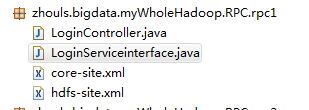
代码 1 package zhouls.bigdata.myWholeHadoop.RPC.rpc1; 2 3 import java.io.IOException; 4 import java.net.InetSocketAddress; 5 6 import org.apache.hadoop.conf.Configuration; 7 import org.apache.hadoop.ipc.RPC; 8 9 public class LoginController { 10 public static void main(String[] args) throws IOException { 11 LoginServiceinterface proxy = RPC.getProxy(LoginServiceinterface.class, 1L, new InetSocketAddress("HadoopMaster", 10000), new Configuration()); 12 String result = proxy.login("angelababy","123456"); 13 System.out.println(result); 14 } 15 } 1 package zhouls.bigdata.myWholeHadoop.RPC.rpc1; 2 3 public interface LoginServiceinterface { 4 public static final long versionID=1L; 5 public String login(String username,String password); 6 } <?xml version="1.0" encoding="UTF-8"?> <?xml-stylesheet type="text/xsl" href="configuration.xsl"?> <!-- Licensed under the Apache License, Version 2.0 (the "License"); you may not use this file except in compliance with the License. You may obtain a copy of the License at http://www.apache.org/licenses/LICENSE-2.0 Unless required by applicable law or agreed to in writing, software distributed under the License is distributed on an "AS IS" BASIS, WITHOUT WARRANTIES OR CONDITIONS OF ANY KIND, either express or implied. See the License for the specific language governing permissions and limitations under the License. See accompanying LICENSE file. --> <!-- Put site-specific property overrides in this file. --> <configuration> <property> <name>fs.default.name</name> <value>hdfs://HadoopMaster:9000</value> <description>The name of the default file system, using 9000 port.</description> </property> <property> <name>hadoop.tmp.dir</name> <value>/tmp</value> <description>A base for other temporary directories.</description> </property> </configuration> <?xml version="1.0" encoding="UTF-8"?> <?xml-stylesheet type="text/xsl" href="configuration.xsl"?> <!-- Licensed under the Apache License, Version 2.0 (the "License"); you may not use this file except in compliance with the License. You may obtain a copy of the License at http://www.apache.org/licenses/LICENSE-2.0 Unless required by applicable law or agreed to in writing, software distributed under the License is distributed on an "AS IS" BASIS, WITHOUT WARRANTIES OR CONDITIONS OF ANY KIND, either express or implied. See the License for the specific language governing permissions and limitations under the License. See accompanying LICENSE file. --> <!-- Put site-specific property overrides in this file. --> <configuration> <property> <name>dfs.namenode.rpc-address</name> <value>HadoopMaster:9000</value> </property> <property> <name>dfs.replication</name> <value>2</value> <description>Set to 1 for pseudo-distributed mode,Set to 2 for distributed mode,Set to 3 for distributed mode.</description> </property> <property> <name>dfs.namenode.http-address</name> <value>HadoopMaster:50070</value> </property> </configuration> 本文转自大数据躺过的坑博客园博客,原文链接:http://www.cnblogs.com/zlslch/p/6175638.html,如需转载请自行联系原作者

优秀的个人博客,低调大师

Hadoop HDFS编程 API入门系列之RPC版本2(九)

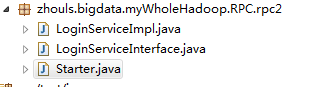
代码 1 package zhouls.bigdata.myWholeHadoop.RPC.rpc2; 2 3 public class LoginServiceImpl implements LoginServiceInterface { 4 5 @Override 6 public String login(String username, String password) { 7 8 return username + " logged in successfully!"; 9 } 10 11 } 1 package zhouls.bigdata.myWholeHadoop.RPC.rpc2; 2 3 public class LoginServiceImpl implements LoginServiceInterface { 4 5 @Override 6 public String login(String username, String password) { 7 8 return username + " logged in successfully!"; 9 } 10 11 } 1 package zhouls.bigdata.myWholeHadoop.RPC.rpc2; 2 3 import java.io.IOException; 4 5 import org.apache.hadoop.HadoopIllegalArgumentException; 6 import org.apache.hadoop.conf.Configuration; 7 import org.apache.hadoop.ipc.RPC; 8 import org.apache.hadoop.ipc.RPC.Builder; 9 import org.apache.hadoop.ipc.RPC.Server; 10 11 public class Starter { 12 13 public static void main(String[] args) throws HadoopIllegalArgumentException, IOException { 14 15 16 Builder builder = new RPC.Builder(new Configuration()); 17 18 builder.setBindAddress("HadoopMaster").setPort(10000).setProtocol(LoginServiceInterface.class).setInstance(new LoginServiceImpl()); 19 20 Server server = builder.build(); 21 22 server.start(); 23 24 25 26 } 27 28 29 } 本文转自大数据躺过的坑博客园博客,原文链接:http://www.cnblogs.com/zlslch/p/6175652.html,如需转载请自行联系原作者

优秀的个人博客,低调大师

Hadoop HDFS编程 API入门系列之HdfsUtil版本1(六)

代码 1 package zhouls.bigdata.myWholeHadoop.HDFS.hdfs2; 2 3 import java.io.FileOutputStream; 4 import java.io.IOException; 5 6 import org.apache.commons.io.IOUtils; 7 import org.apache.hadoop.conf.Configuration; 8 import org.apache.hadoop.fs.FSDataInputStream; 9 import org.apache.hadoop.fs.FileSystem; 10 import org.apache.hadoop.fs.Path; 11 12 public class HdfsUtil { 13 14 15 public static void main(String[] args) throws IOException { 16 17 // to upload a file to hdfs 18 19 Configuration conf = new Configuration(); 20 21 FileSystem fs = FileSystem.get(conf); 22 23 Path src = new Path("hdfs://HadoopMaster:9000/jdk-7u65-linux-i586.tar.gz"); 24 25 FSDataInputStream in = fs.open(src); 26 27 FileOutputStream os = new FileOutputStream("/home/hadoop/download/jdk.tgz"); 28 29 IOUtils.copy(in, os); 30 } 31 } 本文转自大数据躺过的坑博客园博客,原文链接:http://www.cnblogs.com/zlslch/p/6175616.html,如需转载请自行联系原作者

优秀的个人博客,低调大师

Android 3.0 r1 API中文文档(113) ——SlidingDrawer

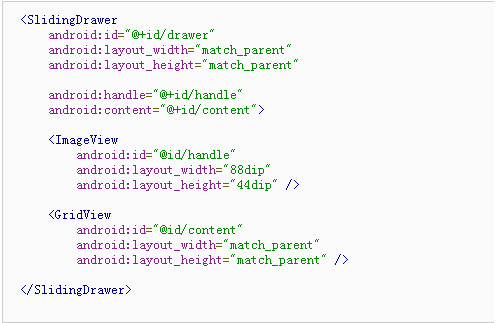
正文 一、结构 public classSlidingDrawer extendsViewGroup java.lang.Object android.view.View android.view.ViewGroup android.widget.SlidingDrawer 二、概述 SlidingDrawer (滑动式抽屉)隐藏屏外的内容,并允许用户拖拽一个 handle 以显示隐藏的内容。 SlidingDrawer 可以在垂直或者水平使用。它由两个子视图组成:一个是用户拖拽的 handle (柄),另一个是随着拖动变化的 content (内容)。 SlidingDrawer 应当作为内部布局的覆盖来使用,也就是说 SlidingDrawer 内部应该使用 FrameLayout 或 RelativeLayout 布局。 SlidingDrawer 的大小决定了其内容显示时所占空间的大小,所以它的尺寸一般定义为 match_parent 。在 XML 布局中 SlidingDrawer 必须指定 handle 和 content 的 id : 三、内部类 interface SlidingDrawer.OnDrawerCloseListener 当drawer(抽屉)关闭时调用 interface SlidingDrawer.OnDrawerOpenListener 当drawer(抽屉)打开时调用 interface SlidingDrawer.OnDrawerScrollListener 当drawer(抽屉)滑动(滚动)时调用 四、XML属性 属性名称 描述 android:allowSingleTap 指示是否可通过单击handle打开或关闭(如果是false,刚用户必须通过拖动,滑动或者使用轨迹球,来打开/关闭抽屉。)默认的是true。 android:animateOnClick 指示当用户点击handle的时候,抽屉是否以动画的形式打开或关闭。默认的是true。 android:bottomOffset Handle距离SlidingDrawer底部的额外距离 android:content 标识SlidingDrawer的内容 android:handle 标识SlidingDrawer的handle(译者注:如按钮) android:orientation SlidingDrawer的方向。必须是下面的一个值: 常量 值 描述 horizontal 0 水平方向对齐 vertical 1 竖直方向对齐 android:topOffset Handle距离SlidingDrawer顶部的额外距离 五、常量 public static final intORIENTATION_HORIZONTAL (译者注:水平方向对齐) 常量值:0 (0x00000000) public static final intORIENTATION_VERTICAL (译者注:垂直方向对齐) 常量值:1 (0x00000001) 六、构造函数 publicSlidingDrawer(Context context, AttributeSet attrs) 用xml中设置的属性来创建一个新的SlidingDrawe 参数 context上下文 attrs XML中定义的属性 public SlidingDrawer (Context context, AttributeSet attrs, int defStyle) 用xml中设置的属性来创建一个新的SlidingDrawe 参数 context上下文 attrs XML中定义的属性 defStyle要应用到这个组件上的样式 七、公共方法 public voidanimateClose() 动画效果关闭抽屉。 参见 close() open() animateOpen() animateToggle() toggle() public voidanimateOpen() 动画效果打开抽屉。 参见 close() open() animateOpen() animateToggle() toggle() public voidanimateToggle() 在打开和关闭抽屉之间动画切换 参见 close() open() animateOpen() animateToggle() toggle() public voidclose() 立即关闭抽屉 参见 open() toggle() animateClose() public ViewgetContent() 返回抽屉的内容(content) 返回值 返回在抽屉内容的视图,它在XML中是用“content”id标识的 public ViewgetHandle() 返回抽屉的handle 返回值 返回在抽屉handle的视图,它在XML中是用“handle”id标识的 public booleanisMoving() 抽屉是否在滚动或滑动。 返回值 如果在滚动或滑动,返回true,否则返回false public booleanisOpened() 当前抽屉是否被完全打开 返回值 如果是打开的,返回true,否则返回false。 public voidlock() 锁定SlidingDrawer,忽略触摸事件 参见 unlock() public booleanonInterceptTouchEvent(MotionEvent event) 实现这个方法可以拦截所有的触屏事件,它在事件被传到子类之前拦截,并获得当前手势的所有权。 使用这个方法时要注意,因为它与View.onTouchEvent(MotionEvent)有一个相当复杂的交互,使用它需要用正确的方法来实现。事件会按照下列顺序接受: 1.down事件会被首先传到本方法中。 2.这个down事件会被当前viewgroup的onTouchEvent()方法或者其各个子视图处理,也就是说你应该实现onTouchEvent()方法并返回true,你会继续看到剩下事件的传递(而不是找一个parent view处理它)。同样的,从onTouchEvent()中返回true,你不会在onInterceptTouchEvent()中接受到任何接下来的事件,并且所有的事件都会被onTouchEvent()处理。 3.如果当前方法返回false,所有接下来的事件(截止到最后包含注册的事件)首先都会被继续传到这里,然后一起传递给目标的onTouchEvent()方法。截至及包括最后注册。 4.如果在这里返回true,将不会收到以下任何事件:目标view将收到同样的事件但是是伴随ACTION_CANCEL事件,并且所有的更进一步的事件将会传递到你自己的onTouchEvent()方法中而不会再在这里出现。 (译者著:这里实在是太麻烦了,很不好懂,我自己看着都头晕,在网上找到一篇很不错的总结,才知道是怎么回事,这里总结一下,记住这个原则你就会很清楚了: 1、onInterceptTouchEvent()是用于处理事件(类似于预处理,当然也可以不处理)并改变事件的传递方向,也就是决定是否允许Touch事件继续向下(子控件)传递,一但返回True(代表事件在当前的viewGroup中会被处理),则向下传递之路被截断(所有子控件将没有机会参与Touch事件),同时把事件传递给当前的控件的onTouchEvent()处理;如果返回false,则把事件交给子控件的onInterceptTouchEvent()处理 2、onTouchEvent()用于处理事件,返回值决定当前控件是否消费(consume)了这个事件,也就是说在当前控件在处理完Touch事件后,是否还允许Touch事件继续向上(父控件)传递,一但返回True,则父控件不用操心自己来处理Touch事件。 相关文章这里1、这里2) 参数 event分层次的动作事件 返回值 如果将运动事件从子视图中截获并且通过onTouchEvent()发送到当前ViewGroup,返回true。当前目标将会收到ACTION_CANCEL事件,并且不再会有其他消息传递到此。 public booleanonTouchEvent(MotionEvent event) 实现触摸屏幕事件的方法 参数 event当前事件 返回值 如果事件被处理就返回true,否则返回false public voidopen() 立即打开抽屉 参见 toggle() close() animateOpen() public voidsetOnDrawerCloseListener(SlidingDrawer.OnDrawerCloseListener onDrawerCloseListener) 给抽屉的关闭事件绑定监听器 参数 onDrawerCloseListener抽屉关闭时的监听器 public voidsetOnDrawerOpenListener(SlidingDrawer.OnDrawerOpenListener onDrawerOpenListener) 给抽屉的打开事件绑定监听器 参数 onDrawerOpenListener抽屉打开时的鉴别器 public voidsetOnDrawerScrollListener(SlidingDrawer.OnDrawerScrollListener onDrawerScrollListener) 给抽屉的滚动(收缩)事件绑定监听器,轻滑(fling)也被当作一个滚动(收缩)事件,同时它可以触发抽屉关闭或者打开事件。 参数 onDrawerScrollListener当滚动(收缩)开始或者停止时通知的监听器 public voidtoggle() 在抽屉打开或关闭状态之间切换。事件会立即产生。 参见 close() open() animateOpen() animateToggle() toggle() public voidunlock() 解锁SlidingDrawer使触摸事件能被处理 参见 lock() 八、补充 文章精选 Android高手进阶教程(二)之----Android Launcher抽屉类SlidingDrawer的使用 SlidingDrawer抽屉类{Android学习指南} MotionEvent事件在onInterceptTouchEvent()、onTouchEvent()中的传递顺序 http://hi.baidu.com/j_fo/blog/item/7321c91324203437dc54017d.html http://www.cnblogs.com/rocky_yi/archive/2011/01/21/1941522.html# 示例代码 < SlidingDrawer android:id ="@+id/drawer" android:layout_width ="match_parent" android:layout_height ="match_parent" android:handle ="@+id/handle" android:content ="@+id/content" > < ImageView android:id ="@id/handle" android:layout_width ="88dip" android:layout_height ="44dip" /> < GridView android:id ="@id/content" android:layout_width ="match_parent" android:layout_height ="match_parent" /> </ SlidingDrawer > SlidingDrawer.OnDrawerCloseListener 译者署名:xiaoQLu 译者链接:http://www.cnblogs.com/xiaoQLu 版本:Android 3.0 r1 结构 继承关系 public static interfaceSlidingDrawer.OnDrawerCloseListener android.widget.SlidingDrawer.OnDrawerCloseListener 类概述 当抽屉被关闭时调用的回调。 公共方法 public abstract voidonDrawerClosed() 当抽屉被完全关闭时调用 补充 文章精选 Android控件之SlidingDrawer(滑动式抽屉)详解与实例 SlidingDrawer.OnDrawerOpenListener 译者署名:xiaoQLu 译者链接:http://www.cnblogs.com/xiaoQLu 版本:Android 3.0 r1 结构 继承关系 public static interfaceSlidingDrawer.OnDrawerOpenListener android.widget.SlidingDrawer.OnDrawerOpenListener 类概述 当抽屉被打开时调用 公共方法 public abstract voidonDrawerOpened() 当抽屉被完全打开时调用 SlidingDrawer.OnDrawerScrollListener 译者署名:xiaoQLu 译者链接:http://www.cnblogs.com/xiaoQLu 版本:Android 3.0 r1 结构 继承关系 public static interfaceSlidingDrawer.OnDrawerScrollListener android.widget.SlidingDrawer.OnDrawerScrollListener 类概述 当抽屉被滚动时调用 公共方法 public abstract voidonScrollEnded() 当用户停止拖曳/滑动抽屉的handle时调用 public abstract voidonScrollStarted() 当用户开始拖曳/滑动抽屉的handle时调用 本文转自over140 51CTO博客,原文链接:http://blog.51cto.com/over140/582369,如需转载请自行联系原作者

资源下载

更多资源
Mario

Mario

马里奥是站在游戏界顶峰的超人气多面角色。马里奥靠吃蘑菇成长,特征是大鼻子、头戴帽子、身穿背带裤,还留着胡子。与他的双胞胎兄弟路易基一起,长年担任任天堂的招牌角色。

腾讯云软件源

腾讯云软件源

为解决软件依赖安装时官方源访问速度慢的问题,腾讯云为一些软件搭建了缓存服务。您可以通过使用腾讯云软件源站来提升依赖包的安装速度。为了方便用户自由搭建服务架构,目前腾讯云软件源站支持公网访问和内网访问。

Rocky Linux

Rocky Linux

Rocky Linux(中文名:洛基)是由Gregory Kurtzer于2020年12月发起的企业级Linux发行版,作为CentOS稳定版停止维护后与RHEL(Red Hat Enterprise Linux)完全兼容的开源替代方案,由社区拥有并管理,支持x86_64、aarch64等架构。其通过重新编译RHEL源代码提供长期稳定性,采用模块化包装和SELinux安全架构,默认包含GNOME桌面环境及XFS文件系统,支持十年生命周期更新。

Sublime Text

Sublime Text

Sublime Text具有漂亮的用户界面和强大的功能,例如代码缩略图,Python的插件,代码段等。还可自定义键绑定,菜单和工具栏。Sublime Text 的主要功能包括:拼写检查,书签,完整的 Python API , Goto 功能,即时项目切换,多选择,多窗口等等。Sublime Text 是一个跨平台的编辑器,同时支持Windows、Linux、Mac OS X等操作系统。

用户登录
用户注册