首页 文章 精选 留言 我的

精选列表

搜索[API集成],共10000篇文章
优秀的个人博客,低调大师

自己实现 ECS 购买页需要用到的 API

1. 查询可购买的地域 DescribeRegions 入参: 付费类型: instanceChargeType(选填),取值:PrePaid|PostPaid,分别代表 包年包月|按量付费 2. 查询可购买的可用区 DescribeAvailableResource 入参: 付费类型:instanceChargeType(必填),PrePaid|PostPaid 地域:regionId(必填) 要查询的目标资源:destinationResource=Zone 3. 查询可购买的实例规格 DescribeAvailableResource 入参: 地域:regionId(必填) 可用区:zoneId(选填) I/O优化:ioOptimized=optimized 要查询的目标资源:destinationResource=InstanceType 4. 查询实

优秀的个人博客,低调大师

资源编排支持弹性网卡全系列API,简化网络配置

目前,阿里云资源编排服务(ROS)开始支持弹性网卡功能,ROS的云资源类型增加了3个新成员, ALIYUN::ECS::NetworkInterface 创建弹性网卡 ALIYUN::ECS::NetworkInterfaceAttachment 绑定弹性网卡 ALIYUN::ECS::NetworkInterfacePermission 给弹性网卡授权通过上面的ROS资源类型,灵活地编排弹性网卡,可以将弹性网卡跟其他云资源编写成你的ROS模板,达到你所希望的“一键部署”效果 弹性网卡资源类型介绍 我们先看看阿里云ROS弹性网卡相关的3个资源类型都提供了什么能力和怎么使用。如果你还没接触过阿里云的资源编排服务,请戳这里 创建弹性网卡 资源编排抽象了弹性网卡CreateNetworkInterface接

优秀的个人博客,低调大师

16.源码阅读(View的绘制-android api-26)

今天带着一个问题来看Android View的绘制流程 View的绘制入口在哪? 很多时候,在进入到一个页面的时候,会需要动态的获取到布局中某一个view的宽度或者高度,但是我们发现如果直接在onCreate方法或者onResume方法中通过这种方式去取高度值得到的是0 int measuredHeight = mTextView.getMeasuredHeight(); 而调用post方法才可以得到正确的值 mTextView.post(new Runnable() { @Override public void run() { int measuredHeight1 = mTextView.getMeasuredHeight(); System.out.println("post measuredHeight:"+measuredHeight1); } }); 所以回到我们的第一个问题,view的绘制入口在哪里,只有view绘制完成经过测量才能得到宽高值,是否在onCreate和onResume方法中,view还没有完成绘制测量呢? 在Activity的启动流程中已经了解到,最终要启动Activity并且开始执行Activity生命周期的位置是在ActivityThread的handleLaunchActivity中,我们直接来到这里看,对Activity启动流程不熟悉可以看另一篇https://www.jianshu.com/p/bd5208574430 handleLaunchActivity private void handleLaunchActivity(ActivityClientRecord r, Intent customIntent, String reason) { ...... //这里会回调onCreate方法 Activity a = performLaunchActivity(r, customIntent); if (a != null) { r.createdConfig = new Configuration(mConfiguration); reportSizeConfigurations(r); Bundle oldState = r.state; //这里会回调onResume方法 handleResumeActivity(r.token, false, r.isForward, !r.activity.mFinished && !r.startsNotResumed, r.lastProcessedSeq, reason); if (!r.activity.mFinished && r.startsNotResumed) { // The activity manager actually wants this one to start out paused, because it // needs to be visible but isn't in the foreground. We accomplish this by going // through the normal startup (because activities expect to go through onResume() // the first time they run, before their window is displayed), and then pausing it. // However, in this case we do -not- need to do the full pause cycle (of freezing // and such) because the activity manager assumes it can just retain the current // state it has. performPauseActivityIfNeeded(r, reason); // We need to keep around the original state, in case we need to be created again. // But we only do this for pre-Honeycomb apps, which always save their state when // pausing, so we can not have them save their state when restarting from a paused // state. For HC and later, we want to (and can) let the state be saved as the // normal part of stopping the activity. if (r.isPreHoneycomb()) { r.state = oldState; } } } else { //如果启动Activity失败,交给ActivityManager处理 // If there was an error, for any reason, tell the activity manager to stop us. try { ActivityManager.getService() .finishActivity(r.token, Activity.RESULT_CANCELED, null, Activity.DONT_FINISH_TASK_WITH_ACTIVITY); } catch (RemoteException ex) { throw ex.rethrowFromSystemServer(); } } } performLaunchActivity ClassLoader加载出Activity后执行了callActivityOnCreate,会回调onCreate方法 private Activity performLaunchActivity(ActivityClientRecord r, Intent customIntent) { ...... Activity activity = null; try { java.lang.ClassLoader cl = appContext.getClassLoader(); activity = mInstrumentation.newActivity( cl, component.getClassName(), r.intent); ...... activity.mCalled = false; if (r.isPersistable()) { mInstrumentation.callActivityOnCreate(activity, r.state, r.persistentState); } else { mInstrumentation.callActivityOnCreate(activity, r.state); } return activity; } public void callActivityOnCreate(Activity activity, Bundle icicle) { prePerformCreate(activity); //调用activity中的performCreate,onCreate方法就在里面 activity.performCreate(icicle); postPerformCreate(activity); } 可以看到,activity创建出来后就开始回调onCreate,而onCreate中做了什么呢,调用了setContentView方法加载我们的布局文件,setContentView源码分析https://www.jianshu.com/p/2f87ebe77f4e 从源码中可以看到,setContentView做了以下的操作: 1.new了一个DecorView 2.加载了一个id为android.R.id.content的布局并把它加入DecorView 3.我们设置的布局文件被加载到id为android.R.id.content的ViewGroup中 也就是说,setContentView后只是加载了布局,但是还没有进行测量绘制,那么在onResum方法调用时是否完成了测量绘制呢? performLaunchActivity之后系统开始执行handleResumeActivity final void handleResumeActivity(IBinder token, boolean clearHide, boolean isForward, boolean reallyResume, int seq, String reason) { .... //回调onResum方法 r = performResumeActivity(token, clearHide, reason); if (r != null) { ...... //获取到WindowManager,将包含了我们我们自己的布局的 //DecorView加入到WindowManager中(ViewManager是一个 //接口,WindowManager实现了它) if (r.window == null && !a.mFinished && willBeVisible) { r.window = r.activity.getWindow(); View decor = r.window.getDecorView(); decor.setVisibility(View.INVISIBLE); ViewManager wm = a.getWindowManager(); WindowManager.LayoutParams l = r.window.getAttributes(); a.mDecor = decor; l.type = WindowManager.LayoutParams.TYPE_BASE_APPLICATION; l.softInputMode |= forwardBit; if (r.mPreserveWindow) { a.mWindowAdded = true; r.mPreserveWindow = false; // Normally the ViewRoot sets up callbacks with the Activity // in addView->ViewRootImpl#setView. If we are instead reusing // the decor view we have to notify the view root that the // callbacks may have changed. ViewRootImpl impl = decor.getViewRootImpl(); if (impl != null) { impl.notifyChildRebuilt(); } } //如果Activity已经可见了,就将DecorView加入Window if (a.mVisibleFromClient) { if (!a.mWindowAdded) { a.mWindowAdded = true; wm.addView(decor, l); } } ...... // The window is now visible if it has been added, we are not // simply finishing, and we are not starting another activity. if (!r.activity.mFinished && willBeVisible ...... WindowManager.LayoutParams l = r.window.getAttributes(); if ((l.softInputMode & WindowManager.LayoutParams.SOFT_INPUT_IS_FORWARD_NAVIGATION) != forwardBit) { l.softInputMode = (l.softInputMode & (~WindowManager.LayoutParams.SOFT_INPUT_IS_FORWARD_NAVIGATION)) | forwardBit; if (r.activity.mVisibleFromClient) { ViewManager wm = a.getWindowManager(); View decor = r.window.getDecorView(); //window可见之后,开始真正的绘制view了,这个方法很关键 wm.updateViewLayout(decor, l); } } ...... r.onlyLocalRequest = false; // Tell the activity manager we have resumed. if (reallyResume) { try { ActivityManager.getService().activityResumed(token); } catch (RemoteException ex) { throw ex.rethrowFromSystemServer(); } } } } 也就是说在onCreate和onResume方法之心的时候,还没有完成View的测量,所以在这两个方法中无法得到实际的高度,具体绘制的代码先不看,我们看看为什么post方法中可以得到高度 public boolean post(Runnable action) { final AttachInfo attachInfo = mAttachInfo; if (attachInfo != null) { return attachInfo.mHandler.post(action); } // Postpone the runnable until we know on which thread it needs to run. // Assume that the runnable will be successfully placed after attach. //把Runnable加入了队列 getRunQueue().post(action); return true; } public void post(Runnable action) { postDelayed(action, 0); } public void postDelayed(Runnable action, long delayMillis) { final HandlerAction handlerAction = new HandlerAction(action, delayMillis); //看得出这是一个数组实现的队列,加入队列后也没有执行 //那么是什么时候执行的 synchronized (this) { if (mActions == null) { mActions = new HandlerAction[4]; } mActions = GrowingArrayUtils.append(mActions, mCount, handlerAction); mCount++; } } public static <T> T[] append(T[] array, int currentSize, T element) { assert currentSize <= array.length; if (currentSize + 1 > array.length) { T[] newArray = (T[]) Array.newInstance(array.getClass().getComponentType(), growSize(currentSize)); System.arraycopy(array, 0, newArray, 0, currentSize); array = newArray; } array[currentSize] = element; return array; } dispatchAttachToWindow,这个队列是在这个方法中执行的,后边我们会找到这个方法执行的时机,然后就会知道为什么这个方法中执行就可以得到高度了 void dispatchAttachedToWindow(AttachInfo info, int visibility) { ...... if (mRunQueue != null) { mRunQueue.executeActions(info.mHandler); mRunQueue = null; } performCollectViewAttributes(mAttachInfo, visibility); onAttachedToWindow(); ...... } 我们再回到上边ViewManager的addView和updateViewLayout方法,ViewManager和WindowManager都是接口,找到它的实现类WindowManagerImpl(可以通过PhoneWindow找到WindowManager的实现类是他) @Override public void addView(@NonNull View view, @NonNull ViewGroup.LayoutParams params) { applyDefaultToken(params); mGlobal.addView(view, params, mContext.getDisplay(), mParentWindow); } @Override public void updateViewLayout(@NonNull View view, @NonNull ViewGroup.LayoutParams params) { applyDefaultToken(params); mGlobal.updateViewLayout(view, params); } 看一下WindowManagerGlobal这个类中做了什么,这里创建了一个ViewRootImpl,并把DecorView加入了这个View中 public void addView(View view, ViewGroup.LayoutParams params, Display display, Window parentWindow) { ...... ViewRootImpl root; View panelParentView = null; ...... root = new ViewRootImpl(view.getContext(), display); ...... // do this last because it fires off messages to start doing things try { root.setView(view, wparams, panelParentView); } catch (RuntimeException e) { } } } //这个方法是给view设置参数的,所以关键还是在addView方法 public void updateViewLayout(View view, ViewGroup.LayoutParams params) { if (view == null) { throw new IllegalArgumentException("view must not be null"); } if (!(params instanceof WindowManager.LayoutParams)) { throw new IllegalArgumentException("Params must be WindowManager.LayoutParams"); } final WindowManager.LayoutParams wparams = (WindowManager.LayoutParams)params; view.setLayoutParams(wparams); synchronized (mLock) { int index = findViewLocked(view, true); ViewRootImpl root = mRoots.get(index); mParams.remove(index); mParams.add(index, wparams); root.setLayoutParams(wparams, false); } } setView public void setView(View view, WindowManager.LayoutParams attrs, View panelParentView) { synchronized (this) { ...... requestLayout(); } } 这里又来到了曾经在invalidate方法中看到的源码,刷新view @Override public void requestLayout() { if (!mHandlingLayoutInLayoutRequest) { checkThread(); mLayoutRequested = true; scheduleTraversals(); } } void scheduleTraversals() { if (!mTraversalScheduled) { mTraversalScheduled = true; mTraversalBarrier = mHandler.getLooper().getQueue().postSyncBarrier(); mChoreographer.postCallback( //执行这个Runnable Choreographer.CALLBACK_TRAVERSAL, mTraversalRunnable, null); if (!mUnbufferedInputDispatch) { scheduleConsumeBatchedInput(); } notifyRendererOfFramePending(); pokeDrawLockIfNeeded(); } } final class TraversalRunnable implements Runnable { @Override public void run() { doTraversal(); } } void doTraversal() { if (mTraversalScheduled) { mTraversalScheduled = false; mHandler.getLooper().getQueue().removeSyncBarrier(mTraversalBarrier); if (mProfile) { Debug.startMethodTracing("ViewAncestor"); } performTraversals(); if (mProfile) { Debug.stopMethodTracing(); mProfile = false; } } } private void performTraversals() { ....省略大量代码 // Ask host how big it wants to be 回调到measure了 performMeasure(childWidthMeasureSpec, childHeightMeasureSpec); .... //回调到layout了 if (didLayout) { performLayout(lp, mWidth, mHeight); } ...... //回调draw了 performDraw(); } 总结一下: 1.onCreate和onResume方法调用时还没有进行view的测量 2.onResume方法调用之后将包含着当前布局文件的DecorView交给了WindowManager(实现类WindowManagerImpl)处理 3.WindowManager中将DecorView设置到ViewRootImpl中,在ViewRootImpl中调用requestLayout开始刷新View,执行measure layout 和 draw方法 4.post方法中能得到高度是因为post将runnable加入队列,在view attachToWindow时后才去获取高度,此时view已经完成了测量

优秀的个人博客,低调大师

Java高并发秒杀业务Api-Service层构建过程

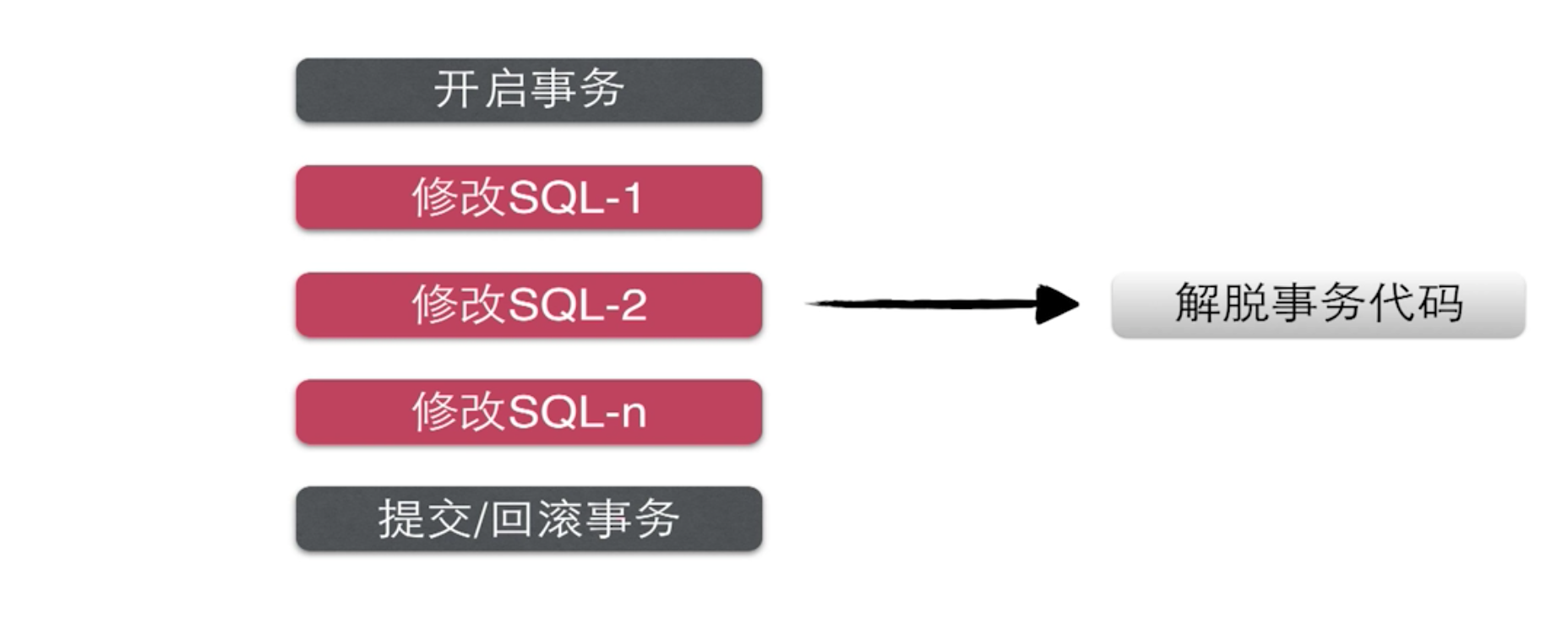
章节目录 秒杀Service 接口开发工作 秒杀业务逻辑编写 spring-IOC 管理 service 组件 context:component-scan Spring 声明式事务 junit测试 创建基本的代码包层 1.创建DTO - 数据传输层对象 网络数据到达Controller 层后会使用框架自带的数据绑定 以及反序列化为dto对 象,并作为参数传递至service层进行处理。 2.业务接口实现 注意:业务接口的实现需要站在使用者的角度去设计接口 方法定义粒度-非常明确,参数简练,直接,不要一个大map对象去传递,return 还可以抛出异常。 代码如下:业务逻辑接口声明类 SecKillService.java package org.seckill.service; import org.seckill.domain.SecKill; import org.seckill.dto.Exposer; import org.seckill.dto.SecKillExcution; import org.seckill.exception.RepeatKillException; import org.seckill.exception.SecKillCloseException; import org.seckill.exception.SecKillException; import java.util.List; /** * 业务接口的实现需要站在使用者的角度去设计接口 * 三个方面:方法定义粒度、参数、返回类型 dto就可以 */ public interface SecKillService { /** * 返回秒杀商品列表 * * @return */ List<SecKill> getSecKillList(); /** * 查询秒杀商品单条记录 * * @param secKillId * @return */ SecKill getSecKillById(long secKillId); /** * 秒杀开启时,输出秒杀接口的地址,否则输出系统时间,和秒杀时间 * * @param secKillId * @return */ Exposer exportSecKillUrl(long secKillId); /** * 执行秒杀操作 * 验证当前的excuteSecKill id 与 传递过来的md5是否相同 * * @param secKillId * @param userPhone * @param md5 */ SecKillExcution excuteSecKill(long secKillId, String userPhone, String md5) throws SecKillException, RepeatKillException, SecKillCloseException; } 业务逻辑接口实现类-SecKillServiceImpl package org.seckill.service.impl; import org.seckill.dao.SecKillDao; import org.seckill.dao.SuccessKilledDao; import org.seckill.domain.SecKill; import org.seckill.domain.SuccessKilled; import org.seckill.dto.Exposer; import org.seckill.dto.SecKillExcution; import org.seckill.enums.SecKillStateEnum; import org.seckill.exception.RepeatKillException; import org.seckill.exception.SecKillCloseException; import org.seckill.exception.SecKillException; import org.seckill.service.SecKillService; import org.slf4j.Logger; import org.slf4j.LoggerFactory; import org.springframework.util.DigestUtils; import java.util.Date; import java.util.List; @Service public class SecKillServiceImpl implements SecKillService { //在业务逻辑层打日志 private Logger logger = LoggerFactory.getLogger(this.getClass()); @Autowire private SecKillDao secKillDao; @Autowire private SuccessKilledDao successKilledDao; //md5加盐,混淆加密 private final String salt = "asdasd8Zy*&ZCY87ywer7t678tzt67wer"; public List<SecKill> getSecKillList() { return secKillDao.queryAll(0, 4); } public SecKill getSecKillById(long secKillId) { return secKillDao.queryById(secKillId); } public Exposer exportSecKillUrl(long secKillId) { SecKill secKill = secKillDao.queryById(secKillId); if (secKill == null) { return new Exposer(false, secKillId);//没有相关产品的秒杀活动 } Date startTime = secKill.getStartTime(); Date endTime = secKill.getEndTime(); Date nowTime = new Date(); if (nowTime.getTime() < startTime.getTime() || nowTime.getTime() > endTime.getTime()) { return new Exposer(false, secKillId, nowTime.getTime(), startTime.getTime(), endTime.getTime());//没有相关产品的秒杀活动 } //转化特定字符串的过程,不可逆 String md5 = null; return new Exposer(secKillId, md5, true); } /** * 生成对应秒杀商品的md5值,做参数校验 * 保证可重用 * * @param secKillId * @return */ private String getMD5(long secKillId) { String base = secKillId + "/" + salt;//用户不知道salt String md5 = DigestUtils.md5DigestAsHex(base.getBytes()); return md5; } /** * 执行秒杀 * * @param secKillId * @param userPhone * @param md5 * @return * @throws SecKillException * @throws RepeatKillException * @throws SecKillCloseException */ public SecKillExcution excuteSecKill(long secKillId, String userPhone, String md5) throws SecKillException, RepeatKillException, SecKillCloseException { try { //1.用户输入的md5值验证 if (md5 == null || !md5.equals(getMD5(secKillId))) { throw new SecKillException("seckill data rewrite"); } //2.减库存、执行秒杀逻辑+记录购买行为,执行秒杀时间 Date nowTime = new Date(); int updateCount = secKillDao.reduceStock(secKillId, nowTime); if (updateCount <= 0) { //没有更新到记录,秒杀结束 throw new SecKillCloseException("seckill is closed"); } else { //3.记录购买行为 insertSuccessKilled 可能出现数据库连接超时等问题,所以需要外层try int insertCount = successKilledDao.insertSuccessKilled(secKillId, userPhone); //唯一验证,secKillId + userPhone if (insertCount <= 0) {//数据库联合主键冲突 throw new RepeatKillException("seckill repeated"); } else {//秒杀成功,返回秒杀成功的实体 SuccessKilled successKilled = successKilledDao.queryByIdWithSecKill(secKillId, userPhone); //不优雅的实现方式,在多处需要用到提示信息时,我们可以采用统一的常量去返回,这样待客户端提示语改变时,我们可以统一进行更改。 // return new SecKillExcution(secKillId, 1, "秒杀成功", successKilled); return new SecKillExcution(secKillId, SecKillStateEnum.SUCCESS, successKilled); } } } catch (SecKillCloseException e1) { throw e1;//还是要回滚 } catch (RepeatKillException e2) { throw e2;//还是要回滚 } catch (Exception e) { logger.error(e.getMessage()); //所有异常最终会转化为 运行时异常,spring 的声明式事务会帮我们做rollback。 throw new SecKillException("seckill inner error" + e.getMessage()); } } } 数据传输层类- Exposer package org.seckill.dto; /** * 暴露秒杀接口 */ public class Exposer { private boolean exposed;//秒杀是否开启标志位 private String md5; //加密措施,暴露地址包括一个md5值 private long now; //系统当前时间(毫秒),方便浏览器计算距离服务器秒杀开启时间 private long secKillId; //秒杀商品的id private long start; private long end; //秒杀正在进行 public Exposer(long secKillId, String md5, boolean exposed) { this.secKillId = secKillId; this.md5 = md5; this.exposed = exposed; } //秒杀结束或还没开启 public Exposer(boolean exposed, long secKillId, long now, long start, long end) { this.exposed = exposed; this.secKillId = secKillId; this.now = now; this.start = start; this.end = end; } //没有相关商品秒杀活动 public Exposer(boolean exposed, long secKillId) { this.exposed = exposed; this.secKillId = secKillId; } public boolean isExposed() { return exposed; } public void setExposed(boolean exposed) { this.exposed = exposed; } public String getMd5() { return md5; } public void setMd5(String md5) { this.md5 = md5; } public long getNow() { return now; } public void setNow(long now) { this.now = now; } public long getStart() { return start; } public void setStart(long start) { this.start = start; } public long getEnd() { return end; } public void setEnd(long end) { this.end = end; } public long getSecKillId() { return secKillId; } public void setSecKillId(long secKillId) { this.secKillId = secKillId; } @Override public String toString() { return "Exposer{" + "exposed=" + exposed + ", md5='" + md5 + '\'' + ", now=" + now + ", secKillId=" + secKillId + ", start=" + start + ", end=" + end + '}'; } } 数据传输层-SecKillExcution package org.seckill.dto; import org.seckill.domain.SuccessKilled; import org.seckill.enums.SecKillStateEnum; /** * 执行秒杀之后的结果 */ public class SecKillExcution { private long secKillId; private int state;//状态的标识 private String stateInfo;//状态表示 private SuccessKilled successSecKilled;//秒杀成功对象 //成功 jakson 在转化枚举的时候会出现问题,不支持枚举序列化 public SecKillExcution(long secKillId, SecKillStateEnum secKillStateEnum, SuccessKilled successSecKilled) { this.secKillId = secKillId; this.state = secKillStateEnum.getState(); this.stateInfo = secKillStateEnum.getStateInfo(); this.successSecKilled = successSecKilled; } //失败,使用到枚举 public SecKillExcution(long secKillId, SecKillStateEnum secKillStateEnum) { this.secKillId = secKillId; this.state = secKillStateEnum.getState(); this.stateInfo = secKillStateEnum.getStateInfo(); } public long getSecKillId() { return secKillId; } public void setSecKillId(long secKillId) { this.secKillId = secKillId; } public int getState() { return state; } public void setState(int state) { this.state = state; } public String getStateInfo() { return stateInfo; } public void setStateInfo(String stateInfo) { this.stateInfo = stateInfo; } public SuccessKilled getSuccessSecKilled() { return successSecKilled; } public void setSuccessSecKilled(SuccessKilled successSecKilled) { this.successSecKilled = successSecKilled; } @Override public String toString() { return "SecKillExcution{" + "secKillId=" + secKillId + ", state=" + state + ", stateInfo='" + stateInfo + '\'' + ", successSecKilled=" + successSecKilled + '}'; } } 业务运行时异常类-SecKillException、RepeatKillException、SecKillCloseException package org.seckill.exception; /** * 秒杀相关业务异常 */ public class SecKillException extends RuntimeException { public SecKillException(String message) { super(message); } public SecKillException(String message, Throwable cause) { super(message, cause); } } package org.seckill.exception; /** * 重复秒杀的异常(运行时异常) * 声明式事务,只接收运行时异常 */ public class RepeatKillException extends SecKillException { public RepeatKillException(String message) { super(message); } public RepeatKillException(String message, Throwable cause) { super(message, cause); } } package org.seckill.exception; /** * 秒杀关闭异常-友好响应给用户 */ public class SecKillCloseException extends SecKillException { public SecKillCloseException(String message) { super(message); } public SecKillCloseException(String message, Throwable cause) { super(message, cause); } } 2.spring-IOC管理 service 组件 spring-service.xml 配置 <?xml version="1.0" encoding="UTF-8"?> <beans xmlns="http://www.springframework.org/schema/beans" xmlns:xsi="http://www.w3.org/2001/XMLSchema-instance" xmlns:context="http://www.springframework.org/schema/context" xmlns:tx="http://www.springframework.org/schema/tx" xsi:schemaLocation="http://www.springframework.org/schema/beans http://www.springframework.org/schema/beans/spring-beans.xsd http://www.springframework.org/schema/context http://www.springframework.org/schema/context/spring-context.xsd http://www.springframework.org/schema/tx http://www.springframework.org/schema/tx/spring-tx.xsd"> <!-- 扫描service包下所有使用注解的类型--> <context:component-scan base-package="org.seckill.service" /> <!-- 配置事务管理器--> <bean id="transactionManager" class="org.springframework.jdbc.datasource.DataSourceTransactionManager"> <!-- 注入数据库连接池--> <property name="dataSource" ref="dataSource" /> </bean> <!-- 配置基于注解的声明式事务 默认使用注解来管理事务行为 --> <tx:annotation-driven transaction-manager="transactionManager" /> </beans> Spring 声明式事务 什么是声明式事务 声明式事务 底层原理:采用动态代理的方式为我们的事务核心逻辑添加开启事务、回滚提交事务的控制操作 声明式事务使用方式 声明式事务 推荐使用@Transactional 声明式事务的传播行为 定义:即事务方法的嵌套 一个业务需要调用多个声明了事务控制的方法,那么最新组合的事务是重新启动一个事务,还是说沿用老的事务呢? 默认的事务传播行为: propagation_required 浅析如下: ServiceA { void methodA() { ServiceB.methodB(); } } ServiceB { void methodB() { } } 比如说ServiceB.methodB 事务传播行为定义为PROPAGATION_REQUIRED, 那么当ServiceA.methodA 调用 ServiceB.methodB 时,methodA起了新的事 务,那么ServiceB.methodB看到自己已经运行在ServiceA.methodA的事务内 部,就不再起新的事务。 而假如ServiceA.methodA运行的时候发现自己没有在事务中,他就会为自己 分配一个事务。这样,在ServiceA.methodA或者在ServiceB.methodB内的任何 地方出现异常,事务都会被回滚。即使ServiceB.methodB的事务已经被提交, 但是ServiceA.methodA在接下来fail要回滚,ServiceB.methodB也要回滚 相当于 methodB 通过自己的事务传播行为告诉methodA 自己使用事务的原 则,告诉methodA 你要有事务我methodB就用你的,如果methodA没有事务, 那你methodA就需要创建一个事务。 什么时候回滚事务 当业务方法抛出运行时异常(RuntimeException)的时候spring 事务管理器会进行commit 配置事务管理器 <bean id="transactionManager" class="org.springframework.jdbc.datasource.DataSourceTransactionManager"> <property name="dataSource" ref="dataSource"> </bean> 配置基于注解的声明式事务 <tx:annotation-driven transaction-manager="transactionManager"/> 使用注解控制事务方法的优点 开发团队达成一致约定,约定明确标注事务方法的编程风格 保证事务方法的执行时间尽可能的短,不要穿插其他的网络操作,RPC/HTTP请求,如果必须需要的话,那么将这些请求剥离出来,形成一个干净的方法调用。不要混合编写和外部系统进行网络通信的代码。 不是所有的方法都需要事务,select、insert操作,单条语句的insert、update都不需要事务操作、不需要并发控制&多个操作联合形成一个事务时,不需要设置事务,因为mysql有autocommit=1的设置。 上述是性能杀手啊 ,注意再注意。 单元测试 package org.seckill.service; import org.junit.Test; import org.junit.runner.RunWith; import org.seckill.domain.SecKill; import org.seckill.dto.Exposer; import org.seckill.dto.SecKillExcution; import org.slf4j.Logger; import org.slf4j.LoggerFactory; import org.springframework.beans.factory.annotation.Autowired; import org.springframework.test.context.ContextConfiguration; import org.springframework.test.context.junit4.SpringJUnit4ClassRunner; import java.util.List; @RunWith(SpringJUnit4ClassRunner.class) @ContextConfiguration({"classpath:spring/spring-dao.xml", "classpath:spring/spring-service.xml"}) public class SecKillServiceTest { private final Logger logger = LoggerFactory.getLogger(this.getClass()); @Autowired private SecKillService secKillService; @Test public void getSecKillList() throws Exception { List<SecKill> secKillList = secKillService.getSecKillList(); logger.info("list{}", secKillList); } @Test public void getSecKillById() throws Exception { long secKillId = 1000L; SecKill secKill = secKillService.getSecKillById(secKillId); logger.info("seckill{}", secKill); } @Test public void exportSecKillUrl() throws Exception { long secKillId = 1000L; Exposer exposer = secKillService.exportSecKillUrl(secKillId); logger.info("exposer{}", exposer); } @Test public void excuteSecKill() throws Exception { long secKillId = 1000L; String userPhone = "15300815981"; String md5 = "6e3cc65f3b42e656bdbc55a6a381f5d0"; SecKillExcution secKillExcution = secKillService.excuteSecKill(secKillId, userPhone, md5); logger.info("secKillExcution{}", secKillExcution); } } intellj idea 下单元测试快捷键:ctrl+shift+t

资源下载

更多资源
腾讯云软件源

腾讯云软件源

为解决软件依赖安装时官方源访问速度慢的问题,腾讯云为一些软件搭建了缓存服务。您可以通过使用腾讯云软件源站来提升依赖包的安装速度。为了方便用户自由搭建服务架构,目前腾讯云软件源站支持公网访问和内网访问。

Nacos

Nacos

Nacos /nɑ:kəʊs/ 是 Dynamic Naming and Configuration Service 的首字母简称,一个易于构建 AI Agent 应用的动态服务发现、配置管理和AI智能体管理平台。Nacos 致力于帮助您发现、配置和管理微服务及AI智能体应用。Nacos 提供了一组简单易用的特性集,帮助您快速实现动态服务发现、服务配置、服务元数据、流量管理。Nacos 帮助您更敏捷和容易地构建、交付和管理微服务平台。

Spring

Spring

Spring框架(Spring Framework)是由Rod Johnson于2002年提出的开源Java企业级应用框架,旨在通过使用JavaBean替代传统EJB实现方式降低企业级编程开发的复杂性。该框架基于简单性、可测试性和松耦合性设计理念,提供核心容器、应用上下文、数据访问集成等模块,支持整合Hibernate、Struts等第三方框架,其适用范围不仅限于服务器端开发,绝大多数Java应用均可从中受益。

Sublime Text

Sublime Text

Sublime Text具有漂亮的用户界面和强大的功能,例如代码缩略图,Python的插件,代码段等。还可自定义键绑定,菜单和工具栏。Sublime Text 的主要功能包括:拼写检查,书签,完整的 Python API , Goto 功能,即时项目切换,多选择,多窗口等等。Sublime Text 是一个跨平台的编辑器,同时支持Windows、Linux、Mac OS X等操作系统。

用户登录
用户注册