使用HTML5实现扫描PC二维码且触发WAP端上传资源功能
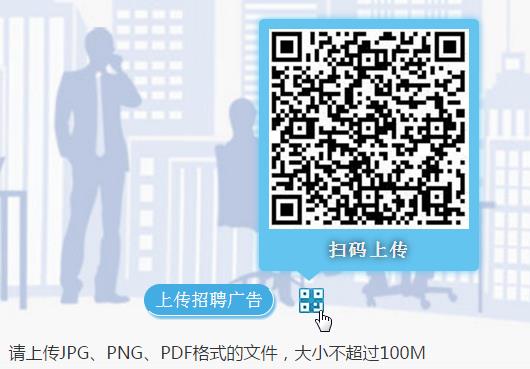
讲解一篇Java代码根据参数动态生成PC二维码效果,且成功扫描并上传图形或视频资源的功能。 技术难度一般,关键在于如何把一整套逻辑思路整合到项目上,如果调用,应该到哪些技术,理清了交互关系,详细对于大家而言这就是一份入门级别的代码参考,以作提升。 粗略介绍一下应用到的技术问题,前端方法使用简单的html元素布局,生成<img>二维码即可,后端框架为SpringMVC,结构简单,查阅清晰,应用到的二维码Jar包为:qrcode_swetake.jar 。 一、从前端开始入手,先构建页面布局确保能够生成二维码效果: 实现出来的成型效果如上图所示,鼠标移入移出则显示隐藏二维码效果框,自行慢慢摸索CSS如何实现了,这里需要说明的是二维码只需要一句话即可动态生成。 <c:setvar="ctx"value="${pageContext.request.contextPath}"></c:set> <imgsrc="${ctx}/upload/codeImg.html?userId=${loginUserId}"/> 设置一个<img>标签动态生成接收返回的二维码图,高宽度自行根据实际情况设定,然后就哔的一声手机即可访问的,当然测试阶段请确保IP同在一个局域网。 扫描出来的页面也异曲同工,关键在于你要设计成什么样子,只要能实现上传功能即可。 我应用的前端上传插件为jquery.form.js,主要JS方法如下: <inputtype="file"name="tempFile"id="tempFile" accept=".avi,.mpg,.mp4,.mov;capture=camera"onchange="previewFile('tempFile');"/> <inputtype="file"name="tempFile"id="tempFile" accept="p_w_picpath/jpg,p_w_picpath/JPG,p_w_picpath/jpeg,p_w_picpath/JPEG,p_w_picpath/pdf,p_w_picpath/png;capture=camera" onchange="previewFile('tempFile');"/> <scriptlanguage="javascript"> functionpreviewFile(id){ varx=document.getElementById("tempFile"); if(!x||!x.value)return; varpatn=/\.jpg$|\.JPG$|\.jpeg$|\.JPEG$|\.pdf$|\.PDF$|\.png$|\.PNG$/; varinpType="p_w_picpath\/jpg,p_w_picpath\/JPG,p_w_picpath\/jpeg,p_w_picpath\/JPEG,p_w_picpath\/pdf,p_w_picpath\/PDF,p_w_picpath\/png,p_w_picpath\/PNG"; vartype=$("#type").val(); if(type=='video'){ patn=/\.mp4$|\.MP4$|\.mov$|\.MOV$/; inpType=".MP4,.MOV,.mp4,.mov"; } if(!patn.test(x.value)){ if(type=='video'){ alertMsg("请上传mov、mp4格式的视频"); }else{ alertMsg("请上传jpg、png、pdf格式的文件"); } }else{ initShow(); $("#uploadForm").ajaxSubmit(options); } } varoptions={ dataType:"json", url:'${ctx}/upload/uploadAndSaveFile.html', type:'post', contentType:"application/x-www-form-urlencoded;charset=utf-8", success:function(data){ initHide(); if(data.success){ //alertCallBack("上传成功<br/>请前往PC端刷新后查阅!",function(){ document.location.href="${ctx}/upload/toUploadEndDetail.html"; //}); }else{ alertCallBack(data.message,function(){ window.location.reload(); }); //alertMsg(data.message); } }, error:function(data){ initHide(); alertMsg(data); }, beforeSubmit:showRequest//pre-submitcallback //clearForm:true }; functionshowRequest(formData,jqForm,options){ varqueryString=$.param(formData); } </script> 以上代码由于涉及公司内部逻辑,故存在个别地方的删减动作,但整体思路已清晰罗列出来了。 这里需要讲到一个应用到的UI插件,即alertMsg使用到的hint弹出框效果。smallarAlert.js 附件资源均会统一部署上来,插件自适应效果可兼容IE、谷歌、360、火狐等主流浏览器,内置样式及功能等也可自行重写,具体应用自行度娘搜索该插件了,这里就不一一讲解了。 二、从后端着手处理二维码生成技术及资源保存动作: /** *@Descript:生成二维码图片url *@author:Teny_lau *@CreatedTime:2016年11月21日-下午3:44:44 *@parammodel *@paramrequest *@paramresponse */ @RequestMapping("/codeImg") publicvoidtoCodeImg(Modelmodel,HttpServletRequestrequest,HttpServletResponseresponse){ StringlocalIp=getInternetIp(request); Stringpath=request.getSession().getServletContext().getContextPath(); Stringport=StringUtils.getNullBlankStr(request.getServerPort());//获取服务器端口 StringuserId=StringUtils.getNullBlankStr(request.getParameter("userId"));//接收参数 Stringparams="userId="+userId; //字节长度须控制在124个长度以内,否则报异常数组索引值溢出 Stringcontent=localIp+":"+port+path+"/upload/toUploadMain.html?"+params; EncoderHandlerencoder=newEncoderHandler(); encoder.encoderQRCoder(content,response); } privateStringgetInternetIp(HttpServletRequestrequest){ Stringip=StringUtils.getNullBlankStr(request.getHeader("x-forwarded-for")); if(ip==null||ip.length()==0||"unknown".equalsIgnoreCase(ip)){ ip=StringUtils.getNullBlankStr(request.getHeader("Proxy-Client-IP")); } if(ip==null||ip.length()==0||"unknown".equalsIgnoreCase(ip)){ ip=StringUtils.getNullBlankStr(request.getHeader("WL-Proxy-Client-IP")); } if(ip==null||ip.length()==0||"unknown".equalsIgnoreCase(ip)){ ip=StringUtils.getNullBlankStr(request.getRemoteAddr());//获取客户端IP地址 } StringlocalIp="";//获取网段地址 try{ InetAddresslocalInter=InetAddress.getLocalHost(); localIp=StringUtils.getNullBlankStr(localInter.getHostAddress()); }catch(UnknownHostExceptione1){ e1.printStackTrace(); } if(!ip.equals(localIp)&&!"127.0.0.1".equals(ip)){ //当程序获取非服务器网口时,自动重置为本地网口 ip=localIp; } if("127.0.0.1".equals(ip)){ //根据网卡取本机配置的IP InetAddressinet=null; try{ inet=InetAddress.getLocalHost(); }catch(Exceptione){ e.printStackTrace(); } ip=StringUtils.getNullBlankStr(inet.getHostAddress()); } //对于通过多个代理的情况,第一个IP为客户端真实IP,多个IP按照','分割 if(ip!=null&&ip.length()>15){//"***.***.***.***".length()=15 if(ip.indexOf(",")>0){ ip=ip.substring(0,ip.indexOf(",")); } } returnip; } /** *提交资源信息 * *@parammodel *@paramrequest *@return */ @RequestMapping("uploadAndSaveFile") @ResponseBody publicvoiduploadAndSaveFile(HttpServletRequestrequest,HttpServletResponseresponse){ Map<String,Object>result=newHashMap<String,Object>(); try{ Stringtype=StringUtils.getNullBlankStr(request.getParameter("type")); saveUploadFile(request); result.put("success",true); }catch(RuntimeExceptionrun){ result.put("success",false); result.put("message",run.getMessage()); }catch(Exceptione){ result.put("success",false); result.put("message","上传失败<br/>请重新或扫码上传!"); //FileUtil.deleteFiles(fileNames); } try{ response.setContentType("text/html;charset=gbk"); JSONObjectjsonObj=JSONObject.fromObject(result); response.getWriter().print(jsonObj); }catch(IOExceptione){ e.printStackTrace(); } } /** *@Descript:保存上传资源 *@author:Teny_lau *@CreatedTime:2016年11月21日-下午3:28:39 */ privatevoidsaveUploadFile(HttpServletRequestrequest){ StringuserId=StringUtils.getNullBlankStr(request.getParameter("userId"));//接收参数 Map<String,Object>queryMap=newHashMap<String,Object>(); queryMap.put("",""); List<XXX>flashList=newArrayList<XXX>(); StringoldFlashName="";//旧文件 //由于以下逻辑存在项目代码,故以下对象均为举例说明,具体要求视项目自行修改 OldoldEntity=newOld(); if(flashList!=null&&flashList.size()>0){ oldEntity=flashList.get(0); //获取已上传的旧文件名,便于在插入新文件时,删除旧文件,避免资源过多占用空间内存 oldFlashName=oldEntity.getFlashName(); } MultipartHttpServletRequestmultipartRequest=(MultipartHttpServletRequest)request; CommonsMultipartFilefile1=(CommonsMultipartFile)multipartRequest.getFile("tempFile");//上传资源参数 if(file1!=null&&!file1.isEmpty()){ //判断上传资源等文件大小控制在500M以内,自行根据项目要求斟酌 intmaxSize=500*1024*1024; if(file1.getSize()>=maxSize){ thrownewRuntimeException("保存失败,文件控制在500M以内"); } StringfileName=saveFile(file1,request,oldFlashName);//这里返回的为重命名新文件名称 } } privateStringsaveFile(CommonsMultipartFilefile,HttpServletRequestrequest,StringoldFileName){ StringfileName=file.getOriginalFilename(); StringuploadPath=request.getSession().getServletContext().getRealPath(FILEPATH); //判断是否有上传文件 FiletargetFile=null; StringgroupId=StringUtils.getNullBlankStr(request.getParameter("groupId"));//接收参数 StringnewTransFileName=DateUtils.getCurrentDateTime14()+groupId+"."+org.apache.commons.lang3.StringUtils.substringAfterLast(fileName,"."); StringnewFilePath=uploadPath+File.separator+newTransFileName; try{ targetFile=newFile(newStringBuilder().append(newFilePath).toString()); //文件重命名 file.transferTo(targetFile); StringoldFilePath=""; if(StringUtils.isNotBlank(oldFileName)){ oldFilePath=uploadPath+File.separator+oldFileName; FileUtil.delSingleFile(oldFilePath); } //复制文件到指定盘 //CopyFileUtil.copyFile(origiNewPath,oldFilePath,true); }catch(NullPointerExceptione){ e.printStackTrace(); }catch(Exceptione){ e.printStackTrace(); } returnnewTransFileName; } 代码先一一贴上,以上代码由于存在公司逻辑,故也做了个别删减动作,但整体思路的增删改上传等功能已一一展示在这里了。 个别工具类方法如下: 1、StringUtils.getNullBlankStr /** *功能描述: *判断字符串是否为null或为空字符串,则返回空字符串"" * *@paramobjString *待检查的字符串 *@returnString *如果为null或空字符串(包括只含空格的字符串)则返回"",否则返回原字符串去空格 */ publicstaticStringgetNullBlankStr(Objectobj){ if(obj==null){ return""; }else{ returnobj.toString().trim(); } } 校验判断为空时则返回空字符串的动作。 2、DateUtils.getCurrentDateTime14() /** *获取当前应用服务器的系统日期时间 * *@return日期时间字符串,格式:yyyyMMddHHmmss */ publicstaticStringgetCurrentDateTime14(){ DateFormatdf=newSimpleDateFormat("yyyyMMddHHmmss"); returndf.format(newDate(System.currentTimeMillis())); } 具体时间格式可自行定义,根据具体情况而定。 3、EncoderHandler和FileUtil 工具类,参考附件文件源码。 特别注意: 这里的EncoderHandler需要提醒到的一个问题点是,该方法接收字节长度是有最大值限制的,即最大可保存124个字符,超出长度则报数据越界异常。 publicvoidencoderQRCoder(Stringcontent,HttpServletResponseresponse){ try{ Qrcodehandler=newQrcode(); handler.setQrcodeErrorCorrect('M'); handler.setQrcodeEncodeMode('B'); handler.setQrcodeVersion(7); //System.out.println(content); byte[]contentBytes=content.getBytes("UTF-8"); BufferedImagebufImg=newBufferedImage(140,140,BufferedImage.TYPE_INT_RGB); Graphics2Dgs=bufImg.createGraphics(); gs.setBackground(Color.WHITE); gs.clearRect(0,0,140,140); //设定图像颜色:BLACK gs.setColor(Color.BLACK); //设置偏移量不设置肯能导致解析出错 intpixoff=2; //输出内容:二维码 if(contentBytes.length>0&&contentBytes.length<124){ boolean[][]codeOut=handler.calQrcode(contentBytes); for(inti=0;i<codeOut.length;i++){ for(intj=0;j<codeOut.length;j++){ if(codeOut[j][i]){ gs.fillRect(j*3+pixoff,i*3+pixoff,3,3); } } } }else{ System.err.println("QRCodecontentbyteslength="+contentBytes.length+"notin[0,120]."); } gs.dispose(); bufImg.flush(); //生成二维码QRCode图片 ImageIO.write(bufImg,"jpg",response.getOutputStream()); }catch(Exceptione){ e.printStackTrace(); } } —————————————————————————————— //字节长度须控制在124个长度以内,否则报异常数组索引值溢出 Stringcontent=localIp+":"+port+path+"/upload/toUploadMain.html?"+params; EncoderHandlerencoder=newEncoderHandler(); encoder.encoderQRCoder(content,response); 所以content字符串拼接时,注意长度不得超出124个字节,否则报错,如下图所示: 恩,以上内容即为今天要讲解的动态生成二维码并上传资源的所有知识点了,各位猿人们多动手操作几次,相信你也能很好的学好一项小技术,如有任何疑问或建议的欢迎来博吐槽。 附件资源无法下载情况下,请自行挪步链接:http://down.51cto.com/data/2261528 如果各位童鞋还有任何建议或比较好的想法,欢迎加入JAVA开发项目讨论群:214404624。 发挥你聪智的大脑,挖掘更新鲜更充满活力的好点子,我们共同探讨技术层面的研究和可实施性。