centos 7安装es 及异常处理
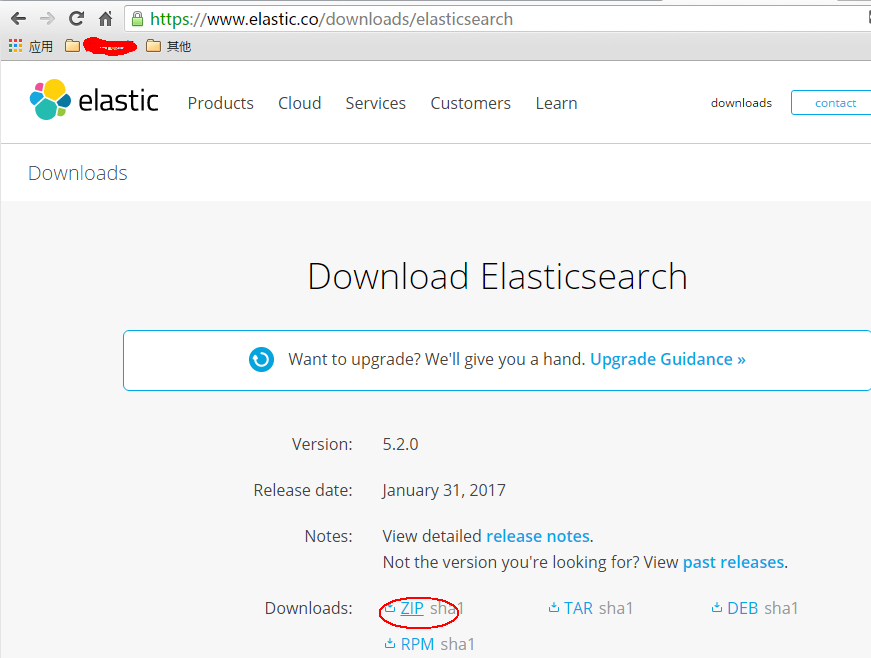
首先,我们从官网下载zip包:(官网:https://www.elastic.co/downloads/elasticsearch) 直接使用浏览器下载可能会很慢,我一般会copy下载链接,然后wget下来: wget https://artifacts.elastic.co/downloads/elasticsearch/elasticsearch-5.2.0.zip 如无意外应该可以安装成功。 接下来就是运行了,这是关键所在,首先我们前往安装目录elasticsearch的安装目录,一般会在:cd /usr/bin/elasticsearch-5.2.0 这个时候如果你直接运行elasticsearch会报以下错误:执行:bin/elasticsearch错误信息: Exception in thread "main" org.elasticsearch.bootstrap.BootstrapException: java.nio.file.NoSuchFileException: /usr/share/elasticsearch/config Likely root cause: java.nio.file.NoSuchFileException: /usr/share/elasticsearch/config ... 见图: elasticsearch github上有这个错误的issue(https://github.com/elastic/ansible-elasticsearch/issues/58)感兴趣的可以看看这个错误的具体原因,我这里主要提供解决方法。 这个错误我觉得主要是因为找不到配置文件,但是如果你直接在安装目录里去启动elasticsearch的话,elasticsearch只会在当前目录找config文件夹,如果安装成service的形式应该是可以找到配置文件,但我没去尝试,后面试试。 问题知道了,我们可以直接把/etc目录下的elasticsearch配置文件copy过来: cp -r /etc/elasticsearch /usr/share/elasticsearch/config 这个时候我们再启动就不会报刚才的错误了,我们再试一遍:bin/elasticsearch 意料之中,这时候会提示以下错误: [2017-01-17T21:54:48,798][WARN ][o.e.b.ElasticsearchUncaughtExceptionHandler] [] uncaught exception in thread [main] org.elasticsearch.bootstrap.StartupException: java.lang.RuntimeException: can not run elasticsearch as root at org.elasticsearch.bootstrap.Elasticsearch.init(Elasticsearch.java:125) ~[elasticsearch-5.1.2.jar:5.1.2] at org.elasticsearch.bootstrap.Elasticsearch.execute(Elasticsearch.java:112) ~[elasticsearch-5.1.2.jar:5.1.2] at org.elasticsearch.cli.SettingCommand.execute(SettingCommand.java:54) ~[elasticsearch-5.1.2.jar:5.1.2] at org.elasticsearch.cli.Command.mainWithoutErrorHandling(Command.java:122) ~[elasticsearch-5.1.2.jar:5.1.2] at org.elasticsearch.cli.Command.main(Command.java:88) ~[elasticsearch-5.1.2.jar:5.1.2] at org.elasticsearch.bootstrap.Elasticsearch.main(Elasticsearch.java:89) ~[elasticsearch-5.1.2.jar:5.1.2] at org.elasticsearch.bootstrap.Elasticsearch.main(Elasticsearch.java:82) ~[elasticsearch-5.1.2.jar:5.1.2] Caused by: java.lang.RuntimeException: can not run elasticsearch as root at org.elasticsearch.bootstrap.Bootstrap.initializeNatives(Bootstrap.java:100) ~[elasticsearch-5.1.2.jar:5.1.2] at org.elasticsearch.bootstrap.Bootstrap.setup(Bootstrap.java:176) ~[elasticsearch-5.1.2.jar:5.1.2] at org.elasticsearch.bootstrap.Bootstrap.init(Bootstrap.java:306) ~[elasticsearch-5.1.2.jar:5.1.2] at org.elasticsearch.bootstrap.Elasticsearch.init(Elasticsearch.java:121) ~[elasticsearch-5.1.2.jar:5.1.2] ... 6 more 这个错误的原因是elasticsearch不允许使用root启动,因此我们要解决这个问题需要新建一个用户来启动elasticsearch(参考:https://my.oschina.net/topeagle/blog/591451?fromerr=mzOr2qzZ) 具体操作如下: ~ groupadd elsearch ~ useradd elsearch -g elsearch -p elsearch ~ cd /usr/share chown -R elsearch:elsearch elasticsearch su elsearch 这个时候在这个用户去启动elasticsearch,一般情况下这个时候就能成功起来了,可能还会出现一些错误,如: hcw-X450VC% ./elasticsearch 2017-01-17 21:03:31,158 main ERROR Could not register mbeans java.security.AccessControlException: access denied ("javax.management.MBeanTrustPermission" "register") at java.security.AccessControlContext.checkPermission(AccessControlContext.java:472) at java.lang.SecurityManager.checkPermission(SecurityManager.java:585) at com.sun.jmx.interceptor.DefaultMBeanServerInterceptor.checkMBeanTrustPermission(DefaultMBeanServerInterceptor.java:1848) at com.sun.jmx.interceptor.DefaultMBeanServerInterceptor.registerMBean(DefaultMBeanServerInterceptor.java:322) at com.sun.jmx.mbeanserver.JmxMBeanServer.registerMBean(JmxMBeanServer.java:522) at org.apache.logging.log4j.core.jmx.Server.register(Server.java:389) at org.apache.logging.log4j.core.jmx.Server.reregisterMBeansAfterReconfigure(Server.java:167) at org.apache.logging.log4j.core.jmx.Server.reregisterMBeansAfterReconfigure(Server.java:140) at org.apache.logging.log4j.core.LoggerContext.setConfiguration(LoggerContext.java:541) at org.apache.logging.log4j.core.LoggerContext.start(LoggerContext.java:258) at org.apache.logging.log4j.core.impl.Log4jContextFactory.getContext(Log4jContextFactory.java:206) at org.apache.logging.log4j.core.config.Configurator.initialize(Configurator.java:220) at org.apache.logging.log4j.core.config.Configurator.initialize(Configurator.java:197) at org.elasticsearch.common.logging.LogConfigurator.configureStatusLogger(LogConfigurator.java:125) at org.elasticsearch.common.logging.LogConfigurator.configureWithoutConfig(LogConfigurator.java:67) at org.elasticsearch.cli.Command.main(Command.java:85) at org.elasticsearch.bootstrap.Elasticsearch.main(Elasticsearch.java:89) at org.elasticsearch.bootstrap.Elasticsearch.main(Elasticsearch.java:82) 这是因为elasticsearch需要读写配置文件,我们需要给予config文件夹权限,上面新建了elsearch用户,elsearch用户不具备读写权限,因此还是会报错,解决方法是切换到管理员账户,赋予权限即可: sudo -i chmod -R 775 config 这个时候就可以起来了,来看看效果: 在浏览器查看: 到这里为止,centos 7安装elasticsearch就完成了 转载请标明本文来源:http://www.cnblogs.com/yswenli/p/6397351.html更多内容欢迎我的的github:https://github.com/yswenli如果发现本文有什么问题和任何建议,也随时欢迎交流~ 感谢您的阅读,如果您对我的博客所讲述的内容有兴趣,请继续关注我的后续博客,我是yswenli 。