首页 文章 精选 留言 我的

精选列表

搜索[windows],共10000篇文章
优秀的个人博客,低调大师

Windows10 VS2017 C++ xml解析(tinyxml2库)

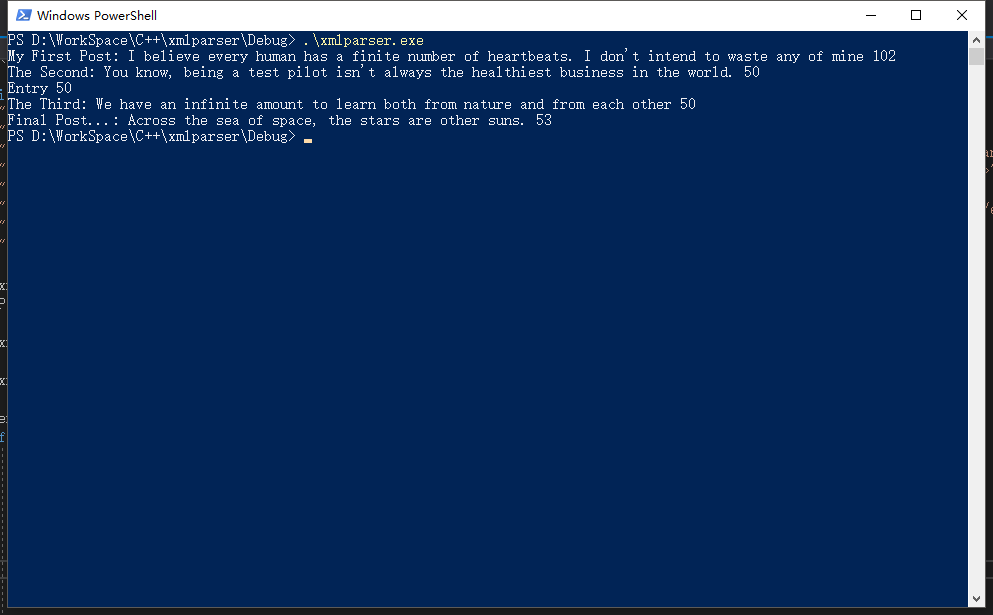
版权声明:本文可能为博主原创文章,若标明出处可随便转载。 https://blog.csdn.net/Jailman/article/details/85264849 首先下载tinyxml2 7.0.1库:https://github.com/leethomason/tinyxml2/releases 打开tinyxml2,然后升级sdk,解决方案->重定解决方案目标,升级。 然后编译生成dll和库文件,在tinyxml2\Debug-Dll下,将tinyxml2.lib和tinyxml2.dll拷贝到新建的工程目录,在新建工程根目录新建include文件夹,将tinyxml2.h拷入,并将工程->配置属性->vc++目录->包含目录指向此目录。 编码: #include "pch.h" #include <iostream> #include <tinyxml2.h> #pragma comment(lib, "tinyxml2.lib") using namespace std; int main() { static const char* xml = "<?xml version=\"1.0\" encoding=\"utf-8\" ?>" "<entries>" "<entry name=\"My First Post\" age=\"52\">I believe every human has a finite number of heartbeats. I don't intend to waste any of mine</entry>" "<entry name=\"The Second\" age=\"\">You know, being a test pilot isn't always the healthiest business in the world.</entry>" "<entry>Entry</entry>" "<entry name=\"The Third\" secretdata=\"9809832\">We have an infinite amount to learn both from nature and from each other</entry>" "<entry name=\"Final Post...\" hidden=\"true\" age=\"3\">Across the sea of space, the stars are other suns.</entry>" "</entries>"; tinyxml2::XMLDocument doc; doc.Parse(xml); tinyxml2::XMLHandle docHandle(&doc); tinyxml2::XMLElement *entry = docHandle.FirstChildElement("entries").ToElement(); if (entry) { for (tinyxml2::XMLNode *node = entry->FirstChildElement(); node; node = node->NextSibling()) { tinyxml2::XMLElement *e = node->ToElement(); const char *name = e->Attribute("name"); if (name) cout << name << ": "; cout << e->GetText(); int true_age = e->IntAttribute("age") + 50; cout << " " << true_age << endl; } } return 0; } 如果需要单独使用exe,需要注意带上tinyxml2.dll文件 结果显示: 参考文章:https://gist.github.com/felton/5530029

优秀的个人博客,低调大师

Windows10 VS2017 C++ ini解析(使用simpleini头文件)

版权声明:本文可能为博主原创文章,若标明出处可随便转载。 https://blog.csdn.net/Jailman/article/details/85266402 simpleini项目地址:https://github.com/brofield/simpleini 下载,新建项目,并将SimpleIni.h文件通过包含目录的方式加载进来。 创建test.ini文件,内容如下: [server] root = 10.1.1.1 gc = 10.1.1.2 game = 10.1.1.3 写码: #include "pch.h" #include <iostream> #include <SimpleIni.h> using namespace std; int main() { CSimpleIniA ini; ini.SetUnicode(); ini.LoadFile("test.ini"); const char * pVal = ini.GetValue("server", "game", "default"); ini.SetValue("server", "game", "10.1.1.5"); const char * xVal = ini.GetValue("server", "game", "default"); cout << pVal << endl; cout << xVal << endl; // save the data back to the file int rc = ini.SaveFile("test.ini"); if (rc < 0) return false; } 打开test.ini文件会发现game一行内容改变。

资源下载

更多资源
Nacos

Nacos

Nacos /nɑ:kəʊs/ 是 Dynamic Naming and Configuration Service 的首字母简称,一个易于构建 AI Agent 应用的动态服务发现、配置管理和AI智能体管理平台。Nacos 致力于帮助您发现、配置和管理微服务及AI智能体应用。Nacos 提供了一组简单易用的特性集,帮助您快速实现动态服务发现、服务配置、服务元数据、流量管理。Nacos 帮助您更敏捷和容易地构建、交付和管理微服务平台。

Rocky Linux

Rocky Linux

Rocky Linux(中文名:洛基)是由Gregory Kurtzer于2020年12月发起的企业级Linux发行版,作为CentOS稳定版停止维护后与RHEL(Red Hat Enterprise Linux)完全兼容的开源替代方案,由社区拥有并管理,支持x86_64、aarch64等架构。其通过重新编译RHEL源代码提供长期稳定性,采用模块化包装和SELinux安全架构,默认包含GNOME桌面环境及XFS文件系统,支持十年生命周期更新。

Sublime Text

Sublime Text

Sublime Text具有漂亮的用户界面和强大的功能,例如代码缩略图,Python的插件,代码段等。还可自定义键绑定,菜单和工具栏。Sublime Text 的主要功能包括:拼写检查,书签,完整的 Python API , Goto 功能,即时项目切换,多选择,多窗口等等。Sublime Text 是一个跨平台的编辑器,同时支持Windows、Linux、Mac OS X等操作系统。

WebStorm

WebStorm

WebStorm 是jetbrains公司旗下一款JavaScript 开发工具。目前已经被广大中国JS开发者誉为“Web前端开发神器”、“最强大的HTML5编辑器”、“最智能的JavaScript IDE”等。与IntelliJ IDEA同源,继承了IntelliJ IDEA强大的JS部分的功能。


用户登录
用户注册