首页 文章 精选 留言 我的

精选列表

搜索[api网关],共10000篇文章
优秀的个人博客,低调大师

利用Java编码测试CSRF令牌验证的Web API

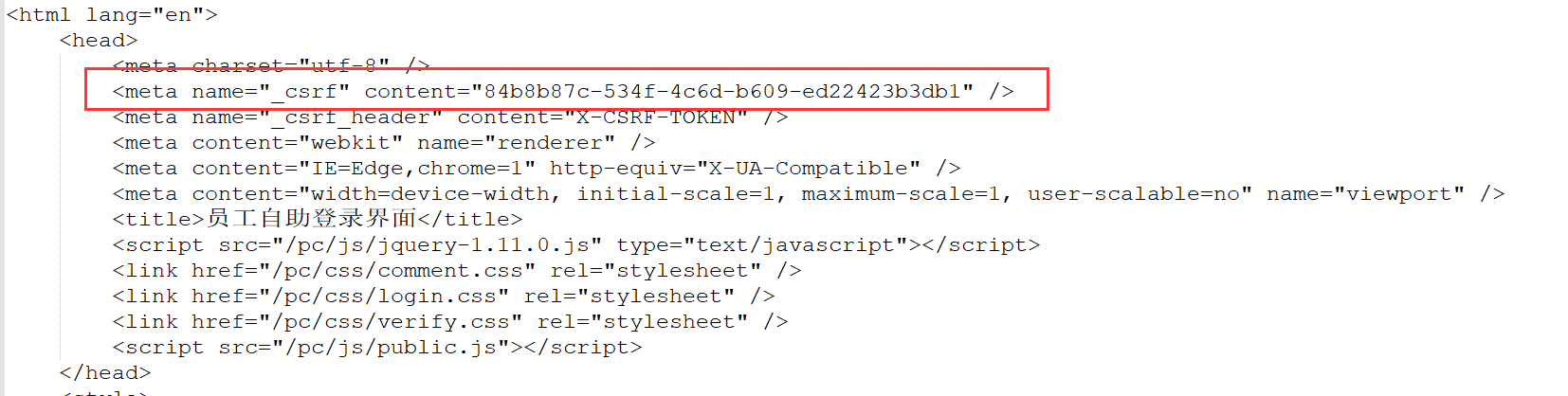
前一篇拙文是利用了Jmeter来测试带有CSRF令牌验证的WebAPI;最近几天趁着项目不忙,练习了用编码的方式实现。 有了之前Jmeter脚本的基础,基本上难点也就在两个地方:获取CSRF令牌、Cookie的传递。 首先添加依赖,在POM.xml中添加以下内容: <!-- https://mvnrepository.com/artifact/org.apache.httpcomponents/httpclient --> <dependency> <groupId>org.apache.httpcomponents</groupId> <artifactId>httpclient</artifactId> <version>4.5.6</version> </dependency> <!-- https://mvnrepository.com/artifact/org.jsoup/jsoup --> <dependency> <groupId>org.jsoup</groupId> <artifactId>jsoup</artifactId> <version>1.11.3</version> </dependency> 解释作用: - httpClient:用来创建httpClient、管理Get和Post的方法、获取请求报文头、应答报文内容、管理CookieStore等等; -jsoup:用来解析应答报文,获得CSRF令牌的值。 创建一个WebAPI测试类: public class LoginEHR { private final static String EHR_ADDRESS = "http://ourTestEHRServer:8083"; static BasicCookieStore cookieStore = new BasicCookieStore(); static CloseableHttpClient httpClient = HttpClients.custom().setDefaultCookieStore(cookieStore).build(); } 我选择了CookieStore的方式管理会话;HttpClient现在还有另一种Context的方式实现会话持久,以后再做深入研究。 先写一个打印应答报文的方法,并不做什么处理,纯打印;根据实际需要调用或者注释: public class LoginEHR { private static void printResponse(HttpResponse httpResponse) throws ParseException, IOException { // 获取响应消息实体 HttpEntity entity = httpResponse.getEntity(); // 响应状态 System.out.println("--------Status: " + httpResponse.getStatusLine()); System.out.println("--------Headers: "); HeaderIterator iterator = httpResponse.headerIterator(); while (iterator.hasNext()) { System.out.println("\t" + iterator.next()); } // 判断响应实体是否为空 if (entity != null) { String responseString = EntityUtils.toString(entity); System.out.println("--------Response length: " + responseString.length()); System.out.println("--------Response content: " + responseString.replace("\r\n", "")); } }} 现在开始写测试方法,虽然篇幅较长,仍然写在main()方法里,便于展示: public class LoginEHR { private final static String EHR_ADDRESS = "http://ourTestEHRServer:8083"; static BasicCookieStore cookieStore = new BasicCookieStore(); static CloseableHttpClient httpClient = HttpClients.custom().setDefaultCookieStore(cookieStore).build(); public static void main(String[] args) throws Exception { String username = "00022222"; String password = "abc123456"; CloseableHttpResponse httpResponse = null; try { HttpGet httpGet = new HttpGet(EHR_ADDRESS); httpResponse = httpClient.execute(httpGet); System.out.println("--------Cookie store for the 1st GET: " + cookieStore.getCookies()); // 唯一的作用是打印应答报文,没有任何处理;实际测试时,可以不执行 // printResponse(httpResponse); // 取出第一次请求时,服务器端返回的JSESSIONID; // 实际上此处只是取出JSESSIONID用作打印;cookieStore自动保存了本次会话的Cookie信息 // List cookies = cookieStore.getCookies(); // String cookie = cookies.toString(); // String sessionID = cookie.substring("[[version: 0][name: JSESSIONID][value: ".length(), // cookie.indexOf("][domain")); // System.out.println("--------The current JSESSIONID is: " + sessionID); httpClient.close(); } catch (Exception ex) { ex.printStackTrace(); } } private static void printResponse(HttpResponse httpResponse) throws ParseException, IOException { ...... } } 根据之前Jmeter测试脚本的经验,先发送一次Get请求,从应答报文中得到CSRF令牌和JSESSIONID。 大家注意我注释掉的那几行打印JSESSIONID的代码,之前在没有引入CookieStore之前,我想的是自己写一个新的Cookie,并把它赋给后面几次请求。 当使用CookieStore之后,就不需要自己封装Cookie、以及添加到Request的Header了,这过程会自动完成。没有删掉也是为了需要的时候打印。 交代完Cookie之后,该轮到处理CSRF令牌了。如果打印出第一次Get的应答,我们能看到令牌的格式是如下呈现的: 之前在Jmeter脚本中,我是添加了一个正则表达式提取器,把_csrf的content提取出来。 现在我将用jsoup来解析和返回content的内容,代码如下: private static String getCsrfToken(HttpEntity responseEntity) throws IOException{ //获取网页内容,指定编码 String web = EntityUtils.toString(responseEntity,"utf-8"); Document doc= Jsoup.parse(web); // 选择器,选取特征信息 String token = doc.select("meta[name=_csrf]").get(0).attr("content"); System.out.println( "--------The current CSRF Token is: " + token); return token; } 在main()中调用此方法: // 利用Jsoup从应答报文中读取CSRF Token HttpEntity responseEntity = httpResponse.getEntity(); String token = getCsrfToken(responseEntity); 然后再封装POST的请求内容: // 获取到CSRF Token后,用Post方式登录 HttpPost httpPost = new HttpPost(EHR_ADDRESS); // 拼接Post的消息体 List<NameValuePair> nvps = new ArrayList<NameValuePair>(); nvps.add(new BasicNameValuePair("username", username)); nvps.add(new BasicNameValuePair("password", password)); nvps.add(new BasicNameValuePair("_csrf", token)); HttpEntity loginParams = new UrlEncodedFormEntity(nvps, "utf-8"); httpPost.setEntity(loginParams); // 第二次请求,带有CSRF Token httpResponse = httpClient.execute(httpPost); // System.out.println("--------Cookie store for the POST: " + cookieStore.getCookies()); printResponse(httpResponse); 然后。。。这里发生了一点小意外: 按照设想,应该能跳转到登录成功、或者验证失败的页面;而Post方法执行后,从服务器返回的状态码是302,被跳转到另一个网址。 如果放任不管,直接提交后面的业务查询,是不会得到成功的;执行的结果是又回到了登录页面。 我在网上爬了一会,发现提问Post得到301、302的人还不在少数,说明这个坑还是给很多人造成了困扰。 简单的说,如果得到了服务器重定向到新的地址,我们也要跟着执行一次新地址的访问;否则服务器会认为这次请求没有得到正确处理,即便我之后的请求带着全套的验证令牌和Cookie,也会被拦截在系统外。 有了这个认识,下面我需要完成的就是对Code:302的处理;添加代码如下: // 取POST方法返回的HTTP状态码;不出意外的话是302 int code = httpResponse.getStatusLine().getStatusCode(); if (code == 302) { Header header = httpResponse.getFirstHeader("location"); // 跳转的目标地址是在 HTTP-HEAD 中的 String newUri = header.getValue(); // 这就是跳转后的地址,再向这个地址发出新申请,以便得到跳转后的信息是啥。 // 实际打印出来的是接口服务地址,不包括IP Address部分 System.out.println("--------Redirect to new location: " + newUri); httpGet = new HttpGet(EHR_ADDRESS + newUri); httpResponse = httpClient.execute(httpGet); // printResponse(httpResponse); } 这里需要注意的地方是跳转的location内容。在我这里,服务器给的只是一个单词【/work】,最好加一个打印的步骤。 确认不是一个完整的URL之后,需要把链接拼完整,然后进行一次httpGet请求。 这个httpGet执行之后,我可以确认已经登录成功(或者,又被送回登录页面,当然我这里是成功了)。 接下来是提交一次业务查询的Get,确认能够在系统中进行业务操作: // 请求一次绩效;确认登录成功 String queryUrl = EHR_ADDRESS + "/emp/performance/mt/query"; httpGet = new HttpGet(queryUrl); httpResponse = httpClient.execute(httpGet); System.out.println("--------Result of the Cardpunch Query: "); printResponse(httpResponse); 最后确认查询的结果无误后,整个脚本完成;只需要修改最后的业务查询,就可以生成其他的测试脚本了。 完整的源码如下: package com.jason.apitest; import org.apache.http.Header; import org.apache.http.HeaderIterator; import org.apache.http.HttpEntity; import org.apache.http.HttpResponse; import org.apache.http.NameValuePair; import org.apache.http.ParseException; import org.apache.http.client.entity.UrlEncodedFormEntity; import org.apache.http.client.methods.HttpGet; import org.apache.http.client.methods.HttpPost; import org.apache.http.impl.client.BasicCookieStore; import org.apache.http.impl.client.CloseableHttpClient; import org.apache.http.impl.client.HttpClients; import org.apache.http.message.BasicNameValuePair; import org.apache.http.protocol.HTTP; import org.apache.http.util.EntityUtils; import org.jsoup.Jsoup; import org.jsoup.nodes.Document; import java.io.IOException; import java.util.ArrayList; import java.util.List; public class LoginEHR { private final static String EHR_ADDRESS = "http://ourTestEHRServer:8083"; static BasicCookieStore cookieStore = new BasicCookieStore(); static CloseableHttpClient httpClient = HttpClients.custom().setDefaultCookieStore(cookieStore).build(); public static void main(String[] args) throws Exception { String username = "00022222"; String password = "abc123456"; HttpResponse httpResponse = null; try { HttpGet httpGet = new HttpGet(EHR_ADDRESS); httpResponse = httpClient.execute(httpGet); System.out.println("--------Cookie store for the 1st GET: " + cookieStore.getCookies()); // 唯一的作用是打印应答报文,没有任何处理;实际测试时,可以不执行 // printResponse(httpResponse); // 取出第一次请求时,服务器端返回的JSESSIONID; // 实际上此处只是取出JSESSIONID用作打印;cookieStore自动保存了本次会话的Cookie信息 // List cookies = cookieStore.getCookies(); // String cookie = cookies.toString(); // String sessionID = cookie.substring("[[version: 0][name: JSESSIONID][value: ".length(), // cookie.indexOf("][domain")); // System.out.println("--------The current JSESSIONID is: " + sessionID); // 利用Jsoup从应答报文中读取CSRF Token HttpEntity responseEntity = httpResponse.getEntity(); String token = getCsrfToken(responseEntity); // 获取到CSRF Token后,用Post方式登录 HttpPost httpPost = new HttpPost(EHR_ADDRESS); // 拼接Post的消息体 List<NameValuePair> nvps = new ArrayList<NameValuePair>(); nvps.add(new BasicNameValuePair("username", username)); nvps.add(new BasicNameValuePair("password", password)); nvps.add(new BasicNameValuePair("_csrf", token)); HttpEntity loginParams = new UrlEncodedFormEntity(nvps, "utf-8"); httpPost.setEntity(loginParams); // 第二次请求,带有CSRF Token httpResponse = httpClient.execute(httpPost); // System.out.println("--------Cookie store for the POST: " + cookieStore.getCookies()); printResponse(httpResponse); // 取POST方法返回的HTTP状态码;不出意外的话是302 int code = httpResponse.getStatusLine().getStatusCode(); if (code == 302) { Header header = httpResponse.getFirstHeader("location"); // 跳转的目标地址是在 HTTP-HEAD 中的 String newUri = header.getValue(); // 这就是跳转后的地址,再向这个地址发出新申请,以便得到跳转后的信息是啥。 // 实际打印出来的是接口服务地址,不包括IP Address部分 System.out.println("--------Redirect to new location: " + newUri); httpGet = new HttpGet(EHR_ADDRESS + newUri); httpResponse = httpClient.execute(httpGet); // printResponse(httpResponse); } // 请求一次绩效;确认登录成功 String queryUrl = EHR_ADDRESS + "/emp/performance/mt/query"; httpGet = new HttpGet(queryUrl); httpResponse = httpClient.execute(httpGet); System.out.println("--------Result of the Cardpunch Query: "); printResponse(httpResponse); httpClient.close(); } catch (Exception ex) { ex.printStackTrace(); } } private static void printResponse(HttpResponse httpResponse) throws ParseException, IOException { // 获取响应消息实体 HttpEntity entity = httpResponse.getEntity(); // 响应状态 System.out.println("--------Status: " + httpResponse.getStatusLine()); System.out.println("--------Headers: "); HeaderIterator iterator = httpResponse.headerIterator(); while (iterator.hasNext()) { System.out.println("\t" + iterator.next()); } // 判断响应实体是否为空 if (entity != null) { String responseString = EntityUtils.toString(entity); System.out.println("--------Response length: " + responseString.length()); System.out.println("--------Response content: " + responseString.replace("\r\n", "")); } } private static String getCsrfToken(HttpEntity responseEntity) throws IOException{ //获取网页内容,指定编码 String web = EntityUtils.toString(responseEntity,"utf-8"); Document doc= Jsoup.parse(web); // 选择器,选取特征信息 String token = doc.select("meta[name=_csrf]").get(0).attr("content"); System.out.println( "--------The current CSRF Token is: " + token); return token; } } 补充:如果使用HttpClientContext方式来维持会话,与CookieStore很接近;直接帖上需要修改的部分内容: // 创建httpClient和context static CloseableHttpClient httpClient = HttpClients.createDefault(); static HttpClientContext context = HttpClientContext.create(); // 下面的代码写在main()方法中 CloseableHttpResponse httpResponse = null; // 先发起一个Get请求,获取CSRF令牌和Cookie HttpGet httpGet = new HttpGet(EHR_ADDRESS); // 保存context上下文 httpResponse = httpClient.execute(httpGet, context); ... // 处理完CSRF令牌后,准备发起POST请求 HttpPost httpPost = new HttpPost(EHR_ADDRESS); ... // 封装POST报文 // 发起POST请求 httpResponse = httpClient.execute(httpPost, context); // 处理HTTP 302和业务查询操作的GET,也要携带着context httpResponse = httpClient.execute(httpGet, context);
优秀的个人博客,低调大师

12.源码阅读(IPC Binder机制-android api 26)

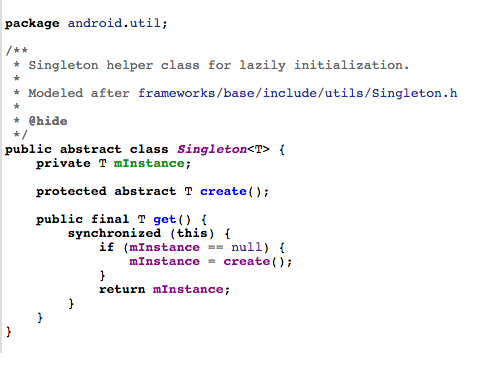
调用bindService方法绑定服务最终会执行Service的onBind方法并在ServiceConnection的onServiceConnected中得到IBinder对象,我们从源码角度看看这一过程是如何进行的 首先从ContextImpl的bindService看起 @Override 1538 public boolean bindService(Intent service, ServiceConnection conn, 1539 int flags) { 1540 warnIfCallingFromSystemProcess(); 1541 return bindServiceCommon(service, conn, flags, mMainThread.getHandler(), 1542 Process.myUserHandle()); 1543 } private boolean bindServiceCommon(Intent service, ServiceConnection conn, int flags, Handler 1582 handler, UserHandle user) { 1583 //注意这里得到的一个IServiceConnection在后边会用到 1584 IServiceConnection sd; 1585 ...... 1588 if (mPackageInfo != null) { 1589 sd = mPackageInfo.getServiceDispatcher(conn, getOuterContext(), handler, flags); 1590 } ...... 1602 int res = ActivityManager.getService().bindService( 1603 mMainThread.getApplicationThread(), getActivityToken(), service, 1604 service.resolveTypeIfNeeded(getContentResolver()), 1605 sd, flags, getOpPackageName(), user.getIdentifier()); 1606 ...... 1614 } 1615 ActivityManager.getService()这行代码我们已经非常熟悉了,前边看activity启动的时候就遇到过 4199 public static IActivityManager getService() { 4200 return IActivityManagerSingleton.get(); 4201 } private static final Singleton<IActivityManager> IActivityManagerSingleton = 4204 new Singleton<IActivityManager>() { 4205 @Override 4206 protected IActivityManager create() { 4207 final IBinder b = ServiceManager.getService(Context.ACTIVITY_SERVICE); 4208 final IActivityManager am = IActivityManager.Stub.asInterface(b); 4209 return am; 4210 } 4211 }; ActivityManager.getService()得到的是IActivityManger,而IActivityManger是一个接口,所以我们要去看它的实现类ActivityManagerService中的bindService方法 ActivityManagerService中 public int bindService(IApplicationThread caller, IBinder token, Intent service, String resolvedType, IServiceConnection connection, int flags, String callingPackage, int userId) throws TransactionTooLargeException { ...... synchronized(this) { return mServices.bindServiceLocked(caller, token, service, resolvedType, connection, flags, callingPackage, userId); } } ActiveServices中 int bindServiceLocked(IApplicationThread caller, IBinder token, Intent service, String resolvedType, final IServiceConnection connection, int flags, String callingPackage, final int userId) throws TransactionTooLargeException { ...... try { //注意,这个方法和下边是殊途同归的 bringUpServiceLocked(serviceRecord, serviceIntent.getFlags(), callerFg, false, false); } catch (RemoteException e) { /* ignore - local call */ } ...... if (s.app != null && b.intent.received) { ...... if (b.intent.apps.size() == 1 && b.intent.doRebind) { requestServiceBindingLocked(s, b.intent, callerFg, true); } } else if (!b.intent.requested) { requestServiceBindingLocked(s, b.intent, callerFg, false); } ...... } private final boolean requestServiceBindingLocked(ServiceRecord r, IntentBindRecord i, boolean execInFg, boolean rebind) throws TransactionTooLargeException { ...... bumpServiceExecutingLocked(r, execInFg, "bind"); r.app.forceProcessStateUpTo(ActivityManager.PROCESS_STATE_SERVICE); r.app.thread.scheduleBindService(r, i.intent.getIntent(), rebind, r.app.repProcState); if (!rebind) { i.requested = true; } i.hasBound = true; i.doRebind = false; ...... } 需要找到 r.app.thread.scheduleBindService这个方法究竟是哪个类中的方法,r是ServiceRecord,那么到它里边去找发现app是ProcessRecord类,然后进入到ProcessRecord中去找thread,可以看到IApplicationThread thread,IApplicationThread很明显是一个接口,我们还要找到它的实现类才行,这里也不再卖关子了,我们要找的实现类就是ApplicationThread,而ApplicationThread是ActivityThread的一个内部类,所以去ActivityThread中继续寻找 public final void scheduleBindService(IBinder token, Intent intent, boolean rebind, int processState) { updateProcessState(processState, false); BindServiceData s = new BindServiceData(); s.token = token; s.intent = intent; s.rebind = rebind; if (DEBUG_SERVICE) Slog.v(TAG, "scheduleBindService token=" + token + " intent=" + intent + " uid=" + Binder.getCallingUid() + " pid=" + Binder.getCallingPid()); sendMessage(H.BIND_SERVICE, s); } private void sendMessage(int what, Object obj) { sendMessage(what, obj, 0, 0, false); } 可以看到是通过handler发送了一个消息,找到这个消息的处理 case BIND_SERVICE: Trace.traceBegin(Trace.TRACE_TAG_ACTIVITY_MANAGER, "serviceBind"); handleBindService((BindServiceData)msg.obj); Trace.traceEnd(Trace.TRACE_TAG_ACTIVITY_MANAGER); break; private void handleBindService(BindServiceData data) { //从集合中取出service,可以猜测服务在之前已经被存储起来了 Service s = mServices.get(data.token); ...... if (!data.rebind) { //调用service的onBind方法,这里终于找到了 IBinder binder = s.onBind(data.intent); //这里是回调到onServiceConnected方法的关键 ActivityManager.getService().publishService( data.token, data.intent, binder); } else { s.onRebind(data.intent); ActivityManager.getService().serviceDoneExecuting( data.token, SERVICE_DONE_EXECUTING_ANON, 0, 0); } ...... } } 再次回到ActivityManagerService中 public void publishService(IBinder token, Intent intent, IBinder service) { // Refuse possible leaked file descriptors if (intent != null && intent.hasFileDescriptors() == true) { throw new IllegalArgumentException("File descriptors passed in Intent"); } synchronized(this) { if (!(token instanceof ServiceRecord)) { throw new IllegalArgumentException("Invalid service token"); } mServices.publishServiceLocked((ServiceRecord)token, intent, service); } } 再次回到ActiveServices类中 void publishServiceLocked(ServiceRecord r, Intent intent, IBinder service) { final long origId = Binder.clearCallingIdentity(); try { if (DEBUG_SERVICE) Slog.v(TAG_SERVICE, "PUBLISHING " + r + " " + intent + ": " + service); if (r != null) { Intent.FilterComparison filter = new Intent.FilterComparison(intent); IntentBindRecord b = r.bindings.get(filter); if (b != null && !b.received) { b.binder = service; b.requested = true; b.received = true; for (int conni=r.connections.size()-1; conni>=0; conni--) { ArrayList<ConnectionRecord> clist = r.connections.valueAt(conni); for (int i=0; i<clist.size(); i++) { ConnectionRecord c = clist.get(i); if (!filter.equals(c.binding.intent.intent)) { if (DEBUG_SERVICE) Slog.v( TAG_SERVICE, "Not publishing to: " + c); if (DEBUG_SERVICE) Slog.v( TAG_SERVICE, "Bound intent: " + c.binding.intent.intent); if (DEBUG_SERVICE) Slog.v( TAG_SERVICE, "Published intent: " + intent); continue; } if (DEBUG_SERVICE) Slog.v(TAG_SERVICE, "Publishing to: " + c); try { c.conn.connected(r.name, service, false); } catch (Exception e) { Slog.w(TAG, "Failure sending service " + r.name + " to connection " + c.conn.asBinder() + " (in " + c.binding.client.processName + ")", e); } } } } serviceDoneExecutingLocked(r, mDestroyingServices.contains(r), false); } } finally { Binder.restoreCallingIdentity(origId); } } 关键代码 c.conn.connected(r.name, service, false); c表示ConnectionRecord,conn就是IServiceConnection,看到这个IServiceConnection我们很容易把它和ServiceConnection联系起来,是不是这样呢,其实这时候我们可以回到最初的那个地方埋下的伏笔,我们写了一句注释 //注意这里得到的一个IServiceConnection在后边会用到 IServiceConnection sd; 从代码ArrayList<ConnectionRecord> clist = r.connections.valueAt(conni);中就可以看出,每一个ConnectionRecord都是提前存入集合中保存的,那么每个ConnectionRecord中的IServiceConnection也就在那时候已经存在了,IServiceConnection是一个接口,我们同样要找到它的实现类,那么回到ContextImpl中,看看,这个IServiceConnection是如何创建出来的 IServiceConnection sd; if (conn == null) { throw new IllegalArgumentException("connection is null"); } if (mPackageInfo != null) { sd = mPackageInfo.getServiceDispatcher(conn, getOuterContext(), handler, flags); @Override 1564 public IServiceConnection getServiceDispatcher(ServiceConnection conn, Handler handler, 1565 int flags) { 1566 return mPackageInfo.getServiceDispatcher(conn, getOuterContext(), handler, flags); 1567 } 进入LoadedApk中 public final IServiceConnection getServiceDispatcher(ServiceConnection c, 1397 Context context, Handler handler, int flags) { 1398 synchronized (mServices) { 1399 LoadedApk.ServiceDispatcher sd = null; 1400 ArrayMap<ServiceConnection, LoadedApk.ServiceDispatcher> map = mServices.get(context); 1401 if (map != null) { 1402 if (DEBUG) Slog.d(TAG, "Returning existing dispatcher " + sd + " for conn " + c); 1403 sd = map.get(c); 1404 } 1405 if (sd == null) { 1406 sd = new ServiceDispatcher(c, context, handler, flags); 1407 if (DEBUG) Slog.d(TAG, "Creating new dispatcher " + sd + " for conn " + c); 1408 if (map == null) { 1409 map = new ArrayMap<>(); 1410 mServices.put(context, map); 1411 } 1412 map.put(c, sd); 1413 } else { 1414 sd.validate(context, handler); 1415 } 1416 return sd.getIServiceConnection(); 1417 } 1418 } 1419 IServiceConnection getIServiceConnection() { 1553 return mIServiceConnection; 1554 } 看到这个 private final ServiceDispatcher.InnerConnection mIServiceConnection; 我们找到了IServiceConnection的实现类,InnerConnection,那么c.conn.connected(r.name, service, false);执行的就是它的connect方法 private static class InnerConnection extends IServiceConnection.Stub { 1489 final WeakReference<LoadedApk.ServiceDispatcher> mDispatcher; 1490 1491 InnerConnection(LoadedApk.ServiceDispatcher sd) { 1492 mDispatcher = new WeakReference<LoadedApk.ServiceDispatcher>(sd); 1493 } 1494 1495 public void connected(ComponentName name, IBinder service, boolean dead) 1496 throws RemoteException { 1497 LoadedApk.ServiceDispatcher sd = mDispatcher.get(); 1498 if (sd != null) { 1499 sd.connected(name, service, dead); 1500 } 1501 } 1502 } public void connected(ComponentName name, IBinder service, boolean dead) { 1569 if (mActivityThread != null) { 1570 mActivityThread.post(new RunConnection(name, service, 0, dead)); 1571 } else { 1572 doConnected(name, service, dead); 1573 } 1574 } public void connected(ComponentName name, IBinder service, boolean dead) { 1569 if (mActivityThread != null) { 1570 mActivityThread.post(new RunConnection(name, service, 0, dead)); 1571 } else { 1572 doConnected(name, service, dead); 1573 } 1574 } 终于找到了,看下边 public void doConnected(ComponentName name, IBinder service, boolean dead) { 1585 ServiceDispatcher.ConnectionInfo old; 1586 ServiceDispatcher.ConnectionInfo info; 1587 1588 ...... 1625 // If there was an old service, it is now disconnected. 1626 if (old != null) { 1627 mConnection.onServiceDisconnected(name); 1628 } 1629 ...... 1632 // If there is a new service, it is now connected. 1633 if (service != null) { //onServiceConnected被调用 1634 mConnection.onServiceConnected(name, service); 1635 } 1636 }

优秀的个人博客,低调大师

ArcGIS API for JavaScript 标注错位问题解决思路

项目需求:完成对点的符号化显示,并将点的某些信息显示在点符号的旁边。 设计 调研开始,展示数据前端一般用GraphicsLayer,再结合Graphic,PictureMarkerSymbol与TextSymbol就可以完成此工作。直接上代码 jidianjing_graphicsLayer: null, jidianjing_text_featureLayer: null, ... this.graphicsLayer = new GraphicsLayer({ id: "graphicsLayer", elevationInfo: { mode: "relative-to-ground", offset: 3 } }); ... view.map.add(this.graphicsLayer); ... let jidianjing_graphics = []; // 处理Graphics $.each(result, function (i, item) { item.widgetModule = 'jidianjingWidgetModule_click'; var stcd = item.STCD; var stnm = item.STNM; let tempPoint = new Point({ type: "point", x: item.LGTD, y: item.LTTD }); let normalsymbol = { type: "picture-marker", url: 'img/menu/081.png', width: "18px", height: "18px" }; if (!StringUtil.isNull(item.WARN_NAME)) { normalsymbol = { type: "picture-marker", url: 'img/menu/083.png', width: "28px", height: "28px" }; } else if (!StringUtil.isNull(item.LL)) { normalsymbol = { type: "picture-marker", url: 'img/menu/082.png', width: "28px", height: "28px" }; } let tempPop = new PopupTemplate({ title: '机电井:' + stnm, content: _self.setjidianjingContentInfo }); let tempGraphic = new Graphic({ geometry: tempPoint, attributes: item, symbol: normalsymbol, popupTemplate: tempPop }); let textGraphic = new Graphic({ geometry: tempPoint, symbol: new TextSymbol({ color: "#FFF", backgroundColor: new Color('red'), borderLineColor: new Color("#fff"), borderLineSize: 2, haloColor: "black", haloSize: "1px", text: '水位:12 水温:11', font: { size: 8, family: "sans-serif" } }) }); _self.jidianjing_graphicsLayer.add(tempGraphic); _self.jidianjing_text_graphicsLayer.add(textGraphic); ... 效果 说明gif图太大,aliyun拒绝了我的上传,所以只能用文字描述;在小比例尺下,符号标注和文字标注之间的距离较小,看着效果还可以,但是有会出现标注覆盖文字或者文字覆盖标注;随着比例尺的放大,符号和标注之间的距离会增大,如第二张图所示。但是拿给项目经理看的时候,不要这种效果,距离和标注与符号之间的距离不能变。so...改改改 新思路-构造FeatureLayer 查看了官网好多例子,发现只有FeatureLayer的标注和符号之间的距离是边的,因为我们拿到的数据是点数据,所以我们可以构造组成FeatureLayer的source,其实就对应ags里的Graphics;还有一个标注LabelClass,这个类就是用来显示标注的。so...又开干了。 jidianjing_featureLayer: null, ... let tempGraphics = []; // 处理Graphics $.each(result, function (i, item) { item.widgetModule = 'jidianjingWidgetModule_click'; var stcd = item.STCD; var stnm = item.STNM; let tempPoint = new Point({ type: "point", x: item.LGTD, y: item.LTTD }); let normalsymbol = { type: "picture-marker", url: 'img/menu/081.png', width: "18px", height: "18px" }; if (!StringUtil.isNull(item.WARN_NAME)) { normalsymbol = { type: "picture-marker", url: 'img/menu/083.png', width: "28px", height: "28px" }; } else if (!StringUtil.isNull(item.LL)) { normalsymbol = { type: "picture-marker", url: 'img/menu/082.png', width: "28px", height: "28px" }; } let tempPop = new PopupTemplate({ title: '机电井:' + stnm, content: _self.setjidianjingContentInfo }); let tempGraphic = new Graphic({ geometry: tempPoint, attributes: item, symbol: normalsymbol, popupTemplate: tempPop }); let textGraphic = new Graphic({ geometry: tempPoint, symbol: new TextSymbol({ color: "#FFF", backgroundColor: new Color('red'), borderLineColor: new Color("#fff"), borderLineSize: 2, haloColor: "black", haloSize: "1px", text: '水位:12 水温:11', font: { size: 8, family: "sans-serif" } }) }); tempGraphics.push(tempGraphic); ... // popup let tempPop = new PopupTemplate({ title: '机电井:' + '{STNM}', content: _self.setjidianjingContentInfo }); // 标注 var labelClass = new LabelClass({ minScale: 20000, symbol: { type: "label-3d", symbolLayers: [{ type: "text", material: { color: "white" }, size: 10, halo: { color: [0, 0, 0, 0.8], size: 0.5 } }], verticalOffset:{ minWorldLength: 20, } }, labelPlacement: "above-center", labelExpression: "水位:[STTP], 水温:[STCD]" // labelExpressionInfo: { // expression: "$feature.STNM" // } }); // 构建feetureLayer并实现标注 this.jidianjing_text_featureLayer = new FeatureLayer({ id: 'jidianjing_featureLayer', fields: [{ name: "STCD", alias: "STCD", type: "oid" }, { name: "LGTD", alias: "LGTD", type: "string" }, { name: "LTTD", alias: "LTTD", type: "string" }, { name: "STCD", alias: "STCD", type: "string" }, { name: "STNM", alias: "STNM", type: "string" }, { name: "STTP", alias: "STTP", type: "string" }, { name: "widgetModule", alias: "widgetModule", type: "string" }], objectIdField: "STCD", geometryType: "point", spatialReference: { wkid: 4326 }, source: tempGraphics, // an array of graphics with geometry and attributes // popupTemplate and symbol are not required in each graphic // since those are handled with the popupTemplate and // renderer properties of the layer popupTemplate: tempPop, // renderer: iconSymbolRenderer, maxScale: 0, minScale: 0, labelsVisible: true, labelingInfo: [labelClass] }); view.map.add(this.jidianjing_text_featureLayer); 效果 说明 可以在上面两张图中看到,标注和符号的位置一直都是固定的,并没有随着距离的变化而变化;这时候拿给项目经理,就这个效果还算满意。 总结 符号和标注之间的距离在GraphicsLayer和FeatureLayer中的表现是不一样的,所以要根据合适的场景进行选择取舍。另外,GraphicsLayer和FeatureLayer标注换行不能实现,对GraphicsLayer可以采用加多个TextSymbol的GraphicsLayer,设置GraphicsLayer相对地面的高度就可以实现,但是距离永远是个问题,在此给一些朋友一些提醒。

优秀的个人博客,低调大师

使用 ES decorators 构建一致性 API

![pic] 重用和一致性是程序设计中经久不衰的两个课题。在最新的 ES Proposal 中,「decorators 语法」为此带来了一定的便利,并且,很适合应用于大型的类库中。 装饰模式 提到 decorator 大家都不会陌生,即「装饰模式」—— 我们可以在「不侵入原有代码」的情况下,为代码增加一些「额外的功能」。 所谓「额外的功能」一般都比较独立,不和原有逻辑耦合,只是做一层包装。你也可以把它看成「包装模式」。形如: // 旧方法 function func() {} // 包装后的新方法 function funcWrapped() { // 有的没的 doSomethingBefore(); // 旧方法的过程本身并不变化 func(); // 这啊那的 doSomethingAfter

优秀的个人博客,低调大师

Android2.2 API 中文文档系列(2) —— EditText

正文 一、结构 java.lang.Object android.view.View android.widget.TextView android.widget.EditText 已知直接子类: AutoCompleteTextView, ExtractEditText 已知间接子类: MultiAutoCompleteTextView 二、xml属性 属性名称 描述 android:autoLink 设置是否当文本为URL链接/email/电话号码/map时,文本显示为可点击的链接。可选值(none/web/email/phone/map/all)。这里只有在同时设置text时才自动识别链接,后来输入的无法自动识别。 android:autoText 自动拼写帮助。这里单独设置是没有效果的,可能需要其他输入法辅助才行,效果参见视频。 android:bufferType 指定getText()方式取得的文本类别。选项editable 类似于StringBuilder可追加字符, 也就是说getText后可调用append方法设置文本内容。spannable 则可在给定的字符区域使用样式,参见这里1、这里2。 android:capitalize 设置英文字母大写类型。设置如下值:sentences仅第一个字母大写;words每一个单词首字母大小,用空格区分单词;characters每一个英文字母都大写。在模拟器上用PC键盘直接输入可以出效果,但是用软键盘无效果。 android:cursorVisible 设定光标为显示/隐藏,默认显示。如果设置false,即使选中了也不显示光标栏。 android:digits 设置允许输入哪些字符。如“1234567890.+-*/%\n()” android:drawableTop 在text的正上方输出一个drawable。在EditView中的效果比较搞笑:,居然在文本框里,而且删不了。 android:drawableBottom 在text的下方输出一个drawable,如图片。如果指定一个颜色的话会把text的背景设为该颜色,并且同时和background使用时覆盖后者。 android:drawableLeft 在text的左边输出一个drawable(如图片)。 android:drawablePadding 设置text与drawable(图片)的间隔,与drawableLeft、drawableRight、drawableTop、drawableBottom一起使用,可设置为负数,单独使用没有效果。 android:drawableRight 在text的右边输出一个drawable,如图片。 android:editable 设置是否可编辑。仍然可以获取光标,但是无法输入。 android:editorExtras 指定特定输入法的扩展,如“com.mydomain.im.SOME_FIELD”。源码跟踪至EditorInfo.extras,暂无相关实现代码。 android:ellipsize 设置当文字过长时,该控件该如何显示。有如下值设置:”start”—–省略号显示在开头;”end”——省略号显示在结尾;”middle”—-省略号显示在中间;”marquee” ——以跑马灯的方式显示(动画横向移动) android:freezesText 设置保存文本的内容以及光标的位置。参见:这里。 android:gravity 设置文本位置,如设置成“center”,文本将居中显示。 android:hint Text为空时显示的文字提示信息,可通过textColorHint设置提示信息的颜色。 android:imeOptions 设置软键盘的Enter键。有如下值可设置:normal,actionUnspecified,actionNone,actionGo ,actionSearch,actionSend,actionNext,actionDone ,flagNoExtractUi,flagNoAccessoryAction,flagNoEnterAction。可用’|’设置多个。这里仅设置显示图标之用,参见文章末尾例子。 android:imeActionId 设置IME动作ID,在onEditorAction中捕获判断进行逻辑操作。 android:imeActionLabel 设置IME动作标签。但是不能保证一定会使用,猜想在输入法扩展的时候应该有用。 android:includeFontPadding 设置文本是否包含顶部和底部额外空白,默认为true。 android:inputMethod 为文本指定输入法,需要完全限定名(完整的包名)。例如:com.google.android.inputmethod.pinyin,但是这里报错找不到。关于自定义输入法参见这里。 android:inputType 设置文本的类型,用于帮助输入法显示合适的键盘类型。有如下值设置:none、text、textCapCharacters字母大小、textCapWords单词首字母大小、textCapSentences仅第一个字母大小、textAutoCorrect、textAutoComplete自动完成、textMultiLine多行输入、textImeMultiLine输入法多行(如果支持)、textNoSuggestions不提示、textEmailAddress电子邮件地址、textEmailSubject邮件主题、textShortMessage短信息(会多一个表情按钮出来,点开如下图: )、textLongMessage长讯息?、textPersonName人名、textPostalAddress地址、textPassword密码、textVisiblePassword可见密码、textWebEditText作为网页表单的文本、textFilte文本筛选过滤、textPhonetic拼音输入、numberSigned有符号数字格式、numberDecimal可带小数点的浮点格式、phone电话号码、datetime时间日期、date日期、time时间。部分参考这里。 android:marqueeRepeatLimit 在ellipsize指定marquee的情况下,设置重复滚动的次数,当设置为marquee_forever时表示无限次。 android:ems 设置TextView的宽度为N个字符的宽度。参见TextView中此属性的截图。 android:maxEms 设置TextView的宽度为最长为N个字符的宽度。与ems同时使用时覆盖ems选项。 android:minEms 设置TextView的宽度为最短为N个字符的宽度。与ems同时使用时覆盖ems选项。 android:maxLength 限制输入字符数。如设置为5,那么仅可以输入5个汉字/数字/英文字母。 android:lines 设置文本的行数,设置两行就显示两行,即使第二行没有数据。 android:maxLines 设置文本的最大显示行数,与width或者layout_width结合使用,超出部分自动换行,超出行数将不显示。 android:minLines 设置文本的最小行数,与lines类似。 android:linksClickable 设置链接是否点击连接,即使设置了autoLink。 android:lineSpacingExtra 设置行间距。 android:lineSpacingMultiplier 设置行间距的倍数。如”1.2” android:numeric 如果被设置,该TextView有一个数字输入法。有如下值设置:integer正整数、signed带符号整数、decimal带小数点浮点数。 android:password 以小点”.”显示文本 android:phoneNumber 设置为电话号码的输入方式。 android:privateImeOptions 提供额外的输入法选项(字符串格式)。依据输入法而决定是否提供,如这里所见。自定义输入法继承 InputMethodService。这篇文章也许有帮助。 android:scrollHorizontally 设置文本超出TextView的宽度的情况下,是否出现横拉条。 android:selectAllOnFocus 如果文本是可选择的,让他获取焦点而不是将光标移动为文本的开始位置或者末尾位置。TextView中设置后无效果。 android:shadowColor 指定文本阴影的颜色,需要与shadowRadius一起使用。参见TextView中此属性的截图。 android:shadowDx 设置阴影横向坐标开始位置。 android:shadowDy 设置阴影纵向坐标开始位置。 android:shadowRadius 设置阴影的半径。设置为0.1就变成字体的颜色了,一般设置为3.0的效果比较好。 android:singleLine 设置单行显示。如果和layout_width一起使用,当文本不能全部显示时,后面用“…”来表示。如android:text="test_ singleLine " android:singleLine="true" android:layout_width="20dp"将只显示“t…”。如果不设置singleLine或者设置为false,文本将自动换行 android:text 设置显示文本. android:textAppearance 设置文字外观。如“?android:attr/textAppearanceLargeInverse ”这里引用的是系统自带的一个外观,?表示系统是否有这种外观,否则使用默认的外观。可设置的值如下:textAppearanceButton/textAppearanceInverse/textAppearanceLarge/textAppearanceLargeInverse/textAppearanceMedium/textAppearanceMediumInverse/textAppearanceSmall/textAppearanceSmallInverse android:textColor 设置文本颜色 android:textColorHighlight 被选中文字的底色,默认为蓝色 android:textColorHint 设置提示信息文字的颜色,默认为灰色。与hint一起使用。 android:textColorLink 文字链接的颜色. android:textScaleX 设置文字之间间隔,默认为1.0f。参见TextView的截图。 android:textSize 设置文字大小,推荐度量单位”sp”,如”15sp” android:textStyle 设置字形[bold(粗体) 0, italic(斜体) 1, bolditalic(又粗又斜) 2]可以设置一个或多个,用“|”隔开 android:typeface 设置文本字体,必须是以下常量值之一:normal 0, sans 1, serif 2, monospace(等宽字体) 3] android:height 设置文本区域的高度,支持度量单位:px(像素)/dp/sp/in/mm(毫米) android:maxHeight 设置文本区域的最大高度 android:minHeight 设置文本区域的最小高度 android:width 设置文本区域的宽度,支持度量单位:px(像素)/dp/sp/in/mm(毫米),与layout_width的区别看这里。 android:maxWidth 设置文本区域的最大宽度 android:minWidth 设置文本区域的最小宽度 补充说明: a). 由于是继承自TextView,所以属性是一样的,但是这里重点补充了输入法相关的属性说明和研究,部分注释也做了相应的调整。 b). Word格式下载 http://download.csdn.net/source/2664164 三、例子 3.1 <!--[endif]-->android:imeOptions例子 < EditText android:id ="@+id/txtTest" android:imeOptions ="actionGo" android:layout_width ="100dp" android:layout_height ="wrap_content" ></ EditText > ((EditText)findViewById(R.id.txtTest)).setOnEditorActionListener( new TextView.OnEditorActionListener(){ @Override public boolean onEditorAction(TextViewv, int actionId, KeyEventevent){ if (actionId == EditorInfo.IME_ACTION_GO){ Toast.makeText(TestActivity. this , " 你点了Go! " ,Toast.LENGTH_SHORT).show(); } return false ; } }); 本文转自over140 51CTO博客,原文链接:http://blog.51cto.com/over140/582733,如需转载请自行联系原作者

优秀的个人博客,低调大师

Android2.2 API 中文文档系列(6) —— ImageView

正文 一、结构 java.lang.Object android.view.View android.widget.ImageView 已知直接子类: ImageButton, QuickContactBadge 已知间接子类: ZoomButton 二、类概述 显示任意图像,例如图标。ImageView类可以加载各种来源的图片(如资源或图片库),需要计算图像的尺寸,比便它可以在其他布局中使用,并提供例如缩放和着色(渲染)各种显示选项。 三、XML属性 属性名称 描述 android:adjustViewBounds 是否保持宽高比。需要与maxWidth、MaxHeight一起使用,否则单独使用没有效果。 android:cropToPadding 是否截取指定区域用空白代替。单独设置无效果,需要与scrollY一起使用,效果如下,实现代码见代码部分: android:maxHeight 设置View的最大高度,单独使用无效,需要与setAdjustViewBounds一起使用。如果想设置图片固定大小,又想保持图片宽高比,需要如下设置: 1)设置setAdjustViewBounds为true; 2)设置maxWidth、MaxHeight; 3)设置设置layout_width和layout_height为wrap_content。 android:maxWidth 设置View的最大宽度。同上。 android:scaleType 设置图片的填充方式。 matrix 0 用矩阵来绘图 fitXY 1 拉伸图片(不按比例)以填充View的宽高 layout_ height :30px layout_ width :120px fitStart 2 按比例拉伸图片,拉伸后图片的高度为View的高度,且显示在View的左边 fitCenter 3 按比例拉伸图片,拉伸后图片的高度为View的高度,且显示在View的中间 fitEnd 4 按比例拉伸图片,拉伸后图片的高度为View的高度,且显示在View的右边 center 5 按原图大小显示图片,但图片宽高大于View的宽高时,截图图片中间部分显示 layout_ height :60px layout_ width :80px padding :10px centerCrop 6 按比例放大原图直至等于某边View的宽高显示。 centerInside 7 当原图宽高或等于View的宽高时,按原图大小居中显示;反之将原图缩放至View的宽高居中显示。 android:src 设置View的drawable(如图片,也可以是颜色,但是需要指定View的大小) android:tint 将图片渲染成指定的颜色。见下图: 左边为原图,右边为设置后的效果,见后面代码。 四、代码 4.1 android:tint < ImageView android:background ="@android:color/white" android:src ="@drawable/btn_mode_switch_bg" android:layout_width ="wrap_content" android:layout_height ="wrap_content" ></ ImageView > < ImageView android:layout_marginLeft ="5dp" android:background ="@android:color/white" android:tint ="#ffff00" android:src ="@drawable/btn_mode_switch_bg" android:layout_width ="wrap_content" android:layout_height ="wrap_content" ></ ImageView > 4.2 android:cropToPadding < ImageView android:background ="@android:color/white" android:scrollY ="-10px" android:cropToPadding ="true" android:src ="@drawable/btn_mode_switch_bg" android:layout_width ="wrap_content" android:layout_height ="wrap_content" ></ ImageView > < ImageView android:background ="@android:color/white" android:scrollY ="10px" android:cropToPadding ="true" android:src ="@drawable/btn_mode_switch_bg" android:layout_width ="wrap_content" android:layout_height ="wrap_content" ></ ImageView > < ImageView android:paddingTop ="10px" android:background ="@android:color/white" android:scrollY ="10px" android:cropToPadding ="true" android:src ="@drawable/btn_mode_switch_bg" android:layout_width ="wrap_content" android:layout_height ="wrap_content" ></ ImageView > < ImageView android:paddingTop ="10px" android:background ="@android:color/white" android:scrollY ="10px" android:cropToPadding ="false" android:src ="@drawable/btn_mode_switch_bg" android:layout_width ="wrap_content" android:layout_height ="wrap_content" ></ ImageView > 本文转自over140 51CTO博客,原文链接:http://blog.51cto.com/over140/582712,如需转载请自行联系原作者

资源下载

更多资源
Nacos

Nacos

Nacos /nɑ:kəʊs/ 是 Dynamic Naming and Configuration Service 的首字母简称,一个易于构建 AI Agent 应用的动态服务发现、配置管理和AI智能体管理平台。Nacos 致力于帮助您发现、配置和管理微服务及AI智能体应用。Nacos 提供了一组简单易用的特性集,帮助您快速实现动态服务发现、服务配置、服务元数据、流量管理。Nacos 帮助您更敏捷和容易地构建、交付和管理微服务平台。

Spring

Spring

Spring框架(Spring Framework)是由Rod Johnson于2002年提出的开源Java企业级应用框架,旨在通过使用JavaBean替代传统EJB实现方式降低企业级编程开发的复杂性。该框架基于简单性、可测试性和松耦合性设计理念,提供核心容器、应用上下文、数据访问集成等模块,支持整合Hibernate、Struts等第三方框架,其适用范围不仅限于服务器端开发,绝大多数Java应用均可从中受益。

Sublime Text

Sublime Text

Sublime Text具有漂亮的用户界面和强大的功能,例如代码缩略图,Python的插件,代码段等。还可自定义键绑定,菜单和工具栏。Sublime Text 的主要功能包括:拼写检查,书签,完整的 Python API , Goto 功能,即时项目切换,多选择,多窗口等等。Sublime Text 是一个跨平台的编辑器,同时支持Windows、Linux、Mac OS X等操作系统。

WebStorm

WebStorm

WebStorm 是jetbrains公司旗下一款JavaScript 开发工具。目前已经被广大中国JS开发者誉为“Web前端开发神器”、“最强大的HTML5编辑器”、“最智能的JavaScript IDE”等。与IntelliJ IDEA同源,继承了IntelliJ IDEA强大的JS部分的功能。

用户登录
用户注册