12.源码阅读(IPC Binder机制-android api 26)
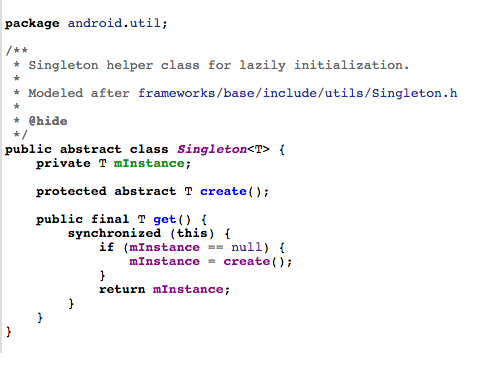
调用bindService方法绑定服务最终会执行Service的onBind方法并在ServiceConnection的onServiceConnected中得到IBinder对象,我们从源码角度看看这一过程是如何进行的 首先从ContextImpl的bindService看起 @Override 1538 public boolean bindService(Intent service, ServiceConnection conn, 1539 int flags) { 1540 warnIfCallingFromSystemProcess(); 1541 return bindServiceCommon(service, conn, flags, mMainThread.getHandler(), 1542 Process.myUserHandle()); 1543 } private boolean bindServiceCommon(Intent service, ServiceConnection conn, int flags, Handler 1582 handler, UserHandle user) { 1583 //注意这里得到的一个IServiceConnection在后边会用到 1584 IServiceConnection sd; 1585 ...... 1588 if (mPackageInfo != null) { 1589 sd = mPackageInfo.getServiceDispatcher(conn, getOuterContext(), handler, flags); 1590 } ...... 1602 int res = ActivityManager.getService().bindService( 1603 mMainThread.getApplicationThread(), getActivityToken(), service, 1604 service.resolveTypeIfNeeded(getContentResolver()), 1605 sd, flags, getOpPackageName(), user.getIdentifier()); 1606 ...... 1614 } 1615 ActivityManager.getService()这行代码我们已经非常熟悉了,前边看activity启动的时候就遇到过 4199 public static IActivityManager getService() { 4200 return IActivityManagerSingleton.get(); 4201 } private static final Singleton<IActivityManager> IActivityManagerSingleton = 4204 new Singleton<IActivityManager>() { 4205 @Override 4206 protected IActivityManager create() { 4207 final IBinder b = ServiceManager.getService(Context.ACTIVITY_SERVICE); 4208 final IActivityManager am = IActivityManager.Stub.asInterface(b); 4209 return am; 4210 } 4211 }; ActivityManager.getService()得到的是IActivityManger,而IActivityManger是一个接口,所以我们要去看它的实现类ActivityManagerService中的bindService方法 ActivityManagerService中 public int bindService(IApplicationThread caller, IBinder token, Intent service, String resolvedType, IServiceConnection connection, int flags, String callingPackage, int userId) throws TransactionTooLargeException { ...... synchronized(this) { return mServices.bindServiceLocked(caller, token, service, resolvedType, connection, flags, callingPackage, userId); } } ActiveServices中 int bindServiceLocked(IApplicationThread caller, IBinder token, Intent service, String resolvedType, final IServiceConnection connection, int flags, String callingPackage, final int userId) throws TransactionTooLargeException { ...... try { //注意,这个方法和下边是殊途同归的 bringUpServiceLocked(serviceRecord, serviceIntent.getFlags(), callerFg, false, false); } catch (RemoteException e) { /* ignore - local call */ } ...... if (s.app != null && b.intent.received) { ...... if (b.intent.apps.size() == 1 && b.intent.doRebind) { requestServiceBindingLocked(s, b.intent, callerFg, true); } } else if (!b.intent.requested) { requestServiceBindingLocked(s, b.intent, callerFg, false); } ...... } private final boolean requestServiceBindingLocked(ServiceRecord r, IntentBindRecord i, boolean execInFg, boolean rebind) throws TransactionTooLargeException { ...... bumpServiceExecutingLocked(r, execInFg, "bind"); r.app.forceProcessStateUpTo(ActivityManager.PROCESS_STATE_SERVICE); r.app.thread.scheduleBindService(r, i.intent.getIntent(), rebind, r.app.repProcState); if (!rebind) { i.requested = true; } i.hasBound = true; i.doRebind = false; ...... } 需要找到 r.app.thread.scheduleBindService这个方法究竟是哪个类中的方法,r是ServiceRecord,那么到它里边去找发现app是ProcessRecord类,然后进入到ProcessRecord中去找thread,可以看到IApplicationThread thread,IApplicationThread很明显是一个接口,我们还要找到它的实现类才行,这里也不再卖关子了,我们要找的实现类就是ApplicationThread,而ApplicationThread是ActivityThread的一个内部类,所以去ActivityThread中继续寻找 public final void scheduleBindService(IBinder token, Intent intent, boolean rebind, int processState) { updateProcessState(processState, false); BindServiceData s = new BindServiceData(); s.token = token; s.intent = intent; s.rebind = rebind; if (DEBUG_SERVICE) Slog.v(TAG, "scheduleBindService token=" + token + " intent=" + intent + " uid=" + Binder.getCallingUid() + " pid=" + Binder.getCallingPid()); sendMessage(H.BIND_SERVICE, s); } private void sendMessage(int what, Object obj) { sendMessage(what, obj, 0, 0, false); } 可以看到是通过handler发送了一个消息,找到这个消息的处理 case BIND_SERVICE: Trace.traceBegin(Trace.TRACE_TAG_ACTIVITY_MANAGER, "serviceBind"); handleBindService((BindServiceData)msg.obj); Trace.traceEnd(Trace.TRACE_TAG_ACTIVITY_MANAGER); break; private void handleBindService(BindServiceData data) { //从集合中取出service,可以猜测服务在之前已经被存储起来了 Service s = mServices.get(data.token); ...... if (!data.rebind) { //调用service的onBind方法,这里终于找到了 IBinder binder = s.onBind(data.intent); //这里是回调到onServiceConnected方法的关键 ActivityManager.getService().publishService( data.token, data.intent, binder); } else { s.onRebind(data.intent); ActivityManager.getService().serviceDoneExecuting( data.token, SERVICE_DONE_EXECUTING_ANON, 0, 0); } ...... } } 再次回到ActivityManagerService中 public void publishService(IBinder token, Intent intent, IBinder service) { // Refuse possible leaked file descriptors if (intent != null && intent.hasFileDescriptors() == true) { throw new IllegalArgumentException("File descriptors passed in Intent"); } synchronized(this) { if (!(token instanceof ServiceRecord)) { throw new IllegalArgumentException("Invalid service token"); } mServices.publishServiceLocked((ServiceRecord)token, intent, service); } } 再次回到ActiveServices类中 void publishServiceLocked(ServiceRecord r, Intent intent, IBinder service) { final long origId = Binder.clearCallingIdentity(); try { if (DEBUG_SERVICE) Slog.v(TAG_SERVICE, "PUBLISHING " + r + " " + intent + ": " + service); if (r != null) { Intent.FilterComparison filter = new Intent.FilterComparison(intent); IntentBindRecord b = r.bindings.get(filter); if (b != null && !b.received) { b.binder = service; b.requested = true; b.received = true; for (int conni=r.connections.size()-1; conni>=0; conni--) { ArrayList<ConnectionRecord> clist = r.connections.valueAt(conni); for (int i=0; i<clist.size(); i++) { ConnectionRecord c = clist.get(i); if (!filter.equals(c.binding.intent.intent)) { if (DEBUG_SERVICE) Slog.v( TAG_SERVICE, "Not publishing to: " + c); if (DEBUG_SERVICE) Slog.v( TAG_SERVICE, "Bound intent: " + c.binding.intent.intent); if (DEBUG_SERVICE) Slog.v( TAG_SERVICE, "Published intent: " + intent); continue; } if (DEBUG_SERVICE) Slog.v(TAG_SERVICE, "Publishing to: " + c); try { c.conn.connected(r.name, service, false); } catch (Exception e) { Slog.w(TAG, "Failure sending service " + r.name + " to connection " + c.conn.asBinder() + " (in " + c.binding.client.processName + ")", e); } } } } serviceDoneExecutingLocked(r, mDestroyingServices.contains(r), false); } } finally { Binder.restoreCallingIdentity(origId); } } 关键代码 c.conn.connected(r.name, service, false); c表示ConnectionRecord,conn就是IServiceConnection,看到这个IServiceConnection我们很容易把它和ServiceConnection联系起来,是不是这样呢,其实这时候我们可以回到最初的那个地方埋下的伏笔,我们写了一句注释 //注意这里得到的一个IServiceConnection在后边会用到 IServiceConnection sd; 从代码ArrayList<ConnectionRecord> clist = r.connections.valueAt(conni);中就可以看出,每一个ConnectionRecord都是提前存入集合中保存的,那么每个ConnectionRecord中的IServiceConnection也就在那时候已经存在了,IServiceConnection是一个接口,我们同样要找到它的实现类,那么回到ContextImpl中,看看,这个IServiceConnection是如何创建出来的 IServiceConnection sd; if (conn == null) { throw new IllegalArgumentException("connection is null"); } if (mPackageInfo != null) { sd = mPackageInfo.getServiceDispatcher(conn, getOuterContext(), handler, flags); @Override 1564 public IServiceConnection getServiceDispatcher(ServiceConnection conn, Handler handler, 1565 int flags) { 1566 return mPackageInfo.getServiceDispatcher(conn, getOuterContext(), handler, flags); 1567 } 进入LoadedApk中 public final IServiceConnection getServiceDispatcher(ServiceConnection c, 1397 Context context, Handler handler, int flags) { 1398 synchronized (mServices) { 1399 LoadedApk.ServiceDispatcher sd = null; 1400 ArrayMap<ServiceConnection, LoadedApk.ServiceDispatcher> map = mServices.get(context); 1401 if (map != null) { 1402 if (DEBUG) Slog.d(TAG, "Returning existing dispatcher " + sd + " for conn " + c); 1403 sd = map.get(c); 1404 } 1405 if (sd == null) { 1406 sd = new ServiceDispatcher(c, context, handler, flags); 1407 if (DEBUG) Slog.d(TAG, "Creating new dispatcher " + sd + " for conn " + c); 1408 if (map == null) { 1409 map = new ArrayMap<>(); 1410 mServices.put(context, map); 1411 } 1412 map.put(c, sd); 1413 } else { 1414 sd.validate(context, handler); 1415 } 1416 return sd.getIServiceConnection(); 1417 } 1418 } 1419 IServiceConnection getIServiceConnection() { 1553 return mIServiceConnection; 1554 } 看到这个 private final ServiceDispatcher.InnerConnection mIServiceConnection; 我们找到了IServiceConnection的实现类,InnerConnection,那么c.conn.connected(r.name, service, false);执行的就是它的connect方法 private static class InnerConnection extends IServiceConnection.Stub { 1489 final WeakReference<LoadedApk.ServiceDispatcher> mDispatcher; 1490 1491 InnerConnection(LoadedApk.ServiceDispatcher sd) { 1492 mDispatcher = new WeakReference<LoadedApk.ServiceDispatcher>(sd); 1493 } 1494 1495 public void connected(ComponentName name, IBinder service, boolean dead) 1496 throws RemoteException { 1497 LoadedApk.ServiceDispatcher sd = mDispatcher.get(); 1498 if (sd != null) { 1499 sd.connected(name, service, dead); 1500 } 1501 } 1502 } public void connected(ComponentName name, IBinder service, boolean dead) { 1569 if (mActivityThread != null) { 1570 mActivityThread.post(new RunConnection(name, service, 0, dead)); 1571 } else { 1572 doConnected(name, service, dead); 1573 } 1574 } public void connected(ComponentName name, IBinder service, boolean dead) { 1569 if (mActivityThread != null) { 1570 mActivityThread.post(new RunConnection(name, service, 0, dead)); 1571 } else { 1572 doConnected(name, service, dead); 1573 } 1574 } 终于找到了,看下边 public void doConnected(ComponentName name, IBinder service, boolean dead) { 1585 ServiceDispatcher.ConnectionInfo old; 1586 ServiceDispatcher.ConnectionInfo info; 1587 1588 ...... 1625 // If there was an old service, it is now disconnected. 1626 if (old != null) { 1627 mConnection.onServiceDisconnected(name); 1628 } 1629 ...... 1632 // If there is a new service, it is now connected. 1633 if (service != null) { //onServiceConnected被调用 1634 mConnection.onServiceConnected(name, service); 1635 } 1636 }