首页 文章 精选 留言 我的

精选列表

搜索[Solon框架],共10000篇文章
优秀的个人博客,低调大师

ORM 框架 sqltoy-orm 4.12.2 发版

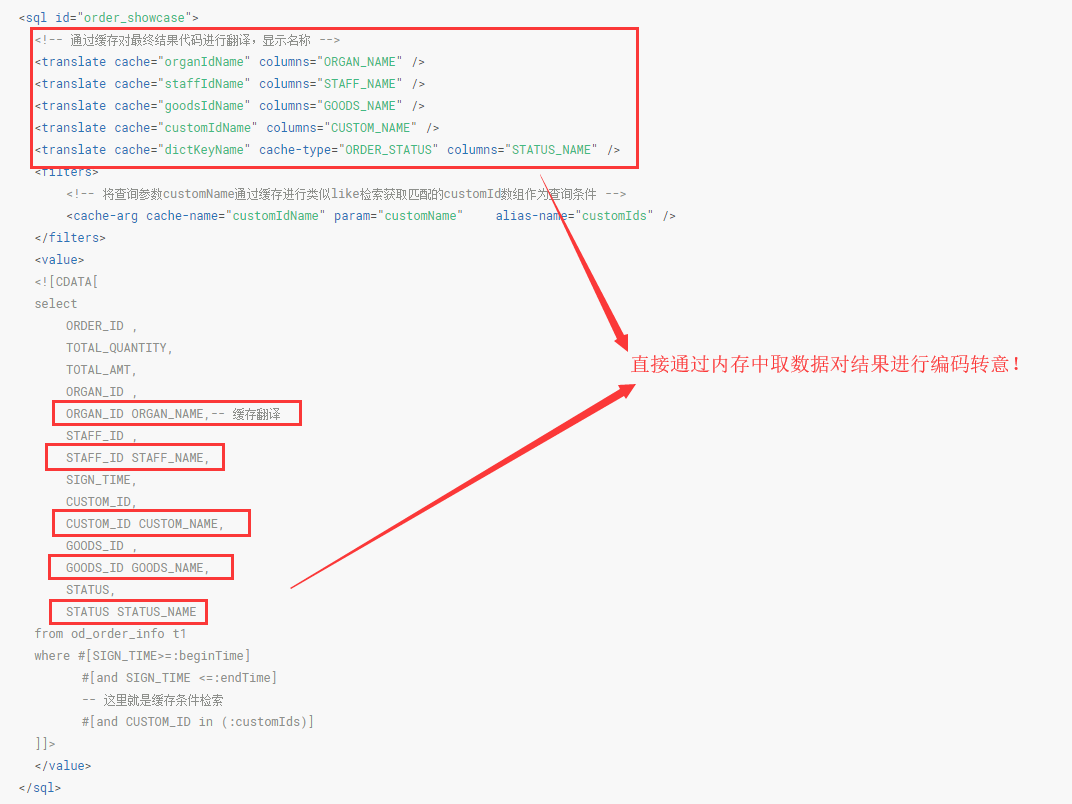
开源地址: github:https://github.com/chenrenfei/sagacity-sqltoy gitee:https://gitee.com/sagacity/sagacity-sqltoy 感谢热心朋友开发了idea 针对sqltoy的插件,快速定位sql https://gitee.com/threefish/sqltoy-idea-plugins 更新内容 1、增强直接写sql查询时自动根据情况补齐select c1,c2,.. from table where 2、优化quickvo,剔除对log4j的依赖改用jdk自带log,大幅减小jar的大小 3、增加三个单表查询、修改、删除方法,更加简化单表操作,便于内部逻辑快捷处理 /** * findEntity 模式,简化sql编写模式,面向接口服务层提供快捷数据查询和处理 * 1、通过where指定条件 * 2、支持lock * 3、支持order by (order by 在接口服务 层意义不大) * 4、自动将对象属性映射成表字段 */ @Test public void findEntity() { //条件利用sqltoy特有的#[]充当动态条件判断,#[]是支持嵌套的 List<StaffInfoVO> staffVOs = sqlToyLazyDao.findEntity(StaffInfoVO.class, EntityQuery.create().where("#[staffName like ?] #[ and status=?]") .lock(LockMode.UPGRADE).orderBy("staffName").orderByDesc("createTime") .values("陈", 1)); System.err.println(JSON.toJSONString(staffVOs)); } /** * 指定where 条件并提供对象传参 */ @Test public void findEntityByVO() { List<StaffInfoVO> staffVOs = sqlToyLazyDao.findEntity(StaffInfoVO.class, EntityQuery.create().where("#[staffName like :staffName] #[ and status=:status]") .values(new StaffInfoVO().setStatus(1).setEmail("test3@aliyun.com"))); System.err.println(JSON.toJSONString(staffVOs)); } /** * 通过参数传值进行删除,where必须有值(后端会校验),delete操作属于危险操作 */ @Test public void deleteEntity() { Long deleteCount = sqlToyLazyDao.deleteByQuery(StaffInfoVO.class, EntityQuery.create().where("status=:status").values(new StaffInfoVO().setStatus(1))); System.err.println(deleteCount); } /** * update 操作where也必须有值,以防危险操作 */ @Test public void updateEntity() { Long updateCount = sqlToyLazyDao.updateByQuery(StaffInfoVO.class, EntityUpdate.create().set("staffName", "张三").where("staffName like ? and status=?").values("陈", 1)); System.err.println(updateCount); } sqltoy特点说明: 支持mysql、postgresql、db2、oracle、sqlserver、sqlite、clickhouse、elasticsearch等 具有JPA模式的CRUD功能(即CRUD无需写sql),无需写Dao,sqltoy提供了SqlToyLazyDao,同时提供了quickvo从数据库生成POJO。 根本上杜绝了sql注入问题 最科学的sql编写方式 * sqltoy的sql编写(支持嵌套) select * from sqltoy_device_order_info t where #[t.ORDER_ID=:orderId] #[and t.ORGAN_ID in (:authedOrganIds)] #[and t.STAFF_ID in (:staffIds)] #[and t.TRANS_DATE>=:beginDate] #[and t.TRANS_DATE<:endDate] * mybatis同样功能实现 select * from sqltoy_device_order_info t <where> <if test="orderId!=null"> and t.ORDER_ID=#{orderId} </if> <if test="authedOrganIds!=null"> and t.ORGAN_ID in <foreach collection="authedOrganIds" item="order_id" separator="," open="(" close=")"> #{order_id} </foreach> </if> <if test="staffIds!=null"> and t.STAFF_ID in <foreach collection="staffIds" item="staff_id" separator="," open="(" close=")"> #{staff_id} </foreach> </if> <if test="beginDate!=null"> and t.TRANS_DATE>=#{beginDate} </if> <if test="endDate!=null"> and t.TRANS_DATE<#{endDate} </if> </where> 缓存翻译大幅提升性能,减少多表关联,让sql直观可维护 最高等级的分页优化 支持用算法代替sql实现行列转换、同比环比、分组汇总等 支持分库分表 sqltoy支持跨数据库函数自适应:一套sql可以自适应多种数据库 提供了5种默认的非数据库相关的主键策略 1、shortNanoTime 22位有序安全ID,格式: 13位当前毫秒+6位纳秒+3位主机ID 2、nanoTimeId 26位有序安全ID,格式:15位:yyMMddHHmmssSSS+6位纳秒+2位(线程Id+随机数)+3位主机ID 3、uuid:32 位uuid 4、SnowflakeId 雪花算法ID 5、redisId 基于redis 来产生规则的ID主键 提供了通用字段赋值处理 提供了树形表的统一处理机制 sql文件更新自动重载,便于开发阶段无需重启应用 慢sql统计功能

优秀的个人博客,低调大师

利用LSTM框架实时预测比特币价格

温馨提示:本案例只作为学习研究用途,不构成投资建议。 比特币的价格数据是基于时间序列的,因此比特币的价格预测大多采用LSTM模型来实现。 长期短期记忆(LSTM)是一种特别适用于时间序列数据(或具有时间 / 空间 / 结构顺序的数据,例如电影、句子等)的深度学习模型,是预测加密货币的价格走向的理想模型。 本文主要写了通过LSTM进行数据拟合,从而预测比特币的未来价格。 import需要使用的库 import pandas as pd import numpy as np from sklearn.preprocessing import MinMaxScaler, LabelEncoder from keras.models import Sequential from keras.layers import LSTM, Dense, Dropout from matplotlib import pyplot as plt %matplotlib inline 数据分析 数据加载 读取BTC的日交易数据 data = pd.read_csv(filepath_or_buffer="btc_data_day") 查看数据可得,现在的数据一共有1380条,数据由Date、Open、High、Low、Close、Volume(BTC)、Volume(Currency)、Weighted Price这几列组成。其中除去Date列以外,其余的数据列都是float64数据类型。 data.info() 查看下前10行的数据 data.head(10) 数据可视化 使用matplotlib将Weighted Price绘制出来,看下数据的分布跟走势。在图中我们发现了有一段数据0的部分,我们需要确认下数据是否有异常。 plt.plot(data['Weighted Price'], label='Price') plt.ylabel('Price') plt.legend() plt.show() 异常数据处理 先查看下数据是否含有nan的数据,可以看到我们的数据中没有nan的数据 data.isnull().sum() Date 0 Open 0 High 0 Low 0 Close 0 Volume (BTC) 0 Volume (Currency) 0 Weighted Price 0 dtype: int64 再查看下0数据,可以看到我们的数据中含有0值,我们需要对0值做下处理 (data == 0).astype(int).any() Date False Open True High True Low True Close True Volume (BTC) True Volume (Currency) True Weighted Price True dtype: bool data['Weighted Price'].replace(0, np.nan, inplace=True) data['Weighted Price'].fillna(method='ffill', inplace=True) data['Open'].replace(0, np.nan, inplace=True) data['Open'].fillna(method='ffill', inplace=True) data['High'].replace(0, np.nan, inplace=True) data['High'].fillna(method='ffill', inplace=True) data['Low'].replace(0, np.nan, inplace=True) data['Low'].fillna(method='ffill', inplace=True) data['Close'].replace(0, np.nan, inplace=True) data['Close'].fillna(method='ffill', inplace=True) data['Volume (BTC)'].replace(0, np.nan, inplace=True) data['Volume (BTC)'].fillna(method='ffill', inplace=True) data['Volume (Currency)'].replace(0, np.nan, inplace=True) data['Volume (Currency)'].fillna(method='ffill', inplace=True) (data == 0).astype(int).any() Date False Open False High False Low False Close False Volume (BTC) False Volume (Currency) False Weighted Price False dtype: bool 再看下数据的分布跟走势,这个时候曲线已经非常的连续 plt.plot(data['Weighted Price'], label='Price') plt.ylabel('Price') plt.legend() plt.show() 训练数据集和测试数据集划分 将数据归一化到0-1 data_set = data.drop('Date', axis=1).values data_set = data_set.astype('float32') mms = MinMaxScaler(feature_range=(0, 1)) data_set = mms.fit_transform(data_set) 以2:8划分测试数据集跟训练数据集 ratio = 0.8 train_size = int(len(data_set) * ratio) test_size = len(data_set) - train_size train, test = data_set[0:train_size,:], data_set[train_size:len(data_set),:] 创建训练数据集跟测试数据集,以1天作为窗口期来创建我们的训练数据集跟测试数据集。 def create_dataset(data): window = 1 label_index = 6 x, y = [], [] for i in range(len(data) - window): x.append(data[i:(i + window), :]) y.append(data[i + window, label_index]) return np.array(x), np.array(y) train_x, train_y = create_dataset(train) test_x, test_y = create_dataset(test) 定义模型并训练 这次我们使用一个简单的模型,这个模型结构如下1. LSTM2. Dense。 这里需要对LSTM的inputh shape做下说明, Input Shape的输入维度为(batch_size, time steps, features)。其中,time steps值的是数据输入的时候的时间窗口间隔,这里我们使用1天作为时间窗口,并且我们的数据都是日数据,因此这里我们的time steps为1。 长短期记忆(Long short-term memory, LSTM)是一种特殊的RNN,主要是为了解决长序列训练过程中的梯度消失和梯度爆炸问题,这里先简单介绍下LSTM。 从LSTM的网络结构示意图中,可以看到LSTM其实是一个小型的模型,他包含了3个sigmoid激活函数,2个tanh激活函数,3个乘法,1个加法。 细胞状态 细胞状态是LSTM的核心,他是上图中最上面的那根黑线, 在这根黑线下面是一些门,我们在后面介绍。细胞状态会根据每个门的结果,来得到更新。下面我们介绍下这些门,你就会理解细胞状态的流程。 LSTM网络能通过一种被称为门的结构对细胞状态进行删除或者添加信息。门能够有选择性的决定让哪些信息通过。门的结构是一个sigmoid层和一个点乘操作的组合。因为sigmoid层的输出是0-1的值,0表示都不能通过,1表示都能通过。一个LSTM里面包含三个门来控制细胞状态。下面我们来一一介绍下这些门。 遗忘门 LSTM的第一步就是决定细胞状态需要丢弃哪些信息。这部分操作是通过一个称为忘记门的sigmoid单元来处理的。我们来看下动画示意图, 我们可以看到,遗忘门通过查看$h_{l-1}$和$x_{t}$信息来输出一个0-1之间的向量,该向量里面的0-1值表示细胞状态$C_{t-1}$中的哪些信息保留或丢弃多少。0表示不保留,1表示都保留。 数学表达式: $f_{t}=\sigma\left(W_{f} \cdot\left[h_{t-1}, x_{t}\right]+b_{f}\right)$ 输入门 下一步是决定给细胞状态添加哪些新的信息,这个步骤是通过输入门开完成的。我们先来看下动画示意图, 我们看到了$h_{l-1}$和$x_{t}$的信息又被放入了一个遗忘门(sigmoid)跟输入门(tanh)中。因为遗忘门的输出结果是0-1的值,因此,如果遗忘门输出的是0的话,输入门后的结果$C_{i}$将不会被添加到当前的细胞状态中,如果是1,会全部的被添加到细胞状态中,因此这里的遗忘门的作用是将输入门的结果选择性的添加到细胞状态中。 数学公式为: $C_{t}=f_{t} * C_{t-1}+i_{t} * \\tilde{C}_{t}$ 输出门 更新完细胞状态后需要根据$h_{l-1}$和$x_{t}$输入的和来判断输出细胞的哪些状态特征,这里需要将输入经过一个称为输出门的sigmoid层得到判断条件,然后将细胞状态经过tanh层得到一个-1~1之间值的向量,该向量与输出门得到的判断条件相乘就得到了最终该RNN单元的输出, 动画示意图如下 def create_model(): model = Sequential() model.add(LSTM(50, input_shape=(train_x.shape[1], train_x.shape[2]))) model.add(Dense(1)) model.compile(loss='mae', optimizer='adam') model.summary() return model model = create_model() history = model.fit(train_x, train_y, epochs=80, batch_size=64, validation_data=(test_x, test_y), verbose=1, shuffle=False) plt.plot(history.history['loss'], label='train') plt.plot(history.history['val_loss'], label='test') plt.legend() plt.show() train_x, train_y = create_dataset(train) test_x, test_y = create_dataset(test) 预测 predict = model.predict(test_x) plt.plot(predict, label='predict') plt.plot(test_y, label='ground true') plt.legend() plt.show() 当前利用机器学习预测比特币长期价格走势还是非常困难的,本文只能作为学习案例使用。该案例之后会上线与矩池云的Demo镜像之中,感兴趣的用户可以直接体验。

优秀的个人博客,低调大师

Spring框架里注解@Autowired的工作原理

Suppose I have a bean named HelloWorld which has a member attribute points to another bean User. With annotation @Autowired, as long as getBean is called in the runtime, the returned HelloWorld instance will automatically have user attribute injected with User instance. How is this behavior implemented by Spring framework? (1) in Spring container implementation’s refresh method, all singleton beans will be initialized by default. When the HelloWorld bean is initialized: Since it has the following source code: @Autowired private User user; In the runtime, this annotation is available in metadata via reflection. In metadata structure below, the targetClass points to HelloWorld bean, and injectedElements points to the User class to be injected. (2) In doResolveDependency, the definition for User bean is searched based on this.beanDefinitionNames ( list in DefaultListableBeanFactory ): Once found, the found result is added to array candidateNames: Then the constructor of User bean class is called ( still triggered by getBean call ), the user instance is created by calling constructor: The created user instance together with its name “user” is inserted to the map matchingBeans. Finally the user reference is set to user attribute of HelloWorld instance via reflection. Here the variable bean in line 569 points to HelloWorld instance, and value points to user instance. Once field.set(bean, value) is done, we can observe in debugger that the user attribute in HelloWorld instance is already injected successfully. 本文来自云栖社区合作伙伴“汪子熙”,了解相关信息可以关注微信公众号"汪子熙"。

优秀的个人博客,低调大师

NativeScript 6.5.0 发布,跨平台原生应用框架

NativeScript 6.5.0 发布了,主要内容如下: Bug Fixes 修复视图未从其父视图移除的问题 d.ts:更新 iOS 13.2 的iOS 输入 bottom-nav:当其中一张图片较小时,Android TabStripItems 无法正确对齐 tabs:动画运行时延迟 loadView Features tabs:选项卡样式改进 tabs:在 TabStrip 中添加了 selectedItemColor 和 unSelectedItemColor gestures:将 locationX 和 locationY 添加到双击事件数据中 tabs:向 TabStripItem 添加了 iconClass 属性 更新说明:https://github.com/NativeScript/NativeScript/releases/tag/6.5.0

优秀的个人博客,低调大师

JBossWS 5.4.0.Final 发布,Web 服务框架

JBossWS 5.4.0.Final 发布了,该版本升级了很多组件,同时引入Elytron 客户端配置支持,Apache CXF 升级到 3.3.4 版本,修复了一些 bug ,详细内容请看 https://issues.jboss.org/projects/JBWS JBoss WS (JBoss Web Services)实现了一个新的符合JAX-RPC1.1标准的SOAP stack,可用于替代先前的WS4EE和JBoss.NET。它能够更好的与整个JBoss架构体系相集成。 支持: JAX-RPC and JAX-WS (2.2) support JBoss Application Server 5 (JavaEE 5 compliant) web service stack EJB 2.1, EJB3 and JSE endpoints Attachments Profile Version 1.0 Support for MTOM/XOP and SwA-Ref WS-Security 1.0 for XML Encryption/Signature of the SOAP message WS-Addressing (W3C candidate release) and JSR-261 WS-ReliableMessaging WS-Eventing WS-Policy

优秀的个人博客,低调大师

PhalApi 2.10.1 版本发布,PHP 开源接口框架

[主要更新] 1、PDO支持具体驱动的连接选项,支持连接超时设置,避免接口长时间连接出现504 Time out 2、PDO调整为有错误时抛出携带更详细错误信息的PDOExcepion,避免笼统的错误提示 3、添加\PhalApi\Api::getApiCommonRules(),以便支持部分接口不需要全局应用参数的场景。 4、支持接口参数置空,通过NULL或FALSE赋值可将接口参数取消 5、在线接口文档,接口参数转换成客户端看到的参数类型 6、接口参数规则中添加is_doc_hide配置,设置为true时,接口文档不显示此参数,但实际上仍可在PHP代码中使用 7、缺少必填接口参数时,追加desc到翻译 8、兼容接收JSON的参数

资源下载

更多资源
Mario

Mario

马里奥是站在游戏界顶峰的超人气多面角色。马里奥靠吃蘑菇成长,特征是大鼻子、头戴帽子、身穿背带裤,还留着胡子。与他的双胞胎兄弟路易基一起,长年担任任天堂的招牌角色。

腾讯云软件源

腾讯云软件源

为解决软件依赖安装时官方源访问速度慢的问题,腾讯云为一些软件搭建了缓存服务。您可以通过使用腾讯云软件源站来提升依赖包的安装速度。为了方便用户自由搭建服务架构,目前腾讯云软件源站支持公网访问和内网访问。

Nacos

Nacos

Nacos /nɑ:kəʊs/ 是 Dynamic Naming and Configuration Service 的首字母简称,一个易于构建 AI Agent 应用的动态服务发现、配置管理和AI智能体管理平台。Nacos 致力于帮助您发现、配置和管理微服务及AI智能体应用。Nacos 提供了一组简单易用的特性集,帮助您快速实现动态服务发现、服务配置、服务元数据、流量管理。Nacos 帮助您更敏捷和容易地构建、交付和管理微服务平台。

WebStorm

WebStorm

WebStorm 是jetbrains公司旗下一款JavaScript 开发工具。目前已经被广大中国JS开发者誉为“Web前端开发神器”、“最强大的HTML5编辑器”、“最智能的JavaScript IDE”等。与IntelliJ IDEA同源,继承了IntelliJ IDEA强大的JS部分的功能。

用户登录
用户注册