PyTorch版CenterNet训练自己的数据集
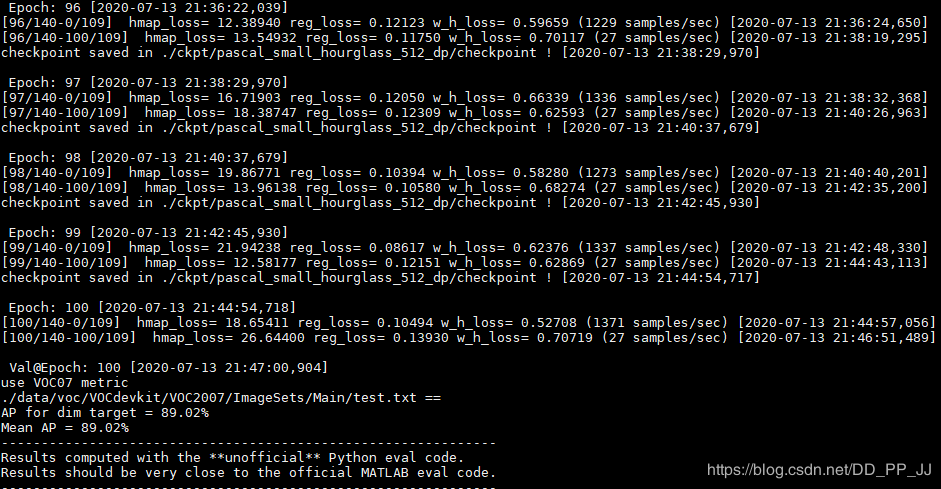
CenterNet(Objects as points)已经有一段时间了,之前这篇文章-【目标检测Anchor-Free】CVPR 2019 Object as Points(CenterNet)中讲解了CenterNet的原理,可以回顾一下。 这篇文章是基于非官方的CenterNet实现,https://github.com/zzzxxxttt/pytorch_simple_CenterNet_45,这个版本的实现更加简单,基于官方版本(https://github.com/xingyizhou/CenterNet)进行修改,要比官方代码更适合阅读和理解,dataloader、hourglass、训练流程等原版中比较复杂的部分都进行了重写,最终要比官方的速度更快。 这篇博文主要讲解如何用这个版本的CenterNet训练自己的VOC数据集,环境的配置。 1. 环境配置 2. 配置自己的数据集 2.1 VOC类别修改 2.2 annotations 2.3 其他 3. 训练和测试 3.1 训练命令 3.2 测试命令 4. 结果 COCO: PascalVOC: 5. 参考 1. 环境配置 环境要求: python>=3.5 pytorch==0.4.1or 1.1.0 or 1.0.0(笔者用的1.0.0也可以) tensorboardX(可选) 配置: 将cudnn的batch norm关闭。打开torch/nn/functional.py文件,找到torch.batch_norm这一行,将 torch.backends.cudnn.enabled选项更改为False。 克隆项目 CenterNet_ROOT=/path/to/clone/CenterNetgitclonehttps://github.com/zzzxxxttt/pytorch_simple_CenterNet_45$CenterNet_ROOT 安装cocoAPI cd$CenterNet_ROOT/lib/cocoapi/PythonAPImakepythonsetup.pyinstall--user 编译可变形卷积DCN 如果使用的是pytorch0.4.1, 将 $CenterNet_ROOT/lib/DCNv2_old重命名为 $CenterNet_ROOT/lib/DCNv2 如果使用的是pytorch1.1.0 or 1.0.0, 将 $CenterNet_ROOT/lib/DCNv2_new重命名为 $CenterNet_ROOT/lib/DCNv2. 然后开始编译 cd$CenterNet_ROOT/lib/DCNv2./make.sh 编译NMS cd$CenterNet_ROOT/lib/nmsmake 对于COCO格式的数据集,下载链接在:http://cocodataset.org/#download。将annotations, train2017, val2017, test2017放在$CenterNet_ROOT/data/coco 对于Pascal VOC格式的数据集,下载VOC转为COCO以后的数据集: 网盘链接:https://pan.baidu.com/share/init?surl=z6BtsKPHh2MnbfT25Y4wYw 密码:4iu2 下载以后将annotations, images, VOCdevkit放在$CenterNet_ROOT/data/voc PS:以上两者是官方数据集,如果制作自己的数据集的话可以往下看。 如果选择Hourglass-104作为骨干网络,下载CornerNet提供的Hourglass预训练模型: 网盘链接:https://pan.baidu.com/s/1tp9-5CAGwsX3VUSdV276Fg 密码:y1z4 将下载的权重checkpoint.t7放到$CenterNet_ROOT/ckpt/pretrain中。 2. 配置自己的数据集 这个版本提供的代码是针对官方COCO或者官方VOC数据集进行配置的,所以有一些细节需要修改。 由于笔者习惯VOC格式数据集,所以以Pascal VOC格式为例,修改自己的数据集。 笔者只有一个类,‘dim target’,所以按照一个类来修改,其他的类别也很容易修改。 2.1 VOC类别修改 将datasets/pascal.py中16行内容: VOC_NAMES=['__background__',"aeroplane","bicycle","bird","boat","bottle","bus","car","cat","chair","cow","diningtable","dog","horse","motorbike","person","pottedplant","sheep","sofa","train","tvmonitor"] 修改为自己类别的名称: VOC_NAMES=['__background__','dimtarget'] 将datasets/pascal.py中第33行内容: num_classes=20修改为自己对应的类别个数num_classes=1 将datasets/pascal.py中的第35行内容: self.valid_ids = np.arange(1, 21, dtype=np.int32)中的21修改为类别数目+1 2.2 annotations VOC格式数据集中没有annotations中所需要的json文件,这部分需要重新构建。 下面是一个VOC转COCO格式的脚本,需要改xml path和json file的名称。 importxml.etree.ElementTreeasETimportosimportjsoncoco=dict()coco['images']=[]coco['type']='instances'coco['annotations']=[]coco['categories']=[]category_set=dict()image_set=set()category_item_id=0image_id=20200000000annotation_id=0defaddCatItem(name):globalcategory_item_idcategory_item=dict()category_item['supercategory']='none'category_item_id+=1category_item['id']=category_item_idcategory_item['name']=namecoco['categories'].append(category_item)category_set[name]=category_item_idreturncategory_item_iddefaddImgItem(file_name,size):globalimage_idiffile_nameisNone:raiseException('Couldnotfindfilenametaginxmlfile.')ifsize['width']isNone:raiseException('Couldnotfindwidthtaginxmlfile.')ifsize['height']isNone:raiseException('Couldnotfindheighttaginxmlfile.')image_id+=1image_item=dict()image_item['id']=image_idimage_item['file_name']=file_nameimage_item['width']=size['width']image_item['height']=size['height']coco['images'].append(image_item)image_set.add(file_name)returnimage_iddefaddAnnoItem(object_name,image_id,category_id,bbox):globalannotation_idannotation_item=dict()annotation_item['segmentation']=[]seg=[]#bbox[]isx,y,w,h#left_topseg.append(bbox[0])seg.append(bbox[1])#left_bottomseg.append(bbox[0])seg.append(bbox[1]+bbox[3])#right_bottomseg.append(bbox[0]+bbox[2])seg.append(bbox[1]+bbox[3])#right_topseg.append(bbox[0]+bbox[2])seg.append(bbox[1])annotation_item['segmentation'].append(seg)annotation_item['area']=bbox[2]*bbox[3]annotation_item['iscrowd']=0annotation_item['ignore']=0annotation_item['image_id']=image_idannotation_item['bbox']=bboxannotation_item['category_id']=category_idannotation_id+=1annotation_item['id']=annotation_idcoco['annotations'].append(annotation_item)defparseXmlFiles(xml_path):forfinos.listdir(xml_path):ifnotf.endswith('.xml'):continuereal_file_name=f.split(".")[0]+".jpg"bndbox=dict()size=dict()current_image_id=Nonecurrent_category_id=Nonefile_name=Nonesize['width']=Nonesize['height']=Nonesize['depth']=Nonexml_file=os.path.join(xml_path,f)print(xml_file)tree=ET.parse(xml_file)root=tree.getroot()ifroot.tag!='annotation':raiseException('pascalvocxmlrootelementshouldbeannotation,ratherthan{}'.format(root.tag))#elemis<folder>,<filename>,<size>,<object>foreleminroot:current_parent=elem.tagcurrent_sub=Noneobject_name=Noneifelem.tag=='folder':continueifelem.tag=='filename':file_name=real_file_name#elem.textiffile_nameincategory_set:raiseException('file_nameduplicated')#addimgitemonlyafterparse<size>tagelifcurrent_image_idisNoneandfile_nameisnotNoneandsize['width']isnotNone:#print(file_name,"===",image_set)iffile_namenotinimage_set:current_image_id=addImgItem(file_name,size)print('addimagewith{}and{}'.format(file_name,size))else:pass#raiseException('duplicatedimage:{}'.format(file_name))#subelemis<width>,<height>,<depth>,<name>,<bndbox>forsubeleminelem:bndbox['xmin']=Nonebndbox['xmax']=Nonebndbox['ymin']=Nonebndbox['ymax']=Nonecurrent_sub=subelem.tagifcurrent_parent=='object'andsubelem.tag=='name':object_name=subelem.textifobject_namenotincategory_set:current_category_id=addCatItem(object_name)else:current_category_id=category_set[object_name]elifcurrent_parent=='size':ifsize[subelem.tag]isnotNone:raiseException('xmlstructurebrokenatsizetag.')size[subelem.tag]=int(subelem.text)#optionis<xmin>,<ymin>,<xmax>,<ymax>,whensubelemis<bndbox>foroptioninsubelem:ifcurrent_sub=='bndbox':ifbndbox[option.tag]isnotNone:raiseException('xmlstructurecorruptedatbndboxtag.')bndbox[option.tag]=int(option.text)#onlyafterparsethe<object>tagifbndbox['xmin']isnotNone:ifobject_nameisNone:raiseException('xmlstructurebrokenatbndboxtag')ifcurrent_image_idisNone:raiseException('xmlstructurebrokenatbndboxtag')ifcurrent_category_idisNone:raiseException('xmlstructurebrokenatbndboxtag')bbox=[]#xbbox.append(bndbox['xmin'])#ybbox.append(bndbox['ymin'])#wbbox.append(bndbox['xmax']-bndbox['xmin'])#hbbox.append(bndbox['ymax']-bndbox['ymin'])print('addannotationwith{},{},{},{}'.format(object_name,current_image_id,current_category_id,bbox))addAnnoItem(object_name,current_image_id,current_category_id,bbox)if__name__=='__main__':xml_path='./annotations/test'json_file='./pascal_test2020.json'#'./pascal_trainval0712.json'parseXmlFiles(xml_path)json.dump(coco,open(json_file,'w')) 注意这里json文件的命名要通过datasets/pascal.py中第44到48行的内容确定的。 self.data_dir=os.path.join(data_dir,'voc')self.img_dir=os.path.join(self.data_dir,'images')_ann_name={'train':'trainval0712','val':'test2007'}self.annot_path=os.path.join(self.data_dir,'annotations','pascal_%s.json'%_ann_name[split]) 这里笔者为了方便命名对这些字段进行了修改: self.data_dir=os.path.join(data_dir,'voc')#./data/vocself.img_dir=os.path.join(self.data_dir,'images')#./data/voc/images_ann_name={'train':'train2020','val':'test2020'}#意思是需要json格式数据集self.annot_path=os.path.join(self.data_dir,'annotations','pascal_%s.json'%_ann_name[split]) 所以要求json的命名可以按照以下格式准备: # ./data/voc/annotations# - pascal_train2020# - pascal_test2020 数据集总体格式为: -data-voc-annotations-pascal_train2020.json-pascal_test2020.json-images-*.jpg-VOCdevkit(这个文件夹主要是用于测评)-VOC2007-Annotations-*.xml-JPEGImages-*.jpg-ImageSets-Main-train.txt-val.txt-trainval.txt-test.txt 2.3 其他 在datasets/pascal.py中21-22行,标准差和方差最好替换为自己的数据集的标准差和方差。 VOC_MEAN=[0.485,0.456,0.406]VOC_STD=[0.229,0.224,0.225] 3. 训练和测试 3.1 训练命令 训练命令比较多,可以写一个shell脚本来完成。 pythontrain.py--log_namepascal_resdcn18_384_dp\--datasetpascal\--archresdcn_18\--img_size384\--lr1.25e-4\--lr_step45,60\--batch_size32\--num_epochs70\--num_workers10 log name代表记录的日志的名称。 dataset设置pascal代表使用的是pascal voc格式。 arch代表选择的backbone的类型,有以下几种: large_hourglass small_hourglass resdcn_18 resdcn_34 resdcn_50 resdcn_101 resdcn_152 img size控制图片长和宽。 lr和lr_step控制学习率大小及变化。 batch size是一个批次处理的图片个数。 num epochs代表学习数据集的总次数。 num workers代表开启多少个线程加载数据集。 3.2 测试命令 测试命令很简单,需要注意的是img size要和训练的时候设置的一致。 pythontest.py--log_namepascal_resdcn18_384_dp\--datasetpascal\--archresdcn_18\--img_size384 flip test属于TTA(Test Time Augmentation),可以一定程度上提高mAP。 #fliptestpythontest.py--log_namepascal_resdcn18_384_dp\--datasetpascal\--archresdcn_18\--img_size384\--test_flip 4. 结果 以下是作者在COCO和VOC数据集上以不同的图片分辨率和TTA方法得到的结果。 COCO: Model Training image size mAP Hourglass-104 (DP) 512 39.9/42.3/45.0 Hourglass-104 (DDP) 512 40.5/42.6/45.3 PascalVOC: Model Training image size mAP ResDCN-18 (DDP) 384 71.19/72.99 ResDCN-18 (DDP) 512 72.76/75.69 笔者在自己的数据集上进行了训练,训练log如下: 每隔5个epoch将进行一次eval,在自己的数据集上最终可以得到90%左右的mAP。 笔者将已经改好的单类的CenterNet放在Github上:https://github.com/pprp/SimpleCVReproduction/tree/master/Simple_CenterNet 5. 参考 https://github.com/pprp/SimpleCVReproduction/tree/master/Simple_CenterNet https://github.com/zzzxxxttt/pytorch_simple_CenterNet_45 欢迎关注GiantPandaCV公众号,对文章有问题或者想加群交流的朋友也可以添加笔者微信。 为了方便读者获取资源,公众号也成立了QQ群,欢迎加群获取资料或者分享资源,二维码在下方。 本文分享自微信公众号 - GiantPandaCV(BBuf233)。如有侵权,请联系 support@oschina.cn 删除。本文参与“OSC源创计划”,欢迎正在阅读的你也加入,一起分享。