首页 文章 精选 留言 我的

精选列表

搜索[教育智能批改],共10002篇文章
优秀的个人博客,低调大师

领课教育开源系统-Elasticsearch的安装和使用

Elasticsearch是一个基于Lucene的搜索服务器。它提供了一个分布式多用户能力的全文搜索引擎,基于RESTful web接口。Elasticsearch是用Java语言开发的,并作为Apache许可条款下的开放源码发布,是一种流行的企业级搜索引擎。Elasticsearch用于云计算中,能够达到实时搜索,稳定,可靠,快速,安装使用方便。 下载 https://www.elastic.co/cn/downloads/past-releases#elasticsearch 安装 # tar -zxvf elasticsearch-6.2.2.tar.gz //解压 # mv /opt/tools/elasticsearch-6.2.2 /opt/elasticsearch 说明:移动到/opt/elasticsearch下 配置 # vi /opt/elasticsearch/config/elasticsearch.yml 说明:可以使用默认配置 设置 # vi /usr/lib/systemd/system/elasticsearch.service [Unit] Description=elasticsearch [Service] User=roncoo LimitNOFILE=65536 LimitNPROC=65536 ExecStart=/opt/elasticsearch/bin/elasticsearch [Install] WantedBy=multi-user.target 操作 # systemctl enable elasticsearch //开机启动 # systemctl start elasticsearch //启动

优秀的个人博客,低调大师

领课教育开源系统-Redis的安装和使用

Redis是一个开源的使用ANSI C语言编写、支持网络、可基于内存亦可持久化的日志型、Key-Value数据库,并提供多种语言的API。从2010年3月15日起,Redis的开发工作由VMware主持。 Redis 是一个高性能的key-value数据库。 redis的出现,很大程度补偿了memcached这类keyvalue存储的不足,在部 分场合可以对关系数据库起到很好的补充作用。它提供了Python,Ruby,Erlang,PHP客户端,使用很方便。 安装软件 # yum install epel-release -y 说明:安装epel源 # yum install redis -y 说明:安装redis,当前版本为3.2 设置开机启动 # systemctl enable redis 设置配置 # vi /etc/redis.conf bing 0.0.0.0 //允许外网访问,默认是不通外网 daemonize yes requirepass roncoo 说明:默认不能外网访问,需要配置。若配置外网访问,为了安全请设置密码。 操作说明 启动:# systemctl start redis 查看:# systemctl status redis 重启:# systemctl restart redis 目录说明 /usr/bin/redis-* 命令 /etc/redis* 配置文件 /var/log/redis/ 日志目录

优秀的个人博客,低调大师

领课教育开源系统-MySQL的安装和使用

MySQL 是最流行的关系型数据库管理系统,在 WEB 应用方面 MySQL 是最好的 RDBMS(Relational Database Management System:关系数据库管理系统)应用软件之一。这里使用yum安装方式,版本选择:https://repo.mysql.com/,推荐使用MySQL5.7版本。 安装软件 # yum install https://repo.mysql.com/mysql57-community-release-el7-9.noarch.rpm -y # yum install mysql-community-server -y 说明:安装完成之后,默认已经设置开机启动。 目录说明 /var/lib/mysql/ 数据库安装目录 /etc/my.cnf 配置文件 /var/log/mysqld.log 错误日志文件 配置设置 # vi /etc/my.cnf [mysqld] # 采用utf8mb4编码,解决表情字符的编码与解码问题 character_set_server=utf8mb4 # 需要启用only_full_group_by SQL模式 sql_mode=STRICT_TRANS_TABLES,NO_ZERO_IN_DATE,NO_ZERO_DATE,ERROR_FOR_DIVISION_BY_ZERO,NO_AUTO_CREATE_USER,NO_ENGINE_SUBSTITUTION 初始化 # cat /var/log/mysqld.log | grep password 说明:查看初始化密码,初始化的时候需要用到 # mysql_secure_installation 说明:这里需要输入上一步的初始密码,特别注意新密码要求比较高的密码强度

优秀的个人博客,低调大师

领课教育开源系统-FastDFS的安装和使用

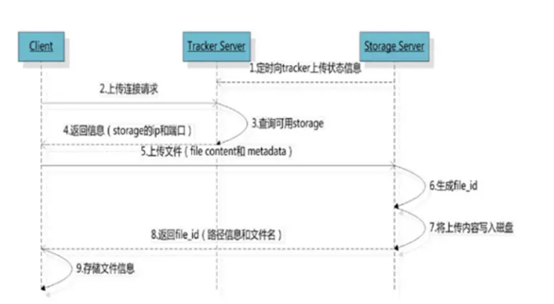
Normal 0 7.8 磅 0 2 false false false EN-US ZH-CN X-NONE /* Style Definitions */ table.MsoNormalTable {mso-style-name:普通表格; mso-tstyle-rowband-size:0; mso-tstyle-colband-size:0; mso-style-noshow:yes; mso-style-priority:99; mso-style-parent:""; mso-padding-alt:0cm 5.4pt 0cm 5.4pt; mso-para-margin:0cm; mso-para-margin-bottom:.0001pt; mso-pagination:widow-orphan; font-size:10.5pt; mso-bidi-font-size:11.0pt; font-family:"Calibri","sans-serif"; mso-ascii-font-family:Calibri; mso-ascii-theme-font:minor-latin; mso-hansi-font-family:Calibri; mso-hansi-theme-font:minor-latin; mso-bidi-font-family:"Times New Roman"; mso-bidi-theme-font:minor-bidi; mso-font-kerning:1.0pt;} FastDFS 是用 c 语言编写的一款开源的分布式文件系统,有多种原因的客户端(包括有Java的客户端)。FastDFS 为互联网量身定制, 充分考虑了冗余备份、负载均衡、线性扩容等机制,并注重高可用、高性能等指标,使用 FastDFS 很容易搭建一套高性能的文件服务器集群提供文件上传、下载等服务。 FastDFS 架构包括 Tracker server 和 Storage server。客户端请求 Tracker server 进行文 件上传、下载,通过 Tracker server 调度最终由 Storage server 完成文件上传和下载。Tracker server 作用是负载均衡和调度,通过 Tracker server 在文件上传时可以根据一些 策略找到 Storage server 提供文件上传服务。可以将 tracker 称为追踪服务器或调度服务 器。Storage server 作用是文件存储,客户端上传的文件最终存储在 Storage 服务器上, Storageserver 没有实现自己的文件系统而是利用操作系统 的文件系统来管理文件。可以将 storage 称为存储服务器。 1. 准备如下 tar 包 libfastcommon-1.0.43.tar.gz fastdfs-6.06.tar.gz nginx-1.18.0.tar.gz fastdfs-nginx-module-1.22.tar.gz 2. libfastcommon的安装 # tar -zxvf libfastcommon-1.0.43.tar.gz //解压 # cd libfastcommon-1.0.43 // 进入解压目录 # ./make.sh //预编译 # ./make.sh install //安装 3. Fastdfs的安装 # tar -zxvf fastdfs-6.06.tar.gz //解压 # cd /root/download/fastdfs-6.06 // 进入解压目录 # ./make.sh && ./make.sh install 4. Fastdfs的配置 FastDFS由跟踪服务器(Tracker Server)、存储服务器(Storage Server)和客户端(Client)构成。 Tracker Server # cp /etc/fdfs/tracker.conf.sample tracker.conf base_path = /opt/fastdfs/tracker 注意:保证/opt/fastdfs/tracker已经存在,否则启动失败。 # service fdfs_trackerd start // 启动 # chkconfig fdfs_trackerd on // 设置开机启动 Storage Server # cp /et/fdfs/storage.conf.sample storage.conf base_path = /opt/fastdfs/storage store_path0 = /opt/fastdfs/storage0 tracker_server = 192.168.10.27:22122 注意: 保证/opt/fastdfs/storage和/opt/fastdfs/storage0已经存在,否则启动失败。 192.168.10.27为内网IP,若要外网调试,可以使用外网IP。 # service fdfs_storaged start // 启动 chkconfig fdfs_storaged on // 设置开机启动 查看Storage和Tracker是否在通信: # /usr/bin/fdfs_monitor /etc/fdfs/storage.conf 5. Nginx 的安装(与 fastdfs-nginx-module 模块整合) # tar -zxvf nginx-1.18.0.tar.gz # tar -zxvf fastdfs-nginx-module-1.22.tar.gz # cd nginx-1.18.0 # ./configure --add-module=../fastdfs-nginx-module-1.22/src # make && make install 6. 配置 # cp fastdfs-nginx-module-1.22/src/mod_fastdfs.conf /etc/fdfs/ # vi /etc/fdfs/mod_fastdfs.conf tracker_server=192.168.10.27:22122 url_have_group_name = true store_path0=/fastdfs/storage # cd fastdfs-6.06/conf/ // 进入fastdfd源码conf目录 # cp http.conf mime.types /etc/fdfs/ // 将http.conf,mime.types两个文件拷贝到/etc/fdfs/目录下 # vi /usr/local/nginx/conf/nginx.conf server { listen 80; server_name localhost; location ~/group([0-9])/M00 { root /opt/fastdfs/storage0/data; ngx_fastdfs_module; } } v\:* {behavior:url(#default#VML);} o\:* {behavior:url(#default#VML);} w\:* {behavior:url(#default#VML);} .shape {behavior:url(#default#VML);} Normal 0 false 7.8 磅 0 2 false false false EN-US ZH-CN X-NONE /* Style Definitions */ table.MsoNormalTable {mso-style-name:普通表格; mso-tstyle-rowband-size:0; mso-tstyle-colband-size:0; mso-style-noshow:yes; mso-style-priority:99; mso-style-parent:""; mso-padding-alt:0cm 5.4pt 0cm 5.4pt; mso-para-margin:0cm; mso-para-margin-bottom:.0001pt; mso-pagination:widow-orphan; font-size:10.5pt; mso-bidi-font-size:11.0pt; font-family:"Calibri","sans-serif"; mso-ascii-font-family:Calibri; mso-ascii-theme-font:minor-latin; mso-hansi-font-family:Calibri; mso-hansi-theme-font:minor-latin; mso-bidi-font-family:"Times New Roman"; mso-bidi-theme-font:minor-bidi; mso-font-kerning:1.0pt;}

资源下载

更多资源
Mario

Mario

马里奥是站在游戏界顶峰的超人气多面角色。马里奥靠吃蘑菇成长,特征是大鼻子、头戴帽子、身穿背带裤,还留着胡子。与他的双胞胎兄弟路易基一起,长年担任任天堂的招牌角色。

Nacos

Nacos

Nacos /nɑ:kəʊs/ 是 Dynamic Naming and Configuration Service 的首字母简称,一个易于构建 AI Agent 应用的动态服务发现、配置管理和AI智能体管理平台。Nacos 致力于帮助您发现、配置和管理微服务及AI智能体应用。Nacos 提供了一组简单易用的特性集,帮助您快速实现动态服务发现、服务配置、服务元数据、流量管理。Nacos 帮助您更敏捷和容易地构建、交付和管理微服务平台。

Spring

Spring

Spring框架(Spring Framework)是由Rod Johnson于2002年提出的开源Java企业级应用框架,旨在通过使用JavaBean替代传统EJB实现方式降低企业级编程开发的复杂性。该框架基于简单性、可测试性和松耦合性设计理念,提供核心容器、应用上下文、数据访问集成等模块,支持整合Hibernate、Struts等第三方框架,其适用范围不仅限于服务器端开发,绝大多数Java应用均可从中受益。

Sublime Text

Sublime Text

Sublime Text具有漂亮的用户界面和强大的功能,例如代码缩略图,Python的插件,代码段等。还可自定义键绑定,菜单和工具栏。Sublime Text 的主要功能包括:拼写检查,书签,完整的 Python API , Goto 功能,即时项目切换,多选择,多窗口等等。Sublime Text 是一个跨平台的编辑器,同时支持Windows、Linux、Mac OS X等操作系统。


用户登录
用户注册