首页 文章 精选 留言 我的

精选列表

搜索[异常],共10003篇文章
优秀的个人博客,低调大师

应用数据迁移网络异常案例分析

问题描述及现象 某客户计划通过P2V工具迁移500台左右镜像至阿里云华北1(青岛),在应用数据迁移传输过程中是把用户的系统盘、数据盘的数据通过公网传输到阿里云中转ECS实例上。 某客户6.12-6.13号批量迁移100台基本正常,从2018.6.13号晚10点左右开始连接阿里云中转ECS实例就出现中断,现象为在客户端telnet中转ECS实例8703端口提示Connection closed by foreign host. 但检查中转ECS实例的http 服务8080正常,而且其它地方测试中转ECS实例8073端口、8080端口服务均正常。 6.20-6.21恢复正常后,继续批量迁移了130台左右,但6.25号开始又问题重现。 问题处理过程 6.15号 12点左右开始,客户再次重现问题。 在客户侧telnet 10次都失败了,在阿里云ECS

优秀的个人博客,低调大师

Android WindowManager$BadTokenException异常应对案例

Android利用ActivityGroup加载子Activity,子Activity调用对话框,弹出: ERROR/AndroidRuntime(10104): Caused by: android.view.WindowManager$BadTokenException: Unable to add window -- token android.app.LocalActivityManager$LocalActivityRecord@45a58ee0 is not valid; is your activity running? 原因分析: 因为new对话框的时候,参数content 指定成了this,即指向当前子Activity的content。但子Activity是动态创建的,不能保证一直存在。其父Activity的content是稳定存在的,所以有下面的解决办法。 解决办法: 将content替换为getParent()即可。 希望对碰到类似问题的同学有帮助。 本文转自Kai的世界,道法自然博客园博客,原文链接:http://www.cnblogs.com/kaima/archive/2011/08/04/2127813.html,如需转载请自行联系原作者。

优秀的个人博客,低调大师

centos 7安装es 及异常处理

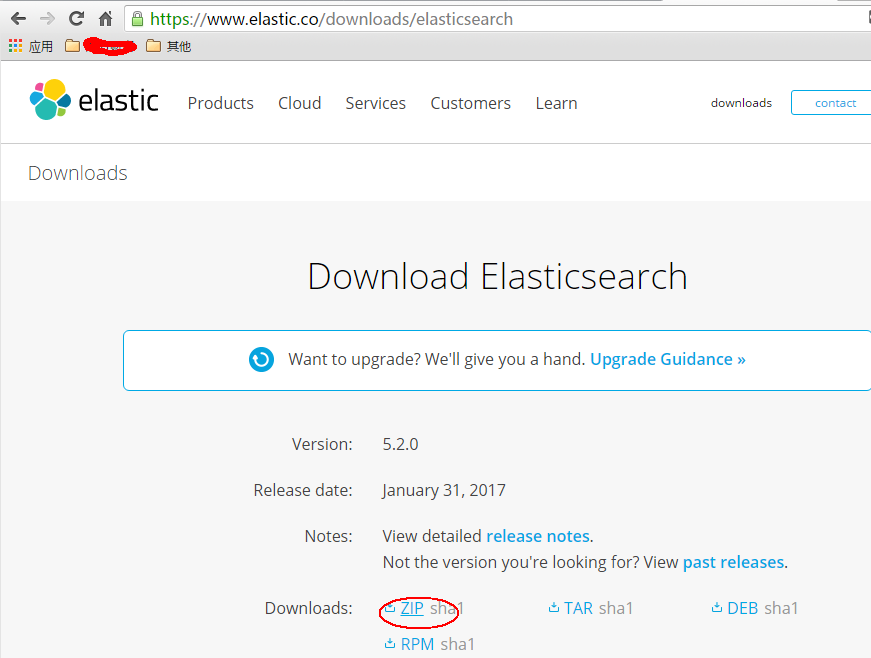
首先,我们从官网下载zip包:(官网:https://www.elastic.co/downloads/elasticsearch) 直接使用浏览器下载可能会很慢,我一般会copy下载链接,然后wget下来: wget https://artifacts.elastic.co/downloads/elasticsearch/elasticsearch-5.2.0.zip 如无意外应该可以安装成功。 接下来就是运行了,这是关键所在,首先我们前往安装目录elasticsearch的安装目录,一般会在:cd /usr/bin/elasticsearch-5.2.0 这个时候如果你直接运行elasticsearch会报以下错误:执行:bin/elasticsearch错误信息: Exception in thread "main" org.elasticsearch.bootstrap.BootstrapException: java.nio.file.NoSuchFileException: /usr/share/elasticsearch/config Likely root cause: java.nio.file.NoSuchFileException: /usr/share/elasticsearch/config ... 见图: elasticsearch github上有这个错误的issue(https://github.com/elastic/ansible-elasticsearch/issues/58)感兴趣的可以看看这个错误的具体原因,我这里主要提供解决方法。 这个错误我觉得主要是因为找不到配置文件,但是如果你直接在安装目录里去启动elasticsearch的话,elasticsearch只会在当前目录找config文件夹,如果安装成service的形式应该是可以找到配置文件,但我没去尝试,后面试试。 问题知道了,我们可以直接把/etc目录下的elasticsearch配置文件copy过来: cp -r /etc/elasticsearch /usr/share/elasticsearch/config 这个时候我们再启动就不会报刚才的错误了,我们再试一遍:bin/elasticsearch 意料之中,这时候会提示以下错误: [2017-01-17T21:54:48,798][WARN ][o.e.b.ElasticsearchUncaughtExceptionHandler] [] uncaught exception in thread [main] org.elasticsearch.bootstrap.StartupException: java.lang.RuntimeException: can not run elasticsearch as root at org.elasticsearch.bootstrap.Elasticsearch.init(Elasticsearch.java:125) ~[elasticsearch-5.1.2.jar:5.1.2] at org.elasticsearch.bootstrap.Elasticsearch.execute(Elasticsearch.java:112) ~[elasticsearch-5.1.2.jar:5.1.2] at org.elasticsearch.cli.SettingCommand.execute(SettingCommand.java:54) ~[elasticsearch-5.1.2.jar:5.1.2] at org.elasticsearch.cli.Command.mainWithoutErrorHandling(Command.java:122) ~[elasticsearch-5.1.2.jar:5.1.2] at org.elasticsearch.cli.Command.main(Command.java:88) ~[elasticsearch-5.1.2.jar:5.1.2] at org.elasticsearch.bootstrap.Elasticsearch.main(Elasticsearch.java:89) ~[elasticsearch-5.1.2.jar:5.1.2] at org.elasticsearch.bootstrap.Elasticsearch.main(Elasticsearch.java:82) ~[elasticsearch-5.1.2.jar:5.1.2] Caused by: java.lang.RuntimeException: can not run elasticsearch as root at org.elasticsearch.bootstrap.Bootstrap.initializeNatives(Bootstrap.java:100) ~[elasticsearch-5.1.2.jar:5.1.2] at org.elasticsearch.bootstrap.Bootstrap.setup(Bootstrap.java:176) ~[elasticsearch-5.1.2.jar:5.1.2] at org.elasticsearch.bootstrap.Bootstrap.init(Bootstrap.java:306) ~[elasticsearch-5.1.2.jar:5.1.2] at org.elasticsearch.bootstrap.Elasticsearch.init(Elasticsearch.java:121) ~[elasticsearch-5.1.2.jar:5.1.2] ... 6 more 这个错误的原因是elasticsearch不允许使用root启动,因此我们要解决这个问题需要新建一个用户来启动elasticsearch(参考:https://my.oschina.net/topeagle/blog/591451?fromerr=mzOr2qzZ) 具体操作如下: ~ groupadd elsearch ~ useradd elsearch -g elsearch -p elsearch ~ cd /usr/share chown -R elsearch:elsearch elasticsearch su elsearch 这个时候在这个用户去启动elasticsearch,一般情况下这个时候就能成功起来了,可能还会出现一些错误,如: hcw-X450VC% ./elasticsearch 2017-01-17 21:03:31,158 main ERROR Could not register mbeans java.security.AccessControlException: access denied ("javax.management.MBeanTrustPermission" "register") at java.security.AccessControlContext.checkPermission(AccessControlContext.java:472) at java.lang.SecurityManager.checkPermission(SecurityManager.java:585) at com.sun.jmx.interceptor.DefaultMBeanServerInterceptor.checkMBeanTrustPermission(DefaultMBeanServerInterceptor.java:1848) at com.sun.jmx.interceptor.DefaultMBeanServerInterceptor.registerMBean(DefaultMBeanServerInterceptor.java:322) at com.sun.jmx.mbeanserver.JmxMBeanServer.registerMBean(JmxMBeanServer.java:522) at org.apache.logging.log4j.core.jmx.Server.register(Server.java:389) at org.apache.logging.log4j.core.jmx.Server.reregisterMBeansAfterReconfigure(Server.java:167) at org.apache.logging.log4j.core.jmx.Server.reregisterMBeansAfterReconfigure(Server.java:140) at org.apache.logging.log4j.core.LoggerContext.setConfiguration(LoggerContext.java:541) at org.apache.logging.log4j.core.LoggerContext.start(LoggerContext.java:258) at org.apache.logging.log4j.core.impl.Log4jContextFactory.getContext(Log4jContextFactory.java:206) at org.apache.logging.log4j.core.config.Configurator.initialize(Configurator.java:220) at org.apache.logging.log4j.core.config.Configurator.initialize(Configurator.java:197) at org.elasticsearch.common.logging.LogConfigurator.configureStatusLogger(LogConfigurator.java:125) at org.elasticsearch.common.logging.LogConfigurator.configureWithoutConfig(LogConfigurator.java:67) at org.elasticsearch.cli.Command.main(Command.java:85) at org.elasticsearch.bootstrap.Elasticsearch.main(Elasticsearch.java:89) at org.elasticsearch.bootstrap.Elasticsearch.main(Elasticsearch.java:82) 这是因为elasticsearch需要读写配置文件,我们需要给予config文件夹权限,上面新建了elsearch用户,elsearch用户不具备读写权限,因此还是会报错,解决方法是切换到管理员账户,赋予权限即可: sudo -i chmod -R 775 config 这个时候就可以起来了,来看看效果: 在浏览器查看: 到这里为止,centos 7安装elasticsearch就完成了 转载请标明本文来源:http://www.cnblogs.com/yswenli/p/6397351.html更多内容欢迎我的的github:https://github.com/yswenli如果发现本文有什么问题和任何建议,也随时欢迎交流~ 感谢您的阅读,如果您对我的博客所讲述的内容有兴趣,请继续关注我的后续博客,我是yswenli 。

优秀的个人博客,低调大师

hive 动态分区(Dynamic Partition)异常处理

Changing Hive Dynamic Partition Limits Symptoms: Hive enforces limits on the number of dynamic partitions that it creates. The default is 100 dynamic partitions per node, with a total (default) limit of 1000 dynamic partitions across all nodes. However, this can be tuned. If your job tries to create too many dynamic partitions, you may see a stack trace similar to the following: Diagnostic Messages for this Task:Error: java.lang.RuntimeException: org.apache.hadoop.hive.ql.metadata.HiveFatalException: [Error 20004]: Fatal error occurred when node tried to create too many dynamic partitions. The maximum number of dynamic partitions is controlled by hive.exec.max.dynamic.partitions and hive.exec.max.dynamic.partitions.pernode. Maximum was set to: 100at org.apache.hadoop.hive.ql.exec.mr.ExecReducer.reduce(ExecReducer.java:283)at org.apache.hadoop.mapred.ReduceTask.runOldReducer(ReduceTask.java:444)at org.apache.hadoop.mapred.ReduceTask.run(ReduceTask.java:392)at org.apache.hadoop.mapred.YarnChild$2.run(YarnChild.java:167)at java.security.AccessController.doPrivileged(Native Method)at javax.security.auth.Subject.doAs(Subject.java:415)at org.apache.hadoop.security.UserGroupInformation.doAs(UserGroupInformation.java:1556)at org.apache.hadoop.mapred.YarnChild.main(YarnChild.java:162)Caused by: org.apache.hadoop.hive.ql.metadata.HiveFatalException: [Error 20004]: Fatal error occurred when node tried to create too many dynamic partitions. The maximum number of dynamic partitions is controlled by hive.exec.max.dynamic.partitions and hive.exec.max.dynamic.partitions.pernode. Maximum was set to: 100at org.apache.hadoop.hive.ql.exec.FileSinkOperator.getDynOutPaths(FileSinkOperator.java:747)at org.apache.hadoop.hive.ql.exec.FileSinkOperator.startGroup(FileSinkOperator.java:829)at org.apache.hadoop.hive.ql.exec.Operator.defaultStartGroup(Operator.java:498)at org.apache.hadoop.hive.ql.exec.Operator.startGroup(Operator.java:521)at org.apache.hadoop.hive.ql.exec.mr.ExecReducer.reduce(ExecReducer.java:232)... 7 moreFAILED: Execution Error, return code 2 from org.apache.hadoop.hive.ql.exec.mr.MapRedTaskMapReduce Jobs Launched: Cause: Your Hive job tried to create too many dynamic partitions on a node, exceeding the current limits. The number of dynamic partitions is controlled by the settings forhive.exec.max.dynamic.partitionsandhive.exec.max.dynamic.partitions.pernode. The default is 100 dynamic partitions on a single node, with a limit of 1000 overall. Solution: Set the values forhive.exec.max.dynamic.partitionsandhive.exec.max.dynamic.partitions.pernodeto higher values. For example: SET hive.exec.dynamic.partition=true;SET hive.exec.max.dynamic.partitions=2048;SET hive.exec.max.dynamic.partitions.pernode=256;

资源下载

更多资源
优质分享App

优质分享App

近一个月的开发和优化,本站点的第一个app全新上线。该app采用极致压缩,本体才4.36MB。系统里面做了大量数据访问、缓存优化。方便用户在手机上查看文章。后续会推出HarmonyOS的适配版本。

Nacos

Nacos

Nacos /nɑ:kəʊs/ 是 Dynamic Naming and Configuration Service 的首字母简称,一个易于构建 AI Agent 应用的动态服务发现、配置管理和AI智能体管理平台。Nacos 致力于帮助您发现、配置和管理微服务及AI智能体应用。Nacos 提供了一组简单易用的特性集,帮助您快速实现动态服务发现、服务配置、服务元数据、流量管理。Nacos 帮助您更敏捷和容易地构建、交付和管理微服务平台。

Spring

Spring

Spring框架(Spring Framework)是由Rod Johnson于2002年提出的开源Java企业级应用框架,旨在通过使用JavaBean替代传统EJB实现方式降低企业级编程开发的复杂性。该框架基于简单性、可测试性和松耦合性设计理念,提供核心容器、应用上下文、数据访问集成等模块,支持整合Hibernate、Struts等第三方框架,其适用范围不仅限于服务器端开发,绝大多数Java应用均可从中受益。

Rocky Linux

Rocky Linux

Rocky Linux(中文名:洛基)是由Gregory Kurtzer于2020年12月发起的企业级Linux发行版,作为CentOS稳定版停止维护后与RHEL(Red Hat Enterprise Linux)完全兼容的开源替代方案,由社区拥有并管理,支持x86_64、aarch64等架构。其通过重新编译RHEL源代码提供长期稳定性,采用模块化包装和SELinux安全架构,默认包含GNOME桌面环境及XFS文件系统,支持十年生命周期更新。


用户登录
用户注册
修改密码
忘记密码