首页 文章 精选 留言 我的

精选列表

搜索[windows server],共10000篇文章
优秀的个人博客,低调大师

Hadoop on Windows with Eclipse -04- Setup SSH daemon

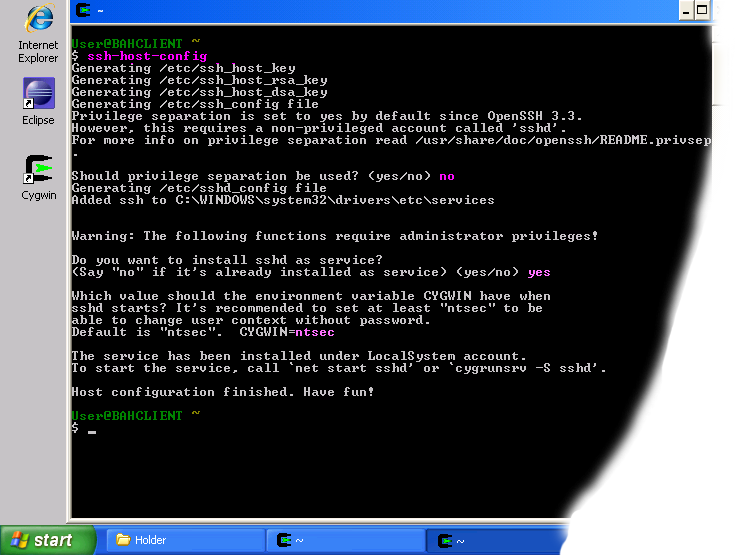
Setup SSH daemon Both Hadoop scripts and Eclipse plug-in need password-less SSH to operate. This section describes how to set it up in the Cygwin environment. Configure ssh daemon Open the Cygwin command prompt. Execute the following command: ssh-host-config When asked if privilege separation should be used, answerno. When asked if sshd should be installed as a service, answeryes. When asked about the value of CYGWIN environment variable, enterntsec. Here is an example session of this command. Note that the input typed by the user is shown in pink and output from the system is shown in gray. Example of using ssh-host-config Start SSH daemon here FindMy Computericon either on your desktop or in the start-up menu, right-click on it and selectManagefrom the context menu. OpenServices and Applicationsin the left-hand panel then select theServicesitem. Find theCYGWIN sshditem in the main section and right-click on it. SelectStartfrom the context menu. Start SSHD service A small window should pop-up indicating the progress of the service start-up. After that window disappears the status of CYGWIN sshd service should change toStarted. Setup authorization keys Eclipse plug-in and Hadoop scripts require ssh authentication to be performed through authorization keys rather than passwords. The following steps describe how authorization keys are set up. here Open cygwin command prompt Execute the following command to generate keys ssh-keygen When prompted for filenames and pass phrases press ENTER to accept default values. After the command has finished generating keys, enter the following command to change into your .ssh directory: cd ~/.ssh Check if the keys were indeed generated by executing the following command: ls -l You should see two filesid_rsa.pubandid_rsawith recent creation dates.These files contain authorization keys. To register the new authorization keys enter the following command (note the sharply-angled double brackets -- they are very important): cat id_rsa.pub >> authorized_keys Setting up authorization keys Now check if the keys were set up correctly by executing the following command: ssh localhost Since it is a new ssh installation, you will be warned that authenticity of the host could not be established and will be asked whether you really want to connect. Answeryesand press ENTER. You should see the Cygwin prompt again, which means that you have successfully connected. Now execute the command again: ssh localhost This time you should not be prompted for anything.

优秀的个人博客,低调大师

Hadoop on Windows with Eclipse -06- Unpack Hadoop Installation

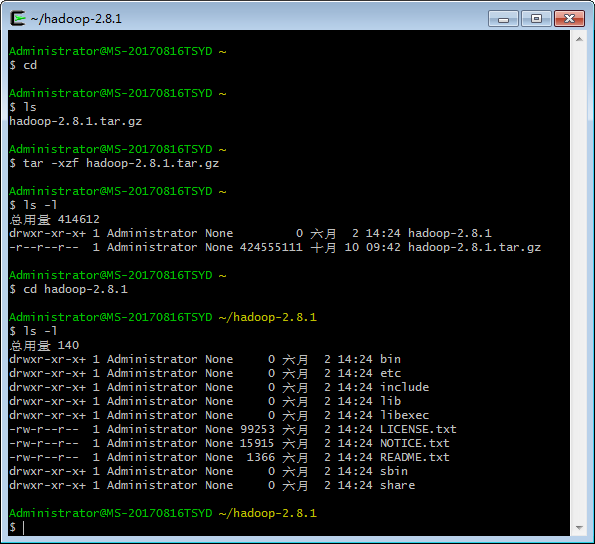
Unpack Hadoop Installation The next step is to unpack the downloaded and copied package. here To unpack the package follow these steps: Open a new Cygwin window. After the new Cygwin window appears, execute the following command: tar -xzf hadoop-0.19.1.tar.gz This will start unpacking the Hadoop distribution. After several minutes you should see a new Cygwin prompt again as shown in the screenshot below: When you see the new prompt, execute the following command: ls -l This command will list the contents of your home directory. You should see a newly created directory calledhadoop-0.19.1 Next execute the following commands: cd hadoop-0.19.1 ls -l If you get output similar to the following, everything was unpacked correctly and you can go to the next step.

优秀的个人博客,低调大师

Hadoop on Windows with Eclipse -03- Set Environment Variables

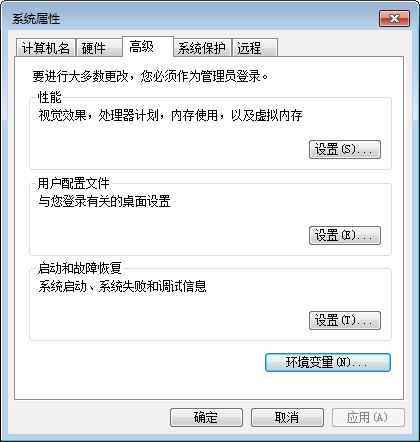
Set Environment Variables The next step is to set up the PATH environment variable so that Eclipse IDE can access Cygwin commands here To set environment variables follow these steps: Find "My Computer" icon either on the desktop or in the start menu, right-click on it and selectPropertiesitem from the menu. When you see the Properties dialog box, click on theEnvironment Variablesbutton as shown below WhenEnvironment Variablesdialog shows up, click on thePathvariable located in theSystem Variablesbox and then click theEditbutton. WhenEditdialog appears append the following text to the end of theVariable valuefield: ;c:\cygwin64\bin;c:\cygwin64\usr\sbin Note: If you installed cygwin in the non-standard location, correct the above value accordingly. Close all three dialog boxes by pressing OK button of each dialog box.

资源下载

更多资源
Mario

Mario

马里奥是站在游戏界顶峰的超人气多面角色。马里奥靠吃蘑菇成长,特征是大鼻子、头戴帽子、身穿背带裤,还留着胡子。与他的双胞胎兄弟路易基一起,长年担任任天堂的招牌角色。

腾讯云软件源

腾讯云软件源

为解决软件依赖安装时官方源访问速度慢的问题,腾讯云为一些软件搭建了缓存服务。您可以通过使用腾讯云软件源站来提升依赖包的安装速度。为了方便用户自由搭建服务架构,目前腾讯云软件源站支持公网访问和内网访问。

Spring

Spring

Spring框架(Spring Framework)是由Rod Johnson于2002年提出的开源Java企业级应用框架,旨在通过使用JavaBean替代传统EJB实现方式降低企业级编程开发的复杂性。该框架基于简单性、可测试性和松耦合性设计理念,提供核心容器、应用上下文、数据访问集成等模块,支持整合Hibernate、Struts等第三方框架,其适用范围不仅限于服务器端开发,绝大多数Java应用均可从中受益。

Rocky Linux

Rocky Linux

Rocky Linux(中文名:洛基)是由Gregory Kurtzer于2020年12月发起的企业级Linux发行版,作为CentOS稳定版停止维护后与RHEL(Red Hat Enterprise Linux)完全兼容的开源替代方案,由社区拥有并管理,支持x86_64、aarch64等架构。其通过重新编译RHEL源代码提供长期稳定性,采用模块化包装和SELinux安全架构,默认包含GNOME桌面环境及XFS文件系统,支持十年生命周期更新。


用户登录
用户注册
修改密码
忘记密码