首页 文章 精选 留言 我的

精选列表

搜索[虚拟线程],共10000篇文章
优秀的个人博客,低调大师

学生机房虚拟架构设计初步实现

一、安装系统 1、硬盘安装 第一步,使用U盘引导进入PE,对目标磁盘进行格式化操作,并分33G为NTFS格式,位于磁盘的最后部分。[此部分涉及用它盘来处理母盘] 第二步,用另一个U盘拷贝硬盘安装系统所必须的文件:mini-10.10.iso以及从/casper/中提取的文件initrd.lz、linux。 第三步,利用U盘中的Grub来引导iso镜像进行硬盘安装。menu.lst的 find /linux root (hdx,y) 注:(hdx,y) 是在find /linux命令后得出的结果。 kernel /linux iso-scan/filename=mini-10.10.iso ro quiet initrd /initrd.gz boot 在安装过程中会问地区,然后会友好的提供对应地区的网络镜像网站,然后从网络上下载软件包的信息,这段时间会因网络的好坏而有所不同。 第四步,分区设置/boot—150M,swap—3G,/--51.6G,/vmos--160G。 2.安装chkconfig 可以方便的实现服务在不同的开启与关闭 sudo apt-get install chkconfig 3.开启SSH 最大的目的是为了在远程调试方便、传输文件方便、使用Clonezilla方便。 sudo apt-get install ssh 4.安装vmaker GUI环境 sudo apt-get install wmaker 5.启动GUI会出现'startx' is currently not installed. shenzhi@sz08254:/$ startx The program 'startx' is currently not installed. You can install it by typing: sudo apt-get install xinit 6.安装xinit sudo apt-get install xinit 7.压缩与解压支持 增加 rar 软件压缩和解压缩支持 sudo apt-get install rar unrar 增加 zip 格式压缩和解压缩支持[此项不用做,安装完file-roller后就有了] sudo apt-get install zip unzip 二、安装VM 2.1上传准备 在ubuntu中安装sshfs sudo apt-get install sshfs 挂载当前linux系统的文件夹到ubuntu[在ubuntu中执行命令] shenzhi@sz08254:~$ sshfs shenzhi@192.168.0.107:/home/shenzhi/vmbak /home/shenzhi/soft 我是通过ssh工具远程登录到ubuntu主机 sz08254上,然后 sshfs shenzhi@192.168.0.107:/home/shenzhi/vmbak 回访当前的Linux系统的目录,将其挂载到ubuntu主机 sz08254的目录/home/shenzhi/soft下。 =============sshfs 网络参考资料============= sshfs name@server:/path/to/folder /path/to/mount/point 这条命令可以让你通过 SSH 加载远程主机上的文件系统为本地磁盘,前提是你需要安装 FUSE 及 sshfs 这两个软件。 卸载的话使用 fusermount 命令: fusermount -u /path/to/mount/point =============sshfs 网络参考资料============= 2.2上传文件-再生龙Clonezilla clonezilla-disk.rar 2.3解压文件 unrar x clonezilla-disk.rar 2.4 ubuntu 10.10显示grub菜单 安装ubuntu10.10后,如果机器上只有一个系统,默认grub菜单是不会显示的,如果想要显示,按如下步骤操作: 1.把/etc/default/grub文件中的GRUB_HIDDEN_TIMEOUT=0的0改为大于0的数字,比如5; 2.把/etc/grub.d/30_os-prober文件中的所有set timeout=0的0改为10,如下: adjust_timeout () { if [ "x${found_other_os}" = "x" ] ; then if [ "x${GRUB_HIDDEN_TIMEOUT}" != "x" ] ; then if [ "x${GRUB_HIDDEN_TIMEOUT_QUIET}" = "xtrue" ] ; then verbose= else verbose=" --verbose" fi if [ "x${GRUB_HIDDEN_TIMEOUT}" = "x0" ] ; then cat <<EOF if [ /${timeout} != -1 ]; then if keystatus; then if keystatus --shift; then set timeout=-1 else set timeout=10 fi else if sleep$verbose --interruptible 3 ; then set timeout=10 fi fi fi EOF else cat << EOF if [ /${timeout} != -1 ]; then if sleep$verbose --interruptible ${GRUB_HIDDEN_TIMEOUT} ; then set timeout=10 fi fi EOF fi fi fi } 来自:http://blog.chinaunix.net/u2/61800/showart_2371499.html 使grub的设置生效 sudo update-grub 三、设置自动脚本 [待续中……] 本文转自tiancong 51CTO博客,原文链接:http://blog.51cto.com/tiancong/738314

优秀的个人博客,低调大师

OpenStack —— 虚拟机的启动过程简述(八)

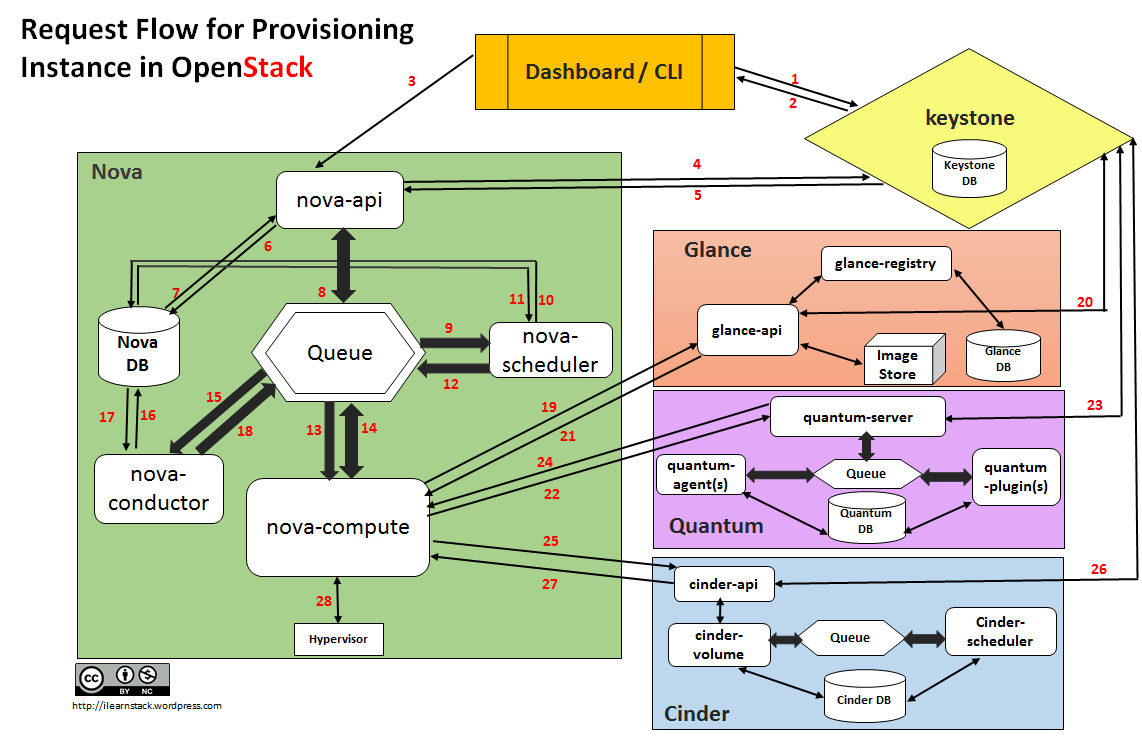
DashboardorCLIgets the user credential and does the REST call toKeystonefor authentication. Keystoneauthenticate the credentials and generate & send back auth-token which will be used for sending request to other Components through REST-call. DashboardorCLIconvert the new instance request specified in ‘launch instance’ or ‘nova-boot’ form to REST API request and send it tonova-api. nova-apireceive the request and sends the request for validation auth-token and access permission tokeystone. Keystonevalidates the token and sends updated auth headers with roles and permissions. nova-apiinteracts withnova-database. Creates initial db entry for new instance. nova-apisends therpc.callrequest tonova-schedulerexcepting to get updated instance entry with host ID specified. nova-schedulerpicks the request from thequeue. nova-schedulerinteracts withnova-databaseto find an appropriate host via filtering and weighing. Returns the updated instance entry with appropriate host ID after filtering and weighing. nova-schedulersends therpc.castrequest tonova-computefor ‘launching instance’ on appropriate host . nova-computepicks the request from thequeue. nova-computesend therpc.callrequest tonova-conductorto fetch the instance information such ashost ID and flavor( Ram , CPU ,Disk). nova-conductorpicks the request from thequeue. nova-conductorinteracts withnova-database. Return the instance information. nova-computepicks the instance information from thequeue. nova-computedoes the REST call by passing auth-token toglance-apito get the Image URI by Image ID from glance and upload image from image storage. glance-apivalidates the auth-token withkeystone. nova-computeget the image metadata. nova-computedoes the REST-call by passing auth-token toNetwork APIto allocate and configure the network such that instance gets the IP address. quantum-servervalidates theauth-token withkeystone. nova-computeget the network info. nova-computedoes the REST call by passingauth-token toVolume APIto attach volumes to instance. cinder-apivalidates the auth-token withkeystone. nova-computegets the block storage info. nova-computegenerates data for hypervisor driver and executes request on Hypervisor( vialibvirtorapi). 本文转自 wzlinux 51CTO博客,原文链接:http://blog.51cto.com/wzlinux/1964195,如需转载请自行联系原作者

资源下载

更多资源
Spring

Spring

Spring框架(Spring Framework)是由Rod Johnson于2002年提出的开源Java企业级应用框架,旨在通过使用JavaBean替代传统EJB实现方式降低企业级编程开发的复杂性。该框架基于简单性、可测试性和松耦合性设计理念,提供核心容器、应用上下文、数据访问集成等模块,支持整合Hibernate、Struts等第三方框架,其适用范围不仅限于服务器端开发,绝大多数Java应用均可从中受益。

Rocky Linux

Rocky Linux

Rocky Linux(中文名:洛基)是由Gregory Kurtzer于2020年12月发起的企业级Linux发行版,作为CentOS稳定版停止维护后与RHEL(Red Hat Enterprise Linux)完全兼容的开源替代方案,由社区拥有并管理,支持x86_64、aarch64等架构。其通过重新编译RHEL源代码提供长期稳定性,采用模块化包装和SELinux安全架构,默认包含GNOME桌面环境及XFS文件系统,支持十年生命周期更新。

Sublime Text

Sublime Text

Sublime Text具有漂亮的用户界面和强大的功能,例如代码缩略图,Python的插件,代码段等。还可自定义键绑定,菜单和工具栏。Sublime Text 的主要功能包括:拼写检查,书签,完整的 Python API , Goto 功能,即时项目切换,多选择,多窗口等等。Sublime Text 是一个跨平台的编辑器,同时支持Windows、Linux、Mac OS X等操作系统。

WebStorm

WebStorm

WebStorm 是jetbrains公司旗下一款JavaScript 开发工具。目前已经被广大中国JS开发者誉为“Web前端开发神器”、“最强大的HTML5编辑器”、“最智能的JavaScript IDE”等。与IntelliJ IDEA同源,继承了IntelliJ IDEA强大的JS部分的功能。


用户登录
用户注册