首页 文章 精选 留言 我的

精选列表

搜索[屏幕阅读器],共8149篇文章
优秀的个人博客,低调大师

python : 动态不刷屏幕输出 python/shell 实现

前言后台运行程序有一种需求,比如查看当前进度,想在终端看到某个值的变化情况: 先提供一种很土的办法,把进度落地文件为 例如 process,采用创建写的方式。然后可以使用watch -n 1 cat process来查看进度。 这里提供两种方式,python和shell shell版本,如下(附带一个进度条的例子) #! /bin/bash for ((i=0; $i<=100; i+=1)) do printf "progress: [%-100s] %d%%\r" "xxxxxxxxxx xxx xxx" $i sleep 1 done function sleepPrograss(){ [ $# -eq 0 ] && echo "sleepPrograss Usage: sleepPrograss 10 " [ $# -eq 0 ] && return 1 allTime=$1 strDone='' stepTime=$(echo "scale=1; $allTime/100" | bc) for ((i=0; $i<=100; i+=1)) do printf "progress: [%-100s] %d%%\r" $strDone $i sleep $stepTime strDone+='#' done echo } python版本,如下(附一个多线程输出进度的例子) 基础用法示例 #! /usr/bin/env python import os import sys import time while 1: os.write(1, "\r[%.3f]" % time.time()) sys.stdout.flush() time.sleep(1) 子线程完成自己的任务,主线程跟踪执行进度。 ** 小编推荐一个学python的学习qun 740322234无论你是大牛还是小白,是想转行还是想入行都可以来了解一起进步一起学习!裙内有开发工具,很多干货和技术资料分享! ** #! /usr/bin/env python # -*- coding: utf-8 -*- ''' @filename : demo.py @authors : U{peterguo<mailto: peterguo@tencent.com>} @copyright: tencent @date : 2012-11-15 @version : 1.0.0.1 ''' import os import sys import time import thread g_nTotal = 100 g_nProcessed = 0 g_fStartTime = time.time() def simpleThdreadFun(interval): global g_nProcessed global g_nTotal while g_nTotal > g_nProcessed: time.sleep(interval) g_nProcessed += 1 thread.exit_thread() def test(): global g_nTotal global g_nProcessed global g_fStartTime g_fStartTime = time.time() thread.start_new_thread(simpleThdreadFun, (1,)) thread.start_new_thread(simpleThdreadFun, (2,)) thread.start_new_thread(simpleThdreadFun, (3,)) thread.start_new_thread(simpleThdreadFun, (4,)) while True: time.sleep(0.5) fRunTime = time.time() - g_fStartTime nLeftNum = g_nTotal - g_nProcessed fLeftTime = fRunTime * nLeftNum / (g_nProcessed + 0.1) fPrograss = 100.0 * g_nProcessed / g_nTotal os.write(1, "\rLeftTime[%.3f]\tLeftNum[%d]\tProgress[%.3f %% (%d/%d) ]" % (fLeftTime, nLeftNum, fPrograss, g_nProcessed, g_nTotal)) sys.stdout.flush() if g_nTotal <= g_nProcessed: break print "\nTest Done, use %.3f seconds" % (time.time() - g_fStartTime) if __name__=='__main__': test()


优秀的个人博客,低调大师

Keep the Screen from Locking(阻止屏幕自动上锁)

在ios设备中,如果ios设备一段时间中没收到touch事件,ios设备就会自动锁定,但是在玩游戏时候可能会某段时间不触发touch时间,这时候就会锁定,而这并不是我们所想要的,那么我们可以设置 [[UIApplication sharedApplication] setIdleTimerDisabled: YES]; // Or for those who prefer dot syntax: [UIApplication sharedApplication].idleTimerDisabled = YES; swift // 保持常亮 UIApplication.shared.isIdleTimerDisabled = true

优秀的个人博客,低调大师

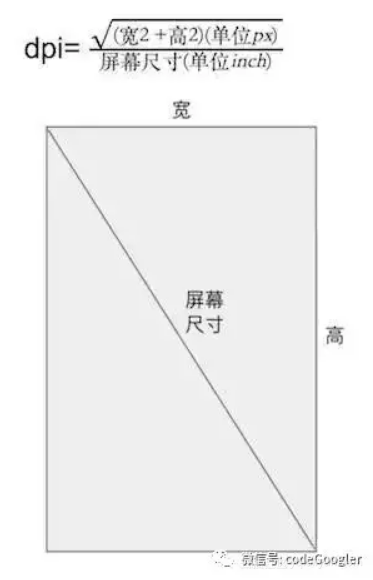
Android 获得手机屏幕真实的宽高

http://stackoverflow.com/questions/1016896/get-screen-dimensions-in-pixels WindowManager w = activity.getWindowManager(); Display d = w.getDefaultDisplay(); DisplayMetrics metrics = new DisplayMetrics(); d.getMetrics(metrics); // since SDK_INT = 1; widthPixels = metrics.widthPixels; heightPixels = metrics.heightPixels; try { // used when 17 > SDK_INT >= 14; includes window decorations (statusbar bar/menu bar) widthPixels = (Integer) Display.class.getMethod("getRawWidth").invoke(d); heightPixels = (Integer) Display.class.getMethod("getRawHeight").invoke(d); } catch (Exception ignored) { } try { // used when SDK_INT >= 17; includes window decorations (statusbar bar/menu bar) Point realSize = new Point(); Display.class.getMethod("getRealSize", Point.class).invoke(d, realSize); widthPixels = realSize.x; heightPixels = realSize.y; } catch (Exception ignored) { } EDIT: slightly improved version (avoid firing exceptions on non-supported OS version):

资源下载

更多资源
腾讯云软件源

腾讯云软件源

为解决软件依赖安装时官方源访问速度慢的问题,腾讯云为一些软件搭建了缓存服务。您可以通过使用腾讯云软件源站来提升依赖包的安装速度。为了方便用户自由搭建服务架构,目前腾讯云软件源站支持公网访问和内网访问。

Nacos

Nacos

Nacos /nɑ:kəʊs/ 是 Dynamic Naming and Configuration Service 的首字母简称,一个易于构建 AI Agent 应用的动态服务发现、配置管理和AI智能体管理平台。Nacos 致力于帮助您发现、配置和管理微服务及AI智能体应用。Nacos 提供了一组简单易用的特性集,帮助您快速实现动态服务发现、服务配置、服务元数据、流量管理。Nacos 帮助您更敏捷和容易地构建、交付和管理微服务平台。

Rocky Linux

Rocky Linux

Rocky Linux(中文名:洛基)是由Gregory Kurtzer于2020年12月发起的企业级Linux发行版,作为CentOS稳定版停止维护后与RHEL(Red Hat Enterprise Linux)完全兼容的开源替代方案,由社区拥有并管理,支持x86_64、aarch64等架构。其通过重新编译RHEL源代码提供长期稳定性,采用模块化包装和SELinux安全架构,默认包含GNOME桌面环境及XFS文件系统,支持十年生命周期更新。

Sublime Text

Sublime Text

Sublime Text具有漂亮的用户界面和强大的功能,例如代码缩略图,Python的插件,代码段等。还可自定义键绑定,菜单和工具栏。Sublime Text 的主要功能包括:拼写检查,书签,完整的 Python API , Goto 功能,即时项目切换,多选择,多窗口等等。Sublime Text 是一个跨平台的编辑器,同时支持Windows、Linux、Mac OS X等操作系统。

用户登录
用户注册