首页 文章 精选 留言 我的

精选列表

搜索[命令行],共8258篇文章
优秀的个人博客,低调大师

新功能:日志服务命令行工具ETL发布!

日志服务托管服务数据加工已经发布,参考: https://yq.aliyun.com/articles/704935 背景 使用日志服务,在搜索、分析时是否经常遇到以下数据格式规整的痛点? 1. 采集时ETL的痛点: 交换机、服务器、容器、Logging模块等,通过文件、标准输出、syslog、网络等途径收集时,里面是各种日志格式的混合,只能做部分提取,例如使用logtail先提取某些基础字段,例如时间、log level、IP等,但是日志主体message中很多有价值的信息因为混合了各种日志,无法在导入时提取? 单一场景下的日志,例如NGNIX,的QueryString中的字符串,或者HttpCookie、甚至HttpBody信息等,里面字段内容变化巨大,格式信息复杂度也很高,难以在提取的时候一次性使用正则表达式完成提取。 某些常规日志包含

优秀的个人博客,低调大师

Java性能调优工具之JDK命令行

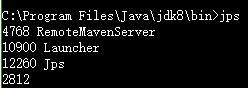
1.1 jps 类似Linux的ps,但是jps只用于列出Java的进程 可以方便查看Java进程的启动类,传入参数和JVM参数等 直接运行,不加参数,列出Java程序的进程ID以及Main函数等名称 jps命令本质也是Java程序 -m 输出传递给Java进程的参数 -l 输出主函数的完整路径 -q 只输出进程ID -v 显示传递给jvm的参数 1.2 jstat 用于观察Java应用程序运行时信息的工具,详细查看堆使用情况以及GC情况 image.png jstat -class pid:显示加载class的数量,及所占空间等信息。 -compiler -t:显示JIT编译的信息 -gc pid:可以显示gc的信息,查看gc的次数,及时间。其中最后五项,分别是young gc的次数,young gc的时间,full gc的次数,full gc的时间,gc的总时间。 -gccapacity比-gc多了各个代的最大值和最小值 -gccause 4768 最近一次GC统计和原因 LGCC:上次GC原因 GCC:当前GC原因 -gcnew pid:new对象的信息。 jstat -gcnewcapacity pid:new对象的信息及其占用量。 -gcold 显示老年代和永久代信息 -gcoldcapacity展现老年代的容量信息 image.png -gcutil显示GC回收相关信息 jstat -printcompilation pid:当前VM执行的信息。 还可以同时加两个数 输出进程4798的ClassLoader信息,每1秒统计一次,共输出2次 1.3 jinfo 查看正在运行的Java应用程序的扩展参数,甚至在运行时修改部分参数jinfo <option> <pid> jinfo可以查看运行时参数: jinfo -flag MaxTenuringThreshold 31518 -XX:MaxTenuringThreshold=15 jinfo还可以在运行时修改参数值: > jinfo -flag PrintGCDetails 31518 -XX:-PrintGCDetails > jinfo -flag +PrintGCDetails 31518 > jinfo -flag PrintGCDetails 31518 -XX:+PrintGCDetails 1.4 jmap 生成堆快照和对象的统计信息 -histo 打印每个class的实例数目,内存占用,类全名信息. VM的内部类名字开头会加上前缀”*”. 如果live子参数加上后,只统计活的对象数量. -dump:[live,]format=b,file=<filename> 使用hprof二进制形式,输出jvm的heap内容到文件=. live子选项是可选的,假如指定live选项,那么只输出活的对象到文件. 获得堆快照文件之后,我们可以使用多种工具对文件进行分析,例如jhat,visual vm等。 1.5 jhat 分析Java应用程序的堆快照文件,以前面生成的为例 jhat heap.hprof jhat在分析完成之后,使用HTTP服务器展示其分析结果,在浏览器中访问 http://127.0.0.1:7000/即可得到分析结果。 1.6b jstack 导出Java应用程序的线程堆栈jstack -l <pid> jstack可以检测死锁,下例通过一个简单例子演示jstack检测死锁的功能。java代码如下: 使用jps命令查看进程号为11468,然后使用jstack -l 11468 > a.txt命令把堆栈信息打印到文件中 从这个输出可以知道: 1、在输出的最后一段,有明确的"Found one Java-level deadlock"输出,所以通过jstack命令我们可以检测死锁 2、输出中包含了所有线程,除了我们的north,sorth线程外,还有"Attach Listener", "C2 CompilerThread0", "C2 CompilerThread1"等等; 3、每个线程下面都会输出当前状态,以及这个线程当前持有锁以及等待锁,当持有与等待造成循环等待时,将导致死锁

优秀的个人博客,低调大师

openstack 命令行管理十八 - instance管理 (备忘)

Openstak 中, 常用 nova 命令对实例进行管理 常见管理方法有, 创建, 删除, 更改(resize flavor, 冷/热迁移), 查询 等 列出当前 tenant 中的实例 首先需要载入 keystone 验证信息 [root@gz-controller-209131 ~(keystone_admin)]# cat keystonerc_admin export OS_USERNAME=admin export OS_TENANT_NAME=admin export OS_PASSWORD=你的openstack密码 export OS_AUTH_URL=http://240.70.115.80:5000/v2.0/ <- keystone 连接方法 export PS1='[\u@\h \W(keystone_admin)]\$ ' 使用 source 命令导入验证信息 [root@gz-controller-209131 ~(keystone_admin)]# source keystonerc_admin 命令帮助 [root@hh-yun-puppet-129021 ~(keystone_admin)]# nova help | grep -E 'boot|list|delete|stop|remove' absolute-limits Print a list of absolute limits for a user agent-delete Delete existing agent build. agent-list List all builds. aggregate-delete Delete the aggregate. aggregate-list Print a list of all aggregates. aggregate-remove-host availability-zone-list boot Boot a new server. cloudpipe-list Print a list of all cloudpipe instances. delete Immediately shut down and delete specified server(s). dns-delete Delete the specified DNS entry. dns-delete-domain Delete the specified DNS domain. dns-domains Print a list of available dns domains. dns-list List current DNS entries for domain and ip or domain flavor-access-list Print access information about the given flavor. flavor-access-remove flavor-delete Delete a specific flavor flavor-list Print a list of available 'flavors' (sizes of floating-ip-bulk-delete Bulk delete floating ips by range. floating-ip-bulk-list floating-ip-delete De-allocate a floating IP. floating-ip-list List floating ips for this tenant. floating-ip-pool-list host-list List all hosts by service. hypervisor-list List hypervisors. image-delete Delete specified image(s). image-list Print a list of available images to boot from. interface-list List interfaces attached to a server. keypair-delete Delete keypair given by its name. keypair-list Print a list of keypairs for a user list List active servers. list-secgroup List Security Group(s) of a server. network-list Print a list of available networks. quota-delete Delete quota for a tenant/user so their quota will rate-limits Print a list of rate limits for a user reboot Reboot a server. rebuild Shutdown, re-image, and re-boot a server. remove-fixed-ip Remove an IP address from a server. remove-floating-ip DEPRECATED, use floating-ip-disassociate instead. remove-secgroup Remove a Security Group from a server. secgroup-delete Delete a security group. secgroup-delete-group-rule secgroup-delete-rule secgroup-list List security groups for the current tenant. secgroup-list-rules server-group-delete server-group-list Print a list of all server groups. service-list Show a list of all running services. Filter by host & stop Stop a server. usage-list List usage data for all tenants. volume-delete Remove volume(s). volume-list List all the volumes. volume-snapshot-delete volume-snapshot-list volume-type-delete Delete a specific flavor volume-type-list Print a list of available 'volume types'. instance-action-list force-delete Force delete a server. restore Restore a soft-deleted server. net-delete Delete a network net-list List networks baremetal-interface-list baremetal-interface-remove baremetal-node-delete baremetal-node-list Print list of available baremetal nodes. migration-list Print a list of migrations. list-extensions List all the os-api extensions that are available. 创建主机相关帮助 [root@station140 ~(keystone_admin)]# nova boot usage: nova boot [--flavor <flavor>] [--image <image>] [--image-with <key=value>] [--boot-volume <volume_id>] [--snapshot <snapshot_id>] [--num-instances <number>] [--meta <key=value>] [--file <dst-path=src-path>] [--key-name <key-name>] [--user-data <user-data>] [--availability-zone <availability-zone>] [--security-groups <security-groups>] [--block-device-mapping <dev-name=mapping>] [--block-device key1=value1[,key2=value2...]] [--swap <swap_size>] [--ephemeral size=<size>[,format=<format>]] [--hint <key=value>] [--nic <net-id=net-uuid,v4-fixed-ip=ip-addr,port-id=port-uuid>] [--config-drive <value>] [--poll] <name> 列出flavor-list [root@hh-yun-puppet-129021 ~(keystone_admin)]# nova flavor-list +--------------------------------------+-----------------+-----------+------+-----------+------+-------+-------------+-----------+ | ID | Name | Memory_MB | Disk | Ephemeral | Swap | VCPUs | RXTX_Factor | Is_Public | +--------------------------------------+-----------------+-----------+------+-----------+------+-------+-------------+-----------+ | 05a60192-4e43-40ae-a2c7-d37d7e9a81b1 | 2core-8g-40g | 8192 | 40 | 0 | 2048 | 2 | 1.0 | True | | 1012 | normal_1core | 2048 | 20 | 0 | 1024 | 1 | 1.0 | False | | 12266e3a-a1fc-4f6a-83f8-fc841abce59e | b2c_allinone_8G | 8192 | 40 | 0 | 1024 | 4 | 1.0 | True | | 3017f87a-a3b2-46ef-8d37-ad341919b74c | 8core-8g | 8192 | 40 | 0 | 2048 | 8 | 1.0 | True | | 43664714-1c93-4e7a-adbd-9e47a6a932fa | 2core-2g | 2048 | 20 | 0 | 1024 | 2 | 1.0 | True | | 5c88939b-8807-4821-9718-5bafecc1daa2 | 2core-8g | 8192 | 20 | 0 | 2048 | 2 | 1.0 | True | | 76269352-5050-4095-b4f3-3ea86cb2879c | 2core-2g-40g | 2048 | 40 | 0 | 2048 | 2 | 1.0 | True | | 8d20b341-d0a2-47e2-acf7-73e64d76a8fe | 4core-8g | 8192 | 40 | 0 | 2048 | 4 | 1.0 | True | | 989f6219-3231-45b5-bcfd-daf87ac07705 | 8core-16g | 16384 | 40 | 0 | 2048 | 8 | 1.0 | True | | 9bb5f019-0c7c-41fc-a3ed-e6e44413a3d3 | 8core-32g | 32768 | 40 | 0 | 2048 | 8 | 1.0 | True | | a009164a-f9fe-47fc-9876-e27dbcef1040 | mysql_db | 4096 | 20 | 0 | 1024 | 4 | 1.0 | True | | bfaefcff-f01b-42fc-bdec-1e5c9fa3c0a1 | b2c_allinone | 4096 | 40 | 0 | 1024 | 2 | 1.0 | True | | ced08277-a79f-491f-97eb-275d5271777e | b2c_web | 2048 | 20 | 0 | 1024 | 2 | 1.0 | True | | dc98e6d6-143f-42c2-9482-ee6efb04ff7e | 4core-4g | 4096 | 40 | 0 | 1024 | 4 | 1.0 | True | | de61ffb3-b1fe-46ec-99c5-390e5280e6d7 | 4core-16g | 16384 | 40 | 0 | 2048 | 4 | 1.0 | True | | edd174c2-7ce1-445d-86b0-3d10705a12b1 | 2core-4g | 4096 | 20 | 0 | 1024 | 2 | 1.0 | True | | f43fe47d-0be6-4c8f-ba0e-cdfa8fea04e0 | b2c_web_1core | 2048 | 20 | 0 | 1024 | 1 | 1.0 | True | | ff40b4a3-fd79-444b-884b-6447e5dc3265 | 2core-4g-40g | 4096 | 40 | 0 | 2048 | 2 | 1.0 | True | +--------------------------------------+-----------------+-----------+------+-----------+------+-------+-------------+-----------+ 列出镜像命名 [root@hh-yun-puppet-129021 ~(keystone_admin)]# glance image-list | grep -v "+" | awk '{printf "%-35s %25s\n", $2,$4}' ID Name 04135fe1-14d8-4480-a638-189ed93ea620 Centos5.8_2.9.4_old c6ce9208-70d4-4b67-ad0a-a82927dcd5b7 Centos5.8_2.9.5 8f9686dc-3286-41ab-8a03-8a107aa56b27 Centos5.8_2.9.5_v1 e624e961-52a4-4c8f-81c4-809355707147 Centos5.8_2.9.6 a1e93465-b3ab-456e-ab30-24ed6d77c11f centos5.8_test_anquan05 f1739787-c454-4001-9253-c7c5d437aff5 Centos6.3_1.3 f87f65e3-24ff-44c0-8858-9662334679e4 Centos6.3_x86_64_1.2 764b2022-0ecf-4013-b68a-898e9c31fb46 Centos6.6_x86_64_1.10 2250a24b-c83d-4c6b-882f-87415a46ea83 Centos6.6_x86_64_1.12 301db4ff-a46f-4235-8f85-5414797377c5 Centos6.6_x86_64_1.6 3043d3e7-c565-44c1-ad5d-8efcb5e3bfe1 Centos65_x86_64_2.6 5aa770b3-8636-4532-9ffd-e1b0dca982be Centos7_Generic_1503 dd684f6d-2bf7-489a-97dd-af04c4758d62 pdns_20140430 4fc0d2a3-b8e0-4d6b-9490-39c82a330c1b pdns_20140430_old 0c47db9c-5f74-4544-8ada-0894c1d2c20c Win7 ec67eb1a-0789-4233-8b02-a6fd7cec12a1 windows-server-2012 4c91c621-c809-4989-a474-da87b5a49401 windows_server_2008 a7996093-9ae6-4dc0-b711-52f03b3a0663 windows_server_2008_v0.1 9eb26d0d-eedb-44ad-b826-03316423d167 windows_server_2012_v1.2 ebaf276d-be8b-44a8-87ff-df623bda5467 windows_server_2012_v1.3 e7905995-bc7c-4594-93d0-f989a18916fe windows_server_2012_v1.4 等价命令 nova image-list | grep -v "+" | awk '{printf "%-35s %25s\n", $2,$4}' 列出 secgroup [root@station140 ~(keystone_admin)]# nova secgroup-list +--------------------------------------+---------+--------------------+ | Id | Name | Description | +--------------------------------------+---------+--------------------+ | 91a191a6-b89e-4f87-99c0-0fb985985978 | default | default | | 6966a8e4-0980-40ad-a409-baac65b60287 | terry | allow ping and ssh | +--------------------------------------+---------+--------------------+ 列出可用网络 [root@hh-yun-puppet-129021 ~(keystone_admin)]# neutron net-list +--------------------------------------+------------+------------------------------------------------------+ | id | name | subnets | +--------------------------------------+------------+------------------------------------------------------+ | 0007150e-b600-4ea6-841d-79261bf10af8 | QA_NET | ecc5f5a4-1fd7-4428-9351-6809ada3ad08 10.199.160.0/19 | | 1e984167-3d90-49c0-91ad-b3910326fa5b | OPS_NET | c2844b96-c26b-483d-b7fe-c2c37ff75cec 10.199.134.0/24 | | 2530bdb0-8910-47d8-bcd5-696325c0cf7e | DMZ5_NET | 35267c69-b8f1-4e5f-9784-5d49db020944 10.199.52.0/24 | | 36c8028c-3ddb-44fb-b232-8eed3ee1c357 | DMZ1_NET | 6b70aad7-3547-4d8d-9ab6-d73d080db88f 10.199.48.0/24 | | 56886b13-e1a5-4213-8456-3616875a6a45 | MOBILE_NET | b18f5475-d334-4726-9508-b161e5998aed 10.199.144.0/20 | | 594a0802-d2df-4aa1-9b49-3a0c4caa55c0 | DMZ3_NET | 1bda2357-268f-4683-b21b-d1f69da62a9b 10.199.50.0/24 | | a46f6060-bfd2-44af-b90c-858ca62f19da | MGMT_NET | 91f2dc9f-9500-4615-989f-0d1562ab3c02 10.199.132.0/24 | | bd780fa9-33fb-4757-887c-c1821630a15b | DMZ4_NET | af474d04-baa0-4410-ac6f-3d7d282b95d6 10.199.51.0/24 | | c3a26318-9741-4067-bd29-49124ac40970 | DMZ6_NET | 2ec35a77-db91-4a9b-9497-ae3bef74035e 10.199.53.0/24 | | d107fe05-0fe9-4fea-9325-4cf2d0825101 | DEV_NET | b0bd1964-ef05-4aec-a602-9dc6a97ef9fd 10.199.192.0/18 | | db1786d1-b8c8-4d27-a4d1-6890d6162557 | QATOOL_NET | b986aeff-f3ba-4f18-9138-f39a6fef323d 10.199.133.0/24 | | e302ca3a-dc19-4387-90ef-f5eb188e98cd | TEST_NET | 1b2ea04c-060a-4f6e-a8d6-66754f90c530 10.199.64.0/22 | | f49a7526-ccbc-4d65-8169-433d19733887 | DMZ2_NET | d3c4da60-6ef1-4c1a-965a-036639ab62f1 10.199.49.0/24 | +--------------------------------------+------------+------------------------------------------------------+ 启动第一个实例 (只有一个网卡) [root@hh-yun-puppet-129021 ~(keystone_admin)]# nova boot --flavor 2core-2g --image Centos6.6_x86_64_1.12 --security-groups default --nic net-id=d107fe05-0fe9-4fea-9325-4cf2d0825101 terry.gz.vclound.com --availability_zone develop-zone +--------------------------------------+--------------------------------------------------------------+ | Property | Value | +--------------------------------------+--------------------------------------------------------------+ | OS-DCF:diskConfig | MANUAL | | OS-EXT-AZ:availability_zone | nova | | OS-EXT-SRV-ATTR:host | - | | OS-EXT-SRV-ATTR:hypervisor_hostname | - | | OS-EXT-SRV-ATTR:instance_name | instance-00017faf | | OS-EXT-STS:power_state | 0 | | OS-EXT-STS:task_state | scheduling | | OS-EXT-STS:vm_state | building | <- 状态为创建中 | OS-SRV-USG:launched_at | - | | OS-SRV-USG:terminated_at | - | | accessIPv4 | | | accessIPv6 | | | adminPass | tNMSsUoA7vcy | <- root 密码 | availability_zone | develop-zone | <- 云主机将会被创建在 develop-zone 中 | config_drive | | | created | 2016-03-14T07:40:44Z | | flavor | 2core-2g (43664714-1c93-4e7a-adbd-9e47a6a932fa) | | hostId | | | id | 7dcfee9a-9338-489b-a335-215b8441d67b | | image | Centos6.6_x86_64_1.12 (2250a24b-c83d-4c6b-882f-87415a46ea83) | | key_name | - | | metadata | {} | | name | terry.gz.vclound.com | <- 主机名 | os-extended-volumes:volumes_attached | [] | | progress | 0 | | security_groups | default | | status | BUILD | | tenant_id | bb0b51d166254dc99bc7462c0ac002ff | <- 云主机 uuid | updated | 2016-03-14T07:40:44Z | | user_id | 226e71f1c1aa4bae85485d1d17b6f0ae | +--------------------------------------+--------------------------------------------------------------+ 查询明细信息 [root@hh-yun-puppet-129021 ~(keystone_admin)]# nova show 486c00a7-e7f8-4bc5-b346-4bef8510832a +--------------------------------------+--------------------------------------------------------------+ | Property | Value | +--------------------------------------+--------------------------------------------------------------+ | DEV_NET network | 10.199.198.167 | <- 云主机 ip 地址 | OS-DCF:diskConfig | MANUAL | | OS-EXT-AZ:availability_zone | develop-zone | | OS-EXT-SRV-ATTR:host | hh-yun-compute-130238.vclound.com | | OS-EXT-SRV-ATTR:hypervisor_hostname | hh-yun-compute-130238.vclound.com | <- 物理机 | OS-EXT-SRV-ATTR:instance_name | instance-00017fa5 | | OS-EXT-STS:power_state | 0 | | OS-EXT-STS:task_state | spawning | | OS-EXT-STS:vm_state | building | <- 云主机状态 | OS-SRV-USG:launched_at | - | | OS-SRV-USG:terminated_at | - | | accessIPv4 | | | accessIPv6 | | | availability_zone | develop-zone | <- zone | config_drive | | | created | 2016-03-14T04:56:10Z | | flavor | 2core-2g (43664714-1c93-4e7a-adbd-9e47a6a932fa) | | hostId | c522176438f370bc97e823844364a051949cd49e22f86832ca6768f6 | <- 云主机 uuid | id | 486c00a7-e7f8-4bc5-b346-4bef8510832a | | image | Centos6.6_x86_64_1.12 (2250a24b-c83d-4c6b-882f-87415a46ea83) | <- images | key_name | - | | metadata | {} | | name | terry.gz.vclound.com | <- 主机名 | os-extended-volumes:volumes_attached | [] | | progress | 0 | | security_groups | default | | status | BUILD | | tenant_id | bb0b51d166254dc99bc7462c0ac002ff | | updated | 2016-03-14T04:56:21Z | | user_id | 226e71f1c1aa4bae85485d1d17b6f0ae | +--------------------------------------+--------------------------------------------------------------+ 下面显示为正常运行中的 instance [root@hh-yun-puppet-129021 ~(keystone_admin)]# nova list --name terry.gz.vclound.com +--------------------------------------+----------------------+--------+------------+-------------+------------------------+ | ID | Name | Status | Task State | Power State | Networks | +--------------------------------------+----------------------+--------+------------+-------------+------------------------+ | 486c00a7-e7f8-4bc5-b346-4bef8510832a | terry.gz.vclound.com | ACTIVE | - | Running | DEV_NET=10.199.198.167 | +--------------------------------------+----------------------+--------+------------+-------------+------------------------+ 列出主机部分信息 [root@hh-yun-puppet-129021 ~(keystone_admin)]# nova list --fields "networks,name,status" --name terry.gz.vclound.com +--------------------------------------+------------------------+----------------------+--------+ | ID | Networks | Name | Status | +--------------------------------------+------------------------+----------------------+--------+ | 486c00a7-e7f8-4bc5-b346-4bef8510832a | DEV_NET=10.199.198.167 | terry.gz.vclound.com | ACTIVE | +--------------------------------------+------------------------+----------------------+--------+ 注: fields 需使用小写进行定义 关闭主机 [root@hh-yun-puppet-129021 ~(keystone_admin)]# nova stop 486c00a7-e7f8-4bc5-b346-4bef8510832a [root@hh-yun-puppet-129021 ~(keystone_admin)]# nova list --fields "networks,name,status" --name terry.gz.vclound.com +--------------------------------------+------------------------+----------------------+---------+ | ID | Networks | Name | Status | +--------------------------------------+------------------------+----------------------+---------+ | 486c00a7-e7f8-4bc5-b346-4bef8510832a | DEV_NET=10.199.198.167 | terry.gz.vclound.com | SHUTOFF | +--------------------------------------+------------------------+----------------------+---------+ 删除主机 [root@hh-yun-puppet-129021 ~(keystone_admin)]# nova delete 486c00a7-e7f8-4bc5-b346-4bef8510832a [root@hh-yun-puppet-129021 ~(keystone_admin)]# nova list --fields "networks,name,status" --name terry.gz.vclound.com +----+----------+------+--------+ | ID | Networks | Name | Status | +----+----------+------+--------+ +----+----------+------+--------+ 冷迁移主机或者改变主机 flavor 方法 列出 flavor [root@hh-yun-puppet-129021 ~(keystone_admin)]# nova flavor-list +--------------------------------------+-----------------+-----------+------+-----------+------+-------+-------------+-----------+ | ID | Name | Memory_MB | Disk | Ephemeral | Swap | VCPUs | RXTX_Factor | Is_Public | +--------------------------------------+-----------------+-----------+------+-----------+------+-------+-------------+-----------+ | 05a60192-4e43-40ae-a2c7-d37d7e9a81b1 | 2core-8g-40g | 8192 | 40 | 0 | 2048 | 2 | 1.0 | True | | 1012 | normal_1core | 2048 | 20 | 0 | 1024 | 1 | 1.0 | False | | 12266e3a-a1fc-4f6a-83f8-fc841abce59e | b2c_allinone_8G | 8192 | 40 | 0 | 1024 | 4 | 1.0 | True | | 3017f87a-a3b2-46ef-8d37-ad341919b74c | 8core-8g | 8192 | 40 | 0 | 2048 | 8 | 1.0 | True | | 43664714-1c93-4e7a-adbd-9e47a6a932fa | 2core-2g | 2048 | 20 | 0 | 1024 | 2 | 1.0 | True | | 5c88939b-8807-4821-9718-5bafecc1daa2 | 2core-8g | 8192 | 20 | 0 | 2048 | 2 | 1.0 | True | | 76269352-5050-4095-b4f3-3ea86cb2879c | 2core-2g-40g | 2048 | 40 | 0 | 2048 | 2 | 1.0 | True | | 8d20b341-d0a2-47e2-acf7-73e64d76a8fe | 4core-8g | 8192 | 40 | 0 | 2048 | 4 | 1.0 | True | | 989f6219-3231-45b5-bcfd-daf87ac07705 | 8core-16g | 16384 | 40 | 0 | 2048 | 8 | 1.0 | True | | 9bb5f019-0c7c-41fc-a3ed-e6e44413a3d3 | 8core-32g | 32768 | 40 | 0 | 2048 | 8 | 1.0 | True | | a009164a-f9fe-47fc-9876-e27dbcef1040 | mysql_db | 4096 | 20 | 0 | 1024 | 4 | 1.0 | True | | bfaefcff-f01b-42fc-bdec-1e5c9fa3c0a1 | b2c_allinone | 4096 | 40 | 0 | 1024 | 2 | 1.0 | True | | ced08277-a79f-491f-97eb-275d5271777e | b2c_web | 2048 | 20 | 0 | 1024 | 2 | 1.0 | True | | dc98e6d6-143f-42c2-9482-ee6efb04ff7e | 4core-4g | 4096 | 40 | 0 | 1024 | 4 | 1.0 | True | | de61ffb3-b1fe-46ec-99c5-390e5280e6d7 | 4core-16g | 16384 | 40 | 0 | 2048 | 4 | 1.0 | True | | edd174c2-7ce1-445d-86b0-3d10705a12b1 | 2core-4g | 4096 | 20 | 0 | 1024 | 2 | 1.0 | True | | f43fe47d-0be6-4c8f-ba0e-cdfa8fea04e0 | b2c_web_1core | 2048 | 20 | 0 | 1024 | 1 | 1.0 | True | | ff40b4a3-fd79-444b-884b-6447e5dc3265 | 2core-4g-40g | 4096 | 40 | 0 | 2048 | 2 | 1.0 | True | +--------------------------------------+-----------------+-----------+------+-----------+------+-------+-------------+-----------+ 参考主机当前状态 [root@hh-yun-puppet-129021 ~(keystone_admin)]# nova show 7dcfee9a-9338-489b-a335-215b8441d67b | grep -E 'hypervisor_hostname|vm_state|flavor|task_state' | OS-EXT-SRV-ATTR:hypervisor_hostname | hh-yun-compute-130238.vclound.com | | OS-EXT-STS:task_state | - | | OS-EXT-STS:vm_state | active | | flavor | 2core-2g (43664714-1c93-4e7a-adbd-9e47a6a932fa) | 当前云主机在物理机 hh-yun-compute-130238 上创建, 处于开机状态, 当前使用了 b2c_web_1core 的主机类型, 迁移, 重定义 flavor nova resize 7dcfee9a-9338-489b-a335-215b8441d67b b2c_allinone 再次查询主机状态 [root@hh-yun-puppet-129021 ~(keystone_admin)]# nova show 7dcfee9a-9338-489b-a335-215b8441d67b | grep -E 'hypervisor_hostname|vm_state|flavor|task_state' | OS-EXT-SRV-ATTR:hypervisor_hostname | hh-yun-compute-130238.vclound.com | | OS-EXT-STS:task_state | resize_migrating | | OS-EXT-STS:vm_state | active | | flavor | 2core-2g (43664714-1c93-4e7a-adbd-9e47a6a932fa) | 当前主机处于 resize_migrating 状态 待完成迁移后, 再次查询状态 [root@hh-yun-puppet-129021 ~(keystone_admin)]# nova show 7dcfee9a-9338-489b-a335-215b8441d67b | grep -E 'hypervisor_hostname|vm_state|flavor|task_state' | OS-EXT-SRV-ATTR:hypervisor_hostname | hh-yun-compute-130214.vclound.com | | OS-EXT-STS:task_state | - | | OS-EXT-STS:vm_state | active | | flavor | 2core-4g (edd174c2-7ce1-445d-86b0-3d10705a12b1) | 可见, 主机 flavor 已经发生改变, 另外, 云主机已经被迁移到 hh-yun-compute-130214 主机上,

优秀的个人博客,低调大师

openstack 命令行管理十九 - 日志管理 (备忘)

instance 终端以日志方式输出方法 [root@station140 ~(network_admin)]# nova console-log --length 80 terry_instance1 | tail Starting atd: [ OK ][ OK ] Starting yum-updatesd: [ OK ] Failed to retrieve hostname from instance metadata. This is a soft error so we'll continue Failed to retrieve user-data from instance metadata. This is a soft error so we'll continue Starting smartd: [ OK ] CentOS release 5.8 (Final) Kernel 2.6.18-308.el5 on an x86_64 host-10-0-0-50 login:

优秀的个人博客,低调大师

openstack 命令行管理六 - 用户管理 (备忘)

openstack 中, 常见用户管理命令是 keystone 常见的管理是, 增加, 删除, 修改用户, 为用户设定角色 默认时候, 增加用户时都需要为用户指定一个租户, 我们同样介绍如何把用户加入到另外的一个租户中去 帮助 [root@station140 ~(keystone_admin)]# keystone | grep user [--os-username <auth-user-name>] Create EC2-compatible credentials for user per tenant. List EC2-compatible credentials for a user token-get Display the current user token. user-create Create new user user-delete Delete user user-get Display user details. user-list List users. user-password-update Update user password. user-role-add Add role to user user-role-list List roles granted to a user user-role-remove Remove role from user user-update Update user's name, email, and enabled status. bootstrap Grants a new role to a new user on a new tenant, after --os-username <auth-user-name> one via authentication (e.g. with username & 添加用户方法 [root@station140 ~(keystone_admin)]# keystone user-create --name terry --tenant cloud --pass vipshop --email <a target=_blank target="_blank" href="mailto:signmem@hotmail.com">signmem@hotmail.com</a> --enabled true +----------+----------------------------------+ | Property | Value | +----------+----------------------------------+ | email | <a target=_blank target="_blank" href="mailto:signmem@hotmail.com">signmem@hotmail.com</a> | | enabled | True | | id | 8f6478593aa845b3b44eded4aade0f6f | | name | terry | | tenantId | 9467f30b8bba4770a06a687e4584636b | <- 对应 cloud 的 id +----------+----------------------------------+ 更新用户信息 keystone user-update --name terry --email terry@111.com terry keystone user-list 命令只能够列出所有用户 或使用参数指定属于某个 project 中的用户 [root@station140 ~(keystone_admin)]# keystone user-list --tenant cloud +----------------------------------+-------+---------+---------------+ | id | name | enabled | email | +----------------------------------+-------+---------+---------------+ | 8f6478593aa845b3b44eded4aade0f6f | terry | True | terry@111.com | +----------------------------------+-------+---------+---------------+ 默认状态下, openstack 对租户具有两种常见格式, 管理员与用户(admin, _member_) [root@hh-yun-puppet-129021 ~(keystone_admin)]# keystone role-list +----------------------------------+---------------+ | id | name | +----------------------------------+---------------+ | e46045f97c974133980771e64913d75b | ResellerAdmin | | 9fe2ff9ee4384b1894a90878d3e92bab | _member_ | | 301acc99e28c457f9b27087a1eb1ab0b | admin | +----------------------------------+---------------+ 上面 user-create 命令, 把用户添加到 tenant 中, 默认用户具有 member 角色, 可以通过命令令用户成为管理员 keystone user-role-add --user terry.zeng --role admin --tenant cloud 把用户添加到另外一个租户方法, (用户只能够使用自己所属租户中的资源) keystone user-role-add --user terry.zeng --role _member_ --tenant DEV 假如要查询其他用户在某个 tenant 下的角色方法 你首先需要知道该用户密码, 才可以以该用户身份去执行角色查询, 因此这个方式是不推荐的 修改用户密码方法 [root@hh-yun-puppet-129021 ~(keystone_admin)]# keystone user-password-update terry.zeng New Password: Repeat New Password: 查询用户 terry.zeng 在 tenant QA 中的角色方法如下 [root@hh-yun-puppet-129021 ~(keystone_admin)]# keystone --os-username terry.zeng --os-password 123123 --os-tenant-name QA user-role-list +----------------------------------+----------+----------------------------------+----------------------------------+ | id | name | user_id | tenant_id | +----------------------------------+----------+----------------------------------+----------------------------------+ | 9fe2ff9ee4384b1894a90878d3e92bab | _member_ | 62b3813eb92e415b85816722e9479636 | 98e5fdd9e50f423881f49c845e1d26ad | | 301acc99e28c457f9b27087a1eb1ab0b | admin | 62b3813eb92e415b85816722e9479636 | 98e5fdd9e50f423881f49c845e1d26ad | +----------------------------------+----------+----------------------------------+----------------------------------+ 另外一个方法, 可以通过直接查询数据库获得 mysql> select a.name username, b.name tenant, c.name role from keystone.user a, keystone.project b, keystone.role c, keystone.assignment d where a.id = d.actor_id and b.id = d.target_id and c.id = d.role_id and a.name='terry.zeng' order by tenant; +------------+--------+----------+ | username | tenant | role | +------------+--------+----------+ | terry.zeng | DEV | _member_ | | terry.zeng | DEV | admin | | terry.zeng | DMZ1 | _member_ | | terry.zeng | DMZ1 | admin | | terry.zeng | DMZ2 | admin | | terry.zeng | DMZ2 | _member_ | | terry.zeng | MGMT | _member_ | | terry.zeng | MGMT | admin | | terry.zeng | MOBILE | _member_ | | terry.zeng | MOBILE | admin | | terry.zeng | OPS | _member_ | | terry.zeng | QA | admin | | terry.zeng | QA | _member_ | | terry.zeng | QATOOL | admin | | terry.zeng | QATOOL | _member_ | +------------+--------+----------+ 15 rows in set (0.01 sec)

优秀的个人博客,低调大师

openstack 命令行管理十四 - 路由管理 (备忘)

 帮助 [root@station140 ~(network_admin)]# neutron help | grep route l3-agent-list-hosting-router List L3 agents hosting a router. l3-agent-router-add Add a router to a L3 agent. l3-agent-router-remove Remove a router from a L3 agent. net-gateway-connect Add an internal network interface to a router. router-create Create a router for a given tenant. router-delete Delete a given router. router-gateway-clear Remove an external network gateway from a router. router-gateway-set Set the external network gateway for a router. router-interface-add Add an internal network interface to a router. router-interface-delete Remove an internal network interface from a router. router-list List routers that belong to a given tenant. router-list-on-l3-agent List the routers on a L3 agent. router-port-list List ports that belong to a given tenant, with specified router. router-show Show information of a given router. router-update Update router's information. 查询 tenant [root@station140 ~(network_admin)]# keystone tenant-list +----------------------------------+----------+---------+ | id | name | enabled | +----------------------------------+----------+---------+ | 9467f30b8bba4770a06a687e4584636b | cloud | True | +----------------------------------+----------+---------+ 创建路由连接到外部网络, 这个路由可以与内部网络进行连接 你可以创建过程中指定一个 tenant, 利用参数 --tenant-id 9467f30b8bba4770a06a687e4584636b 进行定义 创建路由 neutron router-create ext-to-int --tenant-id 9467f30b8bba4770a06a687e4584636b Created a new router: +-----------------------+--------------------------------------+ | Field | Value | +-----------------------+--------------------------------------+ | admin_state_up | True | | external_gateway_info | | | id | b83f43cd-bf8f-42f8-812a-708c2c372820 | | name | ext-to-int | | status | ACTIVE | | tenant_id | 9467f30b8bba4770a06a687e4584636b | +-----------------------+--------------------------------------+ 查询方法 [root@station140 ~(keystone_admin)]# neutron router-list | grep -v router1 +--------------------------------------+------------+------------------------+ | id | name | external_gateway_info | +--------------------------------------+------------+------------------------+ | b83f43cd-bf8f-42f8-812a-708c2c372820 | ext-to-int | null | +--------------------------------------+------------+------------------------+ 查询外部网络 [root@station140 ~(keystone_admin)]# neutron net-list | grep pub1 +--------------------------------------+---------+------------------------------------------------------+ | id | name | subnets | +--------------------------------------+---------+------------------------------------------------------+ | aebe75f0-6013-4a5e-bbd9-cb81e1f017bc | pub1 | 59cc431b-498e-49a0-bc60-4a8ca1ca6f48 192.168.48.0/24 | +--------------------------------------+---------+------------------------------------------------------+ 连接路由到外部网络, 设定外部网络网关 # neutron router-gateway-set b83f43cd-bf8f-42f8-812a-708c2c372820 aebe75f0-6013-4a5e-bbd9-cb81e1f017bc [root@station140 ~(keystone_admin)]# neutron router-list | grep -v router1 +--------------------------------------+------------+-----------------------------------------------------------------------------+ | id | name | external_gateway_info | +--------------------------------------+------------+-----------------------------------------------------------------------------+ | b83f43cd-bf8f-42f8-812a-708c2c372820 | ext-to-int | {"network_id": "aebe75f0-6013-4a5e-bbd9-cb81e1f017bc", "enable_snat": true} | +--------------------------------------+------------+-----------------------------------------------------------------------------+ 列出子网信息 [root@station140 ~(keystone_admin)]# neutron subnet-list | grep terry +--------------------------------------+----------------+-----------------+------------------------------------------------------+ | id | name | cidr | allocation_pools | +--------------------------------------+----------------+-----------------+------------------------------------------------------+ | 3066c397-bccf-4473-8a94-72b09a97a70a | terry_pri_net1 | 10.0.0.0/8 | {"start": "10.0.0.50", "end": "10.0.0.100"} | | 59cc431b-498e-49a0-bc60-4a8ca1ca6f48 | terry_pub_net1 | 192.168.48.0/24 | {"start": "192.168.48.142", "end": "192.168.48.148"} | +--------------------------------------+----------------+-----------------+------------------------------------------------------+ 创建内部网络路由接口 [root@station140 ~(network_admin)]# neutron router-interface-add b83f43cd-bf8f-42f8-812a-708c2c372820 3066c397-bccf-4473-8a94-72b09a97a70a Added interface c9566299-44ed-4924-b845-4fc48bd4de98bbfe84a2-508e-47a1-a664-27b2e8121893 to router b83f43cd-bf8f-42f8-812a-708c2c372820. 显示路由信息 [root@station140 ~(keystone_admin)]# neutron router-show b83f43cd-bf8f-42f8-812a-708c2c372820 +-----------------------+-----------------------------------------------------------------------------+ | Field | Value | +-----------------------+-----------------------------------------------------------------------------+ | admin_state_up | True | | external_gateway_info | {"network_id": "aebe75f0-6013-4a5e-bbd9-cb81e1f017bc", "enable_snat": true} | | id | b83f43cd-bf8f-42f8-812a-708c2c372820 | | name | ext-to-int | | routes | | | status | ACTIVE | | tenant_id | 9467f30b8bba4770a06a687e4584636b | +-----------------------+-----------------------------------------------------------------------------+ 移除路由接口 (interface) [root@station140 ~(keystone_admin)]# neutron router-interface-delete b83f43cd-bf8f-42f8-812a-708c2c372820 3066c397-bccf-4473-8a94-72b09a97a70a Removed interface from router b83f43cd-bf8f-42f8-812a-708c2c372820 移除路由的默认网关 查询 [root@station140 ~(keystone_admin)]# neutron router-list | grep network | grep ext-to-int +--------------------------------------+------------+-----------------------------------------------------------------------------+ | id | name | external_gateway_info | +--------------------------------------+------------+-----------------------------------------------------------------------------+ | b83f43cd-bf8f-42f8-812a-708c2c372820 | ext-to-int | {"network_id": "aebe75f0-6013-4a5e-bbd9-cb81e1f017bc", "enable_snat": true} | +--------------------------------------+------------+-----------------------------------------------------------------------------+ 当 external_gateway_info 则表示具有默认网关 删除网关接口 [root@station140 ~(keystone_admin)]# neutron router-gateway-clear b83f43cd-bf8f-42f8-812a-708c2c372820 Removed gateway from router b83f43cd-bf8f-42f8-812a-708c2c372820 下面显示为不具备网关的路由 [root@station140 ~(keystone_admin)]# neutron router-list | grep ext-to-int +--------------------------------------+------------+-----------------------+ | id | name | external_gateway_info | +--------------------------------------+------------+-----------------------+ | b83f43cd-bf8f-42f8-812a-708c2c372820 | ext-to-int | null | +--------------------------------------+------------+-----------------------+ 删除路由 [root@station140 ~(keystone_admin)]# neutron router-delete b83f43cd-bf8f-42f8-812a-708c2c372820 Deleted router: b83f43cd-bf8f-42f8-812a-708c2c372820

优秀的个人博客,低调大师

openstack 命令行管理十六 - 网络测试 (备忘)

 注: 192.168.48.142 为 floating ip ping 测试 [root@station140 ~(keystone_admin)]# ping 192.168.48.142 PING 192.168.48.142 (192.168.48.142) 56(84) bytes of data. 64 bytes from 192.168.48.142: icmp_seq=1 ttl=63 time=1.61 ms ssh 测试 [root@station140 ~(keystone_admin)]# ssh 192.168.48.142 The authenticity of host '192.168.48.142 (192.168.48.142)' can't be established. RSA key fingerprint is 7f:cc:6e:22:e4:39:99:6a:4c:de:4a:82:df:e9:1c:6c. Are you sure you want to continue connecting (yes/no)? ip netns 空间测试方法 查询路由方法 [root@station140 ~(keystone_admin)]# neutron router-list | grep -v router1 +--------------------------------------+------------+-----------------------------------------------------------------------------+ | id | name | external_gateway_info | +--------------------------------------+------------+-----------------------------------------------------------------------------+ | b83f43cd-bf8f-42f8-812a-708c2c372820 | ext-to-int | {"network_id": "aebe75f0-6013-4a5e-bbd9-cb81e1f017bc", "enable_snat": true} | +--------------------------------------+------------+-----------------------------------------------------------------------------+ 列出网络命名空间 [root@station140 ~(keystone_admin)]# ip netns qrouter-59fa152c-df2e-43e4-9d09-7b89fb9cce5d qdhcp-dc121f2d-1b3b-471f-8fe7-15ef973b949e qrouter-99859660-68fe-4be4-835a-073a05da6533 qrouter-b83f43cd-bf8f-42f8-812a-708c2c372820 qdhcp-d0e3f988-d62f-4f95-ab21-b73f4dae326b qdhcp-e8e14001-44d9-4ab1-a462-ea621b8a4746 利用网络命名空间进行操作例 1 [root@station140 ~(keystone_admin)]# ip netns exec qrouter-b83f43cd-bf8f-42f8-812a-708c2c372820 ip addr list 32: lo: <LOOPBACK,UP,LOWER_UP> mtu 16436 qdisc noqueue state UNKNOWN link/loopback 00:00:00:00:00:00 brd 00:00:00:00:00:00 inet 127.0.0.1/8 scope host lo inet6 ::1/128 scope host valid_lft forever preferred_lft forever 33: qg-5a8b8f30-f5: <BROADCAST,UP,LOWER_UP> mtu 1500 qdisc noqueue state UNKNOWN link/ether fa:16:3e:6f:b7:1c brd ff:ff:ff:ff:ff:ff inet 192.168.48.143/24 brd 192.168.48.255 scope global qg-5a8b8f30-f5 inet 192.168.48.142/32 brd 192.168.48.142 scope global qg-5a8b8f30-f5 inet6 fe80::f816:3eff:fe6f:b71c/64 scope link valid_lft forever preferred_lft forever 34: qr-bbfe84a2-50: <BROADCAST,UP,LOWER_UP> mtu 1500 qdisc noqueue state UNKNOWN link/ether fa:16:3e:1c:fd:1e brd ff:ff:ff:ff:ff:ff inet 10.0.0.1/8 brd 10.255.255.255 scope global qr-bbfe84a2-50 inet6 fe80::f816:3eff:fe1c:fd1e/64 scope link valid_lft forever preferred_lft forever 利用网络命名空间进行操作例 2 [root@station140 ~(keystone_admin)]# ip netns exec qrouter-b83f43cd-bf8f-42f8-812a-708c2c372820 ping 192.168.48.142 PING 192.168.48.142 (192.168.48.142) 56(84) bytes of data. 64 bytes from 192.168.48.142: icmp_seq=1 ttl=64 time=2.01 ms ^C --- 192.168.48.142 ping statistics --- 1 packets transmitted, 1 received, 0% packet loss, time 615ms rtt min/avg/max/mdev = 2.013/2.013/2.013/0.000 ms 利用网络命名空间进行操作例 3 [root@station140 ~(keystone_admin)]# ip netns exec qrouter-b83f43cd-bf8f-42f8-812a-708c2c372820 ping 10.0.0.50 PING 10.0.0.50 (10.0.0.50) 56(84) bytes of data. 64 bytes from 10.0.0.50: icmp_seq=1 ttl=64 time=2.27 ms

优秀的个人博客,低调大师

openstack 命令行管理八 - 服务管理 (备忘)

 帮助 [root@station140 tmp(keystone_admin)]# keystone help | grep service service-create Add service to Service Catalog. service-delete Delete service from Service Catalog. service-get Display service from Service Catalog. service-list List all services in Service Catalog. 列出当前的服务方法 [root@station140 tmp(keystone_admin)]# keystone service-list +----------------------------------+------------+--------------+--------------------------------+ | id | name | type | description | +----------------------------------+------------+--------------+--------------------------------+ | 4db88c4e3efe4f188b6f08756d28c407 | ceilometer | metering | Openstack Metering Service | | e4ce5457b38e4a50a929af9b2b02b81c | cinder | volume | Cinder Service | | ab1e6db2a7b54a459f928075263a8b0f | cinder_v2 | volumev2 | Cinder Service v2 | | f025dc6a95db40f586b6975b154465b9 | glance | image | Openstack Image Service | | 04a34fae776c4573a4d26ccca9407ec9 | keystone | identity | OpenStack Identity Service | | 39f89e436d4942a1b2349e02cfddbed2 | neutron | network | Neutron Networking Service | | 60796518d55347f981ce319121c5e6bf | nova | compute | Openstack Compute Service | | 7867dcf1ec1647efa2287344c2f00775 | nova_ec2 | ec2 | EC2 Service | | 743203738a074f5bac198be5e52977d8 | swift | object-store | Openstack Object-Store Service | | 8b7b18fc6b7c4f169b10282252c0571c | swift_s3 | s3 | Openstack S3 Service | +----------------------------------+------------+--------------+--------------------------------+ 服务管理帮助 [root@station140 tmp(keystone_admin)]# nova help | grep service [--service-type <service-type>] [--service-name <service-name>] [--volume-service-name <volume-service-name>] authenticate services. host-list List all hosts by service. service-disable Disable the service. service-enable Enable the service. service-list Show a list of all running services. Filter by host & --service-type <service-type> --service-name <service-name> --volume-service-name <volume-service-name> 列出 openstack 当前可用的服务器 [root@station140 tmp(keystone_admin)]# nova host-list +----------------------+-------------+----------+ | host_name | service | zone | +----------------------+-------------+----------+ | station140.cloud.com | consoleauth | internal | | station140.cloud.com | scheduler | internal | | station140.cloud.com | conductor | internal | | station140.cloud.com | compute | nova | | station140.cloud.com | cert | internal | +----------------------+-------------+----------+注: 当前使用 all in one 模式, 所以只返回一个 host_name 结果 列出主机上的服务状态 [root@station140 tmp(keystone_admin)]# nova service-list +------------------+----------------------+----------+---------+-------+----------------------------+-----------------+ | Binary | Host | Zone | Status | State | Updated_at | Disabled Reason | +------------------+----------------------+----------+---------+-------+----------------------------+-----------------+ | nova-consoleauth | station140.cloud.com | internal | enabled | up | 2014-02-14T08:40:37.000000 | None | | nova-scheduler | station140.cloud.com | internal | enabled | up | 2014-02-14T08:40:37.000000 | None | | nova-conductor | station140.cloud.com | internal | enabled | up | 2014-02-14T08:40:38.000000 | None | | nova-compute | station140.cloud.com | nova | enabled | up | 2014-02-14T08:40:29.000000 | None | | nova-cert | station140.cloud.com | internal | enabled | up | 2014-02-14T08:40:33.000000 | None | +------------------+----------------------+----------+---------+-------+----------------------------+-----------------+ 关闭某个服务: nova service-disable localhost.localdomain nova-compute --reason 'trial log' <- just test 重新启动服务 nova service-enable localhost.localdomain nova-compute

优秀的个人博客,低调大师

openstack 命令行管理七 - 角色管理 (备忘)

 帮助 [root@station140 ~(keystone_admin)]# keystone help | grep role role-create Create new role. role-delete Delete role. role-get Display role details. role-list List all roles. user-role-add Add role to user user-role-list List roles granted to a user user-role-remove Remove role from user bootstrap Grants a new role to a new user on a new tenant, after 创建方法 [root@station140 ~(keystone_admin)]# keystone role-create --name vgroup +----------+----------------------------------+ | Property | Value | +----------+----------------------------------+ | id | 9ea4fb60241c4a12b3c89630cf3f087a | | name | vgroup | +----------+----------------------------------+ 把用户添加到某个角色中方法 [root@station140 ~(keystone_admin)]# keystone user-role-add --user terry --role vgroup --tenant cloud 显示角色中的用户方法 [root@station140 ~(keystone_admin)]# keystone user-role-list --user terry --tenant cloud <- 必须的参数 +----------------------------------+----------+----------------------------------+----------------------------------+ | id | name | user_id | tenant_id | +----------------------------------+----------+----------------------------------+----------------------------------+ | 9fe2ff9ee4384b1894a90878d3e92bab | _member_ | 8f6478593aa845b3b44eded4aade0f6f | 9467f30b8bba4770a06a687e4584636b | | 9ea4fb60241c4a12b3c89630cf3f087a | vgroup | 8f6478593aa845b3b44eded4aade0f6f | 9467f30b8bba4770a06a687e4584636b | +----------------------------------+----------+----------------------------------+----------------------------------+ 移除角色中的某个用户 [root@station140 ~(keystone_admin)]# keystone user-role-remove --user terry --role vgroup --tenant cloud

资源下载

更多资源
Mario

Mario

马里奥是站在游戏界顶峰的超人气多面角色。马里奥靠吃蘑菇成长,特征是大鼻子、头戴帽子、身穿背带裤,还留着胡子。与他的双胞胎兄弟路易基一起,长年担任任天堂的招牌角色。

腾讯云软件源

腾讯云软件源

为解决软件依赖安装时官方源访问速度慢的问题,腾讯云为一些软件搭建了缓存服务。您可以通过使用腾讯云软件源站来提升依赖包的安装速度。为了方便用户自由搭建服务架构,目前腾讯云软件源站支持公网访问和内网访问。

Spring

Spring

Spring框架(Spring Framework)是由Rod Johnson于2002年提出的开源Java企业级应用框架,旨在通过使用JavaBean替代传统EJB实现方式降低企业级编程开发的复杂性。该框架基于简单性、可测试性和松耦合性设计理念,提供核心容器、应用上下文、数据访问集成等模块,支持整合Hibernate、Struts等第三方框架,其适用范围不仅限于服务器端开发,绝大多数Java应用均可从中受益。

WebStorm

WebStorm

WebStorm 是jetbrains公司旗下一款JavaScript 开发工具。目前已经被广大中国JS开发者誉为“Web前端开发神器”、“最强大的HTML5编辑器”、“最智能的JavaScript IDE”等。与IntelliJ IDEA同源,继承了IntelliJ IDEA强大的JS部分的功能。

用户登录
用户注册