首页 文章 精选 留言 我的

精选列表

搜索[高并发],共10000篇文章
优秀的个人博客,低调大师

使用jMeter构造逻辑上有依赖关系的一系列并发请求

相信前端开发工程师对CSRF(Cross-site request forgery)跨站请求伪造这个概念都非常熟悉,有的时候也简写成XSRF,是一种对网站的恶意利用。 尽管听起来像跨站脚本(XSS),但它与XSS非常不同,XSS利用站点内的信任用户,而CSRF则通过伪装成受信任用户的请求来利用受信任的网站。 CSRF攻击的防御方式有多种,最简单最易实现的一种思路就是在客户端向服务器发起的请求中放入攻击者无法伪造的信息,并且该信息没有存储于 cookie 之中。技术上来说,当客户端向服务器发起请求执行一些敏感操作之前(比如用HTTP post实现的转账,扣款等功能),服务器端随机产生一个token,返回给客户端。客户端接下来的操作,必须在HTTP请求中以参数的形式把这个服务器端颁发的token带上。同时服务器端在实现给客户端分配toke

优秀的个人博客,低调大师

在 Kubernetes中,fluentd 以 sidecar 模式收集日志,并发送至 ElasticSearch

sidecar 1. 简介 ElasticSearch 在日志收集和分析领域非常流行,而 fluentd 是一种万用型的日志收集器,当然也支持 ES(ElasticSearch)。不过在 Kubnernetes 环境中,问题会变得有点复杂,问题在于是否要把 fluentd 放进跑业务代码的容器里:放在一起的话,fluentd 明显和业务无关;不放在一起的话,fluentd 又如何访问到跑业务容器里的日志呢。 fluentd 这个问题有多种解决方式,感兴趣的话,可以参考这个链接:Logging Architecture。在这里要介绍的是 sidecar 模式,sidecar 就是题图中的摩托挎斗,对应到 Kubernetes 中,就是在 Pod 中再加一个 container 来跑非核心的代码,来保证隔离性,并尽量缩减容器镜像的大小。 2. 部署 接下来我们就开始部署吧,要先准备好 fluentd 的配置文件,<source> 部分指定的是要上传的日志文件;<match> 部分指定的是日志要传输到哪里,这里指定的就是 ElasticSearch,真正使用的时候要注意根据具体环境替换 <ES-IP>。 $ cat fluentd-config-sidecar.yaml apiVersion: v1 kind: ConfigMap metadata: name: fluentd-config data: fluentd.conf: | <source> type tail format none path /var/log/1.log pos_file /var/log/1.log.pos tag count.format1 </source> <source> type tail format none path /var/log/2.log pos_file /var/log/2.log.pos tag count.format2 </source> <match **> type elasticsearch host <ES-IP> port 9200 include_tag_key true tag_key @log_name logstash_format true flush_interval 10s </match> 接下来是创建 Pod 的 yaml 文件,其中包含了两个 container:count 和 count-agent。count 是主程序,产生日志;count-agent 是发送日志的 sidecar。这里面由几处需要注意一下: emptyDir:表示创建一个空的目录,之所以用这个种方式挂载日志,原因是 emptyDir 对 Pod 内的全部 container 都可见。 fluentd 使用的镜像:原来的镜像是存放在 google container registry 里的,国内无法访问,所以使用了阿里云的源作为替代。 FLUENTD_ARGS 环境变量:是 fluentd 的启动参数。 $ cat counter-pod-sidecar.yaml apiVersion: v1 kind: Pod metadata: name: counter spec: containers: - name: count image: busybox args: - /bin/sh - -c - > i=0; while true; do echo "$i: $(date)" >> /var/log/1.log; echo "$(date) INFO $i" >> /var/log/2.log; i=$((i+1)); sleep 1; done volumeMounts: - name: varlog mountPath: /var/log - name: count-agent image: registry.cn-beijing.aliyuncs.com/k8s-mqm/fluentd-elasticsearch:v2.1.0 env: - name: FLUENTD_ARGS value: -c /etc/fluentd-config/fluentd.conf volumeMounts: - name: varlog mountPath: /var/log - name: config-volume mountPath: /etc/fluentd-config volumes: - name: varlog emptyDir: {} - name: config-volume configMap: name: fluentd-config 3. 参考文档 Logging Architecture cedbossneo/fluentd-sidecar-es Kubernetes Log Management using Fluentd as a Sidecar Container and preStop Lifecycle Hook- Part IV Collecting Logs into Elasticsearch and S3 emptyDir Volumes

优秀的个人博客,低调大师

Java并发编程-撸一个数据库连接池

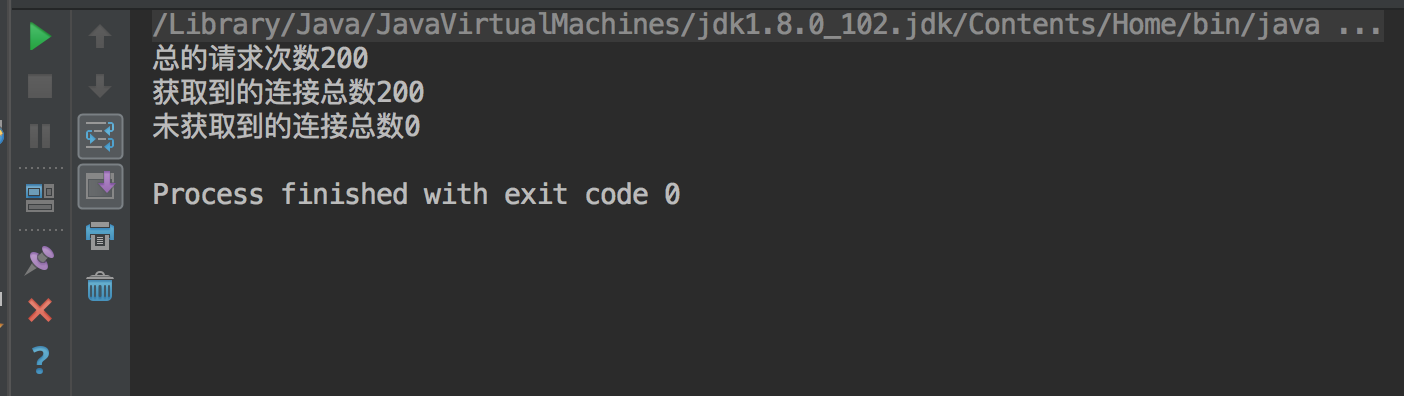
章节目录 等待超时模式的使用场景 可以掌握的技能 等待/通知 消费者/生产者模式 CountDownLatch、AtomicInteger、静态内部类、LinkedList、动态代理的使用 1.等待超时模式 场景 当我们调用方法时,这个方法返回的资源比较重要,比如获取数据库连接池中连接句柄。但是这个资源的返回随着业务量的增加,那么获取资源(连接池连接)的时间就会增加,那么调用一个方法时就要等待一段时间(一般来说是给定一个时间段),如果该方法能够在一段时间内获取到结果,那么将结果立刻返回,反之,超时返回默认结果。 等待/通知的经典范式,即加锁、条件循环、处理逻辑3个步骤,这种范式没办法做到超时等待,对经典范式做很小的改动,就可以实现超时等待。 等待超时模式伪代码: public synchronized Object get(long mills) throws InterruptedException { Object result = null; long future = System.currentTimeMills() + mills; long remaining = mills; while (result == null && remaining > 0) { wait(remaining);//释放锁,阻塞 mills 毫秒 remaining = future - System.currentTimeMills(); } return result;//如果超时之后获取到result则不返回null } 超时等待的作用就是不会永远阻塞调用者,但是 超时之后被唤醒,知识将线程从等待队列移动至阻塞队列,继续向下进行返回result还是要重新获取锁,如果一直获取不到锁,那么result也不会打印。只是增加了灵活性。 2.可以掌握的技能 实战 使用等待超时模式撸一个简单数据库连接池,在示例中模拟: 从连接池获取连接 RunnerThread 使用连接 RunnerThread 释放连接 RunnerThread注意:客户端获取(消费)连接的过程被设定为等待超时、等待/通知两种模式ConnectionPool.java-数据库连接池 package org.seckill.DBConnection; import java.sql.Connection; import java.util.LinkedList; /** * 数据库连接池对象 */ public class ConnectionPool { //链表list(池)维护 connection 连接对象 private LinkedList<Connection> pool = new LinkedList<Connection>(); //构造方法 初始化池中连接 public ConnectionPool(int initialSize) { if (initialSize > 0) { for (int i = 0; i < initialSize; i++) { pool.addLast(ConnectionDriver.createConnection());//创建initialSize个代理Connection对象 } } } //释放connection ,相当于-生产者 public void releaseConnection(Connection connection) { if (connection != null) {//有效归还连接 synchronized (pool) { pool.addLast(connection); //生产者动作完毕后,需要唤醒所有消费者 pool.notifyAll(); } } } //获取connection句柄,相当于消费者,采用超时等待与等待/通知两种策略 public Connection fetchConnection(long mills) throws InterruptedException { synchronized (pool) { if (mills < 0) {//非超时等待模式,采用等待/通知模式 while (pool.isEmpty()) { pool.wait();//本示例中不演示这种模式下获取连接的情景 } return pool.removeFirst(); } else {//超时等待模式 long future = System.currentTimeMillis() + mills; long remaining = mills; while (pool.isEmpty() && remaining > 0) { pool.wait(remaining); remaining = future - System.currentTimeMillis(); } Connection connection = null; if (!pool.isEmpty()) { connection = pool.removeFirst();//返回头结点对象 } return connection; } } } } ConnectionDriver.java-动态生成Connection代理对象 package org.seckill.DBConnection; import java.lang.reflect.InvocationHandler; import java.lang.reflect.Method; import java.lang.reflect.Proxy; import java.sql.Connection; /** * 数据库连接驱动, * 动态代理获取实现java.sql.Connection 接口的代理对象 */ public class ConnectionDriver { static class ConnectionHandler implements InvocationHandler { public Object invoke(Object proxy, Method method, Object[] args) throws Throwable { if (method.getName() == "commit") { Thread.sleep(100); } return null; } } //获取Connection的动态代理类 public static final Connection createConnection() { return (Connection) Proxy.newProxyInstance( ConnectionDriver.class.getClassLoader(),//类加载器 new Class<?>[]{Connection.class},//Connection实现的接口列表,包含Connection接口 new ConnectionHandler());//与代理对象绑定的handler } } ConnectionPoolTest.java--测试类 package org.seckill.DBConnection; import java.sql.Connection; import java.util.concurrent.CountDownLatch; import java.util.concurrent.atomic.AtomicInteger; public class ConnectionPoolTest { //线程池中初始化10个连接 static ConnectionPool connectionPool = new ConnectionPool(10); //保证所有的ConnectionRunner 能够同时开始 static CountDownLatch start = new CountDownLatch(1); //main线程将等待所有的Connection Runner结束后才开始执行 static CountDownLatch end; public static void main(String[] args) throws Exception { //ConnectionRunner 线程数量,可以修改线程数量进行观察 int threadCount = 50; end = new CountDownLatch(threadCount); int count = 20;//每个线程进行20次fetchConnetion动作 AtomicInteger got = new AtomicInteger(); AtomicInteger notGot = new AtomicInteger(); for (int i = 0; i < threadCount; i++) { Thread thread = new Thread(new ConnectionRunner(count, got, notGot), "ConnectionRunnerThread"); thread.start(); } start.countDown();//使所有线程同时运行 end.await();//主线程等待所有线程运行完 System.out.println("总的请求次数" + threadCount * count); System.out.println("获取到的连接总数" + got); System.out.println("未获取到的连接总数" + notGot); } static class ConnectionRunner implements Runnable { int count;//每个线程fetchConnetion的次数 AtomicInteger got;//记录fetchConnection 成功的次数 AtomicInteger notGot;//记录fetchConnetion 未成功的次数 public ConnectionRunner(int count, AtomicInteger got, AtomicInteger notGot) { this.count = count; this.got = got; this.notGot = notGot; } public void run() { try { start.await();//等待 所有ConnectionRunner 初始化成功且处于Runnable状态,同时开始运行,由主线程控制的 } catch (InterruptedException e) { e.printStackTrace(); } while (count > 0) { try { //从连接池中获取连接,如果1000ms内无法获取到,将会返回null。 Connection connection = connectionPool.fetchConnection(1000); if (connection != null) { try { connection.createStatement(); connection.commit(); } finally { //归还连接 connectionPool.releaseConnection(connection); got.incrementAndGet();//对获取次数状态进行更改 } } else { notGot.incrementAndGet();//对未获取次数状态进行更改 } } catch (Exception e) { } finally { count--;//运行次数递减 } } end.countDown(); } } } 运行结果 1.设置RunnerConnection threadCount数为10 threadCount = 10 2.设置RunnerConnection threadCount数为20 threadCount = 20 3.设置RunnerConnection threadCount数为50 threadCount = 50 4.设置RunnerConnection threadCount数为100 threadCount = 50 可以看到随着 runnerConnection 连接线程数的递增,连接的稳定性是越来越低的。但用户调用不会长时间阻塞到connect fetch 上,而是按时返回。

优秀的个人博客,低调大师

谷歌管澄清 Chrome OS 合并到 Android 的报道

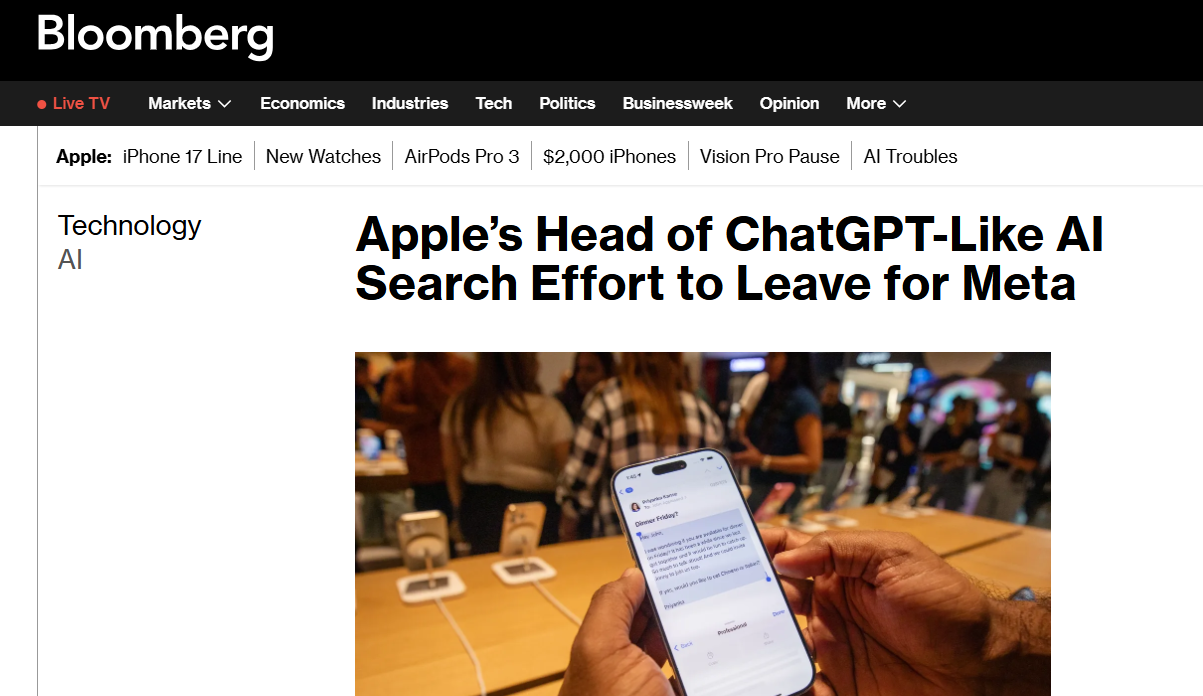
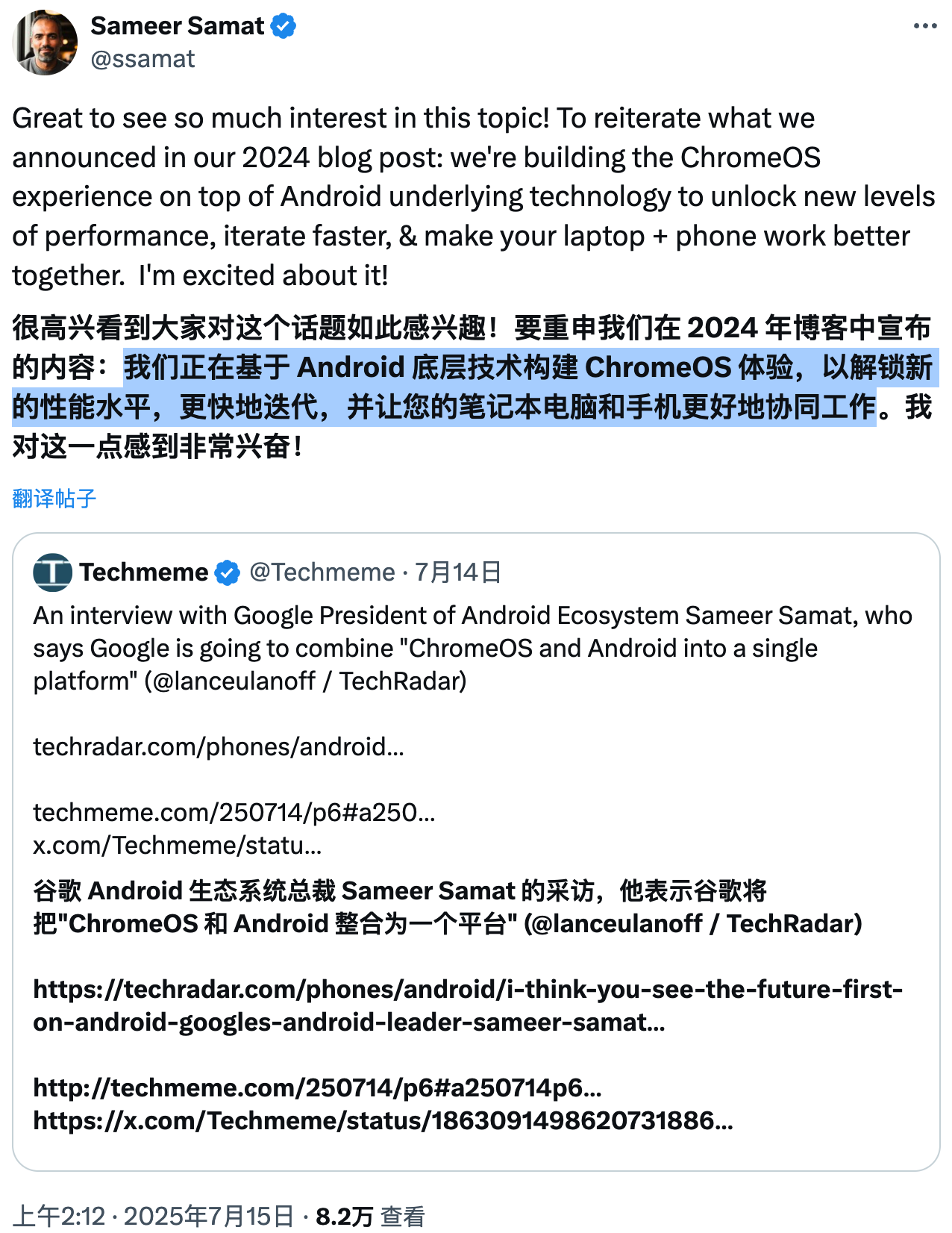
谷歌 Android 生态系统负责人 Sameer Samat 最近确认,谷歌计划将 Chrome OS 与 Android 合并为一个统一平台,未来 Chromebook 和 Android 平板电脑将运行基于 Android 的桌面优化版本,从而提供跨设备的无缝体验。 不过,Samat 随后在社交媒体上澄清表示,他只是重申了 2024 年谷歌博客中的公告,即 Chrome OS 将基于 Android 底层技术(如 Android 内核)构建,以提升性能、加快开发速度,并让笔记本电脑和手机更好地协同工作。 尽管 Samat 的澄清强调 Chrome OS 体验将基于 Android 技术构建,而非字面意义上的“合并”,但外界普遍认为这暗示了 Chrome OS 和 Android 将走向深度融合,未来二者将更紧密地整合。

资源下载

更多资源
Mario

Mario

马里奥是站在游戏界顶峰的超人气多面角色。马里奥靠吃蘑菇成长,特征是大鼻子、头戴帽子、身穿背带裤,还留着胡子。与他的双胞胎兄弟路易基一起,长年担任任天堂的招牌角色。

Nacos

Nacos

Nacos /nɑ:kəʊs/ 是 Dynamic Naming and Configuration Service 的首字母简称,一个易于构建 AI Agent 应用的动态服务发现、配置管理和AI智能体管理平台。Nacos 致力于帮助您发现、配置和管理微服务及AI智能体应用。Nacos 提供了一组简单易用的特性集,帮助您快速实现动态服务发现、服务配置、服务元数据、流量管理。Nacos 帮助您更敏捷和容易地构建、交付和管理微服务平台。

Rocky Linux

Rocky Linux

Rocky Linux(中文名:洛基)是由Gregory Kurtzer于2020年12月发起的企业级Linux发行版,作为CentOS稳定版停止维护后与RHEL(Red Hat Enterprise Linux)完全兼容的开源替代方案,由社区拥有并管理,支持x86_64、aarch64等架构。其通过重新编译RHEL源代码提供长期稳定性,采用模块化包装和SELinux安全架构,默认包含GNOME桌面环境及XFS文件系统,支持十年生命周期更新。

Sublime Text

Sublime Text

Sublime Text具有漂亮的用户界面和强大的功能,例如代码缩略图,Python的插件,代码段等。还可自定义键绑定,菜单和工具栏。Sublime Text 的主要功能包括:拼写检查,书签,完整的 Python API , Goto 功能,即时项目切换,多选择,多窗口等等。Sublime Text 是一个跨平台的编辑器,同时支持Windows、Linux、Mac OS X等操作系统。

用户登录
用户注册