首页 文章 精选 留言 我的

精选列表

搜索[快速],共10000篇文章
优秀的个人博客,低调大师

如何快速构建数据库智能化运维平台(一)

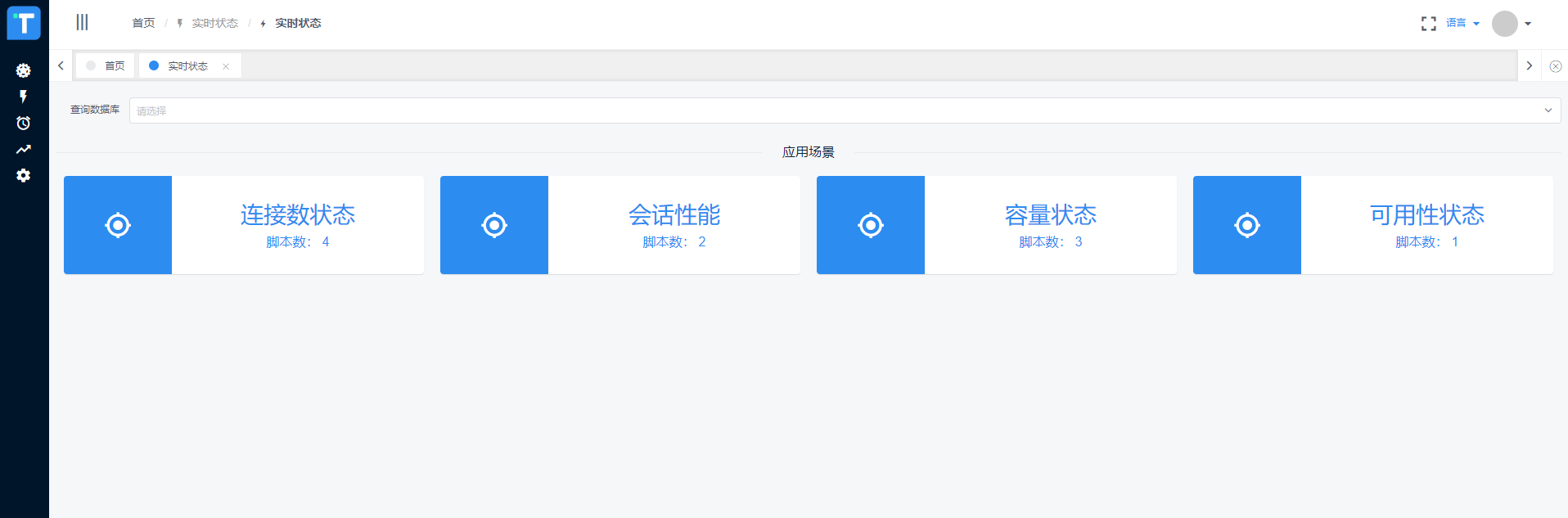
简介 本人出身DBA,主业Oracle,副业PostgreSQL,由于生性懒惰,遂沉迷于自动化运维与智能化运维不能自拔,实现过数据库自动化运维平台、容灾一键切换平台,目前正在坚定地向智能化迈进。从后台管理来说,数据库运维管理是极其重要的组成部分,对业务系统、生产稳定的影响不言而喻。随着业务规模的不断扩大,原有的人肉运维方式已经越来越难以满足运维需求,因此,自动化运维平台、智能化运维平台应运而生。本系列为作者原创,将多年对自动化运维的思考沉淀下来,以平台构建的形式展示给大家,希望对大家有所帮助,欢迎大家批评指正! 写在动手之前 1.目标范围 顾名思义,自动化是将手工操作变革为机器自动操作。但是,许多人在平台建设初期往往会进入一个误区:要穷举可能用到的所有场景,把所有的运维工作都做成自动化,彻底解放人工。想法固然是好,但是由于数据库运维的复杂性,在实际建设过程中会举步维艰,难以为继。我所理解的自动化,是要解决DBA的痛点,而且是最痛的点,把DBA从繁琐的、周期性的、价值低的重复工作中解放出来,注意,我强调的是痛点,而不是全部。这一点非常重要! 2.构建基础 数据库自动化的实现,离不开数据库管理的基础,包括常规化操作的固化、管理的规范等。从数据库参数配置、安装手册、用户管理、资源容量管理等维度都具有一定的标准。这是实现自动化的前提,当然,我构建的平台是支持动态发展的,不会因为脚本更新了平台就运行不下去,那为什么说标准化是前提呢?因为标准化是从更高一层规范了数据库管理,从人、对象、操作都具有一定的合规性和稳定性之后,自动化和智能化的实现会事半功倍。 啰嗦半天,先上几张效果图尝尝鲜1.数据库实时状态 2.数据库批量操作执行情况 3.数据库操作任务执行树 4.任务执行详细数据5.数据库性能指标智能分析 以上为做这件事的一些思考以及效果图,下一篇开始动手!

优秀的个人博客,低调大师

如何快速打造一款高清又极速的短视频APP?

整个短视频的市场规模一直在增长,网络数据显示2018年已经突破100亿大关,在2019年预测将超过200亿。纵观行业,在生活资讯、美食、搞笑、游戏、美妆等领域,短视频流量巨大但竞争激烈,但是在教育、财经、军事、旅游等行业还存在较大的机会。那么在这些垂直行业里,我们如何结合短视频能力,实现业务突破? 近期的云栖TechDay音视频技术专场中,阿里云视频云高级技术专家王海华现场分享了《高清极速-全面提升短视频应用体验》议题。他表示,作为短视频SDK服务提供方,视频云一直和客户同样关注如何把短视频的产品和体验做得更极致。本次分享讲从端到云再到端,探讨如何进行思考与优化,实现视频体验的全面提升。 短视频的业务特征 短视频可以随时随地进行拍摄、分享与浏览,所以它存在着海量的上传和播放 用户在移动端消费短视频的机型和网络情况十分复杂 用户对短视频体验的

优秀的个人博客,低调大师

SpringBoot中oauth2.0学习之服务端配置快速上手

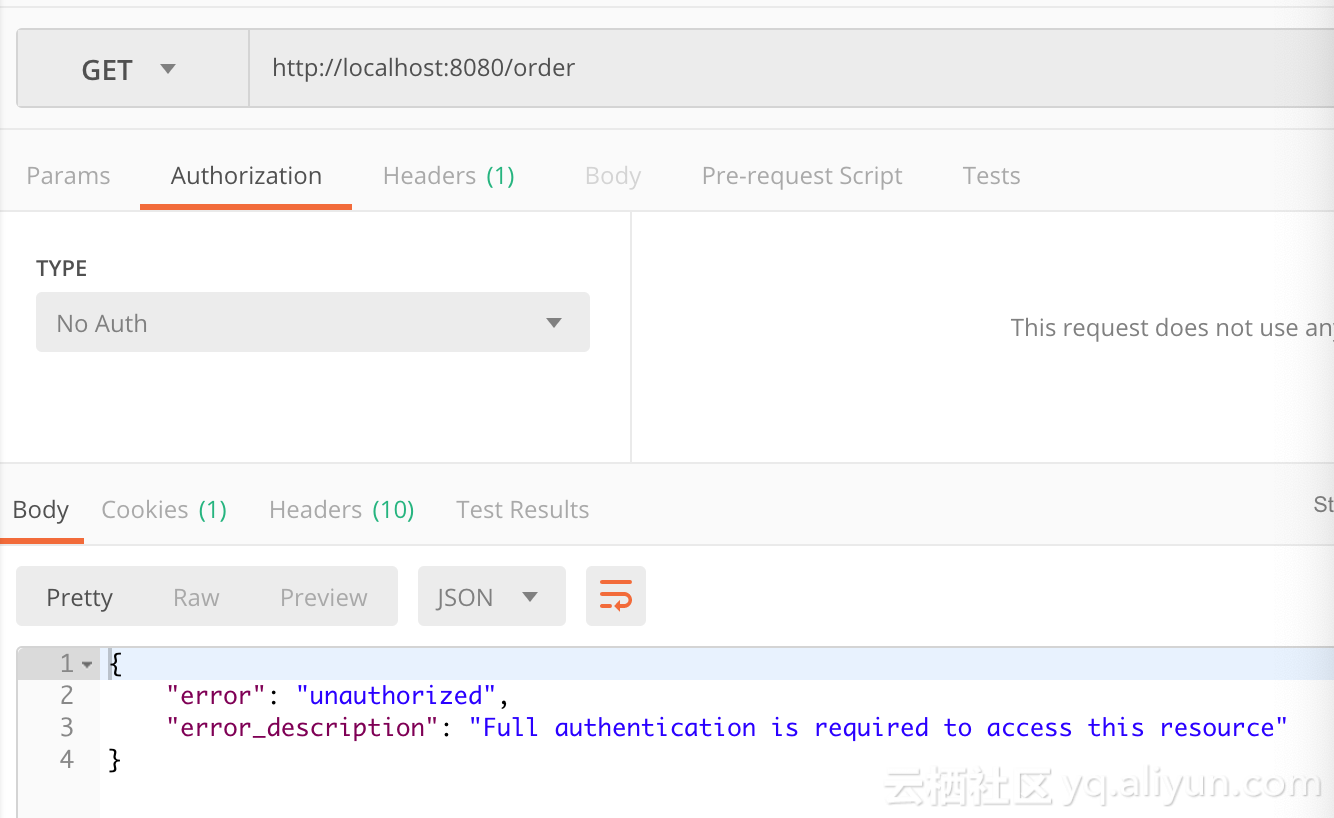
现在第三方登录的例子数见不鲜。其实在这种示例当中,oauth2.0是使用比较多的一种授权登录的标准。oauth2.0也是从oauth1.0升级过来的。那么关于oauth2.0相关的概念及其原理,大家可以参考这篇文章,这篇文章中会有更详细的解释,下来我们直接进入正题。 1.1、gradle依赖 compile('org.springframework.cloud:spring-cloud-starter-oauth2') compile('org.springframework.cloud:spring-cloud-starter-security') 在这里我直接引入的是spring-cloud的依赖项,这种依赖的jar包更全面一些,这里面的核心基础还是spring-security。这里SpringBoot的版本为2.0.6.REALEASE 1.2、@EnableAuthorizationServer 在这里我着重强调一下这个注解:@EnableAuthorizationServer,这个注解源代码如下: @Target(ElementType.TYPE) @Retention(RetentionPolicy.RUNTIME) @Documented @Import({AuthorizationServerEndpointsConfiguration.class, AuthorizationServerSecurityConfiguration.class}) public @interface EnableAuthorizationServer { } 这个注解主要是导入两个配置类,分别是: AuthorizationServerEndpointsConfiguration,这个配置类主要配置授权端点,获取token的端点。大家就把对应的端点想象成controller即可,在这个controller下开放了若干个@RequestMapping,比如常见的有:/oauth/authorize(授权路径),/oauth/token(获取token)等 AuthorizationServerSecurityConfiguration,主要是做spring-security的安全配置,我们可以看一下相关代码: public class AuthorizationServerSecurityConfiguration extends WebSecurityConfigurerAdapter { @Autowired private List<AuthorizationServerConfigurer> configurers = Collections.emptyList(); @Autowired private ClientDetailsService clientDetailsService; @Autowired private AuthorizationServerEndpointsConfiguration endpoints; @Autowired public void configure(ClientDetailsServiceConfigurer clientDetails) throws Exception { for (AuthorizationServerConfigurer configurer : configurers) { configurer.configure(clientDetails); } } @Override protected void configure(AuthenticationManagerBuilder auth) throws Exception { // Over-riding to make sure this.disableLocalConfigureAuthenticationBldr = false // This will ensure that when this configurer builds the AuthenticationManager it will not attempt // to find another 'Global' AuthenticationManager in the ApplicationContext (if available), // and set that as the parent of this 'Local' AuthenticationManager. // This AuthenticationManager should only be wired up with an AuthenticationProvider // composed of the ClientDetailsService (wired in this configuration) for authenticating 'clients' only. } @Override protected void configure(HttpSecurity http) throws Exception { //....省略部分代码 String tokenEndpointPath = handlerMapping.getServletPath("/oauth/token"); String tokenKeyPath = handlerMapping.getServletPath("/oauth/token_key"); String checkTokenPath = handlerMapping.getServletPath("/oauth/check_token"); if (!endpoints.getEndpointsConfigurer().isUserDetailsServiceOverride()) { UserDetailsService userDetailsService = http.getSharedObject(UserDetailsService.class); endpoints.getEndpointsConfigurer().userDetailsService(userDetailsService); } // @formatter:off //上述节点的请求需要授权验证 http .authorizeRequests() .antMatchers(tokenEndpointPath).fullyAuthenticated() .antMatchers(tokenKeyPath).access(configurer.getTokenKeyAccess()) .antMatchers(checkTokenPath).access(configurer.getCheckTokenAccess()) .and() .requestMatchers() .antMatchers(tokenEndpointPath, tokenKeyPath, checkTokenPath) .and() .sessionManagement().sessionCreationPolicy(SessionCreationPolicy.NEVER); // @formatter:on http.setSharedObject(ClientDetailsService.class, clientDetailsService); } protected void configure(AuthorizationServerSecurityConfigurer oauthServer) throws Exception { for (AuthorizationServerConfigurer configurer : configurers) { configurer.configure(oauthServer); } } } 1.2.1、AuthorizationServerConfigurer 这个接口是认证授权配置的核心接口,不过既然是SpringBoot我们就先来看看它怎么帮我们装配的,我们可以在org.springframework.boot.autoconfigure.security.oauth2.authserver这个包下面找到对应配置的Bean: @Configuration @ConditionalOnClass(EnableAuthorizationServer.class) @ConditionalOnMissingBean(AuthorizationServerConfigurer.class) @ConditionalOnBean(AuthorizationServerEndpointsConfiguration.class) @EnableConfigurationProperties(AuthorizationServerProperties.class) public class OAuth2AuthorizationServerConfiguration extends AuthorizationServerConfigurerAdapter { //.... @Override public void configure(ClientDetailsServiceConfigurer clients) throws Exception { //默认基于内存创建ClientDetails ClientDetailsServiceBuilder<InMemoryClientDetailsServiceBuilder>.ClientBuilder builder = clients .inMemory().withClient(this.details.getClientId()); builder.secret(this.details.getClientSecret()) .resourceIds(this.details.getResourceIds().toArray(new String[0])) .authorizedGrantTypes( this.details.getAuthorizedGrantTypes().toArray(new String[0])) .authorities( AuthorityUtils.authorityListToSet(this.details.getAuthorities()) .toArray(new String[0])) .scopes(this.details.getScope().toArray(new String[0])); if (this.details.getAutoApproveScopes() != null) { builder.autoApprove( this.details.getAutoApproveScopes().toArray(new String[0])); } if (this.details.getAccessTokenValiditySeconds() != null) { builder.accessTokenValiditySeconds( this.details.getAccessTokenValiditySeconds()); } if (this.details.getRefreshTokenValiditySeconds() != null) { builder.refreshTokenValiditySeconds( this.details.getRefreshTokenValiditySeconds()); } if (this.details.getRegisteredRedirectUri() != null) { builder.redirectUris( this.details.getRegisteredRedirectUri().toArray(new String[0])); } } @Override public void configure(AuthorizationServerEndpointsConfigurer endpoints) throws Exception { if (this.tokenConverter != null) { endpoints.accessTokenConverter(this.tokenConverter); } if (this.tokenStore != null) { endpoints.tokenStore(this.tokenStore); } if (this.details.getAuthorizedGrantTypes().contains("password")) { endpoints.authenticationManager(this.authenticationManager); } } @Override public void configure(AuthorizationServerSecurityConfigurer security) throws Exception { security.passwordEncoder(NoOpPasswordEncoder.getInstance()); if (this.properties.getCheckTokenAccess() != null) { security.checkTokenAccess(this.properties.getCheckTokenAccess()); } if (this.properties.getTokenKeyAccess() != null) { security.tokenKeyAccess(this.properties.getTokenKeyAccess()); } if (this.properties.getRealm() != null) { security.realm(this.properties.getRealm()); } } @Configuration @ConditionalOnMissingBean(BaseClientDetails.class) protected static class BaseClientDetailsConfiguration { private final OAuth2ClientProperties client; protected BaseClientDetailsConfiguration(OAuth2ClientProperties client) { this.client = client; } /** 由此可知它会寻找security.oauth2.client的配置 */ @Bean @ConfigurationProperties(prefix = "security.oauth2.client") public BaseClientDetails oauth2ClientDetails() { BaseClientDetails details = new BaseClientDetails(); if (this.client.getClientId() == null) { this.client.setClientId(UUID.randomUUID().toString()); } details.setClientId(this.client.getClientId()); details.setClientSecret(this.client.getClientSecret()); details.setAuthorizedGrantTypes(Arrays.asList("authorization_code", "password", "client_credentials", "implicit", "refresh_token")); details.setAuthorities( AuthorityUtils.commaSeparatedStringToAuthorityList("ROLE_USER")); details.setRegisteredRedirectUri(Collections.<String>emptySet()); return details; } } } 如果没有用spring-boot的用户,可以也可以参考上述的配置方法,自行配置 1.3、application.yml的配置 根据上述代码我们可以知道,springboot通过外部化配置的security.oauth2.client的前缀来配置客户端。那么因此我们不妨在外部化配置文件里做如下配置: server: port: 8080 security: oauth2: client: client-id: root client-secret: root scope: - email - username - face spring: security: user: name: root password: root roles: ADMIN 这里先做最基本的配置,配置client-id,client-secret,scope。特别注意oauth2.0一定要先经过springsecurity的auth认证,因此需要在这里配置一个内存用户名与密码为root与root 1.4、配置资源服务器 通过资源服务器来保护我们指定的资源,必须在获取授权认证的时候才能访问。在SpringBoot当中,我们可以通过@EnableResourceServer注解来开启此功能。该注解定义如下: @Target(ElementType.TYPE) @Retention(RetentionPolicy.RUNTIME) @Documented @Import(ResourceServerConfiguration.class) public @interface EnableResourceServer { } 我们可以看到这个注解导入了默认的资源配置信息:ResourceServerConfiguration,它的源代码如下: @Configuration public class ResourceServerConfiguration extends WebSecurityConfigurerAdapter implements Ordered { //.... @Override protected void configure(HttpSecurity http) throws Exception { ResourceServerSecurityConfigurer resources = new ResourceServerSecurityConfigurer(); ResourceServerTokenServices services = resolveTokenServices(); if (services != null) { resources.tokenServices(services); } else { if (tokenStore != null) { resources.tokenStore(tokenStore); } else if (endpoints != null) { resources.tokenStore(endpoints.getEndpointsConfigurer().getTokenStore()); } } if (eventPublisher != null) { resources.eventPublisher(eventPublisher); } //配置资源 for (ResourceServerConfigurer configurer : configurers) { configurer.configure(resources); } // @formatter:off http.authenticationProvider(new AnonymousAuthenticationProvider("default")) // N.B. exceptionHandling is duplicated in resources.configure() so that // it works .exceptionHandling() .accessDeniedHandler(resources.getAccessDeniedHandler()).and() .sessionManagement() .sessionCreationPolicy(SessionCreationPolicy.STATELESS).and() .csrf().disable(); // @formatter:on http.apply(resources); if (endpoints != null) { // Assume we are in an Authorization Server http.requestMatcher(new NotOAuthRequestMatcher(endpoints.oauth2EndpointHandlerMapping())); } for (ResourceServerConfigurer configurer : configurers) { // Delegates can add authorizeRequests() here configurer.configure(http); } //如果没有任何配置资源,则所有请求保护 if (configurers.isEmpty()) { // Add anyRequest() last as a fall back. Spring Security would // replace an existing anyRequest() matcher with this one, so to // avoid that we only add it if the user hasn't configured anything. http.authorizeRequests().anyRequest().authenticated(); } } //.... } 在这里主要是配置资源服务器的配置,我们可以得到如下几点信息: 资源配置的核心ResourceServerConfigurer,在这里如果没有任何配置,则所有请求都要进行token认证 TokenStore 主要定义了对token的增删改查操作,用于持久化token ResourceServerTokenServices 资源服务的service(服务层),这里主要还是根据token来拿到OAuth2Authentication与OAuth2AccessToken 1.5、完整示例 1.5.1、资源认证配置 @Configuration @EnableResourceServer public class ResourceConfigure extends ResourceServerConfigurerAdapter { @Override public void configure(HttpSecurity http) throws Exception { http.csrf().disable().sessionManagement().sessionCreationPolicy(SessionCreationPolicy.IF_REQUIRED) .and().authorizeRequests().antMatchers("/free/**").permitAll().and() .authorizeRequests().anyRequest().authenticated() .and().formLogin().permitAll();//必须认证过后才可以访问 } } 在这里如果以/free/**请求路径的,都允许直接访问。否则,都必须携带access_token才能访问。 1.5.2 、授权认证配置 @Configuration public class WebSecurityConfig extends WebSecurityConfigurerAdapter { @Override protected void configure(HttpSecurity http) throws Exception { http.csrf().disable().requestMatchers().anyRequest().and().authorizeRequests() .antMatchers("/oauth/*").authenticated().and().formLogin().permitAll(); } } 根据上文所述,AuthorizationServerEndpoint与TokenEndpoint会开放/oauth/authorize与/oauth/token端点,因此我们必须保证访问端点进行授权认证前,通过springsecurity的用户认证,因此在这里配置了/oauth/* 1.5.3、启动类 @SpringBootApplication @EnableAuthorizationServer @Controller public class AuthorizationServer { @GetMapping("/order") public ResponseEntity<String> order() { ResponseEntity<String> responseEntity = new ResponseEntity("order", HttpStatus.OK); return responseEntity; } @GetMapping("/free/test") public ResponseEntity<String> test() { ResponseEntity<String> responseEntity = new ResponseEntity("free", HttpStatus.OK); return responseEntity; } public static void main(String[] args) { SpringApplication.run(AuthorizationServer.class, args); } } 1.5.4、访问请求 首先我们通过postman 访问http://localhost:8080/order会得到如下界面: 此时我们明显可以看到对应的资源需要携带有效的token才可以访问,那么我们此时要在postman的Authorization进行oauth2.0配置认证。截图如下: 在这里点击Get New Access Token 来从认证服务器获取token,点击后配置如下: ` scope配置对应application.yml中的配置信息,这里面可以放置用户的属性信息,比如说昵称 头像 电话等等 State代表状态码,设置一个State标志 回调地址这里必须配置,通过这个地址当同意授权后会返回一个认证的code给我们,我们根据这个code请求token 认证地址与获取token的地址请填写,相关Endpoint生成的地址 当经过一连串认证后,我们即可拿到token: 当我们获取到最新的token以后,我们即可访问到对应的请求资源:

优秀的个人博客,低调大师

[雪峰磁针石博客]Bokeh数据可视化工具1快速入门

简介 数据可视化python库参考 python数据可视化库最突出的为Matplotlib、Seaborn和Bokeh。前两个,Matplotlib和Seaborn,绘制静态图。Bokeh可以绘制交互式图。 安装 conda install bokeh pip2 install bokeh pip3 install bokeh 检验安装 from bokeh.plotting import figure, output_file, show #HTML file to output your plot into output_file("bokeh.html") #Constructing a basic line plot x = [1,2,3] y = [4,5,6] p = figure() p.line(x,y) show(p) image.png 问题讨论: https://groups.google.com/a/anaconda.com/forum/#!forum/bokeh bug跟踪:https://github.com/bokeh/bokeh/issues 应用程序:Bokeh应用程序是在浏览器中运行的Bokeh渲染文档 Glyph:Glyph是Bokeh的基石,它们是线条,圆形,矩形等。 服务器:Bokeh服务器用于共享和发布交互式图表 小部件Widgets::Bokeh中的小部件是滑块,下拉菜单等 输出方法有:output_file('plot.html')和output_notebook() 构建图片的方式: #Code to construct a figure from bokeh.plotting import figure # create a Figure object p = figure(plot_width=500, plot_height=400, tools="pan,hover") 绘图基础 线状图 #Creating a line plot #Importing the required packages from bokeh.io import output_file, show from bokeh.plotting import figure #Creating our data arrays used for plotting the line plot x = [5,6,7,8,9,10] y = [1,2,3,4,5,6] #Calling the figure() function to create the figure of the plot plot = figure() #Creating a line plot using the line() function plot.line(x,y) #Creating markers on our line plot at the location of the intersection between x and y plot.cross(x,y, size = 15) #Output the plot output_file('line_plot.html') show(plot) image.png 柱形图 #Creating bar plots #Importing the required packages from bokeh.plotting import figure, show, output_file #Points on the x axis x = [8,9,10] #Points on the y axis y = [1,2,3] #Creating the figure of the plot plot = figure() #Code to create the barplot plot.vbar(x,top = y, color = "blue", width= 0.5) #Output the plot output_file('barplot.html') show(plot) image.png 补丁图 #Creating patch plots #Importing the required packages from bokeh.io import output_file, show from bokeh.plotting import figure #Creating the regions to map x_region = [[1,1,2,], [2,3,4], [2,3,5,4]] y_region = [[2,5,6], [3,6,7], [2,4,7,8]] #Creating the figure plot = figure() #Building the patch plot plot.patches(x_region, y_region, fill_color = ['yellow', 'black', 'green'], line_color = 'white') #Output the plot output_file('patch_plot.html') show(plot) image.png 散列图 #Creating scatter plots #Importing the required packages from bokeh.io import output_file, show from bokeh.plotting import figure #Creating the figure plot = figure() #Creating the x and y points x = [1,2,3,4,5] y = [5,7,2,2,4] #Plotting the points with a cirle marker plot.circle(x,y, size = 30) #Output the plot output_file('scatter.html') show(plot) image.png 更多资源 #- cross() #- x() #- diamond() #- diamond_cross() #- circle_x() #- circle_cross() #- triangle() #- inverted_triangle() #- square() #- square_x() #- square_cross() #- asterisk() #Adding labels to the plot plot.figure(x_axis_label = "Label name of x axis", y_axis_label = "Label name of y axis") #Customizing transperancy of the plot plot.circle(x, y, alpha = 0.5) plot.circle(x, y, alpha = 0.5) 参考资料 本文最新版本地址 讨论 钉钉免费群21745728 qq群144081101 567351477 本文涉及的python测试开发库 谢谢点赞! 本文相关海量书籍下载 代码仓库

优秀的个人博客,低调大师

使用 Python 30分钟 教你快速搭建一个博客

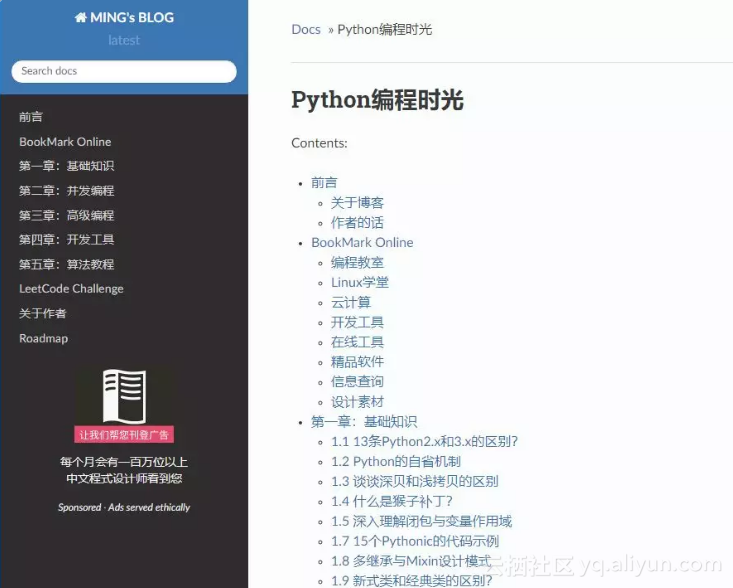
10个优秀的程序员里,有9个人都有写博客的习惯。这是非常好的习惯,它使得知识得以提炼,转输出为输入,在提升自己的同时,还能利用互联网易传播的特性,将知识分享给每一个热爱学习的人。这是值得每个程序员,投入时间和精力去坚持做下去的事。 博客既然是自己的一个知识宝库,那么索引将变得极为重要。通过自己的探索,小明发现了一个能够很好地满足这个需求的 Python 框架 Sphnix。 实现的大体的思路如下: Markdown:书写文档Pandoc:格式转化Sphinx:生成网页GitHub:托管项目ReadtheDocs:发布网页 接下来,就来看看到底是如何实现的? 成品展示 以我的博客为例,先给大家展示一下。 这是首页。显示了你所有的文章索引。 这是我的导航栏。是不是结构很清晰,很方便索引。 点击文章后,还可以很方便查看标题,跳转。 体验下搜索功能,速度很快

优秀的个人博客,低调大师

Python3快速入门——(1)python变量和输入输出函数

1、Python语言 Python 是一种解释型、面向对象、动态数据类型的高级程序设计语言 Python 是一种解释型语言:这意味着开发过程中没有了编译这个环节。类似于PHP和Perl语言。 Python 是交互式语言:这意味着,您可以在一个Python提示符,直接互动执行写你的程序。 Python 是面向对象语言:这意味着Python支持面向对象的风格或代码封装在对象的编程技术。 Python 应用领域:Linux/Unix运维,开发命令行程序、桌面GUI应用(PyQt,Kivy等), 移动 App(PyQt,Kivy等),Web应用(Diango等框架),服务端的应用(基于TCP协议的服务器程序),网络爬虫(为搜索引擎、深度学习等领域提供数据源),数据分析,深度学习,科学计算。 2、个人看过比较好的python3系统学习教程 菜鸟编程 : http://www.runoob.com/python3/python3-basic-syntax.html 廖雪峰: https://www.liaoxuefeng.com/wiki/0014316089557264a6b348958f449949df42a6d3a2e542c000 python解释器内置函数类型:https://docs.python.org/3/library/functions.html 3、变量 #变量(每条语句后可以不写分号,直接回车即可) numeber_of_days=365 #定义变量值 str_test="China" #字符串变量 int_test=123 #整型变量 float_test=122.5 #浮点型变量 print(numeber_of_days) #输出变量值 365 print( type (str_test)) #输出变量的类型 <class 'str'> 4、输入输出函数和条件判断 input()/print() #name=input();print(name) 空值 是Python里一个特殊的值,用 None 表示。 None 不能理解为 0 ,因为 0 是有意义的,而 None 是一个特殊的空值 s = input ( 'birth: ' ) #input()返回的数据类型是str,str不能直接和整数比较,必须先把str转换成整数 birth = int (s) #int()函数将str转换为int if birth >= 2000 : print ( '00后' ) elif birth>= 1990 : print ( '90后' ) else : print ( '90前' )

资源下载

更多资源
腾讯云软件源

腾讯云软件源

为解决软件依赖安装时官方源访问速度慢的问题,腾讯云为一些软件搭建了缓存服务。您可以通过使用腾讯云软件源站来提升依赖包的安装速度。为了方便用户自由搭建服务架构,目前腾讯云软件源站支持公网访问和内网访问。

Nacos

Nacos

Nacos /nɑ:kəʊs/ 是 Dynamic Naming and Configuration Service 的首字母简称,一个易于构建 AI Agent 应用的动态服务发现、配置管理和AI智能体管理平台。Nacos 致力于帮助您发现、配置和管理微服务及AI智能体应用。Nacos 提供了一组简单易用的特性集,帮助您快速实现动态服务发现、服务配置、服务元数据、流量管理。Nacos 帮助您更敏捷和容易地构建、交付和管理微服务平台。

Rocky Linux

Rocky Linux

Rocky Linux(中文名:洛基)是由Gregory Kurtzer于2020年12月发起的企业级Linux发行版,作为CentOS稳定版停止维护后与RHEL(Red Hat Enterprise Linux)完全兼容的开源替代方案,由社区拥有并管理,支持x86_64、aarch64等架构。其通过重新编译RHEL源代码提供长期稳定性,采用模块化包装和SELinux安全架构,默认包含GNOME桌面环境及XFS文件系统,支持十年生命周期更新。

Sublime Text

Sublime Text

Sublime Text具有漂亮的用户界面和强大的功能,例如代码缩略图,Python的插件,代码段等。还可自定义键绑定,菜单和工具栏。Sublime Text 的主要功能包括:拼写检查,书签,完整的 Python API , Goto 功能,即时项目切换,多选择,多窗口等等。Sublime Text 是一个跨平台的编辑器,同时支持Windows、Linux、Mac OS X等操作系统。

用户登录
用户注册