【技术解析】Dolphinscheduler实现MapReduce任务的高效管理
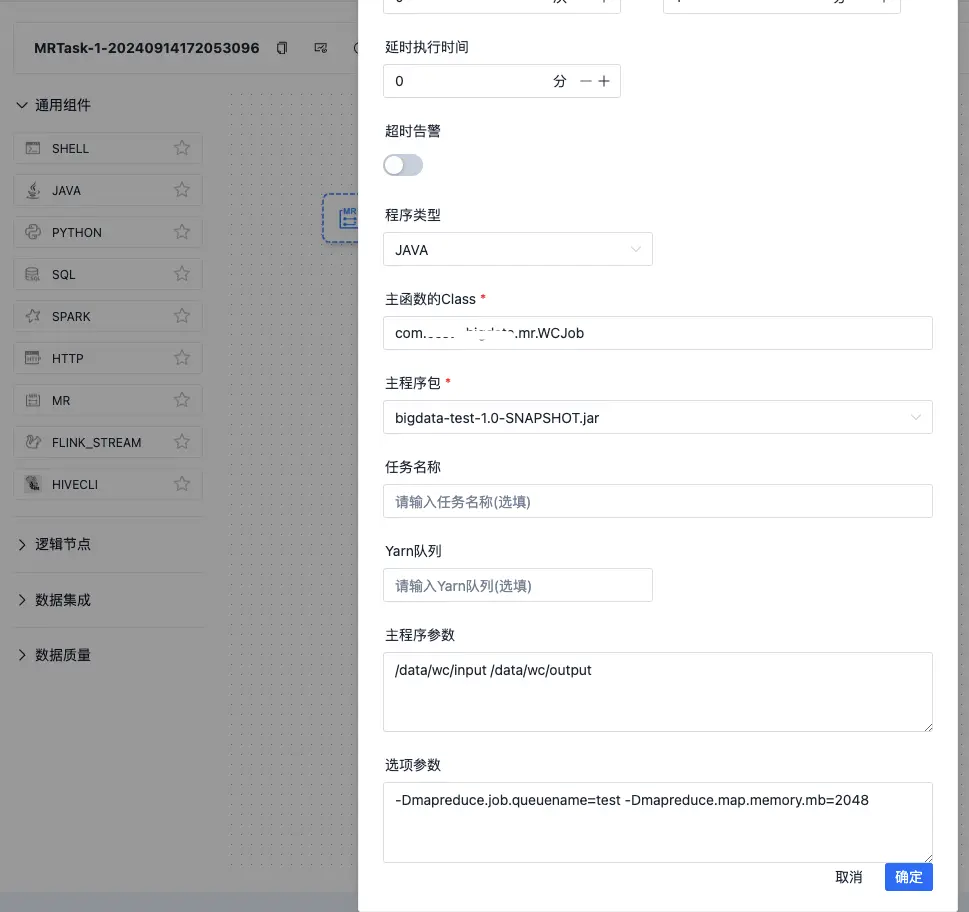
MapReduce是一种编程模型,用于处理和生成大数据集,主要用于大规模数据集(TB级数据规模)的并行运算。本文详细介绍了Dolphinscheduler在MapReduce任务中的应用,包括GenericOptionsParser与args的区别、hadoop jar命令参数的完整解释、MapReduce实例代码,以及如何在Dolphinscheduler中配置和运行MapReduce任务。 GenericOptionsParser vs args区别 GenericOptionsParser 如下: GenericOptionsParser optionParser = new GenericOptionsParser(conf, args); String[] remainingArgs = optionParser.getRemainingArgs(); 查看 GenericOptionsParser 源码做了什么? 1、构造方法 public GenericOptionsParser(Configuration conf, String[] args) throws IOException { this(conf, new Options(), args); } 2、点击 this public GenericOptionsParser(Configuration conf, Options options, String[] args) throws IOException { this.conf = conf; parseSuccessful = parseGeneralOptions(options, args); } 3、查看 parseGeneralOptions private boolean parseGeneralOptions(Options opts, String[] args) throws IOException { opts = buildGeneralOptions(opts); CommandLineParser parser = new GnuParser(); boolean parsed = false; try { commandLine = parser.parse(opts, preProcessForWindows(args), true); processGeneralOptions(commandLine); parsed = true; } catch(ParseException e) { LOG.warn("options parsing failed: "+e.getMessage()); HelpFormatter formatter = new HelpFormatter(); formatter.printHelp("general options are: ", opts); } return parsed; } 4、看 GnuParser package org.apache.commons.cli; import java.util.ArrayList; import java.util.List; [@Deprecated](https://my.oschina.net/jianhuaw) public class GnuParser extends Parser { ....... } org.apache.commons.cli Parser,是不是有点熟悉?对,请参考 https://segmentfault.com/a/1190000045394541 这篇文章吧 5、看 processGeneralOptions 方法 private void processGeneralOptions(CommandLine line) throws IOException { if (line.hasOption("fs")) { FileSystem.setDefaultUri(conf, line.getOptionValue("fs")); } if (line.hasOption("jt")) { String optionValue = line.getOptionValue("jt"); if (optionValue.equalsIgnoreCase("local")) { conf.set("mapreduce.framework.name", optionValue); } conf.set("yarn.resourcemanager.address", optionValue, "from -jt command line option"); } if (line.hasOption("conf")) { String[] values = line.getOptionValues("conf"); for(String value : values) { conf.addResource(new Path(value)); } } if (line.hasOption('D')) { String[] property = line.getOptionValues('D'); for(String prop : property) { String[] keyval = prop.split("=", 2); if (keyval.length == 2) { conf.set(keyval[0], keyval[1], "from command line"); } } } if (line.hasOption("libjars")) { // for libjars, we allow expansion of wildcards conf.set("tmpjars", validateFiles(line.getOptionValue("libjars"), true), "from -libjars command line option"); //setting libjars in client classpath URL[] libjars = getLibJars(conf); if(libjars!=null && libjars.length>0) { conf.setClassLoader(new URLClassLoader(libjars, conf.getClassLoader())); Thread.currentThread().setContextClassLoader( new URLClassLoader(libjars, Thread.currentThread().getContextClassLoader())); } } if (line.hasOption("files")) { conf.set("tmpfiles", validateFiles(line.getOptionValue("files")), "from -files command line option"); } if (line.hasOption("archives")) { conf.set("tmparchives", validateFiles(line.getOptionValue("archives")), "from -archives command line option"); } conf.setBoolean("mapreduce.client.genericoptionsparser.used", true); // tokensFile if(line.hasOption("tokenCacheFile")) { String fileName = line.getOptionValue("tokenCacheFile"); // check if the local file exists FileSystem localFs = FileSystem.getLocal(conf); Path p = localFs.makeQualified(new Path(fileName)); localFs.getFileStatus(p); if(LOG.isDebugEnabled()) { LOG.debug("setting conf tokensFile: " + fileName); } UserGroupInformation.getCurrentUser().addCredentials( Credentials.readTokenStorageFile(p, conf)); conf.set("mapreduce.job.credentials.binary", p.toString(), "from -tokenCacheFile command line option"); } } 原理是把 fs、jt、D、libjars、files、archives、tokenCacheFile 相关参数放入到 Hadoop的 Configuration中了,终于清楚 GenericOptionsParser是干什么的了 args呢?如果要使用args,以上这种 fs、jt、D、libjars、files、archives、tokenCacheFile 是需要自己解析的。 Hadoop jar完整参数解释 hadoop jar wordcount.jar org.myorg.WordCount \ -fs hdfs://namenode.example.com:8020 \ -jt resourcemanager.example.com:8032 \ -D mapreduce.job.queuename=default \ -libjars /path/to/dependency1.jar,/path/to/dependency2.jar \ -files /path/to/file1.txt,/path/to/file2.txt \ -archives /path/to/archive1.zip,/path/to/archive2.tar.gz \ -tokenCacheFile /path/to/credential.file \ /input /output 这条命令会: 将作业提交到 hdfs://namenode.example.com:8020 文件系统 使用 resourcemanager.example.com:8032 作为 YARN ResourceManager 提交到 default 队列 使用 /path/to/dependency1.jar 和 /path/to/dependency2.jar 作为依赖 分发本地文件 /path/to/file1.txt 和 /path/to/file2.txt,注意 : 是本地文件哦 解压并分发 /path/to/archive1.zip 和 /path/to/archive2.tar.gz 分发凭证文件 /path/to/credential.file MR实例 WordCount经典示例 public class WCMapper extends Mapper<LongWritable, Text, Text, IntWritable> { private IntWritable one = new IntWritable(1); private Text word = new Text(); [@Override](https://my.oschina.net/u/1162528) protected void map(LongWritable key, Text value, Mapper<LongWritable, Text, Text, IntWritable>.Context context) throws IOException, InterruptedException { String[] fields = value.toString().split("\\s+"); for (String field : fields) { word.set(field); context.write(word, one); } } } public class WCReducer extends Reducer<Text, IntWritable, Text, IntWritable> { private IntWritable result = new IntWritable(); [@Override](https://my.oschina.net/u/1162528) protected void reduce(Text key, Iterable<IntWritable> values, Reducer<Text, IntWritable, Text, IntWritable>.Context context) throws IOException, InterruptedException { int sum = 0; for (IntWritable val : values) { sum += val.get(); } result.set(sum); context.write(key, result); } } public class WCJob { public static void main(String[] args) throws Exception { Configuration conf = new Configuration(); // TODO 如果要是本地访问远程的hdfs,需要指定hdfs的根路径,否则只能访问本地的文件系统 // conf.set("fs.defaultFS", "hdfs://xx.xx.xx.xx:8020"); GenericOptionsParser optionParser = new GenericOptionsParser(conf, args); String[] remainingArgs = optionParser.getRemainingArgs(); for (String arg : args) { System.out.println("arg :" + arg); } for (String remainingArg : remainingArgs) { System.out.println("remainingArg :" + remainingArg); } if (remainingArgs.length < 2) { throw new RuntimeException("input and output path must set."); } Path outputPath = new Path(remainingArgs[1]); FileSystem fileSystem = FileSystem.get(conf); boolean exists = fileSystem.exists(outputPath); // 如果目标目录存在,则删除 if (exists) { fileSystem.delete(outputPath, true); } Job job = Job.getInstance(conf, "MRWordCount"); job.setJarByClass(WCJob.class); job.setOutputKeyClass(Text.class); job.setOutputValueClass(IntWritable.class); job.setMapperClass(WCMapper.class); job.setReducerClass(WCReducer.class); FileInputFormat.addInputPath(job, new Path(remainingArgs[0])); FileOutputFormat.setOutputPath(job, new Path(remainingArgs[1])); System.exit(job.waitForCompletion(true) ? 0 : 1); } } 文件分发 public class ConfigMapper extends Mapper<LongWritable, Text, Text, NullWritable> { private List<String> whiteList = new ArrayList<>(); private Text text = new Text(); [@Override](https://my.oschina.net/u/1162528) protected void setup(Mapper<LongWritable, Text, Text, NullWritable>.Context context) throws IOException, InterruptedException { // 获取作业提交时传递的文件 URI[] files = context.getCacheFiles(); if (files != null && files.length > 0) { // 读取文件内容 File configFile = new File("white.txt"); // 文件名要与传递的文件名保持一致 try (BufferedReader reader = new BufferedReader(new FileReader(configFile))){ String line = null; while ((line = reader.readLine()) != null) { whiteList.add(line); } } } } [@Override](https://my.oschina.net/u/1162528) protected void map(LongWritable key, Text value, Mapper<LongWritable, Text, Text, NullWritable>.Context context) throws IOException, InterruptedException { String line = value.toString(); String[] datas = line.split("\\s+"); List<String> whiteDatas = Arrays.stream(datas).filter(data -> whiteList.contains(data)).collect(Collectors.toList()); for (String data : whiteDatas) { text.set(data); context.write(text , NullWritable.get()); } } } public class ConfigJob { public static void main(String[] args) throws Exception { // 设置用户名 System.setProperty("HADOOP_USER_NAME", "root"); Configuration conf = new Configuration(); conf.set("fs.defaultFS", "hdfs://xx.xx.xx.xx:8020"); GenericOptionsParser optionParser = new GenericOptionsParser(conf, args); String[] remainingArgs = optionParser.getRemainingArgs(); if (remainingArgs.length < 2) { throw new RuntimeException("input and output path must set."); } Path outputPath = new Path(remainingArgs[1]); FileSystem fileSystem = FileSystem.get(conf); boolean exists = fileSystem.exists(outputPath); // 如果目标目录存在,则删除 if (exists) { fileSystem.delete(outputPath, true); } Job job = Job.getInstance(conf, "MRConfig"); job.setJarByClass(ConfigJob.class); job.setOutputKeyClass(Text.class); job.setOutputValueClass(NullWritable.class); job.setMapperClass(ConfigMapper.class); FileInputFormat.addInputPath(job, new Path(remainingArgs[0])); FileOutputFormat.setOutputPath(job, new Path(remainingArgs[1])); System.exit(job.waitForCompletion(true) ? 0 : 1); } } Dolphinscheduler MR使用 Yarn test队列设置 YARN 的配置目录中找到 capacity-scheduler.xml 文件。通常位于 $HADOOP_HOME/etc/hadoop/ 目录下。 修改 capacity-scheduler.xml <property> <name>yarn.scheduler.capacity.root.queues</name> <value>default, test</value> </property> <property> <name>yarn.scheduler.capacity.root.test.capacity</name> <value>30</value> </property> <property> <name>yarn.scheduler.capacity.root.test.maximum-capacity</name> <value>50</value> </property> <property> <name>yarn.scheduler.capacity.root.test.user-limit-factor</name> <value>1</value> </property> 刷新队列配置 yarn rmadmin -refreshQueues 流程定义设置 执行结果 离线任务实例 YARN作业展示 源码分析 org.apache.dolphinscheduler.plugin.task.mr.MapReduceArgsUtils#buildArgs String others = param.getOthers(); // TODO 这里其实就是想说,没有通过 -D mapreduce.job.queuename 形式指定队列,是用页面上直接指定队列名称的,页面上 Yarn队列 输入框 if (StringUtils.isEmpty(others) || !others.contains(MR_YARN_QUEUE)) { String yarnQueue = param.getYarnQueue(); if (StringUtils.isNotEmpty(yarnQueue)) { args.add(String.format("%s%s=%s", D, MR_YARN_QUEUE, yarnQueue)); } } // TODO 这里就是页面上,选项参数 输入框 // -conf -archives -files -libjars -D if (StringUtils.isNotEmpty(others)) { args.add(others); } 转载自Journey 原文链接:https://segmentfault.com/a/1190000045403915 本文由 白鲸开源科技 提供发布支持! 询问AI