连载|想用Python做自动化测试?彻底学会装饰器
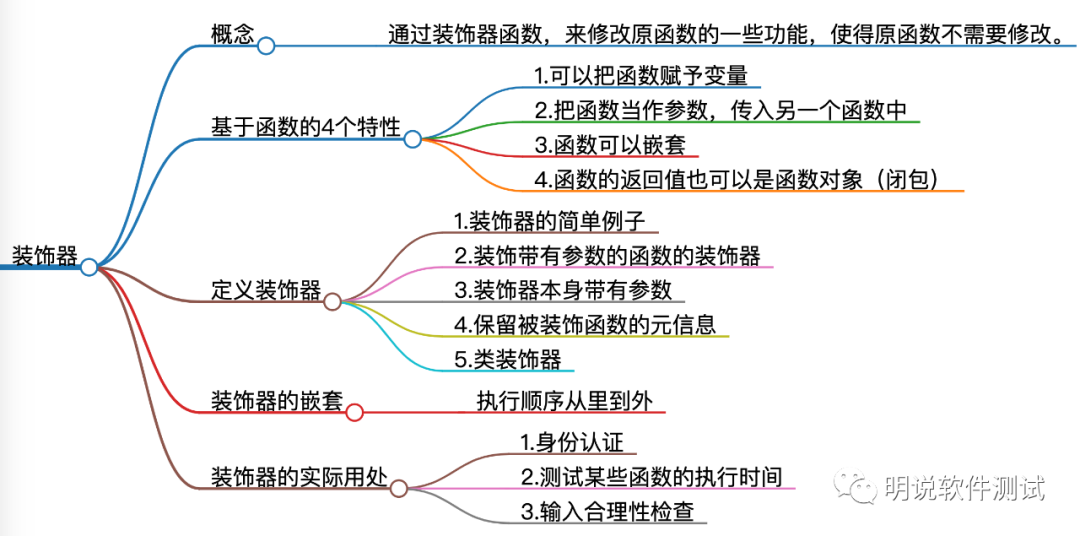
“用好装饰器,才是真正的Python工程师。” 14.1 概念 所谓的装饰器,其实就是通过装饰器函数,来修改原函数的一些功能,使得原函数不需要修改。装饰器依赖前面介绍的Python函数的五个特性: 函数也是对象 函数对象可以赋值给变量 函数对象可以作为参数传递给另外的函数 函数对象可以作为另外一个函数的返回值 函数可以嵌套定义 14.2 函数装饰器 14.2.1 装饰器的简单例子 my_decorator() 是一个装饰器,它把真正需要执行的函数 func() 包裹在其中,并且改变了它的行为,但是原函数 func不变。定义装饰器分三步走: 调用原函数前后做一通操作 调用原函数 返回内部函数对象 def my_decorator(func): def wrapper(): print('wrapper of decorator') # ①这里做一通操作 func() # ②调用原函数 return wrapper # ③返回内部函数对象def greet(): print('hello world')greet = my_decorator(greet) # 变量 greet 指向了内部函数 wrapper()greet() # 调用 greet() 相当于执行内部函数wrapper@my_decorator # @语法糖,相当于greet1 = my_decorator(greet1)def greet1(): print('hello world') 14.2.2 装饰带有参数的函数 装饰器可以接受原函数任意类型和数量的参数,把*args和**kwargs,作为装饰器内部函数 wrapper() 的参数即可。 def my_decorator(func): # 这个func只是个参数,不一定是函数名。 def wrapper(*args, **kwargs): print('wrapper of decorator') # 这里做一通操作 func(*args, **kwargs) # 调用原函数 return wrapper # 返回内部函数对象@my_decoratordef greet(message): print(message)@my_decoratordef celebrate(name, message): print(name+message) 14.2.3 装饰器本身带有参数 它还可以接受自己定义的参数。举个例子,比如我想要定义一个参数,来表示装饰器内部函数被执行的次数,那么就可以写成下面这种形式:在外边再套一层函数,并返回内层函数。参考: def repeat(num): def my_decorator(func): def wrapper(*args, **kwargs): for i in range(num): print('wrapper of decorator') func(*args, **kwargs) return wrapper return my_decorator@repeat(4)def greet(message): print(message) 再看一个装饰器本身带参数的例子: def type_decorator(**kwargs): """检查实例属性类型的装饰器""" def decorate(cls): # 对instance进行装饰 for key, value in kwargs.items(): # 给cls的设置类属性,并给类属性设置描述符实例 setattr(cls, key, TypedAssertion(key, value)) return cls return decorate TypedAssertion是一个描述符。这个装饰器的目标是给cls类添加kwargs中的key作为类属性,将TypedAssertion描述符作为类属性的值。举个例子: @type_decorator(brand=str, shares=int, price=float)class Stock: def __init__(self, brand, shares, price): self.brand = brand self.shares = shares self.price = price 效果就是对brand、shares和price属性做了类型校验。 14.2.4 保留被装饰函数的元信息 在内部函数上面用装饰器@functools.wraps(func)。 import functoolsdef my_decorator(func): @functools.wraps(func) # 为了保留被装饰函数的元信息 def wrapper(*args, **kwargs): print('wrapper of decorator') func(*args, **kwargs) return wrapper @my_decoratordef greet(message): print(message) 14.3 类装饰器 这部分可以看完后面关于Python类的章节后再学习。类装饰器主要依赖于函数__call__,每当你调用一个类的实例时,__call__就会被执行。 这里,我们定义了类 Count,初始化时传入原函数 func(),而__call__函数表示让变量 num_calls 自增 1,然后打印,并且调用原函数,并返回原函数。 因此,在我们第一次调用函数 example() 时,num_calls 的值是 1,而在第二次调用时,它的值变成了 2。 class Count: def __init__(self, func): self.func = func self.num_calls = 0 def __call__(self, *args, **kwargs): self.num_calls += 1 # 调用次数加1 print('num of calls is: {}'.format(self.num_calls)) return self.func(*args, **kwargs)@Count # Count类装饰example,会调用Count类的__call__函数def example(): print("hello world")example()# 输出num of calls is: 1hello worldexample()# 输出num of calls is: 2hello world 14.4 装饰器的嵌套使用 函数可以被多个装饰器装饰,也就是下面这样: @decorator1@decorator2@decorator3def func(): ... 装饰器的执行顺序是从里到外,等效于decorator1(decorator2(decorator3(func)))。 14.5 实际应用场景 1.身份认证每次调用这个函数前,都会先检查用户是否处于登录状态,如果是登录状态,则允许这项操作;如果没有登录,则不允许。 import functoolsdef authenticate(func): @functools.wraps(func) def wrapper(*args, **kwargs): request = args[0] if check_user_logged_in(request): # 如果用户处于登录状态 return func(*args, **kwargs) # 执行函数post_comment() else: raise Exception('Authentication failed') return wrapper @authenticatedef post_comment(request, ...) ... 2.测试某些函数的执行时间 import timeimport functoolsdef log_execution_time(func): @functools.wraps(func) def wrapper(*args, **kwargs): start = time.perf_counter() res = func(*args, **kwargs) end = time.perf_counter() print('{} took {} ms'.format(func.__name__, (end - start) * 1000)) return res return wrapper @log_execution_timedef calculate_similarity(items): ... 3.输入合理性检查 import functoolsdef validation_check(input): @functools.wraps(func) def wrapper(*args, **kwargs): ... # 检查输入是否合法 @validation_checkdef neural_network_training(param1, param2, ...): ... 参考资料: https://foofish.net/python-decorator.html https://python3-cookbook.readthedocs.io/zh_CN/latest/c09/p11_write_decorators_that_add_arguments_to_functions.html 本文分享自微信公众号 - 明说软件测试(liuchunmingnet)。如有侵权,请联系 support@oschina.cn 删除。本文参与“OSC源创计划”,欢迎正在阅读的你也加入,一起分享。