Web 新平台 “airoot-uisys” 释放前端开发活力
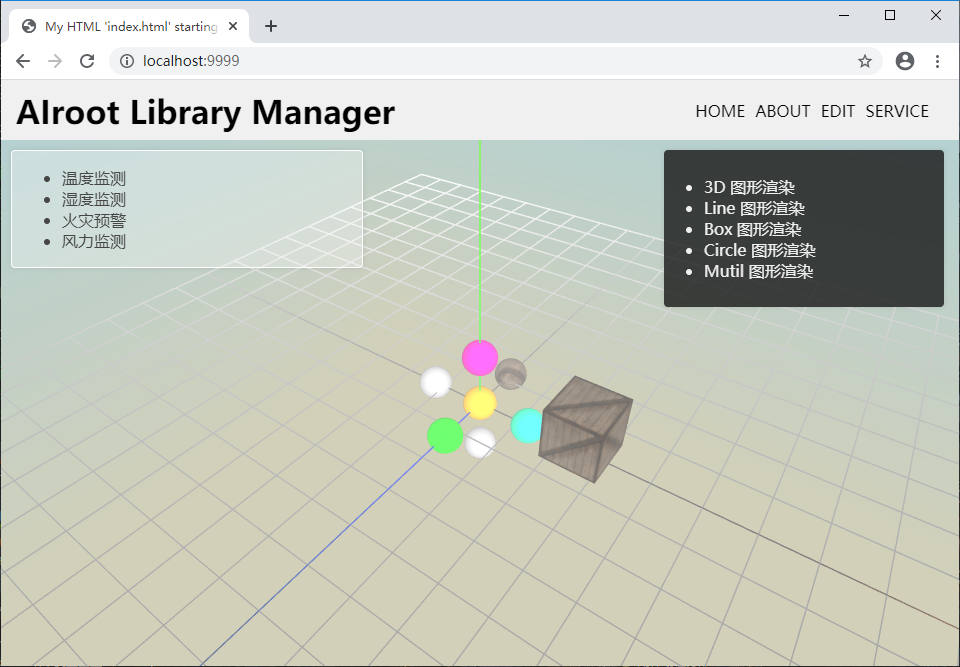
写这篇文章比较尴尬,因为当今开发WEB的平台主要是nodejs,代表性的框架就是网络三大框架。很多人都了解也都熟悉,他们的优势之一就是模块化开发,适合大项目的构架,另外就是数据绑定的思想。我开发WEB大概很长时间了,之前前身做flash,后来做flex,用过extjs、j-ui,当然web三大框架都用过,说实话对于开发来讲还是限制性比较大。由衷的感觉早起开发WEB像拿着画笔,现在开发WEB像拿着印刷机。虽然web开发当今蓬勃发展,丹内在确实siqichenc死气沉沉,没有创意和灵感。 因此,我重新开发了一套工具,这套工具给程序员更自由的发挥空间,并且无论开发者在什么水平,都可以轻易实现模块化的思想。在这套工具里,及时你会最简单的html开发,也不影响你循序渐进的使用。 那么下面看下在套工具的能力:我们用React写个例子: <!DOCTYPE html> <html> <head> <meta charset="UTF-8" /> <title>Hello React!</title> <script src="https://cdn.staticfile.org/react/16.4.0/umd/react.development.js"></script> <script src="https://cdn.staticfile.org/react-dom/16.4.0/umd/react-dom.development.js"></script> <script src="https://cdn.staticfile.org/babel-standalone/6.26.0/babel.min.js"></script> </head> <body> <div id="example"></div> <script type="text/babel"> <!-- 定义一个模块 --> function Element(){ return <h1>Hello Baby!</h1>; } <!-- 你要展现的代码写在下面. --> function App(props) { return ( <div> <Element/> <Element/> </div> ); } ReactDOM.render( <App />, document.getElementById('example') ); </script> </body> </html> 看下 airoot-uisys 工具下的写法(其中@pub 表示可以单页渲染)。 <@pub/> <!-- 定义一个模块 --> <@define name="Element"> <h1>Hello Baby!</h1> </@define> <!-- 你要展现的代码写在下面. --> <div> <Element/> <Element/> </div> 如果要运行上面的代码,可以看下这个博客:https://cloud.tencent.com/developer/article/1611252 你也可通过javascript 创建自定义的component看下React的实现: <!DOCTYPE html> <html> <head> <meta charset="UTF-8" /> <title>Hello React!</title> <script src="https://cdn.staticfile.org/react/16.4.0/umd/react.development.js"></script> <script src="https://cdn.staticfile.org/react-dom/16.4.0/umd/react-dom.development.js"></script> <script src="https://cdn.staticfile.org/babel-standalone/6.26.0/babel.min.js"></script> </head> <body> <div id="example"></div> <script type="text/babel"> <!-- 定义一个模块 --> function Element(){ return <h1>Hello Baby!</h1>; } <!-- 定义一个模块 --> class App extends React.Component{ constructor(props) { super(props); this.state = {comps : [1]} } render() { const {comps } = this.state; return ( <div> {comps.map(comp => { return <Element/> })} </div> ); } } ReactDOM.render( <App />, document.getElementById('example') ); </script> </body> </html> 看下uisys的实现: <@pub/> <!-- 定义一个模块 --> <@define name="Element"> <h1>Hello Baby!</h1> </@define> <!-- 你要展现的代码写在下面. --> <div> <!-- dom 内部区域--> </div> <script> function init(){ var element = new Element(); dom.appendChild(element); } </script> 上面的代码如果不了解dom关键字,你也可以这么写: <@pub/> <!-- 定义一个模块 --> <@define name="Element"> <div>Hello Baby!</div> </@define> <!-- 你要展现的代码写在下面. --> <div id="ct"></div> <script> function init(){ var element= new Element(); #ct.appendChild(element); } </script> uisys 的灵活性非常好,上面的代码你可以分成两个文件,一个放Element.ui ,一个放App.ui。这里就不多演示了。 airoot uisys 现在发布了v1版本,基于它的能力可以创建很多复杂的web应用。例如可以用HTML渲染Three.js 的功能,如下效果图: 其他如下: <!-- 类注释 @author sunxy @version 0.0 --> <@import value="jus.*" /> <@import value="zs.*" /> <@import value="zs.texture.*" /> <desktop> <style> *{ transition:all .3s ease; } #header{ background-color:#f0f0f0; } #header ul{ margin-top:20px; margin-right:20px; } #header li{ float:left; list-style:none; margin-right:10px; } </style> <hbox id="header" width="100%" height="60"> <div width="400" height="100%" style="font-family:Microsoft YaHei;font-size:32px;font-weight:bold;margin:10px 0px 0px 15px;">AIroot Library Manager</div> <div width="100%" height="100%"> <ul style="float:right;"> <li>HOME</li> <li>ABOUT</li> <li>EDIT</li> <li>SERVICE</li> </ul> </div> </hbox> <position width="100%" height="100%"> <td id="plt" width="100%" height="100%"> <SkyBox> <children> <Sphere x="0" y="0" z="0" r="3" w="26" h="24" color="#ffaa00" /> <Sphere x="10" y="0" z="0" r="3" w="26" h="24" color="#00ffaa"/> <Sphere x="0" y="10" z="0" r="3" w="26" h="24" color="#ff00aa"/> <Sphere x="0" y="0" z="10" r="3" w="26" h="24" color="#00ff00"/> <Sphere x="-10" y="0" z="0" r="3" w="26" h="24" /> <Sphere x="0" y="-10" z="0" r="3" w="26" h="24" /> <Sphere x="0" y="0" z="-10" r="3" w="26" h="24"> <texture> <TextureLoader src="textures/crate.gif" /> </texture> </Sphere> <Cube x="20" y="5" width="10" height="10" depth="10"> <texture> <TextureLoader src="textures/crate.gif" /> </texture> </Cube> <Loader src="" /> </children> </SkyBox> <fog /> </td> <LeftLabel /> <RightLabel right="25" top="10" /> </position> </desktop> 目前我正在用airoot uisys重新做一个flash,为什么选择uisys呢,因为uisys在语言写法上不会给你阻碍,思想到代码很直接,可以看下uisys做成flash IDE的效果,一下全部由uisys开发的web flash ide:可以看下里面的代码段落:1. <!-- PlayEditor.ui --> <@pub/> <head> <style> body{ margin:0px; background-color:#dddddd; } </style> </head> <@import value="jus.*"/> <desktop> <plat.TimeLine id="tl" height="230" /> <HBox> <plat.Library width="320" height="100%"></Library> <plat.Scene width="100%" height="100%"></Scene> </HBox> </desktop> <script> function init(){ } </script> 2. <!-- Scene.ui --> <@import value="jus.*"/> <style> body{ border-right:1px solid #aaaaaa; } .header{ display:flex; align-items:center; padding:0px 10px; background-color:#d0d0d0; } .frame{ background-color: #dddddd; box-shadow:0px 0px 4px rgba(0,0,0,0.2); position:relative; } .bg{ background-color:#fefefe; } </style> <VBox height="100%"> <div height="48" width="100%" class="header"> 场景 <Combo> </Combo> </div> <Position width="100%" height="100%" class="frame"> <Index left="100" top="50" right="100" bottom="50"/> </Position> </VBox> airoot uisys 的可塑性非常强,对于插件的定义绝对三大框架后的大佬(我相信),来看下它为人民教育出版社开发的指数联动交互图书:我们看下其中一页的代码: <!-- 类注释 @author sunxy @version 0.0 --> <@import value="component.*" /> <@import value="root.*" /> <page> <image x="35" y="62" src="img/photo87.png" /> <image x="117" y="655" src="img/photo85.png" /> <blacktext x="126" y="66" audio="audio/page014/OtherData/231_014_01.mp3">Let's talk</blacktext> <etext x='54' y='238' audio="audio/page014/OtherData/231_014_02.mp3">Mr Jones,<br/>this is Miss Green.</etext> <etext x='356' y='252' audio="audio/page014/OtherData/231_014_03.mp3">Good morning,<br/>Miss Green.</etext> <etext x='304' y='497' audio="audio/page014/OtherData/231_014_04.mp3">Good morning.</etext> <blacktext x="71" y="594" audio="audio/page014/OtherData/231_014_06.mp3"><img src="img/photo88.png" />Draw and say</blacktext> <etext x='148' y='670' audio="audio/page014/OtherData/231_014_07.mp3">This is Miss Green.</etext> <etext x='382' y='670' audio="audio/page014/OtherData/231_014_08.mp3">This is Mr Jones.</etext> <lnum>14</lnum> </page> 上面的代码在uisys的编写框架下可以实现点击朗读,和通篇朗读,当然还可以支持游戏。 airoot uisys 先介绍这么多。