Unity3D实现模型体积拖拽变化
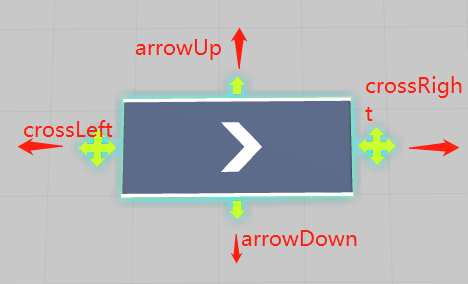
实现模型拖拽体积改变功能算法: publicTransformcrossLeft; publicTransformcro***ight; publicTransformarrowUp; publicTransformarrowDown; //模型结构子对象 publicTransformlegLeftUp; publicTransformlegRightUp; publicTransformlegLeftDown; publicTransformlegRightDown; publicTransformarrow; //////传动带模型MeshFilter ///publicMeshFilterconveyorMeshFilter; //////传送带边沿护栏模型MeshFilter ///publicMeshFilterguardBarMeshFilter; publicBoxColliderboxCollider; //Mesh保存 privateDictionaryconveyorMeshLeftVertices; privateDictionaryconveyorMeshRightVertices; privateDictionaryconveyorMeshUpVertices; privateDictionaryconveyorMeshDownVertices; privateDictionaryguardBarMeshLeftVertices; privateDictionaryguardBarMeshRightVertices; privateDictionaryguardBarMeshUpVertices; privateDictionaryguardBarMeshDownVertices; //交互所用变量 privatefloatfirstDistanceToOtherCross; privateVector3nowInputMousePosition; floatendDistance; privateTransformotherCross; privateVector3otherCrossScreenPostion; privateVector3lastInputMousePoistion; 核心方法: //初始化 voidInit() { conveyorMeshLeftVertices=FiltrateVertices(conveyorMeshFilter.mesh,VecticeDir.Left); conveyorMeshRightVertices=FiltrateVertices(conveyorMeshFilter.mesh,VecticeDir.Right); conveyorMeshUpVertices=FiltrateVertices(conveyorMeshFilter.mesh,VecticeDir.Up); conveyorMeshDownVertices=FiltrateVertices(conveyorMeshFilter.mesh,VecticeDir.Down); guardBarMeshLeftVertices=FiltrateVertices(guardBarMeshFilter.mesh,VecticeDir.Left); guardBarMeshRightVertices=FiltrateVertices(guardBarMeshFilter.mesh,VecticeDir.Right); guardBarMeshUpVertices=FiltrateVertices(guardBarMeshFilter.mesh,VecticeDir.Up); guardBarMeshDownVertices=FiltrateVertices(guardBarMeshFilter.mesh,VecticeDir.Down); //length=1; //heigth=1; boxCollider=gameObject.GetComponent(); if(name.Contains("left")) { otherCross=converyEntityMediator.converyEntityView.cro***ight; isLeft=true; } else { otherCross=converyEntityMediator.converyEntityView.crossLeft; isLeft=false; } } /// ///筛选顶点,分成左右两堆 /// ///顶点方向 DictionaryFiltrateVertices(Meshmesh,VecticeDirdir) { Dictionaryresult=newDictionary(); for(inti=0;i<mesh.vertices.Length;i++) { switch(dir) { caseVecticeDir.Left: if(mesh.vertices[i].z>0) { result.Add(i,mesh.vertices[i]); } break; caseVecticeDir.Up: if(mesh.vertices[i].x>0) { result.Add(i,mesh.vertices[i]); } break; caseVecticeDir.Right: if(mesh.vertices[i].z<0) { result.Add(i,mesh.vertices[i]); } break; caseVecticeDir.Down: if(mesh.vertices[i].x<0) { result.Add(i,mesh.vertices[i]); } break; } } returnresult; } //宽度 publicvoidChangeWidth(floatwidth,Vector3dir,boolisUp) { ListconveyorMeshVertices=newList(conveyorMeshFilter.mesh.vertices); ListguardBarMeshVertices=newList(guardBarMeshFilter.mesh.vertices); floathalfWidth=width/2; transform.position+=halfWidth*(transform.rotation*dir).normalized; //this.length+=length; //改变板和边栏的长度 foreach(KeyValuePairiteminconveyorMeshUpVertices) { conveyorMeshVertices[item.Key]+=Vector3.right*halfWidth; } foreach(KeyValuePairiteminconveyorMeshDownVertices) { conveyorMeshVertices[item.Key]-=Vector3.right*halfWidth; } foreach(KeyValuePairiteminguardBarMeshUpVertices) { guardBarMeshVertices[item.Key]+=Vector3.right*halfWidth; } foreach(KeyValuePairiteminguardBarMeshDownVertices) { guardBarMeshVertices[item.Key]-=Vector3.right*halfWidth; } if(isUp) { //设置子物体的位置 legLeftUp.localPosition+=halfWidth*dir; legRightUp.localPosition+=halfWidth*dir; legLeftDown.localPosition-=halfWidth*dir; legRightDown.localPosition-=halfWidth*dir; arrowUp.localPosition+=halfWidth*dir; arrowDown.localPosition-=halfWidth*dir; } else { //设置子物体的位置 legLeftUp.localPosition-=halfWidth*dir; legRightUp.localPosition-=halfWidth*dir; legLeftDown.localPosition+=halfWidth*dir; legRightDown.localPosition+=halfWidth*dir; arrowUp.localPosition-=halfWidth*dir; arrowDown.localPosition+=halfWidth*dir; } floatarrowScale=Mathf.Clamp(((ConveyorEntity)entity).conveyorProperty.Width*2f,0.2f,1); arrow.localScale=newVector3(arrowScale,1,arrowScale); conveyorMeshFilter.mesh.SetVertices(conveyorMeshVertices); guardBarMeshFilter.mesh.SetVertices(guardBarMeshVertices); //设置collider boxCollider.size+=Vector3.right*width; } ///改变传送带长度 /// ///传送带长度 ///是否选择的左边移动 publicvoidChangeLength(floatlength,Vector3dir,boolisChoiceLeft=false) { ListconveyorMeshVertices=newList(conveyorMeshFilter.mesh.vertices); ListguardBarMeshVertices=newList(guardBarMeshFilter.mesh.vertices); floathalfLength=length/2; transform.position+=halfLength*(transform.rotation*dir).normalized; //改变板和边栏的长度 foreach(KeyValuePairiteminconveyorMeshLeftVertices) { conveyorMeshVertices[item.Key]+=Vector3.forward*halfLength; } foreach(KeyValuePairiteminguardBarMeshLeftVertices) { guardBarMeshVertices[item.Key]+=Vector3.forward*halfLength; } foreach(KeyValuePairiteminconveyorMeshRightVertices) { conveyorMeshVertices[item.Key]-=Vector3.forward*halfLength; } foreach(KeyValuePairiteminguardBarMeshRightVertices) { guardBarMeshVertices[item.Key]-=Vector3.forward*halfLength; } if(isChoiceLeft) { //设置子物体的位置 legLeftUp.localPosition+=halfLength*dir; legRightUp.localPosition-=halfLength*dir; legLeftDown.localPosition+=halfLength*dir; legRightDown.localPosition-=halfLength*dir; crossLeft.localPosition+=halfLength*dir; cro***ight.localPosition-=halfLength*dir; } else { //设置子物体的位置 legLeftUp.localPosition-=halfLength*dir; legRightUp.localPosition+=halfLength*dir; legLeftDown.localPosition-=halfLength*dir; legRightDown.localPosition+=halfLength*dir; crossLeft.localPosition-=halfLength*dir; cro***ight.localPosition+=halfLength*dir; } //floatarrowScale=Mathf.Clamp(((ConveyorEntity)entity).conveyorProperty.Length*2f,0.2f,1); //arrow.localScale=newVector3(arrowScale,1,arrowScale); conveyorMeshFilter.mesh.SetVertices(conveyorMeshVertices); guardBarMeshFilter.mesh.SetVertices(guardBarMeshVertices); //设置collider boxCollider.size+=Vector3.forward*length; ChangeBounds(100);//拉伸mesh会导致原bound不在摄像机视角下,造成传送带不渲染(FrustumCulling) } privatevoidChangeBounds(floatboundLength) { Vector3bound=newVector3(boundLength,boundLength,boundLength); conveyorMeshFilter.mesh.bounds=newBounds(transform.position,bound); guardBarMeshFilter.mesh.bounds=newBounds(transform.position,bound); } 交互输入: privatevoidOnMouseDown() { endAddDistance=0; otherArrowScreenPostion=Camera.main.WorldToScreenPoint(otherArrow.position); lastInputMousePoistion=Input.mousePosition; lastDistanceToOtherCross=Vector2.Distance(otherArrowScreenPostion,lastInputMousePoistion); } privatevoidOnMouseDrag() { nowInputMousePosition=Input.mousePosition; floatdistance=Vector2.Distance(nowInputMousePosition,lastInputMousePoistion)*0.1f; floatotherDistaceToNowInputMousePosition=Vector2.Distance(otherArrowScreenPostion,nowInputMousePosition); //减少宽度 if(lastDistanceToOtherCross>otherDistaceToNowInputMousePosition) { endAddDistance-=distance; ChangeWidth(-distance,(transform.localPosition-otherArrow.localPosition).normalized,isUp); } //增加宽带 elseif(lastDistanceToOtherCross<otherDistaceToNowInputMousePosition) { endAddDistance+=distance; ChangeWidth(distance,(transform.localPosition-otherArrow.localPosition).normalized,isUp); } if(otherDistaceToNowInputMousePositionotherDistaceToNowInputMousePosition) { if(Vector3.Distance(transform.localPosition,otherCross.localPosition)Vector3.Distance(transform.localPosition,otherCross.localPosition)) { return; } endDistance-=distance; converyEntityMediator.ChangeLength(-distance,(transform.localPosition-otherCross.localPosition).normalized,isLeft); } //增加长度 elseif(firstDistanceToOtherCross<otherDistaceToNowInputMousePosition) { endDistance+=distance; converyEntityMediator.ChangeLength(distance,(transform.localPosition-otherCross.localPosition).normalized,isLeft); } lastInputMousePoistion=Input.mousePosition; lastDistanceToOtherCross=Vector2.Distance(otherArrowScreenPostion,lastInputMousePoistion); } privatevoidOnMouseUp() { if(endAddDistance!=0) { ChangeWidth(-endAddDistance,(transform.localPosition-otherArrow.localPosition).normalized,isUp); ChangeLength(-endDistance,(transform.localPosition-otherCross.localPosition).normalized,isLeft); } }