基于Hadoop分布式数据库HBase1.0部署及使用
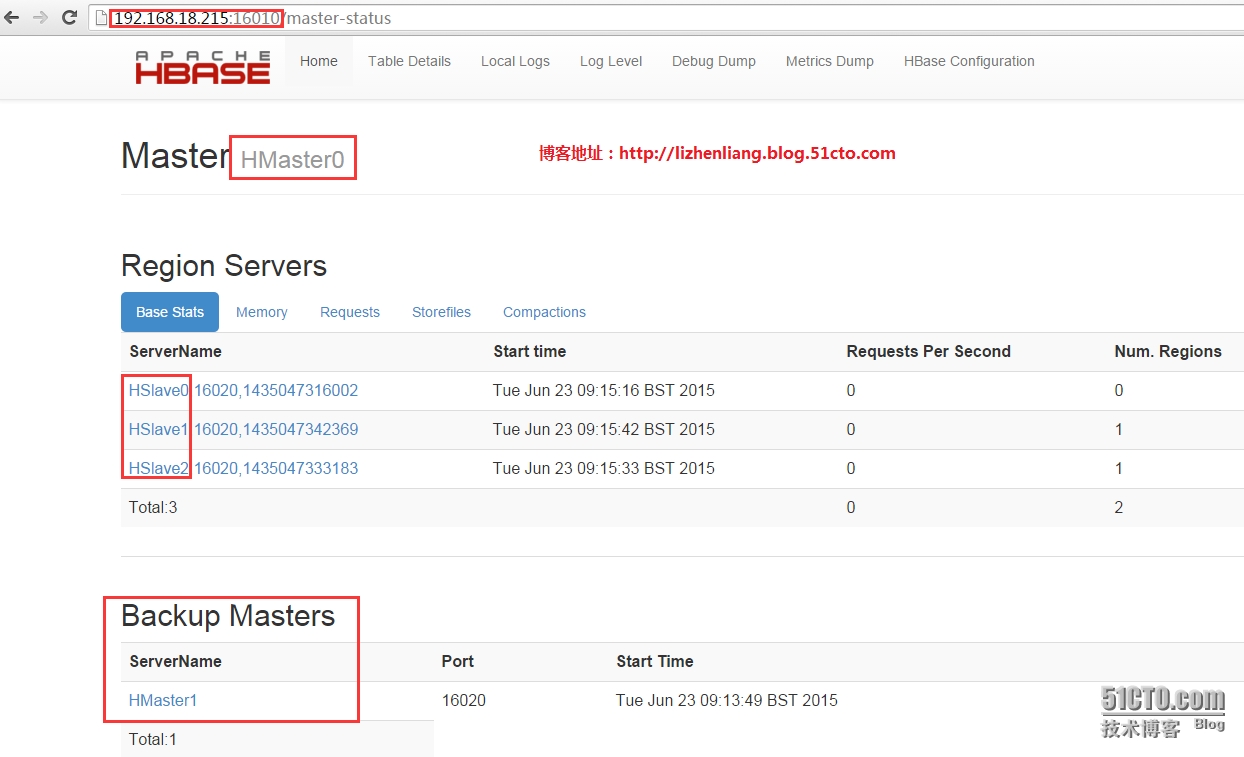
HMaster主要负责Table和Region管理工作: 1. 管理用户对Table的增、删、改、查操作 2. 管理HRegionServer的负载均衡,调整Region分布 3. 在Region Split后,负责新Region的分配 4. 在HRegionServer停机后,负责失效HRegionServer 上的Regions迁移 HRegionServer主要负责响应用户I/O请求,向HDFS文件系统中读写数据。 HBase工作原理: HRegionServer内部管理了一系列HRegion对象,每个HRegion对应了Table中的一个Region,HRegion中由多个HStore组成。每个HStore对应了Table中的一个Column Family的存储,可以看出每个Column Family其实就是一个集中的存储单元,因此最好将具备共同IO特性的column放在一个ColumnFamily中,这样最高效。 HStore存储是HBase存储的核心了,其中由两部分组成,一部分是MemStore,一部分是StoreFiles。MemStore是SortedMemory Buffer,用户写入的数据首先会放入MemStore,当MemStore满了以后会Flush成一个StoreFile(底层实现是HFile),当StoreFile文件数量增长到一定阈值,会触发Compact合并操作,将多个StoreFiles合并成一个StoreFile,合并过程中会进行版本合并和数据删除,因此可以看出HBase其实只有增加数据,所有的更新和删除操作都是在后续的compact过程中进行的,这使得用户的写操作只要进入内存中就可以立即返回,保证了HBase I/O的高性能。当StoreFiles Compact后,会逐步形成越来越大的StoreFile,当单个StoreFile大小超过一定阈值后,会触发Split操作,同时把当前Region Split成2个Region,父Region会下线,新Split出的2个孩子Region会被HMaster分配到相应的HRegionServer上,使得原先1个Region的压力得以分流到2个Region上。 在理解了上述HStore的基本原理后,还必须了解一下HLog的功能,因为上述的HStore在系统正常工作的前提下是没有问题的,但是在分布式系统环境中,无法避免系统出错或者宕机,因此一旦HRegionServer意外退出,MemStore中的内存数据将会丢失,这就需要引入HLog了。每个HRegionServer中都有一个HLog对象,HLog是一个实现WriteAhead Log的类,在每次用户操作写入MemStore的同时,也会写一份数据到HLog文件中,HLog文件定期会滚动出新的,并删除旧的文件(已持久化到StoreFile中的数据)。当HRegionServer意外终止后,HMaster会通过Zookeeper感知到,HMaster首先会处理遗留的 HLog文件,将其中不同Region的Log数据进行拆分,分别放到相应region的目录下,然后再将失效的region重新分配,领取 到这些region的HRegionServer在Load Region的过程中,会发现有历史HLog需要处理,因此会Replay HLog中的数据到MemStore中,然后flush到StoreFiles,完成数据恢复。 HBase高可用实现方式: HBase同样分为Active和Standby,把数据存储在Zookeeper,可以启动两个或多个HMaster服务进程,第一个启动的做为HBase活动节点,其余的作为备用节点。如果一台故障,Zookeeper会选择出备用节点成为活动节点,让他接管故障的活动节点任务,保证总有一个Master运行。 二、HBase安装与配置(每台都要配置) 1.安装配置 1 2 3 4 5 #tarzxvfhbase-1.0.1.1-bin.tar.gz #mvhbase-1.0.1.1/opt #vihbase-env.sh export JAVA_HOME= /usr/local/jdk1 .7 export HBASE_MANAGES_ZK= false #关闭通过内置Zookeeper管理HBase 1 2 3 4 5 6 7 8 9 10 11 12 13 14 15 16 17 18 19 20 21 22 23 24 25 26 27 28 #vihbase-site.xml <configuration> <!--HBase数据目录位置--> <property> <name>hbase.rootdir< /name > <value>hdfs: //hcluster/hbase < /value > < /property > <!--启用分布式集群--> <property> <name>hbase.cluster.distributed< /name > <value> true < /value > < /property > <!--默认HMasterHTTP访问端口--> <property> <name>hbase.master.info.port< /name > <value>16010< /value > < /property > <!--默认HRegionServerHTTP访问端口--> <property> <name>hbase.regionserver.info.port< /name > <value>16030< /value > < /property > <!--不使用默认内置的,配置独立的ZK集群地址--> <property> <name>hbase.zookeeper.quorum< /name > <value>HSlave0,HSlave1,HSlave2< /value > < /property > < /configuration > 1 2 3 4 #viregionservers HSlave0 HSlave1 HSlave2 2. 配置系统变量 1 2 3 4 5 #vi/etc/profile HBASE_HOME= /opt/hbase-1 .0.1.1 PATH=$PATH:$HBASE_HOME /bin export HBASE_HOMEPATH #source/etc/profile 3. 启动HBase 分别在HMaster0和HMaster1启动hmaster: 1 #start-hbase.sh 分别在 HSlave0/1/2启动HRegionServer: 1 #hbase-daemon.shstartregionserver 4. 检查是否启动成功 在主备节点查看有HMaster进程说明成功: 1 2 3 4 5 6 [root@HMaster0~] #jps 2615DFSZKFailoverController 30027ResourceManager 29656NameNode 2841HMaster 8448Jps 在RegionServer节点查看有HRegionServer进程说明成功: 1 2 3 4 5 6 7 [root@HSlave0~] #jps 11391NodeManager 11213DataNode 11298JournalNode 10934QuorumPeerMain 12571HRegionServer 7005Jps 通过访问WEB页面查看: 5. hbase shell常用操作命令 根据下面tb1表的结构来演示hbase增删改查用法: name info address sex age zhangsan 22 man beijing lisi 23 woman shanghai # hbase shell #进入字符页面 5.1 创建表tb1,并有两个列族name、info和address,info列族下有sex和age列 1 hbase(main):024:0>create 'tb1' , 'name' , 'info' , 'address' 5.2 查看表结构 1 hbase(main):025:0>describe 'tb1' 5.3 列出所有表 1 hbase(main):025:0>list 5.4 插入几条记录 1 2 3 4 5 6 hbase(main):028:0>put 'tb1' , 'zhangsan' , 'info:sex' , '22' hbase(main):039:0>put 'tb1' , 'zhangsan' , 'info:age' , 'man' hbase(main):031:0>put 'tb1' , 'zhangsan' , 'address' , 'beijing' hbase(main):046:0>put 'tb1' , 'lisi' , 'info:age' , 'woman' hbase(main):047:0>put 'tb1' , 'lisi' , 'info:sex' , '23' hbase(main):048:0>put 'tb1' , 'lisi' , 'address' , 'shanghai' 5.5 查看所有记录(全表扫描) 1 2 3 4 5 hbase(main):040:0>scan 'tb1' ROWCOLUMN+CELL zhangsancolumn=address:,timestamp=1435129009088,value=beijing zhangsancolumn=info:age,timestamp=1435129054098,value= man zhangsancolumn=info:sex,timestamp=1435128714392,value=22 说明: ROW:行,用来检索记录的主键。 COLUMN family:列族,是表的一部分,必须在创建表时定义,可以看到列名是以列族作为前缀,一个列族可以有多个列(column)。 CELL:存储单位,存储实际数据,也就是所看到的value,cell中没有数据类型,全部是字节码形式存储。 timestamp:时间戳,可以看做是数据版本号,hbase写时自动赋值,为当前系统时间,精确到毫秒。如果每个cell保存同一份数据多个版本时,可通过时间戳来索引版本。 5.6 统计表中记录总数 1 2 3 4 hbase(main):050:0>count 'tb1' 2row(s) in 0.0190seconds =>2 5.7 查看表中某条记录 1 2 3 4 5 6 hbase(main):054:0>get 'tb1' , 'zhangsan' hbase(main):054:0>get 'tb1' , 'zhangsan' COLUMNCELL address:timestamp=1435129096397,value=beijing info:agetimestamp=1435129054098,value= man info:sextimestamp=1435128714392,value=22 5.8 查看表中某行某列族中的所有数据 1 2 3 4 hbase(main):055:0>get 'tb1' , 'zhangsan' , 'info' COLUMNCELL info:agetimestamp=1435129054098,value= man info:sextimestamp=1435128714392,value=22 5.9 更新一条记录(覆盖) 1 2 hbase(main):063:0>put 'tb1' , 'zhangsan' , 'info:sex' , '23' 0row(s) in 0.0080seconds 6.0 给lisi增加一个comment字段 1 hbase(main):070:0>incr 'tb1' , 'lisi' , 'info:comment' 6.1 删除某行某列族数据 1 hbase(main):065:0>delete 'tb1' , 'zhangsan' , 'info:sex' 6.2 删除某行所有记录 1 hbase(main):067:0>deleteall 'tb1' , 'zhangsan' 6.3 删除一个表 1 2 hbase(main):072:0>disable 'tb1' #先禁用 hbase(main):073:0>drop 'tb1' #再删除