首页 文章 精选 留言 我的

精选列表

搜索[Python版本],共10000篇文章
优秀的个人博客,低调大师

【机器学习工具榜单】Tensorflow最多使用,Python 取代 R 成最受欢迎编程语言

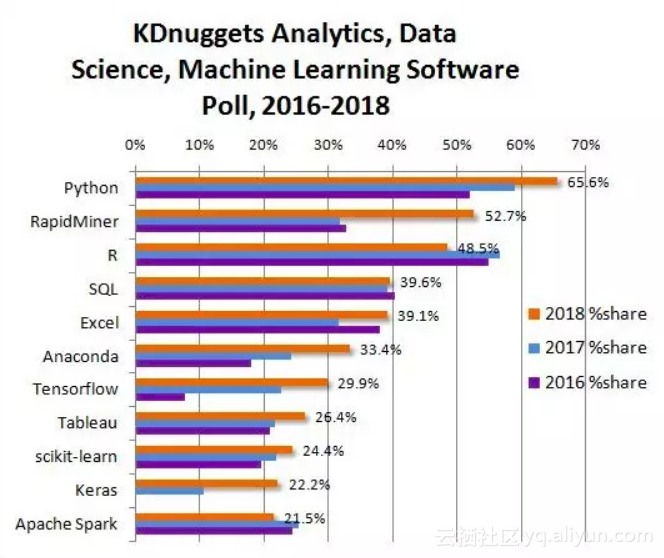
近日,KDnuggets网站公布了2018年度的数据科学和机器学习工具调查结果。2300多名参与者对自己“过去 12 个月内在项目开发中使用过的数据挖掘 / 机器学习工具和编程语言”进行了投票。 最受欢迎的分析、数据科学、机器学习工具 图1:2018年最受欢迎的分析/数据科学/机器学习工具,以及与2016~2017年调查结果的对比 下表列举了最受欢迎的前11个工具,其中每个的占比都达到20%以上。 表1:2018年最受欢迎的分析/数据科学/ 机器学习软件Top 10 上表中,2018 % share 是指使用这个工具的人占所有投票者的百分比,% change是指2018年相较2017年的投票变化。 每个受访者平均使用的工具数量为7.0个,略高于2017年的6.75个(排除了只选择1个工具的投票)。 与2017年的软件调查相比,今年新进入Top

优秀的个人博客,低调大师

Python3网络爬虫——(2)设置User Agent模拟浏览器访问

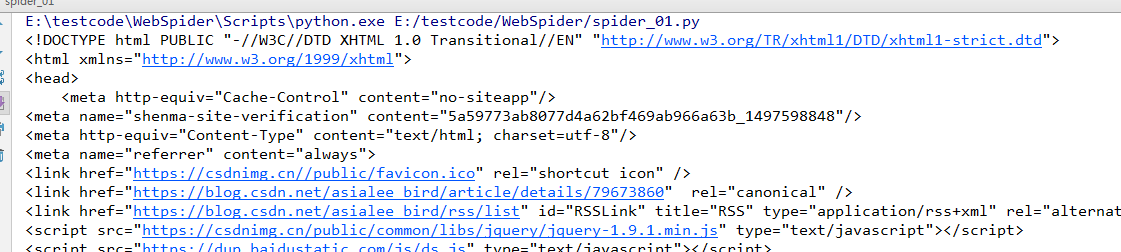
设置User Agent模拟浏览器访问 方法一、使用build_opener()修改报头 # -*- coding: UTF-8 -*- #使用build_opener()修改报头 from urllib import request if __name__ == "__main__": url="https://blog.csdn.net/asialee_bird/article/details/79673860" headers=("User-Agent","Mozilla/5.0 (Windows NT 6.1; Win64; x64) AppleWebKit/537.36 (KHTML, like Gecko) Chrome/64.0.3282.168 Safari/537.36") opener=request.build_opener() opener.addheaders=[headers] file=opener.open(url) data=file.read() print(data) 方法二、使用add_header修改报头 # -*- coding: UTF-8 -*- #使用add_header修改报头 from urllib import request if __name__ == "__main__": url="https://blog.csdn.net/asialee_bird/article/details/79673860" req=request.Request(url) #创建一个Request对象 req.add_header("User-Agent","Mozilla/5.0 (Windows NT 6.1; Win64; x64) AppleWebKit/537.36 (KHTML, like Gecko) Chrome/64.0.3282.168 Safari/537.36") file=request.urlopen(req) data=file.read() data=data.decode('utf-8') #对读取的信息进行解码 print(data) 结果: 方法三、 # -*- coding: UTF-8 -*- from urllib import request if __name__ == "__main__": #以CSDN为例,CSDN不更改User Agent是无法访问的 url = 'http://www.csdn.net/' head = {} #写入User Agent信息 head['User-Agent'] = 'Mozilla/5.0 (Windows NT 6.1; Win64; x64) AppleWebKit/537.36 (KHTML, like Gecko) Chrome/64.0.3282.168 Safari/537.36' req = request.Request(url, headers=head) #创建Request对象 response = request.urlopen(req) #传入创建好的Request对象 html = response.read().decode('utf-8') #读取响应信息并解码 print(html) #打印信息 注: 常见的User Agent 1.Android Mozilla/5.0 (Linux; Android 4.1.1; Nexus 7 Build/JRO03D) AppleWebKit/535.19 (KHTML, like Gecko) Chrome/18.0.1025.166 Safari/535.19 Mozilla/5.0 (Linux; U; Android 4.0.4; en-gb; GT-I9300 Build/IMM76D) AppleWebKit/534.30 (KHTML, like Gecko) Version/4.0 Mobile Safari/534.30 Mozilla/5.0 (Linux; U; Android 2.2; en-gb; GT-P1000 Build/FROYO) AppleWebKit/533.1 (KHTML, like Gecko) Version/4.0 Mobile Safari/533.1 2.Firefox Mozilla/5.0 (Windows NT 6.2; WOW64; rv:21.0) Gecko/20100101 Firefox/21.0 Mozilla/5.0 (Android; Mobile; rv:14.0) Gecko/14.0 Firefox/14.0 3.Google Chrome Mozilla/5.0 (Windows NT 6.2; WOW64) AppleWebKit/537.36 (KHTML, like Gecko) Chrome/27.0.1453.94 Safari/537.36 Mozilla/5.0 (Linux; Android 4.0.4; Galaxy Nexus Build/IMM76B) AppleWebKit/535.19 (KHTML, like Gecko) Chrome/18.0.1025.133 Mobile Safari/535.19 4.iOS Mozilla/5.0 (iPad; CPU OS 5_0 like Mac OS X) AppleWebKit/534.46 (KHTML, like Gecko) Version/5.1 Mobile/9A334 Safari/7534.48.3 Mozilla/5.0 (iPod; U; CPU like Mac OS X; en) AppleWebKit/420.1 (KHTML, like Gecko) Version/3.0 Mobile/3A101a Safari/419.3 上面列举了Andriod、Firefox、Google Chrome、iOS的一些User Agent,直接copy就能用

优秀的个人博客,低调大师

Python-OpenCV学习(七)边界框、最小矩形区域和最小闭圆的轮廓:

边界框、最小矩形区域和最小闭圆的轮廓:找到一个正方形轮廓很简单 找不规则的、歪斜的以及旋转的形状可用OpencV的cv2.findContours函数。 import cv2 import numpy as np img = cv2.pyrDown(cv2.imread("hammer.jpg", cv2.IMREAD_UNCHANGED)) ret, thresh = cv2.threshold(cv2.cvtColor(img.copy(), cv2.COLOR_BGR2GRAY) , 127, 255, cv2.THRESH_BINARY) image, contours, hier = cv2.findContours(thresh, cv2.RETR_EXTERNAL, cv2.CHAIN_APPROX_SIMPLE) for c in contours: # find bounding box coordinates x,y,w,h = cv2.boundingRect(c) cv2.rectangle(img, (x,y), (x+w, y+h), (0, 255, 0), 2) # find minimum area rect = cv2.minAreaRect(c) # calculate coordinates of the minimum area rectangle box = cv2.boxPoints(rect) # normalize coordinates to integers box = np.int0(box) # draw contours cv2.drawContours(img, [box], 0, (0,0, 255), 3) # calculate center and radius of minimum enclosing circle (x,y),radius = cv2.minEnclosingCircle(c) # cast to integers center = (int(x),int(y)) radius = int(radius) # draw the circle img = cv2.circle(img,center,radius,(0,255,0),2) cv2.drawContours(img, contours, -1, (255, 0, 0), 1) cv2.imshow("contours", img) cv2.waitKey() cv2.destroyAllWindows() 结果:加载图片后先进行阈值处理,由于原图为黑白图片所以阈值较为简单计算简单的边界框: x,y,w,h=cv2.boundingRect(c) 转化为框的坐标及宽度,再画出框: cv.rectangle(img,(x,y),(x+w,y+h),(0,255,0),2) 第二步计算出包围最小的矩形区域 rect = cv2.minAreaRect(c) # calculate coordinates of the minimum area rectangle box = cv2.boxPoints(rect) # normalize coordinates to integers box = np.int0(box) 注意计算所得的顶点坐标为浮点型的,像素坐标必须为整数,所以必须做一个转换,然后画出这个矩形,可以用cv2.drawContours函数来: cv2.drawContours(img,[box],0,(0,0,255),3) 该函数的第二个参数接收一个保存着轮廓的数组,从而可以在一次操作中绘制一系列轮廓。第三个参数为所要绘制的轮廓的索引,-1为绘制所有的轮廓,否则只会绘制轮廓组中指定的轮廓最后检查的边界轮廓为最小闭圆: (x,y),radius = cv2.minEnclosingCircle(c) # cast to integers center = (int(x),int(y)) radius = int(radius) cv2.minEnclosingCircle函数会返回一个二元组,第一个元素为圆心坐标组成的元组,第二个元素为圆的半径值。
优秀的个人博客,低调大师

python3.6抓取出现TypeError: cannot use a string pattern on a bytes-like ob...

import reimport requestsfrom requests.exceptions import RequestExceptionimport jsondef get_one_page(url):try: response = requests.get(url)if response.status_code == 200:return response.contentreturn None except RequestException:return Nonedef parse_page_html(html): pattern = re.compile('<dd>.*?board-index.*?>(\d+)</i>.*?data-src="(.*?)".*?name"><a'+ '.*?>(.*?)</a>.*?star">(.*?)</p>.*?releasetime">(.*?)</p>'+ '.*?integer">(.*?)</i>.*?fraction">(.*?)</i>.*?</dd>', re.S) items = re.findall(pattern, html)for item in items:yield {'index':item[0],'image':item[1],'title':item[2],'actor':item[3].strip()[3:],'time':item[4].strip()[5:],'score':item[5]+item[6] }def write_to_file(content):with open('result.txt','a',encoding='utf-8') as f: f.write(json.dumps(content,ensure_ascii=False)+'\n') f.close()def main(): url = 'http://maoyan.com/board/4?' html = get_one_page(url)for item in parse_page_html(html): write_to_file(item)if __name__ == '__main__': main() 如果没有以上红色代码,会出现TypeError: cannot use a string pattern on a bytes-like object,只需要加上html = html.decode('utf-8')即可

优秀的个人博客,低调大师

学习了《python网络爬虫实战》第一个爬虫,爬取新浪新闻

请安装anaconda,其中附带的spyder方便运行完查看变量 1.进入cmd控制台, 输入 pip install BeautifulSoup4 pip install requests 2.编写代码,代码已经很清晰了,直接运行不会报错并有成功的结果 def getNewsDetail(newsUrl): import requests from bs4 import BeautifulSoup from datetime import datetime newsWeb = requests.get(newsUrl) newsWeb.encoding = 'utf-8' soup = BeautifulSoup(newsWeb.text,'lxml') result = {} result['title'] = soup.select('.main-title')[0].text result['newsSource'] = soup.select('.source')[0].text timeSource = soup.select('.date')[0].text result['datetime'] = datetime.strptime(timeSource,'%Y年%m月%d日 %H:%M') result['article'] = soup.select('.article')[0].text result['editor'] = soup.select('.show_author')[0].text.strip('责任编辑:') result['comment'] = soup.select('.num')[0].text return result def parseListLinks(url): import requests import json newsDetails = [] request = requests.get(url) jsonLoad = json.loads(request.text.lstrip(' newsloadercallback(').rstrip(');')) newsUrls = [] for item in jsonLoad['result']['data']: newsUrls.append(item['url']) for url in newsUrls: newsDetails.append(getNewsDetail(url)) return newsDetails if __name__ == '__main__': #获取单个新闻页面的信息 newsUrl = 'http://news.sina.com.cn/s/wh/2018-01-08/doc-ifyqkarr7830426.shtml' newsDetail = getNewsDetail(newsUrl) #获取整个列表各个新闻页面的信息 rollUrl='http://api.roll.news.sina.com.cn/zt_list?channel=news&cat_1=gnxw\ &cat_2==gdxw1||=gatxw||=zs-pl||=mtjj&level==1||=2&show_ext=1&show_all=1&\ show_num=22&tag=1&format=json&page=23&callback=newsloadercallback&_=1515911333929' newsDetails = parseListLinks(rollUrl)

优秀的个人博客,低调大师

gunicorn django nginx多站点 pyvenv virutalvenv python 3 django 2这些限制下,如何让...

昨天测试的是uwsgi, 为了能运行在alphine的docker上面, (听说uwsgi正在改进不是基于于gcc库的应用), 改进一下gunicorn的配置,来实现跟昨天同样的多站点配置。 其实,在配置gunicorn时,它本身的配置不用变, 只要更改nginx为其增加多一级目录即可。 gunicorn.conf bind = "0.0.0.0:9090" workers = 12 #workers是工作线程数,一般设置成:2 * 服务器CPU个数 + 1 errorlog = '/var/log/xxx/gunicorn.error.log' accesslog = '/var/log/xxx/gunicorn.access.log' #loglevel = 'debug' #proc_name = 'gunicorn_xxx' nginx.conf upstream xxx_host { server ip:9090; } server { listen 80; server_name localhost; location /prism/ { # include uwsgi_params; #注释这两行为uwsgi # uwsgi_pass xxx_host; #多目录实现在uwsgi配置 proxy_pass http://xxx_host; #注意有http哟 proxy_set_header X-Real-IP $remote_addr; proxy_set_header X-Forwarded-For $proxy_add_x_forwarded_for; proxy_set_header Host $http_host; proxy_set_header SCRIPT_NAME /xxx; #这种就可以凭空多一级目录 proxy_set_header REMOTE_USER $remote_user; proxy_set_header X-Forwarded-Proto $scheme; client_max_body_size 1000m; client_body_timeout 5m; proxy_connect_timeout 5m; proxy_read_timeout 5m; proxy_send_timeout 5m; } } 以如下方式运行,指定配置文个,wsgi文件位置,优化速度时,可以考虑用-k指定运行模式( gevent, gaihttp,pthread,torado....): gunicorn -c gunicorn.conf settings.wsgi

资源下载

更多资源
腾讯云软件源

腾讯云软件源

为解决软件依赖安装时官方源访问速度慢的问题,腾讯云为一些软件搭建了缓存服务。您可以通过使用腾讯云软件源站来提升依赖包的安装速度。为了方便用户自由搭建服务架构,目前腾讯云软件源站支持公网访问和内网访问。

Nacos

Nacos

Nacos /nɑ:kəʊs/ 是 Dynamic Naming and Configuration Service 的首字母简称,一个易于构建 AI Agent 应用的动态服务发现、配置管理和AI智能体管理平台。Nacos 致力于帮助您发现、配置和管理微服务及AI智能体应用。Nacos 提供了一组简单易用的特性集,帮助您快速实现动态服务发现、服务配置、服务元数据、流量管理。Nacos 帮助您更敏捷和容易地构建、交付和管理微服务平台。

Spring

Spring

Spring框架(Spring Framework)是由Rod Johnson于2002年提出的开源Java企业级应用框架,旨在通过使用JavaBean替代传统EJB实现方式降低企业级编程开发的复杂性。该框架基于简单性、可测试性和松耦合性设计理念,提供核心容器、应用上下文、数据访问集成等模块,支持整合Hibernate、Struts等第三方框架,其适用范围不仅限于服务器端开发,绝大多数Java应用均可从中受益。

Sublime Text

Sublime Text

Sublime Text具有漂亮的用户界面和强大的功能,例如代码缩略图,Python的插件,代码段等。还可自定义键绑定,菜单和工具栏。Sublime Text 的主要功能包括:拼写检查,书签,完整的 Python API , Goto 功能,即时项目切换,多选择,多窗口等等。Sublime Text 是一个跨平台的编辑器,同时支持Windows、Linux、Mac OS X等操作系统。

用户登录
用户注册