Linux自学笔记——日志服务之rsyslog
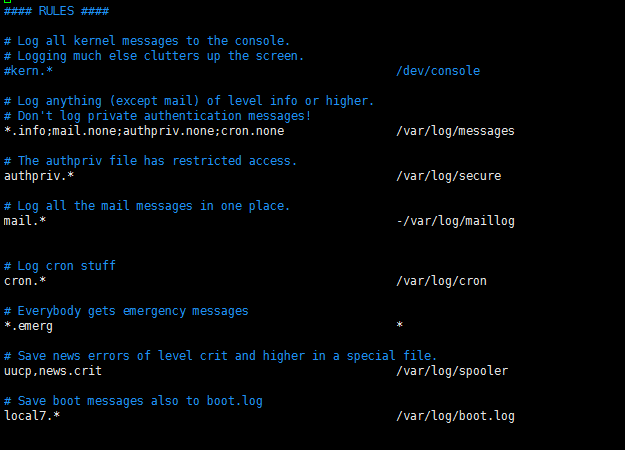
日志:历史事件日志 历史事件: 时间,事件 时间级别(日志级别):事件的关键性程度; 事件:系统引导启动、应用程序启动、应用程序尤其是服务类应用程序运行过程中的一些事件: 系统日志服务: syslog: syslogd:system klogd:kernel 事件格式较为简单时,可统一由syslog进行记录: 事件产生的日期时间 主机 进程[pid]:事件内容 支持C/S架构:可通过UDP或TCP协议提供日志记录服务; rsyslog: rsyslogd: 特性: 多线程; UDP,TCP,SSL,TLS,RELP; 存储日志信息于mysql、pgsql、oracle等数据管理系统; 强大的过滤器,实现过滤日志信息中任何部分的内容; 自定义输出格式; Elk stack:elasticsearch,logstash,kibana rsyslog日志收集器中的术语: facility:设施,从功能或程序上对日志收集进行分类: auth,authpriv,cron,daemon,kern,lpr,mail,mark,news,security,user,uucp,local0-local7,syslog priority:优先级,日志级别 debug,info,notice,warn(warning),err(error),crit(critical),alert,emerg(panic) 指定级别: :所有级别 None:没有级别; priority:此级别以高于此级别的所有级别; =priority:仅此级别; …… 程序环境: 主程序:rsyslogd 主配置文件:/etc/rsyslog.conf, /etc/rsyslog.d/.conf 服务脚本(centos6):/etc/rc.d/init.d/rsyslog Unit File(centos7):/usr/lib/system/system/rsyslog.service 配置文件格式rsyslog.conf 主要由三部分组成: MODULES GLOBAL DRICTIVES RULES RULES: facilty.priority targetbr/> target: 文件:记录日志事件于指定的文件中;通常应该位于/var/log目录下;文件路径之前的“-”表示异步写入; 用户:将日志事件通知给指定的用户;是通过将信息发送给登录到系统上的用户的终端进行的; 日志服务器:@host,把日志送往指定的服务器主机; Host:即日志服务器地址,监听在tcp或udp协议的514端口以提供服务; 管道:| COMMAND 其他日志文件: /var/log/wtmp:当前系统成功登录系统的日志;需要使用last命令查看 /var/log/btmp:当前系统尝试登录系统失败相关的日志;需要使用lastb命令查看 Lastlog:显示当前系统上的所有用户最近一次登录系统的时间; /var/log/dmesg:系统引导过程中的日志信息;也可以使用dmesg命令进行查看; Rsyslog服务器: 编辑配置文件/etc/rsyslog.conf,启用一下选项即可启用rsyslog服务器; Provides UDP syslog reception $ModLoad imudp $UDPServerRun 514 Provides TCP syslog reception $ModLoad imtcp $InputTCPServerRun 514 示例:将日志记录在mysql中,以下为大致的步骤: 1.于mysql服务器:准备好mysql服务器,创建用户,授权对syslog数据库拥有全部的访问权限; 2.于rsyslog主机:安装rsyslog-mysql程序包; 3.于rsyslog主机:通过导入createDB.sql脚本创建依赖到的数据库及表; mysql -uUSER -hHOST -pPASSWORD < /usr/share/doc/rsyslog-mysql-VERSION/createDB.sql 4.配置rsyslog使用ommysql模块 MODULES #### $ModLoad ommysql RULES #### Facility.priority :ommysql:DBHOST,DB,DBUSER,DBUSERPASSWORD 注意:重启rsyslog服务; 5.Web展示接口:loganalyzer 1) 配置lamp Httpd,php,php-mysql,php-gd 2) 安装loganalyzer #tar xf loganalyzer-3.6.5.tar.gz #cp –r loganalyzer-3.6.5/src /var/www/html/loganalyzer #cp –r loganalyzer-3.6.5/contrib/*.sh /var/www/html/loganalyzer/ #cd /var/www/html/loganalyzer/ #chmod +x *.sh #./configure.sh #./secure.sh #chmod 666 config.php 测试,通过url访问; 演示: 日志服务器:192.168.19.134 测试主机:192.168.19.138 Mysql主机:192.168.19.138 启用服务器功能; 启动rsyslog服务,并测试端口; 测试在另一台主机上编辑/etc/rsyslog.conf,将target指向此台日志服务器的地址; 1) 编辑19.138主机上的rsyslog的主配置文件; 2) 重启服务并执行一个安装程序; 3) 在日志服务器上测试是否有日志; 记录日志于mysql中; 1) 授权用户对Syslog数据库的全部访问权限; Note:在这里除了要授权本机的权限,还要授权,rsyslog主机访问mysql数据库的权限,否则,远程访问mysql将失败; 2) 在rsyslog主机上安装rsyslog-mysql程序包; 3) 在rsyslog主机上通过导入createDB.sql脚本创建依赖到的数据库及表; 4) 配置rsyslog使用ommysql模块; Note:重启rsyslog服务; 5) 测试; 在测试主机上安装php,php-mysql,查询mysql服务器数据库Syslog表中的内容; Web展示接口:loganalyzer 1) 配置lamp组合 Httpd,php,php,mysql,php-gd; 2) 安装loganalyzer a. 解压; b. 复制相关文件至/var/www/html目录; c. 更改.sh结尾文件权限; d. 执行脚本; e. Config.php文件权限修改; f. 测试访问; 访问页面如下: 确保config.php权限可写: Step7,创建数据源,按如下填写: 进入页面,showevents选项可以查看日志; 本文转自 claude_liu 51CTO博客,原文链接:http://blog.51cto.com/claude666/2051737,如需转载请自行联系原作者