首页 文章 精选 留言 我的

精选列表

搜索[部署],共10000篇文章
优秀的个人博客,低调大师

openstack 管理三十三 - rpm 方式部署 openstack [compute]

作用 compute 用户启动 instance compute 可以连接 ceph 作为 instance 外部存储 软件安装 # yum install -y openstack-neutron.noarch openstack-neutron-ml2.noarch openstack-neutron-openvswitch.noarch openstack-nova-api openstack-nova-compute openstack-nova-conductor openstack-nova-scheduler python-cinderclient openstack-utils openstack-nova-novncproxy 配置 neutron-metadata-agent, neutron-openvswitch-agent 定义 neutron 连接 keystone 认证 # openstack-config --set /etc/neutron/neutron.conf DEFAULT auth_strategy keystone # openstack-config --set /etc/neutron/neutron.conf keystone_authtoken auth_host 240.10.130.25 # openstack-config --set /etc/neutron/neutron.conf keystone_authtoken admin_tenant_name service # openstack-config --set /etc/neutron/neutron.conf keystone_authtoken admin_user neutron # openstack-config --set /etc/neutron/neutron.conf keystone_authtoken admin_password neutron 定义 neutron 连接 rabbitmq # openstack-config --set /etc/neutron/neutron.conf DEFAULT rpc_backend neutron.openstack.common.rpc.impl_kombu # openstack-config --set /etc/neutron/neutron.conf DEFAULT rabbit_host 240.10.130.25 # openstack-config --set /etc/neutron/neutron.conf DEFAULT rabbit_port 5672 # openstack-config --set /etc/neutron/neutron.conf DEFAULT rabbit_userid neutron # openstack-config --set /etc/neutron/neutron.conf DEFAULT rabbit_password openstack 定义 neutron 使用 ml2 的网络 plugin # ln -s /etc/neutron/plugins/ml2/ml2_conf.ini /etc/neutron/plugin.ini # openstack-config --set /etc/neutron/neutron.conf DEFAULT core_plugin neutron.plugins.ml2.plugin.Ml2Plugin # openstack-config --set /etc/neutron/neutron.conf DEFAULT service_plugins neutron.services.l3_router.l3_router_plugin.L3RouterPlugin # openstack-config --set /etc/neutron/plugin.ini ml2 type_drivers vxlan,flat # openstack-config --set /etc/neutron/plugin.ini ml2 tenant_network_types vxlan,flat # openstack-config --set /etc/neutron/plugin.ini ml2 mechanism_drivers openvswitch # openstack-config --set /etc/neutron/plugin.ini agent l2_population True 配置 ovs plugin # openstack-config --set /etc/neutron/plugins/openvswitch/ovs_neutron_plugin.ini ovs bridge_mappings physnet1:br-ex # openstack-config --set /etc/neutron/plugins/openvswitch/ovs_neutron_plugin.ini ovs network_vlan_ranges physnet1 # openstack-config --set /etc/neutron/plugins/openvswitch/ovs_neutron_plugin.ini ovs tunnel_type vxlan # openstack-config --set /etc/neutron/plugins/openvswitch/ovs_neutron_plugin.ini ovs local_ip 10.199.130.31 # openstack-config --set /etc/neutron/plugins/openvswitch/ovs_neutron_plugin.ini ovs enable_tunneling True # openstack-config --set /etc/neutron/plugins/openvswitch/ovs_neutron_plugin.ini ovs integration_bridge br-int # openstack-config --set /etc/neutron/plugins/openvswitch/ovs_neutron_plugin.ini ovs tunnel_bridge br-tun # openstack-config --set /etc/neutron/plugins/openvswitch/ovs_neutron_plugin.ini agent tunnel_types vxlan # openstack-config --set /etc/neutron/plugins/openvswitch/ovs_neutron_plugin.ini securitygroup firewall_driver neutron.agent.linux.iptables_firewall.OVSHybridIptablesFirewallDriver 桥接网络配置 /etc/sysconfig/network-scripts/ifcfg-eth0 DEVICE=eth0 ONBOOT=yes HWADDR=48:46:FB:04:97:5C TYPE=OVSPort DEVICETYPE=ovs OVS_BRIDGE=br-ex /etc/sysconfig/network-scripts/ifcfg-br-ex DEVICE=br-ex DEVICETYPE=ovs TYPE=OVSBridge BOOTPROTO=static IPADDR=10.199.130.31 NETMASK=255.255.252.0 GATEWAY=10.199.128.1 ONBOOT=yes 重启网络生效 service network restart 配置 compute 配置 keystone 验证 # openstack-config --set /etc/nova/nova.conf DEFAULT auth_strategy keystone # openstack-config --set /etc/nova/api-paste.ini filter:authtoken auth_host 240.10.130.25 # openstack-config --set /etc/nova/api-paste.ini filter:authtoken admin_tenant_name service # openstack-config --set /etc/nova/api-paste.ini filter:authtoken admin_user nova # openstack-config --set /etc/nova/api-paste.ini filter:authtoken admin_password nova 连接 rabbitmq, 用于处理消息队列 # openstack-config --set /etc/nova/nova.conf DEFAULT rpc_backend rabbit # openstack-config --set /etc/nova/nova.conf DEFAULT rabbit_host 240.10.130.25 # openstack-config --set /etc/nova/nova.conf DEFAULT rabbit_port 5672 # openstack-config --set /etc/nova/nova.conf DEFAULT rabbit_userid nova # openstack-config --set /etc/nova/nova.conf DEFAULT rabbit_password openstack 连接 glance, 用于获取镜像信息 # openstack-config --set /etc/nova/nova.conf DEFAULT glance_host 10.199.130.25 # openstack-config --set /etc/nova/nova.conf DEFAULT glance_port 9292 # openstack-config --set /etc/nova/nova.conf DEFAULT glance_protocol http # openstack-config --set /etc/nova/nova.conf DEFAULT glance_api_servers 10.199.130.25:9292 # openstack-config --set /etc/nova/nova.conf DEFAULT image_service nova.image.glance.GlanceImageService 连接 neutron 获得网络信息 # openstack-config --set /etc/nova/nova.conf DEFAULT network_api_class nova.network.neutronv2.api.API # openstack-config --set /etc/nova/nova.conf DEFAULT neutron_url http://240.10.130.29:9696/ # openstack-config --set /etc/nova/nova.conf DEFAULT neutron_admin_tenant_name service # openstack-config --set /etc/nova/nova.conf DEFAULT neutron_admin_username neutron # openstack-config --set /etc/nova/nova.conf DEFAULT neutron_admin_password neutron # openstack-config --set /etc/nova/nova.conf DEFAULT neutron_admin_auth_url http://240.10.130.25:35357/v2.0 # openstack-config --set /etc/nova/nova.conf DEFAULT security_group_api neutron # openstack-config --set /etc/nova/nova.conf DEFAULT firewall_drivernova.virt.firewall.NoopFirewallDriver 获得 libvirt 虚拟化支持 # openstack-config --set /etc/nova/nova.conf DEFAULT compute_driver nova.virt.libvirt.LibvirtDriver # openstack-config --set /etc/nova/nova.conf DEFAULT libvirt_inject_partition \-1 # openstack-config --set /etc/nova/nova.conf libvirt virt_type kvm # openstack-config --set /etc/nova/nova.conf libvirt inject_password True # openstack-config --set /etc/nova/nova.conf libvirt live_migration_uri qemu+ssh://nova@%s/system?keyfile=/etc/nova/ssh/nova_migration_key # openstack-config --set /etc/nova/nova.conf libvirt vif_driver nova.virt.libvirt.vif.LibvirtGenericVIFDriver # openstack-config --set /etc/nova/nova.conf libvirt cpu_mode host-model 设定云主机超配信息 openstack-config --set /etc/nova/nova.conf DEFAULT cpu_allocation_ratio=16.0 openstack-config --set /etc/nova/nova.conf DEFAULT ram_allocation_ratio=1.5 openstack-config --set /etc/nova/nova.conf DEFAULT reserved_host_memory_mb=8096 openstack-config --set /etc/nova/nova.conf DEFAULT reserved_host_disk_mb=80 配置连接 nova 的数据库 openstack-config --set /etc/nova/nova.conf DEFAULT sql_connection mysql://nova:openstack@240.10.130.25/nova 配置 vnc 连接 # openstack-config --set /etc/nova/nova.conf DEFAULT novncproxy_base_url http://10.199.130.30:6080/vnc_auto.html # openstack-config --set /etc/nova/nova.conf DEFAULT vncserver_listen 0.0.0.0 # openstack-config --set /etc/nova/nova.conf DEFAULT vncserver_proxyclient_address 240.10.130.30 # openstack-config --set /etc/nova/nova.conf DEFAULT vnc_enabled True compute 节点服务启动 service messagebus restart service libvirtd restart service openstack-nova-compute restart service neutron-openvswitch-agent restart 验证 检测服务 [root@hh-yun-compute-130025 ~]# source /root/keystonerc_admin [root@hh-yun-compute-130025 ~(keystone_admin)]# nova service-list +------------------+-----------------------------------+----------+---------+-------+----------------------------+-----------------+ | Binary | Host | Zone | Status | State | Updated_at | Disabled Reason | +------------------+-----------------------------------+----------+---------+-------+----------------------------+-----------------+ | nova-consoleauth | hh-yun-compute-130030.vclound.com | internal | enabled | up | 2014-10-14T09:48:59.000000 | - | | nova-scheduler | hh-yun-compute-130030.vclound.com | internal | enabled | up | 2014-10-14T09:49:02.000000 | - | | nova-conductor | hh-yun-compute-130030.vclound.com | internal | enabled | up | 2014-10-14T09:48:55.000000 | - | | nova-compute | hh-yun-compute-130030.vclound.com | nova | enabled | down | 2014-10-11T08:31:52.000000 | - | | nova-compute | hh-yun-compute-130031.vclound.com | nova | enabled | up | 2014-10-14T09:48:55.000000 | - | | nova-compute | hh-yun-compute-130032.vclound.com | nova | enabled | up | 2014-10-14T09:48:54.000000 | - | +------------------+-----------------------------------+----------+---------+-------+----------------------------+-----------------+ [root@hh-yun-compute-130025 ~(keystone_admin)]# neutron agent-list +--------------------------------------+--------------------+-----------------------------------+-------+----------------+ | id | agent_type | host | alive | admin_state_up | +--------------------------------------+--------------------+-----------------------------------+-------+----------------+ | 21fa636f-141f-4d59-8be4-9d85d71498e8 | Open vSwitch agent | hh-yun-compute-130032.vclound.com | :-) | True | | 2ec500b0-84f7-4f4d-8565-8ba0abdb3c50 | Open vSwitch agent | hh-yun-compute-130031.vclound.com | :-) | True | | 6f24029b-e24e-424f-a0c3-bfb507eae6da | L3 agent | hh-yun-compute-130029.vclound.com | :-) | True | | 730a9541-ae3d-4448-8798-b825f80514a2 | Metadata agent | hh-yun-compute-130029.vclound.com | :-) | True | | 98ef41f5-46c7-48b3-a8a0-5f638a15c881 | Metadata agent | hh-yun-compute-130031.vclound.com | :-) | True | | a03f5dd1-cc2f-4b5e-ad58-1b0186638bc9 | DHCP agent | hh-yun-compute-130029.vclound.com | :-) | True | | dbc049c1-7101-4470-bc45-9b21c76265ec | Metadata agent | hh-yun-compute-130032.vclound.com | :-) | True | | ec475da6-9a76-498b-a3e7-c711be90673c | Open vSwitch agent | hh-yun-compute-130029.vclound.com | :-) | True | +--------------------------------------+--------------------+-----------------------------------+-------+----------------+ 创建云主机 nova boot --flavor m1.small --image centos5.8 --security_group terry_test_rule --nic net-id=b26b81fc-bda9-4882-950c-614e9546bcd1 terry_test +--------------------------------------+--------------------------------------------------+ | Property | Value | +--------------------------------------+--------------------------------------------------+ | OS-DCF:diskConfig | MANUAL | | OS-EXT-AZ:availability_zone | nova | | OS-EXT-SRV-ATTR:host | - | | OS-EXT-SRV-ATTR:hypervisor_hostname | - | | OS-EXT-SRV-ATTR:instance_name | instance-00000008 | | OS-EXT-STS:power_state | 0 | | OS-EXT-STS:task_state | scheduling | | OS-EXT-STS:vm_state | building | | OS-SRV-USG:launched_at | - | | OS-SRV-USG:terminated_at | - | | accessIPv4 | | | accessIPv6 | | | adminPass | u7CNVSq5ceyv | | config_drive | | | created | 2014-10-13T08:00:48Z | | flavor | m1.small (2) | | hostId | | | id | 1281d02c-a79e-4241-a596-3c1a10b3e7e9 | | image | centos5.8 (438d5c5a-f595-45e5-8236-801b9da8f9ab) | | key_name | - | | metadata | {} | | name | terry_test | | os-extended-volumes:volumes_attached | [] | | progress | 0 | | security_groups | terry_test_rule | | status | BUILD | | tenant_id | 59728cade8b14853a8d3cee8c2567881 | | updated | 2014-10-13T08:00:48Z | | user_id | 43f38bc5c1314670b0cf1d925736ff3a | +--------------------------------------+--------------------------------------------------+ 检验 [root@hh-yun-compute-130025 ~(keystone_admin)]# nova list +--------------------------------------+------------+--------+------------+-------------+------------------------+ | ID | Name | Status | Task State | Power State | Networks | +--------------------------------------+------------+--------+------------+-------------+------------------------+ | 1281d02c-a79e-4241-a596-3c1a10b3e7e9 | terry_test | BUILD | spawning | NOSTATE | ext_net=10.199.131.209 | +--------------------------------------+------------+--------+------------+-------------+------------------------+ [root@hh-yun-compute-130025 ~(keystone_admin)]# nova list +--------------------------------------+------------+--------+------------+-------------+------------------------+ | ID | Name | Status | Task State | Power State | Networks | +--------------------------------------+------------+--------+------------+-------------+------------------------+ | 1281d02c-a79e-4241-a596-3c1a10b3e7e9 | terry_test | ACTIVE | - | Running | ext_net=10.199.131.209 | +--------------------------------------+------------+--------+------------+-------------+------------------------+ 日志验证 [root@hh-yun-compute-130025 ~(keystone_admin)]# nova console-log terry_test Starting cloud-init-local: Starting cloud-init: Cloud-init v. 0.7.4 running 'init-local' at Mon, 13 Oct 2014 08:01:44 +0000. Up 31.90 seconds. [ OK ] Starting cloud-init: Starting cloud-init: Cloud-init v. 0.7.4 running 'init' at Mon, 13 Oct 2014 08:01:44 +0000. Up 32.23 seconds. ci-info: ++++++++++++++++++++++++++++Net device info++++++++++++++++++++++++++++ ci-info: +--------+-------+----------------+---------------+-------------------+ ci-info: | Device | Up | Address | Mask | Hw-Address | ci-info: +--------+-------+----------------+---------------+-------------------+ ci-info: | sit0 | False | . | . | . | ci-info: | lo | True | 127.0.0.1 | 255.0.0.0 | . | ci-info: | eth0 | True | 10.199.131.209 | 255.255.252.0 | fa:16:3e:b6:10:59 | ci-info: +--------+-------+----------------+---------------+-------------------+ ci-info: ++++++++++++++++++++++++++++++++Route info+++++++++++++++++++++++++++++++++ ci-info: +-------+--------------+--------------+---------------+-----------+-------+ ci-info: | Route | Destination | Gateway | Genmask | Interface | Flags | ci-info: +-------+--------------+--------------+---------------+-----------+-------+ ci-info: | 0 | 10.199.128.0 | 0.0.0.0 | 255.255.252.0 | eth0 | U | ci-info: | 1 | 169.254.0.0 | 0.0.0.0 | 255.255.0.0 | eth0 | U | ci-info: | 2 | 0.0.0.0 | 10.199.128.1 | 0.0.0.0 | eth0 | UG | ci-info: +-------+--------------+--------------+---------------+-----------+-------+ Successfully create eth0 nic configuration file # Virtio Network Device DEVICE=eth0 BOOTPROTO=none ONBOOT=yes NETMASK=255.255.252.0 IPADDR=10.199.131.209 HWADDR=fa:16:3e:b6:10:59 BROADCAST=10.199.131.255 TYPE=Ethernet MTU=1450 ***************** Shutting down interface eth0: [ OK ] Shutting down loopback interface: [ OK ] Bringing up loopback interface: [ OK ] Bringing up interface eth0: [ OK ] ***************** DNS resolv.conf: ; generated by /usr/sbin/change_dhcp2fixedip.sh nameserver 10.199.129.21 ***************** Network configuration file is done. [ OK ] Starting cloud-config: Starting cloud-init: Cloud-init v. 0.7.4 running 'modules:config' at Mon, 13 Oct 2014 08:01:59 +0000. Up 46.85 seconds. [ OK ] Starting cloud-final: Starting cloud-init: Cloud-init v. 0.7.4 running 'modules:final' at Mon, 13 Oct 2014 08:02:00 +0000. Up 47.60 seconds. ci-info: no authorized ssh keys fingerprints found for user apps. ci-info: no authorized ssh keys fingerprints found for user apps. ec2: ec2: ############################################################# ec2: -----BEGIN SSH HOST KEY FINGERPRINTS----- ec2: 1024 fe:e8:c5:5c:73:77:15:24:1f:12:ec:14:47:e2:6b:96 /etc/ssh/ssh_host_dsa_key.pub ec2: 2048 41:70:b7:40:86:79:69:ed:82:6e:08:9e:26:32:25:65 /etc/ssh/ssh_host_key.pub ec2: 2048 94:05:cb:3e:d1:a6:4b:5c:92:2c:4a:c5:33:e3:2b:c5 /etc/ssh/ssh_host_rsa_key.pub ec2: -----END SSH HOST KEY FINGERPRINTS----- ec2: ############################################################# -----BEGIN SSH HOST KEY KEYS----- 2048 35 24719050152202493952997764556808574180021483630571545678073814674834202864549990758294160432886566801351575961690720917902026807869558309589491740363104364672910884140833931316256583453042582305449902291903306361761690698760484435248642299693277384199758799190120646312710570653607607334393232605584218823199035894711152805635283940392739554801142234598490992296063909154465800405846799268020700973109825520692081165606126385351983258006278326660672731432219855911319945415678243385593968583270276881889985961899591589675998971591411582249557089252116513013337851462069105055419123305526546752802961464039386703608659 ssh-rsa AAAAB3NzaC1yc2EAAAABIwAAAQEAwhlU3hJmVhTK9etyhVCmy/BeoqL8BIh3vPsXNLVQ8s/iw1hrJSFQE7C6GUECveIkZQv+DsbqNmmiSrpAmJnyMrc0+iNXt9kqaRUniiySXu7mE7fEajFTH1TTVEKy1733KSg4VXpWFgkqkyMjopJqR9i9A+n8RpW96mYodEeVsG991BQo0p9+cccKNObUbUllnl9EPWKUkaGqu5WvvmuGjOZEQrwnn4l7RXumkUQ5dtb7vqgIpZtlY30tz3JNHjjoF3BpqpcWX24+vJpji4lQ1Dgx6WNXseR5/gv6lICr8LoYJFSiBGZJACp60P2YLFiUe//Ln39Tvr+VA9GAhTDk9Q== -----END SSH HOST KEY KEYS----- Cloud-init v. 0.7.4 finished at Mon, 13 Oct 2014 08:02:00 +0000. Datasource DataSourceEc2. Up 47.75 seconds [ OK ] CentOS release 5.8 (Final) Kernel 2.6.18-308.el5 on an x86_64 terry-test login: 网络连接测试 [root@hh-yun-compute-130025 ~(keystone_admin)]# ping -c 1 10.199.131.209 PING 10.199.131.209 (10.199.131.209) 56(84) bytes of data. 64 bytes from 10.199.131.209: icmp_seq=1 ttl=64 time=0.232 ms --- 10.199.131.209 ping statistics --- 1 packets transmitted, 1 received, 0% packet loss, time 0ms rtt min/avg/max/mdev = 0.232/0.232/0.232/0.000 ms [root@hh-yun-compute-130025 ~(keystone_admin)]# ssh 10.199.131.209 The authenticity of host '10.199.131.209 (10.199.131.209)' can't be established. RSA key fingerprint is 94:05:cb:3e:d1:a6:4b:5c:92:2c:4a:c5:33:e3:2b:c5. Are you sure you want to continue connecting (yes/no)? nova compute 连接 ceph 方法 参考 openstack 管理二十三 - nova compute 连接 ceph 集群

优秀的个人博客,低调大师

openstack 管理三十二 - rpm 方式部署 openstack [neutron]

作用 1 neutron 实现了 openstack 下的虚拟网络功能 2 能够实现路由与交换功能 3 能够具有 dhcp 分配 ip 至云主机 neutron 定义了整个 openstack 的网络模型, 当前测试使用了 flat (平面网络) 生产使用了 vlan flat gre local vlan vxlan neutron 在网络类型中支持下面的组件, 当前使用了 ovs 作为虚拟交换机 arista cisco nexus hyper-V agent L2 population linux bridge agent open vswitch agent tail-f NCS 软件安装 # yum install -y openstack-neutron.noarch openstack-neutron-ml2.noarch openstack-neutron-openvswitch.noarch 必须升级 iproute, 升级后, ip 命令能够具有 netns 参数, 否则在创建云主机时, 无法分配 ip (rhel7不需要) # yum update iproute neutron 连接 keystone # openstack-config --set /etc/neutron/neutron.conf DEFAULT auth_strategy keystone # openstack-config --set /etc/neutron/neutron.conf keystone_authtoken auth_host 240.10.130.25 # openstack-config --set /etc/neutron/neutron.conf keystone_authtoken admin_tenant_name service # openstack-config --set /etc/neutron/neutron.conf keystone_authtoken admin_user neutron # openstack-config --set /etc/neutron/neutron.conf keystone_authtoken admin_password neutron # openstack-config --set /etc/neutron/neutron.conf keystone_authtoken auth_port 35357 # openstack-config --set /etc/neutron/neutron.conf keystone_authtoken auth_protocal http # openstack-config --set /etc/neutron/neutron.conf keystone_authtoken auth_uri http://240.10.130.25:5000/ # openstack-config --set /etc/neutron/neutron.conf agent root_helper sudo\ neutron-rootwrap\ /etc/neutron/rootwrap.conf # openstack-config --set /etc/neutron/neutron.conf agent report_interval 30 neutron 连接 rabbitmq # openstack-config --set /etc/neutron/neutron.conf DEFAULT rpc_backend neutron.openstack.common.rpc.impl_kombu # openstack-config --set /etc/neutron/neutron.conf DEFAULT rabbit_host 240.10.130.25 # openstack-config --set /etc/neutron/neutron.conf DEFAULT rabbit_port 5672 # openstack-config --set /etc/neutron/neutron.conf DEFAULT rabbit_userid neutron # openstack-config --set /etc/neutron/neutron.conf DEFAULT rabbit_password openstack 定义网络 plugin 选择 ml2 作为当前网络 plugin 核心, ovs 将会在以后弃用 # ln -s /etc/neutron/plugins/ml2/ml2_conf.ini /etc/neutron/plugin.ini # openstack-config --set /etc/neutron/neutron.conf DEFAULT core_plugin neutron.plugins.ml2.plugin.Ml2Plugin # openstack-config --set /etc/neutron/neutron.conf DEFAULT service_plugins neutron.services.l3_router.l3_router_plugin.L3RouterPlugin # openstack-config --set /etc/neutron/plugin.ini ml2 type_drivers vxlan,flat # openstack-config --set /etc/neutron/plugin.ini ml2 tenant_network_types vxlan,flat # openstack-config --set /etc/neutron/plugin.ini ml2 mechanism_drivers openvswitch # openstack-config --set /etc/neutron/plugin.ini agent l2_population True 配置 ml2 plugin # openstack-config --set /etc/neutron/plugins/ml2/ml2_conf.ini ml2 type_drivers flat,vxlan # openstack-config --set /etc/neutron/plugins/ml2/ml2_conf.ini ml2 tenant_network_types vxlan,flat # openstack-config --set /etc/neutron/plugins/ml2/ml2_conf.ini ml2 mechanism_drivers openvswitch # openstack-config --set /etc/neutron/plugins/ml2/ml2_conf.ini ml2_type_vxlan vxlan_group 239.1.1.1 neutron 连接 nova 定义连接 nova 方法, 不定义无法正常创建云主机 # openstack-config --set /etc/neutron/neutron.conf DEFAULT notify_nova_on_port_data_changes True # openstack-config --set /etc/neutron/neutron.conf DEFAULT notify_nova_on_port_status_changes True # openstack-config --set /etc/neutron/neutron.conf DEFAULT nova_url http://240.10.130.30:8774/v2 # openstack-config --set /etc/neutron/neutron.conf DEFAULT nova_region_name RegionOne # openstack-config --set /etc/neutron/neutron.conf DEFAULT nova_admin_username nova # openstack-config --set /etc/neutron/neutron.conf DEFAULT nova_admin_tenant_id 5abe0972887645698adbdb94167f9be9 # openstack-config --set /etc/neutron/neutron.conf DEFAULT nova_admin_password nova # openstack-config --set /etc/neutron/neutron.conf DEFAULT nova_admin_auth_url http://240.10.130.25:35357/v2.0 # openstack-config --set /etc/neutron/neutron.conf DEFAULT send_events_interval 2 neutron 连接数据库 # openstack-config --set /etc/neutron/neutron.conf database connection mysql://neutron:openstack@240.10.130.25:3306/neutron_ml2 初始化 neutron 数据库 # neutron-db-manage --config-file /usr/share/neutron/neutron-dist.conf --config-file /etc/neutron/neutron.conf --config-file /etc/neutron/plugin.ini upgrade head 上述命令假如成功, 会出现类似下面的信息 INFO [alembic.migration] Running upgrade 538732fa21e1 -> 5ac1c354a051 INFO [alembic.migration] Running upgrade 5ac1c354a051 -> icehouse 启动 neutron # service neutron-server restart L3 agent 配置 # openstack-config --set /etc/neutron/l3_agent.ini DEFAULT gateway_external_network_id # openstack-config --set /etc/neutron/l3_agent.ini DEFAULT external_network_bridge # openstack-config --set /etc/neutron/l3_agent.ini DEFAULT interface_driver neutron.agent.linux.interface.OVSInterfaceDriver 桥接网络配置 /etc/sysconfig/network-scripts/ifcfg-eth0 DEVICE=eth0 ONBOOT=yes HWADDR=48:46:FB:04:97:EC TYPE=OVSPort DEVICETYPE=ovs OVS_BRIDGE=br-ex /etc/sysconfig/network-scripts/ifcfg-eth0 DEVICE=br-ex DEVICETYPE=ovs TYPE=OVSBridge BOOTPROTO=static IPADDR=10.199.130.29 NETMASK=255.255.252.0 GATEWAY=10.199.128.1 ONBOOT=yes 重启网络可实现桥接网络 # service network restart 创建 OVS 桥接网络 # openstack-config --set /etc/neutron/plugins/openvswitch/ovs_neutron_plugin.ini ovs network_vlan_ranges physnet1 # openstack-config --set /etc/neutron/plugins/openvswitch/ovs_neutron_plugin.ini ovs tunnel_type vxlan # openstack-config --set /etc/neutron/plugins/openvswitch/ovs_neutron_plugin.ini ovs bridge_mappings physnet1:br-ex # openstack-config --set /etc/neutron/plugins/openvswitch/ovs_neutron_plugin.ini ovs local_ip 10.199.130.29 # openstack-config --set /etc/neutron/plugins/openvswitch/ovs_neutron_plugin.ini ovs enable_tunneling True # openstack-config --set /etc/neutron/plugins/openvswitch/ovs_neutron_plugin.ini ovs integration_bridge br-int # openstack-config --set /etc/neutron/plugins/openvswitch/ovs_neutron_plugin.ini ovs tunnel_bridge br-tun # openstack-config --set /etc/neutron/plugins/openvswitch/ovs_neutron_plugin.ini agent tunnel_types vxlan # openstack-config --set /etc/neutron/plugins/openvswitch/ovs_neutron_plugin.ini securitygroup firewall_driver \ # neutron.agent.linux.iptables_firewall.OVSHybridIptablesFirewallDriver 服务启动 service neutron-l3-agent restart service neutron-openvswitch-agent restart 在 openstack 环境下创建网络 网络管理 创建 ext_net 网络, 指定使用平面网络类型 # source /root/keystonerc_admin # neutron net-create ext_net --provider:network_type flat --provider:physical_network physnet1 --router:external=True 创建子网 public_net, 指定网络, dhcp 分配池, dns 信息 # neutron subnet-create ext_net --name public_net --gateway 10.199.128.1 10.199.128.0/22 --allocation-pool start=10.199.131.200,end=10.199.131.220 --enable_dhcp=true --dns-nameserver 10.199.129.21 配置 dhcp agent 功能 # openstack-config --set /etc/neutron/dhcp_agent.ini DEFAULT auth_strategy keystone # openstack-config --set /etc/neutron/dhcp_agent.ini DEFAULT resync_interval 30 # openstack-config --set /etc/neutron/dhcp_agent.ini DEFAULT interface_driver neutron.agent.linux.interface.OVSInterfaceDriver # openstack-config --set /etc/neutron/dhcp_agent.ini DEFAULT dhcp_driver neutron.agent.linux.dhcp.Dnsmasq # openstack-config --set /etc/neutron/dhcp_agent.ini DEFAULT use_namespaces True # openstack-config --set /etc/neutron/dhcp_agent.ini DEFAULT enable_isolated_metadata True # openstack-config --set /etc/neutron/dhcp_agent.ini DEFAULT enable_metadata_network False # openstack-config --set /etc/neutron/dhcp_agent.ini DEFAULT dhcp_delete_namespaces False # openstack-config --set /etc/neutron/dhcp_agent.ini DEFAULT root_helper sudo\ neutron-rootwrap\ /etc/neutron/rootwrap.conf # openstack-config --set /etc/neutron/dhcp_agent.ini DEFAULT state_path /var/lib/neutron # openstack-config --set /etc/neutron/dhcp_agent.ini keystone_authtoken auth_host 10.199.130.25 # openstack-config --set /etc/neutron/dhcp_agent.ini keystone_authtoken admin_tenant_name service # openstack-config --set /etc/neutron/dhcp_agent.ini keystone_authtoken admin_user neutron # openstack-config --set /etc/neutron/dhcp_agent.ini keystone_authtoken admin_password openstack 配置 metadata agent 验证信息 # openstack-config --set /etc/neutron/metadata_agent.ini DEFAULT auth_url http://240.10.130.25:35357/v2.0 # openstack-config --set /etc/neutron/metadata_agent.ini DEFAULT auth_region RegionOne # openstack-config --set /etc/neutron/metadata_agent.ini DEFAULT admin_tenant_name service # openstack-config --set /etc/neutron/metadata_agent.ini DEFAULT admin_user neutron # openstack-config --set /etc/neutron/metadata_agent.ini DEFAULT admin_password neutron # openstack-config --set /etc/neutron/metadata_agent.ini DEFAULT debug False # openstack-config --set /etc/neutron/metadata_agent.ini DEFAULT auth_insecure False # openstack-config --set /etc/neutron/metadata_agent.ini DEFAULT nova_metadata_ip 240.10.130.30 # openstack-config --set /etc/neutron/metadata_agent.ini DEFAULT nova_metadata_port 8775 # openstack-config --set /etc/neutron/metadata_agent.ini DEFAULT metadata_proxy_shared_secret 744ee65672684281 # openstack-config --set /etc/neutron/metadata_agent.ini DEFAULT metadata_workers 0 假如 metadata 没有配置, 创建虚拟机期间将会遇见下面错误 ci-info: ++++++++++++++++++++++++++++Net device info++++++++++++++++++++++++++++ ci-info: +--------+-------+----------------+---------------+-------------------+ ci-info: | Device | Up | Address | Mask | Hw-Address | ci-info: +--------+-------+----------------+---------------+-------------------+ ci-info: | sit0 | False | . | . | . | ci-info: | lo | True | 127.0.0.1 | 255.0.0.0 | . | ci-info: | eth0 | True | 10.199.131.208 | 255.255.252.0 | fa:16:3e:0e:61:31 | ci-info: +--------+-------+----------------+---------------+-------------------+ ci-info: ++++++++++++++++++++++++++++++++Route info+++++++++++++++++++++++++++++++++ ci-info: +-------+--------------+--------------+---------------+-----------+-------+ ci-info: | Route | Destination | Gateway | Genmask | Interface | Flags | ci-info: +-------+--------------+--------------+---------------+-----------+-------+ ci-info: | 0 | 10.199.128.0 | 0.0.0.0 | 255.255.252.0 | eth0 | U | ci-info: | 1 | 169.254.0.0 | 0.0.0.0 | 255.255.0.0 | eth0 | U | ci-info: | 2 | 0.0.0.0 | 10.199.128.1 | 0.0.0.0 | eth0 | UG | ci-info: +-------+--------------+--------------+---------------+-----------+-------+ 2014-10-13 15:35:21,836 - url_helper.py[WARNING]: Calling 'http://169.254.169.254/2009-04-04/meta-data/instance-id' failed [0/120s]: bad status code [500] 2014-10-13 15:35:22,846 - url_helper.py[WARNING]: Calling 'http://169.254.169.254/2009-04-04/meta-data/instance-id' failed [1/120s]: bad status code [500] neutron 服务启动 # service messagebus restart # service neutron-server restart # service neutron-dhcp-agent restart # service neutron-l3-agent restart # service neutron-metadata-agent restart # service neutron-openvswitch-agent restart


优秀的个人博客,低调大师

openstack 管理三十一 - rpm 方式部署 openstack [nova]

作用 1 响应云主机请求, 并把连接调度至对应的 compute 节点 2 提供 console 认证服务 3 提供 vnc 访问云主机功能 软件安装 # yum install -y openstack-nova-api openstack-nova-compute openstack-nova-conductor openstack-nova-scheduler python-cinderclient openstack-utils openstack-nova-novncproxy openstack-nova-console 配置 vnc 服务 # openstack-config --set /etc/nova/nova.conf DEFAULT openstack-config --set /etc/nova/nova.conf DEFAULT xvpvncproxy_base_url http://0.0.0.0:6081/console # openstack-config --set /etc/nova/nova.conf DEFAULT vncserver_listen 0.0.0.0 # openstack-config --set /etc/nova/nova.conf DEFAULT vncserver_proxyclient_address 0.0.0.0 # openstack-config --set /etc/nova/nova.conf DEFAULT vnc_enabled true # openstack-config --set /etc/nova/nova.conf DEFAULT vpvncproxy_port 6081 # openstack-config --set /etc/nova/nova.conf DEFAULT xvpvncproxy_host 0.0.0.0 # openstack-config --set /etc/nova/nova.conf DEFAULT novncproxy_host=0.0.0.0 # openstack-config --set /etc/nova/nova.conf DEFAULT novncproxy_port=6080 配置 keystone 验证 # openstack-config --set /etc/nova/nova.conf DEFAULT auth_strategy keystone # openstack-config --set /etc/nova/nova.conf keystone_authtoken auth_host 240.10.130.25 # openstack-config --set /etc/nova/nova.conf keystone_authtoken auth_port 35357 # openstack-config --set /etc/nova/nova.conf keystone_authtoken auth_protocol http # openstack-config --set /etc/nova/nova.conf keystone_authtoken auth_uri http://240.10.130.25:5000/ # openstack-config --set /etc/nova/nova.conf keystone_authtoken admin_user nova # openstack-config --set /etc/nova/nova.conf keystone_authtoken admin_password nova # openstack-config --set /etc/nova/nova.conf keystone_authtoken admin_tenant_name service # openstack-config --set /etc/nova/api-paste.ini filter:authtoken auth_host 240.10.130.25 # openstack-config --set /etc/nova/api-paste.ini filter:authtoken admin_tenant_name service # openstack-config --set /etc/nova/api-paste.ini filter:authtoken admin_user nova # openstack-config --set /etc/nova/api-paste.ini filter:authtoken admin_password nova # openstack-config --set /etc/nova/api-paste.ini filter:authtoken paste.filter_factory keystoneclient.middleware.auth_token:filter_factory nova 连接 glance # openstack-config --set /etc/nova/nova.conf DEFAULT glance_host 10.199.130.25 # openstack-config --set /etc/nova/nova.conf DEFAULT glance_port 9292 # openstack-config --set /etc/nova/nova.conf DEFAULT glance_protocol http # openstack-config --set /etc/nova/nova.conf DEFAULT glance_api_servers 10.199.130.25:9292 # openstack-config --set /etc/nova/nova.conf DEFAULT image_service nova.image.glance.GlanceImageService nova 连接 rabbitmq # openstack-config --set /etc/nova/nova.conf DEFAULT rpc_backend rabbit # openstack-config --set /etc/nova/nova.conf DEFAULT rabbit_host 240.10.130.25 # openstack-config --set /etc/nova/nova.conf DEFAULT rabbit_port 5672 # openstack-config --set /etc/nova/nova.conf DEFAULT rabbit_userid nova # openstack-config --set /etc/nova/nova.conf DEFAULT rabbit_password openstack 设定虚拟云主机超配 # openstack-config --set /etc/nova/nova.conf DEFAULT cpu_allocation_ratio=16.0 # openstack-config --set /etc/nova/nova.conf DEFAULT ram_allocation_ratio=1.5 # openstack-config --set /etc/nova/nova.conf DEFAULT reserved_host_memory_mb=1024 # openstack-config --set /etc/nova/nova.conf DEFAULT reserved_host_disk_mb=0 nova 节点启用 metadata-proxy 连接 metadata # openstack-config --set /etc/nova/nova.conf DEFAULT enabled_apis ec2,osapi_compute,metadata # openstack-config --set /etc/nova/nova.conf DEFAULT metadata_listen 0.0.0.0 # openstack-config --set /etc/nova/nova.conf DEFAULT metadata_workers 24 # openstack-config --set /etc/nova/nova.conf DEFAULT rootwrap_config /etc/nova/rootwrap.conf # openstack-config --set /etc/nova/nova.conf DEFAULT use_forwarded_for False # openstack-config --set /etc/nova/nova.conf DEFAULT service_neutron_metadata_proxy True # openstack-config --set /etc/nova/nova.conf DEFAULT neutron_metadata_proxy_shared_secret 744ee65672684281 # openstack-config --set /etc/nova/nova.conf DEFAULT neutron_default_tenant_id default # openstack-config --set /etc/nova/nova.conf DEFAULT metadata_host 240.10.130.30 nova 连接 neutron # openstack-config --set /etc/nova/nova.conf DEFAULT network_api_class nova.network.neutronv2.api.API # openstack-config --set /etc/nova/nova.conf DEFAULT neutron_url http://240.10.130.29:9696/ # openstack-config --set /etc/nova/nova.conf DEFAULT neutron_admin_tenant_name service # openstack-config --set /etc/nova/nova.conf DEFAULT neutron_admin_username neutron # openstack-config --set /etc/nova/nova.conf DEFAULT neutron_admin_password neutron # openstack-config --set /etc/nova/nova.conf DEFAULT neutron_admin_auth_url http://240.10.130.25:35357/v2.0 # openstack-config --set /etc/nova/nova.conf DEFAULT security_group_api neutron # openstack-config --set /etc/nova/nova.conf DEFAULT firewall_drivernova.virt.firewall.NoopFirewallDriver 指定 libvirt 连接驱动 openstack-config --set /etc/nova/nova.conf libvirt vif_driver nova.virt.libvirt.vif.LibvirtGenericVIFDriver 支持 ovs 网络 plugin openstack-config --set /etc/nova/nova.conf libvirt vif_driver nova.virt.libvirt.vif.LibvirtGenericVIFDriver nova 连接 db openstack-config --set /etc/nova/nova.conf DEFAULT sql_connection mysql://nova:openstack@240.10.130.25/nova 初始化数据 当数据库配置成功, 则下面命令能够在数据库上产生 108 个表 sudo -u nova nova-manage db sync 服务启动 # service openstack-nova-consoleauth restart # service openstack-nova-novncproxy restart # service messagebus restart # service libvirtd restart # service openstack-nova-api restart # service openstack-nova-scheduler restart # service openstack-nova-conductor restart 创建防火墙 [root@hh-yun-compute-130025 ~(keystone_admin)]# nova agent-list +----------+------------+----+--------------+---------+---------+-----+ | Agent_id | Hypervisor | OS | Architecture | Version | Md5hash | Url | +----------+------------+----+--------------+---------+---------+-----+ +----------+------------+----+--------------+---------+---------+-----+ 检测服务状态 [root@hh-yun-compute-130025 ~(keystone_admin)]# nova service-list +------------------+-----------------------------------+----------+---------+-------+----------------------------+-----------------+ | Binary | Host | Zone | Status | State | Updated_at | Disabled Reason | +------------------+-----------------------------------+----------+---------+-------+----------------------------+-----------------+ | nova-consoleauth | hh-yun-compute-130030.vclound.com | internal | enabled | up | 2014-10-11T02:36:15.000000 | - | | nova-scheduler | hh-yun-compute-130030.vclound.com | internal | enabled | up | 2014-10-11T02:36:16.000000 | - | | nova-conductor | hh-yun-compute-130030.vclound.com | internal | enabled | up | 2014-10-11T02:36:16.000000 | - | | nova-compute | hh-yun-compute-130030.vclound.com | nova | disabled| down | 2014-10-11T02:36:16.000000 | - | +------------------+-----------------------------------+----------+---------+-------+----------------------------+-----------------+ 检测网络 [root@hh-yun-compute-130025 ~(keystone_admin)]# nova network-list +--------------------------------------+---------+------+ | ID | Label | Cidr | +--------------------------------------+---------+------+ | b26b81fc-bda9-4882-950c-614e9546bcd1 | ext_net | - | +--------------------------------------+---------+------+ 检测安全组 [root@hh-yun-compute-130025 ~(keystone_admin)]# nova secgroup-list +--------------------------------------+---------+-------------+ | Id | Name | Description | +--------------------------------------+---------+-------------+ | 9caa0d6f-c063-46f9-ab3b-845962ac836b | default | default | +--------------------------------------+---------+-------------+ 检测规则 [root@hh-yun-compute-130025 ~(keystone_admin)]# nova secgroup-list-rules default +-------------+-----------+---------+-----------+--------------+ | IP Protocol | From Port | To Port | IP Range | Source Group | +-------------+-----------+---------+-----------+--------------+ | | | | | default | | | | | | default | +-------------+-----------+---------+-----------+--------------+ 为 default 安全组加添规则 # nova secgroup-add-rule default icmp -1 -1 0.0.0.0/0 > /dev/null # nova secgroup-add-rule default tcp 22 22 0.0.0.0/0 > /dev/null # nova secgroup-add-rule default udp 53 53 0.0.0.0/0 > /dev/null 验证 [root@hh-yun-compute-130025 ~(keystone_admin)]# nova secgroup-list-rules default +-------------+-----------+---------+-----------+--------------+ | IP Protocol | From Port | To Port | IP Range | Source Group | +-------------+-----------+---------+-----------+--------------+ | icmp | -1 | -1 | 0.0.0.0/0 | | | | | | | default | | tcp | 22 | 22 | 0.0.0.0/0 | | | udp | 53 | 53 | 0.0.0.0/0 | | | | | | | default | +-------------+-----------+---------+-----------+--------------+ 创建新的安全组 # nova secgroup-create terry_test_rule "allow ping and ssh" > /dev/null # nova secgroup-add-rule terry_test_rule icmp -1 -1 0.0.0.0/0 > /dev/null # nova secgroup-add-rule terry_test_rule tcp 22 22 0.0.0.0/0 > /dev/null # nova secgroup-add-rule terry_test_rule udp 53 53 0.0.0.0/0 > /dev/null 验证 [root@hh-yun-compute-130025 ~(keystone_admin)]# nova secgroup-list-rules terry_test_rule +-------------+-----------+---------+-----------+--------------+ | IP Protocol | From Port | To Port | IP Range | Source Group | +-------------+-----------+---------+-----------+--------------+ | icmp | -1 | -1 | 0.0.0.0/0 | | | udp | 53 | 53 | 0.0.0.0/0 | | | tcp | 22 | 22 | 0.0.0.0/0 | | +-------------+-----------+---------+-----------+--------------+

优秀的个人博客,低调大师

Docker分离部署MySQL、Nginx+Tomcat复制共享

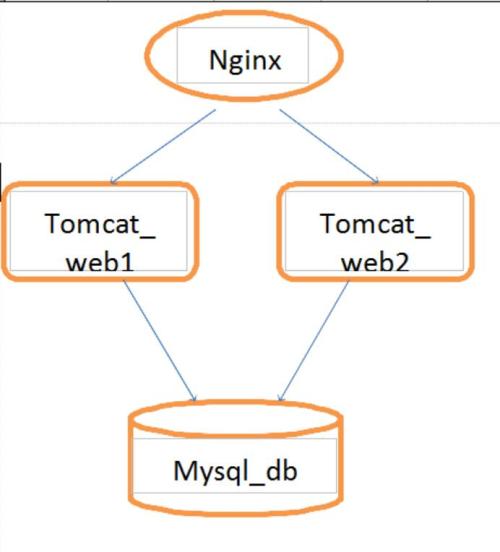
防伪码:失去只是一种姿势,得到并不等同于幸福 项目需求: 1、nginx容器作为整个架构中前端服务器监听80端口接收用户的jsp页面请求,并将用户的jsp请求分发给tomcat web容器,tomcat容器需要连接mysql数据库容器。 2、nginx容器做为前端服务器可以直接响应用户的静态页面请求,jsp动态页面请求交给tomcat容器处理(静动分离) 3、通过session复制共享:session replication,实现tomcat服务器之间同步session,使session保持一致。 注:http://yw666.blog.51cto.com/11977292/1888747,session复制共享在前文详细讲解过,此处不再赘述。 如图所示: 制作nginx镜像 fromdocker.io/centos:centos6 addnginx-1.6.0/nginx-1.6.0 runyum-yinstallgccpcrepcre-develzlib-develmake runuseraddnginx-s/sbin/nologin runcd/nginx-1.6.0&&./configure--prefix=/nginx--user=nginx--group=nginx&&make&& makeinstall runecho"daemonoff;">>/nginx/conf/nginx.conf runecho'ip1=$(cat/etc/hosts|greptomcat1|awk'"'{print"'$1'"}'"')'>> /7.sh runecho'ip=$(cat/etc/hosts|greptomcat2|awk'"'{print"'$1'"}'"')'>> /7.sh runecho"sed-i-e'33i"'\u'"pstreambackend{'-e'33i"'\s'"erver""'"'$ip'"'"":8080 weight=1;'-e'33i"'\s'"erver""'"'$ip1'"'"":8080weight=1;}'-e'46i"'\p'"roxy_passhttp://backend;'/nginx/conf/nginx.conf">>/7.sh runecho"/nginx/sbin/nginx">>/7.sh cmdsource/7.sh 用docker build 生成nginx镜像 制作tomcat镜像 fromdocker.io/centos:centos6 addapache-tomcat-7.0.54/apache-tomcat-7.0.54 addjdk1.7.0_65/jdk1.7.0_65 add123.sh/123.sh addprofile/profile runmv/jdk1.7.0_65/java runmv/apache-tomcat-7.0.54/tomcat7 addserver.xml/tomcat7/conf/server.xml addcontext.xml/tomcat7/conf/context.xml runcp-rf/profile/etc/profile runecho'ip1=$(ifconfig|grepBcast|awk'"'{print"'$2'"}'"'|awk-F:'"'{print "'$2'"}')">>/8.sh runecho'ip2=$(cat/etc/hosts|grepmysql|awk'"'{print"'$1'"}'"')'>>/8.sh runecho"sed-i'118"'i\a'"ddress="'"'"'"'$ip1'"'"'"'"'"" /tomcat7/conf/server.xml">>/8.sh runecho"sed-i'23i"'\u'"rl="'"'jdbc:mysql://"'"'$ip2'"'":3306/javatest'"'"/>' /tomcat7/conf/context.xml">>/8.sh addmysql-connector-java-5.1.22-bin.jar/tomcat7/lib/mysql-connector-java-5.1.22-bin.jar add456.sh/456.sh cmdsource/456.sh 编写tomcat守护进程脚本 program="/tomcat7/bin/startup.sh" progress="tomcat" whiletrue; do sleep10 progremflag=`ps-ef|grep$progress|wc-l` echo$progremflag if[$progremflag-le10];then $program>/dev/null2>&1& fi done 编写cmd启动时要执行的脚本 用docker build 生成tomcat镜像 制作mysql镜像 fromdocker.io/centos:centos6 addcmake-2.8.12/cmake-2.8.12 addmysql-5.5.38/mysql-5.5.38 runyum-yinstallncurses-develgccgcc-c++ runcd/cmake-2.8.12&&./configure&&gmake&&gmakeinstall runcd/mysql-5.5.38&&cmake-DCMAKE_INSTALL_PREFIX=/mysql-DDEFAULT_CHARSET=utf8-DDEFAULT_COLLATION=utf8_general_ci -DWITH_EXTRA_CHARSETS=all-SYSCONFDIR=/etc&&make&&makeinstall runrm-rf/etc/my.cnf runcp/mysql-5.5.38/support-files/my-medium.cnf/etc/my.cnf runcp/mysql-5.5.38/support-files/mysql.server/mysqld runchmod777/mysqld rungroupaddmysql runuseradd-M-s/sbin/nologinmysql-gmysql runchown-Rmysql:mysql/mysql run/mysql/scripts/mysql_install_db--user=mysql--basedir=/mysql/--datadir=/mysql/data/ run./mysqldstart&&cd/mysql/bin&&echo"grantallprivilegeson*.*to'root'@'%.%.%.%' identifiedby'123456';"|./mysql-uroot&&echo"createdatabasejavatest;"|./mysql-uroot&&echo"createtablejavatest.yw(idint);"|./mysql-uroot cmdcd/mysql/bin&&./mysqld_safe 用docker build 生成mysql镜像 至此,镜像都已经做好。 下面开始启动容器 先启动mysql 启动tomcat连接mysql 再启动nginx连接两台tomcat Docker ps 查看容器启动状态 开始测试 验证tomcat连接mysql 谢谢观看,真心的希望能帮到您!

优秀的个人博客,低调大师

ubuntu下zabbix服务器监控工具部署

一 安装 安装Apache、Mysql、Php、zabbix sudoapt-getupdate sudoapt-getinstallapache2mysql-serverlibapache2-mod-php5php5-gdphp5-mysqlphp5-commonzabbix-server-mysqlzabbix-frontend-php 二 服务端配置 2.1 配置数据库连接 sudovim/etc/zabbix/zabbix_server.conf 修改相关 DBName=zabbix DBUser=zabbix DBPassword=zabbix #非必需,但推荐 StartDiscoverers=5 2.2 创建mysql账号 mysql-uroot-p mysql>createuser'zabbix'@'localhost'identifiedby'zabbix'; mysql>createdatabasezabbix; mysql>grantallprivilegesonzabbix.*to'zabbix'@'localhost'; mysql>flushprivileges; mysql>exit; 2.3 导入初始化数据 cd/usr/share/zabbix-server-mysql/ sudogunzip*.gz mysql-uzabbix-pzabbix<schema.sql mysql-uzabbix-pzabbix<p_w_picpaths.sql mysql-uzabbix-pzabbix<data.sql 2.4 修改 PHP 参数 sudovim/etc/php5/apache2/php.ini 修改项: post_max_size=16M max_execution_time=300 max_input_time=300 date.timezone="Asia/Shanghai" 2.5 配置网页 sudocp/usr/share/doc/zabbix-frontend-php/examples/zabbix.conf.php.example/etc/zabbix/zabbix.conf.php sudovim/etc/zabbix/zabbix.conf.php 修改项 $DB['DATABASE']='zabbix'; $DB['USER']='zabbix'; $DB['PASSWORD']='zabbix' 2.6 配置apache sudocp/usr/share/doc/zabbix-frontend-php/examples/apache.conf/etc/apache2/conf-available/zabbix.conf sudoa2enconfzabbix.conf sudoa2enmodalias sudoserviceapache2restart 2.7 配置 zabbix server 启动 sudovim/etc/default/zabbix-server 修改项: START=yes 启动: sudoservicezabbix-serverstart 2.8 本机监控 sudoapt-getinstallzabbix-agent sudoservicezabbix-agentrestart 2.9 访问 http://xxx.xxx.xxx.xxx/zabbix 缺省的账户: Username=admin Password=zabbix 三 客户端配置 sudoapt-getinstallzabbix-agent 修改配置 sudovim/etc/zabbix/zabbix_agentd.conf 调整项 Server=127.0.0.1#修改为zabbixserver服务器的IP,如果有网关或被监控机为虚拟机也加上母机的IP ServerActive=127.0.0.1#修改为zabbixserver服务器的IP Hostname=Zabbixserver#修改为网页里面添加的Hostname,需要保持一致。 简易脚本: sudo-Hs #ubuntu12.04,14.04不需要加 #echo"debhttp://ppa.launchpad.net/9v-shaun-42/zabbix22/ubuntuprecisemain">/etc/apt/sources.list.d/zabbix.list apt-getupdate apt-getinstallzabbix-agent echo"Server=192.168.3.52,192.168.3.10">/etc/zabbix/zabbix_agentd.conf.d/server.conf echo"ServerActive=192.168.3.52">>/etc/zabbix/zabbix_agentd.conf.d/server.conf echo"Hostname=`/sbin/ifconfigeth0|sed-n'/inetaddr/s/^[^:]*:([0-9.]{7,15}).*/1/p'`">>/etc/zabbix/zabbix_agentd.conf.d/server.conf /etc/init.d/zabbix-agentrestart 四 centos下的客户端安装 //安装方法 rpm-ivh yuminstallzabbix-agent //启动 servicezabbix-agentstart //开机启动 chkconfigzabbix-agenton //配置方法 vi/etc/zabbix/zabbix_agentd.conf

资源下载

更多资源
优质分享App

优质分享App

近一个月的开发和优化,本站点的第一个app全新上线。该app采用极致压缩,本体才4.36MB。系统里面做了大量数据访问、缓存优化。方便用户在手机上查看文章。后续会推出HarmonyOS的适配版本。

腾讯云软件源

腾讯云软件源

为解决软件依赖安装时官方源访问速度慢的问题,腾讯云为一些软件搭建了缓存服务。您可以通过使用腾讯云软件源站来提升依赖包的安装速度。为了方便用户自由搭建服务架构,目前腾讯云软件源站支持公网访问和内网访问。

Spring

Spring

Spring框架(Spring Framework)是由Rod Johnson于2002年提出的开源Java企业级应用框架,旨在通过使用JavaBean替代传统EJB实现方式降低企业级编程开发的复杂性。该框架基于简单性、可测试性和松耦合性设计理念,提供核心容器、应用上下文、数据访问集成等模块,支持整合Hibernate、Struts等第三方框架,其适用范围不仅限于服务器端开发,绝大多数Java应用均可从中受益。

Rocky Linux

Rocky Linux

Rocky Linux(中文名:洛基)是由Gregory Kurtzer于2020年12月发起的企业级Linux发行版,作为CentOS稳定版停止维护后与RHEL(Red Hat Enterprise Linux)完全兼容的开源替代方案,由社区拥有并管理,支持x86_64、aarch64等架构。其通过重新编译RHEL源代码提供长期稳定性,采用模块化包装和SELinux安全架构,默认包含GNOME桌面环境及XFS文件系统,支持十年生命周期更新。

用户登录
用户注册