首页 文章 精选 留言 我的

精选列表

搜索[文档处理],共10000篇文章
优秀的个人博客,低调大师

Android -- 处理ViewPager的notifyDataSetChanged无刷新

Viewpager在调用notifyDataSetChanged()时,界面无刷新 Viewpager在调用notifyDataSetChanged()时,界面无刷新,它确实影响我们功能的实现了。可能选择为Viewpager重新设置一遍适配器adapter,达到刷新的目的。但是这种方法在大多数情况下,是有问题的。 查看方法 super.notifyDataSetChanged()调用的是PagerAdapter.notifyDataSetChanged() /** * This method should be called by the application if the data backing this adapter has changed * and associated views should update. */ public void notifyDataSetChanged() { mObservable.notifyChanged(); } 注释里说到,当附加在适配器上的数据发生变化时,应该调用该方法刷新数据。该方法调用了一个mObservable .notifyChanged(); 我们继续跟进这个方法,进入DataSetObservable类中,发现这样一段代码: /** * Invokes {@link DataSetObserver#onChanged} on each observer. * Called when the contents of the data set have changed. The recipient * will obtain the new contents the next time it queries the data set. */ public void notifyChanged() { synchronized(mObservers ) { // since onChanged() is implemented by the app, it could do anything, including // removing itself from {@link mObservers} - and that could cause problems if // an iterator is used on the ArrayList {@link mObservers}. // to avoid such problems, just march thru the list in the reverse order. for (int i = mObservers .size() - 1; i >= 0; i--) { mObservers.get(i).onChanged(); } } } 这都不是重点,重点我们来看这个mObservers的类型是一个抽象类DataSetObserver,里面只有两个未实现的方法,都有谁使用了这个抽象类呢,其中我们发现了Viewpager的身影。进入viewpager,我们终于找到了viewpager中控制数据变更的重点方法dataSetChanged ,这个方法如下: void dataSetChanged () { // This method only gets called if our observer is attached, so mAdapter is non-null. boolean needPopulate = mItems .size() < mOffscreenPageLimit * 2 + 1 && mItems.size() < mAdapter.getCount(); int newCurrItem = mCurItem ; boolean isUpdating = false; for (int i = 0; i < mItems.size(); i++) { final ItemInfo ii = mItems .get(i); final int newPos = mAdapter.getItemPosition(ii.object ); if (newPos == PagerAdapter.POSITION_UNCHANGED ) { continue; } if (newPos == PagerAdapter.POSITION_NONE) { mItems.remove(i); i--; if (!isUpdating) { mAdapter.startUpdate( this); isUpdating = true; } mAdapter.destroyItem( this, ii.position , ii.object); needPopulate = true; if (mCurItem == ii.position ) { // Keep the current item in the valid range newCurrItem = Math. max(0, Math.min(mCurItem, mAdapter.getCount() - 1)); needPopulate = true; } continue; } if (ii.position != newPos) { if (ii.position == mCurItem ) { // Our current item changed position. Follow it. newCurrItem = newPos; } ii. position = newPos; needPopulate = true; } } if (isUpdating) { mAdapter.finishUpdate( this); } Collections. sort(mItems, COMPARATOR); if (needPopulate) { // Reset our known page widths; populate will recompute them. final int childCount = getChildCount(); for (int i = 0; i < childCount; i++) { final View child = getChildAt(i); final LayoutParams lp = (LayoutParams) child.getLayoutParams(); if (!lp.isDecor ) { lp. widthFactor = 0.f; } } setCurrentItemInternal(newCurrItem, false, true); requestLayout(); } } 重点看这样一行代码: final int newPos = mAdapter.getItemPosition(ii.object ); if (newPos == PagerAdapter.POSITION_UNCHANGED ) { continue ; } Called when the host view is attempting to determine if an item’s position has changed. ReturnsPOSITION_UNCHANGEDif the position of the given item has not changed orPOSITION_NONEif the item is no longer present in the adapter. The default implementation assumes that items will never change position and always returnsPOSITION_UNCHANGED. 意思是如果item的位置如果没有发生变化,则返回POSITION_UNCHANGED。如果返回了POSITION_NONE,表示该位置的item已经不存在了。默认的实现是假设item的位置永远不会发生变化,而返回POSITION_UNCHANGED 解决方案 所以我们可以尝试着修改适配器的写法,覆盖getItemPosition()方法,当调用notifyDataSetChanged时,让getItemPosition方法人为的返回POSITION_NONE,从而达到强迫viewpager重绘所有item的目的。 class SearchAdapter extends PagerAdapter { private int mChildCount = 0; @Override public void notifyDataSetChanged() { mChildCount = getCount(); super.notifyDataSetChanged(); } @Override public int getItemPosition(Object object) { if ( mChildCount > 0) { mChildCount --; return POSITION_NONE; } return super.getItemPosition(object); } } 我是天王盖地虎的分割线 本文转自我爱物联网博客园博客,原文链接:http://www.cnblogs.com/yydcdut/p/4232614.html,如需转载请自行联系原作者


优秀的个人博客,低调大师

centos 7安装es 及异常处理

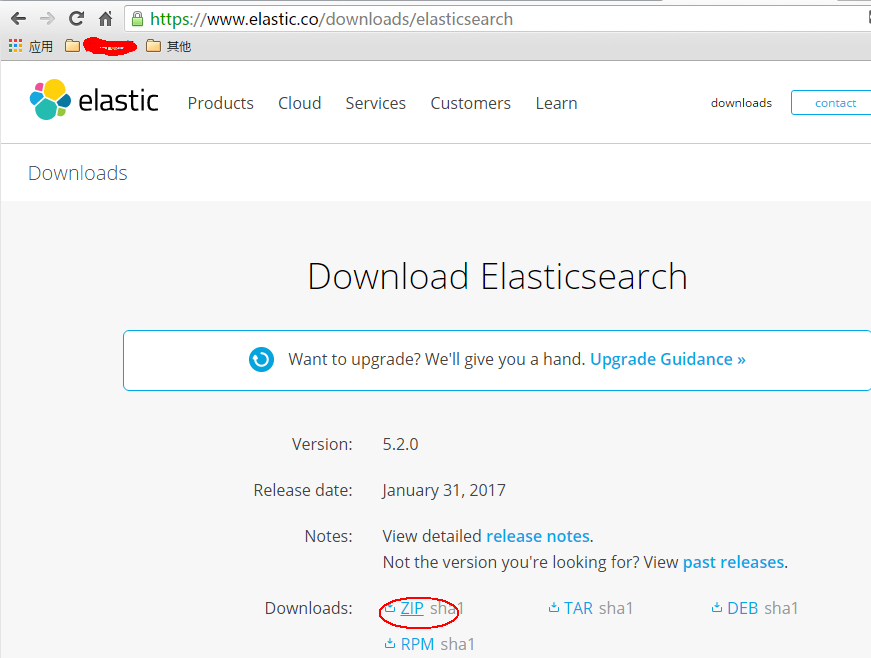
首先,我们从官网下载zip包:(官网:https://www.elastic.co/downloads/elasticsearch) 直接使用浏览器下载可能会很慢,我一般会copy下载链接,然后wget下来: wget https://artifacts.elastic.co/downloads/elasticsearch/elasticsearch-5.2.0.zip 如无意外应该可以安装成功。 接下来就是运行了,这是关键所在,首先我们前往安装目录elasticsearch的安装目录,一般会在:cd /usr/bin/elasticsearch-5.2.0 这个时候如果你直接运行elasticsearch会报以下错误:执行:bin/elasticsearch错误信息: Exception in thread "main" org.elasticsearch.bootstrap.BootstrapException: java.nio.file.NoSuchFileException: /usr/share/elasticsearch/config Likely root cause: java.nio.file.NoSuchFileException: /usr/share/elasticsearch/config ... 见图: elasticsearch github上有这个错误的issue(https://github.com/elastic/ansible-elasticsearch/issues/58)感兴趣的可以看看这个错误的具体原因,我这里主要提供解决方法。 这个错误我觉得主要是因为找不到配置文件,但是如果你直接在安装目录里去启动elasticsearch的话,elasticsearch只会在当前目录找config文件夹,如果安装成service的形式应该是可以找到配置文件,但我没去尝试,后面试试。 问题知道了,我们可以直接把/etc目录下的elasticsearch配置文件copy过来: cp -r /etc/elasticsearch /usr/share/elasticsearch/config 这个时候我们再启动就不会报刚才的错误了,我们再试一遍:bin/elasticsearch 意料之中,这时候会提示以下错误: [2017-01-17T21:54:48,798][WARN ][o.e.b.ElasticsearchUncaughtExceptionHandler] [] uncaught exception in thread [main] org.elasticsearch.bootstrap.StartupException: java.lang.RuntimeException: can not run elasticsearch as root at org.elasticsearch.bootstrap.Elasticsearch.init(Elasticsearch.java:125) ~[elasticsearch-5.1.2.jar:5.1.2] at org.elasticsearch.bootstrap.Elasticsearch.execute(Elasticsearch.java:112) ~[elasticsearch-5.1.2.jar:5.1.2] at org.elasticsearch.cli.SettingCommand.execute(SettingCommand.java:54) ~[elasticsearch-5.1.2.jar:5.1.2] at org.elasticsearch.cli.Command.mainWithoutErrorHandling(Command.java:122) ~[elasticsearch-5.1.2.jar:5.1.2] at org.elasticsearch.cli.Command.main(Command.java:88) ~[elasticsearch-5.1.2.jar:5.1.2] at org.elasticsearch.bootstrap.Elasticsearch.main(Elasticsearch.java:89) ~[elasticsearch-5.1.2.jar:5.1.2] at org.elasticsearch.bootstrap.Elasticsearch.main(Elasticsearch.java:82) ~[elasticsearch-5.1.2.jar:5.1.2] Caused by: java.lang.RuntimeException: can not run elasticsearch as root at org.elasticsearch.bootstrap.Bootstrap.initializeNatives(Bootstrap.java:100) ~[elasticsearch-5.1.2.jar:5.1.2] at org.elasticsearch.bootstrap.Bootstrap.setup(Bootstrap.java:176) ~[elasticsearch-5.1.2.jar:5.1.2] at org.elasticsearch.bootstrap.Bootstrap.init(Bootstrap.java:306) ~[elasticsearch-5.1.2.jar:5.1.2] at org.elasticsearch.bootstrap.Elasticsearch.init(Elasticsearch.java:121) ~[elasticsearch-5.1.2.jar:5.1.2] ... 6 more 这个错误的原因是elasticsearch不允许使用root启动,因此我们要解决这个问题需要新建一个用户来启动elasticsearch(参考:https://my.oschina.net/topeagle/blog/591451?fromerr=mzOr2qzZ) 具体操作如下: ~ groupadd elsearch ~ useradd elsearch -g elsearch -p elsearch ~ cd /usr/share chown -R elsearch:elsearch elasticsearch su elsearch 这个时候在这个用户去启动elasticsearch,一般情况下这个时候就能成功起来了,可能还会出现一些错误,如: hcw-X450VC% ./elasticsearch 2017-01-17 21:03:31,158 main ERROR Could not register mbeans java.security.AccessControlException: access denied ("javax.management.MBeanTrustPermission" "register") at java.security.AccessControlContext.checkPermission(AccessControlContext.java:472) at java.lang.SecurityManager.checkPermission(SecurityManager.java:585) at com.sun.jmx.interceptor.DefaultMBeanServerInterceptor.checkMBeanTrustPermission(DefaultMBeanServerInterceptor.java:1848) at com.sun.jmx.interceptor.DefaultMBeanServerInterceptor.registerMBean(DefaultMBeanServerInterceptor.java:322) at com.sun.jmx.mbeanserver.JmxMBeanServer.registerMBean(JmxMBeanServer.java:522) at org.apache.logging.log4j.core.jmx.Server.register(Server.java:389) at org.apache.logging.log4j.core.jmx.Server.reregisterMBeansAfterReconfigure(Server.java:167) at org.apache.logging.log4j.core.jmx.Server.reregisterMBeansAfterReconfigure(Server.java:140) at org.apache.logging.log4j.core.LoggerContext.setConfiguration(LoggerContext.java:541) at org.apache.logging.log4j.core.LoggerContext.start(LoggerContext.java:258) at org.apache.logging.log4j.core.impl.Log4jContextFactory.getContext(Log4jContextFactory.java:206) at org.apache.logging.log4j.core.config.Configurator.initialize(Configurator.java:220) at org.apache.logging.log4j.core.config.Configurator.initialize(Configurator.java:197) at org.elasticsearch.common.logging.LogConfigurator.configureStatusLogger(LogConfigurator.java:125) at org.elasticsearch.common.logging.LogConfigurator.configureWithoutConfig(LogConfigurator.java:67) at org.elasticsearch.cli.Command.main(Command.java:85) at org.elasticsearch.bootstrap.Elasticsearch.main(Elasticsearch.java:89) at org.elasticsearch.bootstrap.Elasticsearch.main(Elasticsearch.java:82) 这是因为elasticsearch需要读写配置文件,我们需要给予config文件夹权限,上面新建了elsearch用户,elsearch用户不具备读写权限,因此还是会报错,解决方法是切换到管理员账户,赋予权限即可: sudo -i chmod -R 775 config 这个时候就可以起来了,来看看效果: 在浏览器查看: 到这里为止,centos 7安装elasticsearch就完成了 转载请标明本文来源:http://www.cnblogs.com/yswenli/p/6397351.html更多内容欢迎我的的github:https://github.com/yswenli如果发现本文有什么问题和任何建议,也随时欢迎交流~ 感谢您的阅读,如果您对我的博客所讲述的内容有兴趣,请继续关注我的后续博客,我是yswenli 。

资源下载

更多资源
Nacos

Nacos

Nacos /nɑ:kəʊs/ 是 Dynamic Naming and Configuration Service 的首字母简称,一个易于构建 AI Agent 应用的动态服务发现、配置管理和AI智能体管理平台。Nacos 致力于帮助您发现、配置和管理微服务及AI智能体应用。Nacos 提供了一组简单易用的特性集,帮助您快速实现动态服务发现、服务配置、服务元数据、流量管理。Nacos 帮助您更敏捷和容易地构建、交付和管理微服务平台。

Rocky Linux

Rocky Linux

Rocky Linux(中文名:洛基)是由Gregory Kurtzer于2020年12月发起的企业级Linux发行版,作为CentOS稳定版停止维护后与RHEL(Red Hat Enterprise Linux)完全兼容的开源替代方案,由社区拥有并管理,支持x86_64、aarch64等架构。其通过重新编译RHEL源代码提供长期稳定性,采用模块化包装和SELinux安全架构,默认包含GNOME桌面环境及XFS文件系统,支持十年生命周期更新。

Sublime Text

Sublime Text

Sublime Text具有漂亮的用户界面和强大的功能,例如代码缩略图,Python的插件,代码段等。还可自定义键绑定,菜单和工具栏。Sublime Text 的主要功能包括:拼写检查,书签,完整的 Python API , Goto 功能,即时项目切换,多选择,多窗口等等。Sublime Text 是一个跨平台的编辑器,同时支持Windows、Linux、Mac OS X等操作系统。

WebStorm

WebStorm

WebStorm 是jetbrains公司旗下一款JavaScript 开发工具。目前已经被广大中国JS开发者誉为“Web前端开发神器”、“最强大的HTML5编辑器”、“最智能的JavaScript IDE”等。与IntelliJ IDEA同源,继承了IntelliJ IDEA强大的JS部分的功能。

用户登录
用户注册