首页 文章 精选 留言 我的

精选列表

搜索[文档处理],共10015篇文章
优秀的个人博客,低调大师

官方文档 Upgrading Elasticsearch

Upgrading Elasticsearch Before upgrading Elasticsearch: Consult thebreaking changesdocs. Use theElasticsearch Migration Pluginto detect potential issues before upgrading. Test upgrades in a dev environment before upgrading your production cluster. Alwaysback up your databefore upgrading. Youcannot roll backto an earlier version unless you have a backup of your data. If you are using custom plugins, check that a compatible version is available. Elasticsearch can usually be upgraded using a rolling upgrade process, resulting in no interruption of service. This section details how to perform both rolling upgrades and upgrades with full cluster restarts. To determine whether a rolling upgrade is supported for your release, please consult this table: Upgrade From Upgrade To Supported Upgrade Type 1.x 5.x Reindex to upgrade 2.x 2.y Rolling upgrade(wherey > x) 2.x 5.x Full cluster restart 5.0.0 pre GA 5.x Full cluster restart 5.x 5.y Rolling upgrade(wherey > x) Indices created in Elasticsearch 1.x or before Elasticsearch is able to read indices created in theprevious major version only. For instance, Elasticsearch 5.x can use indices created in Elasticsearch 2.x, but not those created in Elasticsearch 1.x or before. This condition also applies to indices backed up withsnapshot and restore. If an index was originally created in 1.x, it cannot be restored into a 5.x cluster even if the snapshot was made by a 2.x cluster. Elasticsearch 5.x nodes will fail to start in the presence of too old indices. SeeReindex to upgradefor more information about how to upgrade old indices. !!!回滚升级就是一次升级一个节点!!!! A rolling upgrade allows the Elasticsearch cluster to be upgraded one node at a time, with no downtime for end users. Running multiple versions of Elasticsearch in the same cluster for any length of time beyond that required for an upgrade is not supported, as shards will not be replicated from the more recent version to the older version. Reindex to upgrade Elasticsearch is able to use indices created in the previous major version only. For instance, Elasticsearch 5.x can use indices created in Elasticsearch 2.x, but not those created in Elasticsearch 1.x or before. Elasticsearch 5.x nodes will fail to start in the presence of too old indices. If you are running an Elasticsearch 2.x cluster which contains indices that were created before 2.x, you will either need to delete those old indices or to reindex them before upgrading to 5.x. SeeReindex in place. If you are running an Elasticsearch 1.x cluster, you have two options: First upgrade to Elasticsearch 2.4.x, reindex the old indices, then upgrade to 5.x. SeeReindex in place. Create a new 5.x cluster and use reindex-from-remote to import indices directly from the 1.x cluster. SeeUpgrading with reindex-from-remote. Reindex in place The easiest way to reindex old (1.x) indices in place is to use theElasticsearch Migration Plugin. You will need to upgrade to Elasticsearch 2.3.x or 2.4.x first. Upgrading with reindex-from-remote If you are running a 1.x cluster and would like to migrate directly to 5.x without first migrating to 2.x, you can do so usingreindex-from-remote. 转自:https://www.elastic.co/guide/en/elasticsearch/reference/current/setup-upgrade.html#setup-upgrade 本文转自张昺华-sky博客园博客,原文链接:http://www.cnblogs.com/bonelee/p/7443844.html,如需转载请自行联系原作者


优秀的个人博客,低调大师

CDH 5.7.0 安装文档

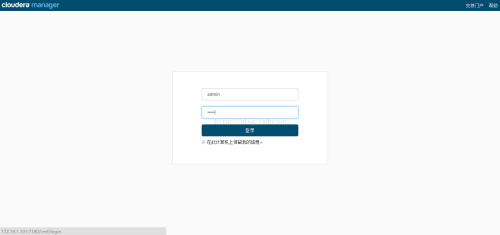
一、实验环境 1. IP和主机名和域名,所有主机都可以连接互联网10.0.70.242 hadoop1 hadoop1.com10.0.70.243 hadoop2 hadoop2.com10.0.70.230 hadoop3 hadoop3.com10.0.70.231 hadoop4 hadoop4.com 2. 操作系统CentOS release 6.5 (Final) 64位 二、配置步骤 1. 安装前准备(都是使用root用户在集群中的所有主机配置)(1)从以下地址下载所需要的安装文件http://archive.cloudera.com/cm5/cm/5/cloudera-manager-el6-cm5.7.0_x86_64.tar.gzhttp://archive.cloudera.com/cdh5/parcels/5.7/CDH-5.7.0-1.cdh5.7.0.p0.45-el6.parcelhttp://archive.cloudera.com/cdh5/parcels/5.7/CDH-5.7.0-1.cdh5.7.0.p0.45-el6.parcel.sha1http://archive.cloudera.com/cdh5/parcels/5.7/manifest.json(2)使用下面的命令检查OS依赖包,xxxx换成包名# rpm -qa | grep xxxx以下这些包必须安装:chkconfigpython (2.6 required for CDH 5)bind-utilspsmisclibxsltzlibsqlitecyrus-sasl-plaincyrus-sasl-gssapifuseportmap (rpcbind)fuse-libsredhat-lsb(3)配置域名解析# vi /etc/hosts# 添加如下内容 10.0.70.242hadoop1 10.0.70.243hadoop2 10.0.70.230hadoop3 10.0.70.231hadoop4 或者做好域名解析 (4)安装JDK CDH5推荐的JDK版本是1.7.0_67、1.7.0_75、1.7.0_80,这里安装jdk1.8.0_51 注意: . 所有主机要安装相同版本的JDK . 安装目录为/app/zpy/jdk1.8.0_51/ # mkdir -p/app/zpy # cd /app/zpy/3rd # tar zxvfjdk-8u51-linux-x64.tar.gz -C /app/zpy # chown -R root.root jdk1.8.0_51/ # cat /etc/profile JAVA_HOME=/app/zpy/jdk1.8.0_51 JAVA_BIN=/app/zpy/jdk1.8.0_51/bin PATH=$PATH:$JAVA_BIN CLASSPATH=$JAVA_HOME/lib/dt.jar:$JAVA_HOME/lib/tools.jar export AVA_HOME JAVA_BIN PATH CLASSPATH # . /etc/profile (5)NTP时间同步# echo "0 * * * *rootntpdate 10.0.70.2" >> /etc/crontab # /etc/init.d/crond restart(6)建立CM用户# useradd --system --home=/app/zpy/cm-5.7.0/run/cloudera-scm-server --no-create-home --shell=/bin/false --comment "Cloudera SCM User" cloudera-scm #sed -i "s/Defaults requiretty/#Defaults requiretty/g" /etc/sudoers (7)安装配置MySQL数据库 # yum install -y mysql# 修改root密码mysqladmin -u root password# 编辑配置文件vi /etc/my.cnf# 内容如下 [mysqld] transaction-isolation = READ-COMMITTED # Disabling symbolic-links is recommended to prevent assorted security risks; # # to do so, uncomment this line: # # symbolic-links = 0 # key_buffer = 16M key_buffer_size = 32M max_allowed_packet = 32M thread_stack = 256K thread_cache_size = 64 query_cache_limit = 8M query_cache_size = 64M query_cache_type = 1 # max_connections = 550 #expire_logs_days = 10 # #max_binlog_size = 100M # # #log_bin should be on a disk with enough free space. Replace '/var/lib/mysql/mysql_binary_log' with an appropriate path for your system # #and chown the specified folder to the mysql user. log_bin=/var/lib/mysql/mysql_binary_log # # # For MySQL version 5.1.8 or later. Comment out binlog_format for older versions. binlog_format = mixed # read_buffer_size = 2M read_rnd_buffer_size = 16M sort_buffer_size = 8M # join_buffer_size = 8M # # # InnoDB settings innodb_file_per_table = 1 innodb_flush_log_at_trx_commit = 2 innodb_log_buffer_size = 64M innodb_buffer_pool_size = 4G innodb_thread_concurrency = 8 innodb_flush_method = O_DIRECT innodb_log_file_size = 512M [mysqld_safe] log-error=/var/log/mysqld.log pid-file=/var/run/mysqld/mysqld.pid # sql_mode=STRICT_ALL_TABLES # 添加开机启动chkconfig mysql on# 启动MySQLservice mysql restart 对于没有innodb的情况 >show databases;查看 删除/var/lib/mysql/下ib*,重启服务即可 # 根据需要建立元数据库 >create database hive; >grant all on hive.* to 'hive'@'%' identified by '1qaz@WSX?'; >create database man; >grant all on man.* to 'man'@'%' identified by '1qaz@WSX?'; >create database oozie; >grant all on oozie.* to 'oozie'@'%' identified by '1qaz@WSX?'; (8)安装MySQL JDBC驱动# cd /app/zpy/3rd # cpmysql-connector-java-5.1.38-bin.jar /app/zpy/cm-5.7.0/share/cmf/lib/ (9)配置免密码ssh(这里配置了任意两台机器都免密码)# # #分别在四台机器上生成密钥对:# cd ~# ssh-keygen -t rsa# # # 然后一路回车# # # 在hadoop1上执行:# cd ~/.ssh/# ssh-copy-id hadoop1# scp /root/.ssh/authorized_keys hadoop2:/root/.ssh/# # # 在hadoop2上执行:# cd ~/.ssh/# ssh-copy-id hadoop2# scp /root/.ssh/authorized_keys hadoop3:/root/.ssh/# # # 在hadoop3上执行:# cd ~/.ssh/# ssh-copy-id hadoop3# scp /root/.ssh/authorized_keys hadoop4:/home/grid/.ssh/# # # 在hadoop4上执行:# cd ~/.ssh/# ssh-copy-id hadoop4# scp /root/.ssh/authorized_keys hadoop1:/root/.ssh/# scp /root/.ssh/authorized_keys hadoop2:/root/.ssh/# scp /root/.ssh/authorized_keys hadoop3:/root/.ssh/ 2. 在hadoop1上安装Cloudera Manager #tar zxvf cloudera-manager-el6-cm5.7.0_x86_64.tar.gz -C /app/zpy/ # # # 建立cm数据库 #/app/zpy/cm-5.7.0/share/cmf/schema/scm_prepare_database.sh mysql cm -hlocalhost -uroot -p1qaz@WSX? --scm-host localhost scm scm scm # # # 配置cm代理 # vim /app/zpy/cm-5.7.0/etc/cloudera-scm-agent/config.ini # # # 将cm主机名改为hadoop1或者改为域名hadoop1.comserver_host=hadoop1 # # # 将Parcel相关的三个文件拷贝到/opt/cloudera/parcel-repo 作为本地源! # cp CDH-5.7.0-1.cdh5.7.0.p0.45-el6.parcel /opt/cloudera/parcel-repo/# cp CDH-5.7.0-1.cdh5.7.0.p0.45-el6.parcel.sha1 /opt/cloudera/parcel-repo/# cp manifest.json /opt/cloudera/parcel-repo/ # ## 改名# mv /opt/cloudera/parcel-repo/CDH-5.7.0-1.cdh5.7.0.p0.45-el6.parcel.sha1 /opt/cloudera/parcel-repo/CDH-5.7.0-1.cdh5.7.0.p0.45-el6.parcel.sha # # # 修改属主# chown -R cloudera-scm:cloudera-scm /opt/cloudera/ # # # 将/app/zpy/cm-5.7.0目录拷贝到其它三个主机# scp -r -p /app/zpy/cm-5.7.0 hadoop2:/app/zpy/# scp -r -p /app/zpy/cm-5.7.0 hadoop3:/app/zpy/# scp -r -p /app/zpy/cm-5.7.0 hadoop4:/app/zpy/ 3. 在每个主机上建立/opt/cloudera/parcels目录,并修改属主# mkdir -p /opt/cloudera/parcels# chown cloudera-scm:cloudera-scm /opt/cloudera/parcels 4. 在hadoop1上启动cm server# /app/zpy/cm-5.7.0/etc/init.d/cloudera-scm-server start# # # 此步骤需要运行一些时间,用下面的命令查看启动情况# tail -f /app/zpy/cm-5.7.0/log/cloudera-scm-server/cloudera-scm-server.log5. 在所有主机上启动cm agent# mkdir /app/zpy/cm-5.7.0/run/cloudera-scm-agent# chown cloudera-scm:cloudera-scm /app/zpy/cm-5.7.0/run/cloudera-scm-agent# /app/zpy/cm-5.7.0/etc/init.d/cloudera-scm-agent 6. 登录cm控制台,安装CDH5打开控制台http://10.0.70.242:7180/页面如图1所示。 图1 缺省的用户名和密码都是admin,登录后进入欢迎页面。勾选许可协议,如图2所示,点继续。 图2 进入版本说明页面,如图3所示,点继续。 图3 进入服务说明页面,如图4所示,点继续。 图4 进入选择主机页面,当前管理的主机。如图5所示,全选四个主机,点继续。 图5 进入选择存储库页面,如图6所示,点继续。 图6 进入集群安装页面,如图7所示,点继续。 图7 进入验证页面,如图8所示,点完成。 图8 进入集群设置页面,如图9所示,根据需要选择服务,这里我们选择自定义,选择需要的服务。后期也可以添加服务,点继续。 图9 进入自定义角色分配页面,如图10所示,保持不变,点继续。 图10 进入数据库设置页面,填写相关信息,点测试连接,如图11所示,点继续。 图11 进入审核更改页面,保持不变,点继续。 进入首次运行页面,等待运行完,如图12所示,点继续。 图11 进入安装成功页面,如图13所示,点完成。 图13 进入安装成功页面,如图14所示。 注意: 1) Error found before invoking supervisord: dictionary update sequence element #78 has length1; 2 is required 这个错误是CM的一个bug,解决方法为修改/app/zpy/cm-5.7.0/lib64/cmf/agent/build/env/lib/python2.6/site-packages/cmf-5.7.0-py2.6.egg/cmf/util.py文件。将其中的代码: pipe = subprocess.Popen(['/bin/bash', '-c', ". %s; %s; env" % (path, command)], stdout=subprocess.PIPE, env=caller_env) 修改为: pipe = subprocess.Popen(['/bin/bash', '-c', ". %s; %s; env | grep -v { | grep -v }" % (path, command)], stdout=subprocess.PIPE, env=caller_env) 然后重启所有Agent即可。 2) 安装hive报错数据库创建失败时 #cp /app/zpy/3rd/mysql-connector-java-5.1.38-bin.jar /opt/cloudera/parcels/CDH-5.7.0-1.cdh5.7.0.p0.45/lib/hive/lib/ 3) 手动添加应用 4)对于spark找不到java_home的报错解决方法如下: echo"exportJAVA_HOME=/opt/javak1.8.0_51">>/opt/cloudera/parcels/CDH-5.7.0-1.cdh5.7.0.p0.45/metah_env.sh 如图: 本文转自 周新宇1991 51CTO博客,原文链接:http://blog.51cto.com/zhouxinyu1991/1873493,如需转载请自行联系原作者

优秀的个人博客,低调大师

Frida JAVA API 文档

Java Java.available: a boolean specifying whether the current process has the a Java VM loaded, i.e. Dalvik or ART. Do not invoke any other Java properties or methods unless this is the case. Java.enumerateLoadedClasses(callbacks) enumerate classes loaded right now, where callbacks is an object specifying: onMatch: function (className): called for each loaded class with className that may be passed to use() to get a JavaScript wrapper. onComplete: function (): called when all classes have been enumerated. Java.enumerateLoadedClassesSync(): synchronous version of enumerateLoadedClasses() that returns the class names in an array. Java.perform(fn): ensure that the current thread is attached to the VM and call fn. (This isn’t necessary in callbacks from Java.) Java.perform(function () { var Activity = Java.use("android.app.Activity"); Activity.onResume.implementation = function () { send("onResume() got called! Let's call the original implementation"); this.onResume(); }; }); Java.use(className) dynamically get a JavaScript wrapper for className that you can instantiate objects from by calling $new() on it to invoke a constructor. Call $dispose() on an instance to clean it up explicitly (or wait for the JavaScript object to get garbage-collected, or script to get unloaded). Static and non-static methods are available, and you can even replace a method implementation and throw an exception from it: Java.perform(function () { var Activity = Java.use("android.app.Activity"); var Exception = Java.use("java.lang.Exception"); Activity.onResume.implementation = function () { throw Exception.$new("Oh noes!"); }; }); Java.scheduleOnMainThread(fn): run fn on the main thread of the VM. Java.choose(className, callbacks): enumerate live instances of the className class by scanning the Java heap, where callbacks is an object specifying: onMatch: function (instance): called once for each live instance found with a ready-to-use instance just as if you would have called Java.cast() with a raw handle to this particular instance. This function may return the string stop to cancel the enumeration early. onComplete: function (): called when all instances have been enumerated Java.cast(handle, klass): create a JavaScript wrapper given the existing instance at handle of given class klass (as returned from Java.use()). Such a wrapper also has a class property for getting a wrapper for its class, and a $className property for getting a string representation of its class-name. var Activity = Java.use("android.app.Activity"); var activity = Java.cast(ptr("0x1234"), Activity); WeakRef WeakRef.bind(value, fn): monitor value and call the fn callback as soon as value has been garbage-collected, or the script is about to get unloaded. Returns an id that you can pass to WeakRef.unbind() for explicit cleanup. This API is useful if you’re building a language-binding, where you need to free native resources when a JS value is no longer needed. WeakRef.unbind(id): stop monitoring the value passed to WeakRef.bind(value, fn), and call the fn callback immediately.

资源下载

更多资源
腾讯云软件源

腾讯云软件源

为解决软件依赖安装时官方源访问速度慢的问题,腾讯云为一些软件搭建了缓存服务。您可以通过使用腾讯云软件源站来提升依赖包的安装速度。为了方便用户自由搭建服务架构,目前腾讯云软件源站支持公网访问和内网访问。

Spring

Spring

Spring框架(Spring Framework)是由Rod Johnson于2002年提出的开源Java企业级应用框架,旨在通过使用JavaBean替代传统EJB实现方式降低企业级编程开发的复杂性。该框架基于简单性、可测试性和松耦合性设计理念,提供核心容器、应用上下文、数据访问集成等模块,支持整合Hibernate、Struts等第三方框架,其适用范围不仅限于服务器端开发,绝大多数Java应用均可从中受益。

Rocky Linux

Rocky Linux

Rocky Linux(中文名:洛基)是由Gregory Kurtzer于2020年12月发起的企业级Linux发行版,作为CentOS稳定版停止维护后与RHEL(Red Hat Enterprise Linux)完全兼容的开源替代方案,由社区拥有并管理,支持x86_64、aarch64等架构。其通过重新编译RHEL源代码提供长期稳定性,采用模块化包装和SELinux安全架构,默认包含GNOME桌面环境及XFS文件系统,支持十年生命周期更新。

WebStorm

WebStorm

WebStorm 是jetbrains公司旗下一款JavaScript 开发工具。目前已经被广大中国JS开发者誉为“Web前端开发神器”、“最强大的HTML5编辑器”、“最智能的JavaScript IDE”等。与IntelliJ IDEA同源,继承了IntelliJ IDEA强大的JS部分的功能。

用户登录
用户注册