首页 文章 精选 留言 我的

精选列表

搜索[配置],共10000篇文章
优秀的个人博客,低调大师

idea配置SpringBoot热部署之自动Build

一、pom.xml文件导入所需依赖文件 SpringBoot热部署插件 <dependency> <groupId>org.springframework.boot</groupId> <artifactId>spring-boot-devtools</artifactId> <optional>true</optional> <scope>runtime</scope> </dependency> 二、pom.xml文件build标签进行修改如下 该插件由Maven提供,它会自动使用当前运行mvn命令的JDK去编译Java源代码。 <build> <plugins> <plugin> <groupId>org.springframework.boot</groupId> <artifactId>spring-boot-maven-plugin</artifactId> <configuration><fork>true</fork></configuration> </plugin> </plugins> </build> 三、打开File==》Settings输入Compiler勾选Buid project automatically点击OK 四、CTRL + SHIFT + A ==》 查找Registry ==》勾选compiler.automake.allow.when.app.running即可

优秀的个人博客,低调大师

Developerkit & Link Develop Demo 环境配置指南

一、设备端开发 Visual Studio Code 本体:https://code.visualstudio.com/ 插件: C/C++ 和 alios-studio Python 2.7 下载地址:https://www.python.org/downloads/。 注意:macOS 及部分 Linux 系统已预装,Windows 及 部分 Linux 系统需要手动安装。 Windows 用户注意:安装 Python 时,务必选择 Add Python to environment variables 及 Install pip。 Git 下载地址:https://git-scm.com/downloads Windows 用户安装后,在任意文件夹右键快捷进入 Git bash,就可以使用 UNIX 终端指令,方便开发。 开发板 USB 驱动 下载

优秀的个人博客,低调大师

React-native 开发环境配置(win版本)

搭建开发环境 1、首先下载node.js 下载链接:https://nodejs.org/zh-cn/ ; 2、安装node.js; 3、安装完成,运行打终端输入:nmp -v 显示node.js版本号,表示安装成功,如图 node.js安装成功 4、打开终端输入: npm install -g yarn react-native-cli打开react-native命令行工具,打开成功 react-native命令行工具打开中 打开成功,如图 打开成功 5、初始化第一个RN项目,在终端中输入:react-native init FirstTest,回车 初始化项目 其中 react-native init 为固定格式,FirstTest为项目名称; 成功创建项目 6、指定文件夹下出现项目 项目 7、当模拟器运行在电脑上或者有测试连接电脑之后,通过终端在项目的根目录输入 react-native run-android命令运行项目,此时会弹出node.js模拟器,如图: node.js模拟器 同时电脑会下载https://services.gradle.org/distributions/gradle-2.14.1-all.zip,如果你没有的话。 当然你也可以通过android studio直接打开项目根目录下的android项目,如图: 直接打开 android studio 直接打开项目 8、安装成功 安装成功

优秀的个人博客,低调大师

Jenkins Linux下安装、配置(学习笔记一)

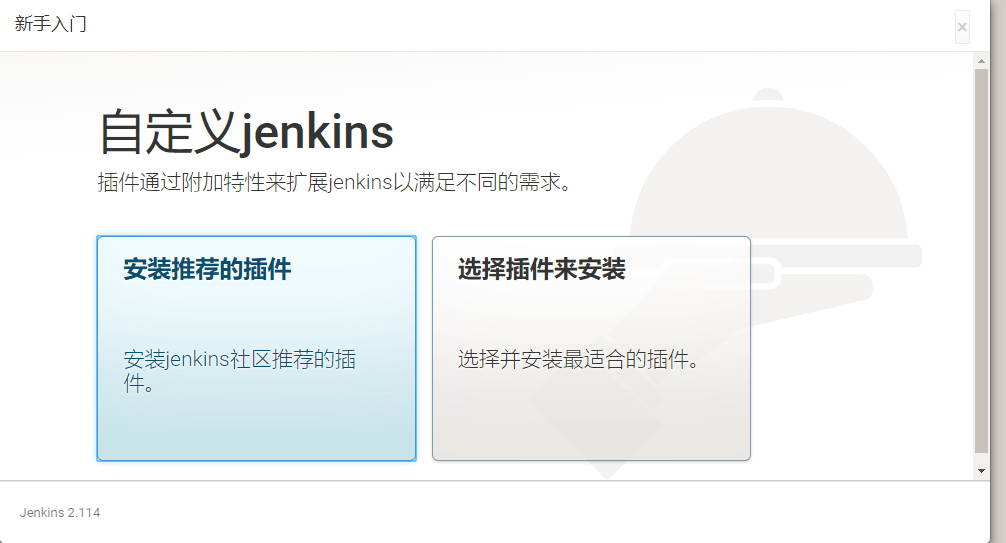
1、安装JDK、Jenkins yum install java-1.8.0-openjdk.x86_64 -y sudo wget -O /etc/yum.repos.d/jenkins.repohttp://pkg.jenkins-ci.org/redhat/jenkins.repo sudo rpm --importhttps://jenkins-ci.org/redhat/jenkins-ci.org.key sudo yum install jenkins -y sudo service jenkins start sudo chkconfig jenkins on 2、关闭防火墙 firewall-cmd --permanent --new-service=jenkins firewall-cmd --permanent --service=jenkins --set-short="Jenkins Service Ports" firewall-cmd --permanent --service=jenkins --set-description="Jenkins service firewalld port exceptions" firewall-cmd --permanent --service=jenkins --add-port=8080/tcp firewall-cmd --permanent --add-service=jenkins firewall-cmd --zone=public--add-service=http --permanent firewall-cmd --reload 3、浏览器输入http://ip:8080 4、获取密码:cat /var/lib/jenkins/secrets/initialAdminPassword xxxxxxxxxxxxxxxxxxxxxxxxxxxxxxxxxxxxxxx 5、安装推荐的插件 6、创建用户

资源下载

更多资源
优质分享App

优质分享App

近一个月的开发和优化,本站点的第一个app全新上线。该app采用极致压缩,本体才4.36MB。系统里面做了大量数据访问、缓存优化。方便用户在手机上查看文章。后续会推出HarmonyOS的适配版本。

腾讯云软件源

腾讯云软件源

为解决软件依赖安装时官方源访问速度慢的问题,腾讯云为一些软件搭建了缓存服务。您可以通过使用腾讯云软件源站来提升依赖包的安装速度。为了方便用户自由搭建服务架构,目前腾讯云软件源站支持公网访问和内网访问。

Spring

Spring

Spring框架(Spring Framework)是由Rod Johnson于2002年提出的开源Java企业级应用框架,旨在通过使用JavaBean替代传统EJB实现方式降低企业级编程开发的复杂性。该框架基于简单性、可测试性和松耦合性设计理念,提供核心容器、应用上下文、数据访问集成等模块,支持整合Hibernate、Struts等第三方框架,其适用范围不仅限于服务器端开发,绝大多数Java应用均可从中受益。

Rocky Linux

Rocky Linux

Rocky Linux(中文名:洛基)是由Gregory Kurtzer于2020年12月发起的企业级Linux发行版,作为CentOS稳定版停止维护后与RHEL(Red Hat Enterprise Linux)完全兼容的开源替代方案,由社区拥有并管理,支持x86_64、aarch64等架构。其通过重新编译RHEL源代码提供长期稳定性,采用模块化包装和SELinux安全架构,默认包含GNOME桌面环境及XFS文件系统,支持十年生命周期更新。

用户登录
用户注册