首页 文章 精选 留言 我的

精选列表

搜索[CANN开源],共10000篇文章
优秀的个人博客,低调大师

ShopXO 开源商城分销插件发布

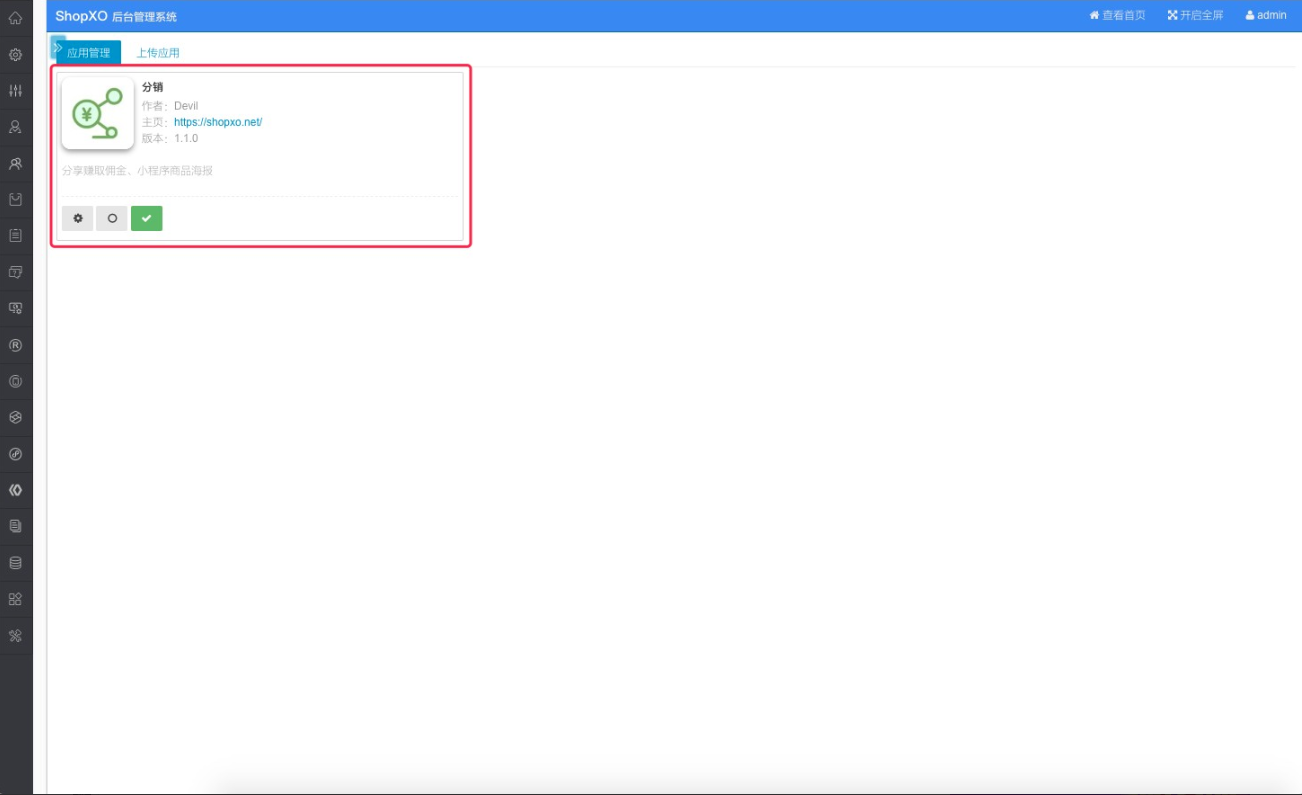
可开启内购模式、可配置分销层级、海报拖拽配置、小程序商品海报、分销等级、订单/统计、web推广海报/推广链接、分享赚取佣金。 1. 分销插件 2. 分销插件管理首页,基础配置,管理入口,数据统计走势图 3. 等级管理,根据用户消费金额自动分配分销等级,不同等级可以设置不同佣金,可以自定义专属图标 4. web分享海报拖拽管理配置 5. 小程序商品海报配置管理,用户在微信小程序商品详情分享可以直接分享海报到朋友圈,提高商品曝光率 6. 分销商管理,可以直接查看分销人员收益明细和订单 7. 分销订单管理 8. 收益明细管理查询 9. 用户端可以在顶部菜单进入 我的分销 10. 用户分销中心,分销订单、收益、推广海报、团队、数据统计走势图

优秀的个人博客,低调大师

VeraCrypt 1.24 发布,开源加密软件

VeraCrypt 1.24 发布,VeraCrypt 是TrueCrypt的分支,于2013年6月发布,项目的主要开发者是来自法国的安全顾问 Mounir Idrassi 。Idrassi 创建 VeraCrypt 分支的动机是在 2012 年他被要求在客户产品中整合 TrueCrypt,他评估了 TrueCrypt代码后发现它存在一些问题,TrueCrypt 的主要弱点是不能防御暴力破解攻击。在加密系统分区时,TrueCrypt 使用 PBKDF2-RIPEMD160 算法进行 1000 次迭代;对于标准容器和非系统分区,TrueCrypt 最多迭代 2000 次。相比之下,VeraCrypt 使用 PBKDF2-RIPEMD160 算法对系统分区迭代 327,661 次,对于标准容器和非系统分区,迭代次数进一步增加到 655,331 次,大幅增加暴力破解难度。结果是,VeraCrypt 打开加密分区的速度略慢,而它的加密格式也不兼容于 TrueCrypt。另一个 TrueCrypt 分支CipherShed项目则努力兼容 TrueCrypt 加密格式。(以上介绍内容来自Solidot) VeraCrypt 增强了用于系统和分区加密的算法的安全性,使其免受暴力破解攻击。VeraCrypt 还解决了TrueCryp t中发现的许多漏洞和安全问题。 以下帖子描述了一些改进和更正:https://veracrypt.codeplex.com/discussions/569777#PostContent_1313325 VeraCrypt on the fly encrypting the system partition : VeraCrypt creating an encrypted volume : 完整改进记录包括: All OSs: Increase password maximum length to 128 bytes in UTF-8 encoding for non-system volumes. Add option to use legacy maximum password length (64) instead of new one for compatibility reasons. Use Hardware RNG based on CPU timing jitter "Jitterentropy" by Stephan Mueller as a good alternative to CPU RDRAND (http://www.chronox.de/jent.html) Speed optimization of XTS mode on 64-bit machine using SSE2 (up to 10% faster). Fix detection of CPU features AVX2/BMI2. Add detection of RDRAND/RDSEED CPU features. Detect Hygon CPU as AMD one. Windows: Implement RAM encryption for keys and passwords using ChaCha12 cipher, t1ha non-cryptographic fast hash and ChaCha20 based CSPRNG. Available only on 64-bit machines. Disabled by default. Can be enabled using option in UI. Less than 10% overhead on modern CPUs. Side effect: Windows Hibernate is not possible if VeraCrypt System Encryption is also being used. Mitigate some memory attacks by making VeraCrypt applications memory inaccessible to non-admin users (based on KeePassXC implementation) New security features: Erase system encryption keys from memory during shutdown/reboot to help mitigate some cold boot attacks Add option when system encryption is used to erase all encryption keys from memory when a new device is connected to the system. Add new driver entry point that can be called by applications to erase encryption keys from memory in case of emergency. MBR Bootloader: dynamically determine boot loader memory segment instead of hardcoded values (proposed by neos6464) MBR Bootloader: workaround for issue affecting creation of hidden OS on some SSD drives. Fix issue related to Windows Update breaking VeraCrypt UEFI bootloader. Several enhancements and fixes for EFI bootloader: Implement timeout mechanism for password input. Set default timeout value to 3 minutes and default timeout action to "shutdown". Implement new actions "shutdown" and "reboot" for EFI DcsProp config file. Enhance Rescue Disk implementation of restoring VeraCrypt loader. Fix ESC on password prompt during Pre-Test not starting Windows. Add menu entry in Rescue Disk that enables starting original Windows loader. Fix issue that was preventing Streebog hash from being selected manually during Pre-Boot authentication. If "VeraCrypt" folder is missing from Rescue Disk, it will boot PC directly from bootloader stored on hard drive This makes it easy to create a bootable disk for VeraCrypt from Rescue Disk just by removing/renaming its "VeraCrypt" folder. Add option (disabled by default) to use CPU RDRAND or RDSEED as an additional entropy source for our random generator when available. Add mount option (both UI and command line) that allows mounting a volume without attaching it to the specified drive letter. Update libzip to version 1.5.2 Do not create uninstall shortcut in startmenu when installing VeraCrypt. (by Sven Strickroth) Enable selection of Quick Format for file containers creation. Separate Quick Format and Dynamic Volume options in the wizard UI. Fix editor of EFI system encryption configuration file not accepting ENTER key to add new lines. Avoid simultaneous calls of favorites mounting, for example if corresponding hotkey is pressed multiple times. Ensure that only one thread at a time can create a secure desktop. Resize some dialogs in Format and Mount Options to fix some text truncation issues with non-English languages. Fix high CPU usage when using favorites and add switch to disable periodic check on devices to reduce CPU load. Minor UI changes. Updates and corrections to translations and documentation. MacOSX: Add check on size of file container during creation to ensure it's smaller than available free disk space. Add CLI switch --no-size-check to disable this check. Linux: Make CLI switch --import-token-keyfiles compatible with Non-Interactive mode. Add check on size of file container during creation to ensure it's smaller than available free disk space. Add CLI switch --no-size-check to disable this check.

优秀的个人博客,低调大师

Android 8款开源游戏引擎

1、Angle (2D Java) Angle是一款专为Android平台设计的,敏捷且适合快速开发的2D游戏引擎,基于OpenGLES技术开发。该引擎全部用Java代码编写,并且可以根据自己的需要替换里面的实现,缺陷在于文档不足,而且下载的代码中仅仅包含有少量的示例教程。 最低运行环境要求不详。 项目地址:http://code.google.com/p/angle/ 2、Rokon (2D Java) rokon是一款Android 2D游戏引擎,基于OpenGL ES技术开发,物理引擎为Box2D,因此能够实现一些较为复杂的物理效果,该项目最新版本为 2.0.3 (09/07/10)。总体来说,此引擎最大的优点在于其开发文档相当之完备,并且项目作者对反馈Bug的修正非常之神速,所以该框架的使用在目前也最为广泛,有人干脆将它称为Cocos2d-iPhone引擎的Android版(业务逻辑和编码风格上也确实很像)。 最低运行环境要求为Android 1.5。 项目地址:http://code.google.com/p/rokon/ 3、LGame LGame是一款国人开发的Java游戏引擎,有Android及PC(J2SE)两个开发版本,目前最高版本同为0.2.6(31/07/10)。其底层绘图器LGrpaphics封装有J2SE以及J2ME提供的全部Graphics API(PC版采用Graphics2D封装,Android版采用Canvas模拟实现),所以能够将J2SE或J2ME开发经验直接套用其中,两版本间主要代码能够相互移植。Android版内置有Admob接口,可以不必配置XML直接硬编码Admob广告信息。 该引擎除了基本的音效、图形、物理、精灵等常用组件以外,也内置有Ioc、xml、http等常用Java组件的封装,代价是jar体积较为庞大,PC版 已突破1.2MB,Android版有所简化也在500KB左右。此外,该引擎还内置有按照1:1实现的J2ME精灵类及相关组件,可以将绝大多数 J2ME游戏平移到Android或PC版中。唯一遗憾的是,该项目作者是个极其懒惰的家伙,开发文档从去年说到今年依旧没有提供,只有游戏示例可供下载。 最低运行环境要求为Android 1.1。 项目地址:http://code.google.com/p/loon-simple/ 4、AndEngine andengine同样是一款基于OpenGL ES技术的Android游戏引擎,物理引擎同样为Box2D(标配|||)。该框架性能普通,文档缺乏,但示例较为丰富。 下载地址(未直接提供jar下载,源码可通过svn提取):http://code.google.com/p/andengine/ 最低运行环境要求不详。 项目地址:http://code.google.com/p/rokon/ 5、libgdx libgdx是一款基于OpenGL ES技术开发的Android游戏引擎,支持Android平台下的2D游戏开发,物理引擎采用Box2D实现。单就性能角度来说,堪称是一款非常强大的 Android游戏引擎,但缺陷在于精灵类等相关组件在使用上不够简化,而且文档也较为匮乏。 最低运行环境要求不详。 项目地址:http://code.google.com/p/libgdx/ 6、jPCT jPCT是一款基于OpenGL技术开发的3D图形引擎(PC环境为标准OpenGL,Android为OpenGLES), 以Java语言为基础的,拥有功能强大的Java 3D解决方案。该引擎与LGame(此为2D游戏引擎)相类似,目前拥有PC(J2SE)以及Android两个开发版本。 jPCT的最大优势之一,就在于它惊人的向下兼容性。在PC环境中,jPCT甚至可以运行在JVM1.1环境之中,因为jPCT内部提供的图形渲染接口完全符合所有的Java 1.1规范(就连已经消失的Microsoft VM乃至更古老的Netscape4 VM也不例外)。 最低运行环境要求为Android 1.5。 项目地址:http://www.jpct.net/jpct-ae/ 7、Alien3d Alien3d是一款体积非常之小的Android 3D游戏引擎,基于OpenGL ES技术开发。为了压缩体积,它根据不同功能采用多jar方式发布(包括alien3d-engine.jar,alien3d- tiled.jar,alien3d-sprites.jar,alien3d-shapes.jar,alien3d- particles2d.jar,),事实上它的核心文件大约只有40KB,所有相关jar的总和也不足150KB。 最低运行环境要求为Android 1.5。 项目地址:http://code.google.com/p/alien3d/ 8、Catcake Catcake是一款跨平台的Java 3D图形引擎,目前支持PC(J2SE)及Android环境运行(已有iPhone版规划)。该引擎在易用性和运行性能上皆有出色的表现,(www.zzqpyx.com)支持常见的游戏开发功能,诸如精灵动画,音频处理和视频播放等。

优秀的个人博客,低调大师

python开源工具列表【持续更新】

以下是个人在工作中整理的一些python wheel,供参考。这个列表包含与网页抓取和数据处理的Python库 网络 通用urllib-网络库(stdlib)。requests-网络库。grab–网络库(基于pycurl)。pycurl–网络库(绑定libcurl)。urllib3–Python HTTP库,安全连接池、支持文件post、可用性高。httplib2–网络库。RoboBrowser–一个简单的、极具Python风格的Python库,无需独立的浏览器即可浏览网页。MechanicalSoup-一个与网站自动交互Python库。mechanize-有状态、可编程的Web浏览库。socket–底层网络接口(stdlib)。Unirest for Python–Unirest是一套可用于多种语

资源下载

更多资源
Mario

Mario

马里奥是站在游戏界顶峰的超人气多面角色。马里奥靠吃蘑菇成长,特征是大鼻子、头戴帽子、身穿背带裤,还留着胡子。与他的双胞胎兄弟路易基一起,长年担任任天堂的招牌角色。

Nacos

Nacos

Nacos /nɑ:kəʊs/ 是 Dynamic Naming and Configuration Service 的首字母简称,一个易于构建 AI Agent 应用的动态服务发现、配置管理和AI智能体管理平台。Nacos 致力于帮助您发现、配置和管理微服务及AI智能体应用。Nacos 提供了一组简单易用的特性集,帮助您快速实现动态服务发现、服务配置、服务元数据、流量管理。Nacos 帮助您更敏捷和容易地构建、交付和管理微服务平台。

Rocky Linux

Rocky Linux

Rocky Linux(中文名:洛基)是由Gregory Kurtzer于2020年12月发起的企业级Linux发行版,作为CentOS稳定版停止维护后与RHEL(Red Hat Enterprise Linux)完全兼容的开源替代方案,由社区拥有并管理,支持x86_64、aarch64等架构。其通过重新编译RHEL源代码提供长期稳定性,采用模块化包装和SELinux安全架构,默认包含GNOME桌面环境及XFS文件系统,支持十年生命周期更新。

Sublime Text

Sublime Text

Sublime Text具有漂亮的用户界面和强大的功能,例如代码缩略图,Python的插件,代码段等。还可自定义键绑定,菜单和工具栏。Sublime Text 的主要功能包括:拼写检查,书签,完整的 Python API , Goto 功能,即时项目切换,多选择,多窗口等等。Sublime Text 是一个跨平台的编辑器,同时支持Windows、Linux、Mac OS X等操作系统。


用户登录
用户注册