首页 文章 精选 留言 我的

精选列表

搜索[Web安全],共10000篇文章
优秀的个人博客,低调大师

JSP web应用程序开发教程实验二

版权声明:转载请注明出处:http://blog.csdn.net/dajitui2024 https://blog.csdn.net/dajitui2024/article/details/79396229 编码统一utf-8 文件名:e2alert.html <!DOCTYPE html> <html> <head> <meta http-equiv="Conten-Type" content="text/html; charset=UTF-8"> <title>登录失败</title> </head> <body> <h1 align="center"> 用户名或密码不正确!<br> 没有登录!无权访问本网站! </h1> <h1 align="center"><a href="e2login.html">请登录!</a></h1> </body> </html> 文件名:e2check_login.jsp <%@ page language="java" contentType="text/html; charset=utf-8" pageEncoding="utf-8"%> <!DOCTYPE html PUBLIC "-//W3C//DTD HTML 4.01 Transitional//EN" "http://www.w3.org/TR/html4/loose.dtd"> <html> <head> <meta http-equiv="Content-Type" content="text/html; charset=utf-8"> <title>Insert title here</title> </head> <body> <% String name=request.getParameter("username"); String password=request.getParameter("passwd"); if(name.equals("admin") && password.equals("123")) { session.setAttribute("username",name); response.sendRedirect("e2login_success.jsp"); } else { %> <jsp:forward page="e2alert.html"/> <% } %> </body> </html> 文件名:e2login.html <html> <body> <form method=post action="e2check_login.jsp"> <table align="center"> <tr> <td> 用户名: </td> <td> <input type=text name="username"> </td> </tr> <tr> <td> 密码: </td> <td> <input type=text name="passwd"> </td> </tr> <tr> <td colspan=2 align="center"> <input type=submit value="登录"> &nbsp;&nbsp;&nbsp;&nbsp; <input type=reset value="重设"> </td> </tr> </table> </body> </html> 文件名:e2login_success.jsp <%@ page language="java" contentType="text/html; charset=utf-8" pageEncoding="utf-8"%> <!DOCTYPE html PUBLIC "-//W3C//DTD HTML 4.01 Transitional//EN" "http://www.w3.org/TR/html4/loose.dtd"> <%@include file="e2session_check.jsp" %> <html> <head> <meta http-equiv="Content-Type" content="text/html; charset=utf-8"> <title>登录成功</title> </head> <body> <br> <hr width=380> <center> <h1> <% out.print(sename); %> 登录成功 </h1> <h2> 欢迎您!<%=sename %> </h2> </center> </body> </html> 文件名:e2session_check.jsp <%@ page language="java" contentType="text/html; charset=utf-8" pageEncoding="utf-8"%> <!DOCTYPE html PUBLIC "-//W3C//DTD HTML 4.01 Transitional//EN" "http://www.w3.org/TR/html4/loose.dtd"> <html> <head> <meta http-equiv="Content-Type" content="text/html; charset=utf-8"> <title>Insert title here</title> </head> <body> <% String sename=(String)session.getAttribute("username"); if(sename==null || !sename.equals("admin")) { response.sendRedirect("e2alert.html"); } %> </body> </html>

优秀的个人博客,低调大师

JSP web应用程序开发教程实验一

版权声明:转载请注明出处:http://blog.csdn.net/dajitui2024 https://blog.csdn.net/dajitui2024/article/details/79396232 编码统一utf-8 文件名:a.jsp <%@ page language="java" import="java.util.*" pageEncoding="utf-8"%> <html> <head> </head> <body> <% int num = Integer.parseInt(request.getParameter("num")); out.println(num+"的平方是:"+num*num); %> </body> </html> 文件名:b.jsp <%@ page language="java" import="java.util.*" pageEncoding="utf-8"%> <html> <head> </head> <body> <jsp:include page="a.jsp"> <jsp:param value="19" name="num"/> </jsp:include> </body> </html> 文件名:ex201.jsp <%@ page language="java" import="java.util.*" pageEncoding="utf-8"%> <html> <head> </head> <body> <% Date date = new Date(); int hour = date.getHours(); int minute = date.getMinutes(); int second = date.getSeconds(); if (hour >= 0 && hour < 12) { out.println("早上好!"); } else if (hour >= 12 && hour < 19) { out.println("下午好!"); } else { out.println("晚上好!"); } %> </body> </html> 文件名:test1.jsp <%@ page contentType="text/html;charset=utf-8" %> <% request.setCharacterEncoding("utf-8"); String strUserName = ""; strUserName = (String)request.getParameter("UserID"); if(strUserName.equals("张三")){ out.println("你好" + strUserName); }else{ out.println("名称错误"); } %> <br>姓名:<%=strUserName%><br> 文件名:test2.jsp <%@ page contentType="text/html;charset=utf-8" %> <html><body> <form action= " test1.jsp" method="post"> <p>姓名:<input type="text" size="20" name= "UserID"></p> <p><input type="submit" value="提 交"> </p> </form> </body></html>

优秀的个人博客,低调大师

Docker Hub工作流程-Docker for Web Developers(6)

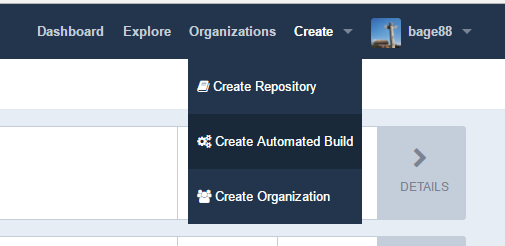
在Github上创建项目仓库 和创建其他Github项目一样,在Github创建一个仓库,然后在仓库里面增加一个dockerfile,然后提交并推送到Github上。 我已经创建的仓库地址:https://github.com/liminjun/simple-dockerfile Dockerfile内容如下: #FROM - Image to start building on. FROM ubuntu:14.04 #MAINTAINER - Identifies the maintainer of the dockerfile. MAINTAINER liminjun2007@gmail.com #RUN - Runs a command in the container RUN echo "Hello World" > /root/hello_world.txt #CMD - Identifies the command that should be used by default when running the image as a container. CMD ["cat", "/root/hello_world.txt"] 在Docker Hub上构建工作流 步骤1:注册Dockerhub并登录。 步骤2:基于Github仓库创建自动化构建 选择Github 步骤3:查看Build Settings 步骤4:查看Build Details 构建和迭代我们的项目 本地修改Dockerfile文件,提交并推动到Github上。 验证上述发生的变化。 获取镜像,并运行,查看内容是否变化。 docker pull bage88/simple-dockerfile 运行Docker镜像 docker run 因为Docker Hub访问速度问题,而且企业内部开发的代码都需要打包成私有的镜像。所以Docker Hub适合开源的小型项目。 对于企业内部来说,可以使用国内云计算厂商提供的镜像服务,也可以在企业内部搭建。 本文转自快乐八哥博客园博客,原文链接http://www.cnblogs.com/liminjun88/p/docker-hub-workflows.html如需转载请自行联系原作者 快乐八哥

资源下载

更多资源
腾讯云软件源

腾讯云软件源

为解决软件依赖安装时官方源访问速度慢的问题,腾讯云为一些软件搭建了缓存服务。您可以通过使用腾讯云软件源站来提升依赖包的安装速度。为了方便用户自由搭建服务架构,目前腾讯云软件源站支持公网访问和内网访问。

Spring

Spring

Spring框架(Spring Framework)是由Rod Johnson于2002年提出的开源Java企业级应用框架,旨在通过使用JavaBean替代传统EJB实现方式降低企业级编程开发的复杂性。该框架基于简单性、可测试性和松耦合性设计理念,提供核心容器、应用上下文、数据访问集成等模块,支持整合Hibernate、Struts等第三方框架,其适用范围不仅限于服务器端开发,绝大多数Java应用均可从中受益。

Rocky Linux

Rocky Linux

Rocky Linux(中文名:洛基)是由Gregory Kurtzer于2020年12月发起的企业级Linux发行版,作为CentOS稳定版停止维护后与RHEL(Red Hat Enterprise Linux)完全兼容的开源替代方案,由社区拥有并管理,支持x86_64、aarch64等架构。其通过重新编译RHEL源代码提供长期稳定性,采用模块化包装和SELinux安全架构,默认包含GNOME桌面环境及XFS文件系统,支持十年生命周期更新。

WebStorm

WebStorm

WebStorm 是jetbrains公司旗下一款JavaScript 开发工具。目前已经被广大中国JS开发者誉为“Web前端开发神器”、“最强大的HTML5编辑器”、“最智能的JavaScript IDE”等。与IntelliJ IDEA同源,继承了IntelliJ IDEA强大的JS部分的功能。


用户登录
用户注册