首页 文章 精选 留言 我的

精选列表

搜索[设置],共10000篇文章
优秀的个人博客,低调大师

【Andrioid】在Gradle编译时生成一个不同的版本号,动态设置应用程序标题,应用程序图标,更换常数

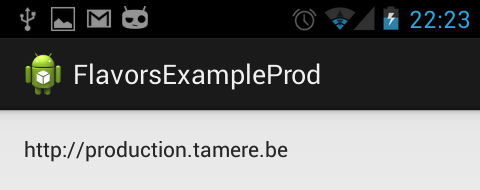
写项目的时候常常会遇到下面的情况: 1.须要生成測试版本号和正式版本号的apk 2.測试版本号和正式版本号的URL是不一样的 3.測试版本号和正式版本号的包名须要不一致,这样才干安装到同一部手机上面。 4.不同apk须要应用名不同,图标不同,某些常量不同.... 假设你有以上的需求。看这篇文章就对了 When developing an app, you usually have many slightly different versions of this app. The most common example is probably the backend you want to use:productionorstaging. 当我们做开发的时候。常常会须要生成多个版本号的app。 最常见的就是測试版和正式版。 You usually define the base URLs with the other constants of the app. Switching from one environment to the other is done by (un)commenting the right lines: 我们经常须要在应用中定义一些常量,当应用正式公布的时候,经常是凝视掉測试用的部分,放开正式的部分,就像以下一样: public static String BASE_URL = "http://staging.tamere.be" //public static String BASE_URL = "http://production.tamere.be" The process is manual, boring and error prone but hey, changing one line is not that bad, is it? Then you add more and more features that depends on the environment. You maybe want a different icon and then different input validation rules and then ... That's where your build tool can help. Let's see how we can automate the process of generating different APKs for different environment with Gradle. 上面的步骤是烦躁。无味的,改动一个地方还好。代码写多了以后正过来整过去就egg_pain了,这个时候我们Gragle就闪亮登场了 Build variants Gradle has the concepts ofBuild TypesandBuild Flavors. When combining the two, you get aBuild Variant. There two default build types:releaseanddebug. We won't change them in our example but we will create two new flavors:productionandstaging. Gradle默认有release和debug两个版本号。 我们这里添加了production和staging.两两组合就是以下4个版本号了。 As a result, we'll have four different variants: ProductionDebug ProductionRelease StagingDebug StagingRelease Sample project 演示样例项目 The project is pretty simple but shows how you can define for each build variant: an app name an icon constants (in our case aBASE_URLvariable) You can download the project onGithub. Here are two screenshots of the generated apps. Nothing really fancy: 演示样例项目非常easy。在不同的版本号中我们须要改动项目名称。项目图标,一些常量:url...,项目能够从Github下载,效果图例如以下: build.gradle file buildscript { repositories { mavenCentral() } dependencies { classpath 'com.android.tools.build:gradle:0.5.+' } } apply plugin: 'android' repositories { mavenCentral() } android { compileSdkVersion 18 buildToolsVersion "18.0.1" defaultConfig { minSdkVersion 15 targetSdkVersion 18 } productFlavors { production { packageName "be.tamere.gradlebuildtypesexample" } staging { packageName "be.tamere.gradlebuildtypesexample.staging" } } } dependencies { compile 'com.android.support:appcompat-v7:18.0.0' } The definition of the flavors is super simple, all the magic will happen in their folders. 改动非常easy:核心配置是productFlavors,同一时候须要注意production和staging。它们须要与后面的文件夹结构名字一致 File structure 改动后的文件结构 In thesrcfolder, we've created two directories whose names must match the flavors. We will define all the flavor-specific values. Only specific values are necessary. 改动也比較简单,在src以下(main同级的文件夹)新建和上面productFlavors中配置production和staging同样的文件夹,分别放入相应的Constants.java。这两个文件夹的属性和功能与系统默认创建的main是一样的。 总结一下就是: 1.production和staging两个文件夹,相应着各存放一份Constants.java 2.对于应用图标和应用名字信息配置在res文件夹以下的。这个地方针对staging又一次配置了一份ic_launcher.png和string.xml。production没配置的话就是用默认main以下的res。 这个比較easy理解哈。 The staging version defines new icons while both flavors defines aConstants.java. The app name is defined in thestring.xmlfiles. ├── main │ ├── AndroidManifest.xml │ ├── ic_launcher-web.png │ ├── java │ │ └── be │ │ └── tamere │ │ └── gradlebuildtypesexample │ │ └── MainActivity.java │ └── res │ ├── drawable-hdpi │ │ └── ic_launcher.png │ ├── drawable-mdpi │ │ └── ic_launcher.png │ ├── drawable-xhdpi │ │ └── ic_launcher.png │ ├── drawable-xxhdpi │ │ └── ic_launcher.png │ ├── layout │ │ └── activity_main.xml │ ├── menu │ │ └── main.xml │ ├── values │ │ ├── dimens.xml │ │ ├── strings.xml │ │ └── styles.xml │ ├── values-v11 │ │ └── styles.xml │ └── values-v14 │ └── styles.xml ├── production │ └── java │ └── be │ └── tamere │ └── gradlebuildtypesexample │ └── Constants.java └── staging ├── java │ └── be │ └── tamere │ └── gradlebuildtypesexample │ └── Constants.java └── res ├── drawable-hdpi │ └── ic_launcher.png ├── drawable-mdpi │ └── ic_launcher.png ├── drawable-xhdpi │ └── ic_launcher.png ├── drawable-xxhdpi │ └── ic_launcher.png └── values └── string.xml Android Studio You can switch between the two flavors in theBuild variantstab of the IDE. Android Studio has some trouble identifying the resources for a non-active flavors. We are using theproductionflavor, Studio does not understand that thestagingfolder contains source code. Don't worry, it's normal, it will catch up when you switch to the staging variant. Launch the app with the different flavors to see the result. The app drawer shows the two icons: References http://tools.android.com/tech-docs/new-build-system/user-guide#TOC-Product-flavors Xav's answer on thisStack overflow topicis particularly helpful. 原文地址: http://tulipemoutarde.be/2013/10/06/gradle-build-variants-for-your-android-project.html 本文转自mfrbuaa博客园博客,原文链接:http://www.cnblogs.com/mfrbuaa/p/4734552.html,如需转载请自行联系原作者

优秀的个人博客,低调大师

ES里设置索引中倒排列表仅仅存文档ID——采用docs存储后可以降低pos文件和cfs文件大小

index_options Theindex_optionsparameter controls what information is added to the inverted index, for search and highlighting purposes. It accepts the following settings: docs Only the doc number is indexed. Can answer the questionDoes this term exist in this field? freqs Doc number and term frequencies are indexed. Term frequencies are used to score repeated terms higher than single terms. positions Doc number, term frequencies, and term positions (or order) are indexed. Positions can be used forproximity or phrase queries. offsets Doc number, term frequencies, positions, and start and end character offsets (which map the term back to the original string) are indexed. Offsets are used by thepostings highlighter. Analyzedstring fields usepositionsas the default, and all other fields usedocsas the default. PUT my_index { "mappings": { "my_type": { "properties": { "text": { "type": "text", "index_options": "offsets" } } } } } PUT my_index/my_type/1 { "text": "Quick brown fox" } GET my_index/_search { "query": { "match": { "text": "brown fox" } }, "highlight": { "fields": { "text": {} } } } COPY AS CURL VIEW IN CONSOLE Thetextfield will use the postings highlighter by default becauseoffsetsare indexed. 转自:https://www.elastic.co/guide/en/elasticsearch/reference/current/index-options.html 注意:ES2.41里没有text这个type curl -XPUT 'http://localhost:9200/hec_test2' -d ' { "mappings": { "hec_type2": { "properties": { "filed-0": { "type": "string", "index_options": "docs" }, "filed-1": { "type": "string", "index_options": "docs" } } } } } ' 比较测试: 可以比默认的节省10+%的存储空间! 本文转自张昺华-sky博客园博客,原文链接:http://www.cnblogs.com/bonelee/p/6397522.html,如需转载请自行联系原作者

优秀的个人博客,低调大师

kibana智能检索发送多次_msearch —— 配置index pattern,同时设置时间段,就知道到底是在哪些索引里去查找数据了

kibanasite/elasticsearch/log-*/_field_stats?level=indices 返回: {"_shards":{"total":600,"successful":600,"failed":0},"indices":{"log-2017.11.22-19-192.168.2.3-93004":{"fields":{"ReceiveDate":{"type":"date","max_doc":24117711,"doc_count":24117711,"density":100,"sum_doc_freq":-1,"sum_total_term_freq":24117711,"searchable":true,"aggregatable":true,"min_value":1511348400000,"min_value_as_string":"2017-11-22T11:00:00.000Z","max_value":1511351999000,"max_value_as_string":"2017-11-22T11:59:59.000Z"}}},"log-2017.11.22-19-192.168.2.3-93005":{"fields":{"ReceiveDate":{"type":"date","max_doc":24108636,"doc_count":24108636,"density":100,"sum_doc_freq":-1,"sum_total_term_freq":24108636,"searchable":true,"aggregatable":true,"min_value":1511348400000,"min_value_as_string":"2017-11-22T11:00:00.000Z","max_value":1511351999000,"max_value_as_string":"2017-11-22T11:59:59.000Z"}}},"log-2017.11.22-19-192.168.2.3-93002":{"fields":{"ReceiveDate":{"type":"date","max_doc":24123473,"doc_count":24123473,"density":100,"sum_doc_freq":-1,"sum_total_term_freq":24123473,"searchable":true,"aggregatable":true,"min_value":1511348400000,"min_value_as_string":"2017-11-22T11:00:00.000Z","max_value":1511351999000,"max_value_as_string":"2017-11-22T11:59:59.000Z"}}},"log-2017.11.22-19-192.168.2.3-93003":{"fields":{"ReceiveDate":{"type":"date","max_doc":24109946,"doc_count":24109946,"density":100,"sum_doc_freq":-1,"sum_total_term_freq":24109946,"searchable":true,"aggregatable":true,"min_value":1511348400000,"min_value_as_string":"2017-11-22T11:00:00.000Z","max_value":1511351999000,"max_value_as_string":"2017-11-22T11:59:59.000Z"}}},"log-2017.11.22-19-192.168.2.3-93001":{"fields":{"ReceiveDate":{"type":"date","max_doc":24111347,"doc_count":24111347,"density":100,"sum_doc_freq":-1,"sum_total_term_freq":24111347,"searchable":true,"aggregatable":true,"min_value":1511348400000,"min_value_as_string":"2017-11-22T11:00:00.000Z","max_value":1511351999000,"max_value_as_string":"2017-11-22T11:59:59.000Z"}}}}} 上述是按照小时建立的索引。 本文转自张昺华-sky博客园博客,原文链接:http://www.cnblogs.com/bonelee/p/7881031.html ,如需转载请自行联系原作者

优秀的个人博客,低调大师

【Android游戏开发二十七】讲解游戏开发与项目下的hdpi 、mdpi与ldpi资源文件夹以及游戏高清版本的设置

今天一个开发者问到我为什么游戏开发要删除项目下的hdpi、mdpi和ldpi文件夹;下面详细给大家解答一下: 首先童鞋们如果看过我写的《【Android游戏开发二十一】Android os设备谎言分辨率的解决方案!》这一节的话都应该知道Android从1.6和更高,Google为了方便开发者对于各种分辨率机型的移植而增加了自动适配的功能; 自动适配的原理很简单,只要你建立的项目是1.6或者更高都会看到项目下有drawable-hdpi、drawable-mdpi、drawable-ldpi 三个文件夹,这三个文件夹分别放置高清分辨率、中分辨率、低分辨率的资源文件;那么如果你的项目在高清分辨率上运行的话,系统会默认索引drawable-hdpi文件夹下的资源,其他雷同; 那么既然系统会自动找匹配的文件夹,那么肯定会出现找不到的情况,比如当前你的应用在高清分辨率运行,假设代码中加载一张“himi.png”的图,那么系统首先会去drawable-hdpi文件夹下去找这张图,一旦找不到,系统会再到其他drawable下寻找,再假设你其实把这张“himi.png”放在了drawable-mdpi中,那么系统会默认把这张图片放大;反之一样,如果你在低分辨率中运行加载一张图片的话,一旦你将图片放入高清的drawable-dpi中,那么系统默认缩小这张图; 总结来说:如果你的应用想适配高、中、低分辨率,那么你需要有3套图放入对应的文件夹中,这样系统会智能加载;如果你就想保留一个文件夹,不想让系统智能寻找缩放的话,有两种方式可以解决: 1.删除drawable-hdpi、drawable-mdpi、drawable-ldpi三个文件夹,创建一个drawable文件夹即可; 2.将资源文件放入assets中,因为assets中的资源系统永远不会为其生成id,所以不会智能缩放; -------------------下面介绍第二点,如何让你的游戏应用高清 其实还是在《【Android游戏开发二十一】Android os设备谎言分辨率的解决方案!》中介绍过,1.6后android有了智能判断的缘故,你获取的屏幕宽高其实是不准确的,详情可以参考【Android游戏开发二十一】Android os设备谎言分辨率的解决方案!》;那么这里要补充一点就是: 如果你在AndroidMainFest 中,定义 <uses-sdk android:minSdkVersion="4" /> 就OK了!你会发现你的图片很清楚,其实也是因为android自动缩放造成的,上面说了,一般获取的分辨率会不正常(比正确的偏小)那么一旦你加上这一句之后,你的分辨率就正常了,所以就明显游戏质量高了一个档次。 这里再补充一下: 一旦你定义了<uses-sdk android:minSdkVersion="4" />,就是限制1.5SDK的手机无法安装你的程序; OK,继续忙了,大家尝试下吧~ 本文转自 xiaominghimi 51CTO博客,原文链接:http://blog.51cto.com/xiaominghimi/659074,如需转载请自行联系原作者

资源下载

更多资源
Mario

Mario

马里奥是站在游戏界顶峰的超人气多面角色。马里奥靠吃蘑菇成长,特征是大鼻子、头戴帽子、身穿背带裤,还留着胡子。与他的双胞胎兄弟路易基一起,长年担任任天堂的招牌角色。

腾讯云软件源

腾讯云软件源

为解决软件依赖安装时官方源访问速度慢的问题,腾讯云为一些软件搭建了缓存服务。您可以通过使用腾讯云软件源站来提升依赖包的安装速度。为了方便用户自由搭建服务架构,目前腾讯云软件源站支持公网访问和内网访问。

Nacos

Nacos

Nacos /nɑ:kəʊs/ 是 Dynamic Naming and Configuration Service 的首字母简称,一个易于构建 AI Agent 应用的动态服务发现、配置管理和AI智能体管理平台。Nacos 致力于帮助您发现、配置和管理微服务及AI智能体应用。Nacos 提供了一组简单易用的特性集,帮助您快速实现动态服务发现、服务配置、服务元数据、流量管理。Nacos 帮助您更敏捷和容易地构建、交付和管理微服务平台。

Sublime Text

Sublime Text

Sublime Text具有漂亮的用户界面和强大的功能,例如代码缩略图,Python的插件,代码段等。还可自定义键绑定,菜单和工具栏。Sublime Text 的主要功能包括:拼写检查,书签,完整的 Python API , Goto 功能,即时项目切换,多选择,多窗口等等。Sublime Text 是一个跨平台的编辑器,同时支持Windows、Linux、Mac OS X等操作系统。

用户登录
用户注册