分布式--Spring Boot 微服务框架
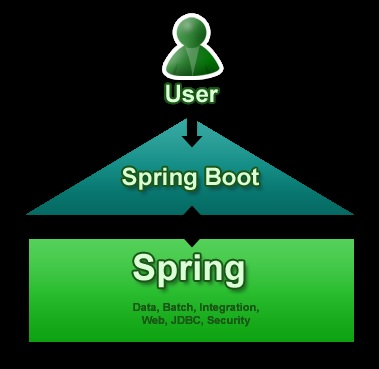
1. Spring Boot 1). 简介 Spring Boot 是由 Pivotal 团队提供的全新框架,其设计目的是用来简化新 Spring 应用的初始搭建以及开发过程。该框架使用了特定的方式来进行配置,从而使开发人员不再需要定义样板化的配置。 2). 好处 (1)它是Spring的升级版,Spring容器能做到的事情,它都能做到,而且更简便,从配置形式上来说,SpringBoot完全抛弃了繁琐的XML文件配置方式,而是替代性地用注解方式来实现,虽然本质来说,是差不多的(类似包扫描,注解扫描,类加载之类)。 (2)SpringBoot集成的插件更多,从而使用很多服务,都只是引入一个依赖,几个注解和Java类就可以用了,具体的参考相关手册。 (3)在Web应用开发这一块,之前的应用一般来说是打包成war包,再发布到相关服务器容器下(例如Tomcat),虽然SpringBoot也可以这么做,但在SpringBoot下更常见的形式是将SpringBoot应用打包成可执行jar包文件。之所以这么做,源于你可以直接将SpringBoot应用看成是一个Java Application,其Web应用可以没有webapp目录(更不用说web.xml了),它推荐使用html页面,并将其作为静态资源使用。 3). Spring Boot是什么 Spring Boot不是一个框架,它是一种用来轻松创建具有最小或零配置的独立应用程序的方式。这是方法用来开发基于Spring的应用,但只需非常少的配置。它提供了默认的代码和注释配置,快速启动新的Spring项目而不需要太多时间。它利用现有的Spring项目以及第三方项目来开发生产就绪(投入生产)的应用程序。它提供了一组pom或gradle构建文件,可以使用它们添加所需的依赖项,并且还便于自动配置。 Spring Boot根据其类路径上的库自动配置所需的类。假设应用程序想要与数据库交互,如果在类路径上有Spring数据库,那么它会自动建立与数据源类的连接。 图1.png 4). 主要目标 为所有Spring开发提供一个基本的,更快,更广泛的入门体验。 开箱即用,但随着需求开始偏离默认值,快速启动。 提供大型项目(例如嵌入式服务器,安全性,度量,运行状况检查,外部化配置)常见的一系列非功能特性。 绝对没有代码生成以及不需要XML配置,完全避免XML配置。 为了避免定义更多的注释配置(它将一些现有的 Spring Framework 注释组合成一个简单的单一注释) 避免编写大量import语句。 提供一些默认值,以便在短时间内快速启动新项目。 5). 新项目使用Spring Boot 简化基于Java的应用程序开发,单元测试和集成测试过程。 通过提供一些默认值来减少开发,单元测试和集成测试时间。 提高生产力。 当使用默认值时,Spring Boot有自己的看法。如果不指定详细信息,它将使用其自己的默认配置。如果想要持久化,但是没有在POM文件中指定任何东西,那么Spring Boot会- 将Hibernate带有HSQLDB数据库的配置作为JPA提供者。 为大型项目(例如嵌入式服务器,安全性,度量,健康检查,外部化配置)提供许多非常常见的非功能特性/解决方案。 6). 优缺点 Spring Boot的优点: 使用Java或Groovy开发基于Spring的应用程序非常容易。 它减少了大量的开发时间并提高了生产力。 它避免了编写大量的样板代码,注释和XML配置。 Spring Boot应用程序与其Spring生态系统(如Spring JDBC,Spring ORM,Spring Data,Spring Security等)集成非常容易。 它遵循“自用默认配置”方法,以减少开发工作量。 它提供嵌入式HTTP服务器,如Tomcat,Jetty等,以开发和测试Web应用程序非常容易。 它提供CLI(命令行界面)工具从命令提示符,非常容易和快速地开发和测试Spring Boot(Java或Groovy)应用程序。 它提供了许多插件来开发和测试Spring启动应用程序非常容易使用构建工具,如Maven和Gradle。 它提供了许多插件,以便与嵌入式和内存数据库工作非常容易。 Spring Boot的限制: 将现有或传统的Spring Framework项目转换为Spring Boot应用程序是一个非常困难和耗时的过程。它仅适用于全新Spring项目。 2. Spring Boot 1). 入门 Spring Boot项目归根只是一个常规的Spring项目,只是利用了Spring Boot启动程序和自动配置。要创建Spring Boot应用程序的方法,Spring团队(The Pivotal Team)提供了以下三种方法。 使用Spring Boot CLI工具 使用Spring STS IDE 使用Spring Initializr 可以使用Spring Boot开发两种基于Spring的应用程序: 基于Java的应用程序 基于Groovy的应用程序 图2.png 2). Spring Boot CLI I. 下载并解压 图3.png 在Windows系统中命令提示符中设置Spring Boot CLI环境变量: 右键“我的电脑”->”高级系统设置”->”高级”->”环境变量”->选择”PATH”并新建并加上面的路径 D:\distribution\spring-2.0.2.RELEASE\bin; 图4.png 验证: spring --version 图5.png II. spring 命令语法查看spring --help 图6.png III. 创建HelloWorld.groovy文件 @RestController class HelloWorld { @RequestMapping("/") String hello() { "Hello mazaiting." } } 图6.png IV. 运行 spring run HelloWorld.groovy 图7.png V. 测试 在浏览器输入http://localhost:8080/即可访问 图8.png 3). Maven 安装Spring Boot <!-- Inherit defaults from Spring Boot --> <parent> <groupId>org.springframework.boot</groupId> <artifactId>spring-boot-starter-parent</artifactId> <version>2.0.2.RELEASE</version> </parent> <!-- Add typical dependencies for a web application --> <dependencies> <dependency> <groupId>org.springframework.boot</groupId> <artifactId>spring-boot-starter-web</artifactId> </dependency> </dependencies> 4). Eclipse 使用 Spring Boot I. 在pom.xml文件中添加SpringBoot的依赖 <project xmlns="http://maven.apache.org/POM/4.0.0" xmlns:xsi="http://www.w3.org/2001/XMLSchema-instance" xsi:schemaLocation="http://maven.apache.org/POM/4.0.0 http://maven.apache.org/xsd/maven-4.0.0.xsd"> <modelVersion>4.0.0</modelVersion> <groupId>com.mazaiting</groupId> <artifactId>SpringBootTest</artifactId> <version>0.0.1-SNAPSHOT</version> <packaging>jar</packaging> <name>SpringBootTest</name> <url>http://maven.apache.org</url> <properties> <project.build.sourceEncoding>UTF-8</project.build.sourceEncoding> </properties> <!-- Spring-Boot --> <parent> <groupId>org.springframework.boot</groupId> <artifactId>spring-boot-starter-parent</artifactId> <version>2.0.2.RELEASE</version> </parent> <dependencies> <dependency> <groupId>junit</groupId> <artifactId>junit</artifactId> <scope>test</scope> </dependency> <!-- Spring-Boot --> <dependency> <groupId>org.springframework.boot</groupId> <artifactId>spring-boot-starter-web</artifactId> </dependency> </dependencies> </project> II. 创建HelloWorld类 @RestController @EnableAutoConfiguration public class HelloWorld { @RequestMapping("/") String home() { return "Hello mazaiting"; } public static void main(String[] args) { SpringApplication.run(HelloWorld.class, args); } } III. 执行结果 图9.png 在浏览器输入 http://localhost:8080/ 图10.png IV. 注解解释 @RestController: 构造型注释, 指定控制器,Spring会在处理传入的Web请求时考虑它. @RequestMapping:注解提供了“路由”信息。它告诉Spring任何带有路径“/”的HTTP请求应该映射到home方法。[@RestController](https://github.com/RestController "@RestController")注解告诉Spring将生成的字符串直接返回给调用者。 @EnableAutoConfiguration: 允许自动配置 V. 创建可执行的jar包 在pom.xml的project节点下添加 <build> <plugins> <!-- 用于创建可执行jar --> <plugin> <groupId>org.springframework.boot</groupId> <artifactId>spring-boot-maven-plugin</artifactId> </plugin> </plugins> </build> 在项目的根目录下执行dos命令mvn package 图11.png 图12.png 执行完成后\SpringBootTest\target\目录下生成SpringBootTest-0.0.1-SNAPSHOT.jar文件 图13.png 执行java -jar target/SpringBootTest-0.0.1-SNAPSHOT.jar命令运行,并在浏览器输入http://localhost:8080/,同样可看到执行效果. 5). Spring Boot JSP 实例 I. 创建Maven Web项目 图14.png II. 在pom文件中添加依赖 <project xmlns="http://maven.apache.org/POM/4.0.0" xmlns:xsi="http://www.w3.org/2001/XMLSchema-instance" xsi:schemaLocation="http://maven.apache.org/POM/4.0.0 http://maven.apache.org/maven-v4_0_0.xsd"> <modelVersion>4.0.0</modelVersion> <groupId>com.mazaiting</groupId> <artifactId>SpringBoot-JSP</artifactId> <packaging>war</packaging> <version>0.0.1-SNAPSHOT</version> <name>SpringBoot-JSP Maven Webapp</name> <url>http://maven.apache.org</url> <!-- Spring-Boot --> <parent> <groupId>org.springframework.boot</groupId> <artifactId>spring-boot-starter-parent</artifactId> <version>2.0.2.RELEASE</version> </parent> <!-- 配置Java版本 --> <properties> <java.version>1.8</java.version> </properties> <dependencies> <dependency> <groupId>junit</groupId> <artifactId>junit</artifactId> <scope>test</scope> </dependency> <!-- Spring-Boot: This is a web application --> <dependency> <groupId>org.springframework.boot</groupId> <artifactId>spring-boot-starter-web</artifactId> </dependency> <!-- Tomcat embedded container--> <dependency> <groupId>org.springframework.boot</groupId> <artifactId>spring-boot-starter-tomcat</artifactId> <scope>provided</scope> </dependency> <!-- Need this to compile JSP --> <dependency> <groupId>org.apache.tomcat.embed</groupId> <artifactId>tomcat-embed-jasper</artifactId> <scope>provided</scope> </dependency> <!-- JSTL for JSP --> <!-- https://mvnrepository.com/artifact/javax.servlet/jstl --> <dependency> <groupId>javax.servlet</groupId> <artifactId>jstl</artifactId> </dependency> <!-- https://mvnrepository.com/artifact/taglibs/standard --> <dependency> <groupId>taglibs</groupId> <artifactId>standard</artifactId> <version>1.1.2</version> </dependency> <!-- Optional, test for static content, bootstrap CSS--> <dependency> <groupId>org.webjars</groupId> <artifactId>bootstrap</artifactId> <version>3.3.7</version> </dependency> </dependencies> <build> <finalName>SpringBoot-JSP</finalName> <plugins> <!-- Package as an executable jar/war --> <plugin> <groupId>org.springframework.boot</groupId> <artifactId>spring-boot-maven-plugin</artifactId> </plugin> </plugins> </build> </project> 实现依赖关系:mvn dependency:tree 图15.png III. SpringBootServletInitializer执行传统的WAR部署运行SpringApplication // 注解为SpringBoot应用 @SpringBootApplication public class SpringBootWebApplication extends SpringBootServletInitializer{ @Override protected SpringApplicationBuilder configure(SpringApplicationBuilder builder) { return builder.sources(SpringBootWebApplication.class); } public static void main(String[] args) { SpringApplication.run(SpringBootWebApplication.class, args); } } IV. 创建控制器 @Controller public class WelcomeController { // 注入应用配置 application.properties @Value("${welcome.message}") private String message = "Hello World"; @RequestMapping("/") public String welcome(Map<String, Object> model) { model.put("message", this.message); return "welcome"; } } V. welcome.jsp页面 <%@ page language="java" contentType="text/html; charset=UTF-8" pageEncoding="UTF-8" isELIgnored="false"%> <%@ taglib prefix="spring" uri="http://www.springframework.org/tags"%> <%@ taglib prefix="c" uri="http://java.sun.com/jsp/jstl/core"%> <!DOCTYPE html> <html lang="en"> <head> <meta http-equiv="Content-Type" content="text/html; charset=UTF-8"> <!-- 链接bootstrap --> <!-- href中的内容写为:webjars/bootstrap/3.3.7/css/bootstrap.css 加载地址为:http://localhost:8080/SpringBoot-JSP/webjars/bootstrap/3.3.7/css/bootstrap.css href中的内容写为:/webjars/bootstrap/3.3.7/css/bootstrap.css 加载地址为:http://localhost:8080/webjars/bootstrap/3.3.7/css/bootstrap.css 使用中建议写为webjars/bootstrap/3.3.7/css/bootstrap.css --> <link rel="stylesheet" type="text/css" href="webjars/bootstrap/3.3.7/css/bootstrap.css"/> <%-- <spring:url value="/css/main.css" var="springCss"/> <link href="${springCss}" rel="stylesheet"/> --%> <script type="text/javascript" src="webjars/jquery/1.11.1/jquery.min.js"></script> <c:url value="/css/main.css" var="jstlCss"></c:url> <link href="${jstlCss }" rel="stylesheet"/> <title>SpringBootTest</title> </head> <body> <nav class="navbar navbar-inverse"> <div class="container"> <div class="navbar-header"> <a class="navbar-brand" href="#">Spring Boot</a> </div> </div> <div id="navbar" class="collapse navbar-collapse"> <ul class="nav nav-bar-nav"> <li class="active"><a href="#">Home</a></li> <li><a href="#about">About</a></li> </ul> </div> </nav> <div class="container"> <div class="starter-template"> <h1>Spring Boot Web JSP Example</h1> <h2>Message: ${message }</h2> </div> </div> <script type="text/javascript" src="webjars/bootstrap/3.3.7/js/bootstrap.min.js"></script> </body> </html> 注 href中的内容写为:webjars/bootstrap/3.3.7/css/bootstrap.css 加载地址为:http://localhost:8080/SpringBoot-JSP/webjars/bootstrap/3.3.7/css/bootstrap.css href中的内容写为:/webjars/bootstrap/3.3.7/css/bootstrap.css 加载地址为:http://localhost:8080/webjars/bootstrap/3.3.7/css/bootstrap.css 使用中建议写为webjars/bootstrap/3.3.7/css/bootstrap.css main.css h1 { color: #00F; } h2 { color: #F00; } VI. 在/src/main/resources/目录下创建application.properties及application-dev.properties、application-prod.properties、application-test.properties。 application-dev.properties:用于开发环境 application-test.properties:用于测试环境 application-prod.properties:用于生产环境 在application.properties文件中配置使用哪一类型的配置文件, prefix和suffix配置视图层的前后缀。 spring.mvc.view.prefix: /jsp/ spring.mvc.view.suffix: .jsp spring.profiles.active= dev application-dev.properties welcome.message: Hello mazaiting1 application-test.properties welcome.message: Hello mazaiting2 application-prod.properties welcome.message: Hello mazaiting3 VII. 代码结构 图16.png VIII. 运行测试一:在SpringBootWebApplication类上右键Run As -> Java Application, 在浏览器中输入http://localhost:8080/ 图17.png IX.. 运行测试二:在项目的根目录下,在命令提示符输入mvn spring-boot:run,然后在浏览器输入http://localhost:8080/也可呈现效果 图18.png X. 运行测试三:在工程右键-> Run As -> Run on Server部署在Tomcat容器中, 然后再浏览器中输入http://localhost:8080/SpringBoot-JSP/即可访问 图19.png XI. JSP限制 不能创建可执行jar来运行这个嵌入式Tomcat + JSP Web示例,因为Tomcat中有一个硬编码文件模式。 6). Spring Boot创建war包,并部署在Tomcat I. 使用命令提示符进入项目根目录 mvn clean package 图20.png II. 执行成功后,项目的\SpringBoot-JSP\target\目录下出现SpringBoot-JSP.war 图21.png 7). Spring Boot + Thymeleaf 模板引擎 -- 可执行JAR文件 I. 引入依赖 <project xmlns="http://maven.apache.org/POM/4.0.0" xmlns:xsi="http://www.w3.org/2001/XMLSchema-instance" xsi:schemaLocation="http://maven.apache.org/POM/4.0.0 http://maven.apache.org/maven-v4_0_0.xsd"> <modelVersion>4.0.0</modelVersion> <groupId>com.mazaiting</groupId> <artifactId>SpringBoot-Thymeleaf</artifactId> <version>0.0.1-SNAPSHOT</version> <name>SpringBoot-Thymeleaf Maven Webapp</name> <url>http://maven.apache.org</url> <parent> <groupId>org.springframework.boot</groupId> <artifactId>spring-boot-starter-parent</artifactId> <version>1.4.2.RELEASE</version> </parent> <!-- Java版本 --> <properties> <java.version>1.8</java.version> </properties> <dependencies> <dependency> <groupId>junit</groupId> <artifactId>junit</artifactId> <scope>test</scope> </dependency> <dependency> <groupId>org.springframework.boot</groupId> <artifactId>spring-boot-starter-thymeleaf</artifactId> </dependency> <!-- hot swapping, disable cache for template, enable live reload --> <dependency> <groupId>org.springframework.boot</groupId> <artifactId>spring-boot-devtools</artifactId> <optional>true</optional> </dependency> <!-- Optional, for bootstrap --> <dependency> <groupId>org.webjars</groupId> <artifactId>bootstrap</artifactId> <version>3.3.7</version> </dependency> </dependencies> <build> <finalName>SpringBoot-Thymeleaf</finalName> <plugins> <!-- Package as an executable jar/war --> <plugin> <groupId>org.springframework.boot</groupId> <artifactId>spring-boot-maven-plugin</artifactId> </plugin> </plugins> </build> </project> spring-boot-devtools有助于禁用缓存并启用热插拔,以便开发人员总是看到最后的更改。尝试修改Thymeleaf模板或属性文件,刷新浏览器以查看更改立即生效。 II. 创建SpringBootWebApplication @SpringBootApplication public class SpringBootWebApplication { public static void main(String[] args) { SpringApplication.run(SpringBootWebApplication.class, args); } } III. 创建WelcomeController @Controller public class WelcomeController { @Value("${welcome.message}") private String message= "Hello World"; @RequestMapping("/") public String welcome(Map<String, Object> model){ model.put("message", this.message); return "welcome"; } } IV. Thymeleaf +资源+静态文件 welcome.html <!DOCTYPE html> <html xmlns:th="http://www.thymeleaf.org"> <head> <meta http-equiv="Content-Type" content="text/html; charset=UTF-8"/> <title>Spring Boot Thymeleaf Hello World 示例</title> <link rel="stylesheet" type="text/css" href="webjars/bootstrap/3.3.7/css/bootstrap.css"/> <link rel="stylesheet" th:href="@{/css/main.css}" href="../../css/main.css"/> <script type="text/javascript" src="webjars/jquery/1.11.1/jquery.min.js"></script> </head> <body> <nav class="navbar navbar-inverse"> <div class="container"> <div class="navbar-header"> <a class="navbar-brand" href="#">Spring Boot</a> </div> <div id="navbar" class="collapse navbar-collapse"> <ul class="nav navbar-nav"> <li class="avtive"><a href="#">首页</a></li> <li><a href="#about">关于</a></li> </ul> </div> </div> </nav> <div class="container"> <div class="starter-template"> <h1>Spring Boot Web Thymeleaf 示例</h1> <h2> <span th:text="'Message: ' + ${message}"></span> </h2> </div> </div> <script type="text/javascript" src="webjars/bootstrap/3.3.7/js/bootstrap.min.js"></script> </body> </html> main.css h1 { font-size: 20pt; } h2 { font-size: 16pt; } application.properties welcome.message: Hello, mazaiting 目录结构 图22.png V. 运行方式一:运行SpringBootWebApplication,浏览器输入http://localhost:8080/ 图23.png VI. 运行方式二:在命令提示符的项目根目录下执行mvn spring-boot:run,浏览器输入http://localhost:8080/即可显示效果 VII. 运行方式三:在命令提示符的项目根目录下执行mvn clean package,创建可执行jar包,运行jar包,浏览器输入http://localhost:8080/即可显示效果。想要生成jar包,在pom.xml文件中,一定有此行<packaging>war</packaging> 8). Spring Boot 非Web应用--命令行应用 I. 创建Maven的普通Java工程,并在pom.xml文件中添加依赖 <project xmlns="http://maven.apache.org/POM/4.0.0" xmlns:xsi="http://www.w3.org/2001/XMLSchema-instance" xsi:schemaLocation="http://maven.apache.org/POM/4.0.0 http://maven.apache.org/xsd/maven-4.0.0.xsd"> <modelVersion>4.0.0</modelVersion> <groupId>com.mazaiting</groupId> <artifactId>SpringBoot-Console</artifactId> <version>0.0.1-SNAPSHOT</version> <packaging>jar</packaging> <name>SpringBoot-Console</name> <url>http://maven.apache.org</url> <!-- Spring-Boot --> <parent> <groupId>org.springframework.boot</groupId> <artifactId>spring-boot-starter-parent</artifactId> <version>2.0.2.RELEASE</version> </parent> <properties> <project.build.sourceEncoding>UTF-8</project.build.sourceEncoding> </properties> <dependencies> <dependency> <groupId>junit</groupId> <artifactId>junit</artifactId> <scope>test</scope> </dependency> <dependency> <groupId>org.springframework.boot</groupId> <artifactId>spring-boot-starter</artifactId> </dependency> </dependencies> <build> <plugins> <!-- Package as an executable jar/war --> <plugin> <groupId>org.springframework.boot</groupId> <artifactId>spring-boot-maven-plugin</artifactId> </plugin> </plugins> </build> </project> II. 创建HelloService服务 @Service public class HelloMessageService { @Value("${name}") private String name; public String getMessage() { return getMessage(name); } public String getMessage(String name) { return "Hello " + name; } } III. application.properties内容 name=mazaiting IV. SpringBootConsoleApplication应用 @SpringBootApplication public class SpringBootConsoleApplication implements CommandLineRunner{ @Autowired private HelloMessageService helloService; public static void main(String[] args) { SpringApplication application = new SpringApplication(SpringBootConsoleApplication.class); application.setBannerMode(Banner.Mode.OFF); application.run(args); } @Override public void run(String... args) throws Exception { if (args.length > 0) { System.out.println(helloService.getMessage(args[0].toString())); } else { System.out.println(helloService.getMessage()); } } } V. 目录结构 图24.png VI. 运行 生成jar包 mvn package 运行1 java -jar target/SpringBoot-Console-0.0.1-SNAPSHOT.jar 结果:Hello mazaiting 运行2 java -jar target/SpringBoot-Console-0.0.1-SNAPSHOT.jar spring-boot 结果:Hello spring-boot 9). Spring Boot 属性配置 I. pom.xml文件 <project xmlns="http://maven.apache.org/POM/4.0.0" xmlns:xsi="http://www.w3.org/2001/XMLSchema-instance" xsi:schemaLocation="http://maven.apache.org/POM/4.0.0 http://maven.apache.org/xsd/maven-4.0.0.xsd"> <modelVersion>4.0.0</modelVersion> <groupId>com.mazaiting</groupId> <artifactId>SpringBoot-Config</artifactId> <version>0.0.1-SNAPSHOT</version> <packaging>jar</packaging> <name>SpringBoot-Config</name> <url>http://maven.apache.org</url> <!-- Spring-Boot --> <parent> <groupId>org.springframework.boot</groupId> <artifactId>spring-boot-starter-parent</artifactId> <version>2.0.2.RELEASE</version> </parent> <properties> <project.build.sourceEncoding>UTF-8</project.build.sourceEncoding> </properties> <dependencies> <dependency> <groupId>junit</groupId> <artifactId>junit</artifactId> <scope>test</scope> </dependency> <dependency> <groupId>org.springframework.boot</groupId> <artifactId>spring-boot-starter</artifactId> </dependency> <!-- Spring-Boot: This is a web application --> <dependency> <groupId>org.springframework.boot</groupId> <artifactId>spring-boot-starter-web</artifactId> </dependency> </dependencies> <build> <plugins> <!-- Package as an executable jar/war --> <plugin> <groupId>org.springframework.boot</groupId> <artifactId>spring-boot-maven-plugin</artifactId> </plugin> </plugins> </build> </project> II. @Value使用 @Component @PropertySource("classpath:global.properties") public class GlobalProperties { @Value("${thread-pool}") private int threadPool; @Value("${email}") private String email; //getters and setters } III. ConfigurationProperties @Component @PropertySource("classpath:global.properties") @ConfigurationProperties public class GlobalProperties { private int threadPool; private String email; //getters and setters } IV. 配置文件 global.properties文件 email=zaitingma@foxmail.com thread-pool=12 application.properties文件 #Logging logging.level.org.springframework.web=ERROR logging.level.com.mazaiting=DEBUG #Global email=1425941077@qq.com thread-pool=10 #App app.menus[0].title=Home app.menus[0].name=Home app.menus[0].path=/ app.menus[1].title=Login app.menus[1].name=Login app.menus[1].path=/login app.compiler.timeout=5 app.compiler.output-folder=/temp/ app.error=/error/ 注: 如果在application.properties文件中有与global.properties中有相同的属性,取值时则取application.properties中的配置 V. 对应的java文件 AppProperties.java @Component //prefix app, find app.* values @ConfigurationProperties("app") public class AppProperties { private String error; private List<Menu> menus = new ArrayList<>(); private Compiler compiler = new Compiler(); public String getError() { return error; } public void setError(String error) { this.error = error; } public List<Menu> getMenus() { return menus; } public void setMenus(List<Menu> menus) { this.menus = menus; } public Compiler getCompiler() { return compiler; } public void setCompiler(Compiler compiler) { this.compiler = compiler; } public static class Menu { private String name; private String path; private String title; public String getName() { return name; } public void setName(String name) { this.name = name; } public String getPath() { return path; } public void setPath(String path) { this.path = path; } public String getTitle() { return title; } public void setTitle(String title) { this.title = title; } @Override public String toString() { return "Menu [name=" + name + ", path=" + path + ", title=" + title + "]"; } } public static class Compiler { private String timeout; private String outputFolder; public String getTimeout() { return timeout; } public void setTimeout(String timeout) { this.timeout = timeout; } public String getOutputFolder() { return outputFolder; } public void setOutputFolder(String outputFolder) { this.outputFolder = outputFolder; } @Override public String toString() { return "Compiler [timeout=" + timeout + ", outputFolder=" + outputFolder + "]"; } } @Override public String toString() { return "AppProperties [error=" + error + ", menus=" + menus + ", compiler=" + compiler + "]"; } } GlobalProperties.java @Component @PropertySource("classpath:global.properties") public class GlobalProperties { @Value("${thread-pool}") private int threadPool; @Value("${email}") private String email; public int getThreadPool() { return threadPool; } public void setThreadPool(int threadPool) { this.threadPool = threadPool; } public String getEmail() { return email; } public void setEmail(String email) { this.email = email; } @Override public String toString() { return "GlobalProperties [threadPool=" + threadPool + ", email=" + email + "]"; } } VI. 应用入口SpringBootWebApplication @SpringBootApplication public class SpringBootWebApplication { public static void main(String[] args) { SpringApplication.run(SpringBootWebApplication.class, args); } } VII. 控制器 @Controller public class WelcomeController { private static final Logger LOGGER = LoggerFactory.getLogger(WelcomeController.class); private GlobalProperties global; private AppProperties app; @Autowired public void setApp(AppProperties app) { this.app = app; } @Autowired public void setGlobalProperties(GlobalProperties global) { this.global = global; } @RequestMapping("/") public String welcome(Map<String, Object> model) { String globalProperties = global.toString(); String appProperties = app.toString(); LOGGER.debug("Welcome {}, {}", app, global); model.put("message", appProperties + globalProperties); return "welcome"; } } VIII. 运行SpringBootWebApplication,浏览器输入http://localhost:8080/,查看控制台 2018-05-14 13:07:22.056 DEBUG 4228 --- [nio-8080-exec-3] com.mazaiting.config.WelcomeController : Welcome AppProperties [error=/error/, menus=[Menu [name=Home, path=/, title=Home], Menu [name=Login, path=/login, title=Login]], compiler=Compiler [timeout=5, outputFolder=/temp/]], GlobalProperties [threadPool=10, email=1425941077@qq.com] IX. 验证 @Component @ConfigurationProperties public class GlobalProperties { @Max(5) @Min(0) private int threadPool; @NotEmpty private String email; //getters and setters } 10). 配置文件中配置logging #Logging # log level 日志等级 logging.level.org.springframework.web=ERROR logging.level.com.mazaiting=DEBUG # log file 日志文件存放路径 #logging.file=${java.io.tmpdir}/application.log # output to a file 存放路径 logging.file=C:/Users/Administrator/Desktop/mylog.log # pattern 格式化文件内容 logging.pattern.file="%d{yyyy-MM-dd HH:mm:ss} [%thread] %-5level %logger{36} - %msg%n" 代码下载