任务调度工具Quartz入门笔记
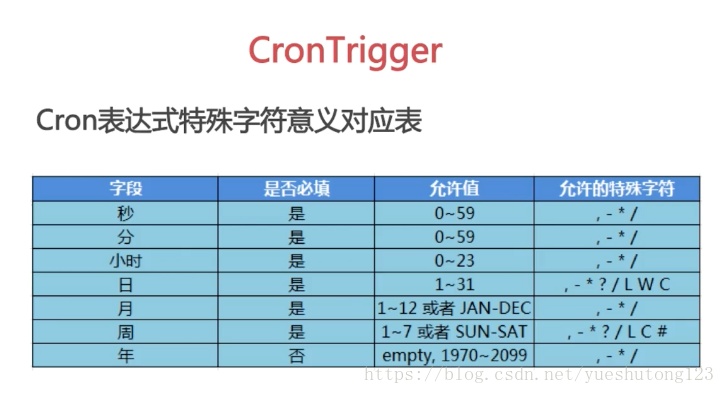
一,导包 1)官网下载:http://www.quartz-scheduler.org/downloads/ 2)Maven <dependency> <groupId>org.quartz-scheduler</groupId> <artifactId>quartz</artifactId> <version>2.2.1</version> </dependency> 二,实例 1.先定义一个作业任务类,写我们的执行代码 package cn.zyzpp.quartz.demo; import java.text.SimpleDateFormat; import java.util.Date; import org.quartz.Job; import org.quartz.JobDataMap; import org.quartz.JobDetail; import org.quartz.JobExecutionContext; import org.quartz.JobExecutionException; import org.quartz.JobKey; import org.quartz.Trigger; /** * Created by yster@foxmail.com * 2018年4月9日 下午11:00:52 */ public class HelloJob implements Job { //第(2)种获取传入的参数的方法:setter方法 属性对应key的值 private String setKey; public void execute(JobExecutionContext context) throws JobExecutionException { //获取JobDetail对象 String now = new SimpleDateFormat("yyyy-mm-dd hh:mm:ss").format(new Date()); JobDetail detail = context.getJobDetail(); String group = detail.getKey().getGroup(); String value = detail.getJobDataMap().getString("key"); //获取Trigger对象 Trigger trigger = context.getTrigger(); value= trigger.getJobDataMap().getString("key"); //获取JobDataMap对象 //第(1)种获取传入的参数的方法 JobDataMap data = context.getMergedJobDataMap(); value = data.getString("key");//相同key 调用trigger的value //System.out.println(group + ":" + value + " at " + now + setKey); //获取Jobkey对象 JobKey jobKey = trigger.getJobKey(); String name = jobKey.getName(); group = jobKey.getGroup(); try { Thread.sleep(5000l); } catch (InterruptedException e) { e.printStackTrace(); } System.out.println(now + ":" + name + " " +group); } public String getSetKey() { return setKey; } public void setSetKey(String setKey) { this.setKey = setKey; } } 2. package cn.zyzpp.quartz.demo; import java.text.SimpleDateFormat; import java.util.Date; import org.quartz.CronScheduleBuilder; import org.quartz.CronTrigger; import org.quartz.JobBuilder; import org.quartz.SimpleScheduleBuilder; import org.quartz.SimpleTrigger; import org.quartz.TriggerBuilder; import org.quartz.JobDetail; import org.quartz.Scheduler; import org.quartz.Trigger; import org.quartz.impl.StdSchedulerFactory; /** * Created by yster@foxmail.com 2018年4月9日 下午10:57:14 */ public class QuartzTest { public static void main(String[] args) { SimpleDateFormat sf =new SimpleDateFormat("yyyy-mm-dd hh:mm:ss"); try { // Quartz 作业:定义一个JobDetail:为Job类设置属性 JobDetail jobDetail = JobBuilder.newJob(HelloJob.class) // 定义Job类为HelloQuartz类,这是真正的执行逻辑所在 .withIdentity("job1", "group1") // 定义name/group .usingJobData("key", "job-value") // 自定义参数 .usingJobData("setKey", "setValue").build(); // System.out.println(jobDetail.getKey().getName()); // System.out.println(jobDetail.getKey().getGroup()); // System.out.println(jobDetail.getJobClass()); // 定义任务开始时间以及结束时间 Date startDate = new Date(); System.out.println("scheduler开始:" + sf.format(new Date())); startDate.setTime(new Date().getTime() + 2000); Date endDate = new Date(); endDate.setTime(startDate.getTime() + 4000); // Quartz触发器:定义一个Trigger Trigger trigger = TriggerBuilder.newTrigger() .withIdentity("trigger1", "group1") // 定义name/group // .startNow()//一旦加入scheduler,立即生效 .startAt(startDate) .endAt(endDate) .withSchedule(SimpleScheduleBuilder.simpleSchedule() .withIntervalInSeconds(1) // 每隔一秒执行一次 .repeatForever()) // 一直执行,奔腾到老不停歇 .usingJobData("key", "trigger-value") .build(); //SimpleTrigger 在一个指定时间段内执行一次作业任务 或者在指定时间间隔内多次执行作业任务 SimpleTrigger simpleTrigger = (SimpleTrigger) TriggerBuilder .newTrigger() .withIdentity("trigger1", "group1") // 定义name/group .startAt(startDate) .withSchedule(SimpleScheduleBuilder.simpleSchedule() .withIntervalInSeconds(2) .withRepeatCount(3)) //执行第1次后再执行3次(SimpleTrigger.REPEAT_INDEFINITELY) .build(); //CronTrigger 基于 cron 表达式,更常用 CronTrigger cronTrigger = (CronTrigger) TriggerBuilder .newTrigger() .withIdentity("trigger1", "group1") // 定义name/group .startAt(startDate) .withSchedule( //Cron表达式:[秒][分][时][日][月][周][年] (周日1-周六7,年可不写) *每 ?不关心 -至 #第 /递增 ,和 L最后 W最近工作日 CronScheduleBuilder.cronSchedule("0/2 * * * * ? * ") ) .build(); // 调度类链接“工作”和“触发器”到一起,并执行它 // 创建scheduler StdSchedulerFactory sfact = new StdSchedulerFactory(); Scheduler scheduler = sfact.getScheduler(); // 加入这个调度 返回第一次执行时间 scheduler.scheduleJob(jobDetail, cronTrigger); //System.out.println("调度器:" + sf.format(scheduler.scheduleJob(jobDetail, cronTrigger))); // 启动之 scheduler.start(); // 运行一段时间后暂停 可再次start 当前主线程不终止 Thread.sleep(10000l); // scheduler.standby(); // System.out.println("暂停:三秒后再次开启"); // Thread.sleep(3000l); // scheduler.start(); // Thread.sleep(5000l); scheduler.shutdown(true);//true等待执行的job完成后关闭scheduler,false直接关闭 System.out.println("scheduler终止" + sf.format(new Date())); } catch (Exception e) { e.printStackTrace(); } } } 三,干货 1)Cron表达式 2)/org/quartz/quartz.properties 3)集成Spring <!-- JobDetail --> <!-- (1)simpleJobDetail : 定义任务类和任务方法--> <bean id="simpleJobDetail" class="org.springframework.scheduling.quartz.MethodInvokingJobDetailFactoryBean"> <property name="targetObject" ref="myBean" /> <property name="targetMethod" value="printMessage" /> </bean> <!--(2)继承 QuartzJobBean 传参--> <bean id="firstComplexJobDetail" class="org.springframework.scheduling.quartz.JobDetailFactoryBean"> <property name="jobClass" value="com.imooc.springquartz.quartz.FirstScheduledJob" /> <property name="jobDataMap"> <map> <entry key="anotherBean" value-ref="anotherBean" /> </map> </property> <property name="durability" value="true"/> </bean> <!--Trigger--> <!-- (1)距离当前时间1秒之后执行,之后每隔两秒钟执行一次 --> <bean id="mySimpleTrigger" class="org.springframework.scheduling.quartz.SimpleTriggerFactoryBean"> <property name="jobDetail" ref="simpleJobDetail"/> <property name="startDelay" value="1000"/> <property name="repeatInterval" value="2000"/> </bean> <!-- (2)每隔5秒钟执行一次 --> <bean id="myCronTrigger" class="org.springframework.scheduling.quartz.CronTriggerFactoryBean"> <property name="jobDetail" ref="firstComplexJobDetail"/> <property name="cronExpression" value="0/5 * * ? * *"/> </bean> <!-- (3)Scheduler --> <bean class="org.springframework.scheduling.quartz.SchedulerFactoryBean"> <property name="jobDetails"> <list> <ref bean="simpleJobDetail"/> <ref bean="firstComplexJobDetail"/> </list> </property> <property name="triggers"> <list> <ref bean="mySimpleTrigger"/> <ref bean="myCronTrigger"/> </list> </property> </bean> 1.MyBean.java import java.text.SimpleDateFormat; import java.util.Date; import org.springframework.stereotype.Component; @Component("myBean") public class MyBean { public void printMessage() { // 打印当前的执行时间,格式为2017-01-01 00:00:00 Date date = new Date(); SimpleDateFormat sf = new SimpleDateFormat("yyyy-MM-dd HH:mm:ss"); System.out.println("MyBean Executes!" + sf.format(date)); } } 2.AnotherBean.java import org.springframework.stereotype.Component; @Component("anotherBean") public class AnotherBean { public void printAnotherMessage() { System.out.println("AnotherMessage"); } } 3.FirstScheduledJob.java import java.text.SimpleDateFormat; import java.util.Date; import org.quartz.JobExecutionContext; import org.quartz.JobExecutionException; import org.springframework.scheduling.quartz.QuartzJobBean; public class FirstScheduledJob extends QuartzJobBean{ private AnotherBean anotherBean; public void setAnotherBean(AnotherBean anotherBean){ this.anotherBean = anotherBean; } @Override protected void executeInternal(JobExecutionContext arg0) throws JobExecutionException { Date date = new Date(); SimpleDateFormat sf = new SimpleDateFormat("yyyy-MM-dd HH:mm:ss"); System.out.println("FirstScheduledJob Executes!" + sf.format(date)); this.anotherBean.printAnotherMessage(); } }