Hadoop hdfs 基础操作 client Api(1)
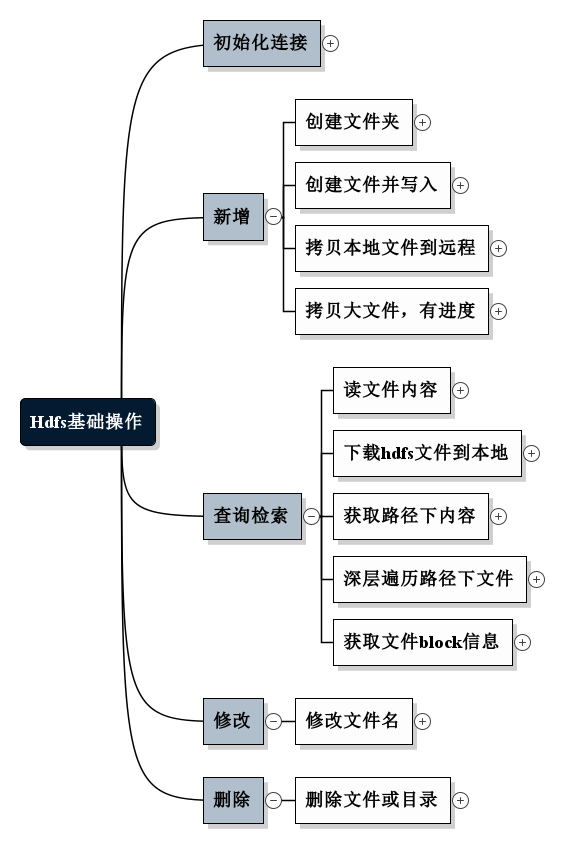
1. 初始化连接 @Before public void setup() throws Exception { configuration = new Configuration(); System.out.println(); configuration.set("dfs.replication", "1"); // configuration.set("hadoop.tmp.dir","/home/hadoop0/data/tmp"); Iterator iterator = configuration.iterator(); while(iterator.hasNext() ){ System.out.println(iterator.next()); //打印所有配置或默认参数 } fileSystem = FileSystem.get(new URI(HDFS_PATH), configuration, HDFS_USER); System.out.println("--------------setup-------------"); } @After public void teardown(){ try { fileSystem.close(); } catch (IOException e) { e.printStackTrace(); } configuration = null; System.out.println("--------------teardown-------------"); } 2. 新增 2.1 创建文件夹 @Test public void mkDir() throws Exception{ System.out.println(fileSystem.mkdirs(new Path("/Complete"))); } 2.2 创建文件并写入 @Test public void create() throws Exception{ FSDataOutputStream out = fileSystem.create(new Path("/HDFSApp/write/2.txt")); out.writeUTF("hello! first wirte to HDFS file!"); out.flush(); out.close(); } 2.3 拷贝本地文件到远程 @Test public void copyFromLocal() throws IOException { Path localFile = new Path("F:/校验大师_2.7.5.1632.zip"); Path remoteFile = new Path("/HDFSApp/write/校验大师_2.7.5.1632.zip"); fileSystem.copyFromLocalFile(localFile, remoteFile); } 2.4 拷贝大文件,带进度条 @Test public void copyFromLocalLargeFile(){ String localFile = "F:/校验大师_2.7.5.1632.zip"; Path remoteFile = new Path("/HDFSApp/write/校验大师_2.7.5.1633.zip"); InputStream in = null; FSDataOutputStream out = null; try { in = new BufferedInputStream(new FileInputStream(localFile)); out = fileSystem.create(remoteFile, new Progressable() { @Override public void progress() { System.out.println("!"); } }); } catch (IOException e) { e.printStackTrace(); System.out.println("创建输入输出流失败!"); } if(in != null && out != null){ try { IOUtils.copyBytes(in, out,2048, true); } catch (IOException e) { e.printStackTrace(); System.out.println("上传过程中失败!"); } } } 3. 查询检索 3.1 读文件内容 @Test public void text() throws Exception{ FSDataInputStream in = fileSystem.open(new Path("/output/part-r-00000")); IOUtils.copyBytes(in, System.out, 1024); } 3.2 下载hdfs文件到本地 @Test public void copyToLocal() throws IOException { Path localFile = new Path("F:/"); Path remoteFile = new Path("/HDFSApp/write/校验大师_2.7.5.1632.zip"); fileSystem.copyToLocalFile(remoteFile, localFile); } 3.3 获取路径下内容 @Test public void listFiles() throws IOException { Path path = new Path("/HDFSApp/write"); FileStatus[] files = fileSystem.listStatus(path); for (FileStatus file:files) { String type = file.isDirectory() ? "文件夹" : "文件"; String permission = file.getPermission().toString(); short replication = file.getReplication(); String filePath = file.getPath().toString(); System.out.println(type + "\t" + permission + "\t" + replication + "\t" + filePath); } } 3.4 深层遍历路径下文件 @Test public void listFilesRecursive() throws IOException { Path path = new Path("/"); RemoteIterator<LocatedFileStatus> remoteIterator = fileSystem.listFiles(path, true); while(remoteIterator.hasNext()){ LocatedFileStatus file = remoteIterator.next(); String type = file.isDirectory() ? "文件夹" : "文件"; String permission = file.getPermission().toString(); short replication = file.getReplication(); String filePath = file.getPath().toString(); System.out.println(type + "\t" + permission + "\t" + replication + "\t" + filePath); } } 3.5 获取文件block信息 @Test public void getBlocksInfo() throws IOException { Path path = new Path("/HDFSApp/write/校验大师_2.7.5.1632.zip"); FileStatus fileStatus = fileSystem.getFileStatus(path); BlockLocation[] blockLocations = fileSystem.getFileBlockLocations(fileStatus, 0 , fileStatus.getLen()); for (BlockLocation block: blockLocations) { for (String name :block.getNames()) { System.out.println(name + ":" + block.getOffset() +"," + block.getLength()); } } } 4. 修改 4.1 修改文件名 @Test public void rename() throws IOException { Path oPath = new Path("/HDFSApp/write/0.txt"); Path nPath = new Path("/HDFSApp/write/3.txt"); boolean res = fileSystem.rename(oPath, nPath); System.out.println(res); } 5. 删除 5.1 删除文件或目录 public void delete() throws IOException { Path path = new Path("/HDFSApp/write/校验大师_2.7.5.1632.zip"); boolean res = fileSystem.delete(path, false); System.out.println(res); }