apiCloud中实现头部与内容分离与操作规范,App头部header固定,头部与内容分离
官方案例 1.头部拆分成一个页面比如news-text <!doctype html> <html> <head> <meta charset="utf-8"> <meta name="viewport" content="initial-scale=1.0,maximum-scale=1.0,minimum-scale=1.0,user-scalable=0, width=device-width"/> <title>api</title> <link rel="stylesheet" type="text/css" href="../css/api.css" /> <link rel="stylesheet" type="text/css" href="../css/common.css" /> <link rel="stylesheet" type="text/css" href="../css/news-text.css" /> </head> <body> <div id="wrap"> <div id="header"> <a class="back-icon" tapmode="" onclick="api.closeWin()"></a> <h1>热点新闻</h1> </div> </div> </body> <script type="text/javascript" src="../script/api.js"></script> <script type="text/javascript" src="../script/news-text.js"></script> </html> 2.内容拆分成另一个页面比如news-textCon <!doctype html> <html> <head> <meta charset="utf-8"> <meta name="viewport" content="initial-scale=1.0,maximum-scale=1.0,minimum-scale=1.0,user-scalable=0, width=device-width"/> <title>api</title> <link rel="stylesheet" type="text/css" href="../css/api.css" /> <link rel="stylesheet" type="text/css" href="../css/common.css" /> <link rel="stylesheet" type="text/css" href="../css/news-text.css" /> </head> <body> <div id="wrap"> <div id="main"> <script id="news-template" type="text/x-dot-template"> <h1>{{=it.title}}</h1> <label> {{? it.from }} {{=it.from}} {{?}} <em>{{=it.date}}</em> </label> <div id="summary"> {{=it.summary}} </div> <div> {{=it.content}} </div> <a id="fav" class="btn" tapmode="active" news-id="{{=it.id}}" >收藏</a> </script> <div id="content"></div> </div> </div> </body> <script type="text/javascript" src="../script/api.js"></script> <script type="text/javascript" src="../script/common.js"></script> <script type="text/javascript" src="../script/doT.min.js"></script> <script type="text/javascript" src="../script/zepto.js"></script> <script type="text/javascript" src="../script/news-textCon.js"></script> </html> 以上就是一个非常规范的内容 1.css在头部 引入必要的css,api.css 引入通用的css,common.css 引入页面特有的css,news-text.css 2.js在尾部 引入必要的css,api.js 引入通用的css,common.js 引入页面特有的css,news-text.js 根据页面需要,引入doT模板和zepto(手机端的jQuery替代品) 来看看news-text.js中的内容 apiready = function(){ var header = $api.byId('header'); // 获取头部 $api.fixStatusBar(header); // 处理ios兼容 var newsId = api.pageParam.newsId; // 获取参数 var pos = $api.offset(header); // 获取位置数据 api.openFrame({ // 打开Frame name: 'news-textCon', url: 'news-textCon.html', pageParam: {newsId: newsId}, // 传递参数 rect:{ x: 0, y: pos.h, // 头部留位置 w: 'auto', h: 'auto' }, bounces: true, vScrollBarEnabled: false }); }; 打开frame,保证头部留有位置,同时可以传递参数 再看看news-textCon.js中的内容 apiready = function () { var newsId = api.pageParam.newsId; // 获取参数 var getNewsByIdUrl = '/news/?filter='; var urlParam = {where: {id: newsId}}; api.showProgress({ title: '加载中...', modal: false }); ajaxRequest(getNewsByIdUrl+JSON.stringify(urlParam),'get','',function(ret,err){ if (ret) { api.toast({ ... }) } else { api.toast({ ... }) } api.hideProgress(); }); }; 获取传入的参数, 获取数据与相应的页面处理 我的案例 商品详情拆分 1.goods_detail.html <!doctype html> <html> <head> <meta charset="utf-8"> <meta name="viewport" content="initial-scale=1.0,maximum-scale=1.0,minimum-scale=1.0,user-scalable=0, width=device-width"/> <title>api</title> <link rel="stylesheet" type="text/css" href="../css/api.css" /> <link rel="stylesheet" type="text/css" href="../css/aui.2.0.css" /> </head> <body> <div id="wrap"> <div id="main"> <header class="aui-bar aui-bar-nav fix-status-bar" id="aui-header"> <a class="aui-btn aui-pull-left" tapmode onclick="api.closeWin();"> <span class="aui-iconfont aui-icon-left"></span> </a> <div class="aui-title"><!-- 商品名称 --></div> </header> </div> </div> </body> <script type="text/javascript" src="../script/api.js"></script> <script type="text/javascript" src="../script/goods_detail.js"></script> </html> 2.goods_detailCon.html 移除头部的 <header class="aui-bar aui-bar-nav fix-status-bar" id="aui-header"> <a class="aui-btn aui-pull-left" tapmode onclick="api.closeWin();"> <span class="aui-iconfont aui-icon-left"></span> </a> <div class="aui-title"><!-- 商品名称 --></div> </header> 3.goods_detail.js apiready = function(){ var header = $api.byId('main'); // 获取头部 $api.fixStatusBar(header); // 处理ios var pos = $api.offset(header); // 获取头部位置 var title = $api.dom(header,'.aui-title'); // 获取标题位置 $api.html(title,api.pageParam.title); // 设置标题内容 api.openFrame({ // 打开内容页,并传递参数 name: 'goods_detailCon', url: 'goods_detailCon.html', rect:{ x: 0, y: pos.h, w: 'auto', h: 'auto' }, bounces: true, opaque: true, vScrollBarEnabled: false, pageParam:{ goods_id:api.pageParam.goods_id } }); }; 4.goods_detailCon.js apiready = function(){ fix_status_bar();// 修复头部 var goods_id = api.pageParam.goods_id; // 获取商品相关信息 api.ajax({ url: 'http://zhudianbao.yunlutong.com/?g=Api&m=Goods&a=getGoodsInfo', method: 'get', data: { values: { goods_id: goods_id } } }, function(json, err) { if (json.status == '1') { var interText = doT.template($("#goodstmpl").text()); $("#info_area").html(interText(json.info)); var swiper = new Swiper('.swiper-container', { pagination: '.swiper-pagination', paginationClickable: true, spaceBetween: 30, centeredSlides: true, autoplay: 3500, autoplayDisableOnInteraction: false }); } else { var toast = new auiToast(); toast.fail({ title:json.msg, duration:2000 }); } }); } 获取参数,根据参数获取数据,并使用doT进行页面布局。 看效果 本文转自TBHacker博客园博客,原文链接:http://www.cnblogs.com/jiqing9006/p/5952935.html,如需转载请自行联系原作者







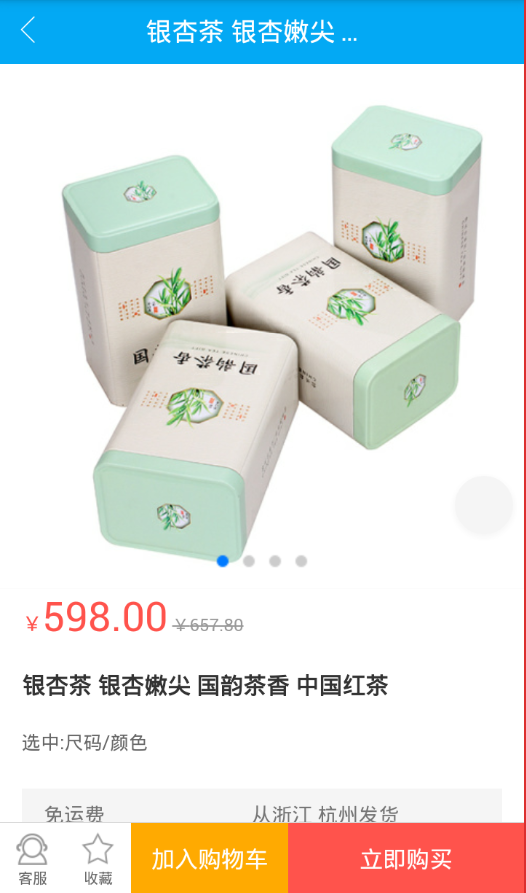

)