首页 文章 精选 留言 我的

精选列表

搜索[编程模型],共10000篇文章
优秀的个人博客,低调大师

《Java编程思想》读书笔记(6)

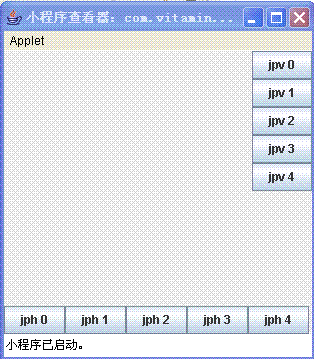
JButton这一章,Brucke只给出了一个简单的例子,代码如下: import java.applet.Applet; import java.awt.*; import javax.swing.*; public class Test extends JApplet { private JButton btn1; private JButton btn2; /** * @param args */ public void init() { this.btn1 = new JButton("确定"); this.btn2 = new JButton("重置"); Container con = this.getContentPane(); con.setLayout(new FlowLayout()); con.add(btn1); con.add(btn2); } public static void main(String[] args) { Test t1 = new Test(); Console.run(t1,300,300); } } 这一节没有过多的东西可以思考,但布局管理器的知识值得去深究。 Java语言中提供的布局管理器种类有:边界式布局、卡片式布局、流式布局和网格式布局等,各有不同的特点,可根据实际 需要选用;但有最大自由设计空间的是“无布局管理器”——即不使用任何布局格式,而通过手工方式添加组件到页面布局的绝对位置上。因此我采用“无布局管理器”将他的代码改写如下: import java.applet.Applet; import java.awt.*; import javax.swing.*; public class Test extends JApplet { private JButton btn1; private JButton btn2; /** * @param args */ public void init() { this.btn1 = new JButton("确定"); this.btn2 = new JButton("重置"); Container con = this.getContentPane(); //con.setLayout(new FlowLayout()); con.setLayout(null); btn1.reshape(30,30,100,100); btn2.reshape(150,150,100,100); con.add(btn1); con.add(btn2); } public static void main(String[] args) { Test t1 = new Test(); Console.run(t1,600,600); } } 1. GridLayout GridLayout类是布局管理器之一,它将容器中的组件在放置在一个矩形网格中。容器被划分为相同大小的矩形,而每个组件就放置在一个单独的矩形中。 import java.awt.*; import javax.swing.*; public class GridForm extends JFrame { /** * @param args */ public static void main(String[] args) { // TODO Auto-generated method stub GridForm gf = new GridForm(); gf.setLayout(new GridLayout(3,2)); Container con = gf.getContentPane(); con.setComponentOrientation(ComponentOrientation.LEFT_TO_RIGHT); con.add(new JButton("1")); con.add(new JButton("2")); con.add(new JButton("3")); con.add(new JButton("4")); con.add(new JButton("5")); con.add(new JButton("6")); gf.setTitle("GridLayout例子"); gf.setDefaultCloseOperation(JFrame.EXIT_ON_CLOSE); gf.setSize(200,200); gf.setVisible(true); } } 如果容器的ComponentOrientation属性是水平的并且从左到右,上面例子产生如下图1: 如果容器的ComponentOrientation属性是horizontal 和 right-to-left,结果就如下图2: 当行数和列数都被设置为非零值(不管是通过构造函数或者通过setRows和setColumns方法来设置),指定的列数就会被忽略掉。例如说,如果指定是3行3列,而将布局中放置9个组件,它们就会显示为3行3列。 2.BorderLayout 边界布局会把容器看成五个:部分:north, south, east, west,和 center。每个区域最多包含一个组件,重要的五个常量:NORTH, SOUTH, EAST, WEST和 CENTER; Panel p = new Panel(); p.setLayout(new BorderLayout()); p.add(new Button("Okay"), BorderLayout.SOUTH); ================================================== ================================================== Panel p2 = new Panel(); p2.setLayout(new BorderLayout()); p2.add(new TextArea()); // Same as p.add(new TextArea(), BorderLayout.CENTER); <!--[endif]--> BorderLayout 支持相对定位常量, PAGE_START, PAGE_END, LINE_START, and LINE_END. 在一个容器中,如果它的 ComponentOrientation 被设置为ComponentOrientation.LEFT_TO_RIGHT,这些常量就分别映射为 NORTH, SOUTH, WEST, and EAST 为了与以前兼容,BorderLayout也好汉相对定位常量 BEFORE_FIRST_LINE, AFTER_LAST_LINE, BEFORE_LINE_BEGINS and AFTER_LINE_ENDS. 他们分别和PAGE_START, PAGE_END, LINE_START and LINE_END等价. 如果同时使用绝对定位和相对定位,就会产生不可预测的结果。例如,如果你在容器中同时使 NORTH 和 PAGE_START 常量 来添加组件,而容器的 方向是 LEFT_TO_RIGHT, 那么就只有PAGE_START被会布局。 import java.awt.*; import javax.swing.*; public class GridForm extends JFrame { /** * @param args */ public static void main(String[] args) { // TODO Auto-generated method stub GridForm gf = new GridForm(); gf.setLayout(new BorderLayout()); Container con = gf.getContentPane(); con.setComponentOrientation(ComponentOrientation.LEFT_TO_RIGHT); con.add(new JButton("North"),BorderLayout.NORTH); con.add(new JButton("SOUTH"),BorderLayout.SOUTH); con.add(new JButton("EAST"),BorderLayout.EAST); con.add(new JButton("WEST"),BorderLayout.WEST); con.add(new JButton("CENTER"),BorderLayout.CENTER); gf.setTitle("BorderLayout例子"); gf.setDefaultCloseOperation(JFrame.EXIT_ON_CLOSE); gf.setSize(200,200); gf.setVisible(true); } } 3. FlowLayout FlowLayout会将组件从左到右进排列,就象文章中的文本行一样。流布局一般用在面板中的按纽的放置。它将会将按纽以从左至右的方式排放,直到在同一行中再也放不下更多的按纽了。 import java.awt.*; import javax.swing.*; public class GridForm extends JFrame { /** * @param args */ public static void main(String[] args) { // TODO Auto-generated method stub GridForm gf = new GridForm(); //gf.setLayout(new BorderLayout()); gf.setLayout(new FlowLayout()); Container con = gf.getContentPane(); con.setComponentOrientation(ComponentOrientation.LEFT_TO_RIGHT); con.add(new JButton("North")); con.add(new JButton("SOUTH")); con.add(new JButton("EAST")); con.add(new JButton("WEST")); con.add(new JButton("CENTER")); gf.setTitle("FlowLayout例子"); gf.setDefaultCloseOperation(JFrame.EXIT_ON_CLOSE); gf.setSize(200,200); gf.setVisible(true); } } 4.BoxLayout BoxLayout能让你在垂直和水平两个方向上控制组件的摆放,它用一些被称为支柱(struts)和胶水(glue)的东西来控制组件间的距离。 package com.vitamin.UI; import javax.swing.*; import java.awt.*; import com.vitamin.*; import com.vitamin.Console.console; public class BoxLayout1 extends JApplet { public void init() { JPanel jpv = new JPanel(); jpv.setLayout(new BoxLayout(jpv, BoxLayout.Y_AXIS)); for(int i = 0; i < 5; i++) jpv.add(new JButton("jpv " + i)); JPanel jph = new JPanel(); jph.setLayout(new BoxLayout(jph, BoxLayout.X_AXIS)); for(int i = 0; i < 5; i++) jph.add(new JButton("jph " + i)); Container cp = getContentPane(); cp.add(BorderLayout.EAST, jpv); cp.add(BorderLayout.SOUTH, jph); } public static void main(String[] args) { console.run(new BoxLayout1(), 450, 200); } } 本文转自Phinecos(洞庭散人)博客园博客,原文链接:http://www.cnblogs.com/phinecos/archive/2006/06/01/415342.html,如需转载请自行联系原作者


优秀的个人博客,低调大师

《Java编程思想》读书笔记(10)

package com.vitamin.UI; import javax.swing.*; import javax.swing.filechooser.FileFilter; import java.awt.BorderLayout; import java.awt.Container; import java.awt.GridLayout; import java.awt.event.*; import java.io.File; import java.io.FileWriter; import java.io.IOException; import com.vitamin.Console.*; public class FileTest extends JFrame { private JButton btnOpen = new JButton("Open"); private JButton btnSave = new JButton("Save"); private JPanel p = null; private JTextField tfDir = new JTextField(); private JTextField tfFileName = new JTextField(); private JScrollPane sp = new JScrollPane(); private JEditorPane ep = new JEditorPane(); private File file = null; public FileTest() { super(); // TODO Auto-generated constructor stub this.initForm(); } public void initForm() { Container con = this.getContentPane(); con.setLayout(new BorderLayout()); this.tfDir.setEditable(false); this.tfFileName.setEditable(false); this.btnSave.setEnabled(false); this.btnOpen.addActionListener(new ActionListener(){ public void actionPerformed(ActionEvent e) { JFileChooser fc = new JFileChooser(); fc.setFileFilter(new TextFileFilter() ); int returnVal = fc.showOpenDialog(FileTest.this); if(returnVal == JFileChooser.APPROVE_OPTION) { file = fc.getSelectedFile(); try { ep.setPage(file.toURL()); tfFileName.setText(file.getAbsolutePath()); btnSave.setEnabled(true); } catch(IOException ex) { throw new RuntimeException(ex); } } else if(returnVal == JFileChooser.CANCEL_OPTION) { tfFileName.setText("你已经取消了文件的选择"); } } }); this.btnSave.addActionListener(new ActionListener(){ public void actionPerformed(ActionEvent e) { try { FileWriter fw = new FileWriter(file); ep.write(fw); JOptionPane.showMessageDialog(FileTest.this,"保存成功"); } catch (IOException ioe) { throw new RuntimeException(ioe); } } }); sp.getViewport().add(ep); p = new JPanel(); p.add(this.btnOpen); p.add(this.btnSave); con.add(p,BorderLayout.SOUTH); con.add(sp,BorderLayout.CENTER); p = new JPanel(); p.setLayout(new GridLayout(2,1)); p.add(this.tfDir); p.add(this.tfFileName); con.add(p,BorderLayout.NORTH); console.run(this,400,400); } public class TextFileFilter extends javax.swing.filechooser.FileFilter { public boolean accept(File f) { return f.getName().endsWith(".txt") || f.isDirectory(); } public String getDescription() { return "Text Files (*.txt)"; } } /** * @param args */ public static void main(String[] args) { FileTest ft = new FileTest(); } } 做了个读写文件的小东西,功能很烂,有时间做个完整的记事本吧。 本文转自Phinecos(洞庭散人)博客园博客,原文链接:http://www.cnblogs.com/phinecos/archive/2006/06/08/420130.html,如需转载请自行联系原作者

优秀的个人博客,低调大师

《Java编程思想》读书笔记(9)

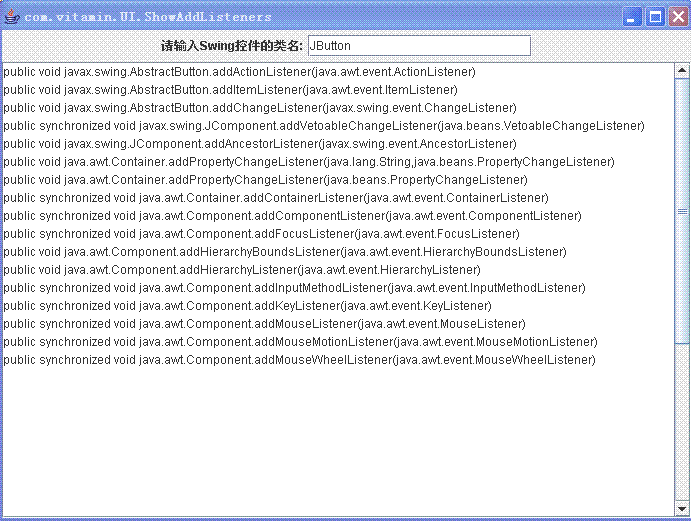
一些listene接口中只定义了一个方法,因此要实现这种接口的工作量并不大,因为只要写完这一个方法,接口也就实现了。但是如果要使用有多个方法的listener的话,就会比较麻烦了,因为必须要实现接口中定义的所有方法,而实际上很多方法我们并不需要。举例来说,如果要捕捉鼠标点击的话,那就必须写一个mouseClicked( )方法。但是由于MouseListener是一个interface,所以即使MouseListener定义的其他方法我们不使用,也得实现其所有的方法。 为了解决这个问题,有些(但不是全部)多方法的listener接口提供了适配器(adapter)。适配器会为接口提供默认的空方法。这样,你只要继承适配器,根据需要覆写方法就可以了。 例如: package com.vitamin.UI; import java.awt.BorderLayout; import java.awt.Container; import java.awt.Event; import java.awt.event.ActionEvent; import java.awt.event.ActionListener; import java.awt.event.MouseAdapter; import java.awt.event.*; import javax.swing.*; public class HelloForm extends JFrame { private JLabel lbInfo = null; private JButton btnOK = null; public HelloForm() { super(); } public HelloForm(String title) { super(title); this.initForm(); } private void initForm() { this.lbInfo = new JLabel(); this.btnOK = new JButton("确定"); this.btnOK.addMouseListener(new MouseAdapter() { public void mouseClicked(MouseEvent e) { lbInfo.setText("hello,world"); } }); Container con = this.getContentPane(); con.setLayout(new BorderLayout()); con.add(this.btnOK,BorderLayout.SOUTH); con.add(this.lbInfo,BorderLayout.NORTH); this.setDefaultCloseOperation(JFrame.EXIT_ON_CLOSE); this.setSize(300,300); this.setVisible(true); } /** * @param args */ public static void main(String[] args) { HelloForm hf = new HelloForm("内部匿名类测试程序"); } } 在附上<<TIJ>>中给出的一段处理多个事件的代码: package com.vitamin.UI; import javax.swing.*; import java.awt.*; import java.awt.event.*; import java.util.*; import com.vitamin.Console.console; public class TrackEvent extends JApplet { private HashMap h = new HashMap(); private String[] event = { "focusGained", "focusLost", "keyPressed", "keyReleased", "keyTyped", "mouseClicked", "mouseEntered", "mouseExited", "mousePressed", "mouseReleased", "mouseDragged", "mouseMoved" }; private MyButton b1 = new MyButton(Color.BLUE, "test1"), b2 = new MyButton(Color.RED, "test2"); class MyButton extends JButton { void report(String field, String msg) { ((JTextField)h.get(field)).setText(msg); } FocusListener fl = new FocusListener() { public void focusGained(FocusEvent e) { report("focusGained", e.paramString()); } public void focusLost(FocusEvent e) { report("focusLost", e.paramString()); } }; KeyListener kl = new KeyListener() { public void keyPressed(KeyEvent e) { report("keyPressed", e.paramString()); } public void keyReleased(KeyEvent e) { report("keyReleased", e.paramString()); } public void keyTyped(KeyEvent e) { report("keyTyped", e.paramString()); } }; MouseListener ml = new MouseListener() { public void mouseClicked(MouseEvent e) { report("mouseClicked", e.paramString()); } public void mouseEntered(MouseEvent e) { report("mouseEntered", e.paramString()); } public void mouseExited(MouseEvent e) { report("mouseExited", e.paramString()); } public void mousePressed(MouseEvent e) { report("mousePressed", e.paramString()); } public void mouseReleased(MouseEvent e) { report("mouseReleased", e.paramString()); } }; MouseMotionListener mml = new MouseMotionListener() { public void mouseDragged(MouseEvent e) { report("mouseDragged", e.paramString()); } public void mouseMoved(MouseEvent e) { report("mouseMoved", e.paramString()); } }; public MyButton(Color color, String label) { super(label); setBackground(color); addFocusListener(fl); addKeyListener(kl); addMouseListener(ml); addMouseMotionListener(mml); } } public void init() { Container c = getContentPane(); c.setLayout(new GridLayout(event.length + 1, 2)); for(int i = 0; i < event.length; i++) { JTextField t = new JTextField(); t.setEditable(false); c.add(new JLabel(event[i], JLabel.RIGHT)); c.add(t); h.put(event[i], t); } c.add(b1); c.add(b2); } public static void main(String[] args) { console.run(new TrackEvent(), 700, 500); } } 另外,今天还尝试了下手工打包可执行的jar文件,可没有成功,找不到原因,郁闷。。。 本文转自Phinecos(洞庭散人)博客园博客,原文链接:http://www.cnblogs.com/phinecos/archive/2006/06/07/419356.html,如需转载请自行联系原作者

优秀的个人博客,低调大师

《Java编程思想》读书笔记(14)

程序是根据具体情况在不断地创建新对象,而这些情况又只有在运行时才能够确定,因此我们就不知道到底需要多少对象,什么类型的对象,所以要能够创建任何对象并且能保持住这些对象的引用。Java就提供了很多容器类来持有和操纵对象。 数组是比较特别的一个容器,怎么说呢,它可以持有象int等基本类型数据,能够随机存储和访问,而且访问效率很高,但高效率是以牺牲灵活为代价的,当你创建了一个数组后,它的容量就确定了,并且在其生命周期内不能改变。而与它相对应的ArrayList就恰好相反,它可以灵活地增加容量,但效率就明显低于数组。而与List,Map,Set等泛型容器相比,数组在创建时就指明了它持有的对象类型,因此在编译时就会做类型检查,从而防止插入错误类型的对象。而泛型容器把它里面的元素都看成是Object,因此能容纳所有类型的对象(这就郁闷了,当你要往里面插入基本类型的数据时,就不得不先用对应的包装类将基本类型包装为Object型),并且泛型容器也没有编译时的类型检查,因此安全性得不到保证。 本文转自Phinecos(洞庭散人)博客园博客,原文链接:http://www.cnblogs.com/phinecos/archive/2006/06/17/428251.html,如需转载请自行联系原作者

优秀的个人博客,低调大师

Android开发实践:多线程编程小结

我们知道,Android系统为了提高程序的实时响应能力,不允许在UI线程中进行耗时的操作,否则会出现ANR异常,因此必须将耗时的任务放到非UI线程中执行。Android/Java提供了很多类来帮助大家完成异步操作,比如:Thread类,Timer类,AsyncTask类,HandlerThread类,以及Executor接口。这些类都分别在什么场合下使用呢? 本文简单地总结一下Android开发中常见的多线程类型和解决方案,并比较和分析了各个方案的区别,以便更好地理解和应用这些API接口。 1. 单项异步任务 [场景]:下载一个APK文件,拷贝一个大文件。 [方案]:Thread类,AsyncTask类 [比较]: AsyncTask提供了onProgressUpdate和onPostExecute通知调用者任务执行的进度和结果,在函数内可以直接执行UI操作。 而Thread中不能直接操作UI界面,而要通过Activity.runOnUiThread或者借助Handler来完成UI的更新。 所以Thread更适合执行一些不需要跟UI频繁交互的单项任务,而AsyncTask相反。 2. 定时/循环执行的任务 [场景]:定时刷新UI(如:秒表),保持TCP心跳连接。 [方案]:“Thread + sleep”,定时器Timer [比较]: “Thread + sleep” 方案示例: 1 2 3 4 5 6 7 8 9 new Thread( new Runnable(){ @Override public void run(){ while (!EXIT){ Thread.sleep( 1000 ); mListener.onTimeArrived(); } } }).start(); 两者都不能在循环中执行UI更新操作,而必须借助Activity.runOnUiThread或者Handler来完成UI的更新。 由于Thread方案中onTimeArrived()占用了部分时间,所以这种方案的定时并不准确,而Timer是由系统创建异步通知的定时器,会更加准确,所以推荐使用Timer来完成定时任务。 3. 工作线程 工作线程启动后处于一种等待“命令”/“消息”的休眠状态,当接收到“命令”/“消息”后,将它放入“命令”/“消息”队列,然后唤醒线程依次串行或者并行执行。 [场景]:“生产者--消费者”模式,TCP Server端命令处理程序 [方案]:“Thread + condition/lock” ,HandlerThread类,线程池Executor [比较]: HandlerThread类是Android系统提供了封装好了Loop循环的Thread类,可以更加便捷地完成CallerThread和WorkThread的命令/消息交互。当然,我们也可以用Thread和Condition/Lock方式实现同样的效果,只不过要自己实现更多的代码。 前面的两种方式,都是“串行”的方式在执行“命令”,如果希望提供并发性,同时开启和管理多个线程来执行任务,则可以考虑使用Executor。 本文转自 Jhuster 51CTO博客,原文链接:http://blog.51cto.com/ticktick/1564055,如需转载请自行联系原作者

优秀的个人博客,低调大师

【Android进阶学习】Http编程之HttpClient

在Android开发中,Android SDK附带了Apache的HttpClient,它是一个完善的客户端。它提供了对HTTP协议的全面支持,可以使用HttpClient的对象来执行HTTP GET和HTTP POST调用。 HTTP工作原理: 1.客户端(一般是指浏览器,这里是指自己写的程序)与服务器建立连接 2.建立连接后,客户端向服务器发送请求 3.服务器接收到请求后,向客户端发送响应信息 4.客户端与服务器断开连接 HttpClient的一般使用步骤: 1.使用DefaultHttpClient类实例化HttpClient对象 2.创建HttpGet或HttpPost对象,将要请求的URL通过构造方法传入HttpGet或HttpPost对象。 3.调用execute方法发送HTTP GET或HTTP POST请求,并返回HttpResponse对象。 4.通过HttpResponse接口的getEntity方法返回响应信息,并进行相应的处理。 最后记得要在AndroidManifest.xml文件添加网络权限 <uses-permission android:name="android.permission.INTERNET" /> 下面是具体的例子: 1.使用HttpClient来执行GET调用 在LogCat窗口就能看到输出的信息 packagecom.lingdududu.http; importjava.io.InputStream; importorg.apache.http.HttpResponse; importorg.apache.http.HttpStatus; importorg.apache.http.client.HttpClient; importorg.apache.http.client.methods.HttpGet; importorg.apache.http.impl.client.DefaultHttpClient; importandroid.app.Activity; importandroid.os.Bundle; importandroid.util.Log; publicclassHttpGetActivityextendsActivity{ Stringuri="http://developer.android.com/"; finalStringTAG_STRING="TAG"; @Override publicvoidonCreate(BundlesavedInstanceState){ super.onCreate(savedInstanceState); setContentView(R.layout.main); try{ //得到HttpClient对象 HttpClientgetClient=newDefaultHttpClient(); //得到HttpGet对象 HttpGetrequest=newHttpGet(uri); //客户端使用GET方式执行请教,获得服务器端的回应response HttpResponseresponse=getClient.execute(request); //判断请求是否成功 if(response.getStatusLine().getStatusCode()==HttpStatus.SC_OK){ Log.i(TAG_STRING,"请求服务器端成功"); //获得输入流 InputStreaminStrem=response.getEntity().getContent(); intresult=inStrem.read(); while(result!=-1){ System.out.print((char)result); result=inStrem.read(); } //关闭输入流 inStrem.close(); }else{ Log.i(TAG_STRING,"请求服务器端失败"); } }catch(Exceptione){ //TODOAuto-generatedcatchblock e.printStackTrace(); } } } 使用HTTP GET调用有一个缺点就是,请求的参数作为URL一部分来传递,以这种方式传递的时候,URL的长度应该在2048个字符之内。如果超出这个这范围,就要使用到HTTP POST调用。 2.使用HttpClient来执行POST调用 使用POST调用进行参数传递时,需要使用NameValuePair来保存要传递的参数。NameValuePair封装了一个键/值组合。另外,还需要设置所使用的字符集。 packagecom.androidbook.services.httppost; importjava.io.BufferedReader; importjava.io.IOException; importjava.io.InputStreamReader; importjava.util.ArrayList; importjava.util.List; importorg.apache.http.HttpResponse; importorg.apache.http.NameValuePair; importorg.apache.http.client.HttpClient; importorg.apache.http.client.entity.UrlEncodedFormEntity; importorg.apache.http.client.methods.HttpPost; importorg.apache.http.impl.client.DefaultHttpClient; importorg.apache.http.message.BasicNameValuePair; importandroid.app.Activity; importandroid.os.Bundle; publicclassHttpPostActivityextendsActivity{ Stringuri="http://developer.android.com/"; @Override publicvoidonCreate(BundlesavedInstanceState){ super.onCreate(savedInstanceState); setContentView(R.layout.main); BufferedReaderin=null; try{ HttpClientclient=newDefaultHttpClient(); HttpPostrequest=newHttpPost("http://code.google.com/android/"); //使用NameValuePair来保存要传递的Post参数 List<NameValuePair>postParameters=newArrayList<NameValuePair>(); //添加要传递的参数 postParameters.add(newBasicNameValuePair("id","12345")); postParameters.add(newBasicNameValuePair("username","dave")); //实例化UrlEncodedFormEntity对象 UrlEncodedFormEntityformEntity=newUrlEncodedFormEntity( postParameters); //使用HttpPost对象来设置UrlEncodedFormEntity的Entity request.setEntity(formEntity); HttpResponseresponse=client.execute(request); in=newBufferedReader( newInputStreamReader( response.getEntity().getContent())); StringBufferstring=newStringBuffer(""); StringlineStr=""; while((lineStr=in.readLine())!=null){ string.append(lineStr+"\n"); } in.close(); StringresultStr=string.toString(); System.out.println(resultStr); }catch(Exceptione){ //Dosomethingaboutexceptions }finally{ if(in!=null){ try{ in.close(); }catch(IOExceptione){ e.printStackTrace(); } } } } } 本文转自 lingdududu 51CTO博客,原文链接: http://blog.51cto.com/liangruijun/803097

优秀的个人博客,低调大师

【Android进阶学习】Http编程之HttpConnection

HttpURLConnection是继承于URLConnection类,二者都是抽象类。其对象主要通过URL的openConnection方法获得的。 下面是具体的代码: packagecom.llingdududu.url; importjava.io.BufferedReader; importjava.io.InputStreamReader; importjava.net.HttpURLConnection; importjava.net.URL; importandroid.app.Activity; importandroid.os.Bundle; publicclassURLConnectionActivityextendsActivity{ StringurlStr="http://developer.android.com/"; /**Calledwhentheactivityisfirstcreated.*/ @Override publicvoidonCreate(BundlesavedInstanceState){ super.onCreate(savedInstanceState); setContentView(R.layout.main); try{ //实例化URL URLurl=newURL(urlStr); //使用HttpURLConnection打开连接 HttpURLConnectionhttpConnection=(HttpURLConnection)url.openConnection(); //得到输入流对象 InputStreamReaderin=newInputStreamReader(httpConnection.getInputStream()); BufferedReaderbufReader=newBufferedReader(in); StringlineStr=""; StringresultStr=""; while((lineStr=bufReader.readLine())!=null){ resultStr+=lineStr+"\n"; } System.out.println(resultStr); //关闭输入流 in.close(); //关闭连接 httpConnection.disconnect(); }catch(Exceptione){ //TODOAuto-generatedcatchblock e.printStackTrace(); } } } 本文转自 lingdududu 51CTO博客,原文链接:http://blog.51cto.com/liangruijun/803159

资源下载

更多资源
Mario

Mario

马里奥是站在游戏界顶峰的超人气多面角色。马里奥靠吃蘑菇成长,特征是大鼻子、头戴帽子、身穿背带裤,还留着胡子。与他的双胞胎兄弟路易基一起,长年担任任天堂的招牌角色。

Spring

Spring

Spring框架(Spring Framework)是由Rod Johnson于2002年提出的开源Java企业级应用框架,旨在通过使用JavaBean替代传统EJB实现方式降低企业级编程开发的复杂性。该框架基于简单性、可测试性和松耦合性设计理念,提供核心容器、应用上下文、数据访问集成等模块,支持整合Hibernate、Struts等第三方框架,其适用范围不仅限于服务器端开发,绝大多数Java应用均可从中受益。

Sublime Text

Sublime Text

Sublime Text具有漂亮的用户界面和强大的功能,例如代码缩略图,Python的插件,代码段等。还可自定义键绑定,菜单和工具栏。Sublime Text 的主要功能包括:拼写检查,书签,完整的 Python API , Goto 功能,即时项目切换,多选择,多窗口等等。Sublime Text 是一个跨平台的编辑器,同时支持Windows、Linux、Mac OS X等操作系统。

WebStorm

WebStorm

WebStorm 是jetbrains公司旗下一款JavaScript 开发工具。目前已经被广大中国JS开发者誉为“Web前端开发神器”、“最强大的HTML5编辑器”、“最智能的JavaScript IDE”等。与IntelliJ IDEA同源,继承了IntelliJ IDEA强大的JS部分的功能。

用户登录
用户注册